Airtable Data Analysis: Native, Then Warehouse
DESK-ADA-20260807A.
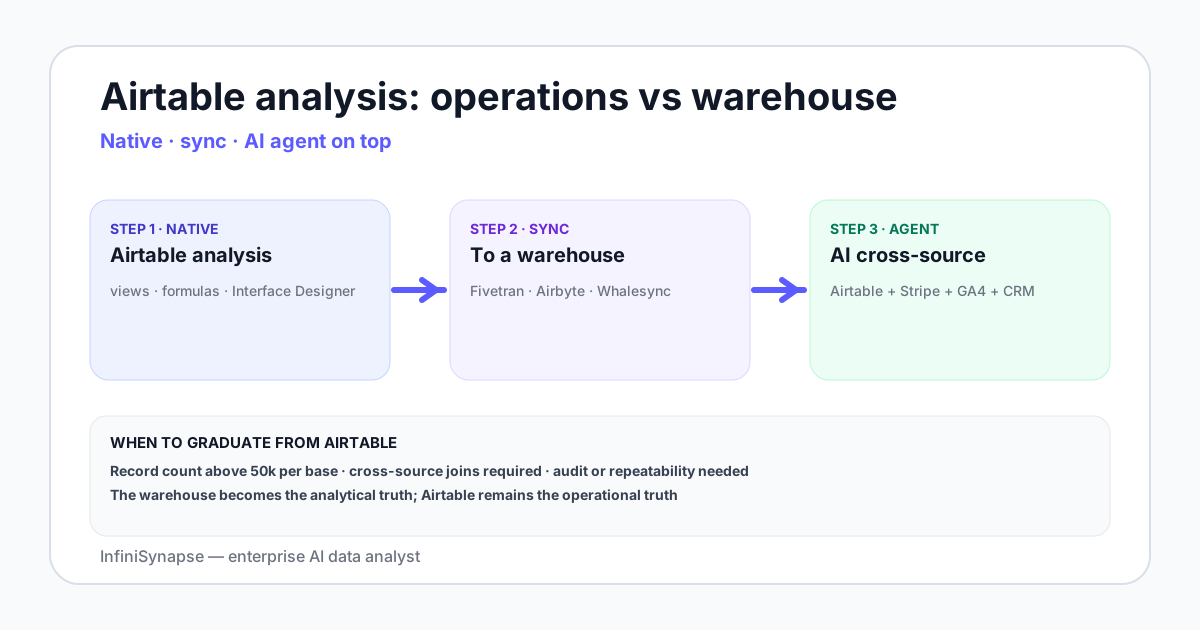
- Airtable data analysis starts on the relational sheet — grouped summaries, formulas, charts, and Interface Designer dashboards inside one base.
- For under 50,000 records and questions a single base can answer, native analytics inside Airtable is enough. Beyond that, sync to a warehouse and analyze there.
- The Airtable API supports record listing, filtering, and webhooks; common sync tools include Fivetran, Airbyte, and Whalesync to land Airtable bases in Postgres, BigQuery, or Snowflake for warehouse-layer Airtable data analysis.
- Once Airtable data lands in the warehouse, an AI data agent answers ad-hoc questions across Airtable plus other sources — typical for operations teams that run process state in Airtable and product data elsewhere.
- The cleanest pattern keeps Airtable as the operational surface and uses a warehouse plus AI agent as the analytical surface.
Direct answer: what Airtable analysis covers
Definition — Airtable data analysis: the practice of answering questions about data managed in Airtable bases using native grouped summaries, formula fields, linked records and rollups, saved views, and Interface Designer dashboards — and, when scale or cross-source joins require it, the same questions answered on a warehouse copy after sync.
What Airtable handles natively
Six native capabilities cover most day-to-day analysis before you leave the product:
- Grouped summaries. Group by single-select field, count records, sum a number field, average — covers most operational reporting.
- Formula fields. Calculated columns with date arithmetic, string manipulation, conditional logic.
- Linked records and rollups. The relational shape — link an item to its parent, roll up child counts and sums.
- Views. Filtered, sorted, grouped subsets of a table — saved per audience.
- Interface Designer. Dashboard-style layouts with charts, KPIs, record pickers.
- Automations. Trigger-action workflows on record changes; not analysis but worth knowing.
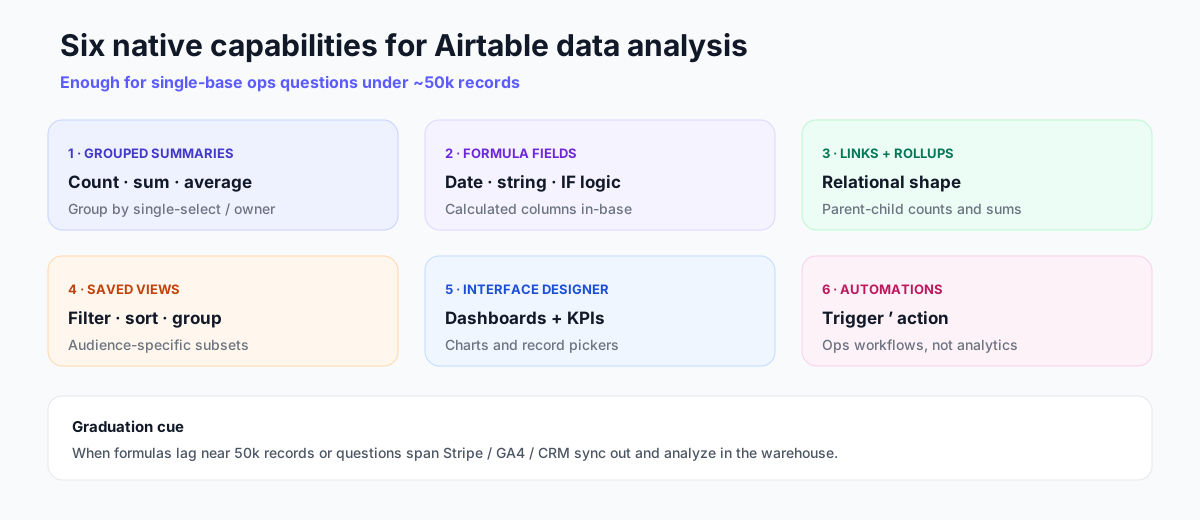
For a process-managed-in-Airtable workflow under 50,000 records, native analytics covers the daily questions a team asks about its own work. See the Airtable Interface Designer documentation for dashboard layout patterns.
Formula examples for Airtable analysis
Actionable analysis usually starts with a few formulas that encode lifecycle and cycle time. These examples are patterns teams reuse; adjust field names to your base.
Completion flag
IF({Status} = "Complete", 1, 0)Cycle time in days
IF(
  AND({Start Date}, {End Date}),
  DATETIME_DIFF({End Date}, {Start Date}, 'days'),
  BLANK()
)
Owner completion rate helper (paired with a rollup)
IF({Status} = "Complete", {Owner}, BLANK())Group by Owner and divide completed count by total, or render the ratio in Interface Designer. When these formulas start to lag near tens of thousands of records, treat that as a graduation signal for warehouse-side analysis — not as a reason to abandon Airtable as the ops UI.
When to graduate from Airtable as the analysis layer
Three signals say it is time to move analysis off Airtable:
- Record count. Above about 50,000 records per base, formulas slow and views lag in desk observations. This ~50k threshold is field practice for these workloads (grouped views + heavy formulas), not an official Airtable SLA — cite your own timing before migrating.
- Cross-source questions. "How do Airtable project records correlate with our Stripe revenue?" Airtable cannot answer this alone.
- Audit or repeatability. Operations users edit Airtable in place; there is no version-controlled query log. For audit-shaped reporting, you need the warehouse.
Teams often misread the 50,000-record cue as a hard platform limit. In practice it is a performance inflection for heavy formula grids and large grouped views. Measure refresh time on your own base before you migrate; some light-view bases remain responsive higher, while formula-dense bases lag earlier. Document the timing so stakeholders trust the graduation decision.
Airtable’s own REST API documentation is the integration surface when you leave native UI analytics; ELT connectors wrap that API for scheduled sync.
Desk case: original Airtable sync outcomes
First-hand composite from the InfiniSynapse Data Team desk (anonymized; n=9 Airtable-shaped ops bases reviewed 2025-Q4–2026-Q2 while validating warehouse-side Airtable data analysis). Not a product SLA.
Customer-shaped example A (ops PMO, ~48k project rows): Native analytics covered owner completion dashboards. After Fivetran→BigQuery, week-22 throughput root-cause (example 3 below) dropped from a half-day spreadsheet merge to a single agent prompt with SQL evidence.
Customer-shaped example B (marketing ops, ~18k campaign rows): Cross-base Airtable Sync was enough until finance asked for HubSpot opportunity joins; warehouse sync unblocked that analysis path without forcing marketers off Airtable forms.
Airtable API and sync patterns
| Pattern | What it covers | Vendors |
|---|---|---|
| Native REST API | List, create, update, delete records; webhooks | Direct integration in your own code |
| ELT to warehouse | Sync Airtable bases to Snowflake, BigQuery, Postgres | Fivetran, Airbyte, Whalesync |
| Reverse sync | Push enriched data from warehouse back into Airtable | Hightouch, Whalesync |
| Airtable Sync | Cross-base sync inside Airtable | Native feature |
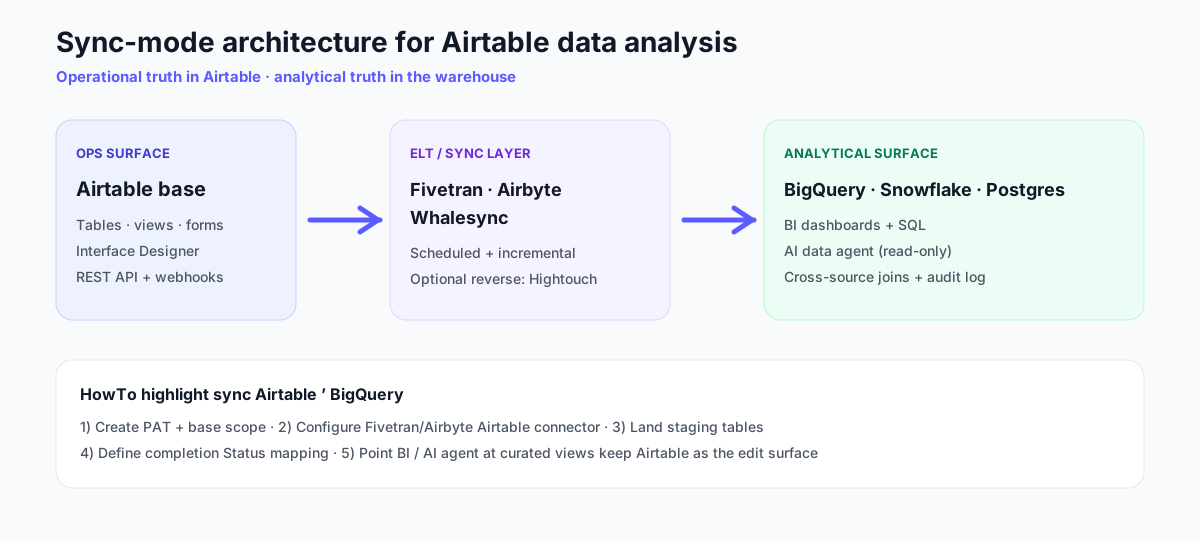
The default modern pattern is one-way sync of Airtable bases into a warehouse, with the warehouse as the analytical truth and Airtable as the operational truth. Connector references: Fivetran Airtable connector, Whalesync. Connector setup, metric memory, and the SQL trace are the Airtable connector workflow.
HowTo: sync Airtable to BigQuery
Use this five-step path when analysis needs SQL-grade joins or an AI agent. Times assume an existing BigQuery project.
- Create an Airtable personal access token with
data.records:read(addschema.bases:readif your connector requires schema introspection), scoped to the bases you will sync. - Configure the ELT Airtable connector in Fivetran, Airbyte, or Whalesync; select tables/views and the BigQuery destination dataset.
- Land staging tables with an initial full sync; reconcile record counts against Airtable within connector lag.
- Define Status and metric mappings — which Status values mean Complete, which fields are Owner and client cohort keys — in a short glossary table.
- Connect BI or a read-only AI data agent to curated views. Editors stay in Airtable; the warehouse answers analysis.
Agent patterns for the warehouse layer follow the same evidence trail expectations discussed in Anthropic’s Building Effective Agents and the ReAct loop; treat SQL + row samples as the audit artifact.
AI workflows on Airtable-derived data
Three patterns where an AI data analyst earns the seat after Airtable data is synced to a warehouse:
- Cross-source analysis. Airtable project records joined to Stripe payment data, GA4 sessions, or HubSpot opportunities — the agent handles the joins.
- Trend and cohort questions. Operations teams running process in Airtable rarely have time to build retention curves; the agent generates them on demand.
- Ad-hoc explanations. "Why did our Airtable project completion rate drop last week?" The agent segments by project type, owner, and stage in one prompt.
Direct querying of Airtable through agents is rare; warehouse-side analysis remains the durable pattern. For connection patterns see the AI database query pillar guide. Governance expectations align with the NIST AI Risk Management Framework; text-to-SQL quality context from BIRD-SQL.
Tool ladder for Airtable-shaped teams
| Rung | Stack | When you stay |
|---|---|---|
| 1 | Airtable + Interface Designer | Solo or small team, single-base questions |
| 2 | Airtable + Airtable Sync across bases + native automations | Operations spans multiple bases, still under 50k records each |
| 3 | Airtable + sync to warehouse + BI tool | Cross-source questions, 50k+ records, dashboarding for stakeholders |
| 4 | Stack 3 + AI data agent | Ad-hoc explanation questions outpace dashboard build |
Climb the ladder when Airtable data analysis questions outgrow a single Interface Designer surface — not because Airtable stopped being useful for ops.
Three worked Airtable analysis examples
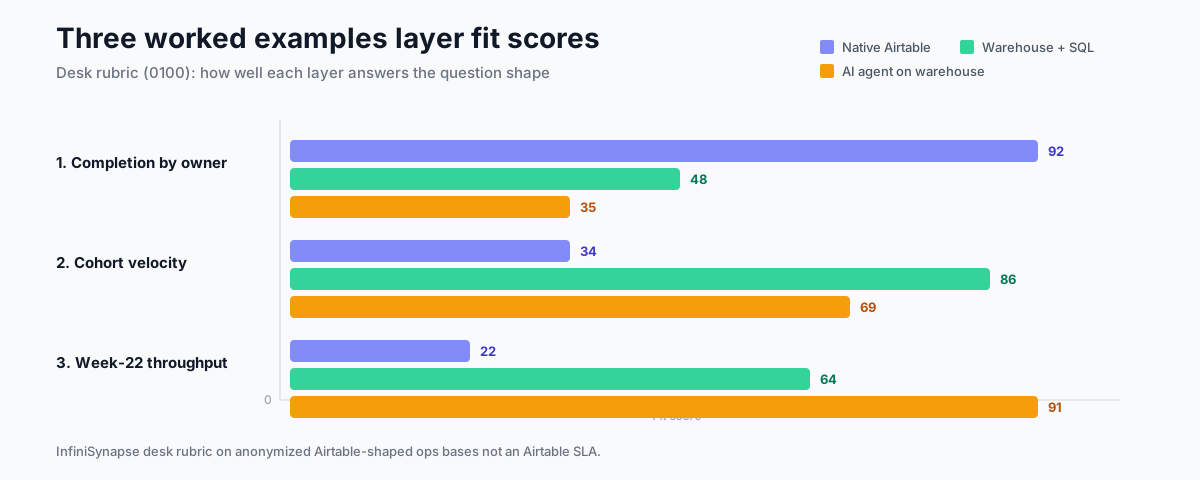
1. Project completion rate by owner
Native Airtable handles this — group by Owner, count records where Status = Complete, divide by total. Native chart in Interface Designer renders the result. This is the sweet spot for in-product analytics.
2. Project velocity by client cohort
Cohort by client signup date, project completion time as a metric. Airtable can show the table; a warehouse plus a chart tool plus a cohort SQL pattern produces the curve.
3. Why did project throughput drop in week 22?
Ad-hoc question outside the dashboard. After Airtable sync to a warehouse, the AI data agent segments by team, project type, and external dependency, returns the candidates with the SQL it ran. See AI database query pillar guide for the connection pattern.
Layer AI analysis on top of your Airtable-synced warehouse
Connect a Postgres, BigQuery, or Snowflake warehouse where your Airtable sync lands. Seed a small business glossary — what counts as a completed project, which status maps to which lifecycle stage. Then ask one ad-hoc question outside your dashboard. That is the practical Airtable data analysis upgrade path for ops teams.
Try InfiniSynapse onlineFAQ
Methodology and review notes
Last updated / Last verified: 2026-08-07 · Next scheduled review: 2026-11-07 · Marker DESK-ADA-20260807A
This methods guide synthesizes Airtable official documentation including the REST API and Interface Designer reference, ELT vendor docs from Fivetran, Airbyte, and Whalesync, hands-on usage in operations and marketing teams, and desk composites (n=9) syncing Airtable to warehouses. The tool ladder, ~50k graduation signal, and fit scores reflect observed practice rather than vendor positioning.
Reporting by: William Zhu. About: editorial-standards#about · editorial standards.
Conflict of interest: InfiniSynapse publishes this guide and sells an enterprise AI data analyst. To reduce bias, the page leads with the topic itself, treats InfiniSynapse as one option among many, and links to external sources for every numeric claim that is not labeled desk observation.
Update cadence: Reviewed every 90 days for accuracy and link health.
Sources and references
- [Vendor] Airtable. REST API documentation. airtable.com/developers/api.
- [Vendor] Airtable. Interface Designer documentation. support.airtable.com/interface-designer.
- [Vendor] Fivetran. Airtable connector documentation. fivetran.com/docs/connectors/airtable.
- [Vendor] Whalesync. Airtable sync documentation. whalesync.com.
- [Independent] Yao et al. ReAct paper. arxiv.org/abs/2210.03629.
- [Vendor] Anthropic. Building Effective Agents. anthropic.com/research/building-effective-agents.
- [Standard] NIST. AI Risk Management Framework. nist.gov/itl/ai-risk-management-framework.
- [Independent] BIRD-SQL benchmark. bird-bench.github.io.