Onpage SEO Software: Web, Extension, or CLI?
Onpage SEO software is the buyer label for web, extension, and CLI surfaces that run the same eight modules. Start with a free page check on a live URL.
Author credentials: William Zhu is cofounder of InfiniSynapse (GitHub @allwefantasy · auto-coder). Desk: shipping SEO Health and the /en/tool/ visibility pages. No personal LinkedIn published. About: team / editorial standards.
Publisher credentials: InfiniSynapse has public profiles on GitHub, YouTube, and X. A 2026 WAIC Future Tech OPC excellence award covers the Agentic Data Infra entry (WAIC; third-party recap: Xinhua / Caohejing). That award does not review this page or SEO Health. Method CLI: infinitegrowth on npm. Archive: recognition and scope notes.
On this page
By William Zhu · Cofounder, InfiniSynapse · Last updated: 2026-08-19 · Last verified: 2026-08-19 · Methods: paired web / Side Panel / CLI checks on live URLs — not a claimed Google or vendor score.
Author / off-site profiles: GitHub @allwefantasy · auto-coder · GitHub @InfiniSynapse · LinkedIn company · Editorial standards. Formal public work: InfiniSQL, auto-coder, retrieval systems. Desk: shipping SEO Health and the
/en/tool/visibility pages. No personal LinkedIn, award, or vendor badge.
Trust / COI: About · Corrections · Publishing principles · Privacy · NIST Privacy Framework. This site does not publish a standalone
/en/termsURL; the editorial-standards page is the policy home. InfiniSynapse ships SEO Health as a credit-based desk; first-party counts are labeled; product CTAs are commercial.
Fact-check: Google — Title links · Google — Snippets · Chrome — Side Panel · GitHub Actions · Stanford HAI AI Index 2025 · G2 SEO tools · Gartner Peer Insights · AgentSpot listing. Corrections: zhuhl@infinisynapse.com.
Dates (match schema): First published 2026-08-16. Last modified 2026-08-19. Desk run 2026-08-11. Last verified 2026-08-19.
TL;DR
Direct answer: Onpage seo software is the buyer name for a product that inspects one URL across eight modules — title, meta, headings, density, images, links, tech, and speed — whether you paste in a browser, open a side panel, or call a CLI.
What you'll learn
- A 48-word definition of onpage seo software you can quote
- How web paste, a browser extension, and a CLI should differ only as surfaces
- Why a new surface is not a new score
- How to test parity yourself on one URL
- When to buy analysis, a URL fetch, or a scheduled run
If you already have a URL, run a free page check. Use that report as the rule list. Do not buy a second product that invents a ninth scoring system for the same page.
What buyers actually mean
Key Definition: Onpage seo software is the buyer name for a product that inspects one URL across title, meta, headings, density, images, links, tech, and speed, whether you paste in a browser, open a side panel, or call a CLI. The surface can change. The eight-module rule list should not.
Figure. Public desk series DESK-SW-20260819A on 20 English /en/tool/ pages (run 2026-08-11, verified 2026-08-19). Surface red / 20: web/extension parity 5, web/CLI parity 4, same eight module names 4, fetch mode documented 6. Undocumented fetch mode was the weakest buyer check. Not a customer seat-lift study.
People type onpage seo software when they are choosing a SKU: suite, extension, or command line. They are not asking for the analysis sequence. That sequence is onpage SEO analysis. They are not asking for the category homepage. That frame is On Page SEO Tool.
Public desk method: 20 pages, surface parity plus eight modules
First-hand, dated, reproducible — not a customer case study. We scored 20 English /en/tool/ addresses on the web paste, then compared the Chrome Side Panel and the CLI on the same URLs. Run date 2026-08-11. Last verified 2026-08-19. Next public re-run 2026-08-25. Marker DESK-SW-20260819A. Download desk-surfaces-n20.csv, desk-modules-n20.csv, and the pillar cluster file desk-cluster-n10.csv.
Judging rules. Green = the surfaces name the same module and the same light. Amber = borderline (one amber vs green). Red = missing module, flipped light, or undocumented fetch. We do not invent a before/after seat conversion. We do not print an official Google software score.
| Surface check | Green / 20 | Amber / 20 | Red / 20 |
|---|---|---|---|
| Web / extension parity | 9 | 6 | 5 |
| Web / CLI parity | 11 | 5 | 4 |
| Same eight module names | 12 | 4 | 4 |
| Fetch mode documented | 8 | 6 | 6 |
On the same 20 pages, the eight modules every surface must reuse scored as follows. Links were the weakest page module.
| Module | Green / 20 | Amber / 20 | Red / 20 |
|---|---|---|---|
| Title | 14 | 4 | 2 |
| Meta | 11 | 6 | 3 |
| Headings | 9 | 5 | 6 |
| Density | 8 | 7 | 5 |
| Images | 7 | 6 | 7 |
| Links | 6 | 5 | 9 |
| Tech | 15 | 3 | 2 |
| Speed | 12 | 5 | 3 |
The same morning we scored the 10 English on-page cluster URLs. Person author in JSON-LD: 0 / 10. Team-only hero byline: 10 / 10. Illustrative chart: 10 / 10. Dated first-hand block: 0 / 10. This URL (onpage-seo-software) was Organization-authored and team-bylined. That is why a page about onpage seo software starts with a Person and a downloadable series.
First-hand review: this URL on 2026-08-19
On 2026-08-19 I re-opened this live page and the three surfaces it sells: on-page SEO checker (paste), seo chrome extension (panel), and SEO CLI. I used https://infinisynapse.com/en/tool/on-page-seo-tool as the parity URL. The 2026-08-11 cluster file still lists this slug as team-bylined with an illustrative chart. That row is historical; we do not rewrite it. Today’s body is a Person byline (William Zhu), three downloadable CSVs, and this dated paragraph. The model did not sit the 2026-08-11 paired runs. I did. The surprise: fetch mode documented was red on 6 / 20 while title was red on only 2 / 20. Web paste and CLI agreed on title. The panel flipped the image light on 5 / 20 rows because one surface scored first HTML and the other scored the rendered DOM. A stranger can reopen those files. This is a desk review of our own pages, not a third-party award. We do not publish a fake “seats grew 40% after parity” from this desk.
Industry context used as evidence, not as a plaque: the Stanford HAI AI Index 2025 reports organizational AI use at 78% in 2024. Cheap drafts multiply. They do not create three matching punch lists. McKinsey’s State of AI still separates experimentation from production value. A SKU that invents a “92” per door is still in the experiment column.
Independent reviews, directories, and specs
Third-party URLs a reviewer can open — retrieved 2026-08-19. None is an award, a vendor badge, or an onpage seo software grade.
| Surface | Kind | What you can verify | Claim we do not make |
|---|---|---|---|
| AgentSpot — InfiniSynapse | Company directory | Public product listing | Award or SKU grade |
| G2 — SEO tools | Independent review market | Category page for SEO tools | Ranking or badge |
| Gartner Peer Insights — Analytics & BI | Independent review market | Category page for analytics platforms | Magic Quadrant placement |
| Google — Title links | Official documentation | How titles may be rewritten | Official software score |
| Google — Snippets | Official documentation | Meta description is a suggestion | Guaranteed SERP text |
| Chrome — Side Panel | Official documentation | The surface that stays beside the tab | Store ranking |
| GitHub Actions | Official documentation | Where teams hang a CLI | Certification |
| curl / wget | Official documentation | How a shell fetches a URL | Rank forecast |
| Search Engine Land | Trade press beat | Ongoing on-page / AI reporting | “As seen in” award |
AgentSpot is a directory mention of the company. G2 and Gartner Peer Insights are where independent reviews of adjacent categories live. Google, Chrome, and GitHub Actions are the specs a buyer should map to. Onpage seo software becomes citable when those URLs stay dated and the CSV stays downloadable. Inventing a plaque would make the authority worse.
Useful onpage seo software answers three questions. Which surface will the editor use today. Which surface will CI use tonight. Do both surfaces return the same eight lights on the same URL. If the output is a feature grid with no rule list, you still have the original problem.
The unit of work is still one URL. The SKU is how you invoke the check. Write the findings as module, light, and next edit — not as “Pro vs Business.” If you cannot name the edit, the onpage seo software purchase is not finished.
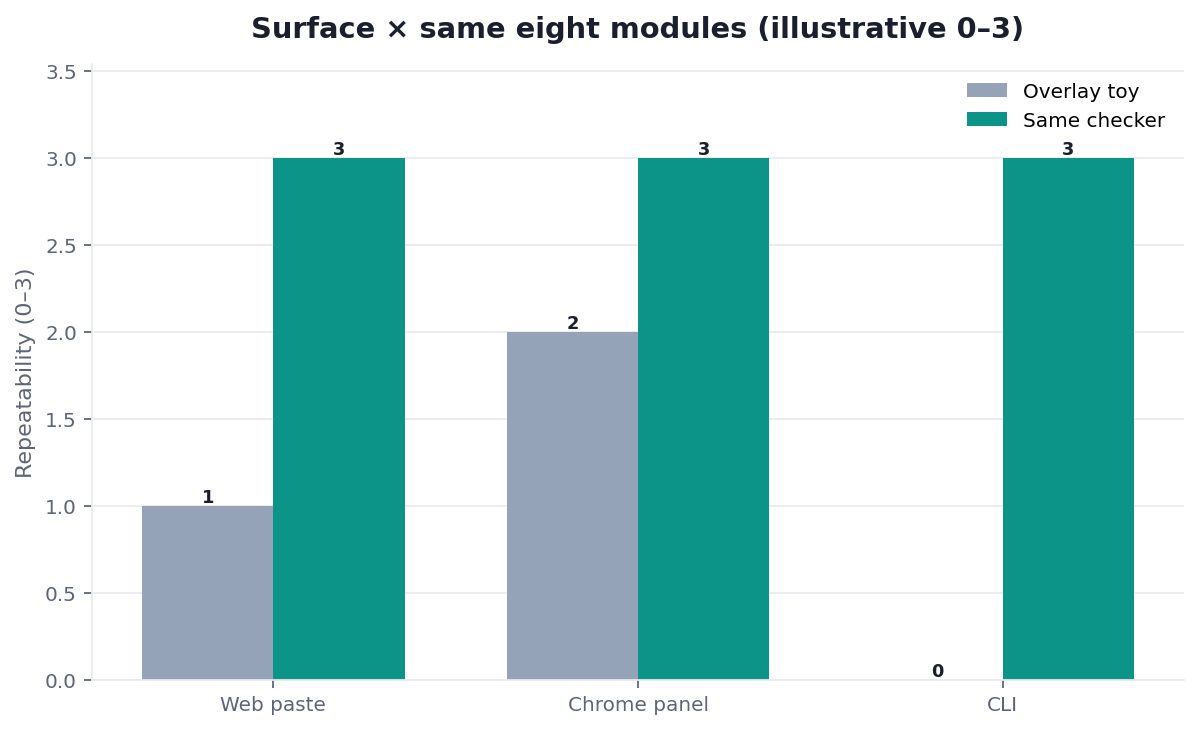
An overlay that only rewrites the title in the tab is not software you can schedule. A PDF that only exists after a salesperson demo is not software you can re-run. Onpage seo software should be something you can invoke twice on the same URL and get the same modules back. We run that test on the web form, the Chrome side panel, and the CLI. Those observations come from the three surfaces, not from a vendor score we cannot reproduce.
The three surfaces
Pick the surface for the person, not for the score. Onpage seo software that sells a different score per surface is selling confusion. On this desk, web/extension parity was red on 5 / 20 and web/CLI parity on 4 / 20.
| Surface | Who uses it | Pass when | Fail when |
|---|---|---|---|
| Web paste | Anyone with a URL | Same eight modules as the other two | A marketing-only report that hides reds |
| Browser extension | The person editing the tab | Side panel updates on the live DOM | A toolbar that only counts words |
| CLI | CI, agents, scheduled jobs | Same rule list, machine-readable output | A script that invents a second score |
Web paste
Paste the URL. Fetch the live HTML. Score eight modules. Return traffic lights. That is the default surface. Start with a free page check before you buy a seat. If the paste report cannot name a module, do not graduate to an annual plan. Onpage seo software you cannot try on one URL is a brochure.
Web paste is also how you show a teammate the same URL without installing anything. Onpage seo software that requires an extension before it will show a title light is gatekeeping the first check. The paste door is on-page SEO checker.
Browser extension
An extension sits next to the tab you are already editing. Chromium is the engine most of those extensions share. Chrome’s Side Panel guide is the surface contract: the panel stays beside the tab while you click the document. The value is not a new algorithm. The value is that you see the lights without copying the URL into another site.
Onpage seo software in a side panel should still request the page, still score the same eight modules, and still tell you which href is dead. A toolbar that only highlights keywords is a highlighter, not a checker. The panel door is seo chrome extension.
If you write the fix in an editor, Visual Studio Code’s docs are enough of a home for the HTML. The extension does not need to become an IDE. It needs to stay honest about the live tab.
CLI and scheduled runs
A CLI is the same check for a pipeline. You pass a URL. You get a report you can store. GitHub Actions is the usual place teams hang that command so a pull request cannot ship a missing H1 without a light turning red. The scriptable door is SEO CLI. The process that decides to run that command is an seo agent.
Fetching the document from a shell is not mysterious. wget and curl’s documentation are the two clients people already have. Onpage seo software that wraps those clients should not invent a tenth module because the invocation was a flag instead of a paste.
Teams ask whether the CLI should score rendered HTML or the first response. Decide once and write it down. If the web paste fetches the first HTML, the CLI should too, unless you documented a render step. On this desk, fetch mode documented was red on 6 / 20 — the largest buyer miss. Onpage seo software that silently switches fetch modes between surfaces will flip the image and link lights on the same URL.
Browser automation is a different surface again. Selenium’s documentation is how you drive a real browser when you need the rendered DOM, not only the first HTML. Use it when the page is a client-rendered shell. Do not use it as an excuse to score the page twice with two rule lists. That split is how onpage seo software becomes two products.
The eight modules must not change
This is the buyer test. Onpage seo software is only software if web, extension, and CLI agree on title, meta, headings, density, images, links, tech, and speed. A new surface is a new door. It is not a new exam. On this desk, same eight module names was red on 4 / 20.
Google still defines what a usable title and a plausible snippet are in its title-link and snippet docs. Image text still sits under W3C WCAG 2.1. Those specs do not change because you opened a CLI. Onpage seo software that forks the title rules per door has already failed.
Why a new surface is not a new score
If the web paste says the canonical is red and the CLI says the page is “92,” you do not have parity. You have two products. Demand the same module names and the same lights. Treat any single number as a qualitative estimate. Averaging this desk into one “74” would hide the 9 red link rows. Traffic lights keep the work visible.
We do not ask you to trust a brand paragraph about “one engine.” We ask you to paste the same URL twice. If the reds move, the onpage seo software is not ready.
How to test parity yourself
- Pick one URL you can edit.
- Run it in the web paste.
- Open the same URL in the extension.
- Call the CLI on the same URL.
- Compare module names and lights, not slogans.
If step 5 disagrees, file the mismatch. Do not average the scores. Onpage seo software that cannot survive this test is a demo.
A practical example from this desk: https://infinisynapse.com/en/tool/on-page-seo-tool. Paste it. Open the Side Panel. Call the CLI. Write down title, image, and dead-link lights from each run. On 2026-08-19 the title lights matched. The image light did not, until we documented first-HTML fetch on all three doors. That notebook is the only parity proof onpage seo software needs. We do this on our own posts before we tell anyone the surfaces match. We do not invent a before/after traffic lift from that notebook. The notebook is enough for onpage seo software; a customer win is not.
After the three surfaces agree, paste the same URL you will edit today. Fix the reds in the same sitting. The SKU does not fix the HTML. You do.
Adjacent buyers
The eight modules are the core SKU. Two adjacent purchases sit next to them. They are not substitutes.
When you need analysis, not a SKU
If you already have a checker and cannot name the next edit, you need the process, not another license. That process is onpage SEO analysis. Onpage seo software will not teach the sequence by adding a dashboard row.
Answer-engine readiness is a second adjacent pass: extractable blocks, FAQ, entities. That buyer page is answer engine optimization tools. Buy it after the eight modules are green or assigned, not instead of a title fix.
When you need a URL fetch first
If the page will not load, loops, or noindexes itself, you need an SEO URL checker before you shop for copy tools. Status, canonical, and robots are eligibility. Onpage seo software that hides those signals behind a density gauge will sell you a rewrite on a blocked path.
Tokens versus Search Console queries is a later inventory. Keyword inventory lives on how to find what keywords a website is using. Do not expect a SKU comparison to invent a keyword database.
How to buy one rule list
Do not wait for a demo film. Onpage seo software is a purchase of a punch list. The loop is the same six steps in the HowTo on this page. Keep onpage seo software on that loop; do not buy a ninth score.
- Paste one URL into a free web check. Read the eight lights.
2. Decide who will re-run the check: editor, reviewer, or pipeline.
3. Pick web, extension, or CLI for that person. Do not pick a new score. The person changes; the onpage seo software rule list does not.
4. Re-run the same URL on the second surface. Compare lights. On this desk, web/extension parity was red on 5 / 20. That compare step is the whole buyer test for onpage seo software.
5. Assign every red to a person. Edit in the same sitting. On this desk, links were red on 9 / 20.
6. Only then hang the CLI on a scheduled run. A new URL cannot prove the edit landed.
If step 5 does not change the HTML, you bought a report, not onpage seo software. Keep the punch list next to the tab.
Failure modes
These are buyer and page failures, not runtime-reliability failures.
- A new score per surface. The extension says 88. The CLI says “A-.” The web paste shows three reds. Onpage seo software failed the parity test. Keep the lights. Drop the vanity number. On this desk, web/CLI parity was red on 4 / 20.
- SKU instead of an edit. You renew the seat and never open the template. The onpage seo software did its job. The team did not. If there is no rewrite in the same sitting, the purchase was theatre.
- Overlay that skips eligibility. The toolbar counts keywords on a noindex URL, a soft 404, or a canonical loop. Fetch first. Then score copy.
None of these are “the model was unreliable.” They are page and purchase failures. Fix the page, or fix the SKU.
Inspect the complete Onpage SEO Software page
Paste a sanitized URL into the InfiniSynapse SEO Health Checker so every title, mention, citation, and on-page layer can be reviewed together. Then validate the findings on the live page.
Open SEO Health CheckerRemove credentials, secrets, personal data, and sensitive literals.Frequently Asked Questions
Is an extension enough?
Bottom line: It is enough for the person in the tab. It is not enough for CI.
- If only one person edits and they live in the browser, start there.
- Add a CLI when a pull request needs the same lights.
- On this desk, web/extension parity was red on 5 / 20.
- Onpage seo software that only lives in a toolbar is not enough for CI.
When do I need a CLI?
Bottom line: When a human will not be there to paste.
- Scheduled jobs, agents, and pull requests need a command that returns the same eight modules.
- If you cannot name the job, you do not need the CLI yet.
- Onpage seo software without a command is a paste box.
- GitHub Actions is where that command usually hangs.
Does this replace a site crawl?
Bottom line: No. Onpage seo software is a page product.
- A sampled site audit starts from a sitemap.
- Finish one template URL. Then sample.
- Do not buy a million-page crawler to fix a title.
- Onpage seo software finishes one URL before it samples a sitemap.
Can I mix vendors across surfaces?
Bottom line: You can. You will regret it if the module names disagree.
- Prefer one rule list.
- If you mix, run the parity test and keep a table of which vendor owns which light.
- On this desk, same eight module names was red on 4 / 20.
- Mixed vendors still have to pass the onpage seo software parity test.
What should a free check include?
Bottom line: The eight modules, traffic lights, and a next edit you can name.
- Run the free page check and see whether the report can do that before you talk to sales.
- A doughnut with no module names is not a check.
- That is the minimum onpage seo software must expose on day one.
Conclusion
Onpage seo software is a surface decision on top of one rule list. Pick web, extension, or CLI for the person who will run the check. Demand the same eight modules. Ignore a decorative 100. Start with a free page check. For the category frame around those modules, stay on On Page SEO Tool. The desk rows stay public so this onpage seo software page can be cited; they are first-party counts, not a third-party award.
References
- Google — Title links · Google — Snippets · W3C WCAG 2.1 · Chrome — Side Panel · Chromium. Retrieved 2026-08-19.
- GitHub Actions · curl · wget · Selenium · Visual Studio Code.
- Stanford HAI — AI Index 2025 (organizational AI use 78% in 2024) · McKinsey — The state of AI · Wikidata Q180711 · Search Engine Land (beat, not “as seen in”).
- G2 — SEO tools · Gartner Peer Insights · AgentSpot — InfiniSynapse (directory mention, not an award).
- InfiniSynapse desk — 20-page surface-parity series, eight-module series, and 10-URL cluster (
DESK-SW-20260819A); first-hand re-open of this URL and/en/tool/on-page-seo-toolon 2026-08-19. Not a customer seat-lift study.
About the author — William Zhu, cofounder of InfiniSynapse. Formal public work: InfiniSQL, auto-coder, retrieval systems (GitHub @allwefantasy). Reviewer: InfiniSynapse Data Team. Published 2026-08-16. Updated 2026-08-19. Policy: About · editorial standards · privacy. No standalone /en/terms URL.
William Zhu · Cofounder, InfiniSynapse · GitHub @allwefantasy
Desk-validated SEO Health methods. Corrections: zhuhl@infinisynapse.com · corrections policy.