What is an SQL query?
An SQL query is a structured statement sent to a relational database to retrieve, combine, summarize, create, change, or remove data. In everyday analytics, “query” often means a SELECT statement. More broadly, SQL includes statements for data definition, data modification, access control, and transactions.
A query is successful only when it returns the intended result under the intended permissions and resource limits. Valid syntax is necessary, but it does not prove correct business meaning, complete joins, stable ordering, safe parameter handling, or acceptable cost. Treat an SQL query as a small executable specification: it should define the population, grain, measures, time boundary, relationships, exclusions, ordering, and output contract. Wikipedia’s SQL article is the public entity page for the language; this guide is about reviewing one statement as a contract.
Key terms
Entities this guide relates
These terms are the entity graph for the page. Each row names a concept, a synonym reviewers actually say, an on-page section, and a third-party or sibling page that disambiguates it.
| Term | Also called | On this page | Related entity |
|---|---|---|---|
| SQL query | SELECT statement; read request | What it is | Wikipedia: SQL |
| Logical processing | Logical order; written vs executed | Clause order | PostgreSQL: SELECT |
| Join cardinality | Row multiplication; grain break | Joins | SQL joins guide |
| Prepared statement | Bound parameter; parameterized query | Parameters | OWASP cheat sheet |
| EXPLAIN | Query plan; estimated vs actual | Execution plans | PostgreSQL: EXPLAIN |
| Result contract | Population, grain, measures | Contract | SQL query examples |
Read an SQL query as a result contract
Clause-by-clause review of an SQL query
A readable SQL query makes each decision visible. The example below returns one row per customer and month, calculates paid revenue, excludes test accounts, and keeps only customer-months above a threshold. The query text is short, but its correctness depends on definitions not fully visible in the syntax: whether refunds reduce revenue, which timezone defines a month, and whether one payment can map to several invoices.
SELECT
    c.customer_id,
    DATE_TRUNC('month', p.paid_at) AS paid_month,
    SUM(p.amount - p.refund_amount) AS net_paid_revenue
FROM customers AS c
JOIN payments AS p
  ON p.customer_id = c.customer_id
WHERE c.is_test = FALSE
  AND p.status = 'settled'
  AND p.paid_at >= :period_start
  AND p.paid_at <  :period_end
GROUP BY
    c.customer_id,
    DATE_TRUNC('month', p.paid_at)
HAVING SUM(p.amount - p.refund_amount) >= :minimum_revenue
ORDER BY paid_month, net_paid_revenue DESC, c.customer_id;| Clause | Decision expressed | Review question |
|---|---|---|
SELECT | Output columns and calculations | Does each row have the promised grain? |
FROM / JOIN | Sources and relationships | Can a join multiply or discard valid rows? |
WHERE | Eligible input rows | Are boundaries, status rules, and nulls explicit? |
GROUP BY | Aggregation grain | Which dimensions define one result row? |
HAVING | Eligible groups after aggregation | Is the threshold applied before or after aggregation? |
ORDER BY | Presentation and tie-breaking | Is ordering deterministic across repeated runs? |
For more pattern-focused code, use the dedicated SQL query examples guide. This page concentrates on how to reason about any SQL query as a controlled, testable unit.
Separate written order from logical query processing
Why a window alias often fails in WHERE
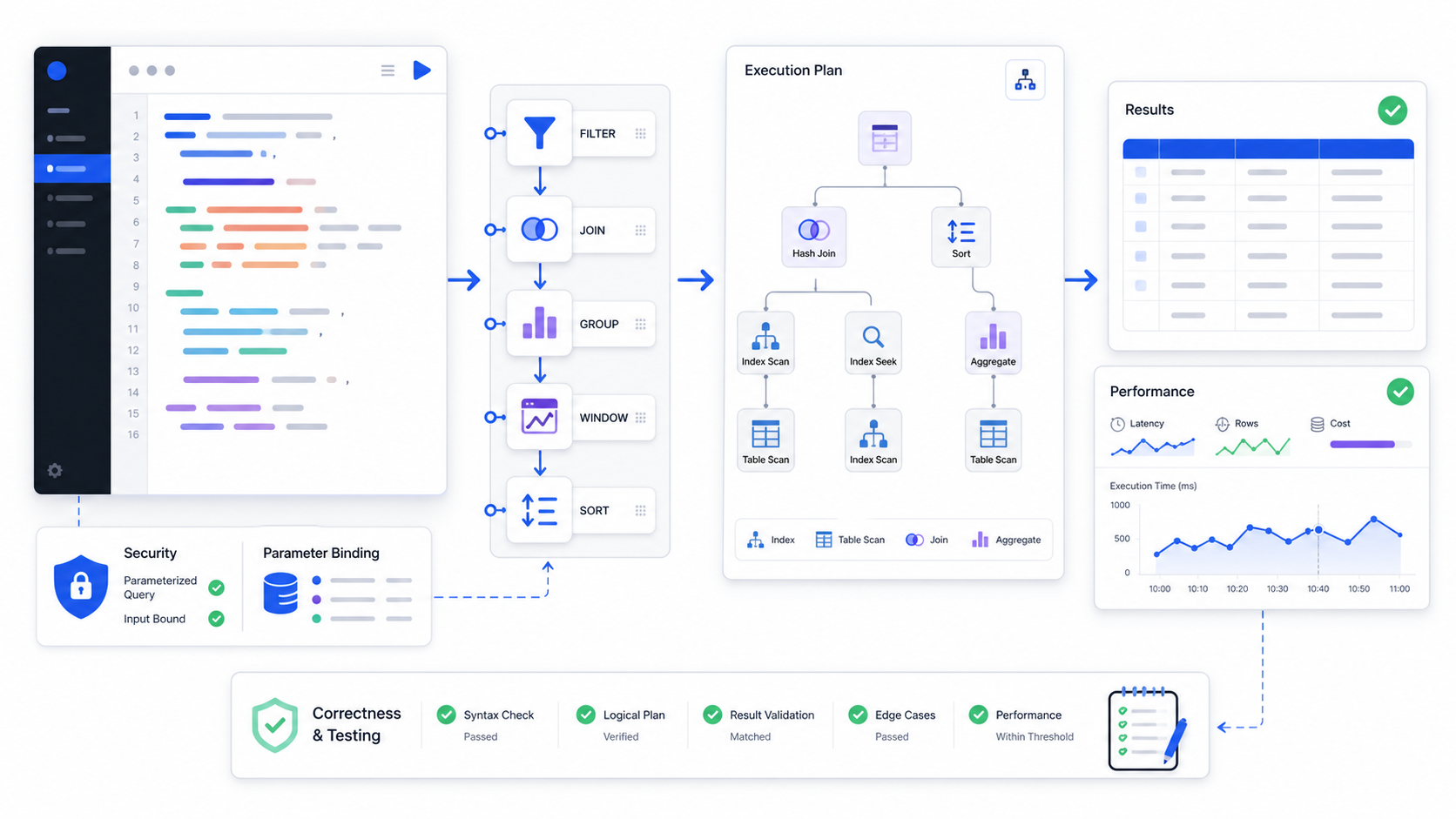
SQL is declarative: the SQL query describes the result, and the optimizer chooses a physical plan. A useful logical model for a read query is WITH, FROM and JOIN, WHERE, GROUP BY, aggregate calculation, HAVING, window functions, SELECT, DISTINCT, set operations, ORDER BY, then LIMIT or FETCH. PostgreSQL’s SELECT command documents that written clause order is not the same as evaluation order. Database engines can rewrite equivalent expressions, so this is a reasoning model rather than a promise about physical execution.
- Establish inputs. Resolve common table expressions, tables, views, functions, and joins.
- Filter input rows. Apply predicates that determine which source rows participate.
- Form and filter groups. Create groups, calculate aggregates, then apply group-level predicates.
- Calculate windows and projection. Add analytic values and produce the selected columns.
- Shape the final result. Remove duplicates where requested, combine sets, order deterministically, and apply result limits.
Common consequence: a window-function alias usually cannot be filtered in the same query block's WHERE clause because the window value is logically calculated later. Put the calculation in a subquery or CTE, then filter in the outer query. Some dialects provide QUALIFY for this purpose.
Know whether the SQL query reads or changes state
Classify the statement before you run it
The risk of an SQL query depends on its statement class and environment. A SELECT can still expose sensitive data or consume excessive resources; a data-changing statement can affect many rows even when its syntax is simple. Statement classification should happen before execution, not after an error or incident.
| Class | Typical statements | Primary control |
|---|---|---|
| Read / query | SELECT, WITH ... SELECT | Row policy, object allow-list, timeout, row limit, export control |
| Data modification | INSERT, UPDATE, DELETE, MERGE | Transaction, affected-row preview, approval, rollback |
| Definition | CREATE, ALTER, DROP | Change management, dependency review, migration testing |
| Access control | GRANT, REVOKE | Named owner, least privilege, independent review |
| Transaction control | BEGIN, COMMIT, ROLLBACK | Isolation policy, lock awareness, bounded duration |
Define the SQL query result before writing syntax
Write the SQL query contract first
Start from the decision or task the result must support. “Revenue by customer” is incomplete: it does not define the customer population, recognized versus billed revenue, gross versus net amount, account versus parent-company grain, calendar, currency, or treatment of refunds and missing mappings. A result contract converts those ambiguities into reviewable choices.
Who or what is eligible, and at what effective date?
What exactly does one result row represent?
Which approved formula, unit, currency, and sign convention apply?
Which event timestamp, timezone, calendar, and half-open boundary apply?
How are nulls, duplicates, late data, refunds, cancellations, and unmatched keys handled?
Which totals, samples, invariants, and source timestamps will prove the result?
If the request starts in everyday language, the natural language query page explains how to resolve meaning before SQL generation. If the main challenge is choosing fields and filters interactively, see the query builder guide.
Build one SQL query from requirement to evidence
Evidence checks that catch a silent error
Requirement: “For each active account, show recognized net revenue for the last complete fiscal quarter versus the previous fiscal quarter, including zero-revenue accounts, and rank growth within region.” This request requires a stable account population, a fiscal calendar, a governed revenue definition, an account-to-region mapping valid at period end, and a rule for new accounts with a zero baseline.
WITH periods AS (
    SELECT
        current_start,
        current_end,
        previous_start,
        previous_end
    FROM governed_fiscal_periods
    WHERE period_key = :last_complete_quarter
),
eligible_accounts AS (
    SELECT a.account_id, a.region
    FROM account_snapshot AS a
    CROSS JOIN periods AS p
    WHERE a.valid_from < p.current_end
      AND COALESCE(a.valid_to, p.current_end) >= p.current_end
      AND a.status = 'active'
),
revenue_by_period AS (
    SELECT
        r.account_id,
        CASE
          WHEN r.recognized_at >= p.current_start
           AND r.recognized_at <  p.current_end THEN 'current'
          WHEN r.recognized_at >= p.previous_start
           AND r.recognized_at <  p.previous_end THEN 'previous'
        END AS period_name,
        SUM(r.recognized_amount - r.refund_amount) AS net_revenue
    FROM recognized_revenue AS r
    CROSS JOIN periods AS p
    WHERE r.recognized_at >= p.previous_start
      AND r.recognized_at <  p.current_end
    GROUP BY r.account_id, period_name
),
account_result AS (
    SELECT
        a.account_id,
        a.region,
        COALESCE(MAX(CASE WHEN rp.period_name = 'current'
                          THEN rp.net_revenue END), 0) AS current_revenue,
        COALESCE(MAX(CASE WHEN rp.period_name = 'previous'
                          THEN rp.net_revenue END), 0) AS previous_revenue
    FROM eligible_accounts AS a
    LEFT JOIN revenue_by_period AS rp
      ON rp.account_id = a.account_id
    GROUP BY a.account_id, a.region
)
SELECT
    account_id,
    region,
    current_revenue,
    previous_revenue,
    current_revenue - previous_revenue AS absolute_growth,
    CASE WHEN previous_revenue = 0 THEN NULL
         ELSE (current_revenue - previous_revenue) / previous_revenue
    END AS growth_rate,
    DENSE_RANK() OVER (
      PARTITION BY region
      ORDER BY current_revenue - previous_revenue DESC, account_id
    ) AS regional_growth_rank
FROM account_result
ORDER BY region, regional_growth_rank, account_id;| Evidence check | Expected behavior | Failure it catches |
|---|---|---|
| Eligible account count | Result rows equal the approved period-end population | Inner join accidentally removes zero-revenue accounts |
| Revenue reconciliation | Current and previous totals match the governed ledger control | Duplicate join paths or missing refunds |
| Boundary fixtures | Rows at start are included; rows at end are excluded | Overlapping periods and double counting |
| Zero baseline | Growth rate is null and absolute growth remains available | Divide-by-zero or misleading infinite growth |
| Rank ties | Equal growth receives equal rank; account ID stabilizes display | Nondeterministic ordering |
The exact functions and date syntax vary by dialect. The important pattern is stable: define periods once, define the population independently from facts, aggregate facts to the intended key, preserve missing facts with a left join, calculate derived values after reconciliation, and attach explicit evidence checks.
Treat every SQL join as a cardinality claim
Measure cardinality before DISTINCT
A join does more than match keys; it changes the number and meaning of rows. Before joining, state whether each side is one-to-one, one-to-many, many-to-one, or many-to-many at the relevant effective date. Then measure row counts and key uniqueness before and after the join. Adding DISTINCT after an unintended many-to-many join can hide the symptom while leaving aggregates wrong. Pattern-level join examples live in the SQL joins guide.
| Join pattern | Use when | Main risk | Evidence |
|---|---|---|---|
INNER JOIN | Only matched rows are eligible | Silent population loss | Unmatched keys by side and reason |
LEFT JOIN | Preserve every eligible left-side row | Right-side predicate in WHERE turns it into an inner join | Null matches and preserved-row count |
| Semi-join | EXISTS tests membership without importing columns | Correlated condition targets the wrong key | Positive and negative membership fixtures |
| Anti-join | NOT EXISTS finds missing relationships | NOT IN behaves unexpectedly with nulls | Fixture containing a null and an unmatched key |
| Range / temporal join | Match the version valid at an event time | Overlapping validity ranges create duplicates | No-overlap invariant and exactly-one-match test |
Make SQL aggregation preserve the intended grain
Keep grain explicit in GROUP BY
Aggregation compresses many input rows into fewer output rows. Every non-aggregated selected expression should contribute to the declared grain. If an extra field is added to GROUP BY merely to satisfy a syntax error, the output grain may change silently. If a field is wrapped in MAX merely to avoid grouping it, the SQL query may hide conflicting values.
COUNT(*), COUNT(column), and COUNT(DISTINCT key) answer different questions. Document which one represents the metric.
When two fact tables share a dimension but not a one-to-one event key, aggregate each fact to a compatible key before combining them.
Use WHERE for eligible input rows and HAVING for conditions on aggregated groups.
The sum of customer-month values should match the same governed measure calculated directly at month level, subject to documented exclusions.
When a measured plan, not folklore, is the bottleneck, use the SQL query optimization notes after the EXPLAIN section on this page.
Use SQL window functions without collapsing detail
Partition, order, and frame
Window functions calculate over a related set of rows while preserving the current row. They are useful for ranking, running totals, period comparisons, moving values, and within-group statistics. Correctness depends on three explicit decisions: partition, order, and frame.
SELECT
    account_id,
    revenue_month,
    net_revenue,
    LAG(net_revenue) OVER (
      PARTITION BY account_id
      ORDER BY revenue_month
    ) AS previous_month_revenue,
    SUM(net_revenue) OVER (
      PARTITION BY account_id
      ORDER BY revenue_month
      ROWS BETWEEN 2 PRECEDING AND CURRENT ROW
    ) AS trailing_three_row_revenue
FROM monthly_account_revenue;
A “three-month” window is not always the same as three preceding rows. If months can be missing, build a calendar spine first or use a dialect-supported range frame with carefully defined semantics. For ranking, include a deterministic tie-breaker when downstream pagination or repeated exports require stable row order. For last-value calculations, specify the frame because some defaults stop at the current peer group. PostgreSQL’s window-function tutorial is the engine page to check before copying a frame clause.
Choose CTEs and subqueries for clarity, not folklore
Name each grain transition
Common table expressions name intermediate relations and can make grain transitions reviewable. Subqueries can keep a transformation local to the expression that uses it. Neither form is universally faster. Optimizer behavior differs by database and version; some CTEs may be inlined, while materialized intermediates may create or avoid work depending on reuse, selectivity, and statistics.
| Need | Useful form | Review point |
|---|---|---|
| Name a population or grain change | CTE | Does the name state what one row represents? |
| Test existence | EXISTS | Is the correlation key complete? |
| Return one scalar value | Scalar subquery | Can it return more than one row? |
| Reuse an expensive intermediate | CTE or temporary object, after measurement | Does materialization reduce total work? |
| Traverse a hierarchy | Recursive CTE | Are depth, cycle, and termination controlled? |
Design SQL query behavior for nulls and duplicates
Define null meaning before you write syntax
SQL uses three-valued logic: a comparison can be true, false, or unknown. NULL = NULL is not true, NOT IN can become unknown when its list contains null, and most aggregate functions ignore null values while COUNT(*) counts rows. Decide whether null means unknown, not applicable, not yet received, redacted, or a failed relationship; those meanings should not be collapsed into one default without review.
Duplicates also need a definition. Two identical displayed rows may represent two valid events, a source-system retry, a many-to-many join, or a projection that omitted the distinguishing key. Before using DISTINCT, identify the entity key and duplicate cause. If deduplication is required, encode a deterministic survivor rule—such as latest approved version by event ID—and test ties.
Make SQL dialect assumptions explicit
Record engine and version beside each statement
SQL concepts travel across databases, but syntax and behavior do not always. Date arithmetic, identifier quoting, string concatenation, case sensitivity, null ordering, pagination, regular expressions, JSON functions, arrays, merge semantics, window frames, and query-plan commands vary. State the engine and version beside each reusable SQL query. Compare BigQuery query syntax and SQLite query planning before treating one dialect’s example as portable.
| Portability question | Evidence to record |
|---|---|
| How is an identifier quoted? | Dialect, compatibility mode, and case-folding rule |
| How is a timestamp interpreted? | Column type, source timezone, session timezone, conversion rule |
| Is integer division possible? | Input types, explicit cast, expected precision and rounding |
| How are nulls ordered? | Explicit NULLS FIRST/LAST where supported, otherwise a portable expression |
| Can an execution command change data? | Whether the command executes the statement and which statement classes are allowed |
Parameterize SQL query values and constrain structure
Keep values separate from identifiers
Prepared statements keep untrusted values separate from SQL structure. The application sends a query template and bound values through the database driver rather than concatenating user input into text. Parameterization protects values; it does not automatically validate dynamic identifiers, sort directions, operators, function names, or entire SQL fragments.
-- Unsafe: input changes SQL structure
sql = "SELECT * FROM orders WHERE customer_id = '" + input + "'"

-- Safer pattern: value remains a bound parameter
sql = "SELECT order_id, total_amount
       FROM orders
       WHERE customer_id = :customer_id
       ORDER BY created_at DESC
FETCH FIRST :row_limit ROWS ONLY"Use the driver's parameter API for strings, numbers, dates, and other supported values.
Map a user choice to a server-side allow-list of approved identifiers; do not accept arbitrary table or column names.
Execute with a role limited to the required objects and operations, preferably against a read-only or isolated workload.
Apply row, time, memory, export, and sensitive-field policies after authorization, not only in generated SQL text.
The OWASP SQL Injection Prevention Cheat Sheet recommends prepared statements with parameterized queries as a primary defense and treats blanket escaping as strongly discouraged. The client that runs this parameterized lookup is covered in database lookup tool development.
Test SQL query results, not only execution success
Fixture an SQL query before production volume
A database returning rows proves that the statement parsed and executed; it does not prove the rows are correct. Build a compact fixture set whose expected answers can be inspected manually, then add production-scale reconciliation and invariants. Keep the fixture schema, seed data, expected result, dialect version, and test query under version control.
| Test type | Example | Why it matters |
|---|---|---|
| Happy path | One account, two valid settled payments | Confirms the core calculation |
| Boundary | Rows exactly at start and end timestamps | Detects overlap and off-by-one errors |
| Null behavior | Missing refund, unknown segment, null join key | Proves deliberate three-valued logic |
| Cardinality | Duplicate dimension versions and one-to-many facts | Detects row multiplication |
| Authorization | Two roles with different permitted regions | Proves policy is enforced in result data |
| Metamorphic | Reordering source rows must not change grouped totals | Tests properties without enumerating every answer |
| Reconciliation | Sum of account totals equals approved ledger control | Connects query output to an independent source |
| Regression | Same test set before and after query or schema change | Prevents silent semantic drift |
Use the execution plan to explain SQL query work
Compare estimated and actual rows
The optimizer translates declarative SQL into a tree of physical operations such as scans, seeks, joins, sorts, aggregates, exchanges, and materialization. An estimated plan predicts work from statistics and the cost model; an analyzed or actual plan adds runtime evidence. Command names and safety behavior differ by database, so confirm whether the inspection command executes the statement before using it on data-changing SQL.
| Plan signal | Question to ask | Possible cause |
|---|---|---|
| Estimated rows differ greatly from actual rows | Which predicate or join first diverges? | Stale statistics, correlated columns, skew, parameter sensitivity |
| Large scan | Is the scan expected, selective, and prunable? | Missing filter, non-sargable expression, no useful index, broad request |
| Repeated inner operation | How many loops occur and how much work per loop? | Correlated subquery or nested-loop choice |
| Large sort, spill, or exchange | Can input rows or width be reduced before this node? | Late filtering, unnecessary columns, insufficient memory, distribution mismatch |
| Fast database plan but slow user response | Where is time spent outside execution? | Queueing, network transfer, serialization, rendering, client processing |
PostgreSQL’s Using EXPLAIN documents that query plans are trees of nodes and that EXPLAIN exposes the planner's chosen plan; estimated costs are not wall-clock milliseconds. MySQL 8.0 EXPLAIN likewise documents EXPLAIN ANALYZE as execution plus iterator timing and row evidence. Read those engine pages before comparing numbers across systems.
Optimize the measured SQL query bottleneck
Change one causal layer of the SQL query
Optimization should preserve the result contract. Establish a baseline using representative parameters and data volume, capture the plan and end-to-end latency, change one causal layer, then re-run correctness and performance tests. A faster wrong result is not an improvement, and a plan that helps one parameter value can hurt another.
- Reduce unnecessary result work. Select only required columns, avoid accidental cross joins, and apply the correct bounded time and population filters.
- Make predicates usable. Compare compatible types, avoid wrapping indexed columns in unnecessary functions, and express half-open ranges clearly.
- Review relationships and grain. Aggregate before combining incompatible facts and eliminate repeated work caused by unintended multiplicity.
- Use physical design deliberately. Evaluate indexes, clustering, partitioning, statistics, distribution, materialized views, or curated aggregates against a measured workload.
- Control concurrency and transfer. Account for queueing, locks, warehouse size, result serialization, network volume, retries, and client rendering.
A broad SELECT * is not automatically wrong, and a sequential scan is not automatically slow. The question is whether the operator is appropriate for the requested fraction, table size, storage layout, cache state, concurrency, and downstream transfer. Prefer evidence over universal rules.
Observe SQL query behavior from request to result
Track an SQL query as a distribution, not one stopwatch
Production performance is a distribution, not one stopwatch value. Record a normalized SQL query identifier or fingerprint rather than raw sensitive SQL where possible, plus engine and version, schema version, application path, role, parameter class, queue time, planning time, execution time, rows scanned and returned, bytes processed, spill, retries, cancellation, and error class. Keep sampled plans under appropriate access controls.
| Metric | Why it matters | Useful segmentation |
|---|---|---|
| p50 / p95 / p99 end-to-end latency | Separates typical from tail experience | Query family, parameter class, tenant, time window |
| Estimated-to-actual row ratio | Signals cardinality estimation drift | Plan node, predicate, data segment |
| Rows or bytes scanned per row returned | Shows work amplification | Partition, date range, customer size |
| Timeout, cancellation, and retry rate | Shows unstable user and system behavior | Client, endpoint, query family, release version |
| Correctness or reconciliation failures | Prevents performance from hiding semantic defects | Metric, domain, schema and query version |
Review an SQL query with a repeatable checklist
Nine gates before you ship
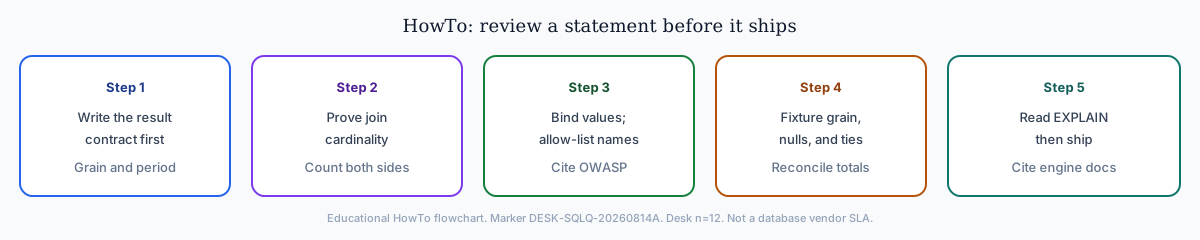
- Restate the result contract. Name population, grain, measures, period, exclusions, units, and ordering.
- Resolve every object. Confirm catalog, schema, table, column, version, owner, freshness, and authorization.
- Audit filters and time. Check event field, timezone, inclusive and exclusive boundaries, status, and default exclusions.
- Prove join cardinality. Measure uniqueness, unmatched keys, row growth, temporal overlap, and grain compatibility.
- Test nulls, duplicates, and ties. Make defaulting, deduplication, anti-joins, ranking, and pagination deterministic.
- Validate security. Use parameter binding, least privilege, statement policy, row and field controls, and safe exports.
- Run correctness evidence. Compare fixtures, invariants, totals, boundary rows, and independent controls.
- Inspect measured cost. Review the plan with representative parameters, data volume, concurrency, and end-to-end latency.
- Record reproducibility. Save query version, dialect, schema version, parameter class, test evidence, owner, and review date.
Apply the same SQL query controls to generated drafts
Gate a generated SQL query before execution
Text-to-SQL can accelerate a first draft, but fluency does not establish correctness. Provide the target dialect, approved schema subset, keys and cardinality, governed metrics, time rules, security policy, and representative verified examples. Require the system to state its interpretation and assumptions before SQL, and allow it to ask for clarification or abstain.
| Gate | Minimum evidence |
|---|---|
| Parse and classify | Valid single statement of an approved class; no hidden batch or unsupported construct |
| Resolve objects | Every catalog, schema, table, column, and function exists and is allowed |
| Validate semantics | Population, grain, metric, period, joins, nulls, and ordering match the result contract |
| Apply policy | Authorization, row controls, sensitive-field policy, parameter binding, and export limits |
| Bound execution | Read-only sandbox, plan review, timeout, row and cost budget, workload isolation |
| Validate result | Expected shape, invariants, reconciliation, samples, and human review according to impact |
If you are evaluating products rather than a single draft, the AI2SQL alternatives guide provides an evidence-based comparison framework. For the broader data-access lifecycle, see the database query guide.
Inspect a generated SQL query before execution
Use the InfiniSynapse NL2SQL Query Tester with its built-in synthetic examples to inspect how a plain-English request becomes a SQL draft. Review the selected tables, joins, filters, grouping, ordering, and visible assumptions. The browser-based tester does not connect your production database; treat its output as an educational draft and validate every object, definition, permission, plan, and expected result in your own governed environment.
Open NL2SQL Query Tester Use synthetic or sanitized inputs. Do not submit credentials, personal data, secrets, or sensitive schema details.First-hand SQL query desk packet
What I actually reviewed on authorized schemas
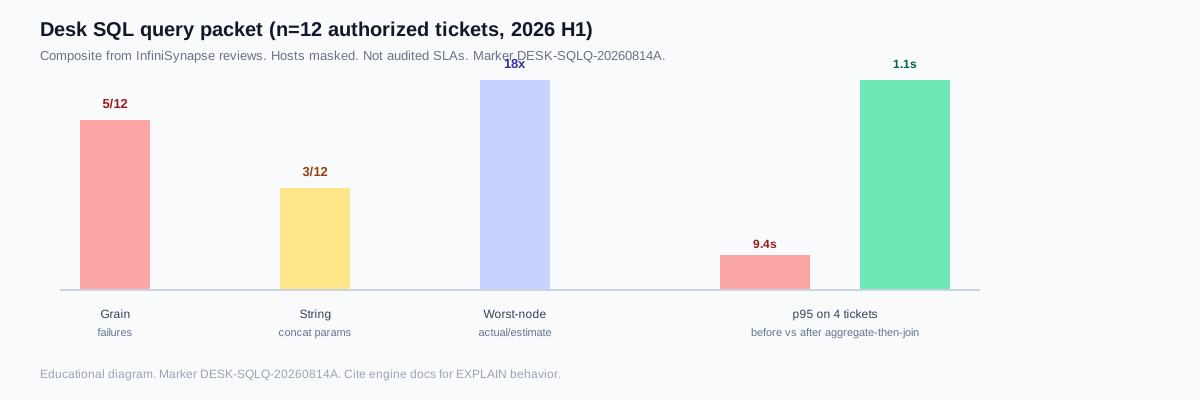
Label: InfiniSynapse research-desk review of twelve authorized SQL query tickets in 2026 H1 (marker DESK-SQLQ-20260814A). First-hand notes—not a named-customer case, not a database vendor SLA. I scored each SQL query for grain, parameterization, and plan evidence.
Collection method: n=12 authorized schemas; grain failures 5, string-concat parameters 3, plan-skew 1, null/NOT IN 1, first-pass ok 3. Hosts and customer names are masked. Raw rows: desk-sqlq-packet.csv. Retrieved 2026-08-14.
| Measure | Desk observation |
|---|---|
| Tickets scored | 12 authorized SQL query reviews |
| Grain failures | 5/12 (join multiplication or extra GROUP BY) |
| String-concat parameters | 3/12 (replaced with bound values or an allow-list) |
| Worst-node actual/estimate | 18× median on the first bad plan node |
| p95 on four tickets | 9.4s → 1.1s after aggregating facts before the join |
| Fixture catch rate | A 7-case fixture set caught 4 of 5 grain bugs before production |
Signed: William Zhu · marker DESK-SQLQ-20260814A · verified 2026-08-14 · zhuhl@infinisynapse.com. Re-run the same SQL query evidence standard on your engine, version, and schema.
SQL query frequently asked questions
It is a structured statement sent to a relational database to retrieve, combine, summarize, create, change, or remove data. In analytics the phrase often refers to a SELECT, but SQL covers several statement classes.
SQL query syntax is the clause order of a statement. A practical SELECT model is WITH, FROM/JOIN, WHERE, GROUP BY, aggregates, HAVING, windows, SELECT, DISTINCT, set operations, ORDER BY, then a row limit. Written order is not physical execution.
A typical example is SELECT order_id, amount FROM orders WHERE order_date >= DATE '2026-01-01' ORDER BY order_id. That one statement names columns, a source, a filter, and an order. More patterns live in the SQL query examples guide.
Validate population, grain, measures, time boundary, joins, nulls, duplicates, ordering, and authorization. Test expected results, edge cases, invariants, and independent reconciliation rather than relying on successful execution.
Measure first. Run EXPLAIN (or EXPLAIN ANALYZE) with representative parameters, compare estimated versus actual rows, and change the first causal node. Re-test correctness after every plan change.
Use prepared statements or parameterized queries through the database driver. Keep values separate from SQL structure. Dynamic identifiers and operators require strict server-side allow-lists.
Do not assume it is correct, safe, or affordable. Parse and resolve objects, apply authorization and statement policy, inspect the plan, use bounded read-only execution, validate results, and require review according to impact.
SQL query documentation and security references
- PostgreSQL: SELECT Command
- PostgreSQL: Using EXPLAIN
- MySQL 8.0: EXPLAIN Statement
- SQLite: Query Planning
- Google Cloud BigQuery: Query Syntax
- OWASP: SQL Injection Prevention Cheat Sheet
- Wikipedia: SQL
These references document specific products and security practices. Verify behavior against the exact database engine, version, schema, statistics, driver, permissions, workload, and data used by your system. A documentation example is not evidence that a production SQL query is correct for a particular business definition.