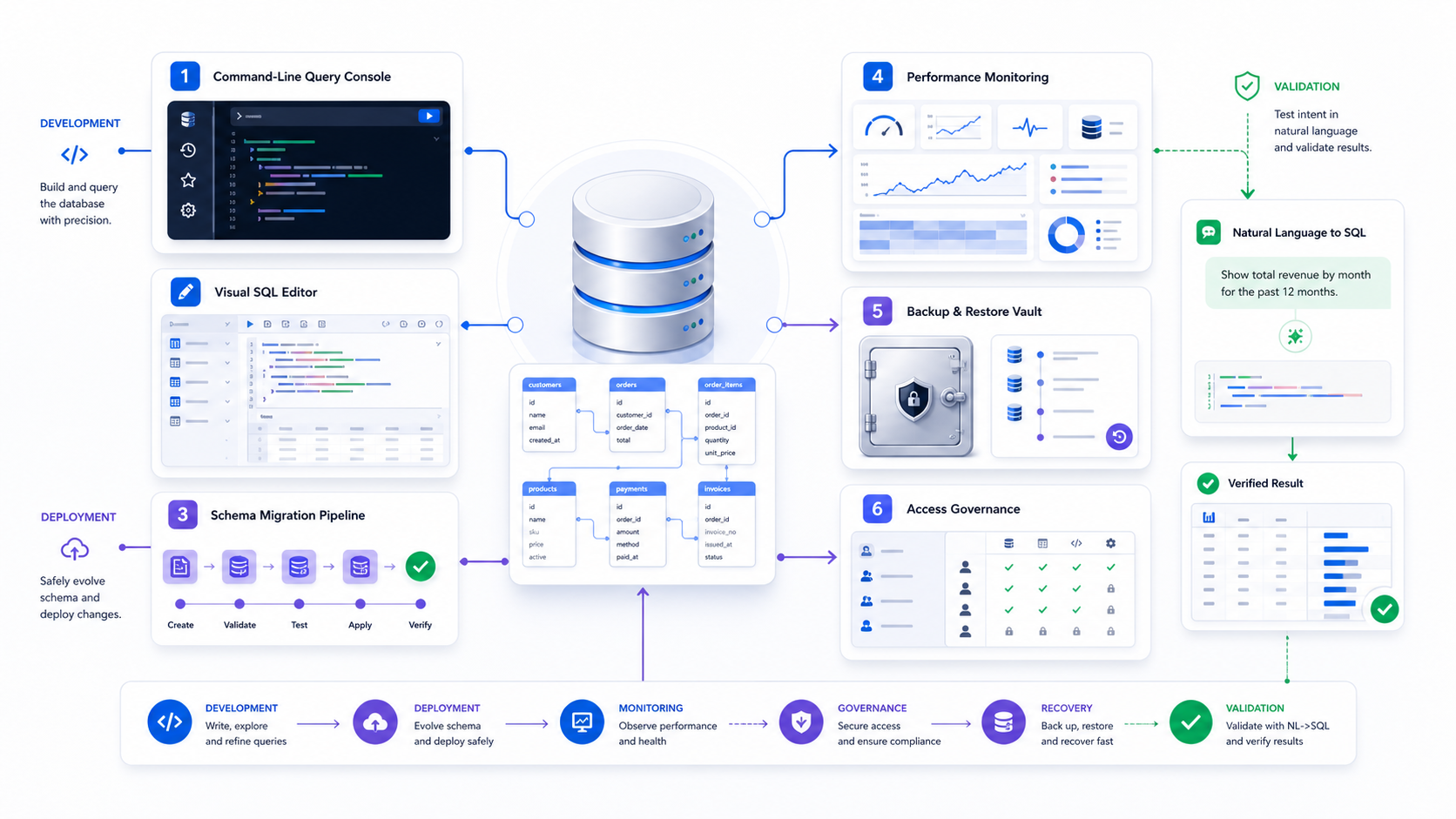
What are database tools?
Database tools are applications, command-line programs, libraries, and services used to connect to, query, design, migrate, monitor, secure, back up, restore, test, and govern databases. Database lookup tool development is the lookup job inside that set: find one allowed row by key or filter, then stop. A useful tool does more than expose features: it helps a defined user complete a database task with appropriate permissions, reproducible evidence, bounded resource use, and a safe recovery path.
There is no single “best database tool” for every job. A terminal may be ideal for deterministic automation, a visual client for exploration, a migration runner for controlled schema changes, and a monitoring system for fleet-level behavior. Strong teams assemble a small, governed toolchain and make the boundaries between authoring, approving, executing, observing, and recovering explicit.
What database lookup tool development means here
On this page the job is the client that returns one allowed row for a known key or filter. A public data catalog is a different product. A ranked list of IDEs is a different page. Design, migration, monitoring, backup, and access control stay in the sections below, with the same permission and evidence rules.
A lookup is a key, a filter, and a bounded result
A lookup names the column that identifies the row, the filter that may narrow it, and the columns the role may see. Bind those values as parameters. Show the active connection, database, schema, role, and transaction state before the statement runs. Enforce a row limit, a timeout, and a way to cancel. A master-detail browser continues the same lookup: the selected row opens the related rows. It does not grant a second permission.
The column or key that should return one row, or a documented small set, for the value the user supplied.
Extra predicates, bound as parameters, that the role is allowed to apply. Identifiers come from an allow-list.
Approved columns only, with a row limit, truncation warning, and an export path that follows the same policy.
The lookup ends when the allowed row is shown. Schema changes and production writes use a different tool and a different role.
The lookup client, the design file, and the migration runner
Use this as an orientation map. Each name is a landmark for that job. It is not a rank, and it is not a claim that the vendor is the best choice for your stack. Confirm the current product scope on the vendor page before you buy.
| Category | Anchor | Fits when | Does not fit |
|---|---|---|---|
| Multi-database query client | DbVisualizer | Interactive lookup across engines from one client | Holding the schema as a versioned design file, or owning migrations |
| Schema design file | DbSchema | A diagram and model file that can be compared with the live database | Day-to-day row lookup |
| Single-engine IDE | dbForge | SQL development, data edit, and comparison on one engine family | One window for every engine without a separate product |
| Parameterized SQL editor | DatabaseSpy | Templates that bind a key or filter and show the result beside the statement | Being the migration authority |
| Internal lookup screen | Appsmith | A fixed form for people who do not write SQL | Ad-hoc SQL, production DDL, or the migration runner |
An internal lookup screen is a later build
A low-code screen can expose one key, one filter, and the columns a role may see. Build it after the lookup is stable in a SQL client: the objects, the parameters, the row limit, and the role are already known. The screen calls that same contract. It does not become the place where someone explores an unfamiliar schema or applies a migration.
Development data stays off the production lookup
Author the lookup against synthetic or development data with the target dialect and version. A tab labeled development can still point at production when the connection profile is wrong, so the client needs a persistent environment label and a read-only indicator. The reviewable workflow keeps authoring, approval, and execution on separate identities.
Separate database tools from databases and SQL tools
A database management system stores and processes data. A database tool interacts with that system or supports its lifecycle. SQL tools are a narrower subset focused on writing, running, formatting, testing, or analyzing SQL. A database platform may also bundle consoles, migration services, monitoring, backup, and access controls, but bundled does not mean those capabilities share one operational boundary.
| Term | Primary responsibility | Typical examples | Decision question |
|---|---|---|---|
| Database | Persist, transact on, and retrieve data | Relational, document, key-value, analytical engines | Which data model and workload must it serve? |
| Database tool | Operate one part of the database lifecycle | Clients, migration runners, monitors, backup tools | Which job, user, environment, and control boundary? |
| SQL tool | Author, execute, inspect, or transform SQL | Editors, formatters, linters, query builders | What SQL task and dialect must it support? |
| Data platform | Integrate storage, processing, governance, and operations | Managed cloud and enterprise data platforms | Which responsibilities remain with the customer? |
This page covers the complete database toolchain. For query semantics, testing, and execution plans, use the SQL query guide. For the wider request-to-result lifecycle, see the database query guide.
Map database tools to the lifecycle they control
Start with work categories, not product names. The same product can span several categories, and one category may require separate tools for developers, analysts, administrators, security teams, and automated pipelines. Document the authoritative tool for each operation so people do not bypass controls with a convenient alternative.
| Category | Primary job | Evidence to retain | Failure boundary |
|---|---|---|---|
| Connection and client | Authenticate, browse objects, run statements, inspect results | User, target, role, session, query or operation identifier | Read-only role, result limits, isolated environment |
| Modeling and catalog | Understand schemas, relationships, definitions, and ownership | Versioned model, lineage, owner, review decision | Metadata-only access and approved publication |
| Migration and change | Version and deploy schema or reference-data changes | Migration, checksum, review, target, execution log, rollback plan | Environment gates, dry run, transaction or compensating action |
| Testing and comparison | Prove schema, query, and data behavior before promotion | Fixtures, expected results, diff, invariant, pass threshold | Disposable data and sanitized production-like samples |
| Observability and tuning | Measure workload health, plans, waits, errors, and cost | Normalized query ID, metrics, traces, plan sample, incident timeline | Sanitized telemetry and bounded diagnostic access |
| Backup and recovery | Create recoverable copies and restore tested service | Backup ID, retention, encryption, restore test, RPO and RTO evidence | Separate account, region, credentials, and immutable retention |
| Security and governance | Control identity, secrets, privileges, sensitive data, and audit | Policy, grant, approval, review date, exception, audit event | Independent policy enforcement and emergency revocation |
Define the database job and consequence before features
“Our team needs a database tool” is not a testable requirement. Rewrite it as a job: “A support analyst must inspect one customer's recent order state without viewing payment details,” or “A release pipeline must validate and apply approved migrations to staging and production with different credentials.” The job reveals required data, permissions, evidence, latency, collaboration, and recovery.
| Risk tier | Example job | Minimum controls |
|---|---|---|
| Learn | Practice SQL on synthetic schemas | No production credentials or sensitive data; clear demo boundary |
| Explore | Read a curated dataset in a sandbox | Least privilege, timeout, row and export limits, logged session |
| Operate | Diagnose a production incident using read-only telemetry | Named role, break-glass path, query controls, incident evidence |
| Change | Apply schema or data modification | Version control, independent review, dry run, backup, rollback, monitoring |
| Recover | Restore service after corruption or loss | Documented RPO/RTO, isolated restore, integrity and application validation |
Build a database tool requirements packet
A requirements packet prevents a polished demo from becoming the decision. Separate non-negotiable gates from scored preferences. A tool that fails a gate—such as unsupported authentication, prohibited data egress, or no tested recovery path—should not win because it has a pleasant editor.
Database engines and versions, cloud or self-hosted targets, proxies, drivers, network paths, and offline requirements.
Developers, analysts, administrators, security reviewers, support users, automation identities, and external partners.
Frequency, volume, query complexity, change type, collaboration, evidence, and response-time target.
Authentication, authorization, secret storage, TLS, device controls, data residency, audit, and emergency revocation.
Deployment model, upgrades, plugin governance, telemetry, backup of tool state, support, and incident ownership.
License metric, infrastructure, administration, training, migration, integration, support, and switching cost.
Choose the database tool interface for the operating context
Interface type affects reproducibility, access, collaboration, and failure modes. Do not reduce the choice to “technical users prefer CLI and everyone else prefers GUI.” A graphical client can expose dangerous controls; a script can automate a mistake consistently; a browser tool can centralize policy or create a new data-egress path depending on architecture.
| Interface | Strong fit | Main caution | Validation evidence |
|---|---|---|---|
| Command line | Automation, scripting, reproducible administration, remote access | Shell history, quoting, environment leakage, wrong target | Non-interactive run, exit codes, logs, target guard, secret handling |
| Desktop client | Exploration, object browsing, visual results, multi-database work | Stored credentials, local exports, plugins, connection confusion | Credential store review, device policy, plugin allow-list, environment labels |
| Browser or hosted console | Centralized access, managed identity, shared workflows, no install | Data processing location, session policy, third-party service boundary | Architecture and data-flow review, tenant isolation, session and export tests |
| IDE extension | Code-adjacent schema exploration and query development | Extension permissions, telemetry, workspace secret exposure | Publisher, update channel, permissions, network behavior, policy control |
| API or library | Embedded applications and controlled automated workflows | Connection pooling, retry semantics, dependency and credential risk | Integration tests, fault injection, observability, dependency review |
PostgreSQL's official psql documentation describes a terminal client that can run interactive queries, files, command arguments, and meta-commands. DBeaver's official SQL Editor documentation illustrates the different affordances of a visual editor, saved scripts, results, plans, and query navigation. These are interface examples, not a universal recommendation.
Evaluate database query tools as a controlled workspace
A query editor should make the active connection, database, schema, role, and transaction state obvious. It should support the target dialect, parameter binding, safe cancellation, bounded result retrieval, explain plans, script versioning or export, and accessible error detail. For production access, convenience features must not bypass authorization or obscure what will execute.
Persistent environment label, role visibility, read-only indicator, idle timeout, and protection against running a development tab on production.
Correct parser, completion, object resolution, formatting, error positions, and version-specific functions.
Selected-statement boundary, transaction behavior, statement classification, timeout, row limit, cancellation, and confirmation for state changes.
Column types, null visibility, truncation warnings, deterministic export, source freshness, and reproducible query parameters.
A visual query builder can help users select fields and filters, but it still needs the same permission, join, result, and cost controls. A generated or handwritten query should ultimately meet the standards in the SQL query guide.
Use modeling tools to make database meaning reviewable
A schema diagram can show tables and keys, but a trustworthy model also records grain, cardinality, effective-date rules, constraints, ownership, sensitivity, freshness, and business definitions. Reverse engineering is useful for discovery; it does not prove the discovered relationships are complete or approved.
| Model artifact | Required evidence | Common false confidence |
|---|---|---|
| Entity relationship diagram | Keys, optionality, cardinality, temporal validity, source version | A drawn line is treated as an enforced relationship |
| Data catalog entry | Owner, definition, classification, freshness, lineage, review date | A populated description is assumed current |
| Semantic metric | Formula, grain, filters, units, calendar, applicability, test cases | A familiar name is assumed to have one meaning |
| Lineage graph | Observed versus declared lineage, run version, unresolved dynamic paths | Missing edges are treated as proof of no dependency |
Make database migration tools preserve change history
Migration tools should make the desired change, execution order, target state, and applied history explicit. The migration file, review decision, checksum, target environment, execution identity, start and finish time, output, and recovery action belong to one evidence chain. Editing an already-applied migration can make source and database history diverge.
- Create a forward change. State compatibility, locking, data backfill, expected duration, and rollback or compensation.
- Validate in a disposable build environment. Apply the full history, test object state, run representative queries, and compare expected schema.
- Review the exact deployment artifact. Do not approve a design document while executing a separately generated script.
- Deploy with environment gates. Confirm target, backup or restore point, change window, health signals, permissions, and stop conditions.
- Verify application behavior. Check schema state, data invariants, old and new application versions, performance, errors, and recovery readiness.
Redgate Flyway's current validation documentation gives one vendor-specific example of comparing applied migrations with available migrations and checksums. Use product documentation to understand exact behavior; do not assume all migration tools validate the same conditions.
Test database tools with data behavior, not connectivity alone
A successful connection proves very little. A meaningful trial includes representative types, nulls, large values, timezones, Unicode, transaction boundaries, permissions, row policies, query cancellation, network interruption, duplicate events, schema evolution, and export limits. Use synthetic fixtures first, then sanitized production-like scale when needed.
| Test | Expected evidence | Failure caught |
|---|---|---|
| Role matrix | Each role can perform only approved jobs and see approved fields and rows | Overprivileged connection or client-side-only hiding |
| Large result | Warning, pagination or bounded fetch, cancellation, stable memory use | Client freeze, server load, accidental export |
| Connection loss | Clear transaction state, bounded retry, no duplicate change | Unknown commit and unsafe automatic retry |
| Schema drift | Detected mismatch, affected dependency, controlled refresh | Stale completion, wrong types, silent query change |
| Sensitive export | Policy block or governed approval with traceable destination | Local uncontrolled copies |
Select database monitoring tools for diagnosis and prevention
Monitoring must connect system health to user-visible work. CPU and storage alone cannot explain whether a checkout query slowed, a migration blocked writes, or one tenant produced an expensive plan. Preserve a low-cardinality query family, operation, target, role or service, queue time, planning time, execution time, returned rows, errors, retries, waits, locks, and resource evidence without exposing sensitive query values.
Query families, throughput, latency distributions, failures, resource consumption, and change annotations.
Representative plan, estimated versus actual rows, spills, repeated loops, and plan change history.
Locks, blockers, deadlocks, queueing, connection saturation, and transaction age.
Application release, migration, configuration, statistics refresh, scaling event, and incident timeline.
The current OpenTelemetry database client span conventions define interoperable attributes such as database system, namespace, operation, query summary, response status, and returned rows, while also discussing sanitization of query text. Treat telemetry design as a data-governance decision, not only an instrumentation task.
Judge database backup tools by verified recovery
A completed backup job is not the final outcome. The outcome is a restored, consistent, usable service within the approved recovery point objective and recovery time objective. Test restoration into an isolated environment, verify database integrity and permissions, run application-level checks, measure elapsed time, and document dependencies such as keys, extensions, object storage, network routes, and configuration.
| Question | Evidence | Unproven claim |
|---|---|---|
| Can the required point in time be restored? | Restore exercise across full backup and logs with recorded target time | “Point-in-time recovery is enabled” |
| Can the team meet RTO? | Timed runbook including access, provisioning, restore, validation, and cutover | Backup duration or vendor estimate |
| Is the copy independent? | Separate credentials, account or project, retention control, encryption and deletion tests | A second copy in the same failure domain |
| Is application behavior correct? | Schema, constraints, row totals, critical queries, jobs, authentication and write tests | Database process starts successfully |
Put database tools inside the authorization boundary
A tool should not become a parallel identity, secret, or policy system unless that responsibility is explicitly designed and operated. Prefer centralized identity, short-lived credentials, least privilege, encrypted transport, controlled devices, environment-specific roles, protected exports, session expiry, and auditable emergency access. Review where connection profiles, query history, result caches, logs, crash reports, plugins, and telemetry are stored.
| Control surface | Review questions |
|---|---|
| Identity and session | Does it support required federation and MFA? Who creates, expires, and revokes sessions? |
| Credentials | Are secrets short-lived and externalized? Can users reveal or export them? |
| Permissions | Are controls enforced by the database or trusted policy layer, not only hidden in UI? |
| Local and hosted data | Where do query text, results, exports, history, logs, and AI prompts travel and persist? |
| Extensions and updates | Who signs, approves, installs, updates, inventories, and removes plugins and drivers? |
| Audit and response | Can events be attributed, exported, retained, alerted, investigated, and correlated? |
The OWASP Database Security Cheat Sheet recommends measures including network isolation, encrypted connections, secure authentication and credential storage, least privilege, account review, and protected backups. Apply controls to the tool-to-database path, not only the database server.
Connect database tools through one reviewable workflow
- Open a bounded task. Record requester, owner, environment, objective, data scope, consequence, deadline, and success evidence.
- Use the approved authoring tool. Work against synthetic or development data with the target dialect and version.
- Store the artifact in version control. Include query or migration, parameters, tests, expected result or state, and operating notes.
- Run automated validation. Parse, lint, resolve objects, test permissions, compare schema or results, and inspect representative cost.
- Review the exact executable artifact. Confirm target, impact, evidence, stop conditions, recovery, and separation of duties.
- Execute with a deployment identity. Avoid using a developer's broad interactive credentials for repeatable production changes.
- Observe and verify. Compare expected state, data invariants, application health, performance, security events, and user outcome.
- Close with reproducible evidence. Link artifact version, approvals, execution log, telemetry, exceptions, recovery status, and follow-up owner.
Score database tools after enforcing mandatory gates
A weighted scorecard is useful only after all mandatory gates pass. Weight criteria from the actual jobs and risks, not from vendor feature counts. Score each criterion from documented trial evidence and record uncertainty separately from a low score. A missing test is not proof of failure, but it is also not evidence of success.
| Criterion | Example weight | Evidence |
|---|---|---|
| Security and policy fit | 25% | Architecture review, role tests, data-flow and secret tests, audit export |
| Core job success | 25% | Task completion rate, result accuracy, user time, recovery from errors |
| Compatibility and integration | 15% | Engine/version matrix, identity, network, API, CI and observability trials |
| Operational reliability | 15% | Upgrade, failover, cancellation, scale, support, and incident exercises |
| Governance and evidence | 10% | Approval, versioning, attribution, retention, export, exception handling |
| Total operating cost | 10% | License, infrastructure, administration, training, migration and switching |
The weights above are a hypothetical example, not a universal model. A recovery tool may put recoverability and independence above interface usability; an analyst client may weight governed task completion more heavily while keeping security as a gate.
Run a task-based database tool proof of concept
A proof of concept should reproduce the hard parts of real operation without exposing unnecessary production data. Use a representative schema, identity provider, network path, query complexity, migration, failure, scale, and audit destination. Give every finalist the same task pack and pass criteria.
| Scenario | Pass evidence | Stop condition |
|---|---|---|
| Connect with enterprise identity | Correct role, expiry, revocation, TLS verification, attributed audit event | Static shared secret or unverifiable server certificate |
| Explore a large schema | Authorized metadata only, responsive search, correct object version and relationships | Unauthorized metadata disclosure or unusable latency |
| Run and cancel a costly query | Plan or warning, enforced budget, clean cancellation, known transaction state | Unbounded execution or unknown session state |
| Deploy and reverse a safe test change | Exact artifact review, checksum, environment gate, verification and recovery evidence | Different script executed from the one reviewed |
| Export allowed and prohibited results | Allowed export is attributable and protected; prohibited export is blocked | Client-side warning without enforceable control |
Calculate database tool cost beyond the license
Total operating cost includes licenses, infrastructure, identity and network integration, packaging, upgrades, driver and plugin governance, administration, training, workflow migration, support, telemetry storage, compliance evidence, outage impact, and switching. Open-source licensing does not make operation free; a managed service does not eliminate customer configuration and data-governance responsibilities.
License, procurement, legal review, security review, pilot, and initial migration.
Infrastructure, support, admin time, identity, networking, storage, telemetry, and training.
Upgrade tests, plugin and driver compatibility, workflow updates, and retraining.
Export formats, saved scripts, metadata, audit records, replacement integration, and decommissioning.
Avoid common database tool selection failures
| Failure | Why it happens | Prevention |
|---|---|---|
| Choosing by feature count | No ranked jobs or mandatory gates | Task pack, risk tier, must-have gates, weighted evidence |
| Using one tool for every role | Operational simplicity is confused with least privilege | Role-specific workflows on shared identity and policy foundations |
| Treating UI hiding as security | Controls live only in the client | Enforce at database or trusted policy boundary and test bypass paths |
| Ignoring local artifacts | Query history, caches, exports, logs, and crash reports are overlooked | Data-flow inventory, device controls, retention and deletion tests |
| Automating before stabilizing | A manual workflow is scripted without clear state and recovery | Idempotency, explicit state, bounded retries, observability and rollback |
| Trusting backup completion | Restore and application validation are not exercised | Scheduled isolated restore tests measured against RPO and RTO |
| Adding AI without an evaluation set | Fluent output is mistaken for correct and authorized output | Versioned prompts, schemas, expected results, safety and abstention tests |
Evaluate AI database tools as generators, not authorities
AI assistance can explain schemas, propose SQL, summarize errors, suggest indexes, or translate natural language into queries. The output remains a draft until it is grounded in the approved dialect, schema, relationships, metrics, permissions, and expected result. Tool evaluation should measure safe clarification and abstention as well as generation.
| AI capability | Required context | Acceptance evidence |
|---|---|---|
| Natural language to SQL | Dialect, approved objects, keys, cardinality, metrics, time and policy | Result equivalence, semantic review, safe rejection, bounded plan |
| Error explanation | Exact engine, version, error code, statement, schema and transaction state | Explanation matches official behavior and suggested change passes tests |
| Optimization suggestion | Plan, statistics, parameter distribution, workload, storage and constraints | Correct result preserved and measured workload improves without harmful regression |
| Schema explanation | Catalog descriptions, constraints, lineage, owners and approved definitions | Claims are attributable and uncertainty is visible |
The natural language query page explains the interpretation and evaluation pipeline in depth. If comparing product approaches, use the AI2SQL alternatives framework.
Test one database tool category without a live connection
Use the InfiniSynapse NL2SQL Query Tester with its built-in synthetic schemas to inspect how a plain-English request becomes a SQL draft. Review the selected objects, filters, joins, grouping, ordering, and visible planning steps. The browser-based tester does not connect your production database; use it to learn and evaluate a draft, then validate every object, definition, permission, plan, and result in your governed environment.
Open NL2SQL Query Tester Use synthetic or sanitized input only. Do not submit credentials, personal data, secrets, or sensitive schema details.Introduce database tools in controlled stages
- Inventory existing tools and paths. Include unofficial clients, scripts, shared credentials, exports, plugins, pipelines, monitors, and recovery utilities.
- Assign authoritative jobs. Name which tool and role may author, approve, execute, observe, and recover each operation.
- Pilot on a bounded domain. Use representative but non-critical workflows, synthetic or sanitized data, and named success thresholds.
- Integrate identity, policy, and evidence. Make secure defaults easy and bypasses visible, attributable, and reviewable.
- Train with real failure scenarios. Practice wrong-target prevention, query cancellation, unknown transaction state, migration stop, credential revocation, and restore.
- Promote by job and role. Do not grant organization-wide production access because a pilot editor experience was successful.
- Measure adoption and control quality. Track task success, unsafe workarounds, permission exceptions, query and change incidents, recovery tests, cost, and user friction.
Database tools frequently asked questions
Database lookup tool development means finding one allowed row by key or filter, using a client that can show the active connection, role, and result limit. Schema design, migrations, and production writes stay on other tools.
A lookup client is one job inside a database IDE: find an allowed row and stop. The design file and the migration runner are separate jobs, with separate permissions and evidence.
They are applications, command-line programs, libraries, and services used to connect to, query, design, migrate, monitor, secure, back up, restore, test, and govern databases across their lifecycle.
Start from a documented job, target databases, users, risk, deployment environment, security, evidence, integration, and total cost. Enforce mandatory gates, then compare finalists with the same representative task pack.
Safety depends on architecture and controls. Verify where credentials, query text, metadata, and results are processed and stored; test tenant isolation, sessions, permissions, exports, audit, and whether synthetic or read-only operation is possible.
SQL tools concentrate on writing, running, formatting, testing, or analyzing SQL. Database tools cover the broader lifecycle, including modeling, migrations, administration, monitoring, backup, recovery, security, and governance.
Use mandatory gates plus weighted criteria, then run task-based trials with representative schemas, roles, networks, queries, migrations, failures, exports, and recovery. Record exact evidence and uncertainty instead of relying on feature claims.
Do not assume the draft is correct, authorized, or affordable. Require interpretation review, object resolution, statement policy, read-only bounded execution, plan inspection, result validation, audit evidence, and human approval according to impact.
Database tool documentation and security references
- PostgreSQL: psql Interactive Terminal
- MySQL Workbench Manual
- DBeaver: SQL Editor Documentation
- Redgate Flyway: Validate Command
- OpenTelemetry: Database Client Span Conventions
- OWASP: Database Security Cheat Sheet
These sources document specific products, interfaces, conventions, and security practices. Confirm exact behavior against the selected product edition, version, database engine, driver, operating system, deployment architecture, identity provider, policy, and workload. A feature listed in documentation is not evidence that it is configured or effective in your environment.