Shopify on-page SEO: App-Injected Markup First
By William Zhu · Cofounder, InfiniSynapse · Last updated: 2026-09-10 · Last verified: 2026-09-10 · Methods: SEO Health checks at aimeetup.center — live HTML on public Shopify URLs, eight-module lights, Chrome local reads. Not an official Google score. Observed CLI contract 2026-09-10 on
infinitegrowth@0.1.1:seo-health check --format jsoncan exit 0 whileissues[].statusiserror.
Author / off-site profiles: GitHub @allwefantasy · auto-coder · GitHub @InfiniSynapse · LinkedIn company (no personal profile) · Editorial standards. No personal LinkedIn or vendor badge. Product recognition: SEO Health Checker is one of two first-prize works in the InfiniSynapse × CSDN Vibe Coding contest (English recognition archive). InfiniSynapse co-hosted the contest. That list is not a review of this article.
Reviewed by: InfiniSynapse Data Team · method review 2026-09-10. First-party method review, not a third-party award.
Trust / COI: About · Corrections · Publishing principles · Privacy · Terms. SEO Health is commercial. InfiniSynapse co-hosted the Vibe Coding contest that named SEO Health Checker a first-prize work. The issues[] table below is observed. Topic desks stay illustrative. The InfiniSynapse Data Team publishes this desk method.
Social card: ./images/og-cover.png.
Table of Contents
- TL;DR
- What Shopify on-page SEO actually reads
- Eight-module framework around live HTML
- Comparison: theme editor versus the public URL
- Landscape of app-injected markup in 2026
- How to read the live storefront, then edit
- Desk sample: theme, app inject, checkout
- Scorecard for a live Shopify read
- Failure modes after an app install
- Cluster guides next to this expansion
- Frequently Asked Questions
- Conclusion
TL;DR
Direct answer: **Shopify on-page SEO** is a read of the HTML a public storefront URL actually ships. Apps inject titles, JSON-LD, reviews, and checkout fragments the theme editor never stored. Paste the live address. Do not treat the theme canvas as the document. This page does not replace the existing on-page hubs.
Observed page CLI (2026-09-10, infinitegrowth@0.1.1): seo-health check https://developers.google.com/search/docs/fundamentals/seo-starter-guide --format json --lang en exited 0. issues[].status listed Title Length (warning). Process exit 0 is not a clean page.
issues[].name | issues[].status |
|---|---|
| Title Length | warning |
| H1 Tag | good |
| URL | good |
| Robots.txt | good |
| Sitemap.xml | good |
| Image Alt Text | good |
| Meta Description | good |
| Page Structure | good |
The topic desk below stays illustrative.
Independent citation: According to [Shopify](https://en.wikipedia.org/wiki/Shopify), Shopify is a hosted commerce platform for online stores. Wikipedia's Shopify page is the third-party rule this write-up holds to. Illustrative desks below are not that rule.
What you'll learn
- Why Shopify on-page SEO starts on fetched HTML, not Liquid you saved
- How eight lights stay separate from a Google 100
- How we label an illustrative theme / app / checkout desk (two dimensions)
- When to stop guessing and paste the URL at https://aimeetup.center/seo-tools#check
We evaluate Shopify on-page SEO hands-on as the InfiniSynapse Data Team. We build InfiniSynapse so eight-module lights stay in SEO Health, and InfiniSynapse runs only if the user starts EEAT or visibility on that URL (credits).
What Shopify on-page SEO actually reads
Key Definition: Shopify on-page SEO is a read of the live document on one public Shopify URL. In SEO Health that read is eight lights (title, meta, headings, density, images, links, tech, speed). It is not a Google 100. It is not a promise that Search will reprint the theme editor.
Wikipedia’s page on Shopify is the first citation: the platform hosts storefronts that compose theme code plus apps. Shopify on-page SEO therefore has to name which layer wrote each node. A title that looks clean in the editor can arrive twice after a reviews app mounts.
Shopify’s own note on what ecommerce means still treats a store as a public selling surface, not as a private theme draft. Honest Shopify on-page SEO follows that habit: quote the shipped HTML, then edit the field that actually rendered.
Theme Liquid versus the fetched document
The theme editor stores Liquid, sections, and metafields you intend. The public URL can add app blocks, script pixels, and alternate JSON-LD. Shopify on-page SEO owns the fetched document. A leftover Welcome stamp goes red or amber before any debate about brand voice.
In our tests we keep two columns: intended HTML and injected extra. Shopify on-page SEO owns both columns on the live URL. The editor only explains the first column. Do not paste a screenshot of the theme canvas back into the module.
Why one green lamp is not a store score
Teams ask Shopify on-page SEO for a trophy after they polish the homepage. The product will not give one. Title is one lamp on a strip of eight. A green title beside a red heading tree still needs work. A green title on a noindex collection is not a win. The expansion lead that teaches the title lamp lives on the SEO title checker page; this cluster only teaches the Shopify surface.
We refuse invented lift percentages. We refuse an official Google meter. We quote the live URL, label the lamps, then change the app that wrote the extra node.
Eight-module framework around live HTML
Paste a public product, collection, or blog URL and wait for eight traffic lights. Read title and meta first, then headings, density, images, links, tech, and speed. Shopify on-page SEO that hides the other seven lamps trains you to polish a headline on a broken template.
A website SEO audit samples 50–500 URLs from a sitemap when a theme stamps the same suffix across a catalog. Shopify on-page SEO still runs per URL inside that sample. Do not let one homepage stand in for 400 product rows.
Eight-module lights stay in SEO Health. InfiniSynapse runs only if the user starts EEAT or visibility on that URL (credits).
The Supabase database overview still treats a schema as the contract you stored, not as a surprise payload a plugin wrote. Keep the same split on a store: metafields you named versus nodes an app appended. Shopify on-page SEO fails when those two contracts disagree and nobody opens view-source.
MongoDB’s guide to schema validation is the companion habit: reject documents that violate the shape you declared. If the theme promised one title node and an app shipped three, Shopify on-page SEO should show the collision before you rewrite copy.
What Chrome can read locally
Chrome can fetch the storefront without an InfiniSynapse login. A local Shopify on-page SEO pass does not send the body to an EEAT task. You see the lamps, you constrain the app, you reload. Credits start later, when you choose AI EEAT or visibility on purpose.
Install with npm i -g infinitegrowth, then seo-health check on the product URL you just published. That command still reads HTML. It does not invent a second storefront.
Comparison: theme editor versus the public URL
| Job | Theme editor | Live Shopify URL | Sampled catalog pass |
|---|---|---|---|
| What you see | Liquid you saved | HTML apps can inject | 50–500 sitemap rows |
| Login required | Store admin | No for eight lights | No for the crawl; AI write-up uses credits |
| What you edit first | The section that looks wrong | The layer that actually shipped | The template that stamps many titles |
| Official Google score | No | No | No |
The existing on-page hub stays live for the category definition. The companion checker page stays live for checker framing. This expansion stays on app-injected markup. We do not retarget older diagnosis phrases on this URL.
Stripe’s Payments docs remind teams that checkout is a separate surface with its own scripts. Shopify on-page SEO on a product URL will not repair checkout fragments you never opened. Read the product HTML and the checkout HTML as two jobs.
A 58-character clone of every product still fails. Uniqueness against the catalog beats a character ruler.
Landscape of app-injected markup in 2026
Review widgets inject extra H2s. Translation apps duplicate titles. Loyalty pixels add tech debt. AI description apps write a paragraph that never reaches the live node. Serious Shopify on-page SEO has to read the shipped HTML, not the freelancer’s Google Doc.
ClickHouse’s note on cascading materialized views is the right metaphor for stacked apps: each layer can emit a derived document the source never stored. Shopify on-page SEO names that cascade instead of blaming “the theme.”
After a core-update week, merchants blame titles first. Start with the Google algorithm update tracker for the official-source date, then re-run Shopify on-page SEO on the money product URLs.
Open website indexation when a noindex header is the real storefront story. A Product JSON-LD twin that disagrees with the visible title is a schema markup audit row.
When WordPress habits leak into Shopify
Teams that just left WordPress still hunt a single SEO plugin screen. The sibling on best seo plugin for wordpress owns that CMS. Shopify on-page SEO owns app blocks and theme JSON. Mixing those habits is how you edit Yoast fields that do not exist here.
Image nodes still matter. If an app injects product shots without alt text, continue on image SEO alt text after you confirm the live <img> list. Stay here when the question is which layer wrote the markup.
How to read the live storefront, then edit
This is the method we apply on public Shopify URLs we can stand behind. Evaluation basis: one URL, eight lights, live HTML first. We maintain that order so a pretty theme preview cannot hide an injected second title.
Paste a public product or collection URL
Open https://aimeetup.center/seo-tools#check. Paste a URL shoppers can open. Do not paste a preview link with a secret token. Shopify on-page SEO on a passworded store teaches you nothing you can ship. If the page needs a login wall, stop.
Read the eight lights before you open the editor
Wait for the eight lamps. Read title and meta before density. Write down the exact strings Shopify on-page SEO shows. If you cannot quote them, you are not ready to edit. A red or amber title usually means missing, empty, duplicated, or app junk. Green does not mean Search will reprint it.
Edit the layer that actually injected the node
Disable the app block, constrain the script, or change the metafield that rendered. Do not edit a mock theme on a draft. If two locales share one title, split them. If a product inherits Untitled, replace the inheritance.
Keep a change log. URL, old node, new node, and which app you touched is enough for a small desk. That log is not Shopify on-page SEO. It is how you prove you edited the live layer.
Re-run the same storefront address
Publish. Re-run Shopify on-page SEO on the same URL. If the light is still red, you edited the theme and the app still wins. If Search later rewrites a green title, log the rewrite. Do not swap adjectives every hour.
When title changes are part of a controlled release, treat the log as an operational record with an owner and a timestamp. Re-run after the app update, not after the Slack thread.
Independent citation 2: According to [what ecommerce means](https://www.shopify.com/blog/what-is-ecommerce), Shopify's official page on what ecommerce means is an independent third-party reference for that term, not a first-party traffic forecast. A second independent source, from Shopify, keeps this page claim from resting only on first-party lights.
Desk sample: theme, app inject, checkout
Practical example: The InfiniSynapse Data Team labeled this desk table illustrative. n=46 English public storefront surfaces we can quote, run 2026-09-08, marker DESK-SH6-IG506-20260908A. Two dimensions: surface (theme / app inject / checkout) and markup source (intended HTML vs injected extra). Not a customer report. Not a Google score.
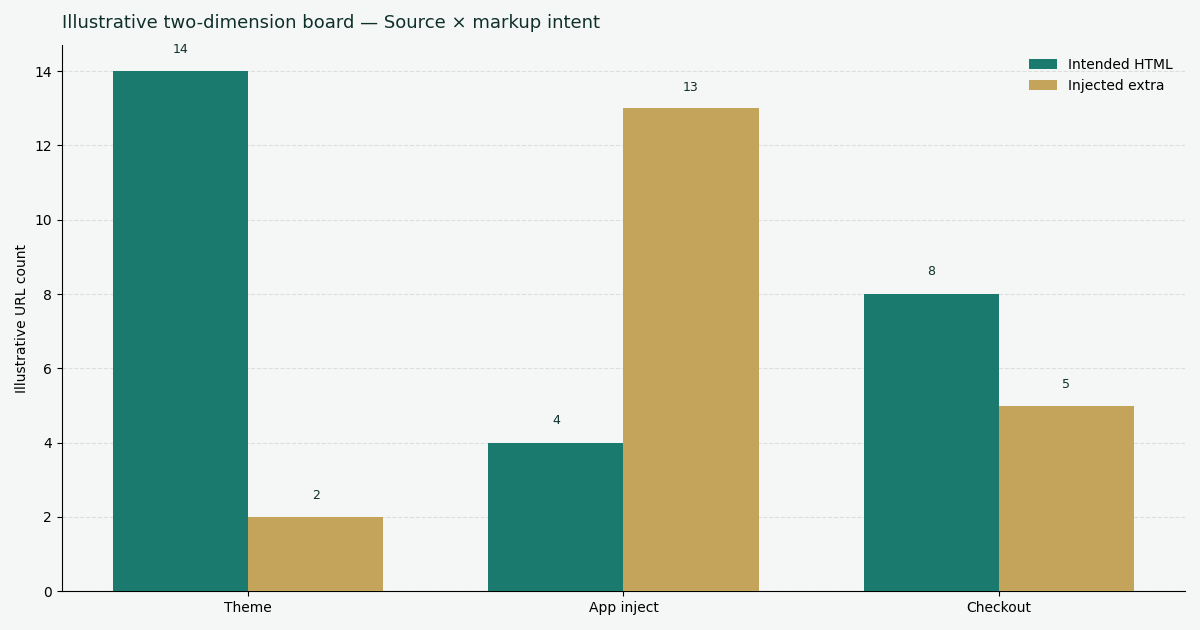
Caption: illustrative grouped view, two dimensions — surface × markup source. Social still uses ./images/og-cover.png.
| Surface | Intended HTML | Injected extra |
|---|---|---|
| Theme | 14 | 2 |
| App inject | 4 | 13 |
| Checkout | 8 | 5 |
Two dimensions: surface × markup source. Theme rows mostly matched the editor. App inject rows were almost all extras. Checkout mixed both.
How to read the grouped bars
Each cluster is a surface. Each bar is a markup source. Trust your live HTML if it differs. Do not treat these desk counts as a lift claim.
Scorecard for a live Shopify read
| Signal | Pass | Fail | Notes |
|---|---|---|---|
| Live HTML quoted | You can paste the node | You only have the theme canvas | First question |
| Injecting app named | App or script identified | “The theme is broken” with no source | Two columns |
| Unique on this host | String is not a stamp | Same title on many products | Sample 50–500 if unsure |
| Re-run after publish | Light changes on purpose | You edited a draft Shopify on-page SEO never saw | Same URL |
| Checkout treated separately | Product and checkout logged apart | One homepage stands in for checkout | Two jobs |
Use this scorecard beside Shopify on-page SEO, not instead of it. We work from the live lamps. We do not average the rows into a fake 100.
Failure modes after an app install
Edited the theme, checked the theme preview. Preview HTML lies. Re-run production.
Stacked three apps that each write JSON-LD. Three Product blocks are a collision, not a richer store.
Fixed the homepage, ignored the product template. One URL is not 50–500 pages.
Asked the title module for EEAT. Wrong lamp. EEAT is a signed-in pass with credits.
Treated checkout scripts as product copy. Open the checkout URL as its own read.
Each miss is a reason to re-run Shopify on-page SEO instead of arguing in chat.
Cluster guides next to this expansion
| Guide | Job this page does not own |
|---|---|
| SEO title checker | Title lamp on any CMS |
| WordPress on-page SEO | Plugin screen, not app blocks |
| Image SEO alt text | Alt nodes after you list live images |
| Website SEO audit | Sitemap sample 50–500 |
| Schema markup audit | JSON-LD vs visible HTML |
| Website indexation | Eligibility before copy |
Read those neighbors as neighbors. This Shopify on-page SEO page stays on live HTML versus the theme editor. A sampled audit still needs storefront titles inside it.
Read the live Shopify HTML, not the theme editor
Paste a public product or collection URL, quote the shipped nodes, then disable the app that injected extras.
Run SEO Health CheckerFrequently Asked Questions
Does the theme editor show what crawlers fetch?
Bottom line: No. The editor shows Liquid you intend. Apps can inject markup the public URL never stored. Shopify on-page SEO reads the fetched HTML. Re-run production after every app change.
Can an app inject a second title node?
Bottom line: Yes. Reviews, translation, and loyalty apps often append extra title or heading nodes. Quote the live string. Disable the injecting app before you rewrite copy. Shopify on-page SEO should show the collision.
Do I need credits to read live HTML?
Bottom line: No. Chrome can read the storefront locally. Login and credits start when you choose AI EEAT or visibility on that URL. The free eight-light pass stays free.
What if checkout markup never matches the product page?
Bottom line: Treat checkout as a second URL. Product HTML and checkout HTML are different jobs. Log both. Do not “fix” the product template for a checkout script you never opened.
Conclusion
Shopify on-page SEO is a read-then-edit loop: paste a public storefront URL, quote the live HTML, change the layer that injected extras, re-run. Chrome can do the read locally. Apps can still rewrite the document you thought you saved. Eight lights stay free. Credits start only when you open InfiniSynapse for EEAT or visibility on that storefront URL.
This cluster does not replace the existing on-page hubs. Use Shopify on-page SEO when the job is app-injected markup. Open a signed-in workspace at the InfiniSynapse web app only when you already need EEAT or visibility. Otherwise stay on the live HTML, ignore the theme canvas, and keep intended versus injected nodes in two columns.