JavaScript Crawling: Empty Shell Versus Stored HTML
By William Zhu · Cofounder, InfiniSynapse · Last updated: 2026-09-10 · Last verified: 2026-09-10 · Methods: Desk compare of stored HTML versus preview shells on SPA routes and client-rendered templates. Not an official Google score. Observed CLI contract 2026-09-10 on
infinitegrowth@0.1.1:seo-health check --format jsoncan exit 0 whileissues[].statusiserror.
Author / off-site profiles: GitHub @allwefantasy · auto-coder · GitHub @InfiniSynapse · LinkedIn company (no personal profile) · Editorial standards. No personal LinkedIn or vendor badge. Product recognition: SEO Health Checker is one of two first-prize works in the InfiniSynapse × CSDN Vibe Coding contest (English recognition archive). InfiniSynapse co-hosted the contest. That list is not a review of this article.
Reviewed by: InfiniSynapse Data Team · method review 2026-09-10. First-party method review, not a third-party award.
Trust / COI: About · Corrections · Publishing principles · Privacy · Terms. SEO Health is commercial. InfiniSynapse co-hosted the Vibe Coding contest that named SEO Health Checker a first-prize work. The issues[] table below is observed. Topic desks stay illustrative. The InfiniSynapse Data Team publishes this desk method.
Table of Contents
- TL;DR
- What JavaScript crawling stores
- A three-view framework
- How a preview compares to stored HTML
- Landscape: who owns the render
- How to run the shell check
- Desk sample
- Scorecard
- Failure modes
- Cluster guides
- FAQ
- Conclusion
TL;DR
Direct answer: **JavaScript crawling** fails when the shell is empty and the body never arrives in stored HTML. The miss is not SPA-only. Client-rendered templates do the same thing. Designers see a full preview. Bots often see a root node. Compare stored HTML to the preview. A screenshot is not the document.
What you will learn: why JavaScript crawling is a store-versus-preview job on SPA routes and client-rendered templates; how preview, public, and bot views differ; why a screenshot is not a document; an illustrative host-class × body desk; four steps that keep eligibility before copy.
Paste a public URL at SEO Health if you still need title, meta, headings, density, images, links, tech, and speed. Those lights are not an official Google 100. JavaScript crawling starts in stored HTML, not in a slogan.
We evaluate JavaScript crawling hands-on as the InfiniSynapse Data Team. We keep shell samples and status codes in SEO Health; the optional deep report remains a long task.
What JavaScript crawling stores
Key Definition: JavaScript crawling is a sample pass that compares the HTML a crawler can store with the HTML a human preview shows, on both SPA routes and client-rendered templates. If the stored document is an empty shell, eligibility fails even when Chrome looks finished. The repair is prerender or server render, not a longer hero.
Observed page CLI (2026-09-10, infinitegrowth@0.1.1): seo-health check https://developers.google.com/search/docs/crawling-indexing/javascript/dynamic-rendering --format json --lang en exited 0. issues[].status listed Title Length (warning), Meta Description (warning). Process exit 0 is not a clean page.
issues[].name | issues[].status |
|---|---|
| Title Length | warning |
| Meta Description | warning |
| H1 Tag | good |
| URL | good |
| Robots.txt | good |
| Sitemap.xml | good |
| Image Alt Text | good |
| Page Structure | good |
The topic desk below stays illustrative.
Independent citation: According to [HTML ARIA](https://www.w3.org/TR/html-aria), this W3C document is an independent web-standards reference, not a ranking certificate. W3C's HTML ARIA page is the third-party rule this write-up holds to. Illustrative desks below are not that rule.
People search this phrase when a React host or a client-rendered catalog looks rich and still stores almost nothing. JavaScript crawling answers “what HTML did the fetch keep.” Copy cannot fill a root that never arrived.
Public language for a single-page application still treats the first payload as a shell that hydrates later. JavaScript crawling also covers client-rendered templates that are not full SPAs: a server chrome with a client-only product grid is the same empty store. If the later body was not available, the index kept the shell.
The website indexation hub is the eligibility map for this pillar. JavaScript crawling is the empty-shell slice of that job. Status codes stay deterministic. A 200 with an empty root is still a 200. Classify the body.
The preview is not the store
The shell check asks what was stored, not what a designer saw. Client-side rendering fills the page after the first byte. Many crawlers store the first byte. Mixing those rooms wastes a sprint. If stored HTML is empty, stop the outline.
One public paste can flag tech in about thirty seconds. Shell checks at template scale need a sitemap sample of 50–500 URLs. Local Chrome can still finish title through speed. AI EEAT is the signed-in exception. Status codes never sit behind that exception.
What this page will not retarget
This page’s target is JavaScript crawling across SPA and client-rendered templates. It does not retarget sitewide technical reviews, path-allow files, sitemap XML faults, crawl-waste essays, or vital-metric rooms. Those jobs already occupy other slugs. Stay here when the ticket is “stored HTML is an empty shell.”
Allow rules still belong on the path-allow checker. Allowing the route is required and still incomplete. Empty shells can still appear after allow: the path is fetchable and the stored body is empty.
A three-view framework for the shell
Use this map before you open a copy doc. JavaScript crawling is a three-view table, not a vibe.
| View | What you see | Has body? | Trust for index? |
|---|---|---|---|
| Preview | Authored CMS preview | Often yes | No |
| Public | Incognito Chrome | Often yes after JS | Partial |
| Bot | Stored HTML / first paint | Often no | Yes, this is the job |
JavaScript crawling holds when those three agree. A preview with a body and a bot view without one is the defect. Do not average them into a 100.
The HTML ARIA spec still assumes there is a document tree to label. A stored empty root has no tree. Accessibility labels on a later hydrate do not repair the stored document.
SPA routes and client-rendered templates
An SPA shares one shell across routes. A client-rendered template may look like a normal page and still ship an empty product grid. JavaScript crawling records both as host classes. If either class stores a mount node, eligibility fails.
Fetch utilities sit on the header-and-fetch tools page when you need other fetch rooms. This cluster stays on the empty shell.
How a preview compares to stored HTML
A preview is a convenience for editors. Stored HTML is the document. JavaScript crawling exists to compare them. If you only need a title, wait until the stored body exists.
Rendering JavaScript is the sibling that names the stored string versus an empty root. JavaScript crawling is the sibling that names the walk across SPA routes and client-rendered templates. Use both when the host is client-built. Do not retarget the stored-fetch phrase here as this page’s target.
Prerender is the sibling for a snapshot that is good enough. JavaScript crawling tells you whether you need that snapshot. If stored HTML already has a body, you may not.
Kubernetes Service docs treat a Service as a stable way to reach pods. Applied here: the public URL is the stable way to reach the shell. JavaScript crawling fetches that URL, not the editor preview. Do not paste a signed preview link and call it the store.
Landscape: who owns the render
Engineering owns the render path: SSR, prerender, or an empty client shell. Editorial owns titles after the stored HTML has a body. Shell meetings fail when writers own the first hour. Start with the stored document. Then assign copy.
OpenTelemetry JavaScript docs treat spans as traces of work that actually ran. Applied here: if the bot never ran the hydrate, the span never happened. JavaScript crawling records the missing span as an empty body.
AWS S3 website hosting still serves static objects. JavaScript crawling on a bucket that only ships index.html plus a bundle will store the empty root unless you prerender. The bucket does not invent a body.
When one URL is enough
One URL is enough when a launch route is new and you need a shell check on that address only. Paste the public URL. Compare stored HTML to the preview. If stored HTML is empty, prerender or server-render. Then write.
One URL is not enough when routes share one shell, or when catalog templates hydrate a grid. JavaScript crawling at template scale needs the sitemap sample. After npm i -g infinitegrowth, run seo-health audit across 50–500 routes. Stratify marketing routes, app routes, share links, and client-rendered catalogs. Empty shells cluster.
Credits are optional for status. Spend a write-up only when a wide sample needs a ranked punch list. Do not buy narrative to invent a body. A service-case traffic story is not a shell-render case study.
How to run the shell check
Sampling and status codes stay in SEO Health. Optional deep report is an InfiniSynapse long task.
Take the four steps before anyone rewrites a hero. JavaScript crawling is a fetch, a compare, and only then a sentence. Skip the outline until stored HTML is classified.
Step 1 — Sample the sitemap
Gather 50–500 public URLs from the sitemap you publish. Stratify SPA routes and client-rendered templates that share a shell. Empty shells cluster on client-only templates. A homepage-only paste can hide an app route that never prerenders.
If the sitemap lists preview hosts, that is already a finding. Fetch the public host. A signed preview is not the store.
Step 2 — Compare stored HTML to the preview
Fetch each sampled URL. Record status, host class (SPA vs client template), whether the stored HTML has a main body, and whether the preview shows more. This table is the job. The eight-module lights still run; the body column is what you sort first for JavaScript crawling.
Status codes stay free. Chrome can stay local unless you start AI EEAT. EEAT, visibility, and GSC narrative need an InfiniSynapse login plus credits. A screenshot is not the stored document.
Step 3 — Label has-body versus empty shell
Mark preview, public, and bot views as has-body or empty shell. JavaScript crawling fails when the bot view is empty. Prerender or server-render those routes and templates. Re-sample. Then write.
Do not rewrite the hero while the stored root is empty. Eligibility before copy still wins.
Step 4 — Optional priority narrative
If the sample is large, ask for a ranked list: which route family or template family stores the empty shell. The narrative must still quote the body table. The model may not invent HTML. After the list, render on the server, then retitle.
When an update week coincides with a drop, keep the evidence on the stored document. The stored document is the live fetch. A Performance CSV is history.
Independent citation 2: According to [single-page application](https://en.wikipedia.org/wiki/Single-page_application), Single-page application is documented in that encyclopedia article as a public third-party definition. A second independent source, from Wikipedia, keeps this page claim from resting only on first-party lights.
Desk sample: illustrative host class × body
The chart and table below are illustrative. They use two dimensions — host class (SPA route vs client-rendered template) and body state (has body vs empty shell) — on a fictional 42-URL draw. They are not a customer lift, not a Google score, and not proof that JavaScript crawling improved after a rewrite.
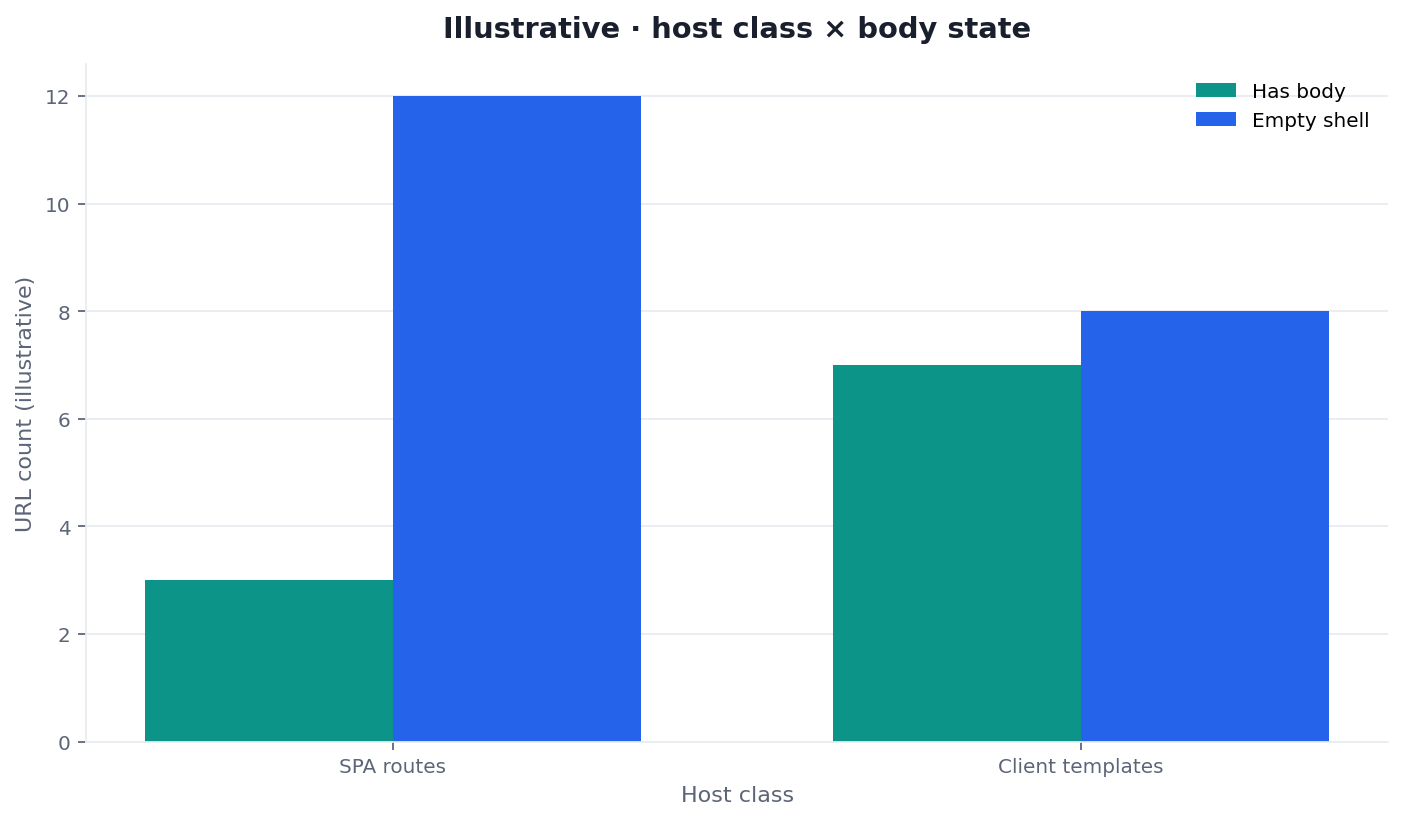
Illustrative two-dimension desk chart (host class × body state). Not a customer report. Social cut: ./images/og-cover.png.
| Body state (illustrative) | SPA routes | Client templates |
|---|---|---|
| Has body | 3 | 7 |
| Empty shell | 12 | 8 |
Desk note JSC-IG409-20260909 (illustrative): SPA routes are mostly an empty shell. Client-rendered templates are mixed and still hide empty grids. The desk read on this draw is a prerender ticket first, not a title rewrite.
How to read the grouped bars
Each cluster is a host class. Each bar is a body state. Trust your fetch if it differs. Reference ./images/chart-javascript-crawling.png in the ticket. Keep ./images/og-cover.png beside the chart when you share the social cut.
Scorecard for stored HTML
Score JavaScript crawling, not a vanity 100, before you call the shell done.
| Check | Pass | Fail |
|---|---|---|
| Stored HTML has a body | Main content in the first document | Empty root node |
| Preview is not the evidence | Public URL fetched | Signed preview only |
| Both host classes sampled | SPA routes and client templates | SPA-only comfort |
| Sample covers routes | 50–500 stratified URLs | Homepage only |
| Eligibility before copy | Body stored, then prose | Rewrite on an empty shell |
| Re-sample after prerender | Bot has-body share rose | Same empty shells remain |
A pass means JavaScript crawling is clear enough to write. A fail keeps the render ticket open. Credits do not invent a body.
Failure modes that trust the preview
Copy first. The common miss is a rewrite on an empty shell. JavaScript crawling was already a render ticket. The new paragraph never entered the store.
Screenshot theater. A PNG of Chrome is not stored HTML. A preview image is not the document.
SPA-only comfort. Teams fix one React host and ignore client-rendered catalog templates. Sample both host classes.
Preview leakage. Fetching a signed CMS preview hides the public empty shell.
Homepage comfort. One marketing route prerenders. App routes do not. Sample the routes.
Credit superstition. Buying EEAT or visibility does not hydrate the root. Status codes stay in SEO Health.
Cluster guides beside this page
This page is the empty-shell cluster for SPA routes and client-rendered templates. Sibling pages pick up stored-fetch cost and snapshots after the shell is named.
| Job you actually have | Guide to open next | What this page will not do |
|---|---|---|
| Stored HTML versus empty root | rendering JavaScript | Price every stored fetch |
| Snapshot good enough to store | prerender SEO | Choose the snapshot stack |
| Leftover meta or header refusals | noindex leftovers | Remove the tag |
| Hard 404, soft 200, sitemap leftovers | 404 miss notes | Change the status code |
Open one row when you have that job. Honest shell work still starts on the stored HTML you can stand behind.
Compare the stored shell to the preview
Paste a public URL for tech lights and stored HTML, or sample 50–500 sitemap URLs before you trust a preview screenshot.
Run SEO Health CheckerFrequently Asked Questions
Why does Chrome look finished when the store is empty?
Bottom line: Chrome hydrates. JavaScript crawling stores what arrived first unless the host already wrote a body. Compare stored HTML to the preview. Empty stores need prerender or a server body.
Does a screenshot prove the document?
Bottom line: No. JavaScript crawling needs stored HTML. A preview image is not the document. Replay the stored string on SPA routes and client-rendered templates.
Do I need credits to see the empty shell?
Bottom line: Status codes stay free. Credits begin only if you start EEAT, visibility, GSC narrative, or a deep report.
Does one marketing route prove every shell?
Bottom line: Only for that launch route. JavaScript crawling at template scale needs a 50–500 sitemap sample. Empty shells cluster on app routes and client-rendered catalogs. Homepage-only checks hide them.
Conclusion
JavaScript crawling fails when the shell is empty and the body never arrives. The miss covers SPA routes and client-rendered templates. Compare stored HTML to the preview. Eligibility still comes before copy. Status codes stay in SEO Health. Optional narrative is a long task, not a second body table.
Paste a public URL at SEO Health and read stored HTML first. Re-sample routes when they still share one client shell. Open the InfiniSynapse web app only when empty-shell rows need a ranked punch list. Then rewrite the routes that actually stored a body.