What accurate document data extraction means准确的文档数据提取是什么
Accurate document data extraction is a field-level match on a labeled set you did not use to tune the extractor. An identifier matches only when the characters match. A date or amount matches after you normalize format. A table matches at the cell, including rows that continue onto the next page. One page-level percent is not the score.
准确的文档数据提取是在未用于调参的标注集上做字段级匹配。标识符只有字符一致才算命中。日期和金额在格式规范化之后再比。表格按单元格计分,包括续到下一页的行。一个页面级百分比不是这个分数。
Place this specific workflow in context with the unstructured data processing and document intelligence guide, which connects the definitions, alternatives, validation steps, and related implementation guides. Document-only field work stays here. Mixed files, pages, and systems — including automated data retrieval before mapping — is automated data extraction.
可通过非结构化数据处理与文档智能指南理解本专题在整体流程中的位置;该指南串联了定义、替代方案、验证步骤与相关实施文章。仅文档字段留在本页。混合文件、页面和系统——包括映射前的自动化数据取回——见automated data extraction。
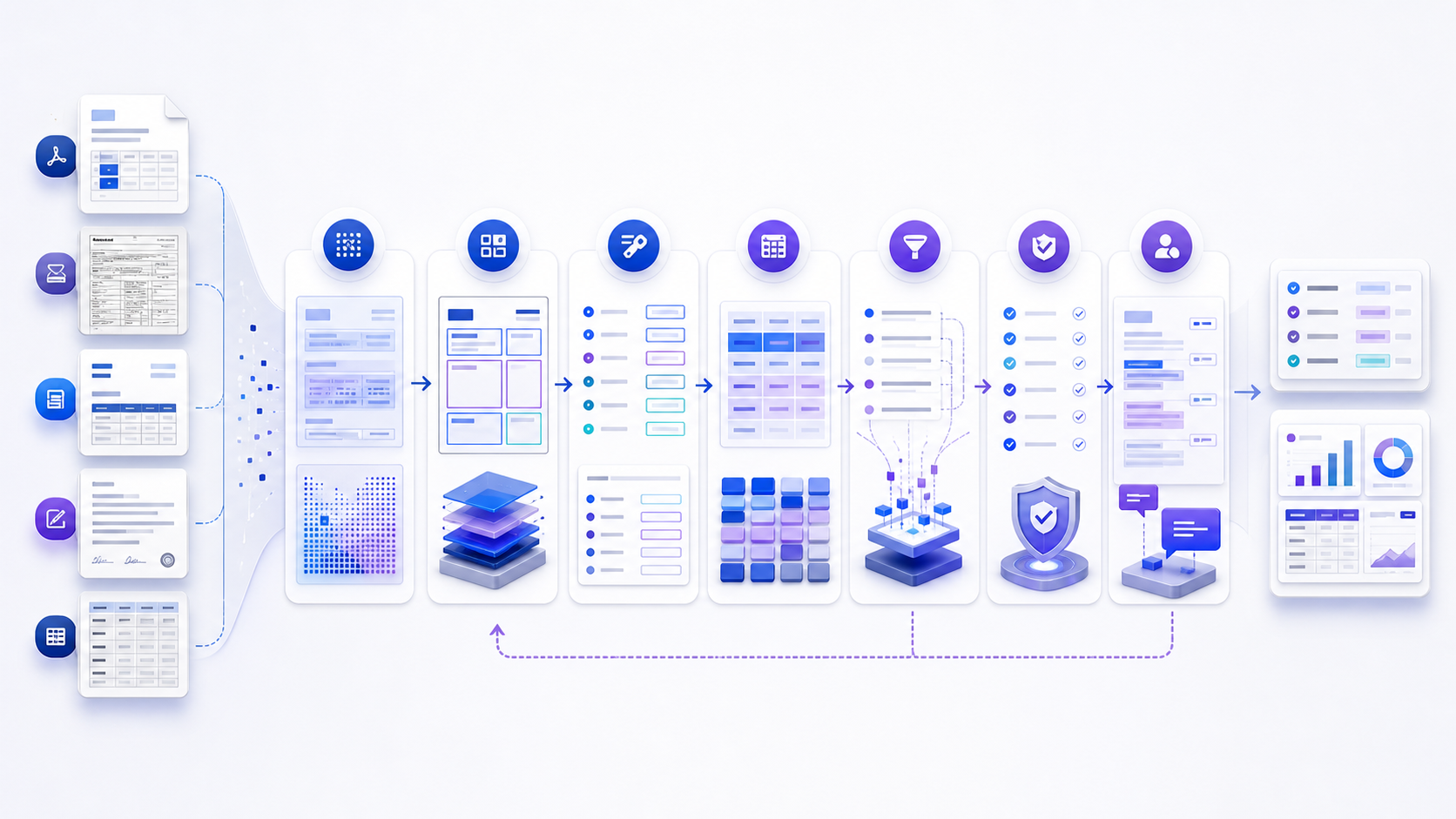
Document data extraction is the process of converting selected content in digital or scanned documents into typed, structured, and verifiable records. A complete workflow does more than copy text: it preserves page context, reconstructs tables and key-value relationships, normalizes values, applies validation rules, and sends uncertain cases to review.
文档数据提取是把数字文档或扫描文档中的指定内容转换为有类型、结构化且可验证记录的过程。完整流程不只是复制文字,还要保留页面上下文、重建表格和键值关系、规范化数值、执行验证规则,并把不确定案例送交复核。
People usually search for document data extraction because manual retyping is slow, inconsistent, and difficult to audit. The intended output may be JSON for an API, rows for a spreadsheet, records for an ERP, searchable text for retrieval, or evidence for analysis. Those outputs require different schemas and quality checks, so define the destination before selecting a parser or model.
用户搜索文档数据提取,通常是因为人工录入缓慢、不一致且难以审计。目标输出可能是 API 使用的 JSON、电子表格行、ERP 记录、用于检索的文本,或供分析使用的证据。不同输出需要不同模式与质量检查,因此应先定义目的地,再选择解析器或模型。
Score fields, tables, and the whole document separately字段、表格和整份文档分开打分
| Object对象 | Match rule匹配规则 | Do not hide inside不要混进 |
|---|---|---|
| Identifier标识符 | Exact characters字符精确一致 | A nearby page-level score附近的页面级分数 |
| Date or amount日期或金额 | Normalized value规范化后的值 | Identifier accuracy标识符准确率 |
| Optional field可选字段 | Precision and recall精确率与召回率 | Required-field accuracy必填字段准确率 |
| Table表格 | Cell match, plus rows cut off or duplicated单元格匹配,外加截断或重复的行 | Header-field accuracy表头字段准确率 |
| Whole document整份文档 | Accepted only when required fields and tables pass必填字段和表格都通过才验收 | A high average on easy fields简单字段上的高平均分 |
PDF-only parsing stays on PDF data extraction. This page owns the accuracy rule after the file is open.
仅 PDF 的解析见PDF 数据提取。文件打开之后的准确率口径留在本页。
Check the page before you score the model给模型打分之前先检查页面
Blur, skew, glare, rotation, handwriting, and blank pages are input defects. Count them before you count a wrong field. A model score that includes unreadable scans will look low for a reason that is not the extractor. Reject or rescan those pages, then score the set that was actually readable.
模糊、倾斜、反光、旋转、手写和空白页是输入缺陷。先统计它们,再统计抽错的字段。把无法阅读的扫描件算进模型分数,低分来自页面,不来自提取器。先拒收或重扫这些页,再对真正可读的集合打分。
Use confidence only after you calibrate it校准之后才使用置信度
Send low-confidence fields to a person. A high score on a wrong value is a calibration failure, and that field does not post. Compare confidence on correct values with confidence on incorrect values using the labeled set. If the two piles overlap, the threshold is not a release rule yet.
低置信度字段交给人工。错误值上的高分是校准失败,该字段不能入账。用标注集比较正确值与错误值上的置信度。若两堆重叠,这个阈值还不能当放行规则。
What to prepare before extracting document data提取文档数据前要准备什么
- A target schema: field names, data types, required status, allowed values, repeated groups, table columns, and relationships. Include examples of valid and invalid output.目标模式:字段名、数据类型、必填状态、允许值、重复组、表格列和关系,并提供合格与不合格输出示例。
- A representative document set: native files, scans, mobile photos, old templates, new templates, multiple languages, handwritten notes, blank pages, and known failures.代表性文档集:原生文件、扫描件、手机照片、旧模板、新模板、多语言内容、手写批注、空白页和已知失败样本。
- Ground truth: independently reviewed values linked to exact pages or regions. Separate the evaluation set from examples used to tune prompts, rules, or models.基准答案:经独立复核并关联到精确页面或区域的值。评估集应与用于调试提示词、规则或模型的样本分离。
- Risk and privacy rules: identify personal, financial, medical, confidential, or regulated data; define storage, access, retention, redaction, and deletion requirements before upload.风险与隐私规则:识别个人、财务、医疗、机密或受监管数据,并在上传前定义存储、访问、保留、脱敏和删除要求。
- Delivery contract: define JSON, CSV, database, spreadsheet, search index, or analytical destination; document encoding, locale, timestamps, IDs, retry behavior, and versioning.交付契约:明确 JSON、CSV、数据库、电子表格、搜索索引或分析目的地,并记录编码、区域设置、时间戳、ID、重试和版本规则。
Start with the hardest pages. A clean invoice is a poor proxy for rotated scans, faint handwriting, nested tables, multi-column contracts, stamps over text, or a twenty-page statement whose table header appears only on page one.
先测试最困难的页面。干净发票无法代表旋转扫描、浅色手写、嵌套表格、多栏合同、印章遮挡文字,或表头只出现在第一页的二十页对账单。
Compare document data extraction methods比较文档数据提取方法
| Method方法 | Best fit适用场景 | Strength优势 | Main risk主要风险 |
|---|---|---|---|
| Native parser原生解析器 | Digital PDF, DOCX, XLSX, HTML数字 PDF、DOCX、XLSX、HTML | Fast, deterministic access to embedded content快速、确定地读取嵌入内容 | Visual reading order and tables may collapse视觉阅读顺序和表格可能崩坏 |
| OCR | Scans, photos, image-only pages扫描件、照片、纯图像页面 | Makes pixels searchable and selectable把像素转成可搜索、可选择文本 | Character errors propagate into fields字符错误会传递到字段 |
| Template and rules模板与规则 | Stable forms with known anchors锚点固定的稳定表单 | Explainable and highly testable可解释且易测试 | Breaks on layout drift版式漂移时容易失效 |
| Document AI or ML文档 AI 或机器学习 | Variable semi-structured document families变化较大的半结构化文档族 | Learns visual and semantic variation适应视觉与语义变化 | Needs labeled evaluation and monitoring需要标注评估与持续监控 |
| Language or vision model语言或视觉模型 | Flexible schemas, uncommon layouts, semantic fields灵活模式、少见版式、语义字段 | Handles instructions and contextual relationships可处理指令和上下文关系 | May omit or invent unsupported values可能遗漏或生成无依据的值 |
| Human-in-the-loop hybrid人机协作混合 | High-risk, ambiguous, or changing inputs高风险、歧义或持续变化的输入 | Combines throughput with accountable review兼顾处理量与可问责复核 | Requires queue and reviewer design需要队列与复核规范设计 |
Choose by document class and field risk, not by one platform-wide label. A practical pipeline may parse native text first, OCR only image regions, use deterministic rules for identifiers, apply a model to variable clauses, and require review for payment values. Official services expose these layers differently: Amazon Textract table documentation describes cells, headers, titles, footers, and table structure, while the Google Cloud Document AI overview distinguishes OCR, layout, classification, splitting, and extraction processors.
方法应按文档类别与字段风险选择,而不是为整个平台贴一个标签。实际管道可以先解析原生文本,只对图像区域运行 OCR,对标识符使用确定性规则,对变化条款使用模型,并要求人工复核付款数值。官方服务对这些层次的划分不同:Amazon Textract 表格文档说明单元格、表头、标题、页脚和表格结构;Google Cloud Document AI 概览则区分 OCR、版面、分类、拆分与提取处理器。
How to extract data from documents step by step如何逐步从文档中提取数据
- Register and fingerprint every source.登记并指纹化每个来源。 Assign a stable document ID, record original filename, MIME type, received time, checksum, page count, access policy, and source system. Never lose the original artifact.分配稳定文档 ID,记录原始文件名、MIME 类型、接收时间、校验和、页数、访问策略和来源系统,并始终保留原始文件。
- Classify the file and its pages.分类文件及页面。 Detect digital text, image-only pages, document family, language, rotation, blank pages, attachments, and mixed packets. Split only with rules that preserve parent-child links. The label contract for that step is document classification.检测数字文本、纯图像页、文档族、语言、旋转、空白页、附件和混合文档包;拆分时保留父子关联。该步骤的标签契约见文档分类。
- Acquire text without discarding geometry.获取文本但不丢失几何信息。 Parse embedded text where reliable and run OCR where necessary. Retain page, block, line, token, bounding box, and reading-order information so extracted values remain traceable.可靠时解析嵌入文本,必要时运行 OCR;保留页、块、行、词元、边界框和阅读顺序,使提取值可追溯。
- Reconstruct layout and semantic units.重建版面和语义单元。 Identify headings, paragraphs, key-value pairs, tables, lists, signatures, checkboxes, headers, footers, and repeated regions. Resolve tables across pages before extracting rows.识别标题、段落、键值对、表格、列表、签名、复选框、页眉、页脚和重复区域;先解决跨页表格,再提取行。
- Map evidence into a typed schema.把证据映射到有类型的模式。 Extract only requested fields. Preserve original value, normalized value, source span, method, confidence, and nullable reason. Reject unsupported guesses instead of silently filling gaps.只提取请求字段;保留原值、规范化值、来源片段、方法、置信度和空值原因。拒绝无依据猜测,不要静默填空。
- Validate structure, values, and relationships.验证结构、数值与关系。 Apply types, formats, required fields, totals, date ranges, reference data, duplicate keys, cross-field rules, and source reconciliation. Confidence alone is not validation.执行类型、格式、必填、合计、日期范围、参考数据、重复键、跨字段规则和来源对账。置信度本身不是验证。
- Route exceptions and deliver with lineage.路由异常并带血缘交付。 Send risky cases to a reviewer with the exact page region visible. Store correction reason, reviewer, timestamp, and version; then export only records that meet the acceptance contract.把风险案例送给复核者,并展示精确页面区域;保存修正原因、复核者、时间戳和版本,只导出符合验收契约的记录。
Keep a citation on every accepted field每个放行字段都保留引用
A flat value without lineage is hard to trust. For each extracted field, retain the document ID, page, source coordinates or character offsets, raw value, normalized value, type, extractor version, confidence when available, validation status, and reviewer correction. For tables, preserve row and column identity, merged-cell behavior, continued-page indicators, and header lineage.
没有血缘的扁平数值很难被信任。每个提取字段应保留文档 ID、页码、来源坐标或字符偏移、原值、规范化值、类型、提取器版本、可用时的置信度、验证状态和复核修正。表格还应保留行列身份、合并单元格行为、续页标记和表头血缘。
| Property属性 | Purpose作用 | Example (illustrative)示例(仅说明) |
|---|---|---|
| document_id | Stable lineage key稳定血缘键 | doc_1048 |
| field_name | Schema destination模式目标 | invoice_total |
| raw_value | Exact extracted evidence精确提取证据 | € 1.240,50 |
| normalized_value | Typed downstream value有类型下游值 | 1240.50 EUR |
| source | Page and region for review用于复核的页面与区域 | page 2, box [x1,y1,x2,y2] |
| status | Acceptance or exception state验收或异常状态 | reconciled |
Validation rules that catch a wrong but plausible value用校验规则抓住看起来合理的错值
Consider a hypothetical accounts-payable workflow. A batch contains native PDF invoices, scanned delivery notes, and one combined file containing both. The target fields are supplier ID, invoice number, issue date, purchase-order number, currency, subtotal, tax, total, and line items. These details are an illustrative process example, not a claim about any product's performance.
假设一个应付账款工作流:批次包含原生 PDF 发票、扫描送货单,以及一个同时包含两者的合并文件。目标字段为供应商 ID、发票号、开票日期、采购单号、币种、小计、税额、总额和行项目。以下仅为流程示例,不代表任何产品性能。
Decision path: classify and split the combined file; parse embedded invoice text; OCR the scan; reconstruct line-item tables; resolve the supplier against an approved vendor master; require subtotal plus tax to equal total within the documented rounding rule; match the purchase-order number across both documents; and route any unknown supplier, duplicate invoice key, missing page, or mismatched total to review.
决策路径:分类并拆分合并文件;解析发票嵌入文本;对扫描件运行 OCR;重建行项目表格;将供应商与批准的供应商主数据匹配;要求小计加税额在规定舍入规则内等于总额;跨两份文档匹配采购单号;把未知供应商、重复发票键、缺页或总额不一致送交复核。
The pipeline should not replace an unreadable invoice number with a likely value from another document unless that cross-document inference is explicitly allowed and labeled. A safer record stores the field as unresolved, links the competing candidates and page regions, and asks a reviewer to decide. Once accepted, the correction becomes labeled feedback, but it should not silently alter the historical extractor version.
除非明确允许并标记跨文档推断,否则管道不应使用另一文档中的可能值替换无法辨认的发票号。更安全的记录会把字段标为未解决,关联候选值及页面区域,并请复核者裁决。接受后的修正可成为标注反馈,但不应静默改变历史提取器版本。
How to validate document data extraction results如何验证文档数据提取结果
Evaluate on an independently labeled set that reflects production document classes and risk. Do not report one page-level accuracy number. Measure exact match for identifiers, normalized match for dates and currencies, cell-level correctness for tables, precision and recall for optional or repeated fields, and document-level acceptance for records that must be complete before delivery.
应在独立标注且反映生产文档类别与风险的数据集上评估。不要只报告一个页面级准确率。标识符使用精确匹配,日期和币种使用规范化匹配,表格使用单元格级正确性,可选或重复字段使用精确率与召回率,必须完整才可交付的记录则使用文档级验收。
- Coverage: count received, opened, classified, processed, rejected, and delivered documents and pages. A missing file cannot be hidden by high field accuracy.覆盖度:统计接收、打开、分类、处理、拒绝和交付的文档及页数。高字段准确率不能掩盖缺失文件。
- Field quality: break results down by field, document family, scan quality, language, template, and risk tier.字段质量:按字段、文档族、扫描质量、语言、模板和风险级别拆分结果。
- Reconciliation: compare counts, totals, identifiers, manifests, and cross-document relationships with authoritative sources.对账:将数量、合计、标识符、清单和跨文档关系与权威来源比较。
- Traceability: sample accepted values and open the exact source region. Confirm that displayed evidence supports the normalized result.可追溯性:抽样已接受值并打开精确来源区域,确认展示证据支持规范化结果。
- Drift: monitor new templates, languages, scan devices, handwriting, page counts, null rates, review rates, and rule failures over time.漂移:持续监控新模板、语言、扫描设备、手写、页数、空值率、复核率和规则失败。
Straight-through rate is not accuracy自动过账比例不是准确率
Report the share of documents that post with no reviewer next to field accuracy, not inside it. Also count documents received, opened, rejected, and delivered. A missing file cannot be hidden by a high field score. Rules and release after the score belong on intelligent document automation.
把无需复核就入账的文档比例和字段准确率并列报告,不要塞进同一个数。同时统计收到、打开、拒绝和交付的文档。高字段分不能掩盖丢失的文件。分数之后的规则和放行见智能文档自动化。
How to test accurate document data extraction如何测试准确的文档数据提取
- Freeze the labeled set.冻结标注集。 Keep it off the examples used to tune prompts or templates.不要把它放进用来调提示词或模板的样例里。
- Score by field type.按字段类型打分。 Exact match for identifiers, normalized match for dates and amounts, cell match for tables.标识符精确匹配,日期和金额规范化匹配,表格按单元格匹配。
- Dirty one scan on purpose.故意弄脏一页扫描件。 Blur or rotate a copy and confirm it is counted as an input defect.把副本弄模糊或旋转,确认它被计为输入缺陷。
- Look at high-confidence errors.查看高置信度错误。 If wrong values still score high, the threshold is not ready.若错误值仍然高分,阈值还不能用。
- Release only cited fields that pass the rules.只放行带引用且通过规则的字段。 A total must equal subtotal plus tax, and a supplier must exist on the approved master.总额必须等于小计加税额,供应商必须在已批准的主数据里。
Connect verified document evidence with broader analysis把已验证文档证据连接到更广泛分析
Before opening the tool, prepare readable documents or validated extracted records, stable source IDs, appropriate permissions, and a specific analytical question. InfiniSynapse is an AI-powered workspace for joint analysis across structured databases, documents, audio, and video. This page does not represent it as a dedicated OCR engine, form parser, or invoice-extraction product. Use it when your prepared document evidence needs to be analyzed with other connected data, and review the returned evidence against your validation plan.
打开工具前,请准备可读文档或已验证的提取记录、稳定来源 ID、适当权限和明确分析问题。InfiniSynapse 是面向结构化数据库、文档、音频和视频联合分析的 AI 工作区;本页不会把它描述成专用 OCR 引擎、表单解析器或发票提取产品。当已准备好的文档证据需要与其他连接数据联合分析时使用它,并依据验证计划复核返回证据。
Open InfiniSynapse for document and data analysis打开 InfiniSynapse 进行文档与数据分析Document data extraction FAQ文档数据提取常见问题
What is accurate document data extraction?什么是准确的文档数据提取?
It is a field-level match against an independently labeled page. Identifiers use exact match, dates and amounts use a normalized match, and tables use the cell. A miss goes to a person before the record is posted.
它是对照独立标注页的字段级匹配。标识符用精确匹配,日期和金额用规范化匹配,表格用单元格。未命中的字段在入账前交给人工。
Is OCR accuracy the same as document data extraction accuracy?OCR 准确率等于文档数据提取准确率吗?
No. OCR accuracy is whether the characters were read. Document data extraction accuracy is whether the right field, table cell, and normalized value passed validation.
不等于。OCR 准确率只说明字符是否读对。文档数据提取准确率说明正确的字段、表格单元格和规范化值是否通过了校验。
What is document data extraction?什么是文档数据提取?
Document data extraction converts selected text, fields, tables, and relationships in digital or scanned documents into structured records that can be validated and used by other systems.
文档数据提取把数字文档或扫描文档中的指定文本、字段、表格和关系转化为可验证、可供其他系统使用的结构化记录。
Is OCR the same as document data extraction?OCR 等同于文档数据提取吗?
No. OCR recognizes characters in document images. Document data extraction also reconstructs layout, identifies fields and tables, normalizes values, applies validation rules, and routes uncertain results for review.
不等同。OCR 识别文档图像中的字符;文档数据提取还要重建版面、识别字段与表格、规范化数值、执行验证规则,并把不确定结果送交复核。
How do you extract data from documents accurately?如何准确地从文档中提取数据?
Define a target schema, classify representative documents, choose extraction methods by document class, retain source coordinates, validate each field by risk, and measure results on an independently labeled test set.
先定义目标模式,分类代表性文档,按文档类别选择提取方法,保留来源坐标,按风险验证每个字段,并在独立标注测试集上衡量结果。
What output format should a document extractor use?文档提取器应使用什么输出格式?
Use a typed JSON or tabular schema that preserves document and page IDs, original values, normalized values, source coordinates, extraction method, confidence, validation status, and reviewer corrections.
使用有类型的 JSON 或表格模式,并保留文档与页面 ID、原值、规范化值、来源坐标、提取方法、置信度、验证状态和复核修正。
When is human review required?何时必须人工复核?
Use human review for low-confidence fields, failed business rules, unfamiliar layouts, unreadable regions, conflicting values, and high-risk data where the cost of an error exceeds the cost of review.
低置信字段、业务规则失败、陌生版式、不可读区域、冲突值,以及错误成本高于复核成本的高风险数据都应进入人工复核。
Official sources and practical next steps权威来源与实用下一步
Use vendor documentation to confirm supported inputs, limits, response structure, regions, security terms, and current model behavior before implementation. The Amazon Textract best-practices documentation emphasizes input quality and confidence handling. The Microsoft Document Intelligence overview describes layout extraction for text, selection marks, tables, and bounding boxes. Product capabilities and limits can change, so verify the version you deploy.
实施前应通过供应商官方文档确认支持输入、限制、响应结构、区域、安全条款和当前模型行为。Amazon Textract 最佳实践文档强调输入质量和置信度处理;Microsoft Document Intelligence 概览说明文本、选择标记、表格和边界框的版面提取。产品能力与限制可能变化,因此应核验实际部署版本。
For a first proof of concept, select two or three document families, define a small typed schema, label a holdout set, and run the full path through delivery and reconciliation. Record failures before adding more document types. A narrow pipeline with visible error boundaries is more useful than a broad demo that cannot explain where a value came from.
首次概念验证可选择两到三个文档族,定义一个小型有类型模式,标注留出集,并完整运行到交付和对账。先记录失败,再增加文档类型。错误边界清晰的窄流程,比无法解释数值来源的宽泛演示更有用。