
What is PDF data extraction?什么是 PDF 数据提取?
This focused article is part of the unstructured data processing and document intelligence guide; use the pillar guide to compare related concepts, methods, and implementation decisions across the full topic.
本文是非结构化数据处理与文档智能指南内容集群中的专题文章;如需比较完整主题下的相关概念、方法与实施决策,请返回基石指南。
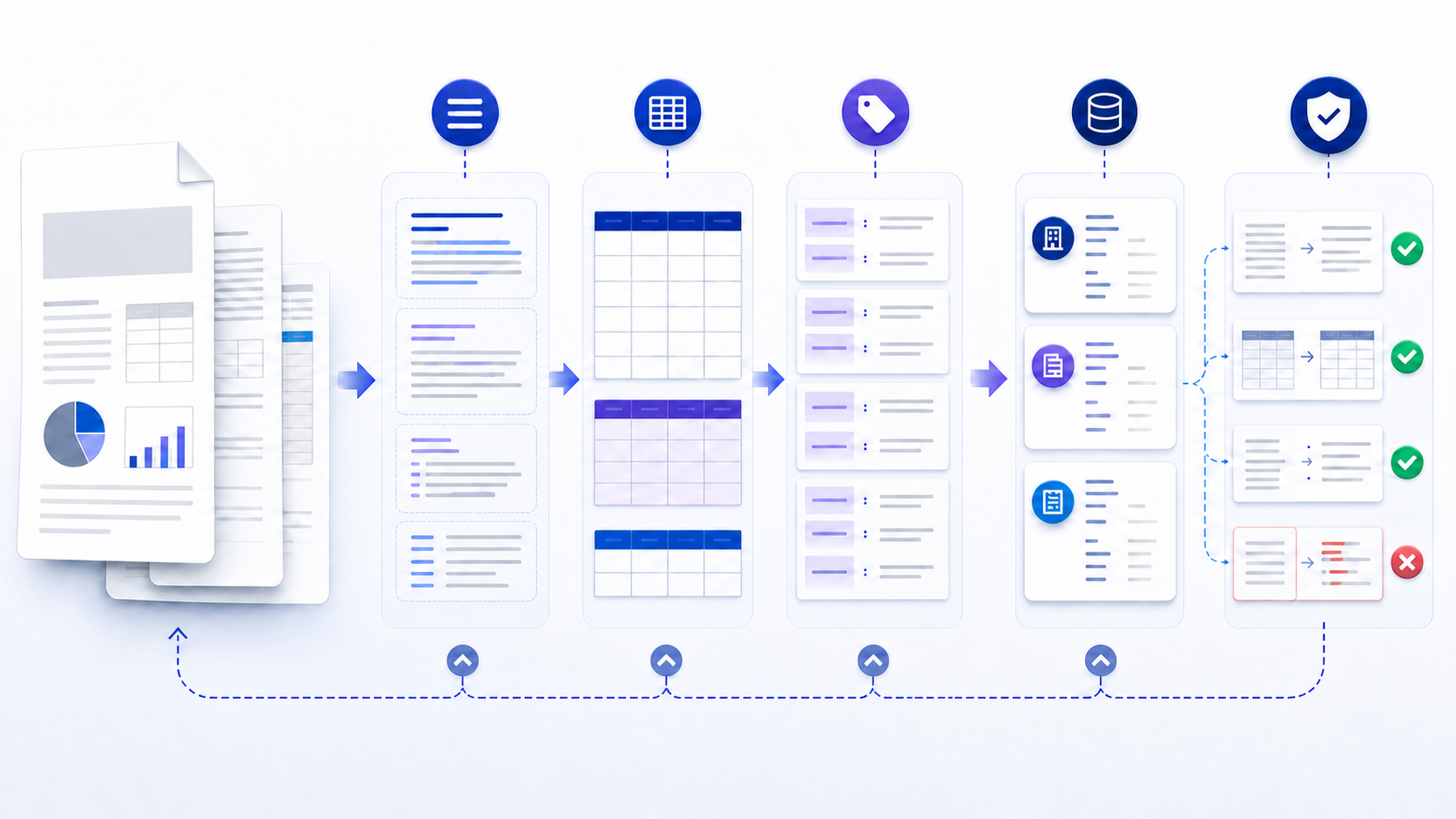
PDF data extraction turns content locked in a PDF into usable text, rows, fields, or structured records. A reliable process first identifies whether the file contains a real text layer or only page images, then applies direct parsing, table reconstruction, form-field reading, OCR, or a combination. Verify the layer on the searchable pdf desk before you extract. The output is not finished until it has been checked against the source. Field accuracy after the file is open is accurate document data extraction.
PDF 数据提取是把锁在 PDF 中的内容转换为可用文本、数据行、字段或结构化记录的过程。可靠流程首先判断文件包含真实文本层还是只有页面图像,再选择直接解析、表格重建、表单字段读取、OCR 或组合方法。只有对照原文件完成检查,输出才算可用。文件打开之后的字段准确度,见准确的文档数据提取。
People usually search for this task because copy-and-paste has broken a table, a recurring report must feed a spreadsheet, invoices need consistent fields, or a document collection must become searchable and analyzable. These are related jobs, but they do not share one universal extraction method.
用户通常会在复制粘贴破坏表格、周期性报告需要进入电子表格、发票需要统一字段,或文档集合需要可搜索和可分析时寻找这类方法。这些任务彼此相关,但不存在适用于所有文件的单一提取方案。
Why extracting data from PDF files is harder than it looks为什么从 PDF 文件提取数据比想象中困难
PDF is primarily a presentation format. A page can look like a tidy document while its internal objects are positioned characters, drawing commands, images, annotations, or form values. Visual proximity does not guarantee a logical relationship. Two values that appear in the same row may be stored far apart; a heading may appear after its paragraph in extraction order.
PDF 主要用于呈现。一个页面视觉上可能非常整齐,内部却由定位字符、绘图命令、图像、批注或表单值组成。视觉位置接近并不保证逻辑关系一致:同一行的两个值在内部可能相隔很远,标题在提取顺序中也可能位于段落之后。
Text can be selected and usually has font and position data. Direct parsing is the best first test, though reading order and tables may still need reconstruction.
文本可选择,通常带有字体与位置信息。应先测试直接解析,但阅读顺序和表格仍可能需要重建。
Each page is an image, so an OCR stage is required before text or fields can be interpreted. Resolution, skew, noise, and language affect recognition.
每页都是图像,必须先经过 OCR,才能解释文本或字段。分辨率、倾斜、噪声和语言都会影响识别。
Some pages or regions contain text while others are images. A page-level or region-level pipeline avoids needlessly OCRing good text.
部分页面或区域含文本,其他部分是图像。按页面或区域处理可避免对已有优质文本重复 OCR。
Structure tags or form fields may provide better semantics than visual parsing. Inspect them before flattening the document into plain text.
结构标签或表单字段可能比视觉解析提供更好的语义。不要先把文件压成纯文本,应优先检查这些信息。
Prepare the PDF, target schema, and acceptance rules准备 PDF、目标数据结构与验收规则
Start with the downstream use, not the extractor. “Get everything” produces an output that is difficult to judge. A better specification names the unit of work, required fields, types, permitted nulls, source evidence, and destination. For example, one record may represent an invoice with invoice number, issue date, supplier, currency, line items, tax, total, and source page.
应从下游用途开始,而不是先选提取器。“提取全部内容”会产生难以判断的输出。更好的规范应说明记录单位、必需字段、数据类型、允许为空的条件、来源证据和目标系统。例如,一条记录可代表一张发票,包含发票号、开票日期、供应商、币种、明细、税额、总额和来源页码。
- Representative files: include clean and poor scans, simple and complex layouts, multi-page tables, rotated pages, multiple languages, and files from each important source.
- 代表性文件:包含清晰与低质量扫描、简单与复杂版式、跨页表格、旋转页面、多语言文件,以及每个重要来源的样本。
- Output contract: define column names or JSON keys, types, date and decimal conventions, whether repeated values are allowed, and how missing values are represented.
- 输出契约:定义列名或 JSON 键、类型、日期与小数格式、是否允许重复值,以及缺失值的表示方式。
- Evidence contract: retain the file ID, page number, bounding box or excerpt, extraction method, and review status where practical.
- 证据契约:在可行时保留文件 ID、页码、边界框或原文摘录、提取方法和复核状态。
- Security boundary: decide whether sensitive files may leave the device or network, how long intermediates remain, and who can review them.
- 安全边界:确定敏感文件能否离开设备或网络、中间文件保留多久,以及哪些人员可进行复核。
Do not remove passwords or access controls without authorization. If a permitted file is encrypted, use an approved credential and record that the extraction was authorized. A damaged, unsupported, or policy-restricted file is a stop condition, not an invitation to bypass controls.
未经授权,不要移除密码或访问控制。如果获准处理的文件已加密,应使用批准的凭据并记录授权。文件损坏、格式不支持或受政策限制时应停止处理,而不是绕过控制。
Choose a PDF data extraction method by document type根据文档类型选择 PDF 数据提取方法
| Approach方法 | Best fit适用情况 | Main limitation主要限制 | Validation focus验证重点 |
|---|---|---|---|
| Direct text parsing直接文本解析 | Native PDFs with selectable text含可选择文本的原生 PDF | Reading order, columns, and layout can collapse阅读顺序、分栏和版式可能混乱 | Sequence, Unicode, headings, page boundaries顺序、Unicode、标题、页边界 |
| OCR | Scans, photos, image-only pages扫描件、照片、纯图像页面 | Recognition errors from blur, skew, fonts, or language模糊、倾斜、字体或语言导致识别错误 | Characters, decimals, dates, names, confidence and crops字符、小数、日期、名称、置信信息与裁切 |
| Table extraction表格提取 | Reports, statements, schedules, pricing tables报告、对账单、计划表、价格表 | Merged cells, sparse rules, repeated headers, page splits合并单元格、稀疏边线、重复表头、跨页 | Row count, columns, totals, units, continuation rows行数、列、合计、单位、续行 |
| Form-field reading表单字段读取 | Interactive PDFs with named fields带命名字段的交互式 PDF | Flattened or custom-drawn forms may expose no fields扁平化或自绘表单可能没有可读字段 | Field names, values, checkbox state, version字段名、值、复选状态、版本 |
| Schema-guided document AI结构引导的文档 AI | Variable layouts mapped to defined business fields把变化版式映射到明确业务字段 | Plausible output can hide unsupported or misread values看似合理的输出可能隐藏无依据或误读值 | Evidence, null behavior, exceptions, drift, review rate证据、空值行为、异常、漂移、复核率 |
| Manual or assisted review人工或辅助复核 | Low volume, novel layouts, or high-consequence values低量、新版式或高后果字段 | Slow and prone to transcription inconsistency速度慢,容易出现录入不一致 | Double entry, reviewer agreement, change log双人录入、复核一致性、变更日志 |
These approaches can be combined. A strong hybrid pipeline might parse native text, OCR only image regions, apply a table-specific pass, and send low-confidence or reconciliation failures to a reviewer. Avoid OCRing every page by default: it can replace accurate embedded text with a noisier interpretation.
这些方法可以组合。稳健的混合流程可以先解析原生文本,只对图像区域做 OCR,再运行表格专用步骤,并把低置信或对账失败的结果交给复核人员。不要默认对每页做 OCR,因为它可能用更嘈杂的识别结果替换原本准确的嵌入文本。
A repeatable workflow to extract data from PDF to Excel, CSV, or JSON把 PDF 数据提取到 Excel、CSV 或 JSON 的可重复流程
- Inventory and classify every file.清点并分类每个文件。 Record origin, owner, permissions, page count, language, encryption, and whether each page has usable text. Separate malformed or unsupported files instead of silently skipping them.记录来源、负责人、权限、页数、语言、加密情况,以及每页是否有可用文本。把损坏或不支持的文件单独列出,不要静默跳过。
- Define the target record and types.定义目标记录及类型。 Specify fields, nested relationships, required and optional values, date and number formats, units, and source references. Create explicit null and exception rules.明确字段、嵌套关系、必需与可选值、日期和数字格式、单位及来源引用,并制定清晰的空值与异常规则。
- Create a small gold sample.创建小型标准样本。 Manually agree on correct outputs for representative pages, including difficult cases. Keep the original page beside the expected record so disagreements can be resolved.针对代表性页面(包括困难样本)人工确认正确输出,并把原页与预期记录保存在一起,以便解决分歧。
- Extract with the least lossy method.使用信息损失最小的方法提取。 Prefer form fields or tagged structure when dependable, then native parsing, region OCR, table reconstruction, or schema-guided extraction. Store raw output before normalization.优先使用可靠的表单字段或标签结构,其次选择原生解析、区域 OCR、表格重建或结构引导提取。规范化前保存原始输出。
- Normalize without erasing evidence.规范化时保留证据。 Convert dates, decimals, currencies, whitespace, and identifiers according to the contract. Keep original values and page references so a reviewer can trace each transformation.按契约转换日期、小数、币种、空白和标识符,同时保留原始值及页码,使复核人员可追踪每次转换。
- Validate content and structure.验证内容与结构。 Compare against the gold sample, reconcile counts and totals, run type and range checks, and inspect failures. Do not use one overall “accuracy” number to hide critical-field errors.与标准样本对比,核对数量和合计,执行类型与范围检查并查看失败案例。不要用单一“准确率”掩盖关键字段错误。
- Export, version, and monitor.导出、版本化并持续监控。 Write CSV or Excel for reviewed tabular work, JSON for nested integrations, and a separate exception file. Record extractor settings and re-test when document layouts change.复核后的表格工作使用 CSV 或 Excel,嵌套集成使用 JSON,并单独输出异常文件。记录提取设置,文档版式变化时重新测试。
Example: extract a multi-page invoice table without inventing values示例:在不虚构数值的前提下提取跨页发票表格
Hypothetical example
假设示例
A three-page supplier invoice contains a native text header, an item table that continues across pages, and a scanned approval stamp that is not needed. The target output is one invoice record plus line-item rows.
一份三页供应商发票包含原生文本抬头、跨页延续的明细表,以及一个不需要提取的扫描审批章。目标输出为一条发票记录和多条明细行。
Method: parse the header directly; detect the table on each page; remove repeated column headers only when every expected header cell matches; join continuation rows using the table structure, not visual guesswork; ignore the stamp by scope; retain page and row evidence.
方法:直接解析抬头;逐页检测表格;仅在所有预期表头单元格一致时移除重复表头;根据表格结构而不是视觉猜测合并续行;按范围忽略审批章;保留页码和行证据。
Checks: line-item count equals the number of retained rows; quantity and unit price parse as numbers; currency is consistent; calculated line totals reconcile within the organization’s approved rounding rule; subtotal, tax, and total match the source; every value links to a page.
检查:明细数量等于保留行数;数量与单价可解析为数字;币种一致;按组织批准的舍入规则核对行合计;小计、税额和总额与来源一致;每个值都关联到页码。
Failure behavior: if a merged description shifts a price into the wrong column, quarantine that row and show the source crop to a reviewer.
失败处理:如果合并描述导致价格移入错误列,应隔离该行并向复核人员展示原始区域。
How to validate PDF data extraction accuracy如何验证 PDF 数据提取准确性
Accuracy is task-specific. A paragraph-search workflow cares about readable text and page references; an accounts-payable workflow may treat one wrong total as unacceptable even if thousands of description characters are correct. Report results by field and failure type, not only as one blended score.
准确性取决于任务。段落搜索关注文本可读性和页码引用;应付账款流程中,即使数千个描述字符正确,一个错误总额也可能不可接受。因此应按字段和失败类型报告,而不是只给出一个混合分数。
- Sampling: stratify by supplier, layout, language, scan quality, page count, and date. A random sample dominated by easy files can produce a misleading result.
- 抽样:按供应商、版式、语言、扫描质量、页数和日期分层。若随机样本主要是简单文件,结论可能失真。
- Reconciliation: compare row counts, subtotals, totals, category sums, and unique identifiers. These checks catch structural errors that visually plausible cells may hide.
- 对账:比较行数、小计、总计、分类汇总和唯一标识。这些检查能发现看似合理的单元格所掩盖的结构错误。
- Type and domain rules: validate dates, decimal separators, ranges, currencies, checksums, and required relationships. Flag rather than silently repair impossible values.
- 类型与领域规则:验证日期、小数分隔符、范围、币种、校验规则和必需关系。对不可能的值应标记,而非静默修复。
- Visual review: show the source page or crop beside extracted fields. This is especially important for OCR, merged cells, handwriting, faint text, and unusual layouts.
- 视觉复核:在提取字段旁展示来源页或裁切区域。OCR、合并单元格、手写内容、浅色文字和异常版式尤其需要此步骤。
- Regression set: retain difficult permitted examples and re-run them whenever a parser, OCR engine, prompt, schema, or normalization rule changes.
- 回归集:保留获准使用的困难样本,在解析器、OCR 引擎、提示词、Schema 或规范化规则变化时重新运行。
Common PDF extraction errors, limits, and remedies常见 PDF 提取错误、局限与处理方法
| Symptom现象 | Likely cause可能原因 | Response处理方式 |
|---|---|---|
| Selectable text extracts as nonsense可选择文本却提取成乱码 | Broken font mapping, encoding, or a poor hidden OCR layer字体映射、编码错误或隐藏 OCR 层质量差 | Test another parser; compare rendered glyphs; OCR only affected pages if authorized测试其他解析器;对照渲染字符;获准后只对受影响页面 OCR |
| Columns merge or reading order jumps列合并或阅读顺序跳跃 | Positioned text lacks logical structure定位文本缺少逻辑结构 | Use layout coordinates, column regions, tags, or a layout-aware parser使用布局坐标、分栏区域、标签或版式感知解析器 |
| Rows split across pages数据行跨页断开 | Page headers and breaks interrupt a table页眉与分页打断表格 | Detect repeated headers and continuation rules; reconcile row IDs and totals检测重复表头与续行规则;核对行 ID 和总计 |
| Decimal point becomes a comma or disappears小数点变逗号或消失 | OCR confusion or locale mismatchOCR 混淆或区域格式不匹配 | Preserve raw text; parse with explicit locale; check totals and ranges保留原文;按明确区域格式解析;检查合计与范围 |
| Output looks fluent but fields lack evidence输出流畅但字段缺少证据 | A generative step inferred rather than extracted生成步骤进行了推断而非提取 | Require page evidence, allow nulls, and separate inference from source facts要求页码证据、允许空值,并把推断与来源事实分开 |
| Previously good files begin failing过去正常的文件开始失败 | Vendor layout, software, language, or pipeline changed供应商版式、软件、语言或流程发生变化 | Compare versions, run the regression set, and route new layouts to review比较版本、运行回归集,并把新版式送交复核 |
Analyze PDF information with related data sources把 PDF 信息与相关数据源一起分析
Prepare an authorized PDF, the question you want answered, and—when accuracy matters—a list of target fields or a small expected sample. InfiniSynapse’s official product pages describe uploading PDF reports for analysis alongside structured sources. Use the analysis workspace after you understand the document and review requirements; it is not a substitute for OCR quality checks or field-level reconciliation.
请准备获准处理的 PDF、需要回答的问题,以及在准确性重要时使用的目标字段清单或小型预期样本。InfiniSynapse 官方产品页面说明可上传 PDF 报告,并与结构化来源一起分析。应在明确文档类型和复核要求后使用分析工作区;它不能替代 OCR 质量检查或字段级对账。
Open the InfiniSynapse analysis workspace打开 InfiniSynapse 分析工作区Frequently asked questions about PDF data extractionPDF 数据提取常见问题
How do I extract data from a PDF accurately?
如何准确地从 PDF 提取数据?
Classify the PDF first, define the target schema, choose parsing or OCR for that file type, preserve source evidence, and compare a representative sample with the original before using the output.
先对 PDF 分类,定义目标 Schema,为该文件类型选择解析或 OCR,保留来源证据,并在使用输出前把代表性样本与原文逐项比较。
Can PDF data extraction preserve tables?
PDF 数据提取可以保留表格吗?
Yes, but table structure usually has to be reconstructed. Validate row and column boundaries, merged cells, repeated headers, page breaks, numeric formats, and totals against the source PDF.
可以,但通常需要重建表格结构。应对照原 PDF 验证行列边界、合并单元格、重复表头、分页、数字格式和合计。
Do scanned PDFs always need OCR?
扫描 PDF 一定需要 OCR 吗?
An image-only scanned PDF needs OCR to create machine-readable text. A scan that already contains a usable OCR text layer may not need OCR again, but the layer should still be tested for recognition and reading-order errors.
纯图像扫描 PDF 需要 OCR 才能产生机器可读文本。若扫描件已有可用 OCR 文本层,可能无需再次 OCR,但仍应检查识别错误和阅读顺序。
What output format should I use for extracted PDF data?
提取的 PDF 数据应使用什么输出格式?
Use CSV or Excel for reviewed tables, JSON for nested fields and system integration, and plain text only when layout and field relationships do not matter. Preserve source page references in every format.
已复核表格可用 CSV 或 Excel;嵌套字段和系统集成可用 JSON;只有在版式和字段关系不重要时才使用纯文本。所有格式都应保留来源页码。
Can InfiniSynapse analyze information from PDFs?
InfiniSynapse 可以分析 PDF 中的信息吗?
InfiniSynapse's official product pages describe uploading PDF reports for analysis alongside structured sources. It is an analysis entry point, not a claim that every scan, table, or field will be extracted without validation.
InfiniSynapse 官方产品页面说明可上传 PDF 报告,并与结构化来源一起分析。它是分析入口,并不意味着所有扫描件、表格或字段都能在不验证的情况下正确提取。
Official sources and further reading权威来源与延伸阅读
Adobe’s official PDF Extract API overview documents extraction of contextual text blocks, tables, figures, reading order, and structured JSON. Microsoft’s PDF actions reference distinguishes text and table extraction and explicitly notes that its table action does not apply OCR to non-copyable scanned text. These examples support the central decision in this guide: inspect the document type before choosing an extraction method.
Adobe 官方的 PDF Extract API 概览说明了上下文文本块、表格、图形、阅读顺序和结构化 JSON 的提取。微软的 PDF 操作参考区分文本与表格提取,并明确说明其表格操作不会对不可复制的扫描文本执行 OCR。这些第一方资料支持本指南的核心判断:先检查文档类型,再选择提取方法。