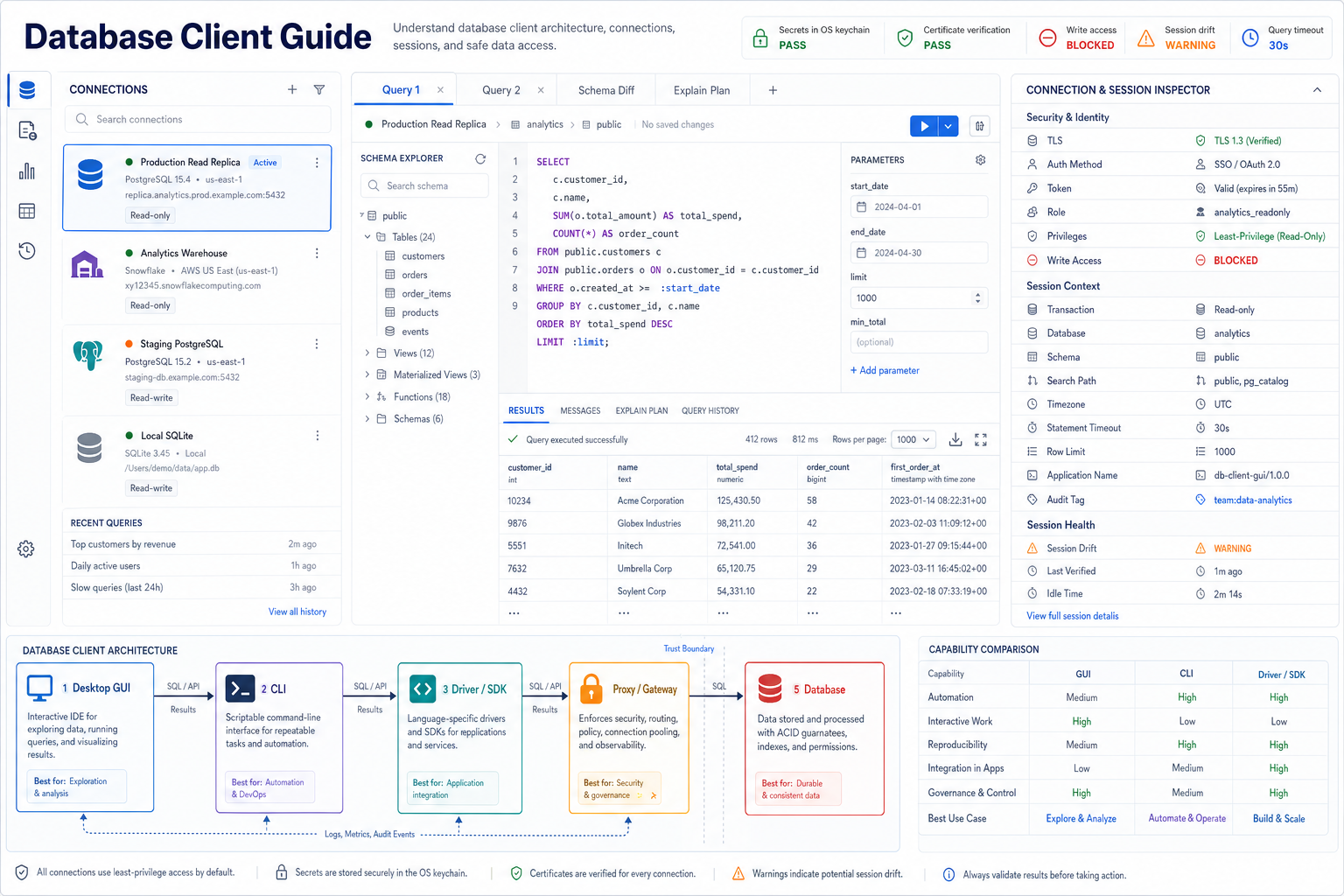
What is a database client?
A database client is software that establishes a database session, speaks a supported protocol or API, sends operations, and interprets responses. It can be a desktop graphical application, browser interface, command-line tool, programming-language driver, SDK, notebook connector, administration console, proxy-aware workspace, or an application component. A capable interactive client also manages connection profiles, authentication, certificates, session context, schema metadata, SQL editing, parameters, results, transactions, cancellation, history, export, and audit events.
The word “client” describes a system role, not one user interface. A GUI user may think the desktop app connects directly, while the real path includes an embedded driver, corporate gateway, identity provider, connection pool, network proxy, and database endpoint. Each hop changes security, latency, observability, failure handling, and who can see query text or result data. Evaluate the complete path rather than only the editor screen.
Distinguish GUI, CLI, driver, SDK, and gateway clients
Different client forms optimize for different decisions. A GUI helps people explore metadata, draft queries, compare results, and inspect plans. When the next step is a business question on that schema, the loop is ai for database exploration. A CLI makes commands repeatable in terminals and automation. A driver exposes typed connection and statement APIs to applications. An SDK adds service-specific identity, retries, telemetry, or object models. A gateway centralizes routing, authentication, pooling, policy, and audit. Product names blur these boundaries, so select capabilities by workflow rather than label.
| Client form | Best fit | Strength | Control to verify |
|---|---|---|---|
| Desktop GUI | Interactive analysis, development, review, administration | Rich metadata, visual results, multi-connection workflow | Secret storage, plugin trust, local cache, update signing |
| Web client | Managed access without local installation | Central policy, consistent version, easy onboarding | Query route, hosted retention, browser isolation, downloads |
| Command line | Scripts, operations, migrations, repeatable tasks | Composable, versionable, automatable | Shell history, environment secrets, exit codes, output safety |
| Driver or connector | Applications, services, BI tools, notebooks | Typed APIs, parameter binding, pooling integration | Version compatibility, defaults, retries, thread safety |
| Gateway or proxy | Central access, routing, policy, pooling, observability | Consistent control across many clients and databases | Protocol fidelity, identity propagation, failure and trust boundary |
Many teams need several forms. Analysts use a GUI, deployment pipelines use a CLI, applications use drivers, and all may route through a governed gateway. The architectural goal is shared identity, connection naming, certificate policy, timeouts, query tags, and audit semantics—not forcing every task into one interface.
Understand database client versus SQL client scope
“SQL client” usually emphasizes SQL authoring and execution against relational or SQL-compatible systems. “Database client” is broader and may include connection administration, protocol and driver management, non-SQL data models, object browsers, users and roles, storage, replication, monitoring, import/export, and application connectivity. In the market, the terms overlap heavily. A product called a database client may be primarily an SQL editor, while a driver is undeniably a database client without offering an editor at all.
| Capability | Typical SQL client emphasis | Broader database client concern |
|---|---|---|
| Query language | SQL dialect editing, formatting, completion, execution | SQL plus APIs, commands, document queries, key-value operations |
| Connection | Choose server and database, then open editor | Protocol, driver, failover, proxy, pooling, identity, topology |
| Metadata | Tables, views, columns, functions for query help | Database objects, users, roles, storage, jobs, replication, health |
| Execution consumer | A person running and reviewing SQL | People, scripts, services, BI platforms, schedulers, connectors |
This page focuses on the client boundary and operational contract. The separate SQL Client guide focuses more deeply on interactive SQL work. Keeping the distinction explicit prevents a feature checklist from comparing a desktop workspace, a language driver, and an administrative console as if they solve the same job.
Map every component between user and database
Begin with a data-flow and trust-boundary map. Identify the user interface, local process, extension host, driver, native libraries, credential provider, identity service, DNS, tunnel, VPN, proxy, gateway, connection pool, load balancer, database listener, replicas, metadata services, logging sinks, update service, crash reporting, and AI-assisted features. Record which components receive credentials, SQL text, schema metadata, result values, exports, and telemetry.
Editor, terminal, application, notebook, or embedded workflow.
Profiles, session state, statements, results, plugins, local storage.
Serialization, negotiation, authentication, parameters, types, errors.
Tunnel, proxy, gateway, policy, pooling, routing, observability.
Listener, primary or replica, catalog, planner, executor, storage.
Audit, metrics, traces, policy decisions, history, exports, retention.
The map resolves questions that a feature page cannot: Does SSO token material reach the desktop process? Does a gateway terminate TLS and open a second connection? Can an extension read result grids? Are queries uploaded for AI explanation? Does crash reporting include editor buffers? Answers determine acceptable use and deployment controls.
Trace the database connection lifecycle end to end
“Connect” hides a sequence of decisions: select a profile, resolve the endpoint, acquire or unlock credentials, establish network reachability, negotiate transport security, authenticate, negotiate protocol features, initialize session variables, choose database and schema, verify capabilities, load metadata, begin or inherit a transaction, send statements, fetch results, cancel work, commit or roll back, reset state, and close or return the connection to a pool. Failures at different stages need different remediation.
| Lifecycle stage | Evidence to expose | Typical failure |
|---|---|---|
| Endpoint resolution | Profile, host alias, resolved address, port, routing mode | Wrong environment, stale DNS, private endpoint unreachable |
| TLS negotiation | Protocol, cipher, hostname, certificate chain and expiry | Verification disabled, hostname mismatch, untrusted issuer |
| Authentication | Method, identity, token expiry, MFA or device flow state | Expired token, wrong role, clock skew, unsupported mechanism |
| Session initialization | Database, schema, role, timezone, read-only, timeout, tags | Partial initialization leaves unsafe or ambiguous defaults |
| Close or pool return | Transaction status, reset outcome, open cursor count, lease owner | Uncommitted work or session state leaks to the next borrower |
Expose the current stage and a safe diagnostic code instead of returning “connection failed.” Keep sensitive values out of messages. A certificate error, network timeout, authentication rejection, missing database, and session initialization failure are operationally different and should not trigger the same retry behavior.
Treat the driver as a versioned behavioral dependency
The driver translates the client API into database protocol messages and maps wire values back into client-language types. It decides or influences parameter binding, type codecs, prepared statements, fetch size, cursor behavior, cancellation, timeouts, keepalives, failover, compression, certificate settings, authentication plugins, error mapping, metadata calls, and thread or async safety. Two applications using the same database can behave differently because their drivers and defaults differ.
| Driver concern | Verify | Regression risk |
|---|---|---|
| Compatibility | Client runtime, OS/architecture, database and protocol versions | Upgrade negotiates different features or rejects old auth |
| Type mapping | Decimal precision, timezone, date range, binary, arrays, JSON, custom types | Silent truncation, floating conversion, timezone shift |
| Statement path | Client-side versus server-side prepare, batch and parameter modes | Changed plan reuse, injection boundary, or error timing |
| Timeout and cancellation | Connect, socket, statement, fetch, cancel channel, hard deadline | Application stops waiting while database work continues |
| Failover and retry | Topology discovery, idempotency, transaction state, replay rules | Duplicate writes or replay after unknown commit outcome |
Pin and inventory driver versions, read release notes, test real protocol paths, and roll out gradually. A GUI that bundles drivers should reveal the active driver build per connection. A system driver selected from the machine path may vary between users and make the same saved profile non-reproducible.
Separate portable connection metadata from secrets
A connection profile should describe the target and desired policy without embedding reusable credentials. Store a stable environment name, database product, driver, host alias or service name, port, database, default schema, authentication method, credential reference, TLS mode, certificate authority reference, tunnel or proxy reference, role, read-only flag, timeouts, row and export limits, session initialization, tags, and owner. Secrets belong in a keychain or secret manager and are resolved at use time.
| Profile field | Portable value | Sensitive or local reference |
|---|---|---|
| Endpoint | Approved service alias, database and port | Private IP selected by local resolver or tunnel |
| Identity | SSO profile, role name, credential-provider ID | Password, refresh token, private key, device secret |
| Trust | Verification required, expected hostname, CA bundle ID | Private CA file or hardware-backed certificate key |
| Session policy | Read-only, timezone UTC, statement timeout 30s, row limit 1000 | User-specific temporary exceptions |
| Network path | Gateway or tunnel policy name | Local socket, agent session, short-lived tunnel token |
Profiles can be versioned when they contain no secrets and when local paths are expressed as references. Validate them in CI for approved endpoints, required TLS, allowed roles, bounded timeouts, and environment naming. Prevent production and staging profiles from sharing ambiguous labels or identical colors; the environment must remain visible in every editor and result view.
Choose a database client by evidence, not feature count
Start with supported workflows, database products, identity architecture, network constraints, data sensitivity, operating systems, accessibility, automation needs, collaboration model, support requirements, and lifecycle cost. Then test representative tasks. A long connector list is weak evidence if required drivers are outdated, certificate verification is confusing, parameters behave inconsistently, large results freeze the client, or policy cannot be managed centrally.
| Decision area | Evidence task | Acceptance question |
|---|---|---|
| Compatibility | Connect to every required engine/version and exercise vendor types | Are protocol, metadata, types, errors, and cancellation faithful? |
| Security | Run SSO, certificate failure, secret recovery, role and export tests | Are safe defaults enforced and exceptions observable? |
| Daily workflow | Navigate schema, write parameters, compare results, inspect plan, share script | Can work move from exploration to review without hidden state? |
| Scale and resilience | Load large catalogs, stream results, cancel slow work, recover network loss | Are memory, time, progress, retry, and partial-result states controlled? |
| Operations | Deploy, update, inventory plugins/drivers, configure policy, collect audit | Can the organization support and govern the client over years? |
Score mandatory requirements separately from preferences. A beautiful editor cannot compensate for an unacceptable credential model. A highly governable client may still fail if it lacks the target dialect or accessibility. Keep test notes, versions, screenshots without sensitive data, and measured outcomes so the selection remains explainable after staff or products change.
Prefer short-lived, attributable database identity
Authentication should identify the human, service, or workload using the client while minimizing reusable secret exposure. Depending on the database and environment, options may include username and password, integrated operating-system identity, Kerberos, client certificates, cloud identity, OAuth or OIDC-based flows, SSO, device authorization, private-key authentication, hardware-backed keys, or short-lived tokens issued by a broker. Evaluate support across the client, driver, gateway, and database—not only the login form.
| Identity property | Evidence to verify | Failure to avoid |
|---|---|---|
| Attribution | Database session and audit event identify the actual user or workload | A shared team account makes actions indistinguishable |
| Lifetime | Token expiry, refresh boundary, session maximum, idle timeout | Long-lived credential remains valid after role or employment change |
| Assurance | MFA, device posture, hardware key, network and risk policy | Sensitive access relies only on a copied password |
| Role selection | Initial role, secondary roles, elevation workflow, visible active role | Client silently reconnects with a more privileged default |
| Revocation | Token and session invalidation after account or policy change | Revoked identity retains an existing database session indefinitely |
Make the active identity and role visible next to the connection and execution action. If the client supports elevation, require a reason, bounded duration, distinct visual state, and audit event. Reauthentication should not silently drop an open transaction or switch context without warning.
Keep database secrets out of profiles, files, and logs
Prefer identity flows that avoid stored passwords. When a reusable secret is unavoidable, resolve it from an operating-system keychain, enterprise secret manager, protected credential helper, or hardware-backed provider. The saved connection contains only a reference. Prevent credentials from appearing in connection URLs, SQL scripts, environment dumps, process arguments, shell history, crash reports, screenshots, clipboard history, exported workspace files, query tags, or telemetry.
| Secret path | Required control | Test |
|---|---|---|
| At rest | OS/user access control, encryption, non-exportable keys, locked profile | Inspect saved files, backups, roaming profile, and migration export |
| In memory | Shortest practical lifetime, minimal copies, protected process boundary | Review plugin and extension access; test lock and logout behavior |
| In transit | Verified encrypted channel and safe authentication exchange | Reject downgrade, wrong hostname, untrusted certificate, insecure proxy |
| Diagnostics | Structured redaction before logs, support bundles, and telemetry | Trigger auth failures and inspect every generated artifact |
| Clipboard and UI | Masked display, explicit reveal, no automatic copy, timed clearing where supported | Screen share, recent items, accessibility tree, and clipboard manager review |
Do not equate encryption with safe secret management. If the client can decrypt every saved password automatically, malware or a malicious plugin running as the same user may also be able to request it. Use OS protections, short-lived tokens, device trust, extension isolation, and least privilege together.
Verify encrypted transport and endpoint identity
A secure connection requires more than “SSL enabled.” The client should negotiate an approved TLS version, validate the certificate chain, verify the expected hostname, reject expired or not-yet-valid certificates, enforce policy for revocation where supported, protect private keys, and show whether a gateway terminates and re-establishes encryption. An encryption-only mode without identity verification can still connect to the wrong server.
| Transport check | Pass evidence | Unsafe shortcut |
|---|---|---|
| Protocol and cipher | Negotiated values meet organization and server policy | Falling back silently to an obsolete protocol |
| Chain validation | Leaf chains to an approved trust anchor with valid constraints | Trusting every presented certificate |
| Hostname verification | Profile host matches a valid certificate identity | Verifying only that the certificate was signed |
| Mutual TLS | Client key protected and server maps certificate to intended principal | Copying a shared client key to every workstation |
| Proxy boundary | Both client-to-proxy and proxy-to-database channels are identified | Displaying one lock icon for only the first hop |
PostgreSQL’s official libpq SSL documentation distinguishes modes that encrypt traffic from modes that also verify the certificate authority and hostname. Regardless of product, test the exact client and driver defaults; a secure server configuration does not repair a client that disables verification.
Design the network path as a controlled dependency
Database clients may connect through private networks, VPNs, zero-trust access brokers, SSH tunnels, cloud proxies, service meshes, database gateways, bastions, or public endpoints. Record which system resolves the hostname, opens the socket, authenticates the user, terminates TLS, forwards identity, applies policy, and logs activity. Avoid arbitrary user-supplied proxy or tunnel commands that turn the client into an uncontrolled network pivot.
| Path question | Evidence | Operational consequence |
|---|---|---|
| Where is DNS resolved? | Local client, tunnel host, proxy, gateway, or database network | Split-horizon names and private endpoints resolve differently |
| Where is identity enforced? | Client certificate, proxy token, database credential, propagated user | Audit may identify the gateway instead of the human |
| How is reachability limited? | Approved destinations, ports, groups, device and environment policy | A compromised client may reach unrelated databases |
| What happens on path loss? | Socket state, transaction outcome, reconnect and retry policy | Unknown commit state or duplicate operation after retry |
| What is observed? | Connection metadata, identity, duration, errors, bytes—not secrets | Insufficient evidence or excessive sensitive logging |
For browser clients, determine whether the browser communicates directly with the database protocol or with a hosted application API. Most browsers cannot natively speak database wire protocols, so a server or gateway often processes connection details, SQL, and results. That architecture can be valid, but it changes the privacy and trust model and must be disclosed.
Make hidden session state visible before every query
Database behavior depends on session state: current user and role, database, catalog, schema or search path, warehouse or compute pool, timezone, locale, collation, transaction isolation and read-only status, autocommit, query tag, statement timeout, lock timeout, date and numeric formats, feature flags, temporary objects, variables, prepared statements, and session-level configuration. A query copied into another client can return different results because these values differ.
| Session field | Visible control | Drift risk |
|---|---|---|
| Identity and role | Persistent badge near editor and run button | Reconnect, elevation, secondary role, or gateway remapping |
| Namespace | Database, schema, search path, and fully resolved object preview | A command or UI action silently changes current context |
| Time and locale | Timezone and format settings in session inspector | Timestamp display, literal parsing, week and date boundaries change |
| Transaction | Autocommit, active transaction, isolation, read-only, savepoints | Uncommitted work remains while user changes editor or connection |
| Resource controls | Timeout, row/fetch/export limit, compute class, query tag | Client reconnects without reapplying protection |
Capture a session fingerprint before execution and attach it to history: connection profile version, endpoint, identity, role, namespace, transaction state, timezone, relevant settings, driver, and server version. Detect drift after reconnect, failover, role change, or session commands and require confirmation when the change affects meaning or risk.
Design transaction controls for deliberate state changes
Interactive clients make transactions easy to lose track of. Autocommit may commit each statement, while manual mode leaves changes open until commit or rollback. A failed statement may abort the transaction in one engine but not another. DDL may be transactional, auto-committing, or restricted. Closing a tab, losing a network path, reconnecting, or switching profiles can leave the user uncertain whether work committed. The client should display transaction state continuously and handle every exit path explicitly.
| Transaction event | Client behavior | Required warning |
|---|---|---|
| Open manual transaction | Persistent state indicator and explicit commit/rollback controls | Tab, window, profile, or application close |
| Statement failure | Refresh transaction status and disable invalid actions | Transaction is aborted or partial work remains |
| Network loss | Mark outcome unknown until server state is independently established | Do not retry non-idempotent operations automatically |
| Connection returned to pool | Rollback and reset all relevant state, then verify reset | Discard connection if reset fails |
| Read-only mode | Enforce at database or transaction level where supported | UI-only read-only labels are not enforcement |
Use least-privilege read-only identities for exploration so a missed transaction warning cannot become a write. For permitted write workflows, require reviewable scripts, bounded predicates, affected-row feedback, backups or rollback strategy where appropriate, and an environment-specific confirmation—not a generic “Are you sure?” dialog.
Separate timeouts, cancellation, and database completion
A client timeout may only stop waiting; it may not stop database work. A socket timeout differs from a statement timeout. A UI cancel button may send an out-of-band cancel request, close the connection, invoke an API, or merely discard results. Server-side cancellation can arrive after completion. Network loss can leave outcome unknown. Define each mechanism, display its state, and verify actual server behavior.
| Control | Scope | Post-event evidence |
|---|---|---|
| Connect timeout | Endpoint resolution, network and handshake establishment | Failed stage and whether any session was created |
| Statement timeout | Server or driver bounds statement execution | Server error code, transaction state, cleanup outcome |
| Socket/read timeout | Client waits for protocol traffic | Database work may continue; connection health may be unknown |
| Cancel request | Targets an identified active operation or session | Acknowledged, completed, rejected, raced with finish, or unknown |
| Hard connection close | Breaks client transport when graceful cancel fails | Transaction and statement outcome require independent verification |
After any timeout or cancellation, refresh transaction state and prevent automatic reuse until the client knows the connection is synchronized. In application drivers, propagate cancellation intentionally and test it under load; canceling an application task without canceling the database statement creates hidden resource consumption.
Build a query workspace that preserves execution context
An editor buffer is not a reproducible query record. The workspace should keep SQL text, selected statement range, connection profile version, endpoint and environment, identity and role, database and schema, session fingerprint, parameters and their types, transaction state, timeout and row limit, execution mode, client and driver versions, timestamps, result schema, messages, and a safe query identifier. Preserve these fields when saving or sharing a script, while excluding secrets and sensitive result values by default.
| Workspace feature | Safe behavior | Ambiguity to remove |
|---|---|---|
| Run action | Show exact selected statement, connection, role, mode, and limits | Does Run execute selection, current statement, script, or all tabs? |
| Tabs | Each tab owns or visibly inherits its connection and session | Global connection selector silently changes every tab |
| History | Store redacted text or hash according to policy with context and outcome | History records a successful query but not the role or schema |
| Autosave | Encrypted or access-controlled local storage with clear retention | Sensitive drafts survive logout or appear in cloud sync |
| Collaboration | Share text and declarative context, never live credentials or session tokens | Recipient unknowingly runs against a different environment |
Use distinct controls for parse, validate, explain, and execute. Each operation has different evidence and risk. A keyboard shortcut should not bypass environment confirmation or expand a selection unexpectedly. Keep destructive actions visually and behaviorally distinct from read-only queries.
Bind query parameters through the driver API
Parameters keep data values separate from SQL structure and let the driver encode values according to declared types. The client should collect named or positional placeholders, require a value and type contract, show nullability, preview only safely redacted representations, and call the driver’s binding API. It should not emulate parameters by replacing text in the editor. Dynamic identifiers such as table names, column names, or sort directions require an allow-listed structural choice, not a value parameter.
| Parameter concern | Client evidence | Failure |
|---|---|---|
| Binding mode | Driver/server prepare or documented protocol binding | Text substitution changes SQL structure or quoting |
| Type | Exact declared type, precision, timezone, array/struct shape | Everything sent as text creates implicit casts or wrong overload |
| Null | Explicit typed null distinct from empty string or missing value | UI cannot represent null without editing SQL |
| Sensitive value | Masked UI, excluded history/log, controlled copy and export | Parameter protects SQL structure but leaks through client telemetry |
| Batch | Documented atomicity, per-item errors, limits and backpressure | Partial success is reported as one undifferentiated failure |
The OWASP Query Parameterization Cheat Sheet provides prepared-statement examples across common programming environments. The database client still needs least privilege and safe identifier handling; parameterization protects the data-versus-command boundary but does not decide which query or object is authorized.
Browse metadata without turning catalogs into a data leak
Schema explorers improve discovery, completion, validation, and result interpretation. They may load databases, schemas, relations, columns, types, keys, indexes, constraints, views, definitions, functions, procedures, comments, statistics, sample values, lineage, users, and grants. Not all metadata is harmless. Object names, comments, view definitions, function bodies, classifications, row counts, and connection endpoints can reveal sensitive architecture or business concepts.
| Metadata behavior | Safe design | Scale or privacy risk |
|---|---|---|
| Initial load | Lazy, paginated, filtered, cancelable, permission-aware | Enumerating an entire large or restricted catalog on connect |
| Caching | Encrypted/access-controlled, scoped by identity, visible age, bounded retention | One user sees another role’s cached objects after role switch |
| Definitions | Fetch only on demand and respect object privileges | View or routine text exposes hidden tables and logic |
| Samples | Treat as data query with permission, limit, masking, audit, and consent | “Preview” bypasses normal query controls |
| Refresh | Versioned invalidation and explicit stale-state indicators | Autocomplete or validation uses dropped and renamed objects |
Keep metadata queries observable and bounded. The client should identify them separately from user queries so database teams can understand catalog load. Use stable object identities where the engine offers them, but do not expose internal IDs in shared artifacts when they reveal environment details unnecessarily.
Handle query results as sensitive, typed, streaming data
Result handling affects correctness and exposure. Preserve column order, names, types, precision, scale, timezone, null, binary encoding, nested structures, and duplicate names. Stream or page large results rather than loading everything into memory. Distinguish rows fetched from rows produced, show truncation and limits, support cancellation, and avoid silently converting exact decimals or timestamps for display. A visually convenient grid must not become a lossy type converter.
| Result concern | Required behavior | Visible indicator |
|---|---|---|
| Completeness | Track server completion, client fetch, row cap, paging, and cancellation | “1,000 fetched of unknown total; client limit reached” |
| Type fidelity | Keep typed value and distinct display rendering | Column type, timezone, formatting and conversion warnings |
| Memory | Bound buffers, incremental rendering, backpressure, spill policy | Rows/bytes received, retained, displayed, and exported |
| Sensitive values | Masking, copy/export restrictions, local cache policy, screen-share mode | Classification and reason for hidden or transformed values |
| Multiple result sets | Preserve order, messages, update counts, and per-result schema | Distinct tabs with statement and result identifiers |
Separate display formatting from data export. The grid may show rounded numbers or localized dates, while export should require an explicit format contract and preserve exact values where possible. Copy actions should state whether they copy rendered text, raw values, headers, or SQL literals.
Govern copying, downloading, and exporting results
Export moves data beyond database controls into files, clipboards, spreadsheets, notebooks, ticket systems, email, cloud drives, and local backups. Treat it as a distinct data action with policy, permission, purpose, row and byte limits, masking, classification, destination controls, audit, and retention. “Read permission” does not automatically imply unrestricted export permission.
| Export dimension | Decision | Evidence |
|---|---|---|
| Population | Exact query, filters, row count, truncation and snapshot time | Query ID, parameter hash, fetched versus exported rows |
| Fields | Column classification, masking, precision, hidden and derived fields | Ordered output schema and applied transformations |
| Format | CSV quoting/encoding, JSON nesting, spreadsheet formula safety, binary handling | Format version, options and conversion warnings |
| Destination | Approved local path, managed repository, encrypted transfer or blocked target | Destination class without exposing personal path unnecessarily |
| Lifecycle | Owner, purpose, encryption, sharing, expiry, deletion and exception | Policy decision and retention label attached to artifact |
Escape spreadsheet formula prefixes when exporting untrusted text to spreadsheet-compatible formats, while preserving an option for controlled raw export when required. Make truncation unmistakable in both filename metadata and file contents; a partial dataset that looks complete can cause incorrect analysis.
Make command-line database work reproducible and observable
CLI clients are powerful because scripts can version SQL, profiles, options, input parameters, and expected outputs. They are risky when secrets appear in arguments, shell history, process lists, environment dumps, or CI logs. A robust command should read credentials from a protected provider, identify its target and role, use explicit transaction and timeout settings, return meaningful exit codes, separate data from diagnostics, support machine-readable output, and avoid interactive prompts in automation.
| Automation contract | Good practice | Failure signal |
|---|---|---|
| Inputs | Versioned SQL file, typed parameters, declarative secret references | Password and dynamic SQL concatenated in shell command |
| Target | Environment-specific profile with approved endpoint and role | Default local config decides production destination |
| Execution | Explicit autocommit/transaction, stop-on-error, timeout, retry policy | Script continues after failure or replays unknown write |
| Outputs | Data stream separate from diagnostics, stable schema, safe encoding | Warnings mixed into CSV or sensitive values printed to logs |
| Outcome | Stable exit codes and structured summary with query and audit IDs | Exit zero despite partial failure or truncated result |
Capture the CLI version, driver version, profile hash, and relevant database version in pipeline artifacts. Containers can improve reproducibility, but they do not remove the need for short-lived credentials, certificate verification, restricted network access, and controlled logs.
Use database drivers as explicit application infrastructure
In applications, the database client is often a driver plus a connection pool, query layer, ORM, migration tool, telemetry wrapper, and resilience policy. Define ownership for each layer. The driver should not be hidden so deeply that teams cannot identify active versions, connection defaults, parameter behavior, pool health, or retry semantics. Application frameworks can override driver settings and add their own SQL generation, caching, transactions, and logging.
| Application layer | Contract to define | Key metric |
|---|---|---|
| Connection pool | Size, acquisition timeout, lifetime, idle policy, validation, reset, leak detection | Active, idle, waiting, timeout, churn, invalid-return count |
| Query API | Parameterization, statement naming, timeout, cancellation, result mapping | Latency, errors, rows, bytes, cancellation and timeout outcomes |
| Transaction layer | Scope, propagation, isolation, retry boundary, commit ownership | Duration, rollback, deadlock, unknown outcome, retry count |
| ORM or generator | SQL visibility, schema model, batching, eager/lazy loading, migrations | Generated statement count, duplicate queries, row amplification |
| Observability wrapper | Safe query fingerprint, attributes, trace context, redaction, sampling | Coverage without sensitive SQL or parameter leakage |
Retry only operations proven safe under the failure mode. A connection failure before sending a statement differs from a lost response after the database may have committed. Use idempotency keys or database constraints where the workflow supports them, and surface unknown outcomes for reconciliation instead of guessing.
Govern the database client as an access platform
A database client is part of the organization’s data-access plane. Governance covers approved products and versions, package source and signing, driver inventory, plugins, connection profiles, identity, endpoint allow-lists, TLS policy, secret providers, read-only defaults, query and export limits, update cadence, vulnerability response, telemetry, local storage, support access, offboarding, and audit retention. The control depth should match data sensitivity and the client’s privileges.
| Governance object | Owner | Minimum evidence |
|---|---|---|
| Approved client build | Endpoint engineering or security | Version, hash/signature, source, support window, vulnerability status |
| Driver and extension | Platform or data engineering | Publisher, version, permissions, update path, supported databases |
| Connection profile | Database service owner | Endpoint, environment, role, TLS, limits, secret reference, review date |
| Access policy | Data owner and security | Allowed roles, data classes, operations, exports, exceptions, expiry |
| Lifecycle | IT operations and product owner | Deployment, configuration, backup, migration, update, removal, evidence deletion |
Central configuration is useful only when users can see what it enforces and administrators can prove deployment. Avoid hidden local overrides that silently weaken certificate verification, increase export limits, or add arbitrary extensions. Exceptions should be named, time-bounded, attributable, and detectable.
Collect audit evidence without creating a query archive
Audit should answer who connected, through which approved client and profile, to which environment, under which role, when, for how long, what class of action occurred, which policy decision applied, whether it succeeded, how much data moved, and which database or gateway event correlates. Full SQL and parameters can contain personal data, secrets, incident details, intellectual property, or confidential business logic. Use structured fingerprints and selective redaction according to a documented purpose.
| Audit field | Safer representation | Purpose |
|---|---|---|
| Identity | Stable enterprise principal and workload ID; no reusable token | Attribution, access review, incident response |
| Target | Service/environment/profile ID and database-native session ID | Correlation and environment boundary |
| Query | Normalized fingerprint, statement class, object IDs, optional redacted text | Performance, policy, troubleshooting, duplicate detection |
| Parameters | Names and types; values excluded or irreversibly classified | Contract troubleshooting without value exposure |
| Result movement | Rows/bytes fetched, displayed, copied, exported, destination class | Data handling and anomaly review |
Define retention, access, region, deletion, and support use for client history, server logs, traces, crash dumps, and collaboration features separately. A local query history and a centralized security audit have different purposes and audiences. Users should be able to see when activity is recorded and which content is excluded.
Measure client performance across the whole interaction
“Query time” may refer to server execution, network transfer, client fetch, decoding, rendering, export, or total wall-clock time. Display these phases separately where possible. Slow metadata loading, UI rendering, type conversion, or an undersized fetch buffer can make a fast database query feel slow. Conversely, the client may display the first page quickly while the database continues producing or transferring a large result.
| Phase | Measure | Likely owner |
|---|---|---|
| Connection | DNS, tunnel, TCP, TLS, auth, session initialization | Network, identity, client, gateway, database |
| Prepare and execute | Parse/bind/plan and server execution to first row | Database, schema/query owner, driver mode |
| Fetch and transfer | Round trips, fetch size, rows, bytes, compression, backpressure | Driver, network, gateway, result size |
| Decode and render | Type conversion, memory, grid update, charts, client CPU | Client implementation, extension, local device |
| Export | Serialization, escaping, compression, destination I/O | Client, destination policy, storage service |
Test large catalogs, wide rows, many columns, long text, binary values, nested types, multiple result sets, slow networks, disconnects, and cancellation. Record P50, P95, and P99 rather than only best-case demos. Performance controls must not weaken security—for example, do not disable certificate verification or copy unrestricted credentials merely to simplify pooling.
Troubleshoot database client failures by stage
Begin with the failing stage and a minimal sanitized reproduction. Capture client and driver versions, operating system, connection profile ID and hash, network path, database and version, time, correlation ID, active identity and role, TLS mode, session fingerprint, statement class, parameters by type, transaction state, and exact error code. Avoid copying credentials, raw tokens, personal data, or unrestricted result samples into tickets.
| Symptom | First evidence | Do not assume |
|---|---|---|
| Cannot connect | Resolution, route, port, TLS stage, auth response, timeout class | The password is wrong or the database is down |
| Object missing | Database/schema/search path, quoted spelling, role, metadata age | The table does not exist |
| Wrong values | Parameter types, timezone, locale, driver codec, display/export path | The stored data is corrupt |
| Query appears stuck | Server state, wait event, transfer, fetch, render, cancellation state | The database is still executing |
| Different client, different result | SQL bytes, parameters, identity, schema, timezone, transaction, driver types | Both clients used the same context |
Provide a support bundle generator that previews exactly what will be collected and redacts before writing the archive. Include configuration names and fingerprints instead of secrets. Support should be able to request one additional artifact at a time with a stated purpose, rather than asking users to upload the entire workspace.
Move database work from exploration to review safely
Interactive exploration produces useful but hidden context: temporary edits, selected connection, parameters, metadata assumptions, result observations, and uncommitted session state. Before work becomes a report, scheduled job, migration, application query, or shared script, convert it into a reviewable package. Use a versioned SQL file, declared target dialect and environment class, parameter schema, expected output contract, schema dependencies, read/write classification, timeout and resource policy, tests, owner, and rollback or reconciliation plan where relevant.
Read-only identity, bounded results, visible context, sanitized data.
Save SQL, parameters, dialect, dependencies, output, limits, assumptions.
Parse, bind, type-check, enforce policy, inspect plan where safe.
Use representative fixtures, boundaries, nulls, duplicates, errors, scale.
Data owner, query reviewer, security or operations as risk requires.
Pinned client/driver, managed identity, explicit transaction and limits.
Monitor behavior, drift, errors, cost, owners, and end-of-life cleanup.
Do not deploy a saved GUI workspace as the only source of truth. Its behavior may depend on local plugins, driver versions, cached metadata, environment variables, and implicit session state. Convert critical operations into artifacts that a second environment and person can inspect and reproduce.
Evaluate a database client with a measurable scorecard
Run the same task corpus against each candidate and version. Include connection success and failure, SSO renewal, certificate errors, role changes, large catalogs, complex types, parameters, transactions, cancellation, network interruption, multiple results, large fetches, exports, accessibility, updates, plugins, offline behavior, and support bundles. Record expected outcomes and evidence before testing so attractive UI cannot redefine acceptance after the fact.
| Score area | Example measure | Mandatory failure |
|---|---|---|
| Compatibility | Required engines, versions, types, auth and protocol features passed | Incorrect value conversion or unsupported required database |
| Security | TLS verification, secret exposure tests, least privilege, plugin isolation | Credential stored or logged in recoverable plaintext |
| Correctness | Parameter, type, timezone, transaction, cancellation, export fidelity | Client shows partial or converted data as complete and exact |
| Usability and accessibility | Task completion, errors, keyboard, screen reader, contrast, zoom | Critical connection or run context inaccessible to required users |
| Performance and resilience | P50/P95 connect, metadata, first row, fetch, render, cancel, recovery | Unbounded memory or unrecoverable state after normal failure |
| Governance and lifecycle | Deployment, config, inventory, policy, audit, update, support, removal | No supported path to patch a critical client or driver issue |
Weight mandatory controls before convenience features and retain raw test evidence. Re-run the corpus after major client, driver, database, identity, proxy, or operating-system changes. A tool selected once is not validated forever; its dependencies and deployment environment continue to evolve.
Deploy a governed database client in twelve steps
List users, applications, databases, environments, actions, and decisions.
Document UI, driver, identity, network, gateway, database, and evidence flows.
Set access, display, copy, export, history, telemetry, and retention rules.
Prefer attributable SSO or short-lived workload credentials and least privilege.
Fix endpoints, verified TLS, private paths, proxy boundaries, and timeouts.
Version secret-free metadata, role, session, read-only and resource controls.
Approve client, driver, native library, plugin, gateway, and OS versions.
Exercise connection, types, parameters, results, transactions, cancel, failures.
Define fingerprints, audit IDs, redaction, history, support bundles, retention.
Start with bounded users and databases; measure security and task outcomes.
Monitor access, errors, drift, versions, performance, exports, exceptions.
Revalidate changes, remove obsolete clients, revoke access, delete residual data.
Write acceptance evidence for each step before broad rollout. If the architecture changes—from direct connection to hosted gateway, for example—repeat the relevant identity, network, privacy, and failure tests. A new hop is a new trust and operational boundary even when the user interface stays the same.
Database client questions teams should answer
What is a database client?
It is software that connects to a database through a protocol, driver, or API, sends operations, and interprets responses. It can be an interactive GUI, web app, CLI, driver, SDK, connector, or embedded application component.
What is the difference between a database client and SQL client?
SQL client usually emphasizes writing and running SQL. Database client is broader and can include protocol, authentication, connection, metadata, administration, drivers, and non-SQL data models. Real product labels overlap, so compare the exact workflow.
How should a database client store passwords and tokens?
Prefer short-lived SSO or workload identity. Store unavoidable secrets in an OS keychain, enterprise secret manager, protected helper, or hardware-backed provider, and keep only a reference in the connection profile.
Is a browser-based database client safe?
It can be when authentication, routing, TLS, credential handling, browser isolation, gateway policy, result handling, logging, and retention are verified. Determine whether query text and results pass through the hosted provider.
Should teams use a GUI, CLI, or driver?
Use a GUI for interactive exploration and review, a CLI for repeatable automation and operations, and a driver or SDK for application integration. Share identity, TLS, session, timeout, audit, and policy contracts across them.
How can a database client reduce query risk?
Use verified connections, least-privilege read-only roles, parameter binding, visible session context, query validation, safe plan review, statement timeouts, row and export limits, transaction warnings, cancellation, and privacy-aware audit evidence.
Use this database client review checklist
| Area | Questions to close |
|---|---|
| Scope | Which users, apps, databases, versions, environments, protocols, and workflows are supported? |
| Architecture | Which components see identity, credentials, SQL, metadata, results, exports, and telemetry? |
| Identity and secrets | Are identities attributable and short-lived, roles least-privilege, and secrets kept out of files and logs? |
| Transport and network | Are endpoints fixed, TLS and hostname verified, proxy hops known, and destinations restricted? |
| Session and execution | Are role, namespace, timezone, transaction, limits, parameters, selected statement, and cancellation explicit? |
| Results and export | Are types exact, partial results labeled, memory bounded, sensitive values protected, and exports governed? |
| Governance | Are clients, drivers, plugins, profiles, updates, vulnerabilities, exceptions, support, and offboarding controlled? |
| Evidence | Can connection, query, policy, result movement, failure, and change decisions be reproduced without storing sensitive content? |
A good database client makes the active context easier to see than to forget. It helps users connect deliberately, run bounded operations, understand typed results, and leave evidence that another person can review without inheriting credentials or hidden session state.
Review generated SQL before opening a database session
Use the InfiniSynapse NL2SQL Query Tester to inspect generated SQL separately from production credentials and data. Confirm the target dialect, review structure and parameters, compare the query with an approved schema, then move it into a least-privilege database client only after the connection, role, session, timeout, and result limits are visible.
Open NL2SQL Query TesterUse sanitized SQL. Do not paste credentials, connection strings, tokens, personal data, or sensitive literal values.