What is an SQL client?
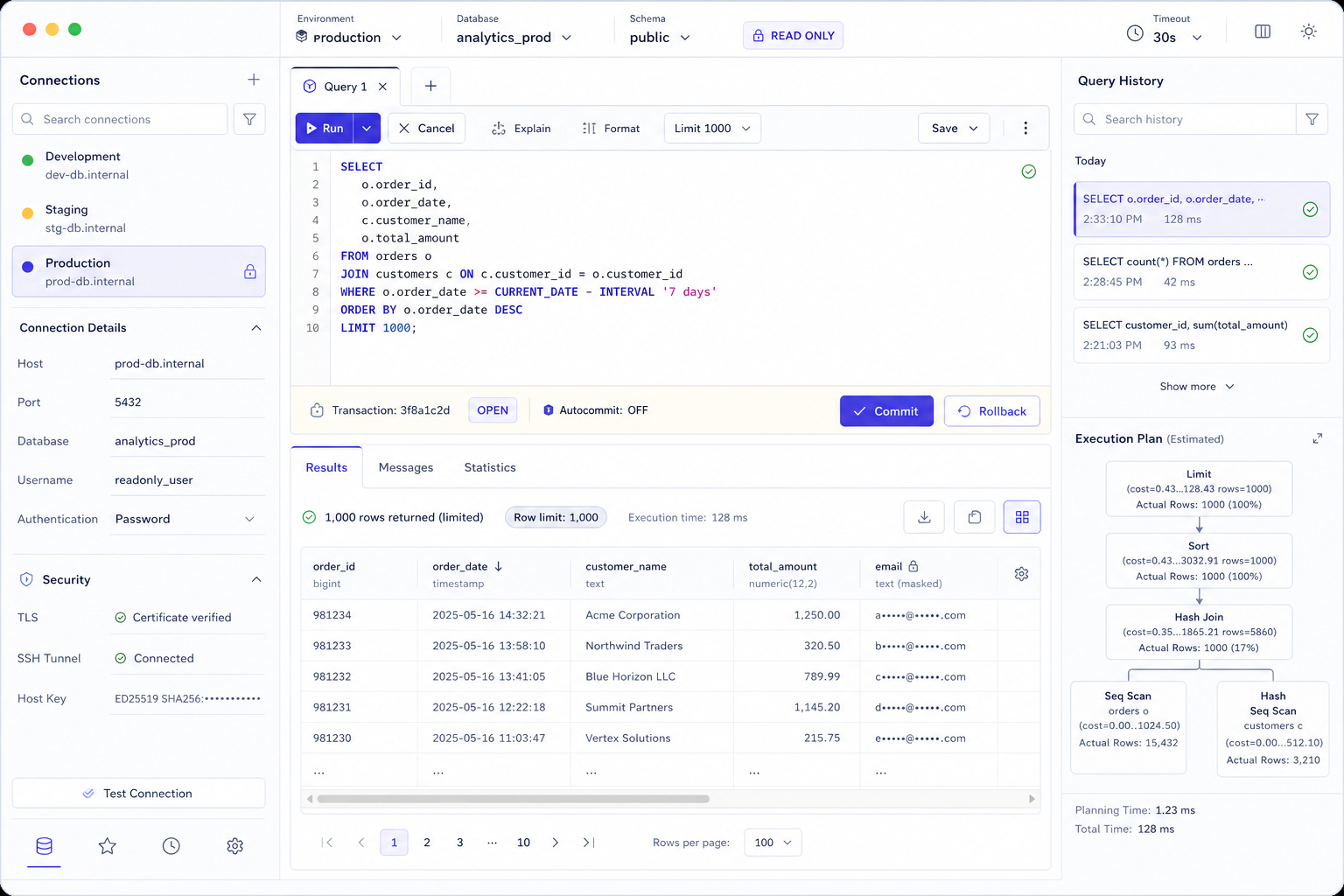
An SQL client is software that establishes a database connection and session, sends SQL statements or client commands, receives results and errors, and exposes enough context to control what happens next. It may be a command-line program, desktop application, IDE feature, browser-based service, notebook connector, or embedded library. Many SQL clients also include a query editor, database browser, result grid, export workflow, execution-plan viewer, and limited administration features.
A strong client does more than make a green connection indicator appear. It helps the operator verify destination, identity, driver, encryption, active database and schema, session settings, transaction state, exact statement, parameters, server response, row limits, elapsed time, and whether cancellation or rollback actually succeeded. These controls matter because the same valid SQL can be harmless in a disposable development database and expensive or destructive in production.
Separate the SQL client from its editor, browser, driver, and server
Search results often use “SQL client,” “database client,” “SQL editor,” and “database tool” interchangeably. Products may bundle every capability, but the concepts describe different control points. Clear boundaries make requirements testable and prevent teams from choosing a polished editor while overlooking connection security, transaction recovery, or driver compatibility.
| Component | Primary responsibility | Evidence it should expose | Typical failure |
|---|---|---|---|
| SQL client | Own connection, session, command exchange, results, and recovery | Destination, identity, transport, transaction, server messages | Connected to the wrong environment or left a transaction open |
| SQL editor | Author, format, navigate, analyze, and review statement text | Selection boundary, dialect, parameters, diagnostics, diff | Executed only a selection or silently substituted variables |
| Database browser | Discover objects, metadata, relationships, and samples | Introspection scope, freshness, fully qualified identity | Cached or filtered catalog appears complete |
| Driver or protocol library | Translate API calls, authentication, types, and wire protocol | Version, source, capabilities, properties, update status | Type conversion or TLS behavior differs after an update |
| Database server | Authorize, plan, execute, lock, commit, and persist | Authoritative privileges, logs, plans, transaction outcome | Client warning says read-only while server role can still write |
The same-batch SQL editor guide focuses on statement authoring, while the database browser focuses on catalog discovery. Open it as the SQL editor checklist. This guide follows the stateful path that begins before either surface opens and continues after a query returns.
Trace the complete path from interface to database engine
A connection label hides a chain of components. The interface collects settings; a credential provider supplies identity material; a driver or native library implements the protocol; DNS and network controls select a route; TLS authenticates and encrypts the endpoint; an optional SSH tunnel or proxy forwards traffic; the server authenticates the identity; and a session is created with defaults that can change query behavior. Hosted clients add a service boundary that may receive credentials, metadata, SQL, results, or logs.
Profile, active context, command, result controls.
Password, certificate, token, SSO, or secret provider.
Protocol, types, parameters, TLS properties.
DNS, firewall, private link, proxy, or tunnel.
Role, database, schema, timezone, isolation, limits.
Rows, messages, locks, commits, audit, and cost.
Document the path for every environment class. “Direct connection” is incomplete if it omits a bastion host, cloud proxy, VPN, service mesh, or vendor relay. “Local client” is incomplete if the product uploads connection telemetry or sends SQL to a hosted AI feature. Evaluate actual data flow, not deployment labels.
Choose a client form factor that matches the work and risk
There is no universally best SQL client. A command-line client can be reproducible and automation-friendly; a desktop client can integrate browsing, editing, plans, and export; an IDE client can keep application code and database context together; a hosted web client can centralize policy but introduces a service boundary; and a library can embed database access in an application while requiring the team to build its own safeguards.
| Form factor | Strong fit | Main trade-off | Evaluation proof |
|---|---|---|---|
| Command line | Runbooks, automation, remote shells, incident response | Context and destructive actions may be less visually obvious | Exit codes, secure history, noninteractive auth, output formats |
| Desktop application | Exploration, ad hoc analysis, cross-engine work | Local credential, cache, plugin, and update footprint | Storage locations, signing, updates, export and plugin controls |
| IDE integration | Application development and schema-aware code changes | Database access inherits a broad development environment | Project sharing rules, data-source secrets, driver isolation |
| Hosted web client | Centralized access, browser-only teams, controlled workspaces | Provider may process sensitive connection context and results | Architecture, region, isolation, retention, audit, deletion |
| Driver or embedded library | Applications, services, notebooks, custom tools | Team must implement context, safety, pooling, and observability | API semantics, pooling defaults, cancellation, retry behavior |
Use at least two clients in critical operations: a human-friendly interface for investigation and an approved command-line path for reproducible runbooks and recovery. Do not assume identical behavior. Parameter syntax, statement splitting, output encoding, autocommit defaults, timeout semantics, and driver versions may differ.
Build a connection profile that makes context auditable
A reusable profile should contain configuration, not unexplained secrets. Give it a human-readable name that includes environment and purpose, then record the engine, supported driver version, endpoint, port, database or service, authentication method, network path, TLS verification mode, default schema, session initialization, timeouts, and permitted actions. Mark which fields come from policy, discovery, user input, or a secret provider.
| Field | Question to answer | Unsafe shortcut | Preferred evidence |
|---|---|---|---|
| Name and color | Can a person distinguish production at a glance? | “db1” and “db2” with identical styling | Environment, system, region, role, purpose |
| Endpoint | What name is verified and where does it resolve? | Unexplained IP address copied from chat | Approved service name and inventory record |
| Identity | Who or what is accountable for activity? | Shared administrator username | Individual or workload identity with owner and expiry |
| Transport | Is encryption enabled and the endpoint authenticated? | Encryption without hostname or certificate verification | Verified TLS policy and certificate chain |
| Session defaults | Which database, schema, timezone, role, and limits apply? | Relying on hidden client or server defaults | Visible bootstrap SQL plus a post-connect verification query |
DBeaver’s official connection documentation shows why profiles extend beyond host and password: connection type, security restrictions, object filters, auto-commit, transaction isolation, default database and schema, keep-alive, idle timeout, and bootstrap queries can all affect behavior. Treat the exported profile as sensitive even when passwords are excluded, because hostnames, usernames, schema names, and network structure can still be confidential.
Treat “test connection” as the beginning, not the proof
A successful test usually proves that some route, credential, and protocol exchange worked at one moment. It may not prove the expected database was selected, certificate hostname was verified, least-privilege role is active, session initialization succeeded, schemas are visible, timeouts are enforced, or queries can be cancelled. Convert the green indicator into a short verification record.
Record the approved hostname and resolved endpoint; do not normalize unexplained redirects.
Confirm encryption, certificate chain, hostname verification, and tunnel destination.
Query current user, role, database, schema, server version, timezone, and read-only state.
Prove allowed reads and denied writes using a controlled non-production fixture where necessary.
Test timeout, cancellation, rollback, reconnect, and stale-session indicators.
Store timestamps, client and driver versions, checks, failures, and owner.
When troubleshooting, separate DNS, TCP reachability, TLS negotiation, proxy or SSH forwarding, server authentication, database authorization, session initialization, and query execution. A generic “connection failed” message is not a diagnosis. DataGrip’s official connectivity troubleshooting guide similarly separates network reachability, ports, SSL, SSH, authentication, and driver-related checks.
Verify both encryption and endpoint identity
Encrypted traffic is not sufficient if the client accepts an untrusted certificate, skips hostname verification, silently falls back to an unencrypted mode, or terminates TLS at an unexpected proxy. The connection profile should state whether TLS is disabled, preferred, required, certificate-authority verified, or fully verified against the hostname. Production policy should normally require authentication of the endpoint, not merely encryption of bytes.
| Control | Question | Evidence | Failure signal |
|---|---|---|---|
| Encryption requirement | Can the driver downgrade or connect without TLS? | Explicit require or verify mode plus failed negative test | Connection succeeds after TLS is removed |
| Trust chain | Which certificate authority is trusted? | Approved CA bundle and certificate path | “Trust all” or an unexplained local certificate |
| Hostname verification | Does certificate identity match the configured service name? | Full verification and a mismatch test that fails | IP or alternate name connects without warning |
| Client certificate | Is mutual TLS required and how is the key protected? | Certificate owner, expiry, key store, rotation test | Exportable private key copied into project files |
| Termination point | Where does TLS end and what protects the next hop? | Documented proxy path and encryption on every required segment | Client verifies proxy while backend identity is unknown |
PostgreSQL’s official libpq SSL documentation distinguishes encryption from verification and explains how modes such as verify-ca and verify-full change trust checks. DataGrip’s SSH and SSL guide likewise describes full verification of certificate chain and host identity. Use the terminology of the actual driver; labels that sound similar can have different defaults.
Make tunnels, proxies, and private routes visible
An SSH tunnel can protect and route traffic through a bastion, but it does not replace database authentication or automatically verify the final database endpoint. A cloud database proxy can centralize authentication and pooling, but it changes failure modes and observability. A VPN or private endpoint restricts reachability, but it does not prove that the SQL session uses least privilege. Treat every hop as a separate trust and availability boundary.
Record bastion hostname, host-key verification method, user identity, authentication agent, local bind address, forwarded destination, and lifetime.
Document whether it terminates TLS, changes identity, pools sessions, rewrites errors, limits features, or exposes a regional endpoint.
Verify DNS split-horizon behavior, route ownership, firewall scope, egress controls, and whether fallback public paths exist.
Bind forwarded ports to loopback where appropriate, avoid predictable shared ports, and close tunnels when the session ends.
The client should show whether the database connection is direct or forwarded, the actual endpoint presented to the driver, tunnel health, reconnect behavior, and whether a stale tunnel can be reused. During incident response, these details distinguish a database outage from an expired bastion credential, DNS change, proxy limit, or dropped tunnel.
Keep credentials short-lived, attributable, and revocable
The most convenient credential is often the hardest to govern: a shared password saved indefinitely inside a client profile. Prefer individual or workload identities, single sign-on, short-lived tokens, client certificates with managed rotation, operating-system keychains, or approved secret providers. The database should record an accountable identity, and the organization should be able to revoke access without editing every workstation.
| Question | Acceptable evidence | Red flag |
|---|---|---|
| Where is the secret stored? | Named keychain, hardware-backed store, or audited secret provider | Plaintext project file, clipboard manager, shell history, screenshot |
| Who can retrieve it? | Scoped operating-system identity and explicit access policy | Any local user, plugin, project collaborator, or backup reader |
| When does it expire? | Short lifetime with tested refresh and graceful reauthentication | No owner, issue date, expiry, or rotation event |
| Can it be exported? | Secrets excluded or separately encrypted with explicit confirmation | Connection export silently includes passwords or private keys |
| Can it be revoked? | Central revocation, active-session termination, audit correlation | Password change is the only control for a shared account |
Test profile duplication, export, synchronization, cloud backup, crash reports, logs, and plugin access. “Encrypted at rest” is incomplete without the encryption key boundary and unlock behavior. Also inspect SQL history: statements can contain access tokens, literals, email addresses, customer identifiers, or temporary tables that are as sensitive as the connection password.
Enforce read-only behavior at the server boundary
A red production banner, confirmation dialog, disabled toolbar button, or “read-only” client property can reduce mistakes, but it is not the security boundary. The database role and platform policy must deny unauthorized writes, DDL, privilege changes, unsafe routines, external access, and other capabilities. Client safeguards are defense in depth and should make the server-enforced policy visible.
| Layer | Control | What it cannot prove alone |
|---|---|---|
| Database identity | Least-privilege grants, read-only role, restricted routines | That network, device, export, and result handling are safe |
| Session policy | Read-only transaction, timeouts, resource group, query tag | That initialization succeeded on every reconnect |
| Client profile | Block edits, DDL, imports, scripts, or connection sharing | That another client or direct API cannot write |
| User interface | Environment color, prominent identity, confirmations | That the label matches effective server privileges |
| Workflow | Peer review, change ticket, temporary elevation, audit | That every execution path follows the workflow |
Create separate profiles for exploration and controlled change. The exploration profile should use a read-only identity, strict time and row limits, masked data where possible, and no credential path to an administrative role. If a write is required, use a time-bounded identity, explicit transaction plan, peer-reviewed statement, rollback evidence, and a new session so the elevated state cannot leak into later work.
Design unmistakable boundaries between development and production
Human error often begins with a context switch that was invisible or incomplete: a tab retained SQL while its connection changed, an imported profile used a production endpoint, a VPN altered DNS resolution, or a reconnect restored a different default schema. Environment separation should combine visual distinction, technical denial, explicit revalidation, and workflow controls.
Put PRODUCTION, region, system, and role in the profile, tab, result, and exported evidence.
Apply color to the whole execution context, not only a small tree icon hidden by another panel.
Use different accounts, credential providers, and permission paths for each environment.
Require different access paths or explicit gates for production rather than relying on a profile dropdown.
Show effective user, database, schema, transaction state, and session settings after every reconnect or profile change.
Do not silently move an editor, history item, or parameter set from development to production.
Try the query on an sql playground before you point a client at production. A playground uses sample data and a reset; a client uses a live connection.
Run a wrong-environment exercise during evaluation. Open similar schemas in development and production, change the active connection, reconnect after a timeout, duplicate a tab, restore a workspace, and execute only a harmless identity query. Observe whether the client continuously communicates the destination or allows ambiguity.
Govern drivers as executable dependencies
Drivers parse connection properties, load certificates, implement authentication, encode values, translate data types, split or prepare statements, process protocol messages, and sometimes download native components. An automatic driver update can fix vulnerabilities but also change defaults, type mappings, TLS behavior, or server compatibility. A client that supports many engines may maintain dozens of independent dependency chains.
| Governance area | Required record | Verification |
|---|---|---|
| Source and integrity | Publisher, repository, signature or checksum, license | Reproduce download and verify artifact before installation |
| Compatibility | Client, driver, runtime, server versions, supported matrix | Run connection, type, transaction, cancellation, and TLS tests |
| Configuration | Nondefault properties and rationale | Export effective properties without secrets and compare baselines |
| Update | Owner, cadence, security notices, staged rollout, rollback | Test in non-production, preserve prior artifact, review differences |
| Removal | Unused drivers, caches, native libraries, profile references | Confirm files, processes, scheduled updates, and secrets are gone |
Record the client and driver version with query evidence and bug reports. “Works in the client” is not reproducible if the driver is unknown. When comparing clients, align driver versions or document the difference; otherwise a type or TLS discrepancy may be incorrectly attributed to the interface.
Display the effective session, not only the saved profile
A saved profile describes intent; the server session describes reality. Login triggers, role inheritance, proxy behavior, connection-pool reuse, initialization failures, server defaults, failover, or user commands can change database, schema, role, timezone, locale, isolation level, read-only state, and resource limits. The SQL client should expose effective values after connection and highlight changes during the session.
| Context | Why it changes meaning | Verification |
|---|---|---|
| Current identity and role | Effective privileges may differ from login name | Engine-specific identity and role query |
| Database, catalog, schema | Unqualified identifiers can resolve to different objects | Display active namespace and search path |
| Timezone and locale | Timestamps, dates, numbers, sorting, and parsing can differ | Query server values and compare client rendering |
| Transaction mode | Autocommit, isolation, and read-only state alter outcomes | Visible transaction badge plus server confirmation |
| Limits and tags | Timeout, workload group, warehouse, and query tag affect cost and audit | Run a safe limit test and inspect server-side activity |
DataGrip’s official connection model distinguishes a saved data source from sessions and the clients attached to those sessions. That distinction is operationally useful: closing an editor does not necessarily prove a session ended, and reconnecting does not necessarily reproduce the previous state.
Make transaction state impossible to overlook
Transaction mistakes are often state mistakes rather than syntax mistakes. An operator may believe autocommit is enabled when a transaction is open, run a statement in a different session, close a tab while locks remain, commit unrelated statements together, or assume cancellation rolled back work. A trustworthy client keeps transaction ownership, boundaries, pending statements, savepoints, commit, rollback, and connection loss visible.
| Event | Client must answer | Safe operator action |
|---|---|---|
| First statement | Did a transaction begin and is autocommit active? | Confirm mode before any write or locking read |
| Additional statements | Are they in the same connection and transaction? | Review transaction log and affected rows as a unit |
| Error | Is the transaction usable, failed, partial, or rolled back? | Read server state; do not infer from one message |
| Cancellation | Was only the active statement stopped, and did the server acknowledge? | Verify statement and transaction status separately |
| Disconnect | Did the server close the session and roll back uncommitted work? | Confirm server session and business state after reconnect |
| Commit | Which statements and rows became durable? | Preserve exact transaction evidence and verify outcome |
DBeaver documents a pending transactions view for inspecting open transactions and committing or rolling them back. Regardless of product, test with two sessions: hold a safe lock in one, observe it from another, cancel a statement, close the editor, disconnect, reconnect, and verify the actual server-side outcome.
Show exactly what will execute before sending it
The text visible in an editor is not always the payload sent to the server. The client may execute the current statement, selected text, entire script, a parsed batch, a prepared statement with parameters, a generated query from a grid, a client-side command, or multiple statements separated according to dialect-specific rules. Variables, templates, macros, and environment files can transform text before execution.
| Execution mode | Ambiguity to remove | Required preview |
|---|---|---|
| Current statement | How are delimiters, comments, procedural blocks, and cursor position parsed? | Highlighted exact range and target connection |
| Selection | Does partial syntax become a different valid command? | Selection markers that remain visible through confirmation |
| Script or batch | Stop-on-error, transaction grouping, client commands, includes | Statement count, order, policy, parameters, expected transaction |
| Prepared statement | Type, null, array, timestamp, and binary binding | Redacted parameter names, types, and provenance |
| Generated action | Grid edits, imports, DDL dialogs, visual builders | Generated SQL, affected scope, transaction plan, rollback |
For consequential operations, capture the final executable statement after substitution but redact secrets from evidence. Confirm destination, role, database, schema, transaction mode, parameters, row predicate, and expected affected count in one review surface. A confirmation that says only “Run query?” is too weak.
Bound query time, rows, cost, concurrency, and cancellation
A syntactically correct read can consume excessive CPU, memory, I/O, warehouse credits, locks, network bandwidth, and client memory. Safety requires multiple independent bounds. A visual row limit may only limit rendering after the server computes the full result; a client timeout may abandon the request without stopping server work; and a cancelled request may leave a transaction or temporary object behind.
| Guardrail | Client-side role | Server-side proof |
|---|---|---|
| Row bound | Inject or request a limit, paginate, stop rendering | Inspect final SQL, plan, returned and scanned rows |
| Statement timeout | Set timeout and report cancellation state | Session or workload timeout plus server activity check |
| Cost or bytes | Show estimate and require threshold confirmation | Warehouse, resource group, quota, budget, or platform policy |
| Concurrency | Limit parallel tabs and warn about shared sessions | Connection limit, queue, workload group, admission control |
| Cancellation | Send protocol cancellation and distinguish request from success | Server confirms query stopped, locks released, state known |
Test cancellation with a safe, intentionally slow non-production query. Measure time from clicking Cancel to server termination, observe UI state, confirm the connection remains trustworthy, and inspect whether a transaction stays open. Repeat after network interruption because a client that cannot reach the server may be unable to deliver cancellation.
Know what the result grid changed, omitted, or inferred
Result grids are renderers, not neutral truth windows. They may truncate strings, round decimals, shift timestamps into the local timezone, display null and empty text similarly, lazy-load binary values, limit rows, sample pages, infer editable keys, hide duplicate column names, or format JSON and arrays. Copy, export, chart, and grid-edit features can apply different conversions from the visible cells.
| Value class | Risk | Verification fixture |
|---|---|---|
| Decimal and large integer | Rounding, scientific notation, spreadsheet coercion | Boundary precision, negative values, leading zeros |
| Timestamp and interval | Timezone shift, daylight-saving ambiguity, lost precision | UTC, offset, no-zone, daylight boundary, microseconds |
| Null, empty, whitespace | Visually indistinguishable or changed during copy/export | Null, empty string, one space, tab, newline |
| Binary, JSON, array, spatial | Preview only, lossy rendering, invalid round trip | Empty and large values, nested structures, invalid encodings |
| Sensitive text | Masking only in UI but raw value leaks to copy or export | Compare grid, detail panel, clipboard, export, logs, cache |
Every result should disclose whether it is complete, limited, paginated, sampled, cached, or interrupted. Preserve server-reported column names and types, execution time, row count semantics, warnings, notices, and query identifier. If a business decision depends on an exported file, test a typed fixture end to end rather than trusting visual inspection.
Use plans as evidence with explicit assumptions
An SQL client may visualize estimated plans, actual plans, runtime statistics, locks, waits, server messages, and query history. These surfaces help explain behavior, but they can also hide essential detail. An estimated plan did not run the statement; an actual plan may execute it; plan nodes are engine-specific; cost units are not elapsed time; displayed rows may be estimated or measured; and parameter values, statistics, indexes, session settings, and cache state can change the plan.
State estimated versus executed, whether writes can occur, and which options collected runtime data.
Keep text, JSON, XML, or engine-native format alongside visualization for reproducibility.
Record engine version, schema, statistics time, indexes, parameters, settings, and query identifier.
Separate plan shape, estimates, actual work, wait time, client transfer, and rendering time.
The client clock should distinguish connection acquisition, queue time, server execution, network transfer, client fetch, and rendering where possible. “Query took 12 seconds” is ambiguous if ten seconds were spent downloading and formatting a large result after the server had finished.
Classify failures before retrying or reconnecting
Automatic retry can turn an uncertain outcome into duplicate work. If the network fails after a request reaches the server but before the client receives confirmation, the client may not know whether a statement executed or committed. Reconnecting creates a new session; it does not restore temporary tables, transaction state, session variables, locks, role changes, or prepared statements unless the system explicitly reconstructs them.
| Failure class | What is known | Before retry |
|---|---|---|
| Client parse or validation | Statement may not have been sent | Inspect exact payload and client logs |
| Server syntax or authorization | Server rejected a known statement | Correct cause; do not broaden privileges reflexively |
| Timeout with cancellation confirmed | Active statement stopped; transaction may still exist | Verify transaction, locks, partial effects, and server activity |
| Network loss or client crash | Outcome may be unknown | Use audit, idempotency key, business state, session inspection |
| Failover or proxy reset | New connection may reach a different server or role state | Revalidate identity, endpoint, database, schema, transaction assumptions |
A good client preserves the original error code, SQL state, server message, query identifier, timestamp, connection identity, and whether the error came from the client, driver, proxy, or database. Friendly explanations can be added, but they should not replace primary diagnostics. Redact secrets and sensitive literals before sharing logs.
Treat query history as sensitive operational evidence
History can accelerate repeated work and explain incidents, but it may also preserve customer identifiers, credentials accidentally pasted into literals, temporary access tokens, proprietary table names, predicates that reveal business logic, result previews, errors, and connection destinations. Determine whether history is stored in memory, local files, project settings, cloud sync, team workspaces, server logs, or telemetry.
| Control | Decision | Test |
|---|---|---|
| Capture scope | Final SQL, template, parameters, results, messages, plans, metadata | Run a synthetic sensitive fixture and search every store |
| Retention | Duration by environment, user, project, and evidence class | Advance time or inspect rotation and deletion behavior |
| Access | User, local administrator, project peer, vendor, plugin | Attempt access from each boundary and inspect permissions |
| Redaction | Credentials, tokens, literals, comments, identifiers, results | Compare visible UI, saved file, export, telemetry, crash report |
| Deletion | Individual item, connection, project, account, backup | Delete and verify indexes, sync replicas, caches, and recovery |
Audit records should distinguish who initiated the action, which client and driver sent it, what database identity executed it, which environment received it, and what outcome the server reported. Client history is useful supporting evidence but should not replace authoritative server and platform audit logs.
Govern result export as a new data product
Export crosses a boundary: controlled database rows become a file, clipboard payload, spreadsheet, chart, report, or shared link with different access, retention, lineage, and deletion properties. A read-only role limits database writes; it does not prevent extraction. The SQL client should make row scope, column scope, masking, file format, encoding, timezone, null representation, destination, and overwrite behavior explicit.
State whether export includes visible page, selected rows, fetched rows, or complete query result.
Define decimal, timestamp, null, binary, JSON, array, and Unicode representation.
Enforce masking, column denial, row policy, watermarking, and approval before data leaves.
Prefer approved encrypted storage; warn about temporary directories, sync folders, and shared desktops.
Record query identifier, source, filters, parameters, execution time, row count, owner, and classification.
Define sharing, retention, revocation, deletion, backup, and incident response.
Test formula injection and delimiter ambiguity before opening CSV output in spreadsheets. Verify encoding and line endings across operating systems. Large exports should be cancellable, resumable only when semantics are clear, and bounded so a desktop does not fail after the database has already performed expensive work.
Do not confuse a common interface with common SQL behavior
A multi-engine SQL client can make PostgreSQL, MySQL, SQL Server, Oracle, SQLite, warehouses, and lakehouse engines look similar. Their catalogs, quoting, parameter markers, transaction semantics, isolation, autocommit, DDL behavior, data types, null ordering, identifier case, stored routines, explain commands, cancellation, and authentication remain different. Generic abstractions improve navigation but can conceal unsupported or lossy mappings.
| Area | Cross-engine question | Fixture |
|---|---|---|
| Identifiers | How are case, reserved words, Unicode, and qualification handled? | Mixed case, spaces, reserved word, non-ASCII name |
| Parameters | Which markers, types, arrays, and expansion rules apply? | Null, timestamp, decimal, list, JSON, binary |
| Transactions | Which statements auto-commit or cannot roll back? | Safe DDL and DML in disposable schemas |
| Types | Are precision, timezone, arrays, JSON, spatial, and binary preserved? | Round-trip typed table and export comparison |
| Plans and cancellation | Does inspection execute, and can active work be stopped? | Estimated plan, safe runtime plan, slow query, network loss |
Keep a dialect-specific profile and test suite rather than one universal “SQL” profile. The client should associate every editor and history item with its dialect and target. If syntax completion changes after a connection switch, the interface should reveal that change before execution.
Share reviewed artifacts without sharing live authority
Teams need to share connection templates, SQL files, parameters, schema context, plans, results, and runbooks. They should not share administrator passwords, personal tokens, private keys, writable production sessions, or unexplained local state. Separate portable, reviewable artifacts from machine-specific secrets and runtime authority.
| Artifact | Safe sharing pattern | Review focus |
|---|---|---|
| Connection template | Nonsecret policy fields with placeholders and owner | Endpoint class, TLS, timeouts, role, initialization, export behavior |
| SQL file | Version control, dialect metadata, parameters separate from code | Intent, scope, predicates, idempotency, transaction, rollback |
| Runbook | Approved steps, identity query, checkpoints, stop conditions | Environment, owner, prerequisites, evidence, failure recovery |
| Plan or result | Redacted evidence with source query identifier and classification | Completeness, parameter context, freshness, sensitive fields |
| Workspace export | Documented manifest excluding secrets, caches, and private history | Hidden files, plugin settings, credentials, local paths, telemetry IDs |
A reviewed query should not become unreviewed merely because someone changes the active connection or parameter set. Bind approval evidence to content hash, dialect, target class, parameter schema, expected effect, and validity period. Require a new review when those material inputs change.
Use the SQL client as a controlled verification surface for NL2SQL
Natural-language-to-SQL can accelerate drafting, but the generated statement lacks trustworthy execution context unless the workflow supplies it. The SQL client can verify the target dialect, qualified objects, column types, parameters, session identity, read-only state, estimated plan, row limits, execution result, and server messages. It should not send production credentials, unrestricted catalog data, or sensitive result rows to an external model by default.
Define metric, grain, filters, time window, output, and exclusions.
Include only relevant qualified objects, types, keys, and approved semantics.
Use sanitized context and request explicit assumptions and dialect.
Verify objects, joins, predicates, aggregation, nulls, parameters, and boundary.
Use read-only identity, estimated plan, time and row limits, safe parameters.
Compare fixtures, reconcile counts, record query ID, outcome, and limitations.
Test generated SQL before it reaches a live client
Use the InfiniSynapse NL2SQL Query Tester with sanitized schema context to review generated structure and assumptions, then move only the approved statement into a read-only SQL client session.
Open NL2SQL Query Tester Use sanitized SQL and metadata. Never paste credentials, secrets, personal data, or unrestricted production samples.Score an SQL client with observable, weighted evidence
Feature counts reward breadth but not trustworthiness. Build a scorecard from real tasks, define nonnegotiable gates, weight criteria by risk, and require evidence. A client should fail regardless of total score if it cannot verify TLS identity, enforce least privilege, reveal transaction state, cancel safely, protect secrets, or control sensitive exports for the intended environment.
| Criterion | Weight | Evidence task | Gate? |
|---|---|---|---|
| Destination and context visibility | 12% | Switch, duplicate, reconnect, and restore similar environments | Yes |
| Authentication, TLS, SSH, secret handling | 18% | Run trust failures, rotation, export, and deletion tests | Yes |
| Least privilege and environment isolation | 15% | Prove allowed read and denied write at server boundary | Yes |
| Transactions and recovery | 15% | Test open, error, cancel, disconnect, rollback, commit | Yes |
| Execution limits and cancellation | 12% | Exercise slow query, row bound, timeout, network loss | Yes |
| Result fidelity and export governance | 12% | Round-trip typed and sensitive fixture through every export | Yes |
| Diagnostics, plans, history, audit | 8% | Correlate client evidence with server-side query and error IDs | No |
| Driver lifecycle and team operations | 8% | Install, update, roll back, share template, offboard user | No |
Score each criterion from 0 to 4: absent, claimed, demonstrated once, repeatably verified, or policy-enforced and monitored. Attach screenshots, logs, configuration exports without secrets, server audit records, fixture results, owners, versions, and dates. Re-evaluate after client, driver, authentication, proxy, server, or policy changes.
Use a repeatable twelve-step SQL client workflow
State the question, owner, deadline, grain, evidence threshold, and prohibited data.
Prefer a representative non-production source; justify production access.
Verify engine, driver, endpoint, TLS, network path, identity, and expiry.
Query user, role, database, schema, timezone, version, read-only and limits.
Confirm qualified objects, types, keys, freshness, permissions, and definitions.
Resolve variables, parameters, selection boundaries, dialect, and statement count.
Check joins, predicates, nulls, aggregation, writes, locks, cost, and data exposure.
Use read-only role, explicit transaction, timeout, row limit, resource group, and cancellation.
Use an estimated plan or nonexecuting validation where supported; label assumptions.
Start with a narrow fixture or sample, observe server activity, then expand deliberately.
Verify completeness, counts, types, warnings, transaction, locks, cost, and business invariants.
Store redacted evidence, commit or roll back explicitly, close sessions, remove temporary access, and document limits.
A checklist is valuable only when stop conditions are explicit. Stop if destination or identity is ambiguous, TLS verification fails, session initialization is incomplete, the final statement cannot be previewed, estimated impact exceeds the approved range, cancellation is unavailable, result completeness is unknown, or the outcome after failure cannot be established.
Recognize SQL client failure patterns before they become incidents
| Pattern | Why it fails | Better control |
|---|---|---|
| Green connection equals safe connection | Route may work while identity, TLS verification, context, or authority is wrong | Post-connect identity and policy verification |
| Client read-only flag as sole boundary | Another execution path or generated command can bypass UI intent | Server-enforced role plus client defense in depth |
| Cancel means rolled back | Cancellation and transaction outcome are independent | Verify query, transaction, locks, and business state separately |
| Visible rows equal complete result | Grid may limit, page, sample, cache, or truncate | Expose completeness and reconcile server counts |
| Reconnect restores the old session | Temporary state, transaction, role, variables, and locks may be gone or changed | Re-run verification and reconstruct only approved state |
| Shared workspace is harmless | Profiles, history, caches, plugins, and exports can leak sensitive context | Manifest-based export with secret and history exclusion |
Frequently asked questions about SQL clients
What is an SQL client?
It is software that establishes a database connection and session, sends SQL or client commands, receives results and errors, and manages context such as identity, database, schema, transactions, timeouts, and output.
Is an SQL client the same as an SQL editor?
No. The editor focuses on statement text. The client owns the connection path, driver, authentication, session, execution, results, transaction, and recovery. Many products combine both.
Can an SQL client be safely connected to production?
Yes, when production access is justified and protected by verified TLS, an approved network path, individual least-privilege identity, server-enforced read-only policy for exploration, visible environment context, strict limits, audited workflow, and tested cancellation and recovery.
What does a connection test prove?
Usually only that a route, credential, and protocol exchange worked at that moment. Follow it with live session identity, database, schema, role, TLS, privilege, timeout, and cancellation checks.
Should an SQL client save passwords?
Prefer short-lived credentials, single sign-on, approved secret providers, or operating-system keychains. If saving is unavoidable, verify encryption key boundaries, access, export, backup, rotation, revocation, and deletion.
Does clicking Cancel stop the database query?
Not necessarily. The client must deliver a cancellation request and the server must acknowledge it. Verify server activity, locks, transaction state, partial effects, and connection trust after cancellation.
Final SQL client readiness checklist
Environment, endpoint, database, schema, identity, role, driver, and session state remain continuously visible.
TLS encryption and endpoint identity are verified; tunnels, proxies, and private routes are documented.
Least privilege is enforced by the server, credentials are attributable and revocable, and production elevation is temporary.
Exact payload, parameters, destination, transaction, row and time limits, cost guardrails, and cancellation are reviewable.
Completeness, types, warnings, plans, errors, affected rows, transaction outcome, and server query identifier are preserved.
History, exports, drivers, caches, profiles, updates, offboarding, retention, and deletion are governed and tested.
An SQL client is trustworthy when it keeps authority, state, execution boundaries, and outcomes explainable under normal work and failure—not when it merely connects quickly or offers many panels. Evaluate with synthetic fixtures first, require server-side evidence for security claims, and preserve enough context that another reviewer can reproduce the conclusion.