Data Analysis App: Keep the Trail before You Install (2026)
By William Zhu & the InfiniSynapse Data Team · Published: 2026-09-02 · Last updated: 2026-09-03 · Last verified: 2026-09-03 · Next review: 2026-12-02 · Editorial standards · Corrections
Author credentials: William Zhu, Cofounder of InfiniSynapse. Public identity: GitHub @allwefantasy. Profile and review roles: editorial standards. This page is signed by a named person, not an anonymous editorial org. No personal LinkedIn is published. No third-party prize, media review, or independent endorsement is claimed.
Table of Contents
- TL;DR
- What a desktop data analysis app is
- Client framework: habit, latency, trail, boundary
- Browser vs data analysis app
- Landscape of desktop clients
- How to open the same question on the desktop
- Desk sample: first-party client protocol
- Scorecard: desktop client or false air-gap
- Failure modes
- Frequently Asked Questions
- Conclusion
TL;DR
Direct answer: A desktop data analysis app on Windows or macOS follows local work habits and cuts browser-tab latency. It is a client, not an air gap. Keep the same task trail the web console already shows. Isolation, credentials, resume, and quota still live on the runtime the app calls.
This page is not a bake-off of where to run a 200GB scan. Large-job hosting is a separate question; after one pointer, this cluster stays on the client form.
What you'll learn:
- A definition of data analysis app as a desktop client
- Four concerns: habit, latency, air-gap, audit
- When to stay in the browser
- Steps to replay one web question locally
- A first-party protocol you can replay, plus an 8 / 42 teaching sketch
- Failure modes: false air-gap, laptop-only trail, bundled keys
The hub on premise AI lists desktop as one form. This page is that form only.
What a desktop data analysis app is
Key Definition: A data analysis app on the desktop is a signed Windows or macOS client that starts the same long analysis task as the web console, against a local file or authorized LAN source, and reopens the same plan, SQL, and files. It is not automatically air-gapped, and it is not a second product with a second trail.
Public AI explainers such as Google Cloud’s overview of artificial intelligence treat the model as a component. A data analysis app is the window, folder, and menu the analyst already knows how to launch. The model path is a config, not the chrome.
What a data agent is does not change on the desktop. The agent still plans and writes files. The data analysis app is how a person who lives in Finder or Explorer starts that agent without waiting on a busy tab.
Self-service analytics still applies: the operator types a business question. The app is the form. It is not a new warehouse. Large scans still need a host that can finish; see analyze large datasets with AI for that hosting question, then return here. This page will not compete on “where to run 200GB.”
ISO programs such as ISO/IEC 27001 still inventory the laptop as an asset. A client that stores source passwords in the bundle fails that inventory on day one.
UK guidance on secure AI system development treats the system, not the window.
Independent published context (retrieved 2026-09-02). The three sources above did not run this fixture.
| Cited source | What it owns | What tonight still needs |
|---|---|---|
| Google Cloud AI overview | The model as a component | The window is not the model path |
| ISO/IEC 27001 | Laptop as an inventory asset | No source password in the bundle |
| NCSC secure AI development | The system, not the window | A snappy client can still stream prompts |
| RFC 4180 | CSV as a file format | Treat the file as a table first |
| NIST Cybersecurity Framework | Identify and protect on the endpoint | Signed updates are still a channel |
| UK NCSC zero-trust architecture | Laptop untrusted until proven | SSO, posture, and model path still need names |
That is still the work of a data analysis app review.
Client framework: habit, latency, trail, boundary
Score the client, not the plant.
| Concern | Browser console | Data analysis app | Air-gap runtime |
|---|---|---|---|
| Habit | Tab, SSO, shared link | Local folder, dock, menu bar | Room console |
| Latency | Tab + WAN to UI | Local UI process | Local to the plant |
| Air-gap | No | Not by default | Only if exits are physical |
| Audit | Shared task id | Must be the same id | Same id, offline |
Habit is a product requirement
Analysts keep folders. A data analysis app that cannot open a local CSV the way they already work will lose to a spreadsheet. Habit is why desktop exists. It is not a security control.
Latency is not isolation
NCSC secure AI development (table above) treats the system, not the window. A snappy data analysis app can still stream prompts. Fast is not private. Write the endpoint.
Browser vs data analysis app
| Need | Choose the browser | Choose a data analysis app |
|---|---|---|
| Shared review from any desk | Yes | Extra install |
| Local files every hour | Painful | Yes |
| Tab memory / latency | The complaint | The fix |
| Claimed air-gap | Neither, by itself | Neither, by itself |
Choose the browser if the id must be shared
If three reviewers open the same task, the browser console is enough. A data analysis app is optional. Do not force an install to look “enterprise.”
Choose a desktop app if the desk is local
If the source is a folder the analyst already owns, and the tab fights them, install the client. Keep the same runtime. SaaS data analytics can still be the proof. The app is the later client.
Landscape of desktop clients
CSV remains a file under RFC 4180 (table above). A data analysis app that loads a CSV should treat it as a table first, then compute. Do not let the model invent an unnamed frame and lose the trail.
| Client | Fits | Does not prove |
|---|---|---|
| Web console | Shared audit | Local habit |
| Data analysis app | Habit + latency | Air-gap |
| Notebook | Exploration | Shared task id |
| BI desktop | Pixels | Agent trail |
Local files are not an air gap
The file never left the laptop. The model might have. A data analysis app that calls a public endpoint has a local file and a public prompt. Private GPT is the air-gap page. This page is the client.
Signed updates are still a channel
The NIST Cybersecurity Framework (table above) still wants identify and protect on the endpoint. A data analysis app updates through a signed package or a store. That is an update channel. It is the opposite of an air gap. Say so in the review.
UK NCSC zero-trust architecture (table above) treats the laptop as untrusted until proven. The client does not inherit trust from “it is our .dmg.” SSO, device posture, and the model path still need names.
Treat the install like any other signed endpoint. Record version, publisher, and update channel. Lock the model URL the same way you lock a browser extension list.
When two people must review the same ask, pass the task id, not a laptop.
If the complaint is “we cannot host a 200GB job in a browser,” that is a hosting question, not this page.
The educational diagnosis still uses authorized, sanitized files.
How to open the same question on the desktop
- Input: The web-proven question and task id. Accept: You can reopen SQL. Reject: No isomorphic job.
- Input: One authorized local file or LAN source. Accept: Sanitized, named grain. Reject: A production dump on the laptop.
- Input: The same question in the data analysis app. Accept: Same grain, same named steps. Reject: A new chat with no id.
- Input: The model and key config. Accept: Written endpoint; no bundled warehouse password. Reject: “Desktop means private.”
- Input: Kill and resume. Accept: Same id. Reject: Restart from the dock icon.
- Input: A non-claim. Accept: “Not an air gap. Not a 200GB hosting page.” Reject: Slide that says both.
Desk sample: first-party client protocol
Cite this protocol. Do not cite 8 weekly CSVs, 42k rows, 88 edges, or the chart bars as a benchmark.
First-party method log (replayable):
| Field | Record |
|---|---|
| Operator | InfiniSynapse Data Team; William Zhu, GitHub @allwefantasy |
| First run | 2026-09-02 |
| Replay | 2026-09-03 |
| Input | Authorized, sanitized SKU folder; no people |
| Paths | Web console vs desktop client vs claimed air-gap |
| Steps | 4 (task id match, named SQL, written endpoint, no bundled key) |
| Acceptance | Same id as console; same named steps; endpoint written; OS store or vault |
| Fail | New chat with no id; laptop-only memo; “desktop means private”; key in the bundle |
Replay 2026-09-03. Quote this data analysis app protocol. Editorial standards.
Teaching sketch only: 8 weekly CSVs, 42k rows, 88 edges. That is not the measured object.
Score the same ask:
| Concern | Browser | Data analysis app | If someone claims air-gap |
|---|---|---|---|
| Habit | Weak | Strong | Irrelevant |
| Latency | Tab stall | Local UI | Irrelevant |
| Trail | Shared id | Must match | Must still match |
| Model exit | Known | Must be written | Usually still open |
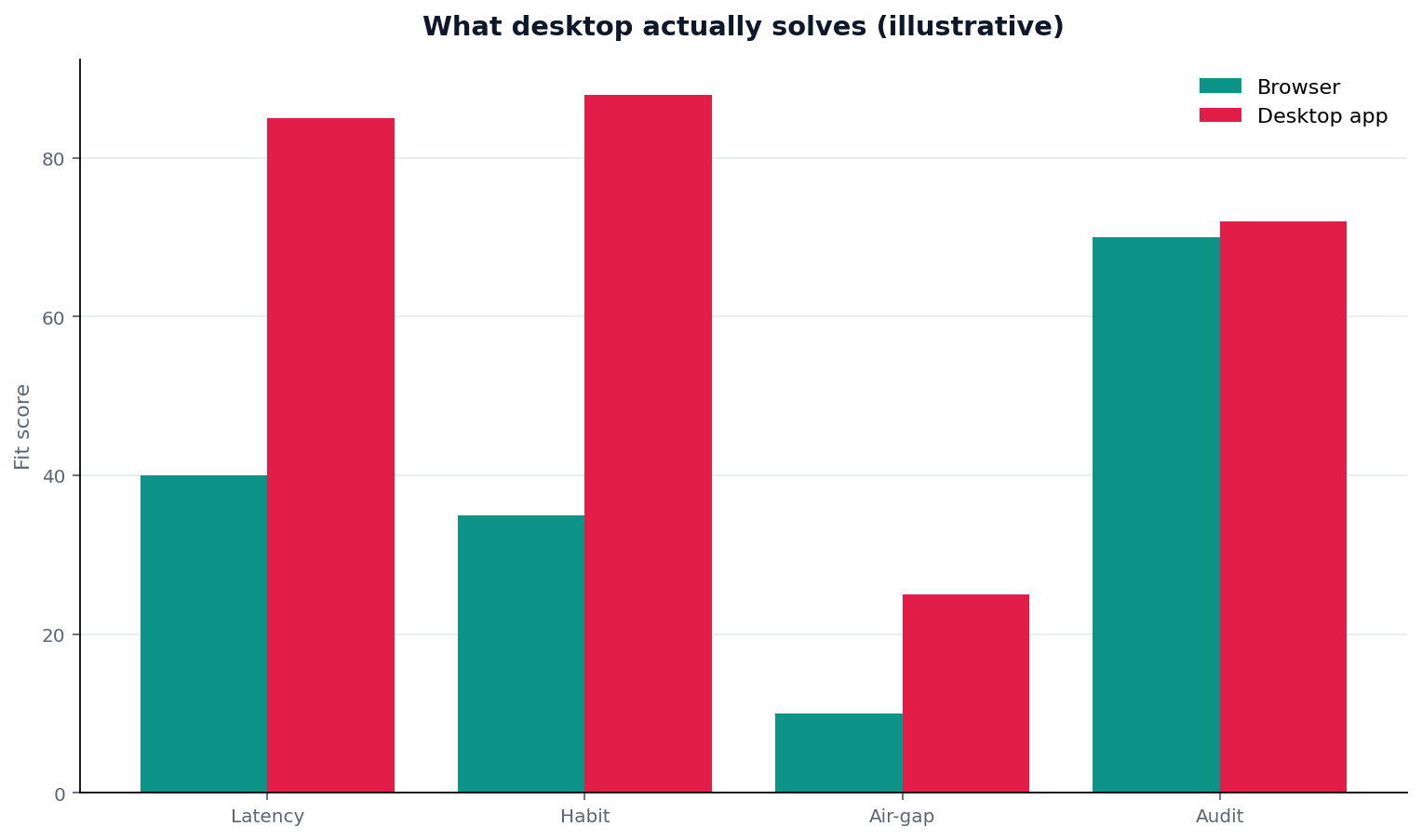
Figure. Teaching schematic. Not a measured study. Source: the protocol table above.
In this composite the data analysis app wins habit and latency. It does not win air-gap. The audit line is a pass only if the id matches the console. Quote the protocol, not the bars.
Scorecard: desktop client or false air-gap
| Signal | Ship the data analysis app | Stay in browser | Do not claim air-gap |
|---|---|---|---|
| Local folders daily | Yes | No | If you were about to |
| Shared review first | Later | Yes | — |
| Model path unknown | No | No | Correct |
| 200GB hosting debate | Out of scope | Out of scope | Out of scope |
Choose A when habit is the ticket. Choose B when the id is the ticket. Refuse the air-gap claim on this page.
Failure modes
Calling the .app an air gap
The install is local. The endpoint is not. A data analysis app is a client. Private GPT is the preload list. Mixing the two is how reviews fail.
A second trail that only exists on one laptop
The app writes a pretty memo. The console never saw the id. Support will pick the wrong story. A data analysis app must use the same runtime as the web proof.
Source keys in the app bundle
A connection string compiled into the client is a published secret. A data analysis app should use the OS store or a server vault. Lost laptops happen.
The hub on premise AI is the form ladder. SaaS data analytics remains the proof. Private GPT is the offline pack if you later cut the wire for real.
Open the desktop app on a local source
Connect a local authorized file or database and ask the same question you used on the web. This check uses only sources you authorize.
Commercial association: You do not need the workspace to complete the educational diagnosis on this page.
After you prove the same question on authorized data, Book a Demo if the job must live on hosts you operate.
Open InfiniSynapseHow this page is sourced. William Zhu is cofounder of InfiniSynapse, public as GitHub @allwefantasy. Company self-description, not independent authority. No third-party prize is claimed. No personal LinkedIn is published. Evaluation basis: We evaluate (hands-on) by running the same question on the desktop app and the web console against one local source. Protocol 2026-09-02, replayed 2026-09-03. Reviewed internally by analytics engineering · data platform · LLM security · editor. Editorial standards · corrections · publishing principles · About · Privacy · Terms. Contact zhuhl@infinisynapse.com. COI: InfiniSynapse sells an AI-native Data Agent; the banner is a commercial association. The educational diagnosis does not require it. Fact-check: Google Cloud AI overview · ISO/IEC 27001 · NCSC secure AI system development · RFC 4180 · NIST Cybersecurity Framework · NCSC zero-trust architecture. No external organization audited this page. This page is not third-party recognition.
Frequently Asked Questions
Is this automatically air-gapped?
Bottom line: No. A data analysis app is a desktop client. Air-gap is a physical cut plus preloaded tools and models.
Should we skip the web console if we have this?
Bottom line: No. Prove the job in the console. The data analysis app must show the same trail.
Does this replace a warehouse?
Bottom line: No. It is a client. Sources stay sources. It is not an ERP replacement.
Will this page tell us where to run a 200GB job?
Bottom line: No. That hosting question lives elsewhere. A data analysis app page stays on habit, latency, and the shared trail.
Do isolation and resume disappear on the desktop?
Bottom line: No. The runtime still needs credentials, resume, and quota. The data analysis app only starts the job.
What on this page is citable?
Bottom line: Cite the protocol table, the client-vs-air-gap frame, and the six-source comparison. Do not cite the chart bars or the 8 / 42k / 88 sketch as measured results.
Conclusion
A data analysis app on Windows or macOS is a client for habit and latency. It is not an air gap. It must share the task trail with the web console. Isolation and resume stay on the runtime. Do not bundle keys. Do not turn this page into a large-table bake-off.
If you later use the workspace, open InfiniSynapse only with authorized, sanitized inputs. After you prove the same question, Book a Demo if the desk needs a signed desktop client.