
PDF annotation meaning is a review layer, not a source editPDF 批注含义是审阅层,不是源文件修改
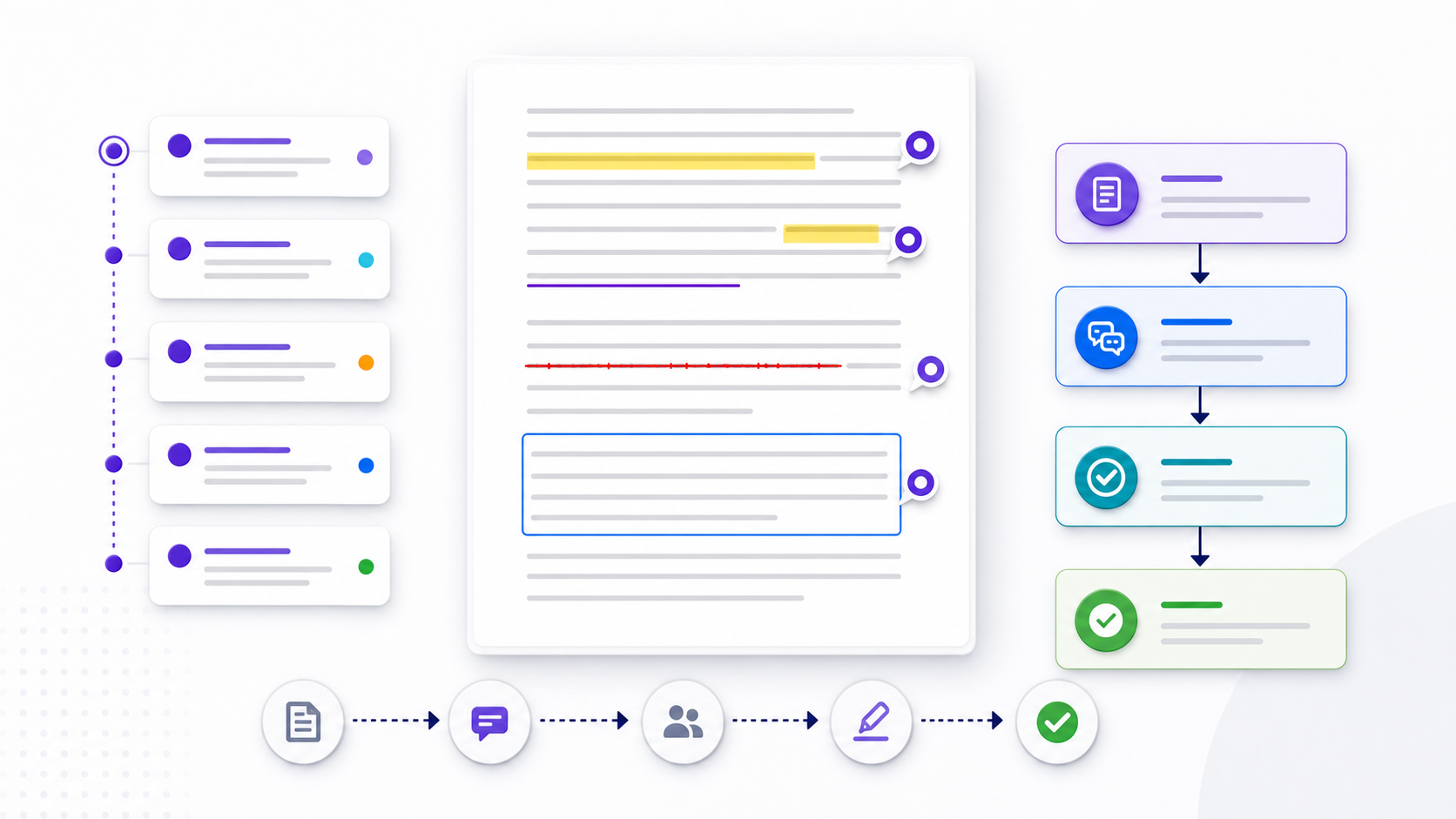
PDF annotation meaning is this: review objects around existing page content—highlights, notes, underlines, strikeouts, shapes, drawings, stamps, attachments, or replies. They normally leave the underlying text unchanged. PDF annotation names the same objects. That distinction matters. A highlight can flag a passage, but it does not approve its accuracy; a strikeout can propose deletion, but it does not remove the source sentence. A reliable workflow converts every meaningful mark into an owned decision. Redline-style marks are PDF markup redline. Linguistic annotation of corpora is a different field.
PDF 批注含义是:在现有页面内容周围添加审阅对象,例如高亮、便笺、下划线、删除线、图形、手绘、图章、附件或回复,通常不会改变底层正文。PDF Annotation 指的就是这些对象。这个区别很重要:高亮可以标记段落,却不等于确认内容准确;删除线可以建议删除,却不会真正移除源句。可靠流程必须把每个重要标记转化为有人负责的决定。红线类标记看 PDF markup redline。语料语言学标注是另一个领域。
Define the PDF annotation objective before opening the file打开文件前先定义 PDF Annotation 目标
Start with the decision the review must support. A copy edit, legal review, accessibility check, design proof, data validation, and final approval need different evidence and different annotation conventions. State the review scope, authoritative version, deadline, reviewer roles, prohibited data, and definition of done. Otherwise reviewers may mark the same symptom repeatedly while nobody owns the source correction.
先确定本轮审阅要支持什么决定。文字校对、法律审阅、无障碍检查、设计打样、数据验证和最终批准,需要不同证据与批注约定。应写明范围、权威版本、截止时间、审阅角色、禁止写入的数据以及完成标准,否则多人可能反复标同一症状,却没人负责修改源文件。
| Review objective审阅目标 | Useful evidence有效证据 | Completion signal完成信号 |
|---|---|---|
| Copy accuracy文字准确性 | Quote, proposed replacement, reason原文、替换建议、原因 | Source corrected and re-exported源文件已修订并重新导出 |
| Visual proof视觉校样 | Page, region, expected geometry页码、区域、预期几何关系 | Rendered output rechecked重新检查渲染结果 |
| Approval批准 | Decision, approver, conditions决定、批准人、条件 | All blockers closed所有阻断项已关闭 |
Choose the annotation type that matches the requested action按照请求动作选择批注类型
Use highlights for passages that need attention, underlines for emphasis or verification, strikeouts for proposed removal, insertion marks for missing copy, sticky notes for contextual explanation, shapes for layout regions, and freehand ink only when geometry is easier to show than describe. Stamps can communicate state, but a decorative “approved” mark should never replace an approval record with identity, time, scope, and conditions. How to place those marks is how to annotate a PDF. Comparing apps is compare annotation tools.
需要关注的段落用高亮,需要强调或核验的文字用下划线,建议删除用删除线,缺失文字用插入标记,背景说明用便笺,版式区域用图形;只有在几何位置比文字描述更清楚时才用手绘。图章可以表达状态,但装饰性的“已批准”不能替代包含身份、时间、范围和条件的批准记录。如何落笔看 how to annotate a PDF。比工具看 compare annotation tools。
- Observation: what is present and where.观察:哪里存在什么情况。
- Impact: why it matters to the audience or requirement.影响:为什么它会影响受众或要求。
- Action: the exact change or decision requested.动作:请求的准确修改或决定。
- Evidence: source, rule, example, or acceptance test.证据:来源、规则、示例或验收测试。
Anchor every PDF comment to a stable location让每条 PDF 评论都能稳定定位
Page numbers alone are fragile when a new export changes pagination. Include the section heading, a short non-sensitive quotation, table or figure label, and the page number of the reviewed version. For scanned pages, identify a region and nearby visible landmark. Record the file name, revision, checksum or release identifier outside the annotation thread so reviewers can prove which artifact they examined.
重新导出后页码可能变化,因此只写页码并不可靠。批注中还应包含章节标题、简短且不敏感的原文、表格或图片标签,以及被审版本的页码。扫描页应标明区域和附近可见定位点。还要在批注线程之外记录文件名、修订号、校验值或发布标识,以证明审阅的是哪个版本。
Write comments that another person can resolve without guessing让接手者无需猜测就能解决评论
“Fix this” is not actionable. A useful comment separates fact from preference, names the affected requirement, proposes a bounded action, and states how the reviewer will verify the result. If several changes share one cause, create one parent issue and link affected locations rather than duplicating contradictory instructions across pages.
“这里改一下”无法执行。有效评论应区分事实与偏好,指出受影响要求,给出边界明确的动作,并说明审阅者如何验证结果。如果多处问题来自同一原因,应建立一个主问题并关联各位置,而不是在不同页面复制可能互相冲突的指令。
Actionable:可执行: “On reviewed version R4, table 3 shows 14.2% while the approved source sheet shows 12.4%. Confirm the source row, correct the value in the editable master, re-export, and verify the table and summary use the same number.”“被审版本 R4 的表 3 显示 14.2%,批准的数据源表显示 12.4%。请确认来源行,在可编辑母版中修正,重新导出,并验证表格与摘要使用同一数值。”
Use a controlled PDF review workflow from intake to release从接收到发布使用受控 PDF 审阅流程
- Register the file, owner, version, purpose, and review deadline.登记文件、负责人、版本、目的和截止时间。
- Preserve an untouched review copy and restrict sensitive distribution.保留未改动审阅副本并限制敏感文件分发。
- Assign review lanes so copy, data, design, accessibility, and approval do not conflict.划分文字、数据、设计、无障碍和批准审阅通道,避免冲突。
- Annotate with the agreed vocabulary, severity, owner, and evidence.按统一术语、严重度、负责人和证据进行批注。
- Triage duplicates and contradictions before editing the source.修改源文件前先合并重复项并处理冲突。
- Apply accepted changes in the editable source, not only on the PDF surface.在可编辑源文件中实施已接受修改,而不只改 PDF 表面。
- Re-export and verify the corrected locations plus regression-sensitive areas.重新导出并验证修正位置以及容易回归的区域。
- Close comments with evidence, archive the decision record, and release a clean artifact.用证据关闭评论,归档决定记录并发布干净文件。
Prevent duplicate and conflicting comments in collaborative PDF review避免协作 PDF 审阅中的重复与冲突评论
Choose one authoritative review channel. Emailing separate annotated copies creates divergent threads and makes resolution evidence difficult to reconstruct. Define whether reviewers work sequentially or in parallel, who may resolve a comment, how disagreements escalate, and which status vocabulary is allowed: open, accepted, rejected with reason, deferred with owner, or verified.
应选择唯一权威审阅通道。通过邮件分发多个独立批注副本会产生分叉线程,难以重建解决证据。需明确审阅者是串行还是并行工作、谁可以解决评论、分歧如何升级,以及允许使用哪些状态:待处理、已接受、附理由拒绝、指定负责人延期、已验证。
Separate annotation severity from review priority区分批注严重度与处理优先级
Severity describes impact if the issue remains; priority describes when the team should act. A wrong regulatory statement may be severe even on a low-traffic appendix, while a minor headline typo may receive high priority because release is imminent. Define both fields in words rather than relying on color. A practical severity model distinguishes blocking defects, material defects that change meaning or usability, minor defects that do not alter meaning, and suggestions that need an explicit accept-or-decline decision.
严重度描述问题未修复时的影响,优先级描述团队何时处理。附录中错误的监管表述即使流量低也可能很严重;标题中的轻微拼写错误则可能因即将发布而获得高优先级。两者都应使用文字定义,不能只依赖颜色。实用模型可区分阻断缺陷、改变含义或可用性的重大缺陷、不改变含义的轻微缺陷,以及需要明确接受或拒绝的建议。
| Class类别 | Typical impact典型影响 | Disposition处理方式 |
|---|---|---|
| Blocker阻断 | Unsafe, unusable, materially false, or release criterion failed不安全、不可用、实质错误或未满足发布标准 | Fix and verify before release发布前修复并验证 |
| Material重大 | Meaning, evidence, navigation, or accessibility is impaired含义、证据、导航或无障碍受到影响 | Owner and due date required必须指定负责人和期限 |
| Minor轻微 | Polish or consistency issue with bounded impact影响有限的润色或一致性问题 | Batch or defer with reason批量处理或附理由延期 |
Annotate numbers, charts, and tables with source-level evidence用来源级证据批注数字、图表和表格
A visible number can be wrong because of the source value, filter, unit, date range, formula, rounding rule, label, or export. Circle the visible symptom, then cite the authoritative dataset, row, query, calculation, and expected formatting when permitted. Ask whether totals reconcile, denominators match the claim, percentages use the intended population, dates use the stated timezone, and chart encodings agree with labels. Do not “correct” a rendered value without confirming the generating source.
可见数字出错,原因可能是源值、筛选条件、单位、日期范围、公式、舍入规则、标签或导出。先圈出表面症状,再在权限允许时引用权威数据集、行、查询、计算方式和预期格式。检查总计能否核对、分母是否符合声明、百分比是否使用目标群体、日期是否采用声明时区、图表编码是否与标签一致。未确认生成来源前,不要只修改渲染结果。
For large tables, annotate one representative defect and state the affected range or rule. Review column headers, repeated headers after page breaks, merged cells, clipped digits, decimal alignment, negative signs, blank-value conventions, footnotes, and reading order. A screenshot can demonstrate appearance, but it cannot establish the lineage or correctness of the underlying value.
对于大型表格,可批注一个代表性缺陷,并写明受影响范围或规则。检查列标题、分页后的重复表头、合并单元格、数字裁切、小数点对齐、负号、空值约定、脚注和阅读顺序。截图可以证明外观,却不能证明底层数值的来源或正确性。
Review links and form controls as behavior, not decoration把链接和表单控件作为行为审阅,而不是装饰
A link may look correct while its target is outdated, redirected, inaccessible, or unsafe. Record the visible anchor, destination, expected audience, and observed status. For forms, test labels, required state, format validation, tab order, calculations, save-and-reopen behavior, submission destination, reset behavior, and error messages. Never enter production credentials or real sensitive records into an unapproved test PDF.
链接外观看似正确,其目标可能过期、重定向、无权限或不安全。应记录可见锚文本、目标地址、预期受众和实际状态。表单需测试标签、必填状态、格式验证、Tab 顺序、计算、保存后重开、提交目标、重置行为和错误提示。不要把生产凭据或真实敏感记录输入未经批准的测试 PDF。
When a comment asks to change a repeated URL or field rule, identify whether it is controlled by the source template, content system, PDF action, or post-processing step. Correcting one visible instance can leave every other occurrence defective. The resolution note should name the control point and the scope of regression testing.
当评论要求修改重复网址或字段规则时,要确认它由源模板、内容系统、PDF 动作还是后处理步骤控制。只修一个可见实例可能让其他位置继续出错。解决说明应写明控制点和回归测试范围。
Recognize common PDF annotation failure patterns识别常见 PDF Annotation 失败模式
- Orphaned mark: a highlight has no explanation, owner, or requested action.孤立标记:高亮没有解释、负责人或请求动作。
- Version drift: reviewers comment on different exports with the same file name.版本漂移:审阅者对同名但不同导出版本发表评论。
- Surface-only fix: the PDF is patched while the editable source remains wrong.只修表面:PDF 被临时修补,可编辑源文件仍错误。
- Premature resolution: a comment is closed when work starts rather than after verification.过早解决:开始修改就关闭评论,而不是验证后关闭。
- Color-only meaning: severity or decision exists only in a highlight color.只靠颜色:严重度或决定只存在于高亮颜色中。
- Unsafe distribution: internal comments, identities, attachments, or hidden data reach an external recipient.不安全分发:内部评论、身份、附件或隐藏数据传给外部收件人。
- Viewer assumption: the team tests one application but recipients use another.阅读器假设:团队只测试一个应用,而收件人使用另一个。
Keep enough evidence to reproduce every important review decision保留足够证据以复现每个重要审阅决定
For material issues, preserve the reviewed artifact identifier, annotation ID or location, reporter, timestamp, requirement or source, accepted disposition, implementer, corrected artifact identifier, verifier, and verification result. Record uncertainty rather than converting it into false confidence. If a comment is rejected, explain why and cite the controlling evidence; silent deletion destroys accountability.
重大问题应保留被审文件标识、批注 ID 或位置、报告人、时间、要求或来源、接受的处理决定、实施者、修正文件标识、验证者和验证结果。应记录不确定性,而不是把它包装成虚假的确定结论。如果评论被拒绝,要说明原因并引用控制证据;直接无声删除会破坏责任链。
The record should be proportionate. A low-risk spelling correction may need only a clear comment and verification, while a financial, clinical, legal, or security-sensitive statement may require independent source review and formal approval. This guide provides workflow guidance, not legal or compliance advice.
记录粒度应与风险相称。低风险拼写修正可能只需清晰评论和验证;涉及财务、医疗、法律或安全的声明,可能需要独立来源复核和正式批准。本指南提供流程方法,不构成法律或合规意见。
Annotate scanned PDFs only after checking the text layer批注扫描 PDF 前先检查文本层
A scanned PDF may be only page images. Highlighting can fail, attach to the wrong characters, or become impossible to search. Check whether text selection and search work, then evaluate OCR quality on names, numbers, punctuation, tables, columns, and rotated text. Keep the original image evidence. If OCR is added, record the tool, language, settings, and review limitations because recognized text can be wrong even when the page looks correct.
扫描 PDF 可能只有页面图像。高亮可能失效、绑定到错误字符,或者无法搜索。先检查能否选择和搜索文字,再抽查 OCR 对姓名、数字、标点、表格、分栏和旋转文字的识别质量,并保留原始图像证据。如果添加 OCR,要记录工具、语言、设置与审阅限制,因为页面看起来正确时识别文本仍可能错误。
Make PDF annotations understandable beyond color and position让 PDF 批注不依赖颜色和位置也能理解
Do not encode priority only as red, yellow, or green. Add meaningful comment text and status. Test keyboard access, focus order, zoom, high contrast, and whether assistive technology announces the annotation and its anchor in a useful sequence. A visually obvious sticky note may be disconnected from reading order. Accessibility conformance depends on the document, viewer, annotation implementation, and testing—not on the presence of tags alone.
不要只用红、黄、绿表达优先级,还应写出有意义的评论文字和状态。测试键盘访问、焦点顺序、缩放、高对比度,以及辅助技术能否按有用顺序读出批注和锚点。视觉上明显的便笺可能与阅读顺序断开。无障碍符合性取决于文档、阅读器、批注实现和实际测试,而不只是存在标签。
Use the W3C WCAG 2.2 quick reference参考 W3C WCAG 2.2 快速指南 to frame perceivable, operable, understandable, and robust review checks.建立可感知、可操作、可理解与稳健的审阅检查。
Treat PDF comment text, identity, and metadata as shared data把 PDF 评论文字、身份和元数据视为共享数据
Annotations can expose author names, initials, timestamps, internal URLs, file paths, attachments, hidden replies, and sensitive reasoning. Do not paste credentials, private customer data, or unnecessary personal information into comments. Before external release, inspect the comments pane, attachments, document properties, hidden layers, form values, and embedded files. Redaction is a separate operation; drawing a black rectangle over text is not reliable removal.
批注可能暴露作者姓名、缩写、时间戳、内部网址、文件路径、附件、隐藏回复和敏感推理。不要把凭据、客户隐私数据或不必要的个人信息写入评论。外发前应检查评论面板、附件、文档属性、隐藏图层、表单值和嵌入文件。遮盖属于独立操作,仅在文字上画黑框并不能可靠删除信息。
Test whether PDF annotations survive the actual sharing path测试 PDF 批注能否经受真实分享路径
Annotation support varies across desktop viewers, browser viewers, mobile apps, preview panes, print pipelines, and document-management systems. Test the actual route recipients use. Verify visibility, author and timestamp display, replies, status, print behavior, search, export, and reopening after save. If a workflow depends on a feature, record supported viewers instead of assuming universal behavior.
桌面阅读器、浏览器预览、移动应用、系统预览、打印流程和文档管理系统对批注的支持并不一致。应测试收件人实际使用的路径,验证可见性、作者与时间、回复、状态、打印、搜索、导出以及保存后重新打开。如果流程依赖某项功能,应记录受支持阅读器,而不是假设所有环境一致。
Decide when to preserve, export, or flatten PDF annotations决定何时保留、导出或扁平化 PDF 批注
Preserve live annotations while discussion is active because replies, status, ownership, and editability matter. Export an annotation summary when decisions must be tracked outside the viewer. Flatten only a controlled derivative when marks must render consistently and no longer be edited; retain the original annotated review file separately. Flattening can remove useful semantics and does not prove that sensitive underlying content was removed.
讨论进行中应保留活动批注,因为回复、状态、责任和可编辑性都很重要。需要在阅读器之外跟踪决定时,可导出批注摘要。只有当标记必须稳定呈现且不再编辑时,才对受控副本进行扁平化,并单独保留原始批注审阅文件。扁平化可能丢失有用语义,也不能证明敏感底层内容已被删除。
Verify the corrected output instead of trusting a resolved badge验证修正后的输出,不要只相信“已解决”标记
A resolved comment records workflow state, not product correctness. Compare the new PDF with the accepted decision and authoritative source. Check the targeted passage, nearby layout, cross-references, table of contents, page numbers, links, form behavior, tags, and any repeated value. Then sample unrelated pages to catch regressions introduced by reflow or export settings.
“已解决”只记录流程状态,不代表成品正确。应把新 PDF 与已接受决定和权威来源比较,检查目标段落、附近版式、交叉引用、目录、页码、链接、表单行为、标签和所有重复数值,再抽查无关页面,捕捉重排或导出设置造成的回归。
| Check检查 | Pass evidence通过证据 |
|---|---|
| Requested change请求修改 | Matches accepted wording or geometry符合已接受文字或几何要求 |
| Regression回归 | Adjacent and repeated content remains correct相邻和重复内容仍正确 |
| Portability兼容性 | Opens and renders in supported viewers在受支持阅读器中正常打开和呈现 |
| Release hygiene发布卫生 | No unintended comments, metadata, or attachments无意外评论、元数据或附件 |
Turn resolved PDF comments into a durable decision log把已解决 PDF 评论转成持久决定记录
The final PDF should not be the only place where important reasoning lives. Capture the issue, evidence, decision, owner, date, affected version, verification, and exceptions in a structured record. This makes recurring publications and templates easier to maintain and prevents the same debate from returning in the next cycle.
最终 PDF 不应是重要推理的唯一存放位置。应在结构化记录中保存问题、证据、决定、负责人、日期、受影响版本、验证结果和例外,便于维护周期性发布物和模板,并避免下一轮重复争论。
Create an editable review brief from structured annotation notes把结构化批注笔记生成可编辑审阅简报
When reviewers collect decisions in Markdown, convert the structured notes into an editable Word document for assignment, approval, or archive. Keep headings for severity and owner, tables for issue status, and links to the reviewed artifact. Conversion does not inspect or modify the PDF itself; it helps turn the surrounding review record into a document teams can refine.
如果审阅者用 Markdown 汇总决定,可以把结构化笔记转换为可编辑 Word 文档,用于分派、批准或归档。保留按严重度和负责人组织的标题、问题状态表格以及被审文件链接。转换不会检查或修改 PDF 本身,它只是帮助团队把外围审阅记录变成可继续完善的文档。
Convert your annotation decision log to Word把批注决定记录转换为 Word
Prepare sanitized Markdown with decisions, owners, evidence, and verification steps, then generate an editable document for the next workflow stage.准备已脱敏的 Markdown,写明决定、负责人、证据和验证步骤,再生成可编辑文档进入下一流程阶段。
Open Markdown to Word Tool打开 Markdown 转 Word 工具PDF annotation release checklistPDF Annotation 发布检查清单
- The reviewed file and revision are unambiguous.被审文件和修订版本清晰无歧义。
- Every blocking comment has an owner and evidence-backed disposition.每个阻断评论都有负责人和有证据的处理结果。
- Accepted changes were made in the authoritative source.已接受修改已落实到权威源文件。
- The re-exported PDF was visually and technically verified.重新导出的 PDF 已通过视觉与技术验证。
- Supported viewers preserve required annotation behavior.受支持阅读器能保留所需批注行为。
- Sensitive comments, metadata, attachments, and hidden content were reviewed.已检查敏感评论、元数据、附件和隐藏内容。
- A clean release file and separate review record are retained.已分别保留干净发布文件和审阅记录。
PDF annotation questionsPDF Annotation 常见问题
What is PDF annotation meaning?PDF 批注含义是什么?
PDF annotation meaning is page objects—highlights, notes, stamps—that usually do not change the source text. PDF annotation is that review layer. Accepted edits belong in the editable file, then a re-export.PDF 批注含义是页上的对象——高亮、便笺、图章——通常不改源文。PDF Annotation 就是这层审阅。已接受的修改应落到可编辑文件,再重新导出。
Is PDF annotation the same as linguistic annotation?PDF 批注等于语言学标注吗?
No. Linguistic annotation labels tokens or spans in a corpus. PDF annotation meaning here is review objects above a PDF page, not a linguistic tag set.不等于。语言学标注给语料里的词或跨度打标签。这里的 PDF 批注含义是 PDF 页上的审阅对象,不是语言学标签集。
Does annotating a PDF change the original text?批注 PDF 会改变原始文字吗?
Usually no. Annotation objects sit above or beside page content. Apply accepted corrections in the editable source and re-export when the published content must change.通常不会。批注对象位于页面内容之上或旁边。需要改变发布内容时,应在可编辑源文件中实施修改并重新导出。
Why do PDF comments disappear for another reviewer?为什么另一位审阅者看不到 PDF 评论?
The file may have been printed, flattened, exported without annotations, opened in a viewer with limited support, or replaced by another version. Test the actual sharing route.文件可能被打印、扁平化、导出时未包含批注、在支持有限的阅读器中打开,或被另一版本替换。应测试真实分享路径。
Should annotations remain in the final PDF?最终 PDF 应保留批注吗?
Only when the audience and purpose require them. Public or customer-facing releases usually need a clean artifact, while the annotated review copy and decision log are retained separately.只有受众和用途需要时才保留。公开或客户交付通常需要干净文件,批注审阅副本和决定记录应单独保存。
Can I annotate a scanned PDF?扫描 PDF 可以批注吗?
Yes, but text-based highlighting may require a reliable OCR layer. Validate recognition and use region-based notes when text anchors are unstable.可以,但文字高亮可能需要可靠 OCR 文本层。应验证识别结果;文字锚点不稳定时使用区域便笺。
Is flattening the same as redaction?扁平化等于遮盖删除吗?
No. Flattening changes annotation editability and rendering. Redaction must remove targeted content and be verified in the saved output.不等于。扁平化改变的是批注可编辑性和呈现方式;遮盖删除必须移除目标内容并在保存结果中验证。