
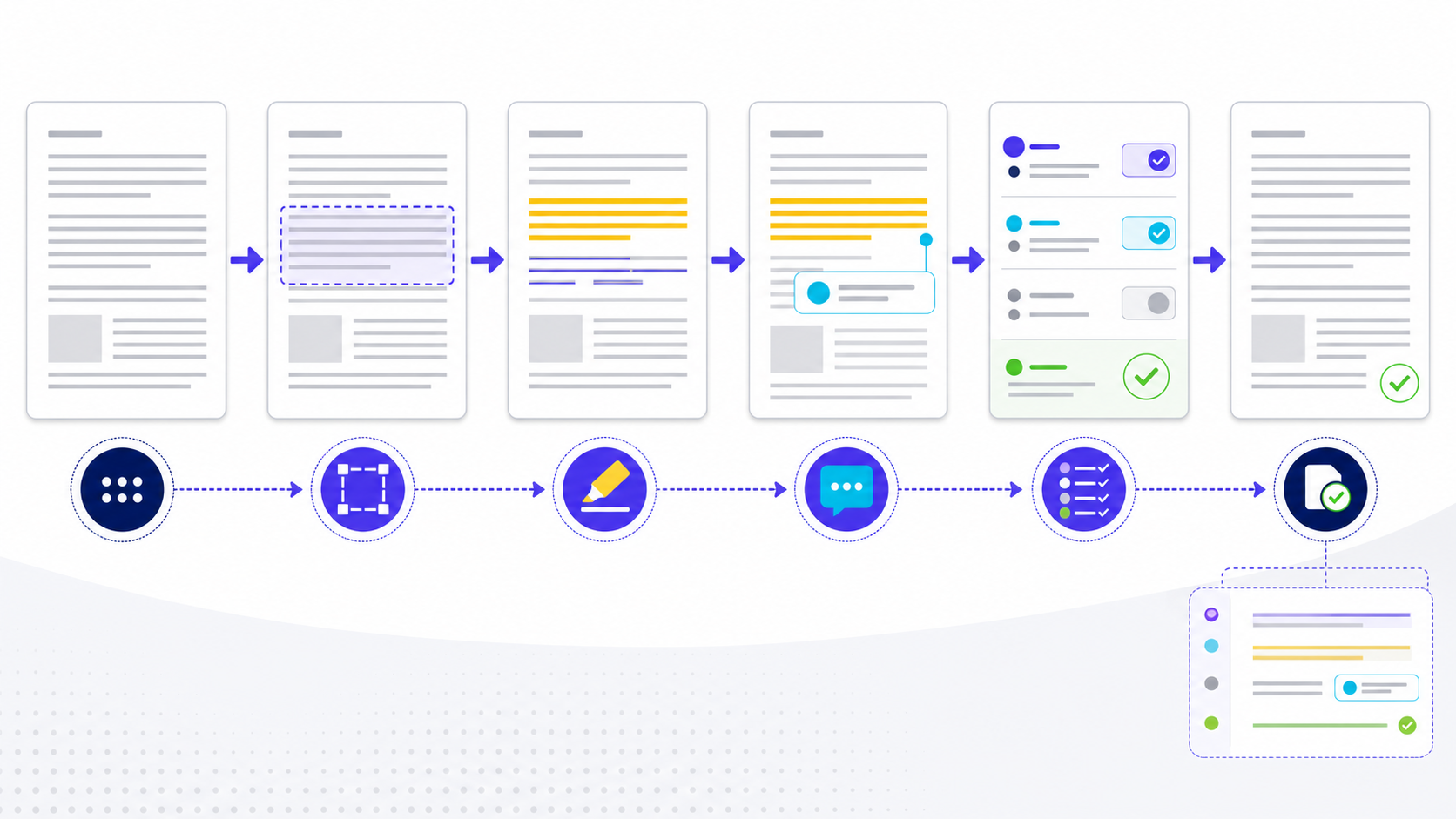
Quick answer: add comments, mark up the PDF, export clean快速答案:加评论、做标记、导出干净稿
To annotate a PDF, add comments and markups on one review copy: highlight or underline the passage, write the requested change in a note, and share that file for client review. When the review is done, export a clean PDF with annotations removed. The marks sit above the page; they do not rewrite the source text until you apply accepted edits and re-export. A highlight flags a passage but does not approve it; a strikeout proposes deletion but does not remove the sentence. Convert every meaningful mark into an owned decision. For the definition first, see pdf annotation meaning.
要批注 PDF,先在一份审阅副本上加评论和标记:高亮或下划线目标段落,在便笺里写清要改什么,再把同一文件发给客户审阅。审完后导出一份去掉批注的干净 PDF。标记叠在页面上方,不会改写源文,除非你把已接受的修改落实后再导出。高亮只是标出段落,不等于确认准确;删除线只是建议删除,不会真的去掉那一句。每个重要标记都要变成有人负责的决定。先看定义用 pdf annotation meaning。
How to annotate PDF files in six controlled steps如何用六个受控步骤 Annotate PDF
- Preserve and identify the source. Save an untouched copy and record the file name, revision, owner, purpose, and review deadline. Work on one authoritative review copy rather than emailing divergent files.保留并识别来源。 保存未改动副本,记录文件名、修订号、负责人、目的和审阅期限;在一个权威审阅副本上工作,不要通过邮件制造分叉文件。
- Select the smallest meaningful target. Anchor a mark to the exact phrase, table cell, image region, form control, or scanned-page area. Add a section label or short quotation when page numbers may move.选择最小有效目标。 把标记锚定到准确短语、表格单元格、图片区域、表单控件或扫描页区域;页码可能变化时添加章节标签或短引文。
- Apply the mark that communicates the action. Highlight attention, underline verification, strike out proposed removal, use an insertion mark for missing text, and use shapes for geometry. Do not use color as the only meaning.使用能表达动作的标记。 高亮表示关注,下划线表示核验,删除线表示建议移除,插入标记表示缺失文字,图形用于几何位置;不要只靠颜色表达含义。
- Add context. State the observation, impact, requested action, evidence, owner, and acceptance test. Avoid “fix this,” unexplained highlights, confidential data, credentials, or personal details.补充上下文。 写明观察、影响、请求动作、证据、负责人和验收测试;避免“改一下”、无解释高亮、机密数据、凭据或个人信息。
- Resolve through the editable source. Triage duplicates and conflicts, accept or reject with reasons, implement accepted changes in the source document, and keep the annotation open until a new export is checked.通过可编辑源文件解决。 合并重复项并处理冲突,附理由接受或拒绝,在源文档中实施已接受修改,并在检查新导出前保持批注开启。
- Verify and release. Reopen the file in supported viewers, inspect marks, replies, links, tags, forms, metadata, and regressions, then retain the annotated record separately from the clean release copy.验证并发布。 在受支持阅读器中重新打开,检查标记、回复、链接、标签、表单、元数据和回归,再把批注记录与干净发布副本分别保留。
Choose text markup, comments, drawing, or source editing deliberately有意识地选择文字标记、评论、绘图或源文件编辑
Text markup is precise when a reliable text layer exists. A sticky note carries reasoning that should not obscure the page. Shapes and drawings communicate spatial defects but need a written explanation. Editing the PDF surface can be useful for limited corrections, yet recurring or authoritative content should normally be corrected in its editable source and regenerated. If the page is scanned, verify OCR before relying on text anchors; otherwise attach a region comment to visible image content. Use the searchable pdf desk for that layer check.
存在可靠文本层时,文字标记定位最精确;便笺适合承载不应遮挡页面的推理;图形和手绘适合表达空间缺陷,但必须配文字解释。直接编辑 PDF 表面可用于有限修正,但周期性或权威内容通常应在可编辑源文件中修订并重新生成。页面为扫描件时,依赖文字锚点前先验证 OCR,否则应把区域评论绑定到可见图像内容。
Prepare the PDF before the first annotation添加第一条批注前先准备 PDF
Save an untouched reference copy, record the filename and revision, and confirm whether the file is a final proof, a draft, or a scanned record. Check permissions, page count, orientation, embedded fonts, links, and whether text can be selected. If the PDF is image-only, run OCR on a working copy and keep the original beside it. This prevents reviewers from attaching comments to an unstable derivative or mistaking OCR corrections for approved source changes.
先保存一份未经修改的参考副本,记录文件名和版本,并确认它属于终稿校样、草稿还是扫描记录。检查权限、页数、方向、嵌入字体、链接以及文字是否可选择。如果 PDF 只有图像层,应在工作副本上执行 OCR,同时保留原始文件。这样可以避免评审者把批注附着在不稳定的衍生文件上,也不会误把 OCR 修正当成已经批准的源文件修改。
Worked example: turn three PDF annotations into verifiable decisions实例:把三条 PDF 批注转化为可验证的决定
Consider a 24-page quarterly report reviewed by finance, legal, and design. The reviewer should not leave isolated marks such as a yellow highlight or “check this.” Each annotation needs a location, observed problem, requested action, owner, and acceptance evidence. The table below shows what a decision-ready annotation looks like before the corrected PDF is released.
假设财务、法务和设计团队正在审阅一份 24 页的季度报告。审阅者不应只留下黄色高亮或“检查一下”之类的孤立标记。每条批注都需要位置、观察到的问题、请求动作、负责人和验收证据。下表展示了修正版 PDF 发布前,能够支持决策的批注应包含什么。
| Finding发现 | Actionable annotation可执行批注 | Completion evidence完成证据 |
|---|---|---|
| Page 8 chart label conflicts with the approved workbook.第 8 页图表标签与已批准工作簿不一致。 | Replace “Q2” with “Q3”; owner: Finance; source: approved workbook cell B14.将“Q2”改为“Q3”;负责人:财务;依据:已批准工作簿 B14 单元格。 | Re-exported chart matches B14 and remains legible at 200% zoom.重新导出的图表与 B14 一致,并且在 200% 缩放下仍清晰可读。 |
| Page 11 claim has no supporting source.第 11 页陈述缺少支持来源。 | Add the approved citation or remove the claim; owner: Legal; due before release candidate 2.添加已批准引用或删除该陈述;负责人:法务;在候选版本 2 前完成。 | Citation opens to the cited evidence and the wording matches the source scope.引用可以打开到对应证据,且文字表述与来源范围一致。 |
| Page 17 callout overlaps a figure when printed.第 17 页标注框在打印时与图形重叠。 | Move the callout 12 mm below the figure; owner: Design; preserve reading order.将标注框下移 12 毫米;负责人:设计;保持正确阅读顺序。 | Screen and print-preview checks show no overlap at A4 and Letter sizes.在 A4 和 Letter 尺寸的屏幕与打印预览中均无重叠。 |
This format creates an auditable chain from observation to correction. Use real roles and approved evidence from the project; do not invent a source merely to close a comment.
这种格式可以建立从观察到修正的可审计链路。应使用项目中的真实角色和已批准证据,不能为了关闭批注而虚构来源。
Control PDF review rounds with one master file使用一个主文件控制 PDF 评审轮次
Name every review package with a stable document ID, revision, and round number. Collect comments in one designated master instead of emailing parallel copies, then define status labels such as open, accepted, rejected, duplicate, and needs evidence. Before starting the next round, publish a short disposition log that maps each material comment to its outcome. This protects the team from silent overwrites and makes it clear which file is authoritative when reviewers work asynchronously.
每个评审包都应包含稳定的文档编号、版本号和轮次。不要通过邮件并行发送多个副本,应把意见汇总到一个指定主文件,并统一使用“待处理、已接受、已拒绝、重复、需要证据”等状态。进入下一轮前发布简短的处理记录,把重要批注映射到具体结果。这样可以避免静默覆盖,并让异步协作的评审者始终知道哪个文件才是权威版本。
Annotate scanned PDFs without losing page coordinates批注扫描 PDF 时不要丢失页面坐标
OCR can make a scan searchable, but deskewing, cropping, page replacement, or recompression may move the visual target after comments are added. Complete structural cleanup first, then annotate the stabilized working copy. For critical findings, include page number, nearby visible wording, and a short description of the region instead of relying only on a highlight rectangle. Reopen the shared file in the recipient's viewer to confirm that the annotation still lands on the intended evidence.
OCR 可以让扫描件可搜索,但纠偏、裁剪、替换页面或重新压缩都可能在批注完成后改变视觉目标的位置。应先完成结构清理,再对稳定的工作副本添加批注。关键发现除了高亮框,还要写明页码、附近可见文字和区域描述。最后用接收方实际使用的阅读器重新打开共享文件,确认批注仍然落在预期证据上。
Choose editable comments, a summary export, or a flattened copy deliberately有意识地选择可编辑批注、汇总导出或扁平化副本
Keep live annotations when the recipient must reply, change status, filter reviewers, or inspect author and time metadata. Export a comment summary when decision makers need a compact register beside the PDF. Flatten only a release copy when appearance must be fixed and interactive comments are no longer required; never flatten the sole working file. State the chosen handoff format in the delivery note, because a PDF that looks correct can still omit replies, attachments, stamps, or hidden review history.
接收方需要回复、更新状态、筛选评审者或查看作者与时间信息时,应保留可编辑批注。决策者只需要紧凑问题清单时,可以导出批注汇总。只有在外观必须固定且不再需要交互批注时,才对发布副本进行扁平化,不能扁平化唯一的工作文件。交付说明中要明确文件类型,因为看起来正常的 PDF 仍可能遗漏回复、附件、图章或隐藏的评审历史。
Match the annotation method to the PDF type and review risk根据 PDF 类型和审阅风险选择批注方法
A method that works on a tagged, text-based PDF may fail on a scan, a protected file, or a digitally signed release. Classify the document before review so that missing comments or invalid signatures are discovered during preparation rather than after handoff.
适用于带标签文字型 PDF 的方法,可能不适用于扫描件、受保护文件或数字签名版本。应在审阅前判断文档类型,让评论丢失或签名失效等问题在准备阶段暴露,而不是在交付后才发现。
| PDF conditionPDF 状态 | Recommended approach推荐方法 | Required verification必须验证 |
|---|---|---|
| Text-based, tagged PDF文字型、带标签 PDF | Use text markup plus a written action and owner.使用文字标记,并写明动作与负责人。 | Confirm the selection remains attached after save and reopen.保存并重新打开后,确认选区仍与批注关联。 |
| Scanned or image-only PDF扫描或纯图片 PDF | Complete OCR first or use region comments with page landmarks.先完成 OCR,或使用包含页面地标的区域评论。 | Check OCR accuracy and annotation coordinates in the recipient viewer.在接收方阅读器中检查 OCR 准确性和批注坐标。 |
| Form or layered PDF表单或分层 PDF | Keep an untouched original and review a controlled working copy.保留未修改原件,并审阅受控工作副本。 | Test form values, layers, calculations, and comments after export.导出后测试表单值、图层、计算和评论。 |
| Password-protected or permission-restricted PDF密码保护或权限受限 PDF | Obtain authorized review access; never bypass document controls.获得授权审阅权限,不能绕过文档控制。 | Confirm allowed operations and remove secrets from shared evidence.确认允许的操作,并从共享证据中删除秘密信息。 |
| Digitally signed PDF数字签名 PDF | Annotate a review copy unless the signing policy explicitly permits changes.除非签名策略明确允许修改,否则应批注审阅副本。 | Validate signature status and document revision after annotation.批注后验证签名状态和文档修订信息。 |
Verify the corrected PDF against every accepted annotation根据每条已接受批注验证修正版 PDF
Do not treat a resolved badge as proof that the source was corrected. Compare the revised PDF with the accepted comment, the source evidence, and the previous release. Check page references again after repagination, inspect charts and links rather than only prose, and confirm that the fix did not create a new layout or accessibility defect. Close the review only when the output passes this evidence-based comparison and the final file name, checksum, or revision identifier is recorded.
“已解决”状态并不能证明源文件已经正确修改。应把修正版 PDF 与已接受批注、源证据和上一发布版本逐项比较。重新分页后再次核对页码引用,检查图表和链接而不只是正文,并确认修复没有产生新的版式或可访问性问题。只有完成这种基于证据的比对,并记录最终文件名、校验值或版本编号后,评审才能关闭。
Diagnose PDF annotation failures before closing the review关闭审阅前诊断 PDF 批注失败
A correct-looking file in one application is not sufficient evidence. Test the saved artifact through the same viewer, download route, and export settings the recipient will use. Keep the original and working copy separate while diagnosing a failure.
文件在一个应用中看起来正确,并不足以作为证据。应使用接收方实际采用的阅读器、下载路径和导出设置测试保存后的文件。诊断失败时,要将原件与工作副本分开保留。
| Symptom现象 | Likely cause可能原因 | Evidence-based fix基于证据的修复 |
|---|---|---|
| Comments disappear after sharing.分享后评论消失。 | The file was printed, flattened, or exported without comments.文件被打印、扁平化或导出时未包含评论。 | Re-export with comments enabled, then download and reopen the actual shared file.启用评论重新导出,然后下载并重新打开实际共享文件。 |
| Highlights move away from scanned text.高亮偏离扫描文字。 | OCR, deskewing, cropping, or page replacement changed coordinates.OCR、纠偏、裁剪或页面替换改变了坐标。 | Stabilize pages before annotation and use page landmarks in critical comments.批注前先稳定页面,并在关键评论中记录页面地标。 |
| Replies or reviewer names are missing.回复或审阅者姓名缺失。 | The receiving viewer supports only part of the annotation model.接收方阅读器只支持部分批注模型。 | Test a sample in the target viewer and include a comment-summary export when needed.在目标阅读器中测试样本,必要时附带批注汇总导出。 |
| A digital signature becomes invalid.数字签名变为无效。 | The annotation created a new document revision not allowed by the signature policy.批注创建了签名策略不允许的新文档修订。 | Return to an authorized review copy and follow the document owner's signing procedure.返回授权审阅副本,并遵循文档所有者的签名流程。 |
| Resolved comments remain unfixed in the release.批注已解决,但发布版仍未修正。 | Status was changed without comparing the output to acceptance evidence.只更改了状态,没有按验收证据比对输出。 | Reopen the issue and verify the revised page, source evidence, and release identifier together.重新打开问题,同时核对修订页面、来源证据和发布版本编号。 |
Turn resolved annotations into an editable review brief把已解决批注转成可编辑评审简报
After closing the PDF review, organize the approved actions, owners, evidence, and release checks in Markdown, then convert the brief into an editable Word document for handoff.
PDF 评审关闭后,可用 Markdown 整理已批准行动、负责人、证据和发布检查,再把简报转换为可编辑 Word 文档进行交付。
Open Markdown to Word打开 Markdown 转 Word 工具PDF annotation release checklistPDF Annotation 发布检查清单
- The reviewed file and revision are unambiguous.被审文件和修订版本清晰无歧义。
- Every blocking comment has an owner and evidence-backed disposition.每个阻断评论都有负责人和有证据的处理结果。
- Accepted changes were made in the authoritative source.已接受修改已落实到权威源文件。
- The re-exported PDF was visually and technically verified.重新导出的 PDF 已通过视觉与技术验证。
- Supported viewers preserve required annotation behavior.受支持阅读器能保留所需批注行为。
- Sensitive comments, metadata, attachments, and hidden content were reviewed.已检查敏感评论、元数据、附件和隐藏内容。
- A clean release file and separate review record are retained.已分别保留干净发布文件和审阅记录。
PDF annotation questionsPDF Annotation 常见问题
How do I export a clean PDF without annotations?怎样导出没有批注的干净 PDF?
Keep the annotated review copy. Export or print a second file with comments and markups flattened or excluded, open it in another viewer, and confirm no highlights, sticky notes, or reply threads remain before you send the public version.先保留带批注的审阅副本。再导出或打印第二份文件,扁平化或不包含评论和标记,换一个阅读器打开,确认没有高亮、便笺或回复线程后再发公开版本。
What's the easiest way to annotate a PDF for client review?给客户审阅 PDF,最简单的批注方法是什么?
Work on one review copy. Highlight the passage, add a comment that states the change, owner, and due date, then share that same file. When the client signs off, apply accepted edits in the source and export a clean PDF without annotations.只在一份审阅副本上工作。高亮段落,在评论里写清改什么、谁负责、何时截止,然后分享同一文件。客户确认后,把已接受的修改落实到源文件,再导出一份没有批注的干净 PDF。
Does annotating a PDF change the original text?批注 PDF 会改变原始文字吗?
Usually no. Annotation objects sit above or beside page content. Apply accepted corrections in the editable source and re-export when the published content must change.通常不会。批注对象位于页面内容之上或旁边。需要改变发布内容时,应在可编辑源文件中实施修改并重新导出。
Why do PDF comments disappear for another reviewer?为什么另一位审阅者看不到 PDF 评论?
The file may have been printed, flattened, exported without annotations, opened in a viewer with limited support, or replaced by another version. Test the actual sharing route.文件可能被打印、扁平化、导出时未包含批注、在支持有限的阅读器中打开,或被另一版本替换。应测试真实分享路径。
Should annotations remain in the final PDF?最终 PDF 应保留批注吗?
Only when the audience and purpose require them. Public or customer-facing releases usually need a clean artifact, while the annotated review copy and decision log are retained separately.只有受众和用途需要时才保留。公开或客户交付通常需要干净文件,批注审阅副本和决定记录应单独保存。
Can I annotate a scanned PDF?扫描 PDF 可以批注吗?
Yes, but text-based highlighting may require a reliable OCR layer. Validate recognition and use region-based notes when text anchors are unstable.可以,但文字高亮可能需要可靠 OCR 文本层。应验证识别结果;文字锚点不稳定时使用区域便笺。
Is flattening the same as redaction?扁平化等于遮盖删除吗?
No. Flattening changes annotation editability and rendering. Redaction must remove targeted content and be verified in the saved output.不等于。扁平化改变的是批注可编辑性和呈现方式;遮盖删除必须移除目标内容并在保存结果中验证。
Write each PDF annotation as an actionable change request把每条 PDF 批注写成可执行的修改请求
A useful annotation identifies the exact object, explains what is wrong, states the required outcome, and supplies evidence when the decision is not obvious. Replace “fix this” with language such as “Page 8, revenue chart: update the Q3 label to match table 4 and cite the approved workbook.” Add an owner or review role when several teams are involved. Keep one decision per comment so it can be resolved, reopened, or audited without interpreting a paragraph of mixed requests.
有效批注应指出准确对象、说明问题、写明期望结果,并在判断并不明显时附上证据。不要只写“这里改一下”,应改为“第 8 页收入图:将第三季度标签更新为与表 4 一致,并引用已批准的工作簿”。多个团队参与时还应标注负责人或评审角色。每条批注只承载一个决定,便于单独解决、重新打开和审计。