
Quick answer: PDF markup proposes change but does not implement it快速答案:PDF Markup 提出修改,但不会自动实施修改
PDF annotation adds review objects around existing page content: highlights, notes, underlines, strikeouts, shapes, drawings, stamps, attachments, or replies. It normally leaves the underlying text unchanged. That distinction matters. A highlight can flag a passage, but it does not approve its accuracy; a strikeout can propose deletion, but it does not remove the source sentence. A reliable workflow converts every meaningful mark into an owned decision.
PDF Annotation 会在现有页面内容周围添加审阅对象,例如高亮、便笺、下划线、删除线、图形、手绘、图章、附件或回复,通常不会改变底层正文。这个区别很重要:高亮可以标记段落,却不等于确认内容准确;删除线可以建议删除,却不会真正移除源句。可靠流程必须把每个重要标记转化为有人负责的决定。
Distinguish PDF markup, annotation, redline, and source editing区分 PDF Markup、批注、红线与源文件编辑
Annotation is the broad family of review objects added around page content. For pdf annotation meaning, those objects are the review layer. Markup emphasizes visible proposed changes and spatial feedback. A redline is a comparison-oriented convention showing deletion, insertion, movement, or revision. Source editing changes the authoritative content itself. A markup can request a correction, but the correction is not complete until it is applied at the appropriate control point, regenerated, and verified.
批注是添加在页面内容周围的广义审阅对象。定义看 pdf annotation meaning。Markup 更强调可见的建议修改和空间反馈;红线是一种面向比较的约定,用于表示删除、插入、移动或修订;源文件编辑则真正改变权威内容。标记可以请求修正,但只有在正确控制点实施、重新生成并验证后,修正才算完成。
Define one PDF markup language before reviewers begin审阅开始前定义统一 PDF Markup 语言
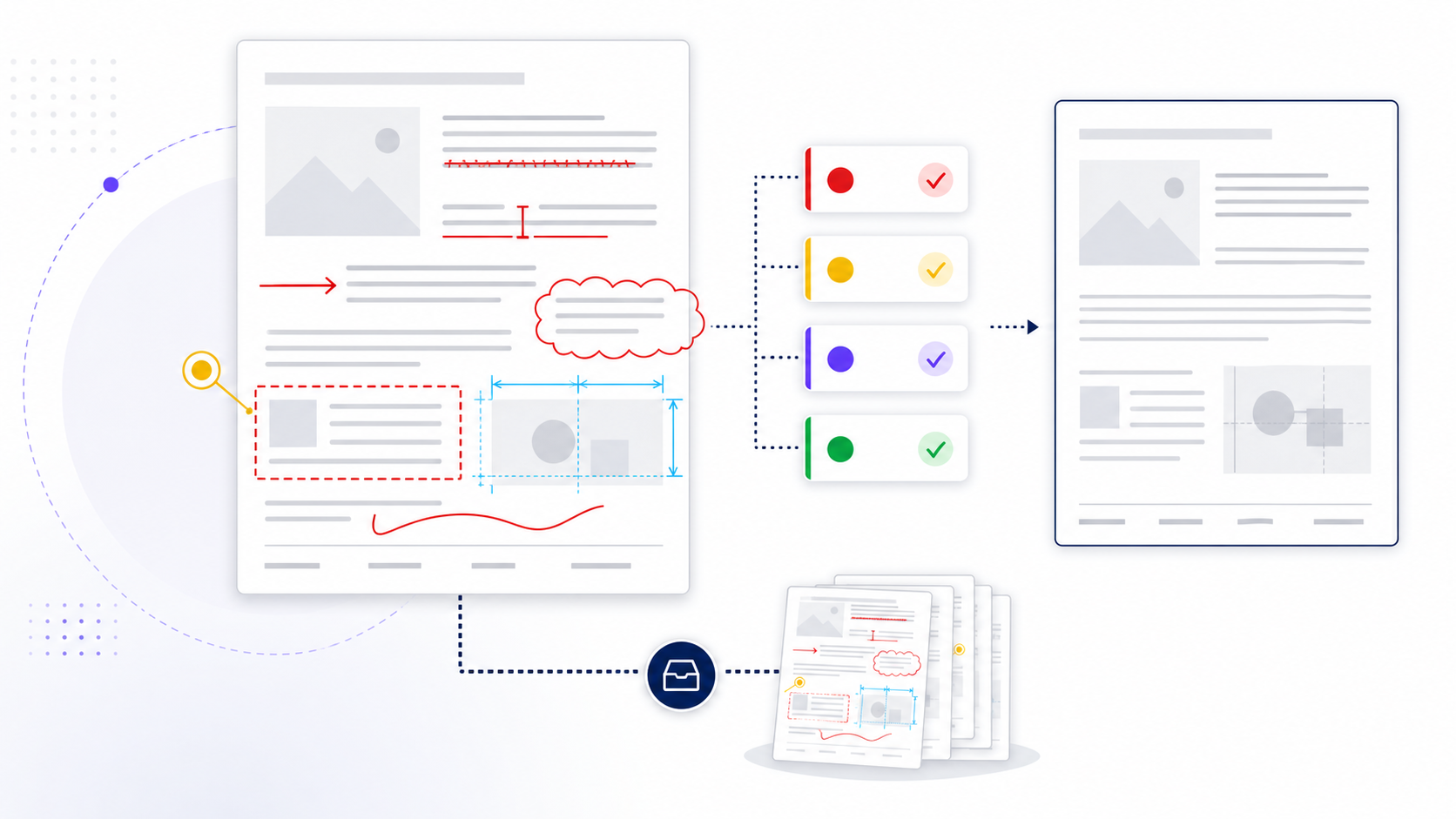
Publish a compact legend that maps each mark to an action. Strikeout means proposed removal; insertion means missing content; arrow or leader connects a note to a target; rectangle identifies a bounded region; cloud signals a changed or disputed area; dimension line records expected geometry; freehand drawing explains shape only when ordinary forms are insufficient. Pair every nontrivial mark with text that states observation, impact, requested action, owner, and acceptance test.
发布简洁图例,把每种标记映射到动作。删除线表示建议移除,插入表示缺失内容,箭头或引线把说明连接到目标,矩形确定边界区域,云线表示变更或争议区,尺寸线记录预期几何关系;只有普通图形不足时才使用手绘解释形状。每个非简单标记都应配文字,写明观察、影响、请求动作、负责人和验收测试。
| Markup标记 | Use用途 | Do not assume不能假设 |
|---|---|---|
| Strikeout + insertion删除线 + 插入 | Propose exact copy change建议准确文字修改 | Source is already corrected源文件已经修正 |
| Box, cloud, arrow框、云线、箭头 | Identify a region or relationship标识区域或关系 | Shape explains the defect图形本身已解释缺陷 |
| Status stamp状态图章 | Communicate workflow state表达流程状态 | Formal approval evidence exists已经存在正式批准证据 |
Use geometry markup carefully on plans, diagrams, and visual proofs在图纸、图表和视觉校样中谨慎使用几何标记
Confirm page scale, crop, rotation, sheet identifier, and revision before measuring or placing geometry. Viewer measurement tools can be wrong when calibration, units, or page transformations differ. State whether a dimension is observed, expected, or illustrative. Anchor comments to gridlines, labels, objects, or coordinates that will survive a new export. Never treat markup measurements as construction, manufacturing, clinical, or safety authority without the required professional verification.
测量或放置几何标记前,应确认页面比例、裁切、旋转、图纸标识和修订版本。校准、单位或页面变换不同时,阅读器测量工具可能出错。应注明尺寸是观察值、预期值还是示意值,并把评论锚定到能经受重新导出的网格线、标签、对象或坐标。未经所需专业验证,不得把标记测量当作施工、制造、医疗或安全权威。
Connect every material markup to an owned issue record把每个重大 Markup 连接到有人负责的问题记录
A material issue needs an ID, reviewed artifact and revision, location, reporter, date, severity, owner, due date, evidence, disposition, corrected revision, verifier, and verification result. Use one parent issue when many marks share a root cause. Record rejected and deferred items with reasons; deleting inconvenient comments destroys the decision trail. Separate severity from priority so impact and scheduling remain transparent.
重大问题需要 ID、被审文件及修订、位置、报告人、日期、严重度、负责人、期限、证据、处理决定、修正版本、验证人和验证结果。多处标记来自同一根因时应建立一个主问题。拒绝和延期项必须附理由,删除不方便的评论会破坏决定链。还应区分严重度与优先级,使影响和排期保持透明。
Compare the revised PDF against both markup and source evidence同时依据 Markup 与源证据比较修订 PDF
Do not verify by looking only at the marked location. Confirm the accepted instruction, then compare the new output with the authoritative source and previous reviewed version. Check nearby reflow, repeated values, cross-references, page numbers, bookmarks, links, form fields, image placement, layers, tags, and print output. Automated visual comparison can identify differences, but a human still must decide whether each difference is intended and correct.
验证时不能只看被标位置。先确认已接受指令,再把新输出与权威源文件和上一被审版本比较。检查附近重排、重复数值、交叉引用、页码、书签、链接、表单字段、图片位置、图层、标签和打印输出。自动视觉比较可以发现差异,但仍需人工判断每个差异是否有意且正确。
Close PDF markup with explicit approval scope and release evidence用明确批准范围和发布证据关闭 PDF Markup
An approval mark should identify approver, artifact revision, scope, conditions, date, and unresolved exceptions. A green check or “resolved” state alone is not formal approval. Before release, confirm all blockers are verified, conditional approvals are satisfied, rejected items have reasons, sensitive metadata and attachments are reviewed, and the clean artifact is distinguishable from the annotated record. Retain both according to the governing retention policy.
批准记录应标明批准人、文件修订、范围、条件、日期和未解决例外。绿色勾选或“已解决”状态本身并不构成正式批准。发布前应确认所有阻断项已验证、附条件批准已满足、拒绝项有理由、敏感元数据和附件已检查,而且干净文件与批注记录清晰区分;两者按适用保留政策保存。
Create a PDF markup taxonomy that maps symbols to actions建立把符号映射到行动的 PDF 标记分类
Define approved symbols for delete, insert, replace, move, verify, approve, and question, then document line style, color, and required note text. Every symbol should answer what action is requested and who owns it. Avoid inventing new shorthand during review. A shared legend reduces interpretation differences between design, engineering, legal, and production teams and gives the coordinator a consistent basis for counting and closing issues.
为删除、插入、替换、移动、验证、批准和提问定义统一符号,并写明线型、颜色和必需说明文字。每个符号都应回答请求什么行动以及由谁负责。评审过程中不要临时创造缩写。共享图例可以减少设计、工程、法务和生产团队之间的解释差异,也为协调人员统计和关闭问题提供一致基础。
Protect scale and coordinates when marking up drawings标记图纸时保护比例和坐标
Confirm page size, drawing scale, rotation, crop box, and measurement calibration before adding dimensions or area markup. Identify the sheet, detail number, grid reference, and nearby label in every material comment. Never assume a viewer's measuring tool is calibrated because it displays a numeric result. If the PDF was printed, scanned, or resized, compare a known dimension first and state when a markup is conceptual rather than a construction measurement.
添加尺寸或面积标记前,应确认页面尺寸、图纸比例、旋转、裁剪框和测量校准。每条重要意见都要注明图纸编号、详图号、网格坐标和附近标签。测量工具显示数字并不代表已经校准。如果 PDF 经过打印、扫描或缩放,应先比对已知尺寸,并明确标记属于概念说明还是施工测量。
Bind every PDF markup round to a controlled revision把每轮 PDF 标记绑定到受控版本
Use a document ID, revision, review round, and issue date in both the filename and the cover note. Freeze the review copy while comments are open. If the source changes, publish a new review package and migrate only still-valid issues instead of silently replacing pages beneath existing annotations. Preserve the previous marked copy and a disposition log so reviewers can distinguish resolved changes from comments that disappeared because the underlying document moved.
文件名和封面说明中都应包含文档编号、版本、评审轮次和发布日期。意见未关闭期间冻结评审副本。如果源文件发生变化,应发布新的评审包,只迁移仍然有效的问题,而不能在现有批注下静默替换页面。保存上一版标记文件和处理记录,让评审者能够区分真正解决的修改与因底层文档变化而消失的意见。
Convert material PDF markups into an owned issue register把重要 PDF 标记转成有责任人的问题清单
For each material markup, capture an issue ID, page or sheet reference, requested change, rationale, owner, due date, status, evidence, and final disposition. Link the register back to the visual markup rather than copying ambiguous screenshots. Use one row per decision and define which statuses permit release. The PDF provides location and context; the register provides accountability, filtering, reporting, and a durable record when markup software or file formats change.
每个重要标记都应记录问题编号、页码或图纸引用、修改要求、理由、负责人、截止日期、状态、证据和最终处理结果。问题清单要链接回视觉标记,不要只复制含义模糊的截图。每个决定占一行,并定义哪些状态允许发布。PDF 提供位置和上下文,清单则提供责任、筛选、报告和在软件或格式变化后仍可保留的记录。
Compare the revised PDF against markup and source evidence将修订 PDF 与标记和源证据进行比较
Start with accepted issues, then inspect unmarked areas for collateral change. Use visual comparison for layout, text comparison where extraction is reliable, and source-level checks for numbers, links, and interactive controls. Recheck page references after repagination. A clean overlay is not enough if a chart value changed incorrectly or a hyperlink now points elsewhere. Record the comparison method and reviewer so approval can be reproduced rather than inferred from a final filename.
先检查已接受问题,再查看未标记区域是否发生连带变化。版式使用视觉比较,文本层可靠时使用文字比较,数字、链接和交互控件则回到源级验证。重新分页后要再次核对页码引用。即使叠加图看起来干净,图表数值错误或链接目标变化仍可能造成缺陷。记录比较方法和评审者,使批准过程可以复现,而不是仅凭最终文件名推断。
Choose editable or flattened PDF markup at the correct stage在正确阶段选择可编辑或扁平化 PDF 标记
Keep markup editable while reviewers must reply, revise geometry, filter authors, or change status. Export a summary for coordination and archive the editable review master. Flatten only a clearly labeled issue or record copy when visual permanence is required and interactive data is no longer needed. Test stamps, opacity, line weight, layers, and print output after flattening. Never destroy the only version that contains author, time, reply, and resolution history.
评审者仍需回复、修改几何形状、筛选作者或更新状态时,应保持标记可编辑。协调阶段可以导出汇总,同时归档可编辑评审主文件。只有在需要固定视觉外观且不再需要交互数据时,才扁平化明确标注的发布或记录副本。扁平化后要检查图章、透明度、线宽、图层和打印结果,不能破坏唯一包含作者、时间、回复和解决历史的版本。
Close PDF markup with explicit approval scope用明确的批准范围关闭 PDF 标记
The approver should identify the exact document ID and revision, accepted exceptions, unresolved items, intended use, and effective date. Attach the final issue register or disposition log and state whether approval covers content, visual appearance, technical operation, accessibility, or only a subset. Preserve the approved PDF separately from working markups. This prevents a generic “approved” message from being reused for a later revision or interpreted as acceptance of conditions that were never reviewed.
批准人应明确文档编号和版本、接受的例外、未解决事项、预期用途和生效日期。附上最终问题清单或处理记录,并说明批准覆盖内容、视觉外观、技术运行、可访问性还是其中一部分。已批准 PDF 应与工作标记分开保存。这样可以避免笼统的“已批准”消息被用于后续版本,或被误解为接受从未审查的条件。
Worked example: convert a visual PDF markup into an owned change request实操示例:把可视化 PDF Markup 转成有人负责的变更请求
This fictional teaching example is not a customer case, benchmark, or performance claim. A reviewer receives drawing A-204, revision C, and notices that a door-clearance dimension conflicts with the approved schedule. The reviewer draws a cloud around the affected detail and adds an arrow. That geometry identifies location, but it does not explain the defect or authorize a correction. The accompanying issue record states the observed value, the expected value and its authoritative source, the requested action, the responsible discipline, the due date, and the evidence required for closure.
下面是虚构教学示例,不代表真实客户案例、基准或性能声明。审阅者收到 A-204 图纸 C 版,发现门洞净空尺寸与已批准明细表冲突,于是在相关详图周围绘制云线并添加箭头。几何标记只能指出位置,既没有解释缺陷,也没有授权修正;配套问题记录还应写明观察值、预期值及其权威来源、请求动作、责任专业、截止日期和关闭所需证据。
| Control field控制字段 | Fictional record虚构记录 | Why it matters重要原因 |
|---|---|---|
| Artifact identity文件标识 | A-204, revision C, detail 7A-204,C 版,详图 7 | Prevents comments moving to another revision防止意见漂移到其他版本 |
| Observation观察 | Clearance shown as 820 mm图示净空为 820 mm | Separates observed evidence from interpretation区分观察证据与解释 |
| Expected source预期来源 | Approved schedule S-12 states 900 mm已批准明细表 S-12 标注 900 mm | Makes the requested correction traceable使修正请求可追溯 |
| Requested action请求动作 | Reconcile sources and issue revision D核对来源并发布 D 版 | Avoids treating an arrow as an instruction避免把箭头直接当作指令 |
| Closure evidence关闭证据 | Updated source, regenerated PDF, and independent comparison更新源文件、重新生成 PDF 并独立比对 | Proves implementation rather than comment deletion证明修改已实施,而非仅删除评论 |
The coordinator should reject a markup that lacks a stable target or an actionable statement. When the two sources legitimately differ, the issue remains open until an authorized owner decides which source governs. The reviewer verifies the new PDF against both the accepted disposition and the authoritative source; seeing that the cloud disappeared is not evidence that the underlying correction is right.
如果标记没有稳定目标或可执行说明,协调人员应退回补充。当两个来源确实存在差异时,问题必须保持开放,直到授权负责人决定以哪个来源为准。审阅者应依据已接受的处理决定和权威源文件共同核验新 PDF;云线消失并不能证明底层修正正确。
Use evidence-based release gates for every PDF markup round为每轮 PDF Markup 设置基于证据的发布关卡
Define release gates before review begins so urgency cannot silently lower the standard later. A gate is a testable condition, not a color, stamp, or percentage-complete label. Test the marked file in the actual viewer set, verify that every material item has a disposition, compare the regenerated PDF with its source, inspect collateral changes outside marked regions, and preserve a clean release artifact separately from the editable review master.
审阅开始前就应定义发布关卡,避免后续以紧急为由默默降低标准。关卡必须是可测试条件,而不是颜色、图章或完成百分比。应在真实阅读器组合中测试标记文件,确认每个重大事项都有处理结论,将重新生成的 PDF 与源文件比对,检查标记区域之外的连带变化,并把干净发布文件与可编辑审阅主文件分开保存。
| Gate关卡 | Evidence required所需证据 | Stop condition停止条件 | Accountable role责任角色 |
|---|---|---|---|
| Revision identity版本标识 | Document ID, revision, date, and controlled filename agree文档 ID、版本、日期和受控文件名一致 | Any ambiguous or replaced page任何含糊或被替换页面 | Document controller文档控制人员 |
| Issue disposition问题处理 | Accepted, rejected with reason, or deferred with owner已接受、附理由拒绝,或指定负责人延期 | Unowned blocker or unexplained deletion无人负责的阻断项或无解释删除 | Review coordinator审阅协调人 |
| Implementation实施 | Source change, regenerated output, and comparison record源文件修改、重新输出和比对记录 | Markup closed without source verification未核验源文件就关闭标记 | Change owner and verifier变更负责人和验证人 |
| Release hygiene发布卫生 | Metadata, attachments, layers, links, and print output checked已检查元数据、附件、图层、链接和打印输出 | Sensitive comments or broken output remain仍有敏感评论或损坏输出 | Release owner发布负责人 |
Convert the PDF markup closeout record into an editable handoff把 PDF 标记关闭记录转成可编辑交付文档
Capture issue IDs, dispositions, owners, exceptions, and approval scope in Markdown, then convert the controlled closeout note to Word for distribution and archive.
用 Markdown 记录问题编号、处理结果、负责人、例外和批准范围,再把受控关闭说明转换为 Word 进行分发和归档。
Open Markdown to Word打开 Markdown 转 Word 工具PDF markup release checklistPDF Markup 发布检查清单
- The reviewed file and revision are unambiguous.被审文件和修订版本清晰无歧义。
- Every blocking comment has an owner and evidence-backed disposition.每个阻断评论都有负责人和有证据的处理结果。
- Accepted changes were made in the authoritative source.已接受修改已落实到权威源文件。
- The re-exported PDF was visually and technically verified.重新导出的 PDF 已通过视觉与技术验证。
- Supported viewers preserve required annotation behavior.受支持阅读器能保留所需批注行为。
- Sensitive comments, metadata, attachments, and hidden content were reviewed.已检查敏感评论、元数据、附件和隐藏内容。
- A clean release file and separate review record are retained.已分别保留干净发布文件和审阅记录。
PDF markup questionsPDF Markup 常见问题
Does annotating a PDF change the original text?批注 PDF 会改变原始文字吗?
Usually no. Annotation objects sit above or beside page content. Apply accepted corrections in the editable source and re-export when the published content must change.通常不会。批注对象位于页面内容之上或旁边。需要改变发布内容时,应在可编辑源文件中实施修改并重新导出。
Why do PDF comments disappear for another reviewer?为什么另一位审阅者看不到 PDF 评论?
The file may have been printed, flattened, exported without annotations, opened in a viewer with limited support, or replaced by another version. Test the actual sharing route.文件可能被打印、扁平化、导出时未包含批注、在支持有限的阅读器中打开,或被另一版本替换。应测试真实分享路径。
Should annotations remain in the final PDF?最终 PDF 应保留批注吗?
Only when the audience and purpose require them. Public or customer-facing releases usually need a clean artifact, while the annotated review copy and decision log are retained separately.只有受众和用途需要时才保留。公开或客户交付通常需要干净文件,批注审阅副本和决定记录应单独保存。
Can I annotate a scanned PDF?扫描 PDF 可以批注吗?
Yes, but text-based highlighting may require a reliable OCR layer. Validate recognition and use region-based notes when text anchors are unstable.可以,但文字高亮可能需要可靠 OCR 文本层。应验证识别结果;文字锚点不稳定时使用区域便笺。
Is flattening the same as redaction?扁平化等于遮盖删除吗?
No. Flattening changes annotation editability and rendering. Redaction must remove targeted content and be verified in the saved output.不等于。扁平化改变的是批注可编辑性和呈现方式;遮盖删除必须移除目标内容并在保存结果中验证。