eCommerce API Guide: Catalog, Orders, Shipping
By the InfiniSynapse Data Team · Published: 2026-06-24 · Last updated: 2026-09-30 · About: Editorial standards
Business relationship disclosure: We build InfiniSynapse, an AI-native data agent. It is not a storefront platform, a payment gateway, or a unified commerce connector. Store, payment, and carrier behavior below is summarized from public vendor documentation.
TL;DR
Direct answer: An eCommerce API is the interface a store uses to exchange catalog, order, inventory, payment, and shipping data with another system. One system sends a request, the other returns structured data (usually JSON), and a written rule says which side owns each object.
Threads on r/shopify, r/webdev, and r/ecommerce keep showing the same gap: the storefront looks finished, and the first real order never lands in the operator's database. Connect the object that creates the row you will reconcile. For most new stores that object is the order, then the catalog, then shipping.
- Connect first: the store admin API that can read and write orders, if you sell on one platform.
- Add next: catalog (products, variants) and inventory, then a carrier or multi-carrier shipping API.
- Leave payments on a hosted checkout. Card fields belong on the gateway page, covered in Payment Gateway API Integration.
- Stop duplicates: verify the webhook signature, then upsert on the store's order id with a unique constraint.
Who this is for: builders wiring a store, a marketplace, or a tool that must read another merchant's catalog and orders. What you'll learn: the type map, the direct-versus-unified choice, a five-step integration order, and the checks that keep retries from creating a second order.
Pillar context: API Integration Services. A single-vendor client, when the platform API is not enough, is Custom API Integration.
Key Definition
Key Definition: An eCommerce API is a programmatic contract between an online store and another application. The store exposes resources such as products, variants, orders, customers, inventory levels, payments, and shipments. The other application calls those resources over HTTPS and treats the response schema as the contract.
An eCommerce API matters when a theme, a headless front end, or an internal tool can display products but cannot create, update, or reconcile the row the warehouse and finance team will trust.
Shopify's current Admin API for apps is GraphQL. The Shopify Admin GraphQL reference is the request surface for products, orders, inventory, and fulfillment on that platform. REST Admin calls still appear in older apps; new work should start from the GraphQL Admin schema and its access scopes.
What an eCommerce API Does
Request and response
A call has three beats.
- Request. Your server asks for an action: read orders updated since a cursor, create a fulfillment, adjust an inventory quantity.
- Processing. The platform checks the token, the scope, and the payload, then reads or writes its database.
- Response. You get JSON (sometimes XML on older stacks), a status code, and often a cursor or a rate-limit header.
Checkout is the familiar example. The storefront asks a payment API to take money. The payment API returns a session or a charge id. Your server must not treat the browser redirect as proof. The settled status arrives on a webhook or a follow-up read. That split—browser return versus server confirmation—is the same shape for orders and shipments.
Objects worth naming before you write code
| Object | Typical owner | What breaks if you guess |
|---|---|---|
| Product and variant | Catalog / PIM, or the store | Two titles for one SKU |
| Inventory quantity | The system that ships | Oversell on the second channel |
| Order | The store that took the checkout | A second order on webhook retry |
| Shipment and tracking | Carrier or the store's fulfillment record | A label with no tracking pushback |
| Payment | Gateway, not your database | Card data in your logs |
Name the owner in a one-page note before the first credential is issued. An eCommerce API integration that skips this note syncs whatever the last successful call wrote. Revisit that note when a second channel is added, because the eCommerce API on the new channel will not share the first channel's ids.
eCommerce API Types That Run a Store
An eCommerce API setup rarely uses one interface. Stores use a small set of types. Pick the type that owns the row, then one example of that type. This page is the map. Each eCommerce API type below names the object it owns.
Payments
A payment eCommerce API opens a checkout, captures or refunds, and emits a signed event when money moves. Stripe, PayPal, and Adyen are the usual names. Your server stores a payment id and an order id. It does not store a card number.
Hosted checkout, webhook verification, and Idempotency-Key on create calls are the payment page's job: Payment Gateway API Integration. Use that page before you paste card fields into a React form. To integrate a payment API on the store website, follow the plugin-or-custom setup, sandbox, and go-live checks.
Inventory and shipping
An inventory eCommerce API sets or adjusts stock at a location. A shipping eCommerce API rates a parcel, buys a label, and returns tracking. FedEx, UPS, and multi-carrier aggregators sit in the second group. The store still needs a fulfillment write-back so the buyer sees the tracking number.
WooCommerce exposes products, orders, and related store data over its REST API. Self-hosted stores vary by plugin set and host, so test pagination and timeouts against a copy of the merchant's site, not only a clean demo shop.
Catalog and checkout
A catalog eCommerce API creates and updates products, variants, categories, and media. Checkout and cart APIs assemble the basket and the shipping choice. On a hosted platform, checkout often stays on the platform even when the product page is headless. Read the platform's rule before you rebuild the payment step yourself.
Marketplace selling is a different contract from a single store. Adobe Commerce documents REST and GraphQL for catalog and order work in its web API getting started guide. A marketplace seller API, such as Amazon's Selling Partner API, covers that marketplace's orders and listings. It does not replace the eCommerce API of the store you operate.
Which eCommerce API to Connect First
Direct store API
Use the platform's own API when you operate one store, or when your app's value is a feature that only that platform exposes (metafields, checkout functions, a specific fulfillment service).
BigCommerce documents store operations—catalog, orders, customers, inventory—on its REST Management API. A direct eCommerce API means you accept that platform's auth, pagination, webhook names, and versioning. The payoff is depth: you can use fields a normalized model may drop.
Connect in this order for a single store:
- Orders, including financial status and line items.
- Products and variants, including the SKU you will join on.
- Inventory at the location you fulfill from.
- Fulfillments and tracking.
- Payments, only through hosted checkout.
Unified API
Use one unified eCommerce API when one product must read or write the same objects—products, orders, customers, inventory, shipments—across several shopping platforms. That eCommerce API maps each platform onto one model so you do not maintain a separate client, OAuth app, and webhook style per store. The trade is depth. Platform-specific fields still need a direct call. A practical split is: unified methods for the shared order and catalog path, direct calls for the few features customers actually require on one platform. Count maintenance, not the logo list. Each extra direct client adds an auth flow, a data model, a rate-limit policy, and a test matrix.
eCommerce API Integration Steps
Roll an eCommerce API out in this order. Skipping ahead is how teams get a live key before they can explain a duplicate order.
Sandbox credentials
Register a developer app for the eCommerce API you chose. Store the client secret in a secret manager. Keep a sandbox token and a live token in different environments. The browser bundle gets neither.
Rotate by changing the secret store, not by editing a frontend env file and redeploying the theme. Scopes should match the feature you are shipping: read orders first, write inventory only when that screen exists.
Limits, errors, and pagination
Read the eCommerce API docs for authentication, cursor versus page pagination, rate-limit headers, and the error body. Shopify GraphQL uses a cost budget. REST platforms often use a call count per second. Treat a 429 as a backoff, not as a tight retry loop.
Write down one success payload and one error payload for the object you care about. If the error shape is a string today and an object next month, your parser should fail the contract test rather than store a null order id.
Webhooks and idempotency keys
On the eCommerce API, subscribe only to the events that change a row you own: order created, order updated, inventory level changed, fulfillment created. Verify the signature before any database write. Reject unsigned bodies.
Create calls that can move money or buy a label should send an idempotency key. Stripe documents the header behavior in idempotent requests: the same key and the same parameters return the original result instead of a second charge. Copy that discipline to order creates and label purchases even when the vendor uses a different header name.
Webhook delivery and idempotency stores are also covered, with a handler sketch, in API integration examples.
Contract tests before live traffic
In CI, assert the eCommerce API fields you persist: order id, currency, line SKU, quantity, financial status. Run them against the sandbox. A nightly job should compare counts: orders the platform says were updated since yesterday versus rows you upserted.
Do not invite production traffic because the happy-path screenshot worked. The OWASP API Security Top 10 applies here in a narrow way: broken authentication on the webhook route, and credentials in the client, are the failures that show up first on commerce integrations.
Orders, Catalog, and Inventory Sync
Source of truth
Pick one writer per field before the eCommerce API starts writing.
| Field | Source of truth | Other systems |
|---|---|---|
| SKU and variant id | Catalog | Store channels receive updates |
| On-hand quantity | Inventory location that ships | Channels read or receive deltas |
| Order id and checkout total | Store that took payment | ERP and support read |
| Tracking number | Carrier, then fulfillment write-back | Store shows it to the buyer |
Two-way sync without this table produces last-write-wins bugs: a channel edit overwrites the PIM title, or a delayed inventory poll overwrites a newer webhook. Start one-way. Add a reverse write only for a field whose owner is explicit.
Incremental pull versus webhooks
For an eCommerce API, webhooks are the fast path and polling is the repair path. Use both.
- Webhook: update one order when the platform says it changed.
- Incremental pull: each night, or when a webhook has been failing, list orders updated since the stored cursor and upsert the same way.
- Full catalog pull: rare, for a first load or a suspected drift, and never on the request thread of a shopper.
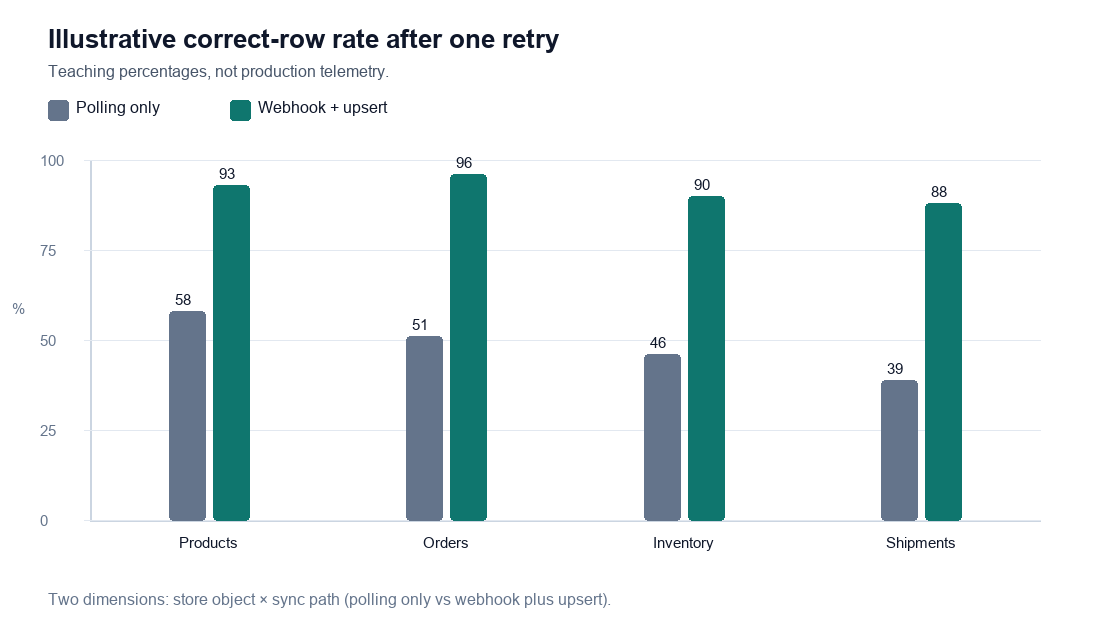
Illustrative pass rate, not production telemetry. In a sandbox retry, polling alone left more stale or duplicate rows. A verified webhook plus the same upsert kept a larger share of products, orders, inventory, and shipments as one correct row. The chart uses teaching percentages so both paths stay visible. Measure your own cursor lag before you quote a number.
Desk walkthrough (reproducible from public docs, not a customer metric). A Shopify order should hit your database once.
- Subscribe to the orders webhook your app is allowed to receive.
- Verify the HMAC with the app secret. If it fails, return a non-2xx and write nothing.
- Upsert on the platform order id. A unique constraint is the real lock. An in-memory set is not.
- Return 200 only after the commit.
- Nightly, pull orders updated since the cursor and run the same upsert.
That sequence is the eCommerce API behavior to test in sandbox before a sale. After the order table exists, analyzing it is a separate job. Analyze Shopify data with AI starts from rows you already stored. InfiniSynapse can query that warehouse. It does not replace the store admin API, and it should not be the system that creates orders.
Webhooks, Idempotency, and Duplicate Orders
Verify the signature first
An eCommerce API signs webhook bodies so you can tell a real event from a forged POST. Check the signature, then the timestamp if the platform sends one, then the event id. Parsing JSON before the check turns a public URL into an order-creation form.
Store the raw body bytes the signature was computed over. Re-serializing JSON before you verify will fail valid events and tempt someone to skip the check.
Make retries safe
An eCommerce API retries webhooks. A timeout, a 500, or a dropped connection delivers the same order again. Safe handling:
async function onOrderEvent(eventId: string, order: { id: string }) {
  if (await events.has(eventId)) return;
  await db.order.upsert({
    where: { platformOrderId: order.id },
    update: orderFields(order),
    create: { platformOrderId: order.id, ...orderFields(order) },
  });
  await events.set(eventId);
}
The unique key is platformOrderId, not the webhook delivery id. The delivery id only answers "did we already run this attempt." The order id answers "does this order already exist." Using the delivery id as the order key creates a new row on every retry.
Apply the same rule to label purchases and payment captures. A retry of a label call without an idempotency key buys a second label. A retry of a charge without an idempotency key bills twice.
Failure Modes
A second order after an eCommerce API retry. The handler inserts on every POST. Fix: unique constraint on the store's order id, and return 200 only after commit so the platform does not retry a write that already landed.
Stock overwritten by a slow poll. A six-hour inventory job writes an old quantity over a webhook that arrived at noon. Fix: ignore poll rows whose platform updated_at is older than the row you stored, or stop polling fields that webhooks already own.
Live token in the theme. The next person to view source has the admin key. Fix: proxy from your server, sandbox key in non-production, live key only in the secret manager.
Browser redirect treated as paid. The shopper can reload the success URL. Fix: fulfill from the signed payment webhook. The payment article linked above is the procedure.
Scope larger than the feature. A token that can refund and delete products, issued for a read-only order export, is the credential attackers want. Issue the narrow scope, then widen it when a write screen ships.
Frequently Asked Questions
What is an eCommerce API?
An eCommerce API is the HTTPS interface that lets your application read or change store data: products, variants, orders, customers, inventory, payments, and shipments. The platform authenticates the call, applies it, and returns a structured payload. Your integration is the code that decides which system owns each of those objects.
Which eCommerce API should a new store connect first?
Connect the store admin API for orders first, if you sell on one platform. Add catalog and inventory next, then shipping write-back. Put card capture on a hosted payment page rather than a new custom card form. A unified API is the wrong first step when you only have one store.
When is a unified eCommerce API worth it?
It is worth it when the product must support several shopping platforms with the same order, product, customer, and shipment flows. One normalized model replaces a stack of one-off clients. Keep a direct API beside it for platform-specific features the unified model does not cover. If you only operate a single store, the platform API is the simpler contract.
How do you stop duplicate orders from an eCommerce API?
Verify the webhook signature, upsert on the platform order id under a unique constraint, and record the webhook event id so a retry returns immediately. Send an idempotency key on any create that charges a card or buys a label. Reconcile with an incremental pull so a missed webhook does not stay missing, and so a replay does not insert a second row.
Are REST eCommerce APIs still the default?
REST is still the default on WooCommerce, BigCommerce, and many carrier and payment APIs. Shopify's Admin API for current apps is GraphQL, and its Storefront API is GraphQL as well. Match the interface the platform documents for new work. Many stacks call REST for operations and GraphQL for storefront reads. The integration steps on this page—scopes, signatures, idempotency, contract tests—apply to both.
Conclusion
An eCommerce API integration is finished when a sandbox order becomes one database row, a retried webhook does not become a second row, and you can name the owner of catalog, inventory, and tracking. Start with the store's order API, add catalog and shipping after that path is tested, and keep card data on the gateway's hosted page.
The checks are ordinary and sufficient: separate sandbox and live secrets, verify signatures, upsert on the store's id, and reconcile with a cursor. Explore the pillar at API Integration Services when the next vendor is not a store.