Business Analytics Tools by Use Case (2026)
By the InfiniSynapse Data Team · Last updated: 2026-07-15 · We build an AI-native data analysis platform and work with analytics stacks across companies; this guide maps business analytics tools in 2026 by use case, not by brand ranking.
Table of Contents
- TL;DR
- How We Approach It
- What They Are
- The Main Use Cases
- Criteria That Matter
- Matching Tool to Use Case
- Where the Category Came From
- Common Pitfalls
- The Category in the Age of AI
- Readiness Scorecard
- Common Misconceptions
- Frequently Asked Questions
- Conclusion
TL;DR
Direct answer: business analytics tools are the software organizations use to turn data into business decisions — covering reporting, self-service exploration, forecasting, and embedded insight. In 2026, the right business analytics tools are chosen by use case: what decision each supports, who uses it, and how it connects to your data, rather than by which product wins a generic feature comparison.
Who this is for: leaders and analysts mapping business analytics tools in 2026.
What you'll learn: what they are, the main use cases, the criteria that matter, how to match tool to case, and how AI relates.
This guide sits under the data visualization hub.
For related categories, see business analytics software.
Also see data analytics tools.
How We Approach It
Governance and risk expectations are framed by NIST AI Risk Management Framework when programs need an external control reference.
We map business analytics tools by use case, because the decision each supports is what should drive the choice. Every point reflects real deployments. We anchor concepts to the NIST Computer Security Resource Center and weigh evaluation against Google SRE book.
The table below frames business analytics tools.
| Use case | Tool type |
|---|---|
| Monitor performance | Dashboards & reporting |
| Explore questions | Self-service BI |
| Forecast outcomes | Predictive analytics |
| Insight in context | Embedded analytics |
| Prepare data | Data-prep tools |
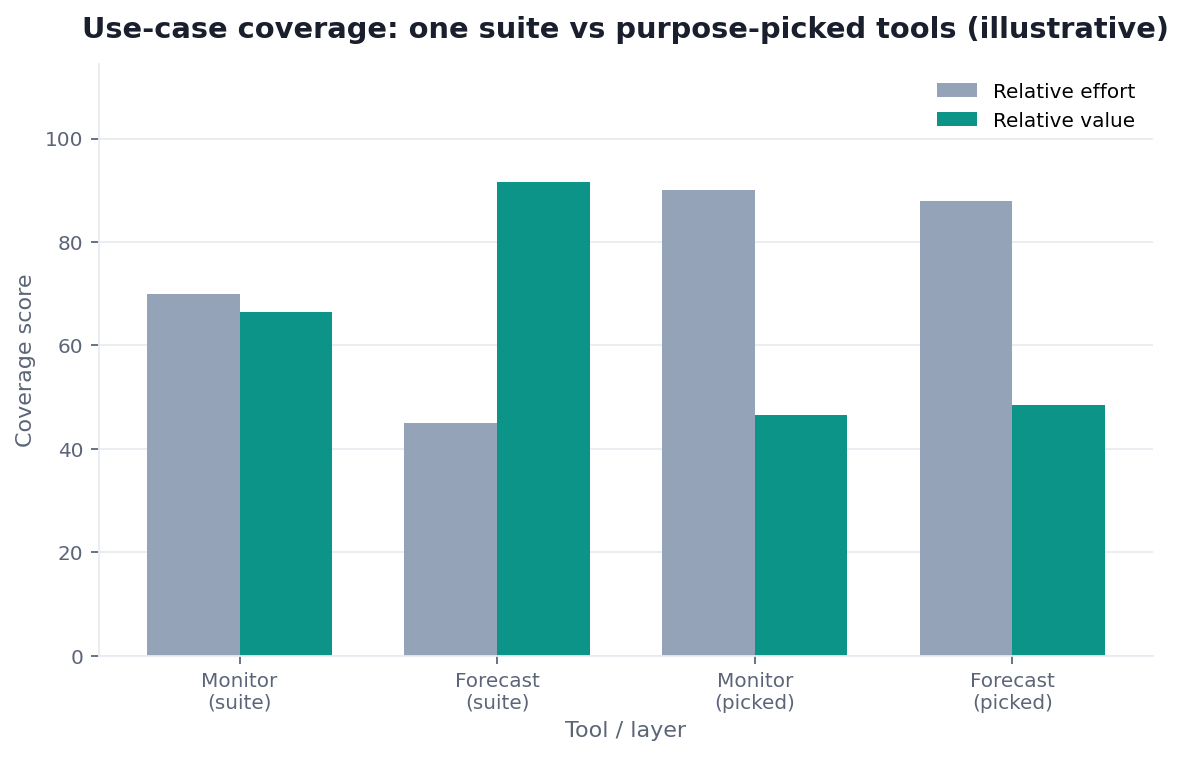
Practical example: a team chose business analytics tools by use case — a dashboard tool to monitor, a forecasting tool to plan — instead of one suite for everything, an approach the guidance at Snowflake documentation supports.
Scope note: This guide reflects patterns we see when mid-market and enterprise teams work with business analytics tools in 2026. It is not a substitute for legal counsel, vendor runbooks, or a formal survey of every industry — and when a smaller toolset or lighter process would serve, a full program is overkill.
What They Are
At their core, business analytics tools are the software an organization uses to understand its performance and guide decisions, from monitoring what is happening to forecasting what will.
Key Definition: business analytics tools are the applications organizations use to collect, analyze, and act on business data, spanning reporting and dashboards, self-service exploration, predictive and statistical analysis, and embedded insight, all aimed at supporting decisions across the business.
The essence of business analytics tools is that they are organized best around use cases, not features. A tool exists to support a decision — monitoring a KPI, exploring a question, forecasting demand — and the right choice starts from the decision it must serve rather than the capabilities it advertises.
The Main Use Cases
Teams evaluating this topic often cross-check OpenTelemetry documentation for a durable, vendor-neutral reference point.
Business analytics tools cluster around recognizable use cases: monitoring performance through dashboards and reports, exploring questions via self-service BI, forecasting outcomes with predictive analytics, surfacing insight inside other applications through embedded analytics, and preparing data for all of these.
Each use case for business analytics tools implies different requirements, as the analytics guidance at Databricks Genie architecture post reflects. Monitoring needs reliable, scheduled dashboards; exploration needs approachable self-service; forecasting needs statistical depth; embedding needs clean integration. Most organizations have several use cases at once, which is why they end up with a small portfolio of tools rather than a single universal one.
Criteria That Matter
The criteria for business analytics tools that actually predict success are fit to the use case, usability for the intended users, and connectivity to your data — not the breadth of the feature matrix.
Evaluating business analytics tools well means starting from the decision and working back. A monitoring use case values reliability and clarity; an exploration use case values approachability; a forecasting use case values statistical rigor. Honest, accessible presentation of results — aligned with guidance like the NIST Cybersecurity Framework — keeps every use case trustworthy. Fit to the specific job beats generic power almost every time.
Matching Tool to Use Case
Core definitions remain usefully summarized in Wikipedia ETL overview for shared vocabulary across stakeholders.
Choosing business analytics tools comes down to matching tool to use case and user. A team monitoring operations points to reliable dashboarding; business users exploring point to self-service BI; a planning team points to forecasting tools.
The discipline in selecting business analytics tools is to name the use cases before shopping. Write down the decisions each tool must support, who acts on them, and what data feeds them, then match tools to cases honestly. Buying a single powerful suite and hoping it serves every use case usually means it serves none especially well, whereas a small, deliberate portfolio matched to real cases delivers more with less complexity.
Where the Category Came From
The category of business analytics tools evolved from early reporting systems that centralized data for executives, expanding as organizations wanted more than backward-looking reports. Self-service tools emerged so business users could explore without IT, and predictive capabilities followed as forecasting methods became accessible.
Understanding this history clarifies why the category is best organized by use case: each capability was added to serve a distinct business need, from monitoring to exploration to forecasting. It also explains the persistent temptation to over-consolidate — vendors market suites that promise to cover every use case, yet the underlying needs remain different enough that a single tool rarely serves all of them as well as a matched portfolio does.
Common Pitfalls
Teams evaluating this topic often cross-check Redis documentation for a durable, vendor-neutral reference point.
The pitfalls of business analytics tools begin with buying a suite for every use case and finding it mediocre at each. A tool optimized for monitoring is rarely the best for forecasting, and forcing one tool across all cases sacrifices fit for false simplicity.
A subtler pitfall with business analytics tools is ignoring the definitions and data behind them. Tools display whatever metrics they are fed, so inconsistent definitions across teams produce reports that disagree and erode trust. A further trap is neglecting adoption — buying capable tools without training or starter content, so intended users never actually use them. The healthiest approach matches tools to use cases, governs the data and definitions beneath them, and invests in the enablement that turns a purchase into a habit.
A final pitfall is confusing activity with value. It is easy to measure success by how many dashboards exist or how many licenses are assigned, when the only measure that matters is whether decisions actually improved. Organizations sometimes accumulate an impressive-looking analytics estate — hundreds of reports, wide tool adoption — while the underlying choices are still made on instinct because nothing in the estate is trusted or timely enough to act on. The honest test of any tool is not usage statistics but whether a real decision was made better or faster because of it, and portfolios pruned against that test tend to be smaller, sharper, and far more useful than those that grow unchecked.
The Category in the Age of AI
AI is reshaping business analytics tools by letting users ask business questions in plain language rather than navigating dashboards and menus.
We explore this in what AI-native data analysis means. In the InfiniSynapse web app, an agent analyzes across your data sources and answers business questions directly, so business analytics tools shift toward conversational interfaces that span use cases — provided the underlying data and metric definitions stay governed and consistent.
Readiness Scorecard
Teams evaluating this topic often cross-check MariaDB documentation for a durable, vendor-neutral reference point.
Assess your analytics toolset (1 point each):
| Check | Pass? |
|---|---|
| Tools are matched to use cases | |
| Intended users can operate them | |
| They connect to your data | |
| Metric definitions are consistent | |
| The portfolio is lean | |
| Adoption is supported | |
| Data beneath them is governed | |
| An AI-native option was considered |
6–8: a well-matched toolset. 3–5: revisit fit. Below 3: restart from use cases.
Common Misconceptions
Misconception 1: One suite covers every use case. Matched tools beat a universal one.
Misconception 2: Features decide the choice. Fit to the use case matters more.
Misconception 3: Tools fix inconsistent definitions. They display whatever they are fed.
Misconception 4: Buying is the hard part. Adoption decides the return.
Frequently Asked Questions
What are business analytics tools?
They are the applications organizations use to collect, analyze, and act on business data, spanning reporting and dashboards, self-service exploration, predictive and statistical analysis, and embedded insight. All of them aim at supporting decisions across the business. Their essence is that they are best organized around use cases rather than features: each tool exists to serve a decision — monitoring a KPI, exploring a question, forecasting demand — so the right choice starts from the decision it must support rather than the capabilities its marketing happens to emphasize.
What are the main use cases?
They cluster into monitoring performance through dashboards and reports, exploring questions via self-service BI, forecasting outcomes with predictive analytics, surfacing insight inside other applications through embedded analytics, and preparing data for all of these. Each implies different requirements — monitoring needs reliable scheduled dashboards, exploration needs approachable self-service, forecasting needs statistical depth, and embedding needs clean integration. Most organizations have several of these use cases at once, which is precisely why they end up with a small portfolio of tools rather than one universal product.
Which criteria actually matter when choosing?
Fit to the use case, usability for the intended users, and connectivity to your data predict success far better than the breadth of a feature matrix. Start from the decision and work back: a monitoring case values reliability and clarity, an exploration case values approachability, a forecasting case values statistical rigor. Honest, accessible presentation keeps every case trustworthy. Fit to the specific job beats generic power almost every time, because a tool that is broadly capable but wrong for the actual decision still fails the people who depend on it.
How do I match a tool to a use case?
Name the use cases before shopping. Begin by listing the decisions each tool needs to inform, the people who act on them, and the data behind them, then map candidates to those cases honestly. Operational monitoring suggests reliable dashboarding; open-ended questions from business users suggest self-service BI; planning work suggests forecasting tools. Buying a single powerful suite and hoping it serves every case usually means it serves none especially well, whereas a small, deliberate portfolio matched to real cases delivers more capability with markedly less complexity.
How is AI changing this category?
AI is letting users ask business questions in plain language rather than navigating dashboards and menus. An AI-native platform can analyze across your data sources and answer business questions directly, so the tools shift toward conversational interfaces that span several use cases at once. This depends on the underlying data and metric definitions staying governed and consistent, because a conversational layer over contradictory definitions simply spreads disagreement faster. Done well, it widens who can get answers, turning analytics from a specialist task into something more of the business can do directly.
Are they the same as business analytics software?
They are largely interchangeable in everyday use, with "tools" often implying the individual applications and "software" the broader category, but the distinction is minor. What matters more than the label is how you organize the choice: by the use cases and decisions the tools must support. Whether you call them tools or software, the recurring lesson is the same — match each to a real decision, connect it to governed data, and support adoption. The terminology varies by author and vendor, so focus on capability and fit rather than the precise word used to describe them.
In practice, teams evaluating business analytics tools should judge outcomes by reliability and clarity, not by tool count alone.
Conclusion
Business analytics tools turn data into decisions across monitoring, exploration, forecasting, and embedded insight — and the right ones are chosen by use case, user, and data connectivity rather than a generic feature race. In 2026, build a lean portfolio matched to real decisions, govern the definitions beneath it, and remember AI-native analysis now lets more of the business get answers by asking.
Then try asking your data directly in the InfiniSynapse web app, free on registration.