Business Analytics Software (2026)
By the InfiniSynapse Data Team · Last updated: 2026-07-15 · We build an AI-native data analysis platform and work with analytics stacks across companies; this guide covers business analytics software in 2026 by category and decision, not by brand ranking.
Table of Contents
- TL;DR
- How We Approach It
- What It Is
- The Main Categories
- Criteria That Matter
- Matching Software to Need
- Where the Category Came From
- Common Pitfalls
- The Category in the Age of AI
- Readiness Scorecard
- Common Misconceptions
- Frequently Asked Questions
- Conclusion
TL;DR
Direct answer: business analytics software is the class of tools that helps organizations collect, analyze, and act on data to improve decisions — spanning BI and reporting, statistical and predictive analysis, and self-service exploration. In 2026, choosing business analytics software depends far more on who will use it, what decisions it must support, and how well it connects to your data than on any headline feature list.
Who this is for: leaders and analysts evaluating business analytics software in 2026.
What you'll learn: what it is, the main categories, the criteria that matter, how to match it to need, and how AI relates.
This guide sits under the data visualization hub.
For related categories, see business analytics tools.
Also see data analytics software.
How We Approach It
Governance and risk expectations are framed by ENISA AI cybersecurity framework when programs need an external control reference.
We frame business analytics software by the decisions it supports, because software chosen without a decision in mind becomes shelfware. Every point reflects real deployments. We anchor concepts to the Amazon Redshift documentation and weigh evaluation criteria against OECD AI policy observatory.
The table below frames business analytics software.
| Category | What it does |
|---|---|
| BI & reporting | Dashboards and recurring reports |
| Self-service exploration | Business users query data |
| Predictive analytics | Forecast and model outcomes |
| Embedded analytics | Insights inside other apps |
| Data prep | Clean and shape inputs |
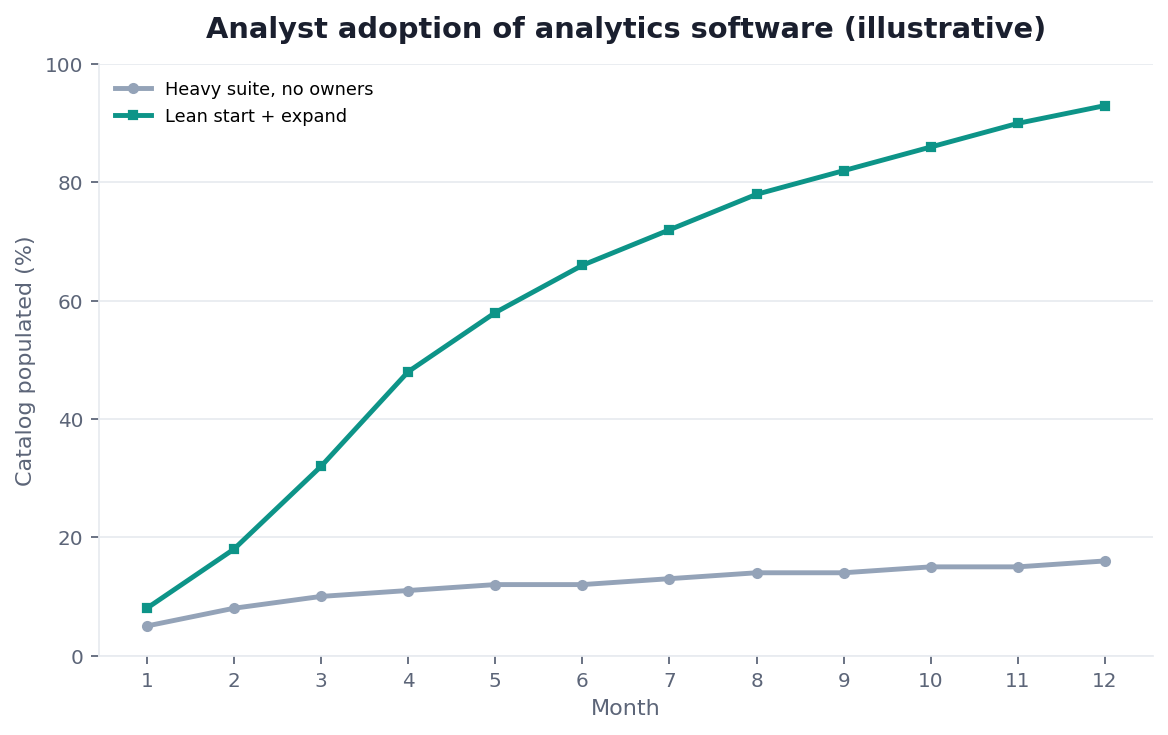
Practical example: a company bought powerful business analytics software no one but IT could use; switching to a self-service tool matched to its analysts — the fit-first logic reinforced at Prometheus documentation — finally drove adoption.
Scope note: This guide reflects patterns we see when mid-market and enterprise teams work with business analytics software in 2026. It is not a substitute for legal counsel, vendor runbooks, or a formal survey of every industry — and when a smaller toolset or lighter process would serve, a full program is overkill.
What It Is
At its core, business analytics software is any tool designed to help an organization turn its data into insight and better decisions, from summarizing what happened to predicting what will.
Key Definition: business analytics software is the category of applications that enable organizations to collect, process, analyze, and visualize business data in order to understand past performance, monitor current operations, and inform or predict future decisions, typically combining reporting, exploration, and statistical or predictive capabilities.
The essence of business analytics software is decision support. It exists to move an organization from gut feel toward evidence, whether by showing what happened last quarter, monitoring what is happening now, or estimating what is likely next — all in service of choices people actually have to make.
The Main Categories
Teams evaluating this topic often cross-check Shopify ecommerce analytics for a durable, vendor-neutral reference point.
Business analytics software spans several categories: BI and reporting for dashboards and recurring reports, self-service exploration for business users to query data themselves, predictive analytics for forecasting, embedded analytics that surface insight inside other applications, and data-prep tools that clean inputs.
Each category of business analytics software answers a different question, as the reference guidance at BIRD NL2SQL benchmark on analytics workloads illustrates. Reporting answers "what happened"; self-service answers "let me check for myself"; predictive answers "what is likely next"; embedded answers "show me in context." Most organizations need several, and the mix depends on how data-literate the users are and what decisions recur.
Criteria That Matter
The criteria for business analytics software that actually predict success are usability for the intended audience, connectivity to your data, and fit to the decisions it must support — not the size of the feature matrix.
Evaluating business analytics software well means asking who will use it day to day. A tool only analysts can operate limits reach; one business users can drive spreads insight but may lack depth. Connectivity to your real sources matters more than exotic capabilities, and honest, accessible presentation — aligned with guidance like the Microsoft data architecture guidance — keeps outputs trustworthy across a broad audience. Match to people and decisions beats raw capability nearly every time.
Matching Software to Need
Governance and risk expectations are framed by FTC consumer protection guidance when programs need an external control reference.
Choosing business analytics software comes down to matching users and decisions. A business team needing self-serve dashboards points to a self-service BI tool; a team forecasting demand points to predictive analytics; a product embedding insight points to embedded analytics.
The discipline in selecting business analytics software is to define the decisions first. List the recurring choices the software must inform, who makes them, and what data feeds them, then match categories to those answers. Buying capability that no intended user can operate, or that does not connect to your data, is the most common way analytics investments quietly fail to pay off.
Where the Category Came From
The category of business analytics software grew out of the reporting and business-intelligence tools of earlier decades, which centralized data and produced dashboards for executives. As data literacy spread, self-service tools emerged so business users could explore without waiting on IT, and predictive capabilities followed as statistical methods became more accessible.
Understanding this history clarifies why the category spans such different capabilities: it accumulated layers as organizations asked more of their data, from describing the past to predicting the future. It also explains the recurring adoption problem — much of the software was originally built for specialists, and the persistent challenge has been making genuine analytical power usable by the business people who need to act on it, not just the analysts who can operate it.
Common Pitfalls
Governance and risk expectations are framed by ISO/IEC 42001 AI management when programs need an external control reference.
The pitfalls of business analytics software begin with buying for capability rather than adoption. The most powerful platform delivers nothing if the intended users cannot or will not use it, and expensive licenses sit idle while people revert to spreadsheets.
A subtler pitfall with business analytics software is treating it as a substitute for clear metric definitions and trustworthy data. Software cannot resolve disagreement about what "revenue" or "active user" means; it will faithfully display whichever definition it is fed, and inconsistent definitions across reports quietly erode trust. The tool is only as valuable as the governed, well-defined data behind it, so the organizational work of agreeing on metrics matters at least as much as the software choice itself.
A third pitfall is underinvesting in the rollout after the purchase. Organizations often spend months selecting a platform and then treat go-live as the finish line, skipping the training, template-building, and change management that determine whether people actually adopt it. A tool that ships without example reports, without a clear owner, and without anyone teaching the intended users how it fits their daily work tends to be quietly abandoned within a quarter, no matter how capable it is. The teams that see lasting value budget deliberately for enablement — starter dashboards, short training, a named administrator, and a feedback channel — treating adoption as a project in its own right rather than an afterthought that will somehow take care of itself.
The Category in the Age of AI
AI is reshaping business analytics software by letting users ask questions in plain language instead of building reports. The interface shifts from menus and drag-and-drop toward conversation.
We explore this in what AI-native data analysis means. In the InfiniSynapse web app, an agent analyzes across your data sources and answers business questions directly, so business analytics software moves from something analysts operate on behalf of others toward something decision-makers can query themselves — provided the underlying data stays governed and well-defined.
Readiness Scorecard
Teams evaluating this topic often cross-check MongoDB documentation for a durable, vendor-neutral reference point.
Assess your analytics software choice (1 point each):
| Check | Pass? |
|---|---|
| The decisions it supports are defined | |
| Intended users can operate it | |
| It connects to your data | |
| Metric definitions are agreed | |
| Outputs are trustworthy | |
| Adoption, not capability, drove the choice | |
| Data behind it is governed | |
| An AI-native option was considered |
6–8: a well-matched choice. 3–5: revisit fit. Below 3: restart from the decisions.
Common Misconceptions
Misconception 1: The most powerful software is best. Adoption beats raw capability.
Misconception 2: Software fixes messy definitions. It displays whatever it is fed.
Misconception 3: One tool serves everyone. Different users need different categories.
Misconception 4: You must build reports by hand. AI lets you ask in plain language.
Frequently Asked Questions
What is business analytics software?
It is the category of applications that let organizations collect, process, analyze, and visualize business data in order to understand past performance, monitor current operations, and inform or predict future decisions. It typically combines reporting, exploration, and statistical or predictive capabilities. Its essence is decision support — moving an organization from gut feel toward evidence, whether by showing what happened last quarter, monitoring what is happening now, or estimating what is likely next, always in service of choices people actually have to make.
What are the main categories?
The main categories are BI and reporting for dashboards and recurring reports, self-service exploration that lets business users query data themselves, predictive analytics for forecasting outcomes, embedded analytics that surface insight inside other applications, and data-prep tools that clean and shape inputs. Each answers a different question — what happened, let me check myself, what is likely next, show me in context. Most organizations need several, and the right mix depends on how data-literate the users are and which decisions recur often enough to justify dedicated tooling.
Which criteria actually matter when choosing?
Usability for the intended audience, connectivity to your data, and fit to the decisions the software must support predict success far better than the size of a feature matrix. Ask who will use it day to day: a tool only analysts can operate limits reach, while one business users can drive spreads insight but may lack depth. Connectivity to your real sources matters more than exotic capabilities, and honest, accessible presentation keeps outputs trustworthy. In short, how well a tool fits your people and the choices they face almost always outweighs how much raw power it advertises.
How do I match software to my need?
Define the decisions first. Start by writing down the recurring choices the tool must inform, the people who make them, and the data that feeds them, then map candidates to those answers. Self-serve dashboards for a business team suggest a self-service BI tool; demand forecasting suggests predictive analytics; insight surfaced inside a product suggests embedded analytics. Buying capability no intended user can operate, or that does not connect to your data, is the most common way analytics investments quietly fail to deliver a return.
How is AI changing this category?
AI is letting users ask questions in plain language instead of building reports, shifting the interface from menus and drag-and-drop toward conversation. An AI-native platform can analyze across your data sources and answer business questions directly, so the software moves from something analysts operate on behalf of others toward something decision-makers can query themselves. That widens access dramatically, but it depends on the underlying data staying governed and well-defined, because a conversational interface over inconsistent metrics simply spreads confusion faster.
Is it the same as business intelligence?
They overlap heavily but are not identical. Business intelligence traditionally emphasizes describing and reporting what has happened — dashboards, KPIs, and historical analysis — while business analytics is often used more broadly to include predictive and prescriptive work that estimates what will happen or recommends what to do. In practice the terms blur, and most modern platforms span both. The useful distinction is less about labels than about capability: know whether a given tool merely reports the past or also helps you model and act on the future, and buy according to which of those your decisions actually require.
In practice, teams evaluating business analytics software should judge outcomes by reliability and clarity, not by tool count alone.
When stakeholders ask for a short takeaway on business analytics software, start from the decision it must support and work backward.
Conclusion
Business analytics software turns organizational data into better decisions across reporting, exploration, and prediction — and the right choice follows your users, decisions, and data far more than any feature list. In 2026, prioritize adoption and governed definitions over raw power, and remember AI-native analysis now lets decision-makers query their data by simply asking.
Then try asking your data directly in the InfiniSynapse web app, free on registration.