Azure Data Factory Complex Transformation: A Guide (2026)
By the InfiniSynapse Data Team · Last updated: 2026-07-15 · We build an AI-native data analysis platform and work across cloud ETL stacks; this guide covers azure data factory complex transformation patterns in practical terms for 2026, not a feature tour.
Table of Contents
- TL;DR
- How We Approach It
- What It Means
- The Main Approaches
- Where Transformation Should Live
- Patterns That Work
- Common Pitfalls
- Transformation in the Age of AI
- Readiness Scorecard
- Common Misconceptions
- Frequently Asked Questions
- Conclusion
TL;DR
Direct answer: an azure data factory complex transformation is any non-trivial reshaping of data — multi-source joins, aggregations, conditional logic, or type-heavy cleaning — built in Azure Data Factory using Mapping Data Flows or by pushing logic down to a compute engine. In 2026, the key decision is not how to build the transformation in ADF, but where the logic should actually live, because ADF is often better as an orchestrator than as the transformation engine itself.
Who this is for: data engineers building an azure data factory complex transformation in 2026.
What you'll learn: the main approaches, where transformation should live, the patterns that work, the pitfalls, and how AI fits in.
This guide sits under the data engineering hub.
For the platform overview, see Azure Data Factory.
Also see ETL for data.
How We Approach It
Implementation details are commonly grounded in Python documentation when teams translate concepts into production practice.
We approach an azure data factory complex transformation by first asking where the logic belongs, because the most common mistake is forcing heavy transformation into ADF when a warehouse would do it better. Every recommendation reflects pipelines we have watched perform or struggle. We anchor concepts to the Kubernetes documentation and to the official reference at Google Cloud AI overview, which documents ADF's transformation capabilities.
The table below maps how to build transformation in ADF.
| Approach | Best for |
|---|---|
| Mapping Data Flows | Visual, code-free transformation |
| Pushdown to warehouse | Heavy joins and aggregations |
| Databricks/Spark activity | Large-scale or custom logic |
| Stored procedures | Logic that belongs in the database |
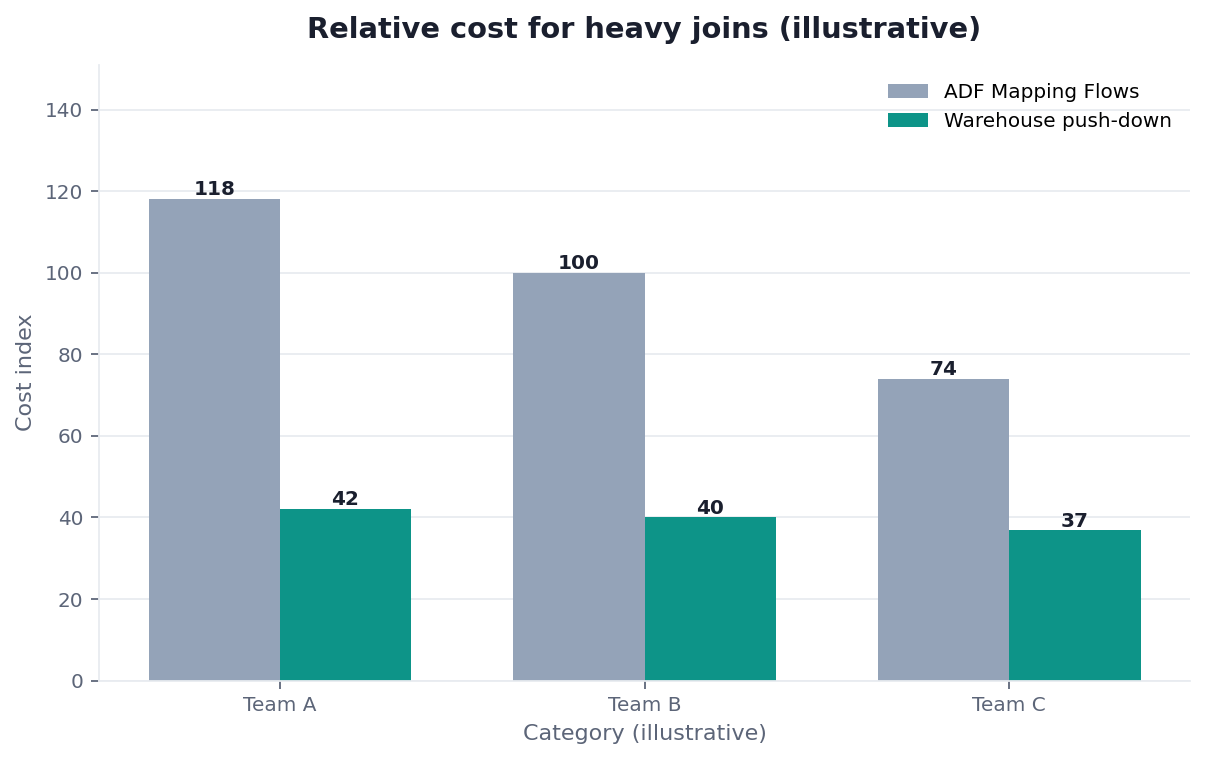
Practical example: a team built an azure data factory complex transformation entirely in Mapping Data Flows and hit cost and performance walls. Pushing the heavy joins down to the warehouse — a pattern the architecture guidance at RFC 4180 CSV format supports — made ADF the orchestrator and the warehouse the engine, fixing both problems.
Scope note: This guide reflects patterns we see when mid-market and enterprise teams work with azure data factory complex transformation in 2026. It is not a substitute for legal counsel, vendor runbooks, or a formal survey of every industry — and when a smaller toolset or lighter process would serve, a full program is overkill.
What It Means
Teams evaluating this topic often cross-check W3C WCAG accessibility standard for a durable, vendor-neutral reference point.
At its core, an azure data factory complex transformation is data reshaping that goes beyond simple copy-and-map: joining multiple sources, aggregating, applying conditional logic, or handling messy types and formats.
Key Definition: an azure data factory complex transformation is a non-trivial data-reshaping operation — multi-source joins, aggregations, conditional or type-heavy logic — implemented within Azure Data Factory, either through its visual Mapping Data Flows or by orchestrating pushdown to a warehouse or Spark engine that performs the heavy computation.
The distinction that matters is between building the azure data factory complex transformation in ADF and orchestrating it from ADF. ADF can transform data directly, but it often works better coordinating transformation that happens in a more suitable engine.
The Main Approaches
Teams evaluating this topic often cross-check Shopify ecommerce analytics for a durable, vendor-neutral reference point.
There are a few ways to build an azure data factory complex transformation, and choosing among them is the core skill.
Mapping Data Flows
Mapping Data Flows let you build an azure data factory complex transformation visually, without code, and run it on managed Spark. The reference at Google Sheets documentation on comparable visual ETL tools shows the trade-off: convenient and accessible, but they can become costly and hard to optimize for very heavy logic.
Pushdown and Spark activities
The alternative is to have ADF orchestrate transformation elsewhere — pushing an azure data factory complex transformation down to the warehouse via SQL, or running it in a Databricks/Spark activity. The distributed-processing patterns at Tableau Desktop documentation show why this often scales better: the transformation runs where the data and compute already live.
Where Transformation Should Live
Architecture choices are often checked against Microsoft Excel support so boundaries, ownership, and scale patterns stay explicit.
The most important decision about any azure data factory complex transformation is where the logic lives. ADF is a strong orchestrator, but for heavy joins and aggregations, a modern warehouse is usually the better engine.
This connects the azure data factory complex transformation question to the broader ELT shift in data engineering: load raw data into the warehouse, then transform it there with SQL, using ADF to coordinate. This pattern is often cheaper, faster, and easier to maintain than doing everything in Mapping Data Flows, because it uses each tool for what it does best — ADF for orchestration, the warehouse for computation.
Patterns That Work
Core definitions remain usefully summarized in Wikipedia machine learning overview for shared vocabulary across stakeholders.
The patterns that work for an azure data factory complex transformation center on separation of concerns. Use ADF to move data and orchestrate; push heavy transformation to the warehouse or Spark; keep each pipeline step focused and testable.
Parameterizing an azure data factory complex transformation so one pipeline handles many similar sources reduces duplication, and building idempotent steps means a failed run can be safely retried. These are the same reliability principles that apply to any pipeline: the tool changes, but the discipline of testable, re-runnable, observable steps does not.
Common Pitfalls
The pitfalls of an azure data factory complex transformation are consistent. The biggest is doing everything in Mapping Data Flows regardless of scale, which drives cost and performance problems. Building non-idempotent steps makes failures dangerous. And embedding logic without documentation makes the pipeline unmaintainable.
A subtler pitfall is over-engineering the azure data factory complex transformation for imagined complexity. Not every transformation needs Data Flows or Spark; sometimes a simple copy activity plus a stored procedure is clearer and cheaper. We favor the simplest approach that meets the real requirement, because a pipeline is maintained far longer than it is built, and clarity pays off every day.
Transformation in the Age of AI
AI is changing how teams build an azure data factory complex transformation in two ways. AI tools help generate the transformation logic and SQL, and AI-native platforms reduce how much transformation must be pre-built at all.
That second shift is worth weighing, and we describe it in what AI-native data analysis means. In the InfiniSynapse web app, zero-config federation lets an agent join and reshape data across sources on demand, so before building an elaborate azure data factory complex transformation to pre-integrate data, it is worth asking whether federated analysis handles the join at query time.
Testing and Maintaining It Over Time
A transformation is not finished when it first produces correct output; it is finished when it keeps producing correct output as sources drift and requirements change. That is why testing deserves as much attention as the initial build. An azure data factory complex transformation should be validated against known inputs and expected outputs, so a schema change upstream or a subtle logic error surfaces in a test rather than in a executive's dashboard. Teams that skip this step discover their mistakes the expensive way, when a stakeholder notices the numbers look wrong and trust in the whole platform erodes.
Observability is the companion to testing. A pipeline that fails silently is worse than one that fails loudly, because silent failure lets bad data flow downstream unnoticed. Building clear logging, alerting, and row-count checks into an azure data factory complex transformation means that when something breaks — and eventually something always breaks — the team learns immediately and from the pipeline itself, rather than from an angry email. The goal is a flow whose health is obvious at a glance, so that a small team can operate many transformations with confidence rather than dread.
Maintainability comes from restraint and documentation. Every clever trick embedded in a transformation is a puzzle a future maintainer must solve, so the simplest approach that meets the requirement is almost always the right one. When complexity is genuinely necessary, it should be documented — not with comments that restate the obvious, but with notes that explain why a non-obvious choice was made. A transformation that a new engineer can read and safely modify is worth far more than a faster one that only its author understands, because the cost of a system is dominated by the years of maintenance that follow its construction.
Finally, revisit transformations periodically rather than treating them as permanent. Sources change, business definitions evolve, and volumes grow, so a design that was ideal a year ago may now be pushing too much work into the wrong layer. A light quarterly review — checking whether heavy logic has crept back into the visual layer, whether steps are still idempotent, whether the pattern still matches the need — keeps the flow healthy and prevents the slow decay that turns a once-clean pipeline into a fragile one nobody wants to touch.
Readiness Scorecard
Assess your transformation design (1 point each):
| Check | Pass? |
|---|---|
| Logic lives in the right engine | |
| Heavy joins run in the warehouse | |
| ADF orchestrates rather than over-computes | |
| Steps are idempotent and re-runnable | |
| Pipelines are parameterized to reduce duplication | |
| Logic is documented | |
| It is as simple as the requirement allows | |
| Federation was considered as an alternative |
6–8: well-designed. 3–5: move heavy logic to the warehouse. Below 3: rethink where transformation lives.
Common Misconceptions
Misconception 1: ADF should do all transformation. An azure data factory complex transformation often belongs in the warehouse.
Misconception 2: Data Flows are always the answer. Pushdown scales better for heavy logic.
Misconception 3: Visual means simple to maintain. Undocumented visual logic is still hard to maintain.
Misconception 4: More sophistication is better. The simplest approach that works is usually best.
Frequently Asked Questions
What is an azure data factory complex transformation?
It is a non-trivial data-reshaping operation — multi-source joins, aggregations, conditional or type-heavy logic — implemented within Azure Data Factory, either through its visual Mapping Data Flows or by orchestrating pushdown to a warehouse or Spark engine. The key distinction is between building the transformation in ADF and orchestrating from ADF a transformation that runs in a more suitable engine.
What are the main approaches?
Mapping Data Flows let you build transformation visually without code, running on managed Spark, which is convenient but can be costly for heavy logic. The alternative is orchestrating transformation elsewhere — pushing it down to the warehouse via SQL, or running it in a Databricks/Spark activity — which often scales better because the transformation runs where the data and compute already live.
Where should transformation logic live?
For heavy joins and aggregations, a modern warehouse is usually the better engine, with ADF used to orchestrate. This ELT pattern — load raw data into the warehouse, then transform there with SQL — is often cheaper, faster, and easier to maintain than doing everything in Mapping Data Flows, because it uses ADF for orchestration and the warehouse for computation, each doing what it does best.
What patterns work best?
Separation of concerns: use ADF to move data and orchestrate, push heavy transformation to the warehouse or Spark, and keep each step focused and testable. Parameterizing a pipeline so it handles many similar sources reduces duplication, and building idempotent steps means a failed run can be safely retried. The tool changes, but the discipline of testable, re-runnable, observable steps stays constant.
How is AI changing this?
AI tools help generate transformation logic and SQL, and AI-native platforms reduce how much transformation must be pre-built at all. Before building an elaborate transformation to pre-integrate data, it is worth asking whether federated analysis can handle the join at query time, because the cheapest transformation is the one you never had to build and maintain.
A useful checkpoint for azure data factory complex transformation is whether owners, metrics, and escalation paths are written down — not just discussed.
Conclusion
An azure data factory complex transformation is best approached by first deciding where the logic belongs — usually the warehouse for heavy work, with ADF orchestrating. In 2026, favor ELT pushdown over doing everything in Data Flows, keep steps idempotent and documented, stay as simple as the requirement allows, and consider whether AI-native federation removes the need to pre-integrate at all.
To see how federated analysis joins data across sources without heavy pre-built transformation, read what AI-native data analysis means and try the InfiniSynapse web app free on registration.