Azure Data Factory: A Practical Overview (2026)
By the InfiniSynapse Data Team · Last updated: 2026-07-15 · We build an AI-native data analysis platform and work with teams running cloud pipelines; this overview reflects how Azure Data Factory actually fits a 2026 stack, not a feature list.
Table of Contents
- TL;DR
- How We Approach It
- What It Is
- Core Concepts
- When to Use It
- Cost and Operations
- Common Pitfalls
- ADF in the Age of AI
- Readiness Scorecard
- Common Misconceptions
- Frequently Asked Questions
- Conclusion
TL;DR
Direct answer: Azure Data Factory is Microsoft's cloud service for orchestrating data movement and transformation across cloud and on-premises sources. In 2026, Azure Data Factory matters for teams on Azure because it provides managed, code-optional pipelines, but its value depends on using it for orchestration rather than heavy transformation logic it was never designed to hold.
Who this is for: data engineers and leaders evaluating Azure Data Factory in 2026.
What you'll learn: what it is, its core concepts, when to use it, the pitfalls to avoid, and how it fits AI-driven analysis.
This guide sits under the data engineering hub.
For complex transformation patterns, see Azure Data Factory complex transformations.
Also see ETL for data.
How We Approach It
Teams evaluating this topic often cross-check OWASP API Security Top 10 for a durable, vendor-neutral reference point.
We treat Azure Data Factory as an orchestration service first and a transformation tool second, because that is where teams get value or get stuck. Every observation reflects what we see when Azure teams adopt it well or overload it. We anchor concepts to the MongoDB documentation and place it in the broader picture using the Google Vertex AI documentation.
The table below maps the core building blocks of Azure Data Factory.
| Concept | What it is |
|---|---|
| Pipeline | A workflow of activities |
| Activity | A single step (copy, transform) |
| Dataset | A named view of data |
| Linked service | A connection to a source |
| Trigger | What starts a pipeline |
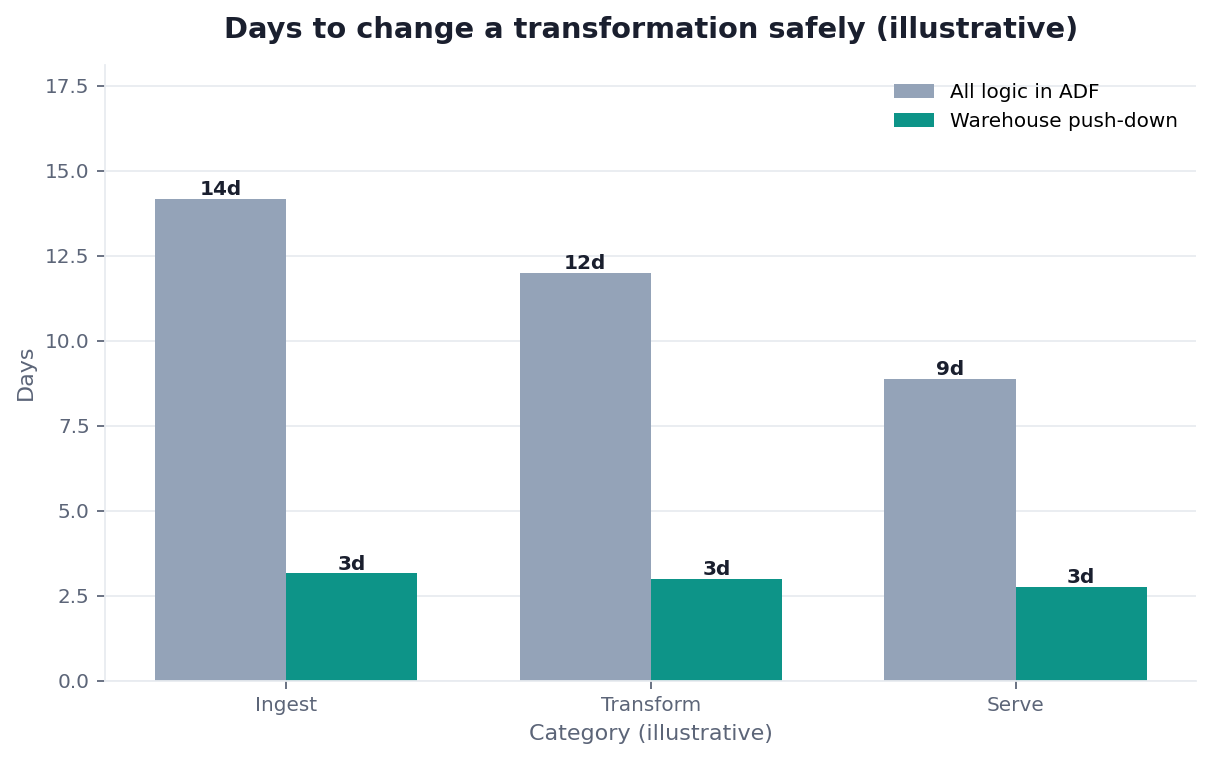
Practical example: a team used Azure Data Factory to hand-code every transformation inside it and hit maintainability walls. Moving heavy logic into the warehouse and keeping ADF for orchestration — an ELT pattern echoed at Wikipedia statistics overview — simplified everything. Right tool for each job, not one tool for all, fixed it.
Scope note: This guide reflects patterns we see when mid-market and enterprise teams work with Azure Data Factory in 2026. It is not a substitute for legal counsel, vendor runbooks, or a formal survey of every industry — and when a smaller toolset or lighter process would serve, a full program is overkill.
What It Is
At its core, Azure Data Factory is a managed cloud service that connects to your data sources, moves data between them, and orchestrates the steps of a pipeline on a schedule or trigger.
Key Definition: Azure Data Factory is Microsoft Azure's managed data integration service that orchestrates and automates the movement and transformation of data across cloud and on-premises sources, using code-optional pipelines built from activities, datasets, and linked services.
The distinction that matters is that Azure Data Factory excels at orchestration and movement, and is adequate but not ideal for complex transformation. Teams that use it as an orchestrator — coordinating steps while heavy logic lives in a warehouse or Spark — get the most from it, which is the mental model worth adopting before you build.
Core Concepts
Implementation details are commonly grounded in Amazon Redshift documentation when teams translate concepts into production practice.
Understanding Azure Data Factory means knowing a few building blocks that everything else composes from.
Pipelines and activities
A pipeline in Azure Data Factory is a workflow made of activities, where each activity is a step such as copying data or running a transformation. This composition is the heart of the service, and enterprise adoption patterns from BIRD NL2SQL benchmark show why clear, composable steps make pipelines maintainable across any cloud.
Datasets, linked services, and triggers
Datasets name the data a pipeline works with, linked services define connections to sources, and triggers decide when a pipeline runs. Together these let Azure Data Factory connect to almost anything and run on schedules or events, which is the flexibility that makes it a general-purpose orchestrator on Azure.
When to Use It
Choosing Azure Data Factory makes sense when you are on Azure and need managed, reliable orchestration of data movement across many sources without running your own scheduler. Its deep Azure integration and connector breadth are the main reasons to pick it.
It is less compelling when your transformation logic is complex, in which case Azure Data Factory should orchestrate while the heavy lifting happens in a warehouse or Spark. This connects to the broader question of ETL for data: the modern pattern loads data and transforms it in the destination, using a tool like ADF to coordinate rather than to compute. Matching the tool to orchestration keeps pipelines maintainable.
Cost and Operations
Teams evaluating this topic often cross-check Tableau Desktop documentation for a durable, vendor-neutral reference point.
Running Azure Data Factory well means understanding its cost model, which charges for pipeline activities, data movement, and integration runtime. Costs can climb quietly when pipelines run more often than needed or move more data than necessary.
The operational discipline that keeps Azure Data Factory economical is the same as any cloud service: monitor what runs, right-size how often pipelines fire, and avoid moving data you do not need to move. Teams that treat it as "set and forget" are the ones surprised by the bill, whereas teams that monitor activity runs and tune schedules keep costs proportional to value. Operations, not just design, determines whether the service pays off.
Common Pitfalls
The pitfalls with Azure Data Factory are consistent. Overloading it with complex transformation logic makes pipelines hard to maintain. Ignoring cost until the bill arrives turns convenient orchestration into runaway spend. And building sprawling pipelines without clear structure produces workflows nobody can debug.
A subtler pitfall is treating Azure Data Factory as the only tool rather than one part of a stack. It orchestrates and moves data well, but forcing it to also be your transformation engine, quality checker, and catalog produces a tangled system. We treat it as the conductor, not the whole orchestra, because the teams that get the most from it pair it with the warehouse and processing engines each suited to their part of the job.
Integration Runtimes and Connectivity
Implementation details are commonly grounded in Snowflake documentation when teams translate concepts into production practice.
A concept that trips up newcomers to Azure Data Factory is the integration runtime — the compute that actually performs data movement and dispatches activities. Choosing the right one matters: the Azure runtime handles cloud-to-cloud movement, while a self-hosted runtime is what lets the service reach data behind a corporate firewall or on-premises.
Why the runtime choice matters
Teams that ignore the integration runtime often hit a wall when they try to connect on-premises sources and discover they need a self-hosted runtime they never provisioned. Planning connectivity early — which sources live where, and which runtime reaches them — avoids a mid-project surprise. The reliability framing in Snowflake Cortex Analyst reinforces that connectivity is a first-class design concern, not a detail to sort out later.
Connector breadth
Much of the appeal of Azure Data Factory is its large library of connectors to databases, SaaS apps, and file stores. That breadth is what makes it a general-purpose mover on Azure, but it also tempts teams to connect everything through it when a lighter-weight or federated approach would serve better for read-only analysis.
Alternatives Worth Weighing
Azure Data Factory is not the only way to orchestrate data, even on Azure, and weighing alternatives keeps a choice honest. Code-first orchestrators appeal to teams that prefer version-controlled Python; warehouse-native transformation tools appeal to teams doing ELT; and federated analysis appeals to teams that want to avoid movement altogether where they can.
The right answer is rarely all-or-nothing. Many teams use Azure Data Factory for the movement that genuinely must happen while adopting a federated approach for analysis that does not require consolidation, getting the strengths of each rather than forcing one tool to cover every case. Deliberately choosing where each approach fits is what separates a maintainable stack from a tangled one.
ADF in the Age of AI
Governance and risk expectations are framed by NIST Computer Security Resource Center when programs need an external control reference.
AI is changing how teams think about tools like Azure Data Factory, because an AI-native approach can reduce how many pipelines you need by reading across sources directly rather than moving everything first. Where ADF moves data into one place for analysis, federation can sometimes analyze it where it lives.
That alternative is the approach we describe in what AI-native data analysis means. In the InfiniSynapse web app, zero-config federation lets an agent query across sources without building a movement pipeline for each, so Azure Data Factory can focus on the movement that genuinely needs to happen while federation handles the analysis that does not require consolidation first.
Readiness Scorecard
Assess your Azure Data Factory use (1 point each):
| Check | Pass? |
|---|---|
| We use it mainly for orchestration | |
| Heavy transformation lives elsewhere | |
| Pipelines are clearly structured | |
| We monitor activity runs | |
| Schedules are right-sized for cost | |
| We move only data we need to | |
| It integrates with our Azure stack | |
| Its output is trustworthy for AI |
6–8: healthy use. 3–5: move heavy logic out and monitor cost. Below 3: rethink structure.
Common Misconceptions
Misconception 1: It is a full transformation engine. Azure Data Factory is best as an orchestrator; heavy logic belongs elsewhere.
Misconception 2: It is set-and-forget. Cost and reliability need ongoing monitoring.
Misconception 3: One tool should do everything. ADF is the conductor, not the whole orchestra.
Misconception 4: More pipelines is progress. AI-native federation can reduce how many you need.
Frequently Asked Questions
What is Azure Data Factory?
Azure Data Factory is Microsoft Azure's managed data integration service that orchestrates and automates the movement and transformation of data across cloud and on-premises sources, using code-optional pipelines built from activities, datasets, and linked services. It excels at orchestration and data movement and is best paired with a warehouse or Spark for complex transformation.
What are its core concepts?
The core building blocks are pipelines (workflows of activities), activities (individual steps like copy or transform), datasets (named views of data), linked services (connections to sources), and triggers (what starts a pipeline). Together they let it connect to almost anything and run on schedules or events, making it a flexible general-purpose orchestrator on Azure.
When should you use it?
Use it when you are on Azure and need managed, reliable orchestration of data movement across many sources without running your own scheduler; its Azure integration and connector breadth are the main draws. It is less compelling for complex transformation, where it should orchestrate while the heavy lifting happens in a warehouse or Spark following a modern load-then-transform pattern.
How do you control its cost?
Understand its model — it charges for pipeline activities, data movement, and integration runtime — and apply cloud discipline: monitor what runs, right-size how often pipelines fire, and avoid moving data you do not need. Teams that treat it as set-and-forget are the ones surprised by the bill, while those that tune schedules and monitor activity runs keep cost proportional to value.
How does AI change its role?
An AI-native approach can reduce how many pipelines you need by reading across sources directly rather than moving everything into one place first. Where the service moves data into one location for analysis, federation can analyze it where it lives, so the service can focus on the movement that genuinely must happen while federation handles analysis that needs no consolidation.
Conclusion
Azure Data Factory is a managed orchestration service that moves and coordinates data across sources on Azure — most effective as a conductor rather than a transformation engine. In 2026, use it for orchestration, keep heavy logic in the warehouse, monitor cost, and remember AI-native federation can reduce how many movement pipelines you need at all.
Use it for the movement that genuinely must happen, keep the transformation where it belongs, and let federation handle the analysis that never needed a pipeline in the first place. To see how federated analysis reduces movement pipelines, read what AI-native data analysis means and try the InfiniSynapse web app free on registration.