Hex vs Power BI Copilot for Natural Language Analytics
Author / credentials: By the InfiniSynapse Data Team. Named accountability: cofounder William Zhu (GitHub @allwefantasy) — open-source data-systems publisher (InfiniSQL lineage) who reviews Fabric capacity notes, Q&A deprecation timelines, and Wall Street Prep accuracy scores against multi-source investigation pilots. No personal LinkedIn; identity signals are GitHub + About / team + Vision + editorial standards. Credentials asserted: engineering/OSS + desk practice — not a vendor certification badge.
Commercial interest (COI): InfiniSynapse sells agentic analytics. This page cites Microsoft docs, Wall Street Prep, Tray.ai, Holistics, Bruin, and Dialpad (arXiv) as primary evidence. Treat InfiniSynapse as one shortlist option; re-verify pricing and Fabric requirements on Microsoft Learn.
Independent signals: Microsoft Copilot docs · Hex Threads · Hex Threads docs · Wall Street Prep benchmark · Dialpad arXiv · Tray.ai survey. Last updated: 2026-09-16.
Hex vs Power BI Copilot for natural language analytics — then the Copilot cost, accuracy, and four-architecture desk.
- Hex vs Copilot: Different jobs. Copilot answers as DAX on a Fabric report canvas. Hex Threads writes inspectable SQL in a notebook workspace and shows the agent steps. Pick Copilot for governed Microsoft packs; pick Hex when analysts will open the project. Neither covers CRM + support + billing that live outside both products.
- The Copilot floor: Power BI Copilot requires Fabric F2+ capacity (~$9K+/year) + Pro licenses ($14/user/month after 40% price hike). Microsoft's fabrication warning and Q&A deprecation matter too. It only answers questions about data already in a Fabric semantic model. Microsoft's own docs warn Copilot can fabricate data. And the legacy Q&A feature is being deprecated December 2026 — meaning even basic NLQ will require Fabric migration. Wall Street Prep benchmarked Copilot at 4.4/10 on financial modeling accuracy — below Claude Opus 4.7 (5.5/10) and a human junior analyst (6.4/10).
- Alternatives: Agentic analytics (77–95% accuracy on arbitrary questions, no Fabric required), AI-native semantic BI (governed metrics + AI, near-100% within scope), search-driven BI (ThoughtSpot: NLQ without dashboard dependency), and AI notebooks (Hex, Deepnote: code-native analysis with AI co-pilots).
- 2026 pattern: Keep Power BI for governed reporting and scheduled dashboards. Add an agentic layer for ad-hoc cross-source investigation. Best of both: Microsoft for compliance, AI-native for exploration.
Hex vs Power BI Copilot for natural language analytics
The query hex vs power bi copilot for natural language analytics is a two-product job comparison, not a vanity winner. Official product pages: Microsoft Copilot and Hex Threads.
Power BI Copilot is a report-canvas assistant. It prepares a Fabric semantic model, then turns a question into DAX, a visual, or a summary. Quality tracks model prep (Prep data for AI, verified answers). Microsoft still warns that Copilot can fabricate values when fields are missing. Legacy Q&A retires December 2026, which pushes more NL traffic onto Copilot + Fabric.
Hex Threads is a conversational agent inside Hex. Hex documents that Threads searches endorsed semantic models and warehouse tables the user can access, writes SQL, builds charts, and shows step-by-step reasoning. A Thread opens as a Hex project so a data team can inspect it as a notebook. That is natural-language analytics for analysts who will open the cells — not a Fabric report pack.
Neither product is a multi-source Data Agent. If the question spans Salesforce + Zendesk + a warehouse that is not in Fabric and not connected in Hex, both will stall. That third job is why the four-architecture table below still exists.
| Dimension | Power BI Copilot | Hex Threads |
|---|---|---|
| NL job | Ask a governed Fabric model; get DAX, a visual, or a summary | Ask endorsed models and warehouse tables; get SQL, charts, and inspectable steps |
| Where it lives | Power BI / Fabric report canvas | Hex workspace; Thread backed by a notebook project |
| Query language | DAX (Power BI only) | SQL + Python cells analysts can open |
| Unmodeled data | Partial answer or fabrication risk (Microsoft discloses) | Can query warehouse tables if the connection is in Hex and the user has access |
| Cost shape | Fabric F2+ / Premium floor (~$9K+/year) + Pro seats (~$14/user/month after 2025 hike) | Editor / workspace pricing — verify current Hex sheets; notebooks on this desk were $36–$75/editor/month as of May 2026 |
| Best when | Mature Fabric model, DAX reviewers, board-pack reporting | Analysts explore in notebooks and will review the Thread as a project |
| Not enough when | The question leaves Fabric | The question leaves Hex connections, or you need a scheduled KPI pack in Power BI |

When Hex, when Copilot, when neither
- Pick Power BI Copilot if the last 20 ad-hoc questions already map to a published Fabric model and someone can debug DAX.
- Pick Hex Threads if the same questions should become inspectable SQL/notebook work, and warehouse tables (not only a Microsoft semantic model) are the source of truth.
- Pick neither alone if the question joins CRM, support, and billing that live outside both Fabric and Hex. Use the agentic column in the head-to-head table, or keep Power BI for packs and add a query layer. Adjacent Hex depth: InfiniSynapse vs Hex and Hex alternatives.
What changed in the Copilot desk (2025–2026)
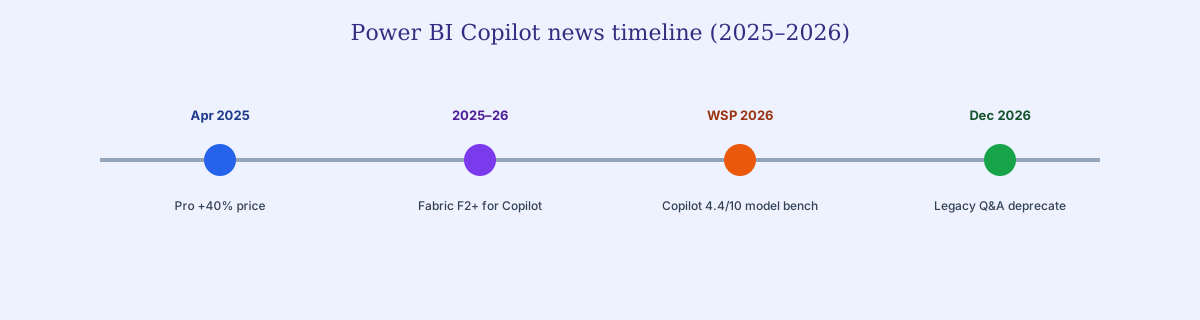
Power BI Copilot news usually consolidates four durable signals — pricing, capacity, fabrication risk, and Q&A deprecation — into stack decisions.
Teams scanning Copilot updates usually land on four durable signals — not product slogans. First, Copilot access is gated behind Fabric F2+ / Premium capacity, so “included AI” still carries a capacity floor. Second, Power BI Pro pricing moved +40% in April 2025, which compounds seat economics in every TCO model. Third, Microsoft’s documentation still warns that Copilot can fabricate data on missing values — a trust issue every review should quote, not bury. Fourth, legacy Q&A deprecation (December 2026) means natural-language habits built without Fabric now face a forced path. This guide turns those signals into architecture choices. Bookmark it when pricing or deprecation cycles again.
What Power BI Copilot gets right — and the hidden costs
Vendor coverage often leads with convenience. Copilot's core value proposition is straightforward: if your data is already in Microsoft Fabric, and your team already uses Power BI, Copilot adds AI assistance with zero learning curve. It generates DAX queries from natural language — "show me product category sales by month, filtered by region" — and produces the visualization. It summarizes report pages into narrative text. It suggests visuals based on data patterns. For organizations fully committed to the Microsoft stack, Copilot reduces the friction between asking a question about known data and getting a chart.
But coverage that stops at the demo misses structural costs:
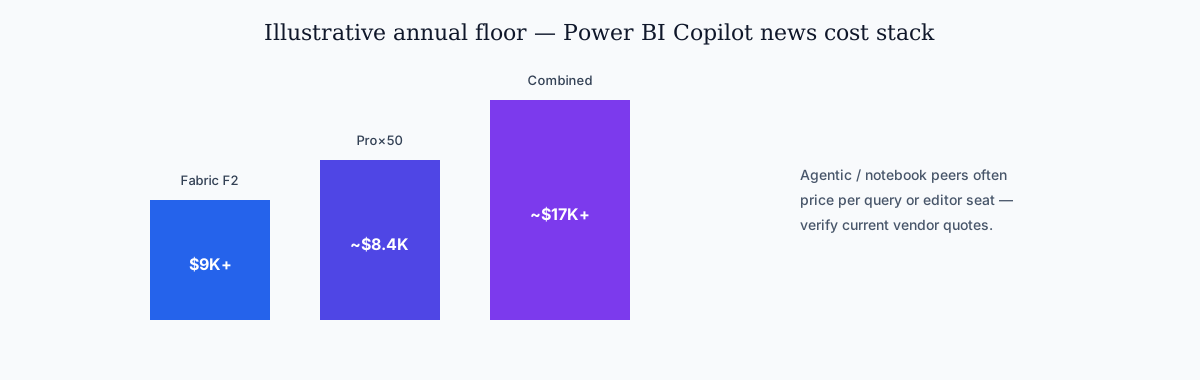
1. The Fabric tax. Copilot requires Fabric F2+ or Premium P1+ capacity. Fabric F2 starts at approximately $9,000/year — before a single user license. Power BI Pro licenses add $14/user/month after the 2025 40% price increase. For a mid-market team of 50 users, the annual minimum is roughly $17,400/year just to access Copilot — and that assumes your data is already in Fabric. Coverage that omits this floor understates TCO.
2. The DAX lock-in. Copilot generates DAX — Microsoft's proprietary formula language unique to Power BI. Those DAX queries, calculations, and measures only work inside Power BI. If your organization later adopts Looker, Tableau, or an agentic analytics platform, none of the Copilot-generated logic ports. If that later stack is Looker, start from the looker alternative page. You are not just buying an AI assistant; you are deepening your dependency on the Microsoft analytics stack.
3. The verification gap. Microsoft's own documentation states: "Copilot can fabricate data on missing values." When a user asks a question and the underlying semantic model is missing the relevant field, Copilot may return a plausible-looking wrong answer rather than saying "I don't have that data." This is a known limitation that Microsoft discloses — but disclosure does not prevent bad decisions made on fabricated numbers. Reviews should quote that warning verbatim.
The 4 places Power BI Copilot breaks down in production
These failure modes show up repeatedly in Power BI Copilot news production write-ups — Fabric scope, DAX verification, Q&A deprecation, and single-step reasoning.
The following failure modes show up repeatedly for practitioners — Fabric scope, DAX verification, Q&A deprecation, and single-step reasoning.
1. Fabric-bound AI: only answers questions about modeled data
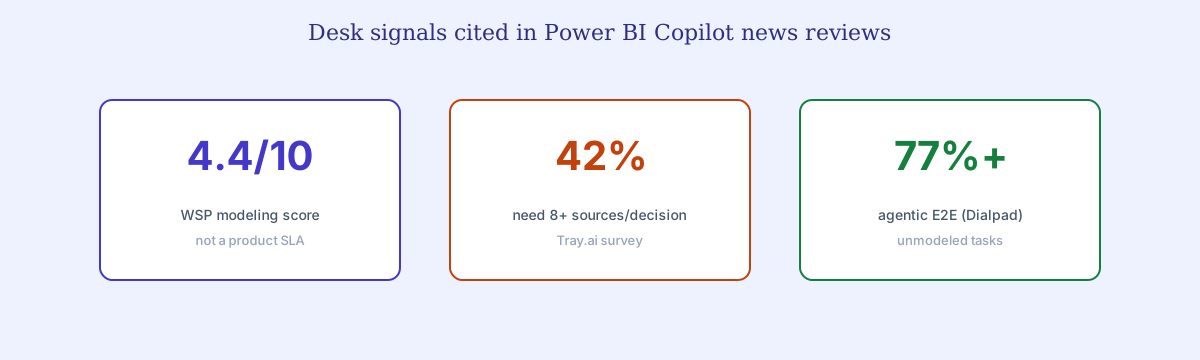
Copilot's scope is the Fabric semantic model. Every question it can answer must map to data already ingested, modeled, and published in Fabric. When a VP asks "which accounts that expanded last quarter had below-target support satisfaction in the same period?" — a question spanning CRM data (Salesforce), support data (Zendesk), and financial data (Fabric) — Copilot only sees the Fabric slice. It either returns a partial answer or nothing. A Tray.ai survey found 42% of enterprises need 8+ data sources per analytical decision — far beyond any single semantic model's coverage. That multi-source gap is central to production-readiness reviews.
2. DAX complexity: the language barrier that Copilot hides (but doesn't remove)
Copilot generates DAX for you. But when the generated DAX is wrong — and on complex measures it often is — you need a DAX expert to debug it. You still need someone who understands filter context, row context, and iterator functions. Copilot shifts the DAX writing burden from "write it yourself" to "verify what the AI wrote" — which, for complex logic, can be harder than writing it from scratch. A Wall Street Prep benchmark found Copilot scored 4.4/10 on financial modeling tasks, with errors concentrated in multi-step calculations that require reasoning across measures — a headline number in accuracy roundups.
3. Q&A deprecation: the NLQ rug pull
Microsoft is retiring Power BI's legacy Q&A feature in December 2026 — the natural language query tool that many teams built their self-service analytics around. The recommended migration path is Copilot, which requires Fabric. For organizations that adopted Q&A precisely because it was accessible without premium licensing, this is a forced upgrade. The timing is not coincidental: Microsoft is consolidating its AI features behind the Fabric paywall. Teams evaluating Copilot alternatives should ask whether they want to bet on a vendor that deprecates features to push users into higher-cost tiers.
4. No multi-step reasoning, no cross-source verification
Copilot translates one question into one DAX query or one visualization. It does not plan a multi-step analysis: "identify the customers with the fastest declining usage, check their support ticket history, compare to the renewal timeline, and flag churn risk accounts." This requires the AI to break a question into sub-tasks, execute across systems, check intermediate results, and synthesize. Copilot was not designed for this. It is a DAX assistant, not an analytical reasoning engine. Coverage that equates Copilot with an “autonomous analyst” oversells the product.
What a Power BI Copilot alternative needs to deliver
When Power BI Copilot news turns into a purchase checklist, score architectures on the five bars below — not on chatbot demos alone.
When a purchase decision follows, the bar is architectural — not “another chatbot on a dashboard.”
A genuine Power BI Copilot alternative addresses the four structural limitations above. It is not another BI tool with a chatbot bolted on — it is a different architecture for AI-powered analytics:
1. Platform-agnostic, not Fabric-bound. Buyers should demand native drivers — Snowflake, PostgreSQL, BigQuery, MySQL, MongoDB — without requiring Fabric, Azure, or any specific cloud. Your data stays where it is. The AI queries it in place.
2. Generate verified analysis, not unverified DAX. When the AI produces a result, it should also show what it checked: distribution benchmarks, reformulated queries for ambiguous terms, source citations. Not "here is a plausible DAX query — trust me."
3. Multi-source and multi-step. The system must query CRM, support, billing, and analytics databases in their native languages — then correlate results into one coherent analysis. A question that spans three systems should get one answer, not three siloed partials.
4. No proprietary language lock-in. The system's output should be readable analysis and standard SQL — not DAX that only works inside Power BI. Your analytical logic should be portable across your stack.
5. Answer questions you haven't pre-modeled. Agentic-tool coverage emphasizes runtime schema discovery — testing candidate queries and self-correcting — without a pre-built semantic model for every possible question.
CALCULATE(SUM(Sales[Revenue]), DATESQTD(Sales[Date])). A DAX formula and a chart — if the data is in your Fabric model. If it isn't, Copilot may fabricate a plausible-looking answer. No source verification. No cross-system context. The DAX stays locked inside Power BI — a lock-in point reviews should not soft-pedal.Power BI Copilot vs alternatives: head-to-head comparison
Read this scorecard alongside independent sources cited in Power BI Copilot news roundups — then re-run cells against your Fabric coverage.
Independent parallel comparisons (not InfiniSynapse lab results): Cross-check this desk against Wall Street Prep’s AI financial-modeling scores (Copilot 4.4/10 vs human junior 6.4/10), Holistics’ AI-powered BI fact comparison, and Bruin’s AI data-analyst tool matrix. Those sources score vendors without InfiniSynapse as publisher — use them to balance any shortlist bias on this page. Peer review markets: Gartner Peer Insights and G2 (category reviews, not endorsements of our desk tallies).
Use this table as a Copilot scorecard: scope, unmodeled questions, multi-source reach, verification, lock-in, and cost floor. Re-run any cell against your Fabric model coverage before you treat any roundup as a buying mandate. For the notebook column specifically, start with the Hex vs Power BI Copilot table — Threads is not the same job as Fabric DAX.
| Dimension | Power BI Copilot | Agentic Analytics (InfiniSynapse, Bruin) |
AI-Native Semantic BI (Holistics, Looker, Zenlytic) |
Search-Driven BI (ThoughtSpot) |
AI Notebooks (Hex, Deepnote) |
|---|---|---|---|---|---|
| AI scope | Fabric semantic model only | Any database, any question | Modeled metrics within semantic layer | Modeled data within worksheets | Connected data sources (code-native) |
| Unmodeled questions | Returns partial or fabricated answer | Answers (77–95% accuracy) | Returns "I don't know" | Returns nothing | Human-driven exploration |
| Multi-source queries | Single Fabric model only | Yes (native drivers across DBs) | Within semantic layer scope | Single data model | Yes (manual code) |
| Multi-step reasoning | No (single Q→DAX) | Yes (plan-execute-verify loop) | No | No | Yes (human-driven) |
| Self-verification | None (MS warns of fabrication) | Distribution checks, reformulation | Deterministic (within scope) | None | Human review |
| Unstructured data | No | Yes (PDFs, documents, transcripts) | No | No | Yes (via Python) |
| Query language | DAX (proprietary) | SQL (standard, portable) | Varies (LookML, AQL, etc.) | Proprietary search layer | SQL + Python |
| Ecosystem lock-in | High (Fabric, Azure, DAX) | Low (cloud-agnostic) | Medium (platform-specific semantics) | Medium | Low–Medium |
| Minimum annual cost | $9K+ (Fabric F2) + Pro licenses | Free tier → LLM costs ($0.04–$0.50/query) | $800+/month (Holistics); custom (Looker) | $25/user/month (annual) | $36–$75/editor/month |
| Setup to first answer | Weeks (model + publish in Fabric) | Minutes (connection string) | Weeks–months (build semantic layer) | Weeks (model data) | Hours (connect + learn) |
| Best for | Microsoft-stack orgs with mature Fabric models | Ad-hoc, cross-source investigation | Governed metrics with AI Q&A | NLQ search across known data | Deep exploratory data science |
Media note: There is no hosted 3–5 minute architecture video on this page (and therefore no video schema). Use the Speakable TL;DR, the HTML architecture-gap table, the head-to-head table, and the HowTo decision path as short-answer surfaces. If we publish a video later, it will ship with a full transcript.
Architecture gap: Fabric-bound AI vs agentic analytics
The HTML table below is the citeable form of the architecture gap that most Power BI Copilot news charts only show as graphics.
Coverage that only compares LLM brands misses the permission model: Copilot is allowed to generate DAX inside Fabric; agentic systems are allowed to explore databases. That is the durable architectural distinction.
| Layer | Fabric-bound Copilot | Agentic analytics layer |
|---|---|---|
| Permission model | Generate DAX inside a Fabric semantic model | Plan → multi-DB SQL → verify across sources |
| Happy path | Question → DAX → Fabric model → chart | Question → RAG context → plan → query → verify → insights |
| Outside-model data | Partial answer or fabrication risk (Microsoft discloses) | Cross-source join with portable SQL |
| Lock-in | Fabric · Azure · DAX | Low; complements Power BI governed reports |
| Cost shape | $9K+/yr Fabric F2 + Pro seats | Free tier → ~$0.04–$0.50/query (LLM); no Fabric tax |
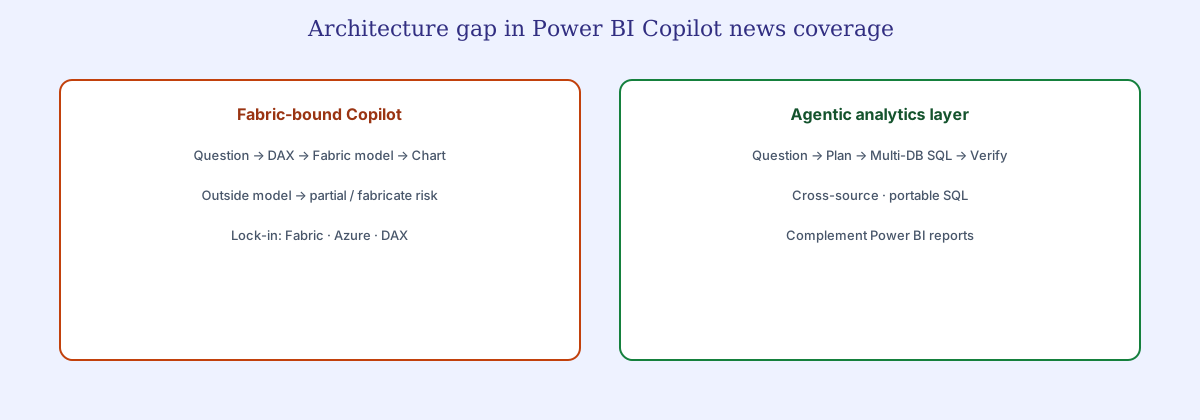
The difference between Power BI Copilot and an agentic alternative is not about which LLM is under the hood. It is about what the AI is allowed to do. Copilot answers questions by generating DAX against a Fabric semantic model. An agentic alternative answers questions by exploring databases. Below is what that difference looks like in practice:
When Power BI Copilot is enough (and when it isn't)
Balanced Power BI Copilot news states when Copilot-only is rational — mature Fabric models, DAX reviewers, single-source questions.
Honest reviews should say when Copilot is enough. Mature Fabric models, DAX reviewers on staff, and single-source questions remain a valid path — this is not an anti-Microsoft brief.
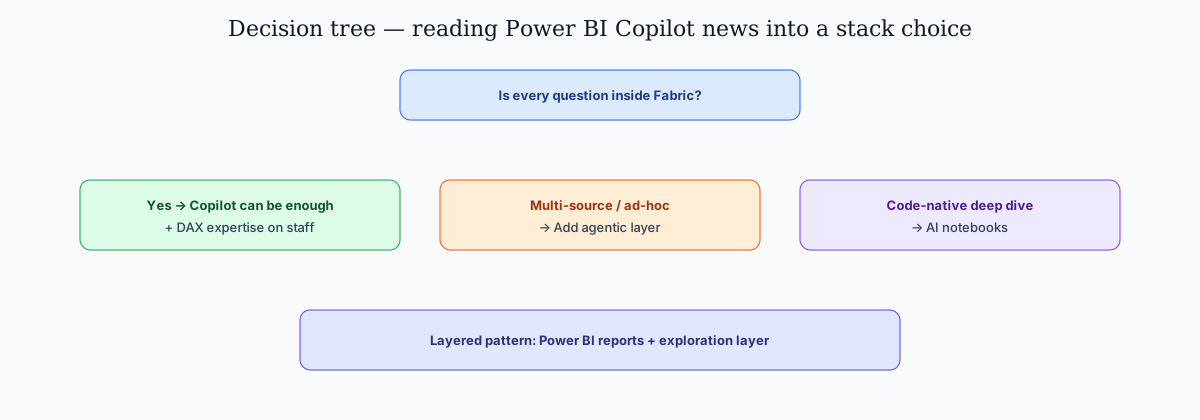
This guide is not an argument that Power BI Copilot is useless. For organizations already deep in the Microsoft stack — Fabric semantic models built, DAX measures defined, security roles configured — Copilot adds real convenience: ask a question about known data, get a chart faster than clicking through the report builder. If your analytical needs are fully met by data already in Fabric, and your team has DAX expertise for when Copilot-generated queries need debugging, it does what it says on the tin.
But most analytical work does not look like "summarize the Q2 revenue report." It looks like "why did West region revenue decline while East grew?" and "which accounts showing usage decline also have open support tickets?" — questions that span systems, require multi-step reasoning, and were never modeled in anyone's Fabric semantic layer.
Stick with Power BI Copilot if:
- Your data is already in Fabric with mature, well-governed semantic models.
- Your team has DAX expertise to verify and debug Copilot-generated queries.
- Your questions are predictable and single-source: quarterly revenue, pipeline status, customer counts — all from the same Fabric model.
- You are comfortable with the cost: $9K+/year for Fabric F2 + $14/user/month for Pro, scaling with user count.
Add a Power BI Copilot alternative if:
- Your most valuable questions span multiple systems (CRM, support, billing, product analytics) — not just one Fabric model.
- Your data lives outside Azure — Snowflake, PostgreSQL, BigQuery — and routing it all through Fabric is architecturally awkward or costly.
- You need the AI to verify its own work — not return unverified DAX that Microsoft's own docs warn can fabricate data.
- You are Q&A users facing the December 2026 deprecation who don't want to pay the Fabric tax just to keep natural language querying.
Layer both if:
- You have governed KPI reports and scheduled dashboards in Power BI that must remain the source of truth plus a high volume of ad-hoc investigative questions Power BI cannot handle.
- Different teams have different needs: finance and compliance use Power BI for governed reporting; product and growth teams need the agentic layer for ad-hoc exploration across systems.
- You want to reduce ad-hoc data request load on your analytics team while keeping Power BI as the KPI governance and scheduled reporting layer.
InfiniSynapse limitations (candid)
Any Power BI Copilot news page that sells agentic tools should also publish self-limits — including ours.
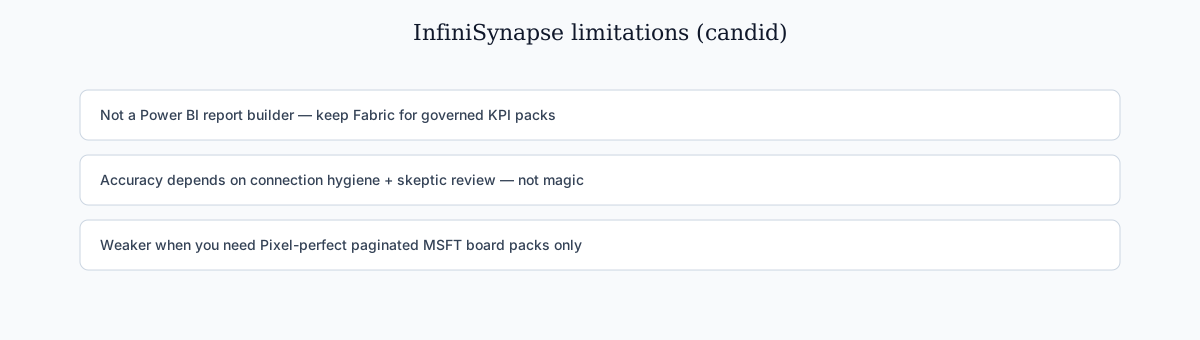
Objective coverage should include vendor self-limits. InfiniSynapse is not a Power BI report builder: pixel-perfect paginated board packs, Microsoft-native row-level security packs, and Fabric capacity administration stay on the Microsoft side. Agentic answers still need connection hygiene and human skeptic review — any coverage that implies “zero verification” is marketing, whether it comes from us or anyone else. InfiniSynapse can be weaker when your only requirement is Copilot-style DAX generation inside an already-perfect Fabric model; in that niche, favoring Copilot-only is fair. We recommend layering: Power BI for governed KPI packs; agentic exploration for cross-source questions Fabric cannot cover.
Case pattern from desk reviews (anonymized): a mid-market ops team kept Power BI for monthly board packs, then routed “which expanding accounts also spiked Zendesk severity?” to an agentic layer because Fabric lacked the support model. That is complementary adoption — not a rip-and-replace story.
FAQ: Copilot alternatives and architecture choices in 2026
Methodology & Sources
This guide draws on Microsoft's official documentation and pricing (Power BI, Fabric, Copilot licensing as of May 2026, re-checked September 2026), Hex Threads product and docs (September 2026), independent benchmarks (Wall Street Prep financial modeling accuracy comparison, 2026), industry surveys (Tray.ai Enterprise AI Agent Readiness Survey, 2026; Concurate BI keyword ranking analysis, 2026), peer-reviewed research (Dialpad Agentic Analytics, arXiv 2026), and vendor-published comparisons (Holistics, ThoughtSpot, Hex, Bruin). All pricing reflects publicly available tiers — verify current Microsoft and Hex sheets before you buy.
References & Further Reading
- Microsoft — Power BI Copilot Documentation (official feature docs, Fabric requirements, and known limitations including data fabrication disclosure)
- Hex — Threads: Conversational Analytics (vendor product page for Hex natural-language analytics)
- Hex — Threads documentation (how Threads searches endorsed models and warehouse tables, writes SQL, and opens as a project)
- Wall Street Prep — AI Financial Modeling Benchmark (Copilot scored 4.4/10; Claude Opus 4.7 scored 5.5/10; human junior analyst 6.4/10)
- Concurate — 39 BI Keywords Challenger Brands Can Win in 2026 (Power BI lost rankings on high-intent BI keywords; alternative pages capturing evaluation-stage traffic)
- Holistics — AI-Powered BI Tools: A Fact-Based Comparison (2026) (10-tool feature comparison including Copilot, semantic layer depth, AI reliability)
- Bruin — 8 AI Data Analyst Tools Compared (2026) (decision matrix across Copilot, ThoughtSpot, Hex, Dot, Julius AI, Querio)
- Dialpad — Beyond Text-to-SQL: An Agentic LLM System for Governed Enterprise Analytics APIs (2026: agentic architecture achieving 77.22% end-to-end accuracy on unmodeled tasks)
- Tray.ai — Enterprise AI Agent Readiness Survey (42% of enterprises need 8+ data sources per decision; single-model AI like Copilot is architecturally insufficient)
- Gartner Peer Insights — Analytics & BI Platforms (peer-market reviews; not an endorsement of this desk)
- G2 — Analytics Platforms (peer-market reviews; not an endorsement of this desk)
Related Guides
After reading this desk, try an agentic layer that answers questions, not just generates DAX
Connect your databases and knowledge base. Ask a cross-source business question. Get charts, explanations, and insights — no Fabric, no DAX, no lock-in. Read our limitations above before you treat any roundup as a rip-and-replace brief.
Try InfiniSynapse Free