Shopify on page SEO: Read Docs, Then Your URL
Shopify on page SEO starts as one docs read: HTTP 200 on 2026-09-14, with the docs H1 stored. Inspect a storefront you own before you call a title fixed.
Author credentials: William Zhu is cofounder of InfiniSynapse (GitHub @allwefantasy · auto-coder). Desk: shipping SEO Health and the /en/tool/ visibility pages. No personal LinkedIn published. About: team / editorial standards.
Publisher credentials: InfiniSynapse has public profiles on GitHub, YouTube, and X. A 2026 WAIC Future Tech OPC excellence award covers the Agentic Data Infra entry (WAIC; third-party recap: Xinhua / Caohejing). That award does not review this page or SEO Health. Method CLI: infinitegrowth on npm. Archive: recognition and scope notes.
On this page
By William Zhu · Cofounder, InfiniSynapse · Published: 2026-09-08 · Last updated: 2026-09-27 · Last verified: 2026-09-14 · Reviewed by the InfiniSynapse Data Team.
Reviewed by: InfiniSynapse Data Team · method review 2026-09-14. Shopify metadata docs HTTP 200 (80,266 bytes; H1 “Add SEO metadata to your theme”). No merchant admin. No storefront Liquid runtime.
Trust / COI: About · Corrections. SEO Health is a commercial product from this team. This page is not a Shopify partner review.
TL;DR
Shopify’s metadata doc answered 200; this desk has no storefront Liquid runtime.
Direct answer: Shopify on page SEO on this desk is a documentation fetch plus a later owned-URL inspection. On 2026-09-14,
https://shopify.dev/docs/storefronts/themes/seo/metadataanswered HTTP 200 (80,266 bytes; H1 “Add SEO metadata to your theme”). No Shopify admin was opened. No theme compiled. Title, description, canonical, and Product JSON-LD stay blank until a URL you own is fetched. The sample size is one docs URL.
A Shopify on page SEO slide that treats example.test as a merchant storefront is already mixing two jobs. A theme metadata guide is not a rendered head.
What you will learn
- Which Shopify URL we actually fetched
- Why a docs H1 is not Liquid output
- Which fields a later owned route still needs
- When an app or Market claim is unlabeled
- Where title, heading, and image siblings live
Shopify on page SEO on the same morning
Key definition: Shopify on page SEO on this desk is one official theme-metadata URL × one user-agent × one parsed H1. A storefront node counts only when you later fetch a URL you own. A Liquid object page is not that node.
Then check if a URL is fetchable on the storefront you own, not on the docs page.
People open Shopify on page SEO after a teammate pastes a product fixture hosted on example.test. That fixture is not a shop. Start with the public docs response. Write the H1, or write “H1 not parsed.”
The Shopify theme metadata guide is the page this desk fetched. We stored status, bytes, and H1. We did not accept its examples as a substitute for a storefront. That is the whole Shopify on page SEO packet until an owned URL exists.
SEO Health stays the deterministic evidence foundation for a public check on a storefront you are allowed to fetch. A later signed-in InfiniSynapse Server API long-task workspace can attach SSE /api/ai/events to a metadata brief; that workspace still does not compile Liquid.
The unit is a docs URL
The unit is the metadata guide, not a product template. Shopify on page SEO that copies page_title from the docs prose into a “theme output” column without seeing that string in a response is inventing a field.
The Shopify page_description object names a Liquid object. This desk did not evaluate it. Keep object docs and rendered meta in separate rows.
What we did not open
No merchant admin. No theme editor. No Online Store preview. No Market switcher. Shopify on page SEO that hides those absences cannot be replayed.
As of 2026 this page is not a customer Shopify export.
Public pages we could fetch
User-agent InfiniSynapse-SH67-desk/2026-09-14.
| URL | Status | H1 | Bytes |
|---|---|---|---|
| Theme metadata | 200 | Add SEO metadata to your theme | 80,266 |
One title parsed. One HTTP 200. Zero storefronts. Shopify on page SEO still has no Liquid node to count.
The Shopify structured_data filter documents Product and Article JSON-LD helpers. We kept the URL. We did not run the filter. Shopify on page SEO does not inherit a Product node from that citation.
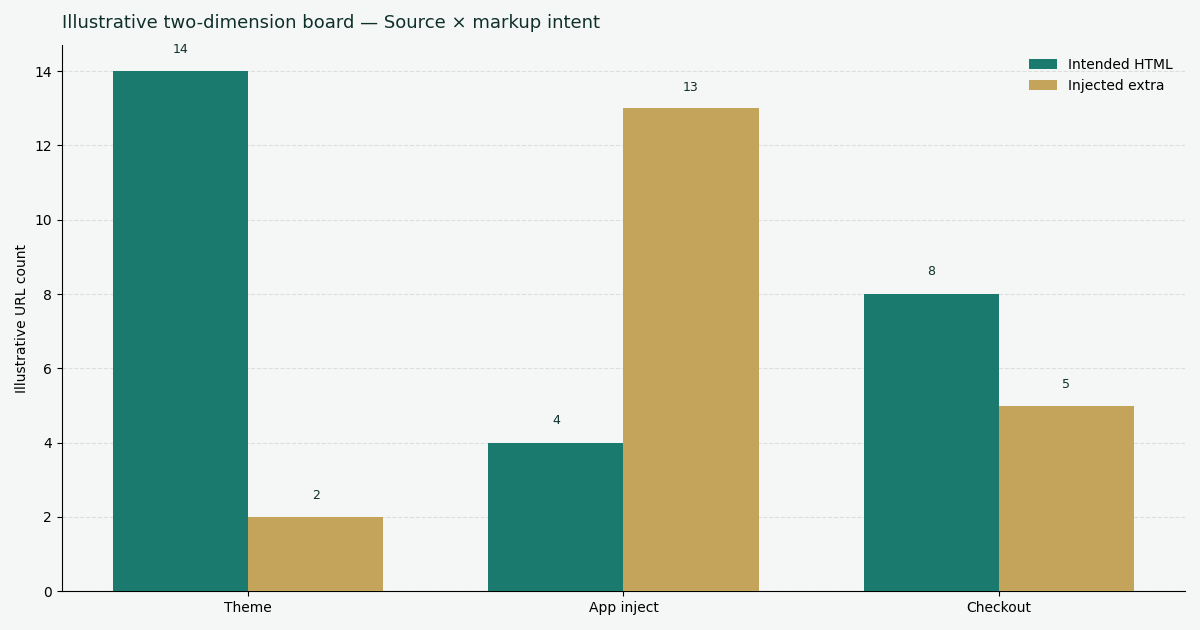
Figure: Every bar is a public docs page. None is a shop.
The theme metadata H1
The H1 we stored is “Add SEO metadata to your theme.” That string describes a writing task for theme authors. Shopify on page SEO that relabels it as “storefront title observed” is changing the evidence class.
The Shopify image_url filter documents image URL parameters. It is not an alt audit of a product image we fetched, because we fetched none.
Why Liquid objects stay unread
Object and filter pages can change independently of the metadata guide. This packet logged one 200. Citing the other Shopify URLs keeps the vocabulary; it does not add rows to the fetch table.
Shopify performance practices is official theme-performance guidance. We did not measure LCP on a shop. Google product structured data constrains Product markup interpretation. It does not prove a merchant emits Product JSON-LD. Those pages stay citations, not storefront rows.
How to reproduce the 200
curl -sS -A 'InfiniSynapse-SH67-desk/2026-09-14' -o /tmp/shopify-metadata.html \
  -w '%{http_code} %{size_download}\n' \
  https://shopify.dev/docs/storefronts/themes/seo/metadata
Expect 200 unless Shopify moves the docs host. Store the H1. Do not paste a product card under this chart. Shopify on page SEO reproduction stops at the public guide until a reviewer fetches a URL they own and keeps that capture offline.
MDN canonical-link reference is why a later rel=canonical is written as a link type, not as “the Shopify canonical.” Schema.org Product is the vocabulary. It is not a storefront node.
CLI boundary on the same morning
seo-health eeat on https://infinisynapse.com/en/editorial-standards printed unauthorized after a page fetch. This Shopify page did not spend that credit either. The command is not a theme compile. Shopify on page SEO notes that quote scores[] without a taskId from a logged-in run are fiction.
Package pin infinitegrowth@0.1.1; -V printed 0.1.0. Record both.
A same-morning seo-health check on /en/tool/seo-title-checker exited 0 with a 44-character title and a missing-alt warning on 2 of 5 images. That light is on-page HTML. It cannot establish a Shopify on page SEO theme pass.
What a later storefront pass must keep
When someone does fetch a storefront, keep route type, market, locale, theme release, and the app set that can write head nodes. Hash the HTML. Save initial response and, if scripts mutate the page, rendered DOM as a second row. Leave duplicate writers unresolved until a second reviewer names the owner.
Shopify on page SEO fails when a Market URL is folded into the default-market row.
Title and description owners
Count <title>, meta description, and the Liquid names the theme claims to read. The docs mention page_title and page_description. Seeing those words in a guide does not prove the theme printed them. Shopify on page SEO that skips the public head is reading the editor.
W3C validator documentation can check markup you actually fetched. It does not validate a theme we never rendered.
Canonical and structured data
Count rel=canonical and JSON-LD blocks on the owned URL. Two canonicals are an ownership finding. They are not a ranking score. web.dev Core Web Vitals remains a performance frame. This desk did not collect vitals on a shop, and that absence does not prove the theme is fast or slow.
The sample size here is one documentation URL. That cannot establish storefront output, and it does not prove a theme ships those Liquid fields.
Fields a later owned URL still has to record
The guide names these fields. This chart did not measure them on a shop. A checklist row stays open until the owned HTML is stored.
| Field | What the public guide names | This 2026-09-14 desk |
|---|---|---|
<title> | page_title | Storefront not fetched |
| Meta description | page_description | Storefront not fetched |
| One H1 | A theme-author writing task | Stored H1 is the docs page |
rel=canonical | A link type, cited separately | No storefront node |
| Product JSON-LD | structured_data filter | Filter was not run |
| Image alt | image_url parameters | No product image fetched |
Failure modes that invent a shop
Docs 200 as a storefront. A metadata guide is not “the theme rendered.”
example.test as a merchant. The host is a teaching name.
Admin screenshot as public HTML. The editor is an input.
App blame without a second writer. Count nodes first.
App-written head needs a second owner
An app can inject a second title, canonical, or JSON-LD block on a URL you own. Count those nodes first. Name the writer only when a second reviewer can point at that app. This packet has no app row, because no storefront was fetched.
Vitals page as a shop lab. web.dev is not your product route.
Unauthorized CLI as a theme fail. Login failed. Liquid was not run.
A Shopify on page SEO memo that skips the owned-URL rule is already late.
How a reviewer should read the log
Start with the one 200. Confirm the metadata H1 still says “Add SEO metadata to your theme.” Confirm this article still refuses a merchant table. Only then fetch a storefront you are allowed to test, if the ticket actually needs one. Shopify on page SEO that opens the admin first will contaminate the record with whatever the reviewer already believed about the theme.
Save the initial HTML before you click a consent banner or an app drawer. Clicking can change what the interface still shows. Shopify on page SEO that follows app popovers first is measuring a mutation, not the first response.
If the owned URL has two canonicals, keep the row. Duplication is a result. Deleting the extra node from the notes inflates the next “clean” count.
When the reviewer is done, the folder should contain: the dated docs curl, the owned-URL captures if any, and a one-page decision. The decision may be “no action,” “fix the theme snippet,” or “ask the app owner.” Shopify on page SEO is not required to produce a sales forecast.
Do not upload a merchant admin screenshot to a public ticket to prove you worked. Redact. Store a hash of the allowed HTML. Shopify on page SEO that publishes raw theme.liquid to look empirical is leaking a store, not proving a node count.
What stays on disk after this desk
Keep the curl log, the H1 line, and a one-sentence note that no admin was opened. That folder is the 2026-09-14 Shopify on page SEO packet. If a later teammate adds a storefront, they go in a dated subfolder with the owned URL and capture stage, not into this chart.
Print the package pin on the same page as the empty-admin note: infinitegrowth@0.1.1 and -V = 0.1.0. Those strings do not prove theme behavior. They prove which CLI we could have used and did not authorize against a shop.
A reviewer who needs a punch list can still run seo-health check on a public URL they own. Expect on-page lights, not Liquid bytes. Shopify on page SEO does not promote those lights into a Shopify score.
If legal asks whether we “tested Shopify,” the accurate answer is: we fetched Shopify’s public theme-metadata page and we did not open a merchant session.
Store the user-agent InfiniSynapse-SH67-desk/2026-09-14. A later browser UA can receive a different shell. Write the new status beside the old 200.
The decision this page supports is narrow: refuse a merchant table until an owned URL exists. Shopify on page SEO does not decide theme vendors, app installs, or budgets. Those decisions need the addendum folder.
When the addendum folder is still empty next quarter, republish the same 200 with a new date if you re-fetched it. Do not backfill example.test products to make the quarter look complete. Empty is a legal state for Shopify on page SEO. A quarter with one dated 200 and a still-empty storefront folder is a complete desk, not an unfinished slide.
Nearby guides
The SEO title checker owns the public <title> extraction. Do not copy that table here.
| Job | Guide |
|---|---|
| Outline ranks on a live page | heading structure SEO |
| Empty decorative alts | image SEO alt text |
| WordPress directory fields | best SEO plugin for WordPress |
The on-page SEO tool hub still owns the broader eight-check story. Shopify on page SEO stays on the docs-then-owned-URL job.
Keep the docs 200 unlabeled as a store
Replay the metadata fetch. Inspect a storefront only when you intend to store that HTML offline.
Run SEO Health CheckerFrequently Asked Questions
What did this Shopify on page SEO pass fetch?
On 2026-09-14 the theme-metadata guide answered HTTP 200 (80,266 bytes; H1 “Add SEO metadata to your theme”). No Shopify admin was opened. No theme compiled. There is still no merchant row to code.
Does a docs 200 prove theme output?
No. HTTP 200 on a writing guide cannot establish a rendered <title>. Fetch a URL you own.
Can we use example.test as evidence?
No. That host is a teaching name. It is not a customer shop and does not prove Liquid ran.
What should a later product route record?
Route type, market, locale, theme release, app set, capture stage, and every title, description, canonical, and JSON-LD writer. Keep Shopify on page SEO rows unmerged across Markets.
May we publish a storefront score from this article’s chart?
No. The chart is HTTP 200 versus H1 present. It cannot establish a theme pass.
Conclusion
Use Shopify on page SEO when the job is to refuse a merchant table until an owned URL can be stored. This 2026-09-14 pass recorded one public 200 and zero admins. Stop when the metadata H1, the empty storefront folder, and the example.test ban remain visible. A bounded docs log beats an unsupported Liquid percentage.
Replay the docs fetch, then inspect a URL you own; do not treat example.test as a shop.
William Zhu · Cofounder, InfiniSynapse · GitHub @allwefantasy
Desk-validated SEO Health methods. Corrections: zhuhl@infinisynapse.com · corrections policy.