
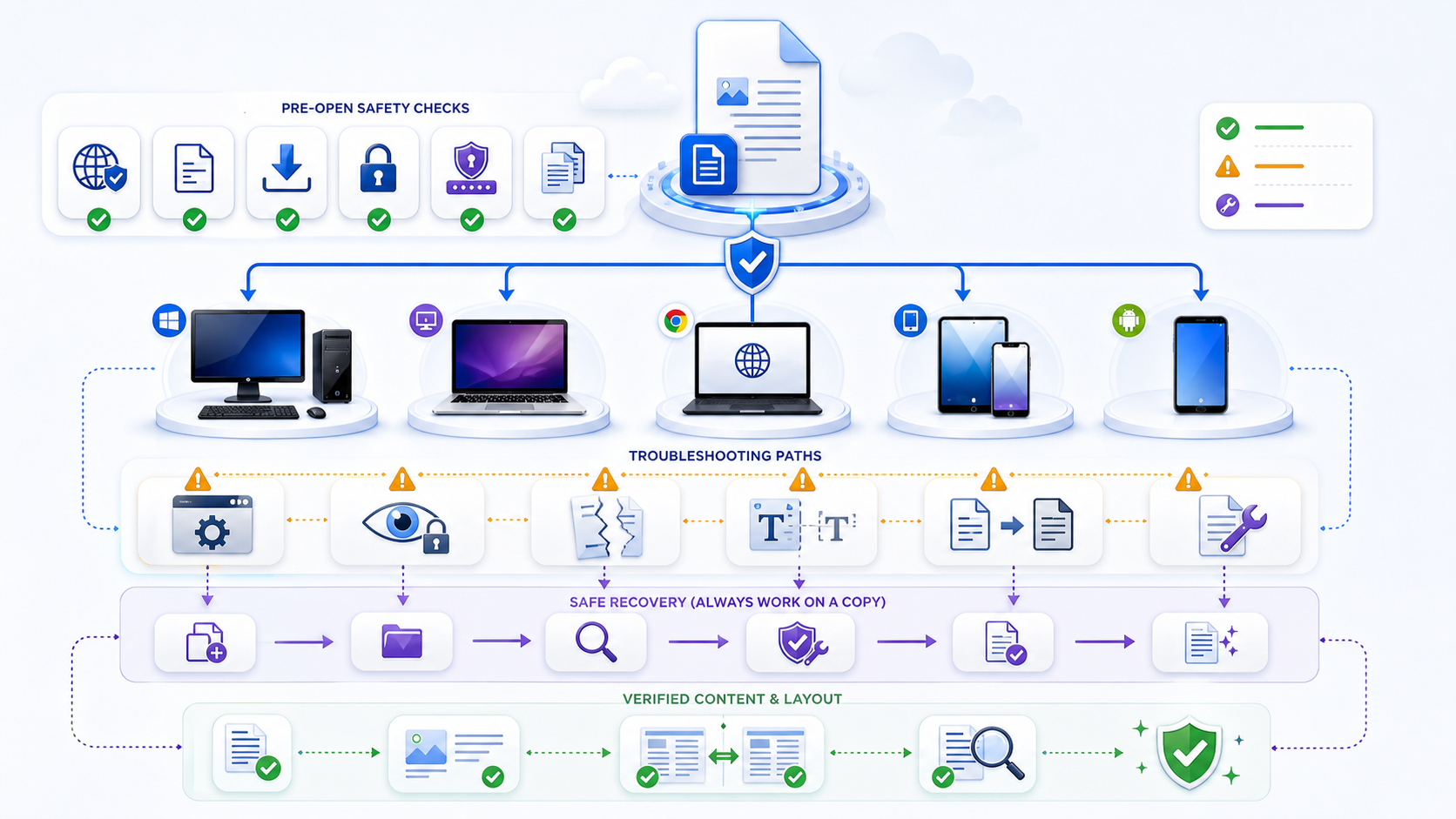
How to Open DOCX Files: Choose the Fastest Route如何打开 DOCX 文件:选择最快路径
Open DOCX files in Microsoft Word when exact layout, comments, tracked changes, or advanced features matter. Without desktop Word, use Word for the web, Google Docs, LibreOffice Writer, Apple Pages, or a qualified browser viewer. For a quick read, choose a docx viewer; for editing, choose an editor and keep the original. Do not upload confidential documents until you have verified the service’s processing, retention, access, and deletion terms.
需要精确版式、批注、修订或高级功能时,应使用 Microsoft Word 打开 DOCX 文件。没有桌面 Word 时,可使用 Word 网页版、Google Docs、LibreOffice Writer、Apple Pages 或经过核验的浏览器查看器。只需快速阅读时选择 docx viewer;需要修改时选择编辑器并保留原件。上传机密文档前,先核实服务的数据处理、保留、访问与删除条款。
Use current desktop Microsoft Word for complex layouts, review markup, fields, and final approval.
复杂版式、审阅标记、域和最终批准应使用当前桌面版 Microsoft Word。
Use Word for the web, Google Docs, LibreOffice Writer, or Apple Pages, then verify formatting before saving.
可使用 Word 网页版、Google Docs、LibreOffice Writer 或 Apple Pages,保存前核验格式。
Use a qualified viewer only after checking upload behavior, file limits, retention, and deletion.
核实上传方式、文件限制、保留和删除政策后,再使用经过核验的查看器。
Use the official Word app or an approved office app; verify wide tables and tracked changes on a larger screen.
使用官方 Word 或获准办公应用,并在大屏幕上复核宽表格和修订。
The best route depends on the device, file sensitivity, whether you need only to read or also to edit, and how exact the rendering must be. A third-party browser viewer is a separate data-processing decision, not a harmless double-click.
最佳路径取决于设备、文件敏感度、只读还是编辑需求,以及渲染必须多么精确。第三方浏览器查看器属于独立的数据处理决策,而不是无害的双击操作。
Complete six checks before opening an unfamiliar DOCX打开陌生 DOCX 前完成六项检查
- 1Expected source: confirm the sender, channel, filename, purpose, and whether the attachment was expected through a separate trusted route when risk is high.来源预期:确认发送者、渠道、文件名、用途;风险较高时,应通过另一可信渠道确认附件确实预期收到。
- 2Original copy: retain the received file unchanged and perform conversion, repair, or editing on duplicates.原始副本:保持收到的文件不变,转换、修复和编辑均在副本上进行。
- 3Real format: display full extensions. A file named
report.docx.exeis not a DOCX, and changing a suffix does not convert a file.真实格式:显示完整扩展名。名为report.docx.exe的文件不是 DOCX,修改后缀也不会完成格式转换。 - 4Complete transfer: compare the expected size if available, finish synchronization, and avoid opening a temporary or partially downloaded file.传输完整:在有条件时比较预期大小,等待同步完成,避免打开临时文件或部分下载文件。
- 5Approved route: choose an application, account, storage location, and network permitted for the document classification.获准路径:依据文档分类选择允许的应用、账户、存储位置和网络。
- 6Protected first view: keep Protected View, read-only mode, scanning, and organizational policy enabled until trust and need are established.首次受保护查看:在建立信任与必要性之前,保持受保护视图、只读模式、扫描和组织策略开启。
Know what a DOCX file is before diagnosing it诊断前先理解 DOCX 文件是什么
DOCX is an Office Open XML package, normally a ZIP-based collection of XML parts, relationships, media, styles, and metadata. That explains why archive tools may expose folders such as word and _rels, but extracting a package is not the normal reading workflow. It also explains why one damaged relationship, missing XML part, incompatible object, or incomplete transfer can prevent the whole document from opening even though the filename looks correct.
DOCX 是 Office Open XML 包,通常由基于 ZIP 的 XML 部件、关系、媒体、样式与元数据组成。因此,压缩工具可能显示 word、_rels 等文件夹,但解压并不是常规阅读方式。也正因为如此,一个损坏的关系、缺失的 XML 部件、不兼容对象或不完整传输,都可能让整个文档无法打开,即使文件名看起来正确。
Do not confuse DOCX with legacy binary DOC, macro-enabled DOCM, template DOTX, OpenDocument ODT, PDF, or an archive that someone merely renamed. Use the application’s file information, trusted file-identification tools, or organizational support workflow when the format is uncertain. Never execute embedded content merely to discover what the file is.
不要把 DOCX 与旧二进制 DOC、启用宏的 DOCM、模板 DOTX、OpenDocument ODT、PDF,或仅被改名的压缩包混淆。格式不确定时,应使用应用文件信息、可信文件识别工具或组织支持流程;不要为了识别文件而运行嵌入内容。
Best Apps and Services to Open DOCX Files打开 DOCX 文件的应用与服务选择
Choose by task rather than brand alone. Word provides the strongest compatibility for advanced Word features; Word for the web and Google Docs support convenient cloud access; LibreOffice Writer offers an offline alternative; Apple Pages can open ordinary DOCX files on Apple devices; browser viewers are best limited to low-risk preview when their data practices are acceptable.
应按任务而非品牌选择。Word 对高级 Word 功能的兼容性最强;Word 网页版与 Google Docs 便于云端访问;LibreOffice Writer 提供离线替代;Apple Pages 可在 Apple 设备打开普通 DOCX;浏览器查看器更适合在数据处理政策可接受时预览低风险文件。
| Route路径 | Good for适合 | Check first先检查 | Do not assume不要假设 |
|---|---|---|---|
| Desktop Word桌面 Word | Complex layout, review evidence, protected content, authoritative verification复杂版式、审阅证据、受保护内容、权威复核 | License, updates, Protected View, organization policy许可、更新、受保护视图、组织政策 | The source is safe merely because Word can open itWord 能打开就说明来源安全 |
| Controlled Word for the web受控 Word 网页版 | Managed accounts, sharing, ordinary viewing and editing托管账户、共享、普通查看与编辑 | Upload location, access, browser/desktop feature differences上传位置、访问权限、网页与桌面功能差异 | Every desktop feature behaves identically所有桌面功能完全相同 |
| Compatible local suite兼容本地办公套件 | Offline reading or ordinary documents without Word无 Word 时离线阅读普通文档 | Source, updates, DOCX fidelity, default save format来源、更新、DOCX 保真度、默认保存格式 | Round-trip edits preserve every Word feature往返编辑保留全部 Word 功能 |
| Browser viewer浏览器查看器 | Low-risk quick orientation on a constrained device受限设备上的低风险快速了解 | Privacy, retention, upload path, fidelity, limits隐私、保留、上传路径、保真度、限制 | “Free” or “client-side” is independently verified“免费”或“客户端处理”已经独立验证 |
Open a DOCX file safely on Windows在 Windows 上安全 Open DOCX File
Save the attachment to an approved folder, display file extensions, scan according to policy, and keep the original. If Microsoft Word is installed, open Word first and use File → Open rather than repeatedly double-clicking a suspicious attachment. Files from email or the internet may open in Protected View; Microsoft recommends editing only when you trust the source and the file is not suspicious. If you need only to read, leave it protected or read-only.
把附件保存到获准文件夹,显示扩展名,按政策扫描并保留原件。如果已安装 Microsoft Word,可先打开 Word,再使用“文件 → 打开”,不要反复双击可疑附件。来自邮件或互联网的文件可能进入受保护视图;Microsoft 建议只有在信任来源且文件不显可疑时才编辑。若只需阅读,应保持受保护或只读。
If double-click opens the wrong program, right-click the file, choose Open with, select the approved app, and set the default only when you intend all DOCX files to use it. A file association error changes which app launches; it does not corrupt the DOCX. If Word reports a block, permission, unreadable-content, or corruption message, preserve the exact message and follow the corresponding troubleshooting section instead of disabling global security settings.
如果双击启动错误程序,可右键文件,选择“打开方式”,选取获准应用;只有在确实希望所有 DOCX 都使用该应用时才设为默认。文件关联错误只会改变启动应用,不会损坏 DOCX。如果 Word 提示被阻止、权限不足、内容不可读或文件损坏,应保留完整错误信息并进入对应诊断流程,而不是关闭全局安全设置。
Open a DOCX file on a Mac without overwriting it在 Mac 上打开 DOCX 而不覆盖原件
Use an approved current version of Word for Mac when exact Word behavior matters. For ordinary documents, an approved compatible app can open DOCX, but inspect the result before saving because fonts, pagination, floating objects, fields, comments, and tracked changes may differ. In Finder, Control-click the file and choose Open With to select the intended app. Use Get Info to change the default only when that is an authorized device-wide choice.
当精确 Word 行为很重要时,应使用获准且为当前版本的 Word for Mac。普通文档可以用获准兼容应用打开,但保存前应检查结果,因为字体、分页、浮动对象、域、批注和修订可能不同。在 Finder 中按住 Control 点击文件并选择“打开方式”;只有当这是获准的设备级决策时,才通过“显示简介”修改默认应用。
If macOS or the application warns about an unknown source, quarantine, password, permissions, or damage, do not bypass the warning just to see the content. Confirm the sender, copy the file to a permitted local location if the issue is removable-media access, check whether synchronization completed, and compare the behavior in the approved reference environment.
如果 macOS 或应用提示未知来源、隔离、密码、权限或损坏,不要为了查看内容而绕过警告。应确认发送者;若问题来自移动介质权限,可把副本复制到允许的本地位置;确认同步已经完成,并在获准参考环境中比较行为。
Open DOCX on Chromebook with an approved cloud route在 Chromebook 上通过获准云路径打开 DOCX
Google’s current Chromebook guidance supports opening Office files through the Microsoft 365 app connected to OneDrive or through Google Docs connected to Google Drive. Both paths can move the local file into cloud storage, so choose only an account and tenant authorized for the document. In the Files app, locate the file, open it, select the approved app when prompted, and note where the file is moved and where changes are saved.
Google 当前 Chromebook 指南支持通过连接 OneDrive 的 Microsoft 365 应用,或连接 Google Drive 的 Google Docs 打开 Office 文件。两种路径都可能把本地文件移入云存储,因此只能选择获准处理该文档的账户与租户。在“文件”应用中找到文件,打开并在提示时选择获准应用,同时记录文件被移动到哪里、修改保存在哪里。
Offline behavior may be limited and can use a basic editor. Do not assume an offline fallback preserves complex DOCX features. If layout, comments, tracked changes, or exact output matter, return to the approved Word environment and verify the original or exported DOCX before release.
离线能力可能受限,并可能使用基础编辑器。不要假设离线回退能够保留复杂 DOCX 功能。如果版式、批注、修订或精确输出很重要,应回到获准 Word 环境,在发布前核验原件或导出的 DOCX。
Open DOCX on iPhone or iPad from the Files app从“文件”应用在 iPhone 或 iPad 打开 DOCX
Save the attachment into an approved Files location, confirm that the transfer completed, and use the organization’s approved Word-compatible app or managed cloud account. A quick preview may be sufficient to identify the document, but small screens can hide wide tables, comments, side-by-side changes, headers, and page relationships. Avoid approving contracts, financial schedules, forms, or publication layouts from a phone preview alone.
把附件保存到获准的“文件”位置,确认传输完成,再使用组织批准的 Word 兼容应用或托管云账户。快速预览可用于识别文档,但小屏幕可能隐藏宽表、批注、并排修订、页眉与页面关系。不要仅凭手机预览批准合同、财务明细、表单或出版版式。
When sharing into another app, confirm whether that action creates a new copy, uploads to a personal account, changes ownership, or leaves a copy in downloads or temporary storage. After viewing, close the app, remove unneeded temporary copies under policy, and verify the final document on the required recipient environment.
把文件分享到其他应用时,应确认该操作是否创建新副本、上传到个人账户、改变所有权,或在下载与临时存储中留下副本。查看后关闭应用,按政策删除不需要的临时副本,并在要求的接收环境中复核最终文档。
Open DOCX on Android without losing the authoritative copy在 Android 上打开 DOCX 且不丢失权威副本
Use the device’s approved file manager to locate the completed download, then open it with the managed Word-compatible application or approved cloud workspace. If Android offers several apps, choose once until the result is verified rather than setting a permanent default immediately. Confirm which account, storage provider, and app cache receive the file.
使用设备获准文件管理器找到已完成下载,再用受管理的 Word 兼容应用或获准云工作区打开。如果 Android 提供多个应用,可先选择“仅此一次”,验证结果后再决定是否永久设为默认。确认文件进入哪个账户、存储提供商与应用缓存。
Large images, complex tables, custom fonts, comments, and tracked changes can be difficult to inspect on mobile. Treat a mobile view as orientation unless the workflow explicitly tested the same document class, application version, device, and output path. Do not overwrite the source after a compatibility warning; save a named copy and compare it on the reference renderer.
大图片、复杂表格、自定义字体、批注与修订在移动端可能难以检查。除非工作流已经测试同一文档类别、应用版本、设备与输出路径,否则移动端查看只能用于了解内容。出现兼容性警告后不要覆盖源文件,应另存具名副本并在参考渲染器中比较。
Open DOCX Files Online Without Microsoft Word无需 Microsoft Word 在线打开 DOCX 文件
Without desktop Word, choose among Word for the web, Google Docs, an approved local suite such as LibreOffice Writer, Apple Pages on supported devices, or a qualified browser viewer. Word for the web and Google Docs normally require an account and cloud upload. A third-party viewer may offer faster preview but can have different file-size, retention, access, and formatting limits. Match the route to the task: reading a memo, editing a draft, reviewing tracked changes, checking a legal layout, and recovering a damaged file are different jobs.
没有桌面版 Word 时,可选择 Word 网页版、Google Docs、LibreOffice Writer 等获准本地套件、受支持设备上的 Apple Pages,或经过核验的浏览器查看器。Word 网页版和 Google Docs 通常需要账户与云端上传。第三方查看器可能预览更快,但文件大小、保留、访问和格式能力各不相同。应按任务选择:阅读备忘录、编辑草稿、审阅修订、核对法律版式和恢复损坏文件并不是同一种工作。
Round-trip warning: opening and then saving a DOCX in another application can change styles, numbering, fields, floating objects, fonts, review markup, and metadata. Preserve the source and compare the exported copy before replacing anything.
往返编辑警告:在其他应用中打开再保存 DOCX,可能改变样式、编号、域、浮动对象、字体、审阅标记与元数据。保留源文件,并在替换任何内容前比较导出副本。
Can You Edit a DOCX in an Online Viewer?在线 DOCX 查看器能否编辑文件?
A docx viewer is designed to render a file for reading or preview. A DOCX editor can change text, styles, comments, tracked changes, and other document features, then save or export a new file. Some products combine both roles, but the words “viewer,” “reader,” and “editor” are not interchangeable guarantees.
DOCX 查看器主要用于阅读或预览;DOCX 编辑器可以修改文字、样式、批注、修订和其他文档功能,再保存或导出新文件。有些产品同时具备两类功能,但“查看器”“阅读器”和“编辑器”并不是可以互换的能力保证。
Before choosing a service, confirm whether it only previews or also edits, whether it preserves tracked changes and comments, which formats it exports, and whether the downloaded DOCX retains the original layout. For the editor itself, see the DOCX editor guide. To compare browser, Word, desktop, and SDK paths, use the DOCX editing solution.
选择服务前,确认它只预览还是也能编辑、是否保留修订与批注、可以导出哪些格式,以及下载的 DOCX 是否保留原版式。编辑器本身见 DOCX 编辑器指南。要比较浏览器、Word、桌面和 SDK 路径,用 DOCX editing solution。
Check Privacy, Upload Limits, and File Deletion核实隐私、上传限制与文件删除
Before uploading a DOCX file, verify whether processing occurs on your device or a remote server, whether an account is required, the maximum file size, where data is processed, who can access it, how long files, previews, backups, and logs remain, and how deletion works. Also check whether content is used for analytics, abuse review, product improvement, or model training.
上传 DOCX 前,应核实处理发生在本机还是远程服务器、是否需要账户、文件大小上限、数据处理位置、可访问人员、文件、预览、备份与日志的保留时间,以及删除机制。还要检查内容是否用于分析、滥用审查、产品改进或模型训练。
Capability note: InfiniSynapse does not accept or preview DOCX files on this page. The instructions help you compare third-party and installed options without implying that a file is processed here.
能力说明:InfiniSynapse 本页不接收或预览 DOCX 文件。本指南用于比较第三方与本地安装方案,不表示文件会在本站处理。
Fix the default DOCX app without changing the file不修改文件即可修复 DOCX 默认应用
If DOCX opens in an archive utility, text editor, browser download loop, or unwanted office app, the association may be wrong. Use the operating system’s Open With or default-app settings to select an approved program. Test one copy before applying the setting to all files. Do not extract and edit XML, rename the extension, or resave from a text editor as an association fix.
如果 DOCX 被压缩工具、文本编辑器、不停下载的浏览器或不需要的办公应用打开,可能是文件关联错误。使用操作系统“打开方式”或默认应用设置选择获准程序;应用到所有文件前先用一个副本测试。不要把解压编辑 XML、修改扩展名或从文本编辑器另存当作关联修复。
If no approved app appears, install only through the organization’s trusted software channel or use an authorized cloud route. Random “file opener” downloads create a larger security decision than the document itself.
如果没有出现获准应用,只能通过组织可信软件渠道安装,或使用授权云路径。随机下载“文件打开器”会引入比文档本身更大的安全决策。
Treat Protected View and read-only as information, not obstacles把受保护视图与只读视为信息,而不是障碍
Protected View can appear for files from the internet, unsafe locations, attachments, or validation concerns. Read-only can come from file properties, owner settings, rights management, storage permissions, a locked file, or a view-only sharing link. Identify the cause before changing anything. If reading satisfies the task, keep the protection. If editing is required, confirm the source and obtain the correct permission or approved editable copy.
来自互联网、不安全位置、附件或存在验证问题的文件可能进入受保护视图。只读则可能来自文件属性、所有者设置、权限管理、存储权限、文件锁定或只读共享链接。修改前先识别原因。如果阅读已经满足任务,应保留保护;若必须编辑,应确认来源并获得正确权限或获准的可编辑副本。
Do not globally disable Protected View, antivirus, file blocking, rights management, or organizational policy as a routine troubleshooting step. A security control that blocks one file may be working as designed. Escalate the exact message and file provenance to the responsible administrator.
不要把全局关闭受保护视图、杀毒、文件阻止、权限管理或组织政策作为常规排错步骤。阻止某个文件的安全控制可能正在正确工作。应把完整提示与文件来源升级给责任管理员。
Distinguish password protection from access permission区分密码保护与访问权限
A DOCX can be encrypted with an open password, restricted for modification, protected through rights management, or inaccessible because the storage account lacks permission. These are different controls. Use the password or identity supplied through an approved separate channel, verify the owner, and follow the platform’s supported process. Do not use password-removal sites, copy content around rights controls, or treat an error as permission to bypass protection.
DOCX 可能使用打开密码加密、限制修改、通过权限管理保护,也可能因为存储账户无权限而无法访问。这些是不同控制。应使用通过获准独立渠道提供的密码或身份,核验所有者,并遵循平台支持流程。不要使用密码移除网站、绕过权限复制内容,也不要把错误提示视为绕过保护的许可。
Microsoft notes that Word for the web cannot open documents encrypted with a password or protected by Information Rights Management in some workflows. A browser failure does not prove the password is wrong or the file is damaged; use the approved desktop path or ask the owner for an authorized distribution copy.
Microsoft 说明,在部分工作流中,Word 网页版无法打开使用密码加密或受信息权限管理保护的文档。浏览器失败并不证明密码错误或文件损坏;应使用获准桌面路径,或请所有者提供授权分发副本。
Rule out incomplete downloads and false extensions排除下载不完整与虚假扩展名
A zero-byte file, unusually small file, temporary download, cloud placeholder, email preview cache, or interrupted synchronization may look like a DOCX but cannot open. Wait for completion, copy from the original source again, compare size or hash when the sender provides one, and avoid repeatedly repairing a partial copy. If the service returned an HTML login or error page named .docx, downloading again after proper authentication is the fix—not Word repair.
零字节文件、异常小文件、临时下载、云占位符、邮件预览缓存或中断同步,可能看起来像 DOCX 却无法打开。应等待完成,从原始来源重新复制,在发送者提供时比较大小或摘要,不要反复修复部分副本。如果服务返回的是被命名为 .docx 的 HTML 登录页或错误页,正确做法是在完成认证后重新下载,而不是修复 Word。
Never convert a legacy DOC, RTF, ODT, PDF, or archive by changing its extension. Open the real format with an approved compatible application and use a supported Save As or export operation on a copy.
绝不能通过修改扩展名把旧 DOC、RTF、ODT、PDF 或压缩包转换为 DOCX。应使用获准兼容应用打开真实格式,再对副本执行受支持的“另存为”或导出。
Determine whether the DOCX or the environment is damaged判断损坏发生在 DOCX 还是运行环境
Microsoft’s damaged-document guidance starts by distinguishing document damage from a software problem. Record the exact error, duplicate the file, and test safely: can other trusted DOCX files open in the same application; can the same file open in another approved environment; did a previous version work; did the transfer complete; is the format genuine; and do permissions allow reading? One failing document suggests source or transfer damage. Many failing documents suggest application, update, profile, policy, storage, or device issues.
Microsoft 的损坏文档指南首先区分文档损坏与软件问题。记录完整错误,复制文件,再安全测试:同一应用能否打开其他可信 DOCX;同一文件能否在另一获准环境打开;早期版本是否正常;传输是否完成;格式是否真实;权限是否允许读取?只有一个文件失败更可能是源文件或传输损坏;多个文件失败更可能是应用、更新、配置、政策、存储或设备问题。
| Observation现象 | Likely class可能类别 | Safe next step安全下一步 |
|---|---|---|
| Only one downloaded copy fails只有一个下载副本失败 | Incomplete transfer or source damage传输不完整或源损坏 | Re-download from the verified source; compare size从已验证来源重新下载并比较大小 |
| All DOCX files fail in one app一个应用中所有 DOCX 都失败 | Application, profile, update, or policy应用、配置、更新或政策 | Test approved second environment; repair app through support测试第二获准环境并通过支持修复应用 |
| File opens elsewhere but layout differs其他环境能打开但版式不同 | Compatibility, font, or rendering兼容性、字体或渲染 | Use authoritative renderer; compare without overwriting使用权威渲染器并在不覆盖下比较 |
| Password or rights message密码或权限提示 | Protection, not corruption属于保护而非损坏 | Obtain authorized credential or owner-provided copy获取授权凭据或所有者提供的副本 |
Attempt supported recovery only on a named copy只对具名副本尝试受支持恢复
Preserve the original and its metadata. Create a working copy with a clear name, record each action, and start with supported methods: obtain a clean source copy, restore a previous cloud or backup version, use Word’s documented Open and Repair route when appropriate, or follow the organization’s recovery procedure. After recovery, compare text, page count, tables, images, fields, comments, tracked changes, links, metadata, and protection with known evidence.
保留原件及其元数据。创建名称清楚的工作副本,记录每项操作,并从受支持方法开始:获取干净源副本、恢复云端或备份早期版本、在适当时使用 Word 文档化的“打开并修复”,或遵循组织恢复流程。恢复后,把文字、页数、表格、图片、域、批注、修订、链接、元数据和保护与已知证据比较。
Stop when the process would require disabling security, uploading confidential content to an unknown repair service, editing package XML without expertise, or accepting partial recovered text as a complete document. Recovery can salvage content but cannot prove completeness. For legal, financial, regulated, evidentiary, or signed documents, involve the accountable owner and preserve chain-of-custody requirements.
如果流程要求关闭安全、把机密内容上传到未知修复服务、在缺乏专业能力时编辑包 XML,或把部分恢复文字当成完整文档,应立即停止。恢复可以挽救内容,却不能证明完整性。对于法律、财务、受监管、证据或签署文档,应由责任人参与并保留保管链要求。
Verify the document before editing, sharing, or approving编辑、共享或批准前核验文档
Successful opening proves only that the application produced a view. Compare expected filename, version, author or owner, page count, opening and closing text, headings, tables, totals, images, captions, hyperlinks, footnotes, headers, footers, page numbers, comments, tracked changes, and protection. For important layout, compare with an authoritative PDF or recipient environment. Check whether the application converted the file, created a new cloud copy, changed the default save format, or auto-saved into another location.
成功打开只证明应用产生了视图。应比较预期文件名、版本、作者或所有者、页数、开头与结尾文字、标题、表格、合计、图片、题注、超链接、脚注、页眉页脚、页码、批注、修订与保护。重要版式还要与权威 PDF 或接收环境比较。检查应用是否转换文件、创建新云副本、改变默认保存格式,或自动保存到其他位置。
Beginning, end, key clauses, totals, tables, figures, and links are present and ordered.
开头、结尾、关键条款、合计、表格、图形与链接存在且顺序正确。
Comments, authors, replies, insertions, deletions, and unresolved changes are visible as required.
批注、作者、回复、插入、删除与未解决修订按要求可见。
Pages, sections, fonts, line breaks, headers, footers, objects, and signatures remain meaningful.
页面、分节、字体、换行、页眉页脚、对象与签名关系仍有意义。
Storage, copies, autosave, accounts, access, download, and temporary files are understood.
存储、副本、自动保存、账户、访问、下载与临时文件均已明确。
Use this open DOCX file checklist使用这份 Open DOCX File 检查表
| Stage阶段 | Required checks必查项目 | Stop when停止条件 |
|---|---|---|
| Before打开前 | Expected sender, real extension, completed transfer, preserved original, approved route, protection enabled发送者符合预期、真实扩展名、传输完成、保留原件、路径获准、保护开启 | Source, format, permission, or route is uncertain来源、格式、权限或路径不确定 |
| Open打开时 | Read-only first, exact errors recorded, no global security bypass, no overwrite先只读、记录完整错误、不绕过全局安全、不覆盖 | Unexpected prompt, executable content, unknown upload, or rights warning appears出现意外提示、可执行内容、未知上传或权限警告 |
| After打开后 | Identity, version, pages, content, layout, review evidence, links, copies, and save location verified核验身份、版本、页面、内容、版式、审阅证据、链接、副本与保存位置 | View is partial, transformed, stale, or cannot support the decision视图不完整、被转换、过期或无法支持决策 |
Open DOCX Files FAQ打开 DOCX 文件常见问题
Yes. Use Word for the web, Google Docs, LibreOffice, Apple Pages, or a qualified DOCX viewer. Choose a route that matches the file’s sensitivity and the formatting or editing features you need.
可以。可使用 Word 网页版、Google Docs、LibreOffice、Apple Pages 或经过核验的 DOCX 查看器。请根据文件敏感度及所需格式和编辑能力选择路径。
Yes. Word for the web, Google Docs, and browser-based viewers can display DOCX files. Check whether the service uploads the file, requires an account, limits file size, retains copies, or changes complex formatting.
可以。Word 网页版、Google Docs 和浏览器查看器都能显示 DOCX。请核实服务是否上传文件、需要账户、限制大小、保留副本或改变复杂格式。
LibreOffice Writer, Google Docs, Apple Pages on supported devices, and some mobile office apps can open DOCX files. Support for fonts, fields, tracked changes, macros, and complex layouts varies, so verify important documents before saving.
LibreOffice Writer、Google Docs、受支持设备上的 Apple Pages,以及部分移动办公应用都能打开 DOCX。它们对字体、域、修订、宏和复杂版式的支持不同,保存重要文档前应核验。
Some services only preview DOCX files, while editors can change and export them. Check the feature list before uploading and preserve the original because another editor may alter layout, styles, comments, or tracked changes.
有些服务只能预览 DOCX,编辑器则可以修改和导出。上传前核对功能并保留原件,因为其他编辑器可能改变版式、样式、批注或修订。
Only if the service and account are approved for that data. Verify where processing occurs, who can access the file, how long copies and logs are retained, how deletion works, and whether the document is used for analytics or model training.
只有服务与账户获准处理相关数据时才可以。应核实处理位置、文件访问者、副本与日志保留时间、删除方式,以及文档是否用于分析或模型训练。
Official sources for opening and troubleshooting DOCX打开与排查 DOCX 的官方资料
- Microsoft Support: What is Protected View?Microsoft 支持:什么是受保护视图
- Microsoft Support: Enable editing in a documentMicrosoft 支持:在文档中启用编辑
- Microsoft Learn: Troubleshoot damaged Word documentsMicrosoft Learn:排查损坏的 Word 文档
- Microsoft Support: File type blocked from openingMicrosoft 支持:文件类型被阻止打开
- Microsoft Support: Browser Word versus desktop WordMicrosoft 支持:浏览器 Word 与桌面 Word 的差异
- Google Chromebook Help: Open and edit Office filesGoogle Chromebook 帮助:打开和编辑 Office 文件