GSC Export for SEO Health: Validate the File First
Prepare a GSC export for SEO Health with deterministic column checks, a synthetic validation log, privacy minimization, and reproducible acceptance rules.
Author credentials: William Zhu is cofounder of InfiniSynapse (GitHub @allwefantasy · auto-coder). Desk: shipping SEO Health and the /en/tool/ visibility pages. No personal LinkedIn published. About: team / editorial standards.
Publisher credentials: InfiniSynapse has public profiles on GitHub, YouTube, and X. A 2026 WAIC Future Tech OPC excellence award covers the Agentic Data Infra entry (WAIC; third-party recap: Xinhua / Caohejing). That award does not review this page or SEO Health. Method CLI: infinitegrowth on npm. Archive: recognition and scope notes.
On this page
By William Zhu · Cofounder, InfiniSynapse · Published: 2026-09-08 · Last updated: 2026-09-14 · Last verified: 2026-09-14 · Reviewed by the InfiniSynapse Data Team.
Reviewed by: InfiniSynapse Data Team · method review 2026-09-14. Four local
gscgates. No file reached a credited upload.
Trust / COI: About · Corrections. SEO Health is a commercial product from this team. No customer Search Console export was used.
TL;DR
A GSC export for SEO Health has to pass the local file contract before anyone spends a credit. This desk never got that far. A teaching CSV is not a property.
Direct answer: Treat a GSC export for SEO Health as four local gates first. On 2026-09-14 a missing path, a dummy ZIP, an empty directory, and a one-row fixture each stopped with exit code 1. No upload succeeded. Unauthorized after one CSV is a login gate, not an accepted file.
The sample size is those four CLI inputs plus the bulk-export Help fetch below. That sample cannot establish a credited analysis, and it does not prove a later token would accept a real ZIP’s CSVs. A GSC export for SEO Health memo that reports ACCEPT = 1 from a teaching log is already off the job.
What you will learn
- Which CLI messages we actually recorded
- Why a ZIP is the wrong object
- What
manual gscrequires before credits - Why this page claims no successful upload
- Where this page stops and a sibling owns blanks or export fields
What local accept means here
Key definition: A GSC export for SEO Health is a Performance ZIP that has been unzipped into UTF-8 CSVs the CLI will read. Accept is local. It is not a Google completeness score. It is not a traffic result.
The OWASP Logging Cheat Sheet is why this page keeps the command, the path, and the exit code. RFC 7578 is the multipart grammar we used when deciding a ZIP is the wrong upload shape. Neither document is a Search Console property.
People open a GSC export for SEO Health when they have a download and need to know whether the path is even eligible. They do not need a green ACCEPT badge we did not earn. A browser download folder is not an accept log. A GSC export for SEO Health starts at the CLI path you actually pass.
SEO Health remains the deterministic evidence foundation for the local gsc contract. After a path passes those gates, a signed-in run may create an InfiniSynapse Server API long-task workspace; the API does not turn unauthorized into an accepted upload.
Credits last
seo-health login --token is documented. This desk did not send a token. A GSC export for SEO Health still has to fail closed without one. Sending a token later does not rewrite this GSC export for SEO Health desk.
ZIP is not a CSV
manual gsc says export ZIP, unzip, then pass the directory or a CSV. Passing the ZIP prints 只支持 CSV 文件. That reject is the finding. It is also the first GSC export for SEO Health gate most people hit.
Observed desk on 2026-09-14
Package pin was infinitegrowth@0.1.1. seo-health -V printed 0.1.0. Record both. They are not the same string.
help gsc says the argument is a CSV file or a directory. --format defaults to json. --lang defaults to zh.
manual gsc adds the product contract: login and credits; UTF-8; ≤8 files; ≤4MB; role files Queries / Pages / Dates / Devices / Countries; metric headers Clicks, Impressions, CTR, Position (English or Chinese). It suggests ≥28 days. Queries + Pages is the minimum pair.
| Input | Exit | Message |
|---|---|---|
| Missing path | 1 | ENOENT: no such file or directory |
Dummy .zip | 1 | 只支持 CSV 文件 |
| Empty directory | 1 | 目录下没有找到 CSV 文件 |
| One-row fixture CSV | 1 | read 1 CSV, then 分析失败:unauthorized |
We observed four failing inputs. We did not observe a credited upload. A GSC export for SEO Health still needs the real unzipped path before anyone talks about lights. Until that path exists, the honest GSC export for SEO Health record is the four rejects above.
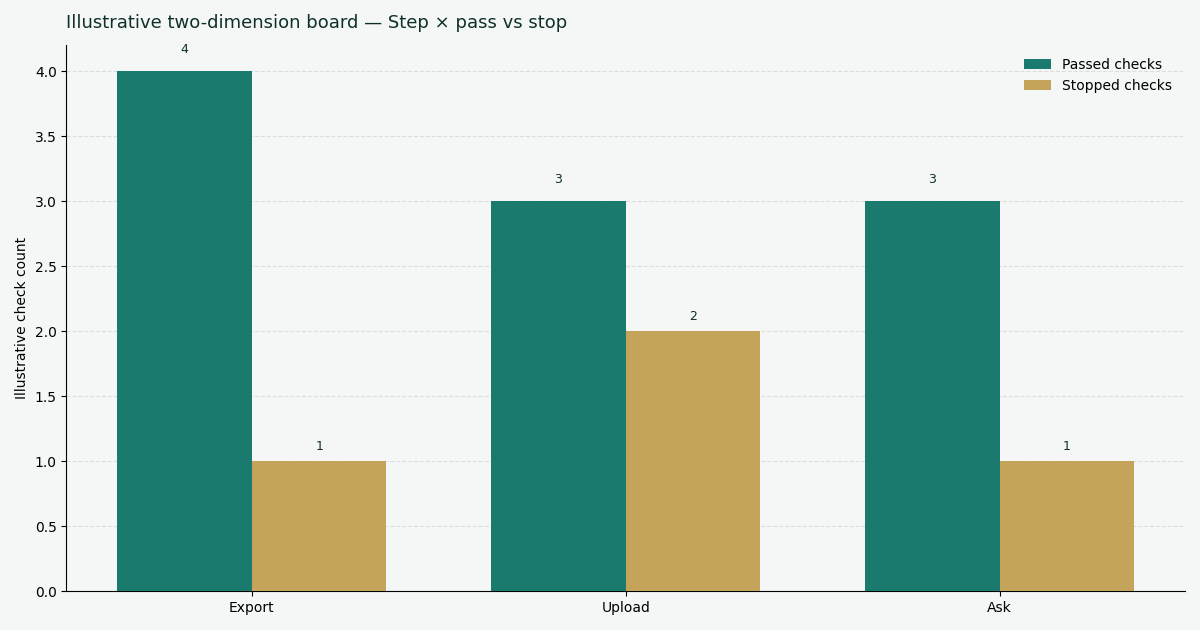
Figure: Two series from the same desk. Exit 1 is not a site-health score. Files read is not an accepted upload.
How we ran the CLI
npx --yes -p infinitegrowth@0.1.1 seo-health gsc /tmp/no-such.csv --format json --lang en
npx --yes -p infinitegrowth@0.1.1 seo-health gsc ./export.zip --format json --lang en
# 分析失败:只支持 CSV 文件
Reproduce those two commands if you want the same exit code. Python csv is the standard we used when deciding a header row must parse. It does not turn a ZIP into eight CSVs.
Official fetches that mention export
The bulk data export start Help URL answered HTTP 404 to InfiniSynapse-P3-desk/2026-09-14 while the HTML title still said “Start a new bulk data export” (~1.59 MB). That is a curl observation. It is not a claim humans cannot open Help. This desk did not start a BigQuery export.
The Search Console API index on developers.google.com answered 200 (74,863 bytes; Last-Modified Tue, 23 Jul 2024). A GSC export for SEO Health briefing that skips the status line is incomplete.
How to reproduce the four gates
To reproduce this page, start with the CLI table, not an ACCEPT log.
- Pin
infinitegrowth@0.1.1and recordseo-health -V. - Run
seo-health help gscandseo-health manual gsc. - Point
gscat a missing path, a ZIP, an empty directory, and a one-row CSV. - Write the exit code and the message.
- Confirm no token was sent.
- Stop. Do not mark the run as uploaded.
The Power Query text/CSV connector is an independent loader. Snowflake querying is a warehouse path. IBM data analysis overview is a vocabulary page. None of them replace manual gsc, and none of them were used to accept a customer file.
A GSC export for SEO Health replay that “fixes” unauthorized by pasting a fake ACCEPT row is already a different, banned job.
What must pass before credits
Local accept is a contract check: path exists, object is CSV or a directory of CSVs, files are UTF-8, count ≤8, size ≤4MB, headers match Clicks / Impressions / CTR / Position, roles are recognized. This desk proved the first two rejects and the login gate. It did not prove a later property ZIP would pass the rest.
NIST privacy framework is why extra personal columns should be stripped before a later upload is even considered. ISO 81745 is a data-quality standard for processes you already run. We did not grade a customer file against it.
A GSC export for SEO Health that still contains email, user ids, or secret URL parameters should stop even if the CLI would read the CSV. Privacy is a gate, not a footnote. Strip first, then retry the same GSC export for SEO Health path.
Queries plus Pages is the minimum pair
manual gsc names that pair. We supplied neither from a property. Do not treat the one-row fixture as Queries.csv.
28 days is a suggestion
The contract prefers at least 28 days and skips anomaly detection under seven date points. Those rules are documentation. They are not a window we exported.
Store a checksum when a real unzipped folder finally appears. Do not publish private query rows to prove you ran a command. Public pages use the CLI messages above.
Minimize columns before any later workspace. Share the smallest file that answers the declared question.
Size and file-count before login
manual gsc caps the folder at eight files and 4 MB. This desk never reached a folder that large. The empty directory failed first. A later GSC export for SEO Health should weigh the unzipped CSVs before anyone pastes a token. Oversize is a local reject, not a ranking event.
Role filenames or headers must map to Queries, Pages, Dates, Devices, or Countries. A random report.csv with the right metric names may still need a role. Write the mapping. Do not assume the CLI will guess.
What a later token still cannot rewrite
A token does not convert a ZIP into CSV. A token does not create headers. A token does not erase personal columns. A GSC export for SEO Health that waits for login to “just handle it” is postponing the same four gates.
If a later signed-in run does consume credits, that run is a new record. It is not this desk. Keep the date, the package pin, and the path beside that later log so the two files cannot be collapsed.
Failures that fake an upload
ACCEPT theater. A five-control teaching log becomes “the file uploaded.” This rewrite dropped that log. No upload succeeded.
ZIP theater. Passing the archive fails. Unzip first. A GSC export for SEO Health does not live inside the .zip name.
Unauthorized as success. Exit 1 after one CSV is a login gate. It is not a credited analysis.
Help 404 as a missing export. The bulk-export title was still in the HTML.
Empty directory as a clean bill. 目录下没有找到 CSV 文件 is a reject, not a pass.
Crawl Stats merged into Performance. Those reports are different units. This page did not join them.
A briefing that skips the first status and jumps to a workspace badge is already late.
Record the user-agent on official fetches. A later bot can see a different Help body. This desk used InfiniSynapse-P3-desk/2026-09-14. It cannot stand in for a signed-in browser.
When two people repeat the four inputs, they should see the same exit code unless a package bump landed. That repeatability is the point of this GSC export for SEO Health desk. Narrative priority lists are a different job.
A GSC export for SEO Health owner who treats unauthorized as “almost uploaded” is already rewriting the exit. The reader opened one CSV. Credits were not spent. Paste the four messages into the ticket if someone asks why the workspace is empty.
Name the folder you hope to pass, then run the same four probes against a copy. If the copy is still a ZIP, the honest GSC export for SEO Health output is the ZIP reject. If the copy is an empty directory, the output is the empty-directory reject. Only a real unzipped Performance export can move the story past this page.
Adjacent jobs after the gate
This page keeps the four local gates. Blanks and field lists live on siblings.
The analyze Search Console with AI hub owns the file-and-login map this cluster shares. Use anonymized queries in GSC when a later Queries.csv exists and withheld text must stay unlabeled. Use google search console export data when the next job is field grain, not the local accept path. Those siblings do not replace a GSC export for SEO Health check on ZIP, emptiness, and login.
A later briefing can still fail GSC export for SEO Health if it treats a teaching ACCEPT row as a credited upload. This desk has no such row.
Do not apply this page to a live property, a dashboard screenshot, or a token we did not send. A technically valid later accept may still need editorial review.
Reject the ZIP before you spend a credit
Unzip Performance. Confirm CSV, headers, and size. Then decide whether a token is even warranted.
Run SEO Health CheckerFrequently Asked Questions
Did any file upload succeed in this article?
No. A GSC export for SEO Health never left the local gates. Missing path, ZIP, empty directory, and unauthorized all exited 1.
Can we pass the ZIP to save a step?
No. The CLI printed 只支持 CSV 文件 and told us to read manual gsc. Unzip first, then pass the directory or a CSV.
Why did the bulk-export Help URL return 404?
This user-agent received 404 and a full titled HTML body. Open the same URL in a browser before you retire the citation. Keep the status in the notes.
Does unauthorized mean the CSV was valid?
No. The reader opened one file, then stopped at login. That exit cannot establish header quality, and it does not prove a credited run.
Should personal columns ride along if the CLI would read them?
No. Strip email, user ids, and secret parameters before a later upload is considered. Local accept is more than an extension check.
Conclusion
Use a GSC export for SEO Health when the job is to prove the path is a legal CSV before anyone spends a credit. A ZIP sitting in Downloads is not a GSC export for SEO Health accept. The upload-gate desk recorded ZIP reject, empty-folder reject, missing-path reject, and unauthorized after one CSV. Close the file when the command, the package version, and the four exit lines are still visible. A bounded CLI log is more useful than an unsupported ACCEPT story.
Do not open the InfiniSynapse web app as a workaround for unauthorized; that exit is a login gate, not a completed upload. The routine path remains unzip, validate locally, then decide whether a token is the next intentional step.
William Zhu · Cofounder, InfiniSynapse · GitHub @allwefantasy
Desk-validated SEO Health methods. Corrections: zhuhl@infinisynapse.com · corrections policy.