Google Search Console Export Data: 4 Methods
Export Google Search Console data to CSV, Excel, Sheets, the API, or BigQuery, then validate fields, date ranges, limits, and privacy.
Author credentials: William Zhu is cofounder of InfiniSynapse (GitHub @allwefantasy · auto-coder). Desk: shipping SEO Health and the /en/tool/ visibility pages. No personal LinkedIn published. About: team / editorial standards.
Publisher credentials: InfiniSynapse has public profiles on GitHub, YouTube, and X. A 2026 WAIC Future Tech OPC excellence award covers the Agentic Data Infra entry (WAIC; third-party recap: Xinhua / Caohejing). That award does not review this page or SEO Health. Method CLI: infinitegrowth on npm. Archive: recognition and scope notes.
On this page
By William Zhu · Cofounder, InfiniSynapse · Published: 2026-09-08 · Last updated: 2026-09-24 · Last verified: 2026-09-24 · Reviewed by the InfiniSynapse Data Team.
Reviewed by: InfiniSynapse Data Team · method review 2026-09-14. ZIP reject plus bulk-export Help 404+title. No BigQuery job started.
Trust / COI: About · Corrections. SEO Health is a commercial product from this team. No customer Search Console export was used.
TL;DR
Google Search Console export data can leave the platform in four practical ways: export a report to Google Sheets, Excel, or CSV; query the Search Analytics API; configure ongoing bulk export to BigQuery; or use an authorized connector for scheduled delivery. Choose the path by row volume, refresh frequency, destination, and governance.
Direct answer: Open the Search Console report you need, confirm the property, date range, search type, and filters, then click Export and choose Google Sheets, Excel, or CSV. Use the Search Analytics API for controlled programmatic requests and BigQuery bulk export for ongoing property-scale delivery. Preserve the raw export before cleaning or analysis.
This guide first completes the export task, then applies the existing local validation desk. The four CLI rejects prove only the reader contract; they do not establish that a warehouse table matches the Search Console UI or that any property shipped a partition.
What you will learn
- How to export a Search Console report to Sheets, Excel, or CSV
- When to use the Search Analytics API, BigQuery bulk export, or a connector
- Which property, filters, dimensions, and dates belong in the export record
- How to validate files, fields, grain, encoding, limits, and privacy before analysis
Export directly from a Search Console report
For a one-time Google Search Console export data task, sign in, select the correct property, open the report—usually Performance—and set the date range, search type, dimensions, and filters before exporting. Click Export in the report and choose the destination shown in the interface. Google’s official report export instructions document Google Sheets, Microsoft Excel, and CSV as current direct-export formats.
Record these settings beside the download:
| Setting | Why it matters |
|---|---|
| Property | Domain and URL-prefix properties can represent different scopes |
| Report | Performance, indexing, links, and other reports expose different records |
| Date range | Defines the period represented by the exported rows |
| Search type | Web, image, video, and news data should not be silently mixed |
| Filters | Country, device, query, page, and appearance change the grain |
| Export time | Later runs can reflect fresher or reprocessed data |
A screenshot is useful context but is not the export. Save the untouched source file before renaming columns, changing types, filtering rows, or calculating metrics.
Choose CSV, Excel, or Google Sheets
Use CSV for durable, tool-neutral ingestion; Excel when reviewers need a familiar workbook; and Google Sheets when collaboration matters more than local file control. The interface may export multiple report tabs or tables, so inspect every file or sheet rather than assuming the first tab contains all dimensions.
| Format | Best for | Main control |
|---|---|---|
| CSV | Scripts, warehouses, versioned pipelines | Preserve encoding, headers, and raw bytes |
| Excel | Manual review and workbook delivery | Check types, formulas, and hidden sheets |
| Google Sheets | Shared review and lightweight automation | Control sharing, copies, and refresh ownership |
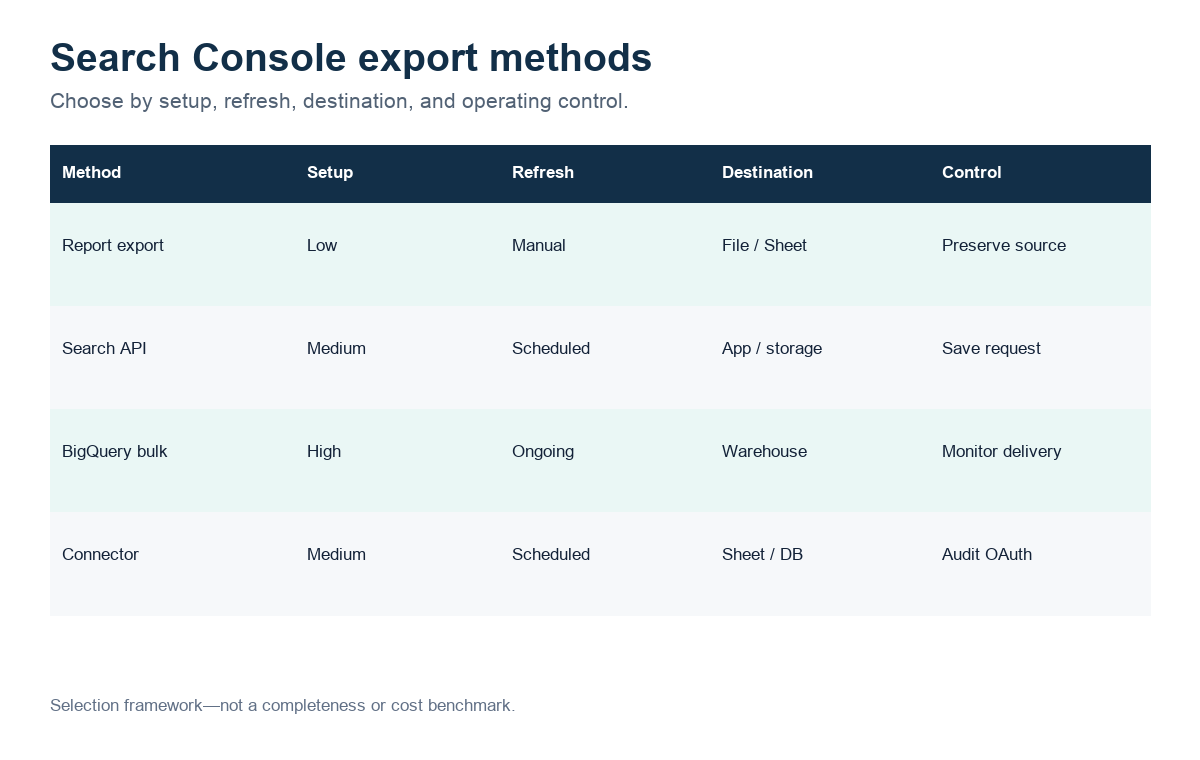
Figure: Export-path selection framework; not a completeness or cost benchmark.
Direct report exports are convenient, but they are not a promise of unlimited rows or long-term retention. If a decision depends on completeness, document the report limits shown by Google and compare the chosen path with the API or bulk export.
Export with the Search Analytics API
Use the Search Analytics API when a script or scheduled job needs explicit dates, dimensions, filters, and row handling. The official Search Analytics query method defines startDate, endDate, dimensions, filters, row limits, and pagination behavior. Store the request body with the response so another reviewer can reproduce the extraction.
An API response can differ from a UI table because the request may use different dimensions, filters, aggregation types, or row coverage. Do not label the API “complete” merely because it returned HTTP 200. Reconcile totals and record truncation or paging rules before downstream analysis.
Set up BigQuery bulk data export
Bulk export is the ongoing warehouse path. Google’s bulk data export announcement explains the purpose: recurring Search Console delivery to BigQuery beyond manual report downloads. The official setup instructions cover the Cloud project, dataset, permissions, and Search Console property configuration.
Use this path when the team needs recurring history, larger-scale joins, governed access, and scheduled transformations. Before enabling it, assign billing and dataset owners, choose region and retention controls, restrict service permissions, and document how downstream models handle late or revised data. A created dataset is not proof that every expected partition arrived; monitor delivery explicitly.
Automate recurring exports
A connector or workflow platform can move Search Console results into Sheets, a database, or a reporting destination. The n8n template surfaced in this SERP demonstrates the product intent: retrieve Search Console results and write them to Google Sheets. Commercial connectors such as Coupler.io package similar scheduling and delivery around credentials and refresh policies.
Evaluate connectors on OAuth scope, property access, supported dimensions, pagination, refresh frequency, retries, duplicate handling, destination ownership, logs, and deletion policy. Keep one raw landing table or sheet before transformations. A convenient connector does not remove the need to reconcile dates, filters, and totals.
What the exported data records
Key definition: google search console export data means the files that left Search Console for a declared window, plus the grain those files actually contain. It does not mean a screenshot, a remembered property, or a warehouse job that never ran.
The Search Console bulk data export page is the official BigQuery-path vocabulary this article still cites. The same Help URL answered HTTP 404 to InfiniSynapse-P3-desk/2026-09-14 while the HTML title still said “About bulk data export of Search Console data to BigQuery.” That is a curl observation. It is not a claim the Help article vanished for a signed-in browser.
The Start a new bulk data export page answered the same 404-plus-title pattern (~1.59 MB). We did not click Start. We did not create a dataset.
The Search Console API Reference came back 200 with 74,863 bytes and Last-Modified 23 Jul 2024. An API map is not a CSV directory. google search console export data still needs the unzipped files.
People open this page when they have a ZIP from Performance and someone already scheduled a warehouse review. The first honest move is to refuse the warehouse story until the local directory exists. google search console export data is the unzipped object, not the slide about partitions. Once the unzipped Performance files exist, how GSC turns clicks and impressions into CTR is the measure page. This page stays on field, grain, and unzip.
A ZIP is a download container. A directory is the reader input. Mixing those two objects is how this desk failed on purpose. If the archive is still zipped, stop. Write that stop in the ticket so a later analyst does not “just upload it.”
SEO Health stays the deterministic evidence layer for unzip-then-pass checks. Once the unzipped directory exists, a credited run may create an InfiniSynapse Server API task workspace; the API does not start a BigQuery export.
ZIP is the wrong object
manual gsc says pass a CSV file or a directory. It says do not pass the ZIP. The dummy ZIP run reproduced that rule. google search console export data that uploads the archive to save a step will fail at the reader.
NIST SP 1800-25 is the integrity control we used when deciding the unzipped bytes must stay intact. Apache Arrow columnar format is an independent column layout for later engines. It does not unzip the archive.
Partition talk without a job
BigQuery schema documentation describes fields a warehouse table can declare. This desk created none. AWS Athena CSV SerDe and AWS Glue Data Quality are other loaders. They also need a file. google search console export data that quotes a partition bound without a job ID is already a story.
Validate the export before analysis
Observed validation desk on 2026-09-14
We pinned infinitegrowth@0.1.1 and still saw 0.1.0 from seo-health -V. Quote both. A single version string is incomplete.
help gsc still wants a CSV file or a directory, not an archive. --format defaults to json and --lang to zh. help login documents --token. This unzip desk sent none.
manual gsc for an unzip desk: signed-in credits; take the Performance ZIP; unpack it; hand the folder or a CSV to the reader; refuse the archive; stay UTF-8; stay at ≤8 files and ≤4MB; identify Queries, Pages, Dates, Devices, or Countries by name or header; keep Clicks / Impressions / CTR / Position. Prefer 28 days or more. Queries and Pages together are the minimum pair.
| Desk input for unzip | Exit | Recorded message |
|---|---|---|
| Missing path | 1 | ENOENT: no such file or directory |
Dummy .zip | 1 | 只支持 CSV 文件 |
| Empty directory | 1 | 目录下没有找到 CSV 文件 |
| One-row fixture CSV | 1 | read 1 CSV, then 分析失败:unauthorized |
The one-row file only proved CSV parsing. It did not prove a Performance download. google search console export data still needs the real unzipped path.
Record the package pin beside the command. infinitegrowth@0.1.1 and seo-health -V = 0.1.0 are two strings. Write stdout. The ZIP run printed 只支持 CSV 文件 and pointed at seo-health manual gsc. The empty directory printed 目录下没有找到 CSV 文件. Those strings are the evidence. They are not a bulk-export job ID.
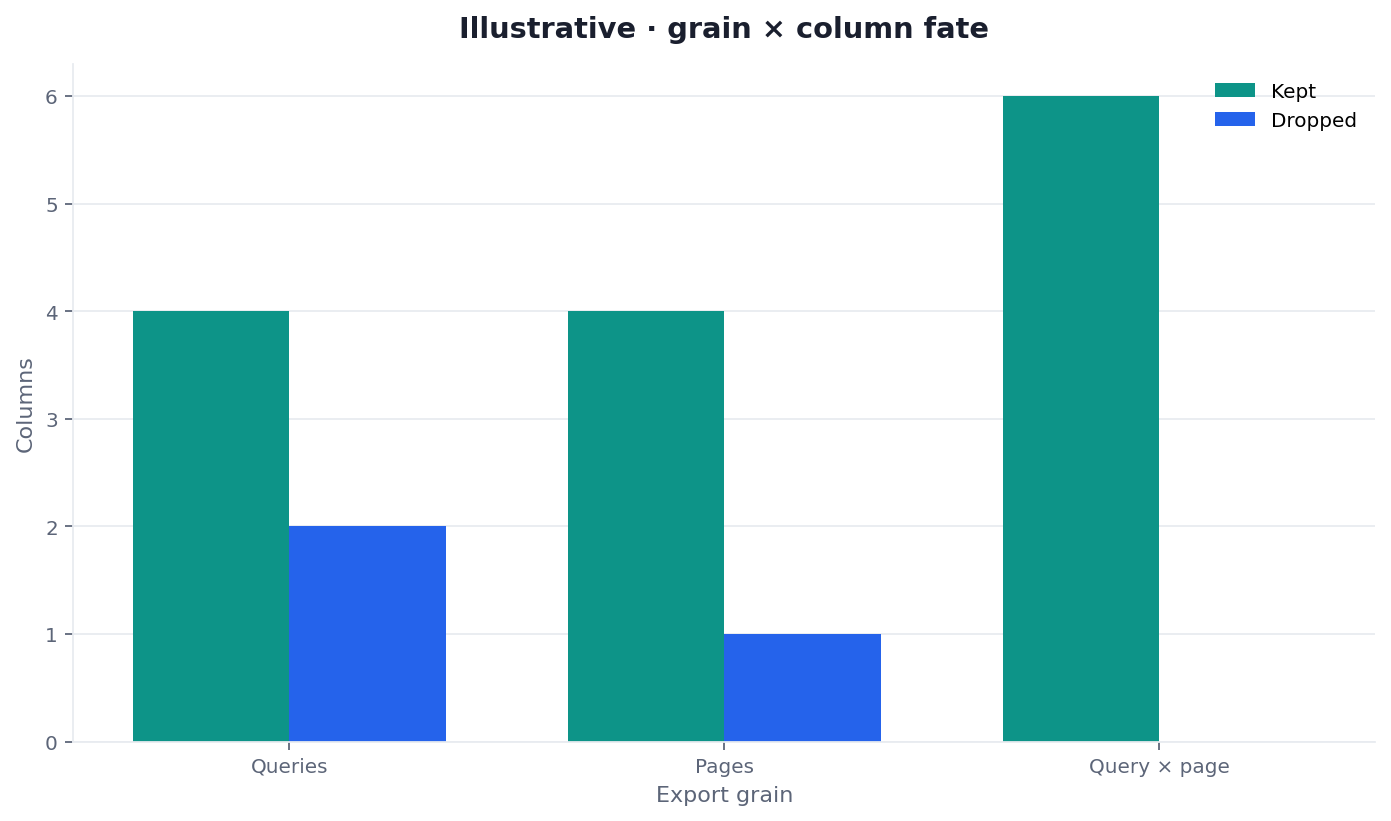
Figure: Two series from the same desk. Exit 1 is not a missing warehouse table. Files accepted is not a bulk-export job.
How we ran the CLI
npx --yes -p infinitegrowth@0.1.1 seo-health gsc ./dummy.zip --format json --lang en
npx --yes -p infinitegrowth@0.1.1 seo-health gsc ./empty-dir --format json --lang en
# 分析失败:目录下没有找到 CSV 文件
Run the same four path checks locally. Reproduce the exit code class unless the package reader changed. Keep the Help UA on a separate note: InfiniSynapse-P3-desk/2026-09-14.
Bulk-export Help we fetched
Help URLs on support.google.com returned 404 to this user-agent and still shipped about 1.6 MB of HTML with the expected title.
| URL class | First status | Title present | Bytes |
|---|---|---|---|
| Bulk export start 12917675 | 404 | yes | ~1.59MB |
| About bulk export 12918484 | 404 | yes | ~1.58MB |
| Search Console API index | 200 | yes | 74,863 |
Cite Help for vocabulary. Do not treat a 404 curl as “bulk export was deleted.” A google search console export data note that skips the status line is incomplete.
Titled 404 HTML is what this curl saw. A human Help session can still render the article. Do not write “Google removed BigQuery export.” Keep the first status, the title string, and the byte count. That is enough provenance for google search console export data.
The unzip contract
When a later ZIP does exist, keep the local contract in front of the warehouse conversation. google search console export data that jumps to SQL before the folder hash exists is already reversed.
Role files
Filename or header should identify Queries, Pages, Dates, Devices, or Countries. Queries + Pages is the minimum pair for later cross-tabs. Search Analytics query dimensions lists the API-side names. They are not proof your ZIP contained those files. google search console export data that ships Dates alone cannot answer a query-page question.
Size and count limits
≤8 files. ≤4MB. UTF-8. An extra screenshot in the folder is not a ninth CSV. A 12 MB dump fails the local gate before credits. google search console export data that ignores the byte cap will spend a day on a file the reader refuses.
Headers that must exist
Clicks, Impressions, CTR, Position — English or Chinese. A file that only has “Query” and a comment column is not ready. IBM data analysis overview is a general method reminder: name the fields before you interpret them. The reading order is gsc intepret. google search console export data without those metric headers is incomplete.
API 200 is not a CSV
The API index answering 200 is useful. It is not an export. Do not paste the reference as if it were Queries.csv. google search console export data lives on disk first.
Date window suggestion
manual gsc suggests ≥28 days. We exported 0 days. Do not invent a 12% rate for a window that never left the property. google search console export data with a nine-day stub should stay labeled incomplete, not annualized.
Why a warehouse path is later
Bulk export can support longer retention and larger row sets. This desk did not start that job. A local Performance ZIP is a different object from a partitioned table. Mixing them hides missing grain. google search console export data from the UI download is still the object this page owns.
Name the folder with start date, end date, and property label before you share it. Open each CSV once and confirm headers. A renamed screenshot is not a role file. If a file exceeds 4MB, split or re-export rather than hoping the reader will stretch. Those checks are local. They do not require credits.
The analyze Search Console with AI hub owns the file-and-login order. Use GSC data analysis when the directory already exists and the next question is whether totals agree. Use GSC export for SEO Health when the next question is whether the local gate will accept the path before credits.
google search console export data is allowed to say the warehouse table is unknown when no job ran. It is not allowed to guess a data_date so the schema looks complete.
Privacy stays local first. Drop columns the question does not need. Store a checksum of the unzipped directory. Do not publish private query rows to prove you unzipped a file. Public pages use the CLI rejects above. A later authorized reviewer can replay the same four inputs without seeing a customer ZIP.
Limits, missing rows, and troubleshooting
Failure modes that skip unzip
ZIP theater. Passing the archive fails. Unzip first.
Empty-folder confidence. A directory with no CSV is not a valid grain. The CLI said so.
Help 404 as a product death. The title was still in the HTML.
Warehouse-first narrative. A slide about partitions appears before any local file hash.
Unauthorized as insight. Exit 1 after a fixture is a login gate, not a field map.
Synthetic-to-real drift. A three-row schema toy becomes “the export was valid.” Label teaching files as teaching files.
A google search console export data briefing that skips the ZIP reject and jumps to SQL is already late.
Two people passing the same dummy ZIP should see the same reject class unless the reader changed. That is the unzip gate. A warehouse cost estimate is a different job and needs a real export first.
Nearby guides after the directory exists
This page keeps the unzip rule. Narrower jobs live on siblings.
| Job you actually have | Guide to open next |
|---|---|
| Reconcile exported totals after files exist | GSC data analysis |
| Local accept before credits | GSC export for SEO Health |
Unzip the archive before you praise the warehouse
Keep the dates on the folder. Confirm CSV headers. Then decide whether BigQuery is even the next surface.
Run SEO Health CheckerFrequently Asked Questions
Can you pass the Performance ZIP to seo-health gsc?
No. This desk’s dummy ZIP exited 1 with 只支持 CSV 文件. Unzip, then pass the directory or a CSV. The archive is the download, not the input. google search console export data starts after that unzip.
Did we start a BigQuery bulk export?
No. Help pages for start and about-export answered 404 to this user-agent and still carried titles. We started no job and created no dataset.
Does a 404 on bulk-export Help retire those citations?
No. This unzip desk received 404 plus titled HTML on both bulk-export Help URLs. Open them in a browser before you drop the citations.
What local limits does the manual name?
UTF-8 CSV, at most eight files, at most 4MB, role names by filename or header, and metric headers for clicks, impressions, CTR, and position. Those limits are the contract. They are not a warehouse quota. google search console export data that ignores them fails locally.
Is the API index a substitute for the unzipped folder?
No. The API reference answered 200 and documents dimensions. It does not replace google search console export data on disk.
Conclusion
Use google search console export data when the job is to keep the unzipped directory honest before anyone opens SQL. This 2026-09-14 pass is ZIP-fail, empty-folder-fail, missing-path-fail, and unauthorized after a one-row CSV. Leave the command, both version strings, and the Help 404+title lines in the folder. A bounded CLI log beats an unsupported partition claim. google search console export data ends on the files that actually left the property; this article never received those files.
Keep the InfiniSynapse web app closed until the unzipped directory already satisfies manual gsc; a warehouse story is not that directory.
William Zhu · Cofounder, InfiniSynapse · GitHub @allwefantasy
Desk-validated SEO Health methods. Corrections: zhuhl@infinisynapse.com · corrections policy.