Google Search Date Range: Filter Results by Date
Filter Google results by date with Search Tools, Custom Range, before: and after:. Includes desktop, mobile, exact examples, and troubleshooting.
Author credentials: William Zhu is cofounder of InfiniSynapse (GitHub @allwefantasy · auto-coder). Desk: shipping SEO Health and the /en/tool/ visibility pages. No personal LinkedIn published. About: team / editorial standards.
Publisher credentials: InfiniSynapse has public profiles on GitHub, YouTube, and X. A 2026 WAIC Future Tech OPC excellence award covers the Agentic Data Infra entry (WAIC; third-party recap: Xinhua / Caohejing). That award does not review this page or SEO Health. Method CLI: infinitegrowth on npm. Archive: recognition and scope notes.
On this page
By William Zhu & the InfiniSynapse Data Team · Published: 2026-09-24 · Last updated: 2026-09-24 · Editorial standards
Quick answer
Direct answer: Set a Google Search date range from the results page with Tools → Any time → Custom range, or add
after:YYYY-MM-DDandbefore:YYYY-MM-DDto the query. The operator method is usually the most portable fallback when the visual filter is missing or different on mobile.
For example, this query asks for pages about product analytics within a bounded period:
product analytics after:2026-01-01 before:2026-02-01
Google can infer a page date from multiple signals, so a date-filtered result is not proof that the visible publication date is exact. Use the filter to narrow research, then verify important dates on the source page.
Use Search Tools and Custom Range
On a desktop Google results page, run the search first. Open Tools, choose the time control—often labeled Any time—and select Custom range. Enter the start and end dates, apply the filter, and inspect the query and filter state before sharing the result.
The exact labels and placement can vary by interface, account, locale, experiment, and device. Google’s refine web searches documentation is the primary reference for supported search controls. A community screenshot or an old article can explain a historical interface, but it cannot guarantee the controls visible today.
A Google Search date range is useful for finding coverage around a launch, checking what was published before an announcement, or restricting research to a known incident window. It does not sort every result in strict chronological order, and it does not change the underlying page dates.
Custom range checklist
- Write the topic query before adding dates.
- Open Tools and locate the time filter.
- Enter explicit start and end dates.
- Apply the filter and confirm it remains active.
- Open important results and verify their dates directly.
Use before: and after: operators
The before: and after: operators place the date constraint directly in the query. Use ISO-style dates because YYYY-MM-DD is unambiguous across locales.
| Goal | Query example |
|---|---|
| Results after a date | topic after:2026-01-01 |
| Results before a date | topic before:2026-02-01 |
| Results between dates | topic after:2026-01-01 before:2026-02-01 |
| One domain in a period | site:example.com topic after:2026-01-01 before:2026-02-01 |
| Exact phrase in a period | "product launch" after:2026-01-01 before:2026-02-01 |
Treat the boundary behavior conservatively. If a specific calendar day matters, test adjacent dates and inspect the sources rather than assuming the operator behaves like a database predicate. Search Engine Land’s documented overview of before: and after: search commands provides historical context for these operators.
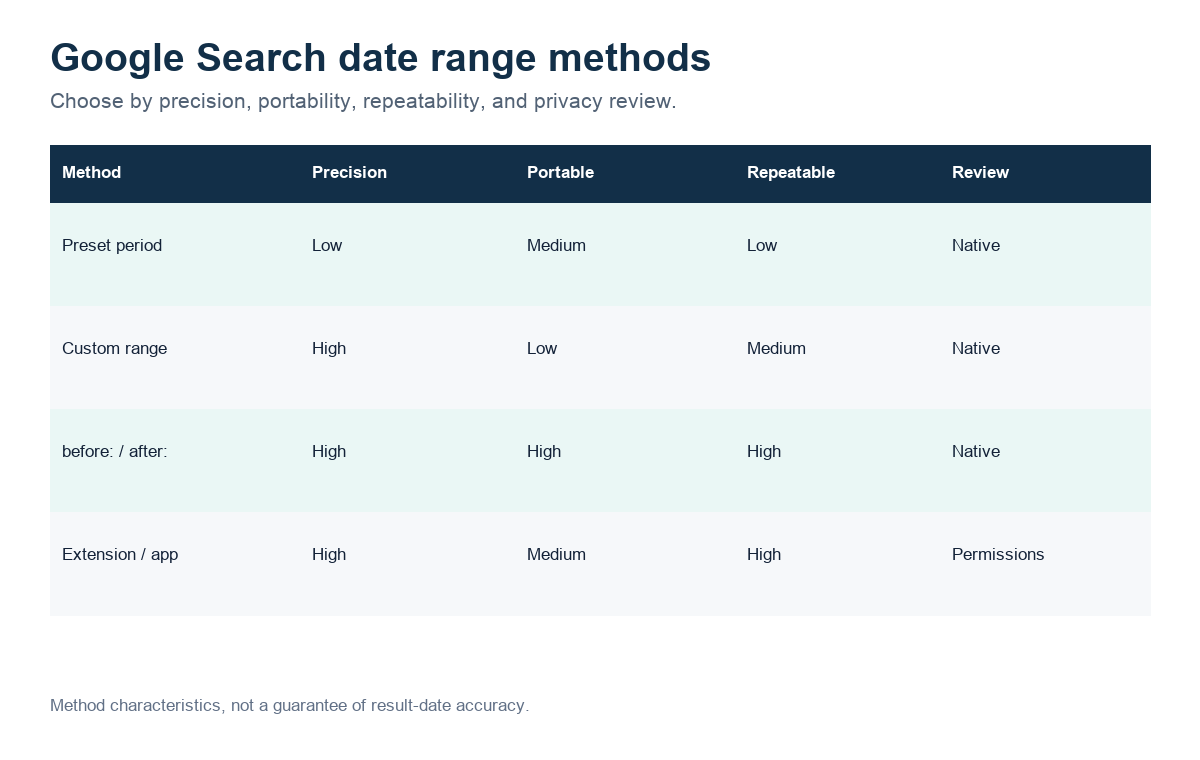
Figure: A decision aid based on observable method characteristics, not a ranking-quality benchmark.
Choose preset date filters
Preset filters are faster when an exact start date is unnecessary. Depending on the interface, Google may offer periods such as the past hour, 24 hours, week, month, or year. Use them for quick monitoring; use Custom range or operators when a report needs reproducible boundaries.
| Method | Best for | Reproducibility | Main limitation |
|---|---|---|---|
| Preset period | Fast news or incident checks | Low to medium | Boundary moves with the current time |
| Custom range | Visual, bounded research | Medium | Interface availability varies |
before: / after: | Shareable query text | High | Page-date interpretation can still vary |
| Extension or app | Frequent repeated searches | Depends on tool | Permissions and maintenance require review |
Do not describe “past month” as a fixed month in an audit. Record the exact date and time of the search or convert the task to explicit boundaries.
Search by date on mobile
Mobile interfaces have changed over time, and some users do not see the same Custom range control available on desktop. First check the current Search Tools or time-filter menu. If the custom picker is absent, use after: and before: in the query; this keeps the request visible and avoids depending on a hidden menu.
Older reports about Google removing Custom Range on mobile describe a historical rollout, not a permanent guarantee. Primotech’s article documents the older path and remaining preset filters, while current behavior should be verified on the device in front of you. Do not rewrite a historical report as a current Google policy.
For a repeatable mobile search:
- Type the topic and both operators in the search box.
- Use four-digit years and two-digit months and days.
- Save or share the full query text.
- Reopen it and confirm the terms were not removed.
- Verify critical dates on the destination pages.
Extensions and app alternatives
Extensions can add shortcuts, calendars, and persistent date controls. The Chrome Web Store result supplied for this review offers customizable shortcuts and an option to keep Search Tools open. Its listing also exposes ratings, user count, version, update date, developer identity, and privacy disclosures. Those are evaluation inputs—not proof that an extension is safe for every organization.
The open-source Google Date Range Search extension provides another review path: teams can inspect releases, commits, dependencies, and source code. The App Store’s Date Range Search Filter Tool demonstrates an app and share-extension workflow for custom intervals.
Before installing a date-range tool, review:
- requested browser or device permissions;
- whether search queries or browsing history leave the device;
- update recency and maintainer identity;
- source availability and dependency health;
- whether native operators already complete the task.
For occasional use, operators avoid an installation. For frequent research, a maintained shortcut can reduce clicks, but privacy and update status belong in the decision.
Why date filtering can be inexact
Google Search does not promise that every result exposes one authoritative publication timestamp. A page can contain publication, modification, event, copyright, and structured-data dates. Crawling and indexing can add more timing signals. A Google Search date range therefore narrows results; it is not a forensic timestamp query.
Google Search Central explains date signals and visible dates in its guidance on article dates in search results. Publishers should provide consistent visible and structured dates, but researchers should still open the source and inspect the evidence.
Common causes of surprising results include:
- a page was materially updated after its original publication;
- structured and visible dates disagree;
- the search system inferred a date from weaker signals;
- syndicated copies carry different timestamps;
- a preset period moved between two runs;
- the interface retained or dropped a filter unexpectedly.
For legal, compliance, or historical research, archive the source and verify its timestamp through an appropriate evidence process. A search filter alone is not chain-of-custody evidence.
Troubleshoot a missing date filter
If the Google Search date range control is missing, do not assume the feature has been permanently removed. Check whether Tools is collapsed, try a desktop-width layout, inspect the active account and locale, and compare a private window. Then use explicit operators as the fallback.
If results appear outside the intended period:
- Confirm both operators remain in the final query.
- Replace locale-formatted dates with
YYYY-MM-DD. - Remove one operator to isolate the failing boundary.
- Test a narrower site with
site:. - Open the result and distinguish publication from modification dates.
- Record the query, device, locale, and observation time.
Google’s Search operators documentation explains that operators are bounded retrieval tools and may be limited by indexing and serving constraints. They should guide research, not be treated as exhaustive database queries.
Inspect the complete Google Search Date Range page
Paste a sanitized URL into the InfiniSynapse SEO Health Checker so every title, mention, citation, and on-page layer can be reviewed together. Then validate the findings on the live page.
Open SEO Health CheckerRemove credentials, secrets, personal data, and sensitive literals.Frequently asked questions
How do I search Google between two dates?
Add both operators: topic after:2026-01-01 before:2026-02-01, or choose Tools, Any time, and Custom range when that interface is available.
Is Google Search Custom Range gone?
Not necessarily. Availability and placement can vary by device and interface. Use before: and after: when the custom picker is unavailable.
Does before: include the date I enter?
Do not rely on an unstated boundary assumption for critical research. Test adjacent dates and verify the publication date on each important source.
Can I sort all Google results chronologically?
A date range filters eligible results but does not guarantee a complete, strictly chronological index. Search ranking and date interpretation still apply.
Are date-range browser extensions safe?
Safety depends on permissions, data handling, maintenance, and code. Review the store disclosure and source before installing; use native operators when they are sufficient.
Is this the same as a Search Console date range?
No. A web-search filter narrows public search results. A Google Search Console date range selects Performance data for a verified property and must preserve complete, comparable reporting windows.
Conclusion
Use Search Tools for a quick visual Google Search date range, and use before: plus after: when you need portable, shareable query boundaries. On mobile, operators are the most reliable fallback. Extensions can save clicks, but native controls avoid additional permissions. For every important result, verify the date on the source page instead of treating the filter as definitive timestamp evidence.
William Zhu · Cofounder, InfiniSynapse · GitHub @allwefantasy
Desk-validated SEO Health methods. Corrections: zhuhl@infinisynapse.com · corrections policy.