How Long Does It Take to Vibe Code an App in Claude
By William Zhu & the InfiniSynapse Data Team · Published: 2026-06-24 · Last updated: 2026-09-27 · About: Editorial standards
Author credentials: William Zhu is an InfiniSynapse cofounder and open-source builder (GitHub @allwefantasy). This guide is based on a reproducible starter-app walkthrough and repository review checklist, not a benchmark or sponsored model comparison.
Commercial interest: InfiniSynapse sells an AI data-agent platform. The Claude setup, prompts, Git safeguards, and debugging steps below work without InfiniSynapse. Product context is isolated near the end.
SEO Title: How Long Does It Take to Vibe Code an App in Claude
Meta Description: How long does it take to vibe code an app in Claude? Hours for a demo, a weekend for a task list, weeks with login and data, months before production.
Slug: /blog/vibe-coding-with-claude-reddit
Target keyword: how long does it take to vibe code an app
- How long does it take to vibe code an app
- What Is Vibe Coding With Claude?
- Choose the Right Claude Surface
- Set Up Claude Code Safely
- Write a Useful CLAUDE.md
- Build a First App Step by Step
- Use the Plan, Diff, Test, Commit Loop
- Debug and Recover
- Connect Cursor, GitHub, and MCP
- Move From Prototype to Production
- Frequently Asked Questions
How long does it take to vibe code an app
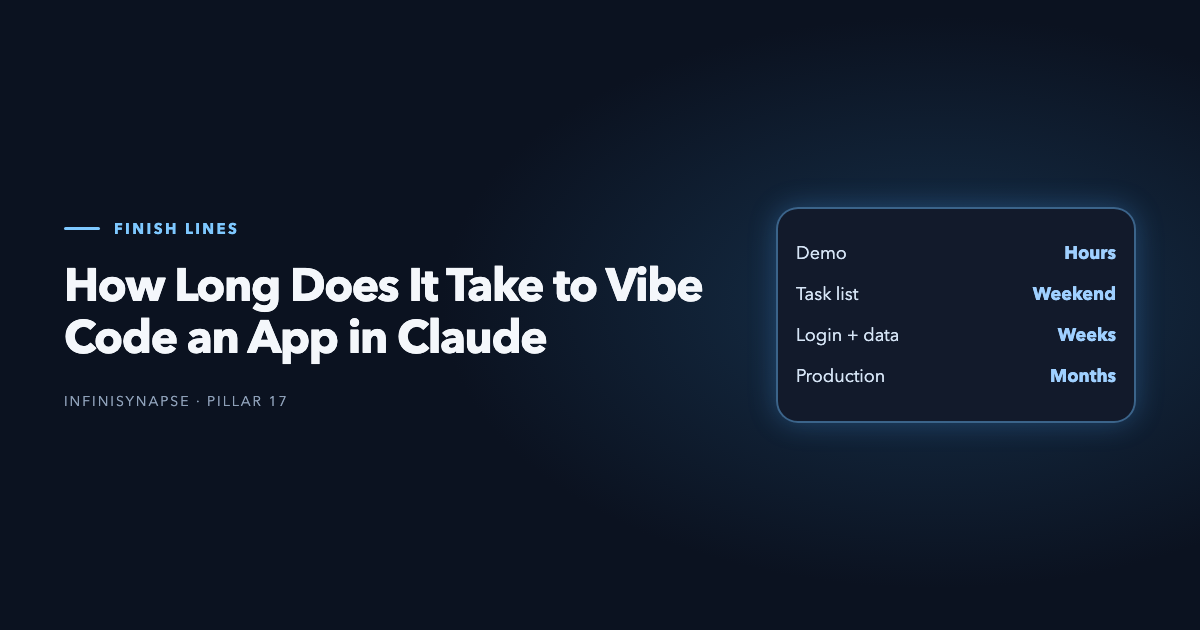
Direct answer: How long does it take to vibe code an app depends on the finish line, not on the model. On the Claude loop below, a clickable demo is hours, the task-list walkthrough is a weekend, login plus real data is weeks, and a production release is months.
| Finish line | What exists | Clock |
|---|---|---|
| Demo | One slice you can click, before a full review | Hours |
| Task list | The five steps on this page, with checks passing | A weekend |
| Login and data | Accounts, a database, secrets kept off the client | Weeks |
| Production | The release checks later on this page | Months |
Public stories split across those rows. A short screen recording is the demo row. A multi-month build is the production row, where review and debugging take longer than generation. This page does not average those stories. It clocks the plan, diff, test, and commit loop you can reproduce in the task-list walkthrough. Each slice that fails review starts that slice's clock again.
What Is Vibe Coding With Claude?
Direct answer: Vibe coding with Claude means describing a software goal in plain language, letting Claude inspect and change the code, then reviewing and testing each small result. The safest beginner loop is: define one outcome, ask for a plan, approve a limited diff, run the app and tests, inspect the change, and commit a working checkpoint before continuing.
That definition matters because “prompt once and accept everything” is not a development method. Claude can explain a repository, propose a design, edit several files, run commands, and help diagnose failures. You still own the requirements, credentials, tests, and decision to merge.
This guide completes one concrete task: turn an empty folder into a small task-list app with a reviewable repository. The worked example gives you a CLAUDE.md template, scoped prompts, acceptance checks, and recovery commands. It complements the broader vibe coding tools guide, which compares tool categories rather than teaching this Claude loop.
Anthropic's Claude Code overview is the primary reference for current installation and product capabilities. Check it before copying commands because supported platforms, authentication, and package names can change.
What Claude should do
Claude should inspect the existing project before proposing changes, state assumptions, identify the files it expects to touch, implement one bounded outcome, run the agreed checks, and summarize what changed.
What the human should do
You should decide what “done” means, deny unnecessary permissions, keep secrets out of prompts and commits, read the diff, exercise the feature, and preserve a known-good Git state. Vibe coding with Claude accelerates the editing loop; it does not transfer accountability.
Choose the Right Claude Surface
Claude is available through several surfaces. Pick the one that can complete your immediate task with the least access.
| Surface | Repository access | Can run local checks? | Best beginner use | Main limitation |
|---|---|---|---|---|
| Claude web or Desktop chat | Only what you provide | No, unless connected to tools | Clarify requirements and draft a plan | Context can drift from the real repo |
| Claude Code | Direct project context | Yes, with permission | Implement, test, and debug inside a repository | Requires terminal and permission discipline |
| Cursor with Claude | Editor and selected workspace context | Yes, through agent tools | Review diffs while staying in the IDE | Editor settings affect what context is visible |
| Anthropic API | Only what your integration sends | Only through tools you build | Custom agents and repeatable automation | You own tool safety, retries, and observability |
For a first app, use Claude Code or an IDE agent only after creating a Git repository. Use chat first when the idea is still ambiguous. The adjacent Claude Code vibe coding guide goes deeper on terminal-native operation; this page focuses on the end-to-end beginner workflow.
Set Up Claude Code Safely
Follow the current operating-system instructions in Anthropic's official documentation rather than a copied installer from a forum. Then create a disposable project:
mkdir claude-task-app
cd claude-task-app
git init
npm create vite@latest . -- --template react-ts
npm install
npm run dev
Confirm the untouched starter app loads. Stop the development server, commit that baseline, and only then begin vibe coding with Claude:
git add .
git commit -m "chore: create clean Vite baseline"
GitHub's documentation explains why small, descriptive commits make later comparison and recovery easier. Do not place API keys in CLAUDE.md, prompts, source files, screenshots, or committed .env files.
Set a permission boundary
Start with project-directory access, not broad access to your home directory. Read every request to run an install, migration, network call, or destructive command. A coding agent should not receive production credentials merely because the prototype will eventually use them.
Establish the first acceptance check
Before requesting a feature, write down the checks:
- the existing app starts without errors;
- a user can add, complete, and delete a task;
- tasks persist after a refresh;
- empty tasks are rejected;
- type checking and the production build pass.
These checks turn an open-ended prompt into a testable job.
Write a Useful CLAUDE.md
Persistent project instructions reduce repeated explanations, but they should be concise and verifiable. Anthropic's guidance on Claude Code memory describes how project instructions are discovered and applied.
Use this starter file:
Project instructions

Goal
Build a small React + TypeScript task app for local use.

Commands
- Install: npm install
- Develop: npm run dev
- Build: npm run build
- Type-check: npx tsc --noEmit

Constraints
- Inspect existing files before editing.
- Plan before changing code.
- Touch no more than four files in one step unless approved.
- Never add secrets or external services.
- Keep task persistence in localStorage.
- Preserve strict TypeScript types.

Definition of done
- Add, complete, delete, and persist tasks.
- Reject blank task labels.
- Build and type-check pass.
- Summarize files changed and checks run.
This is an original, reusable task contract—not a magic prompt. Adapt the commands and constraints to the repository. Remove instructions that cannot be checked. Do not fill CLAUDE.md with style preferences while leaving authentication, test commands, or forbidden actions undefined.
Build a First App Step by Step
Step 1: Ask Claude to inspect, not edit
Prompt:
Read CLAUDE.md and inspect this repository. Do not edit files yet.
Explain the current structure, identify the smallest implementation plan
for the task app, and list the files you expect to touch.
Compare the response with the repository. If Claude invents a library or misses an existing component, correct the plan before any code is written.
Step 2: Approve one vertical slice
Prompt:
Implement only task creation and rendering. Use strict TypeScript.
Do not add persistence, styling libraries, or new dependencies.
After editing, run the type-check and summarize the diff.
Run the app yourself. Add a normal task, whitespace-only input, and a long label. Inspect the actual diff rather than accepting a verbal summary.
Step 3: Add state transitions
Ask for completion and deletion in a second pass. Keep this separate so a broken event handler is easy to locate. Require accessible button labels and stable item identifiers.
Step 4: Add persistence
Ask Claude to store and restore the task array in localStorage, including a safe fallback for invalid stored JSON. Test a refresh, an empty store, and malformed stored data.
Step 5: Run the acceptance checks
Prompt:
Run the commands in CLAUDE.md. Then compare the implementation with every
Definition of done item. Do not claim a manual browser check was performed
unless it actually was. Report failures and unresolved assumptions.
This worked example creates information gain that generic “Claude is good at coding” commentary lacks: another reader can reproduce the same repository states and checks.
Use the Plan, Diff, Test, Commit Loop
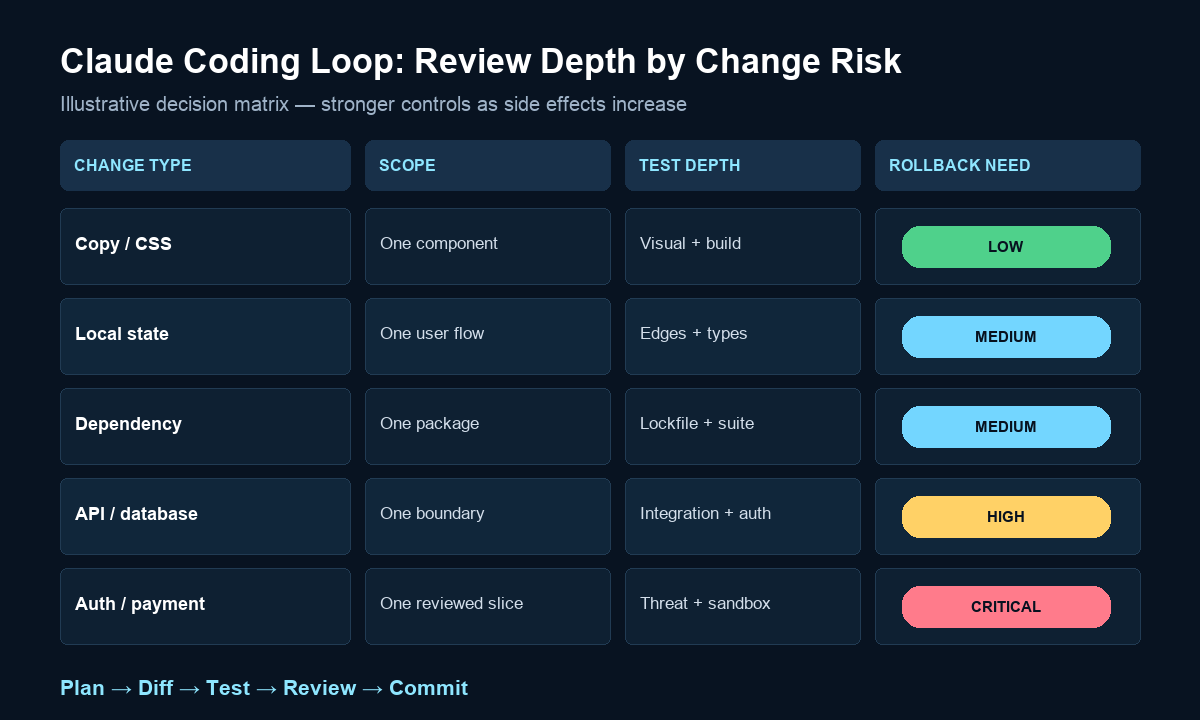
The repeatable operating loop is more important than a perfect first prompt:
- Plan: define one observable outcome and the allowed scope.
- Diff: ask for the smallest coherent change.
- Test: run automated checks and manually exercise the changed behavior.
- Review: inspect the patch for unrelated edits, secrets, and weak error handling.
- Commit: preserve the working state before the next request.
Match review depth to change risk
| Change type | Maximum useful scope | Required evidence before commit |
|---|---|---|
| Copy or CSS | One component | Visual check and build |
| Local state | One user flow | Edge cases, type-check, build |
| Dependency | One package and integration | Package review, lockfile diff, tests |
| API or database | One endpoint or migration | Auth, validation, rollback, integration test |
| Authentication or payment | One reviewed slice | Threat review, test environment, human approval |
OWASP's LLM application guidance is relevant when generated code handles tool calls, sensitive data, or external content. It is not a substitute for reviewing the specific application.
Commit the evidence
Commit source and tests, not Claude's confidence. A useful commit message names the behavior: feat: persist tasks in local storage. If a change touches more files than the approved plan, stop and ask why before proceeding.
Debug and Recover
When Claude breaks a working app, do not immediately ask it to “fix everything.” Preserve the error and narrow the change.
Capture a reproducible failure
Provide the command, exact error, expected result, actual result, and last known-good commit. Ask Claude to explain the most likely cause before editing:
The command `npm run build` fails with the error below.
The last good commit is abc123. Inspect the relevant files and the diff
since that commit. Propose the smallest fix, but do not edit yet.
Inspect before reverting
Use:
git status
git diff
git log --oneline -5
If the working tree contains valuable manual edits, commit them on a temporary branch or stash them intentionally. Avoid destructive reset commands unless you understand exactly which work will be lost.
Reduce the failure surface
Revert or repair the smallest faulty slice. Re-run the specific failing test first, then the full build. Add a regression test when the failure can recur. The GitHub debugging documentation provides a comparable evidence-first approach for failing automated workflows.
Connect Cursor, GitHub, and MCP
Vibe coding with Claude can span an editor, terminal, source host, and external tools. Add each integration only when it removes a real handoff.
- Use Cursor when visual diff review and in-editor navigation are central.
- Use Claude Code for terminal-native repository inspection, tests, and refactors.
- Use GitHub as the durable review and rollback record.
- Use MCP when Claude needs a controlled, documented tool rather than pasted credentials or ad hoc scripts.
The official Model Context Protocol documentation explains the client-server model. Treat every server as a new permission boundary: review its tools, data access, authentication, and side effects.
For a first local app, you do not need MCP. Add it only after the core plan–diff–test–commit loop works. The GitHub Copilot vibe coding comparison is useful when choosing between repository workflows rather than stacking several agents at once.
Move From Prototype to Production
A local task app can use browser storage. A production application needs explicit trust boundaries.
Put secrets and privileged calls on the server
Never expose vendor keys in browser bundles. Route privileged calls through authenticated server endpoints with input validation, timeouts, rate limits, and an allowlist. NIST's Secure Software Development Framework provides a broader framework for integrating security into development.
Separate long work from requests
For imports, document processing, or AI jobs that can outlive a request, return a job identifier and expose progress. Add idempotency for retries and structured logs for diagnosis.
Verify dependencies and generated code
Review every new package, lockfile change, migration, and permission. Run static checks and tests in CI. Claude can propose the implementation, but production approval must rely on observable evidence.
When a Claude-built interface needs governed analytics, InfiniSynapse is one optional backend pattern; the InfiniSynapse web app is the commercial product. The architecture requirements above apply whether you use it, another service, or your own queue.
The broader production readiness checklist covers release ownership and operational controls after the first prototype works.
Common Beginner Mistakes
Asking for the whole application at once
Large prompts hide assumptions and produce diffs that are hard to verify. Split the app into observable slices.
Treating generated tests as independent proof
Claude can write an implementation and a test that repeats the same mistaken assumption. Review assertions against the requirement and add manual edge cases.
Mixing feature work with cleanup
Do not combine a feature, framework upgrade, folder restructure, and dependency replacement. Separate commits make failures attributable.
Continuing after a failed check
Fix or explicitly defer the failure before asking for another feature. Otherwise, every later diff inherits an uncertain baseline.
Granting broad permissions for convenience
Use the least access needed. Never paste production tokens into a session. Review network, install, migration, and deletion requests individually.
Frequently Asked Questions
How long does it take to vibe code an app?
Hours for a demo, a weekend for the task list on this page, weeks once login and stored data are in scope, and months before production. A failed review restarts that slice. It does not restart the whole calendar unless the baseline itself is broken.
Is Claude good for vibe coding?
Yes, especially when it can inspect the repository and work from explicit constraints. Results still depend on small scopes, executable checks, diff review, and Git checkpoints.
Do I need Claude Code to vibe code with Claude?
No. You can plan in Claude web or Desktop and use Claude through an IDE. Claude Code is useful when the task requires direct repository inspection, terminal commands, tests, and multi-file changes.
What should go in CLAUDE.md?
Include the project goal, verified commands, architectural constraints, forbidden actions, coding conventions that matter, and a testable definition of done. Do not include secrets or vague motivational instructions.
How do I stop Claude from changing too many files?
Ask it to inspect first, name the files it expects to touch, and wait for approval. Set a file-count or component boundary in CLAUDE.md, then reject unrelated edits during diff review.
How do I recover when Claude breaks working code?
Capture the exact failure, inspect git diff, compare with the last working commit, and repair or revert the smallest slice. Re-run the failed check before the full suite and commit only after the baseline is restored.
Conclusion
How long does it take to vibe code an app is the finish line you pick: hours, a weekend, weeks, or months. Vibe coding with Claude works best as a controlled feedback loop, not a one-shot generation trick. Start from a clean Git baseline, put verifiable constraints in CLAUDE.md, request one vertical slice, test the behavior, inspect the diff, and commit before expanding scope.
For the first app, keep everything local and observable. Add integrations, server boundaries, queues, and production credentials only when the simpler version is proven. That discipline preserves Claude's speed without surrendering the evidence needed to ship reliable software.