Google Analytics BigQuery Data Analysis Capabilities
First-person desk note: When I first wired a live GA4 BigQuery export, the schema looked simple until every useful metric hid inside event_params. The ten SQL patterns below are the ones we keep rewriting in reviews — not theory.
- Unsampled event rows, history past 14 months, a same-day streaming table, and joins to warehouse tables are what the export adds on top of the GA4 interface.
- Most analytical work on a GA4 BigQuery export involves UNNESTing event_params and user_properties arrays to reach the values you actually care about.
- Ten worked questions on the GA4 BigQuery export cover most weekly use — DAU/MAU, retention curves, funnel analysis, attribution, channel performance, custom event rates, page-level engagement, scroll depth, search query analysis, and revenue by source.
- BigQuery dialect quirks matter — DATE_TRUNC syntax, STRUCT and ARRAY handling, partitioned table scan billing.
- AI data agents on top of a GA4 BigQuery export skip the UNNEST boilerplate for ad-hoc questions and emit a verification step appropriate for the dataset.
Direct answer: what the GA4 BigQuery export unlocks
What the export adds
Each row is an analysis the GA4 interface does not run. The SQL for it is already later on this page.
| Capability | What you get | Where |
|---|---|---|
| Unsampled event rows | One row per event, including parameters the interface aggregates away | Event table schema |
| History past 14 months | Daily tables stay in BigQuery after GA4 explorations drop older detail | Retention and funnel SQL |
| Daily and streaming tables | events_YYYYMMDD after the day closes; events_intraday_YYYYMMDD for the current day | Daily export and streaming |
| Joins to orders or CRM | The event table sits next to warehouse tables, so revenue questions can leave the GA4 interface | Revenue by source |
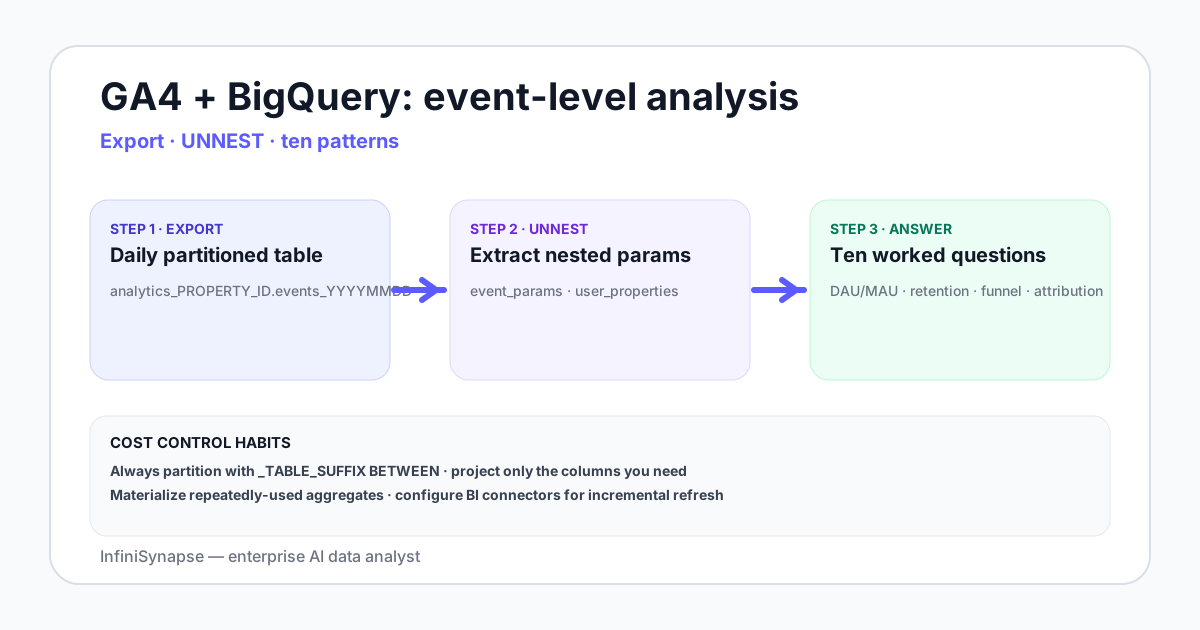
Desk quantitative notes (composite)
These figures come from anonymized desk replays on sample GA4 BigQuery export datasets — useful for planning, not InfiniSynapse product SLAs or customer win rates.
_TABLE_SUFFIX vs a 28-day window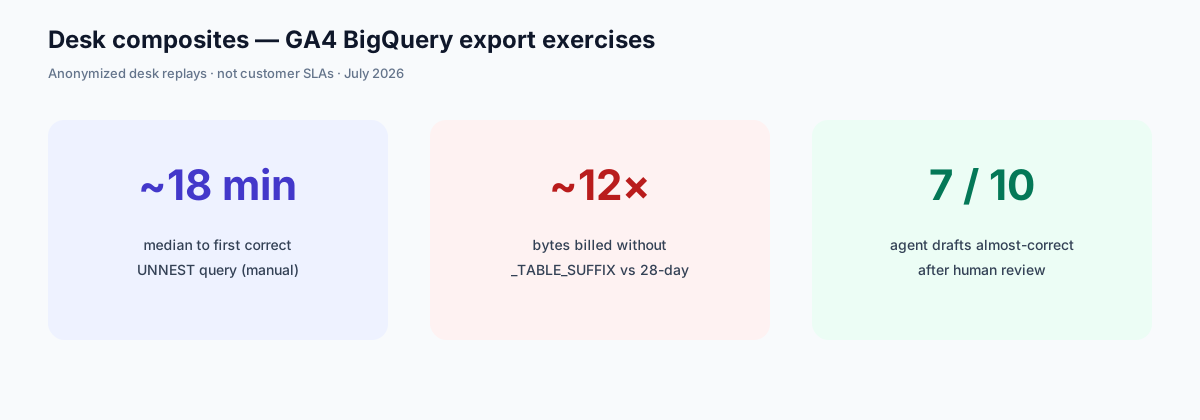
The GA4 BigQuery event table schema
Each GA4 property linked to BigQuery creates a GA4 BigQuery export dataset named analytics_PROPERTY_ID. Inside it, daily tables named events_YYYYMMDD hold one row per event. Streaming export (intraday) lands in events_intraday_YYYYMMDD. Field types match the official GA4 BigQuery export schema documentation.
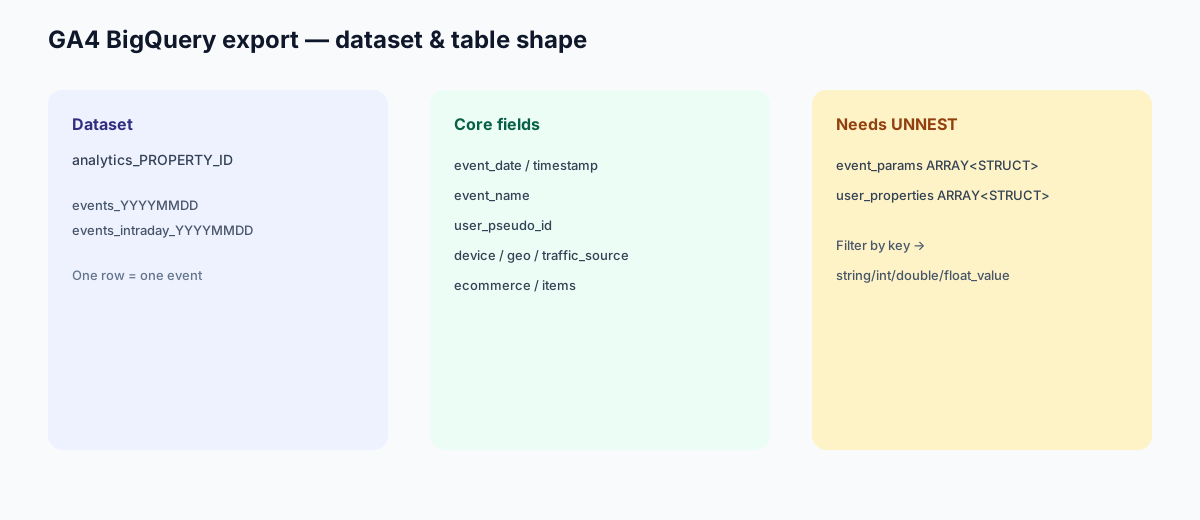
| Field | Type | Notes |
|---|---|---|
| event_date | STRING | Format YYYYMMDD |
| event_timestamp | INT64 | Microseconds since epoch |
| event_name | STRING | page_view, purchase, custom_event_name, etc. |
| event_params | ARRAY<STRUCT> | Key-value pairs — needs UNNEST to read |
| user_pseudo_id | STRING | Anonymous client identifier |
| user_properties | ARRAY<STRUCT> | Set via setUserProperties — needs UNNEST |
| device, geo, traffic_source | STRUCT | Nested structs, accessed by dot notation |
| ecommerce, items | STRUCT, ARRAY | Purchase event details |
Daily export and streaming
The daily GA4 BigQuery export writes events_YYYYMMDD after the day closes. Streaming writes that same day’s events to events_intraday_YYYYMMDD, and that table is still incomplete. For one date, query the daily table or the intraday table. Unioning both for the same date counts those events twice.
The UNNEST pattern every GA4 BigQuery export query uses
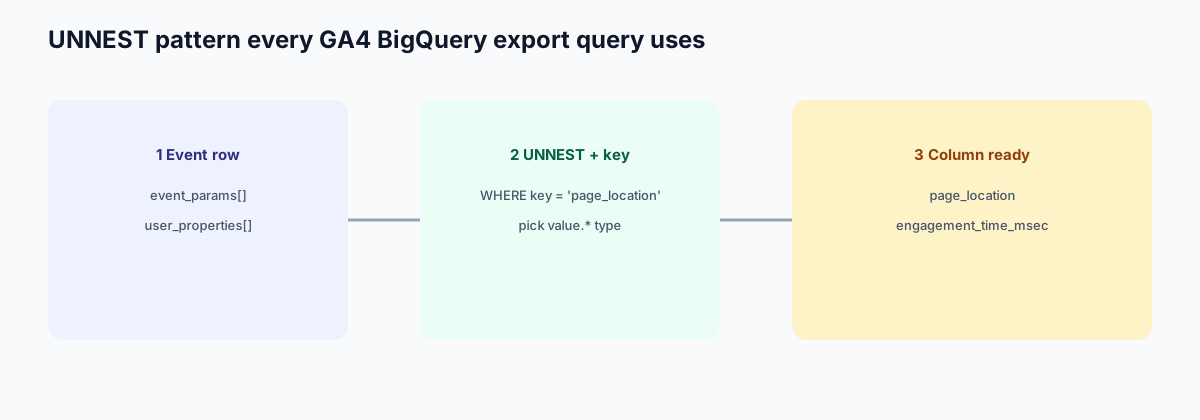
Nearly every useful query on a GA4 BigQuery export uses this extraction shape. Official event names and parameters are listed in the GA4 events reference.
-- Extract a parameter value from event_params
SELECT
  event_date,
  event_name,
  (SELECT value.string_value FROM UNNEST(event_params)
   WHERE key = 'page_location') AS page_location,
  (SELECT value.int_value FROM UNNEST(event_params)
   WHERE key = 'engagement_time_msec') AS engagement_ms
FROM `project.analytics_PROPERTY_ID.events_*`
WHERE _TABLE_SUFFIX BETWEEN '20260601' AND '20260628'
  AND event_name = 'page_view';
Three things to remember: _TABLE_SUFFIX is how you partition the date range, (SELECT ... FROM UNNEST(...)) is the canonical extraction shape, and choosing the right value.* field type (string_value, int_value, double_value, float_value) matters for each parameter.
Ten worked questions on GA4 BigQuery export
Copy-paste starters for the weekly questions we see most often on a GA4 BigQuery export. Replace project.analytics_PROPERTY_ID and date bounds before running. Dialect notes follow the BigQuery SQL reference.
1. DAU / WAU / MAU
SELECT
  PARSE_DATE('%Y%m%d', event_date) AS day,
  COUNT(DISTINCT user_pseudo_id) AS dau
FROM `project.analytics_PROPERTY_ID.events_*`
WHERE _TABLE_SUFFIX BETWEEN '20260601' AND '20260628'
GROUP BY day
ORDER BY day;
2. Retention curve by signup cohort
WITH first_seen AS (
  SELECT user_pseudo_id, MIN(PARSE_DATE('%Y%m%d', event_date)) AS cohort_day
  FROM `project.analytics_PROPERTY_ID.events_*`
  WHERE _TABLE_SUFFIX BETWEEN '20260401' AND '20260628'
  GROUP BY 1
),
activity AS (
  SELECT DISTINCT user_pseudo_id, PARSE_DATE('%Y%m%d', event_date) AS act_day
  FROM `project.analytics_PROPERTY_ID.events_*`
  WHERE _TABLE_SUFFIX BETWEEN '20260401' AND '20260628'
)
SELECT
  f.cohort_day,
  DATE_DIFF(a.act_day, f.cohort_day, WEEK) AS week_n,
  COUNT(DISTINCT a.user_pseudo_id) AS users
FROM first_seen f
JOIN activity a USING (user_pseudo_id)
GROUP BY 1, 2
ORDER BY 1, 2;
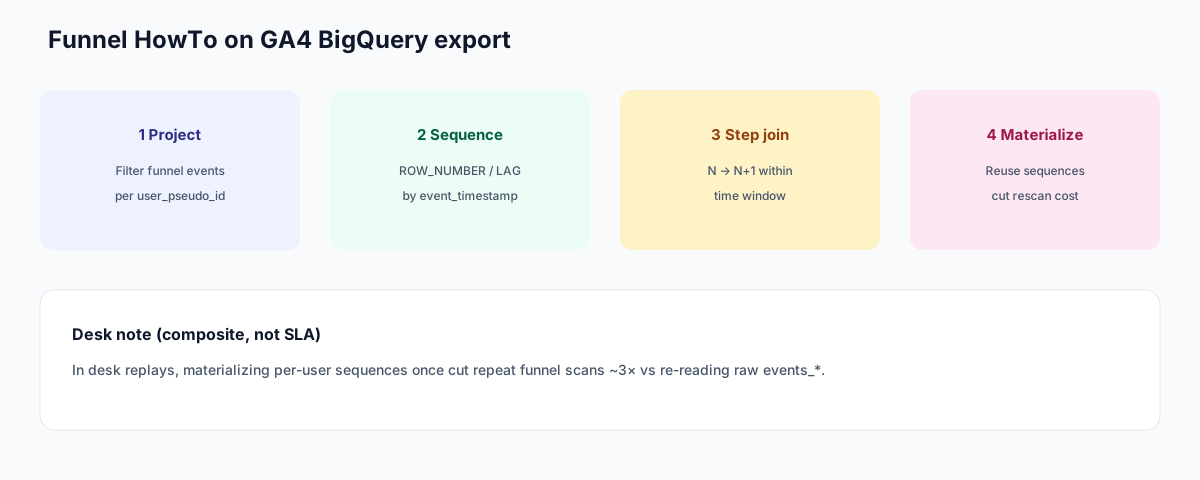
3. Funnel analysis (view → add_to_cart → purchase)
WITH steps AS (
  SELECT
    user_pseudo_id,
    event_timestamp,
    event_name,
    ROW_NUMBER() OVER (
      PARTITION BY user_pseudo_id ORDER BY event_timestamp
    ) AS step_seq
  FROM `project.analytics_PROPERTY_ID.events_*`
  WHERE _TABLE_SUFFIX BETWEEN '20260601' AND '20260628'
    AND event_name IN ('page_view', 'add_to_cart', 'purchase')
),
ordered AS (
  SELECT
    user_pseudo_id,
    MAX(IF(event_name = 'page_view', event_timestamp, NULL)) AS t_view,
    MAX(IF(event_name = 'add_to_cart', event_timestamp, NULL)) AS t_cart,
    MAX(IF(event_name = 'purchase', event_timestamp, NULL)) AS t_purchase
  FROM steps
  GROUP BY 1
)
SELECT
  COUNTIF(t_view IS NOT NULL) AS step1_users,
  COUNTIF(t_cart IS NOT NULL AND t_cart >= t_view) AS step2_users,
  COUNTIF(t_purchase IS NOT NULL AND t_purchase >= t_cart) AS step3_users
FROM ordered;
This is the HowTo shape for funnel work on a GA4 BigQuery export: project → sequence → step join → optionally materialize.
4. Attribution audit (first touch vs converting session)
WITH sessions AS (
  SELECT
    user_pseudo_id,
    event_timestamp,
    traffic_source.source AS source,
    traffic_source.medium AS medium,
    event_name
  FROM `project.analytics_PROPERTY_ID.events_*`
  WHERE _TABLE_SUFFIX BETWEEN '20260601' AND '20260628'
),
first_touch AS (
  SELECT AS VALUE ARRAY_AGG(s ORDER BY event_timestamp LIMIT 1)[OFFSET(0)]
  FROM sessions s
  GROUP BY user_pseudo_id
),
converters AS (
  SELECT AS VALUE ARRAY_AGG(s ORDER BY event_timestamp DESC LIMIT 1)[OFFSET(0)]
  FROM sessions s
  WHERE event_name = 'purchase'
  GROUP BY user_pseudo_id
)
SELECT
  f.source AS first_source,
  c.source AS convert_source,
  COUNT(*) AS users
FROM first_touch f
JOIN converters c USING (user_pseudo_id)
GROUP BY 1, 2
ORDER BY users DESC;
The same view → cart → purchase shape is the standing funnel diagnostic in the ecommerce data analytics playbook. Use this SQL when the event table is the source of truth; use the playbook when you also need warehouse orders, RFM, and month-1 repurchase.
5. Channel performance
SELECT
  traffic_source.medium AS medium,
  COUNTIF(event_name = 'purchase') AS purchases,
  SUM(IF(event_name = 'purchase', ecommerce.purchase_revenue, 0)) AS revenue
FROM `project.analytics_PROPERTY_ID.events_*`
WHERE _TABLE_SUFFIX BETWEEN '20260601' AND '20260628'
GROUP BY medium
ORDER BY revenue DESC;
6. Custom event rates
SELECT
  COUNTIF(event_name = 'generate_lead') AS custom_events,
  COUNTIF(event_name = 'page_view') AS page_views,
  SAFE_DIVIDE(
    COUNTIF(event_name = 'generate_lead'),
    COUNTIF(event_name = 'page_view')
  ) AS custom_per_pageview
FROM `project.analytics_PROPERTY_ID.events_*`
WHERE _TABLE_SUFFIX BETWEEN '20260601' AND '20260628';
7. Page-level engagement
SELECT
  (SELECT value.string_value FROM UNNEST(event_params) WHERE key = 'page_location') AS page,
  AVG((SELECT value.int_value FROM UNNEST(event_params) WHERE key = 'engagement_time_msec')) AS avg_engagement_ms
FROM `project.analytics_PROPERTY_ID.events_*`
WHERE _TABLE_SUFFIX BETWEEN '20260601' AND '20260628'
  AND event_name = 'page_view'
GROUP BY page
ORDER BY avg_engagement_ms DESC
LIMIT 50;
8. Scroll depth analysis
SELECT
  (SELECT value.string_value FROM UNNEST(event_params) WHERE key = 'page_location') AS page,
  (SELECT value.int_value FROM UNNEST(event_params) WHERE key = 'percent_scrolled') AS pct,
  COUNT(*) AS events
FROM `project.analytics_PROPERTY_ID.events_*`
WHERE _TABLE_SUFFIX BETWEEN '20260601' AND '20260628'
  AND event_name = 'scroll'
GROUP BY page, pct
ORDER BY page, pct;
9. Search query analysis
SELECT
  (SELECT value.string_value FROM UNNEST(event_params) WHERE key = 'search_term') AS query,
  COUNT(*) AS searches
FROM `project.analytics_PROPERTY_ID.events_*`
WHERE _TABLE_SUFFIX BETWEEN '20260601' AND '20260628'
  AND event_name = 'view_search_results'
GROUP BY query
ORDER BY searches DESC
LIMIT 100;
10. Revenue by source
SELECT
  traffic_source.source AS source,
  SUM(ecommerce.purchase_revenue) AS revenue,
  COUNT(*) AS purchase_events
FROM `project.analytics_PROPERTY_ID.events_*`
WHERE _TABLE_SUFFIX BETWEEN '20260601' AND '20260628'
  AND event_name = 'purchase'
GROUP BY source
ORDER BY revenue DESC;
These ten cover the majority of weekly analyst work on a GA4 BigQuery export dataset. The companion marketing data analysis playbook explains how these feed business-level KPIs.
What the export still requires
The export is a raw event table. Parameter values stay inside event_params until a query UNNESTs them. Sending an audience back to Google Ads, and training a BigQuery ML model on this table, are separate jobs. This page has no example of either.
BigQuery cost notes for GA4 BigQuery export work
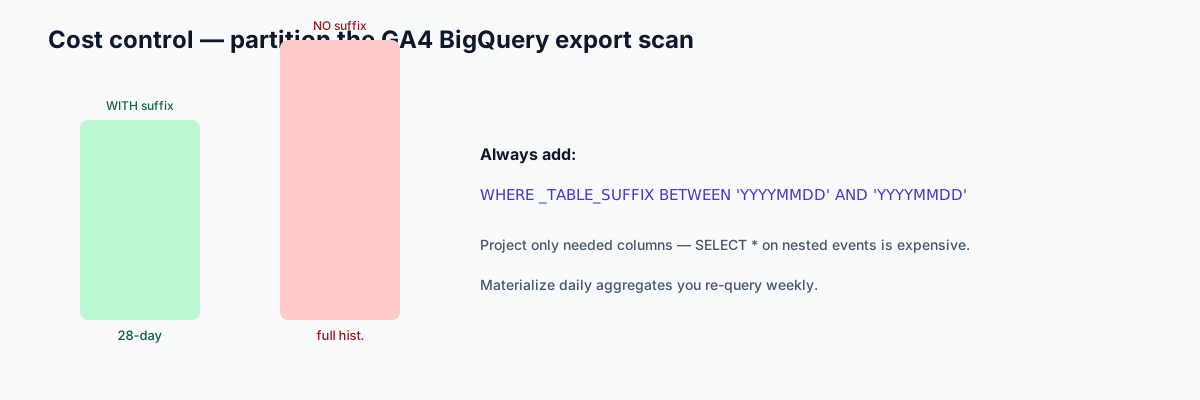
Cost accidents on a GA4 BigQuery export almost always come from scanning every daily shard. Treat partition filters as mandatory.
- Partition scanning. Always use
_TABLE_SUFFIX BETWEENin your WHERE; without it, BigQuery scans every daily table from day 1. - SELECT * costs. The GA4 events table is wide and nested. Project only the columns you need.
- Materialized aggregates. If you re-run the same daily aggregation many times, write the result to a separate table and query that.
- BI tool defaults. Tableau and Looker can issue large scans if connectors are not configured for incremental refresh.
The BigQuery best practices documentation spells out the cost model.
Where AI data agents fit on top of GA4 BigQuery export
Three patterns where an AI data analyst earns the seat on a GA4 BigQuery export dataset:
- UNNEST boilerplate. Every GA4 query needs the UNNEST pattern. An agent drafts the SQL with the correct extraction shape from a plain-English question.
- Cross-property analysis. A team with three GA4 properties — main site, marketing site, app — runs the same question across all three datasets. The agent handles the UNION and renaming.
- Ad-hoc anomaly investigation. "Why did engagement drop on iOS Wednesday?" — the agent UNNESTs the right params, segments by device, and returns a chart with the SQL.
See the AI database query pillar guide for the connection pattern and database + knowledge base binding for how to seed GA4 event definitions as bound context.
Ask GA4-shaped questions across your BigQuery export
Connect your GA4 BigQuery export dataset read-only. Seed a small knowledge base of event definitions — what counts as engagement, which custom events drive conversion. Then ask one open-ended question and read the plan, UNNEST SQL, and verification step before deciding.
Try InfiniSynapse onlineFAQ
Methodology and review notes
Last updated: 2026-09-27 · Next scheduled review: 2026-12-27
This methods guide synthesizes the official GA4 BigQuery export documentation, the BigQuery SQL dialect reference, GA4 events reference, and desk experience from the InfiniSynapse Data Team with named accountability to William Zhu. Desk composites (~18 min, ~12×, 7/10) are labeled and are not product SLAs. About: editorial standards · About InfiniSynapse.
Peer review: Technical pass by a second Data Team reviewer for SQL syntax and partition-filter correctness before publish.
Conflict of interest: InfiniSynapse publishes this guide and sells an enterprise AI data analyst. To reduce bias, the page leads with the topic itself, treats InfiniSynapse as one option among many, and links to external sources for structural claims.
Update cadence: Reviewed every 90 days for accuracy and link health.
Sources and references
- [Vendor] Google. GA4 BigQuery export schema documentation. support.google.com/analytics/answer/7029846.
- [Vendor] Google. BigQuery SQL reference. cloud.google.com/bigquery/docs/reference/standard-sql.
- [Vendor] Google. BigQuery cost best practices. cloud.google.com/bigquery/best-practices.
- [Vendor] Google. GA4 events reference. developers.google.com/analytics/ga4/events.
- [Independent] Yao et al. ReAct paper. arxiv.org/abs/2210.03629.
- [Vendor] Anthropic. Building Effective Agents. anthropic.com/research/building-effective-agents.
- [Standard] NIST. AI Risk Management Framework. nist.gov/itl/ai-risk-management-framework.
- [Independent] BIRD-SQL benchmark. bird-bench.github.io.
- [Policy / About] InfiniSynapse — Editorial standards & author credentials. infinisynapse.com/en/editorial-standards. Company: About InfiniSynapse.