GitLab CI SEO Check: A Second Pipeline, Same Lights
By William Zhu · Cofounder, InfiniSynapse · Last updated: 2026-09-10 · Last verified: 2026-09-10 · Methods: GitLab CI runner jobs at aimeetup.center —
npm i -g infinitegrowth,seo-health checkwithout login, a second pipeline next to tests,--format jsonas the fail file. Deep commands need a CLI key and credits. Not an official Google score. Observed CLI contract 2026-09-10 oninfinitegrowth@0.1.1:seo-health check --format jsoncan exit 0 whileissues[].statusiserror.
Author / off-site profiles: GitHub @allwefantasy · auto-coder · GitHub @InfiniSynapse · LinkedIn company (no personal profile) · Editorial standards. No personal LinkedIn or vendor badge. Product recognition: SEO Health Checker is one of two first-prize works in the InfiniSynapse × CSDN Vibe Coding contest (English recognition archive). InfiniSynapse co-hosted the contest. That list is not a review of this article.
Reviewed by: InfiniSynapse Data Team · method review 2026-09-10. First-party method review, not a third-party award.
Trust / COI: About · Corrections · Publishing principles · Privacy · Terms. SEO Health is commercial. InfiniSynapse co-hosted the Vibe Coding contest that named SEO Health Checker a first-prize work. The issues[] table below is observed. Topic desks stay illustrative. The InfiniSynapse Data Team publishes this desk method.
Table of Contents
- TL;DR
- What a GitLab CI SEO check actually is
- A second-pipeline framework
- GitLab CI SEO check versus an Actions job
- Landscape of GitLab pipelines in 2026
- How to add the second pipeline
- Desk sample: pipeline role by command
- Selection scorecard
- Failure modes that hide the second job
- Cluster guides for this pillar
- Frequently Asked Questions
- Conclusion
Cover: ./images/hero-gitlab-ci-seo-check.png · Social: ./images/og-cover.png · Chart: ./images/chart-gitlab-ci-seo-check.png
TL;DR
A GitLab CI SEO check is a second pipeline next to your test pipeline. It installs infinitegrowth, runs seo-health check on the public preview URL, writes --format json, and fails when title, meta, headings, density, images, links, tech, or speed lights go red. The lights are the same lights. The file is .gitlab-ci.yml. The key still does not live in that file.
Direct answer: A **GitLab CI SEO check** fails the GitLab job the same way a unit test fails it. `check`, `audit`, and `links` run without login. `eeat`, `aivisibility`, and `gsc` need a CLI key plus credits. Traffic lights are not a Google 100. Do not treat the test pipeline as a substitute.
Paste a public URL at aimeetup.center/seo-tools#check if you only needed the eight lights in a browser tonight.
We evaluate a GitLab CI SEO check hands-on as the InfiniSynapse Data Team. We build InfiniSynapse only for credited deep commands, not for the default merge-request check.
What a GitLab CI SEO check actually is
Key Definition: A GitLab CI SEO check is a second pipeline declared in .gitlab-ci.yml that runs seo-health on a public preview URL, emits --format json, and exits non-zero on a required red light. It uses the same eight modules as the browser checker. It is not a rewrite of your test pipeline, and it is not an official Google health score.
Observed page CLI (2026-09-10, infinitegrowth@0.1.1): seo-health check https://docs.github.com/en/actions --format json --lang en exited 0. issues[].status listed Sitemap.xml (error), Meta Description (warning). Process exit 0 is not a clean page.
issues[].name | issues[].status |
|---|---|
| Sitemap.xml | error |
| Meta Description | warning |
| H1 Tag | good |
| Title Length | good |
| URL | good |
| Robots.txt | good |
| Page Structure | good |
The topic desk below stays illustrative.
Independent citation: According to [CI/CD documentation](https://docs.gitlab.com/ee/ci), GitLab CI runs pipeline jobs from a repository YAML file on a GitLab runner. GitLab's CI/CD documentation page is the third-party rule this write-up holds to. Illustrative desks below are not that rule.
People search GitLab CI SEO check when the team already lives on GitLab and someone pasted an Actions snippet into Slack. That is a second-pipeline question. It is not a reason to migrate the git host.
GitLab’s own CI/CD documentation treats pipelines as jobs you declare, stage, and allow to fail or not. A GitLab CI SEO check is one more pipeline on that host. Keep the test pipeline. Add this one. Do not fold title-string checks into a unit-test job that nobody will read.
Install with npm i -g infinitegrowth. The binary is seo-health. The install notes live on the command-line install page; this page does not retarget that old phrase. If you only need a human pass on one URL, the SEO health checker hub is the browser sibling, not the pipeline.
A second pipeline, not a rewritten test job
A GitLab CI SEO check that hides inside rspec or jest will get skipped the first time tests go red for a real reason. Keep it visible. Name the job. Make it required on the merge request.
The test pipeline proves the code runs. The GitLab CI SEO check proves the preview title is still a title. Those are different artifacts.
Eight lights, same as the other runner
The GitLab CI SEO check inherits title, meta, headings, density, images, links, tech, and speed. Chrome can finish the local modules unless you start AI EEAT. audit --pages accepts 50–500 sitemap samples. links reports status codes. None of those commands invent a Google 100.
A pipeline that only screenshots the web UI is not the gate. A screenshot cannot fail a job.
A second-pipeline framework
Treat a GitLab CI SEO check as three layers: the existing test pipeline you do not touch, the new job that runs seo-health, and the JSON parser that fails the merge request. Merge those layers and you will either skip the lights or break the tests.
Wikipedia’s continuous delivery article expects every change to be releasable. A GitLab CI SEO check applies that rule to extractable title and heading strings. If the preview ships a blank title, the merge request fails before production.
seo-health calls aimeetup.center. Deep commands use the same credits and long-task API. JSON is for the gate.
That is the InfiniSynapse boundary. The rule engine that colors the eight lights stays on aimeetup. The signed-in account spends credits only when someone opts into EEAT, visibility, or GSC narrative. The pipeline must not send unsanitized exports or secrets.
The pillar hub that keeps the merge rule as the product is the SEO CI/CD page. This article stays on the GitLab CI SEO check question: second pipeline, same lights.
Why the test pipeline stays first
ISO/IEC 27001 is a reminder that controls are named and scoped. A GitLab CI SEO check is a named control. “We already have CI” is not a control. Keep tests as tests. Add the lights as lights.
If the merge request is docs-only, you may still run the job on the preview URL. A docs change is how blank titles ship.
JSON as the fail contract
--format json is the contract. A table is for the merge-request note. The GitLab CI SEO check parser should read a stable field for each module and fail on red. If your job greps English sentences, it will break the first time a label changes.
If you need the file-shape vocabulary without the GitLab YAML, open the JSON SEO report guide after you accept that the artifact is the gate.
GitLab CI SEO check versus an Actions job
The lights do not change when the runner brand changes. A GitLab CI SEO check and a GitHub Actions job both call seo-health check --format json. The difference is the file you commit and the secret store you already use.
Use a GitLab CI SEO check when the repository already lives on GitLab. Use an Actions job when the repository already lives on GitHub. Do not run both on day one “to be thorough.” Pick the host you merge on.
If the first runner in the room is GitHub, read the GitHub Actions SEO audit page for that YAML. This page stays on .gitlab-ci.yml.
Prometheus documentation is how teams already scrape job health they own. Scrape the GitLab CI SEO check exit code if you must chart it. Do not scrape aimeetup as if it were your Prometheus target.
Landscape of GitLab pipelines in 2026
Shared runners sell minutes. Calling check on one preview URL is cheap to explain because the unit is one URL. A 500-page audit on every commit is a quota conversation, not a Monday default.
Eight modules still sit on that URL. Traffic lights are not a Google 100. Keep audit --pages 50–500 on a schedule unless policy says otherwise.
PostgreSQL documentation is a reminder that a second database is a second operational object, not a thinner copy of the first. A GitLab CI SEO check is a second pipeline in that sense. It is not a thinner test job.
Preview URL versus the default branch host
Point the GitLab CI SEO check at the public preview URL the merge request already built. Do not point it at a cookie-gated Review App that needs a staff session. Do not point it at the default-branch host because “that is the real site.”
Microsoft’s Azure data architecture guide treats pipelines as designed paths with an owner. Name the owner of the GitLab CI SEO check. An ownerless job will be set to allow_failure: true by the first person who wants to merge on Friday.
If you need a nightly sample instead of a per-commit check, open the scheduled site audit guide after you accept the 50–500 cap.
If pages are not in the index, no pipeline will invent impressions. Read website indexation before you treat a green check as traffic.
How to add the second pipeline
This method H2 is the four-step GitLab CI SEO check. The preview URL must exist before step 2.
Step 1 — Declare a job in .gitlab-ci.yml
Add a job. Give it a stage. Do not bury it under test. A GitLab CI SEO check that shares a stage with unit tests will be read as optional the first time tests fail.
Put any CLI key in GitLab CI/CD variables, masked, not in the YAML. check needs no key. Deep commands do.
Step 2 — Install infinitegrowth on the runner
Run npm i -g infinitegrowth on the runner image you control. Confirm seo-health is on PATH. A GitLab CI SEO check does not require login for check. Do not commit a personal CLI key into the repository.
Step 3 — Run seo-health check --format json
Call seo-health check <preview-url> --format json and write the file to the job artifacts. Use the same eight modules the browser paste uses at aimeetup.center/seo-tools#check. If you need a sitemap sample, schedule seo-health audit --pages 50 on a different pipeline, not on every commit.
Keep links for a nightly dead-link pass.
Step 4 — Fail the merge request on a red light
Map required red lights to a non-zero exit. Set the job as a required pipeline on the merge request. The job is finished when the request cannot merge. allow_failure: true is a comment, not a check.
Independent citation 2: According to [continuous delivery](https://en.wikipedia.org/wiki/Continuous_delivery), Continuous delivery is documented in that encyclopedia article as a public third-party definition. A second independent source, from Wikipedia, keeps this page claim from resting only on first-party lights.
Desk sample: pipeline role by command
The table is an illustrative InfiniSynapse desk log, not a customer result. Two dimensions: pipeline role × command outcome on one public preview host (DESK-IG803-20260909A).
| Pipeline role (illustrative) | Command | Preview A | Preview B | Required on MR |
|---|---|---|---|---|
| Existing test pipeline | unit tests | Pass | Pass | Yes |
| GitLab CI SEO check | seo-health check | Pass | Fail (title red) | Yes |
| Nightly sample | seo-health audit --pages 50 | 2 ambers | Fail (links red) | No — schedule |
| Release narrative | seo-health eeat | Skipped | Skipped | No — credits |
A GitLab CI SEO check on this desk stayed off the test pipeline. Preview B failed check on a red title while tests stayed green. That is the intended story: second pipeline, same lights, blocked merge. First-party desk counts are labeled illustrative.
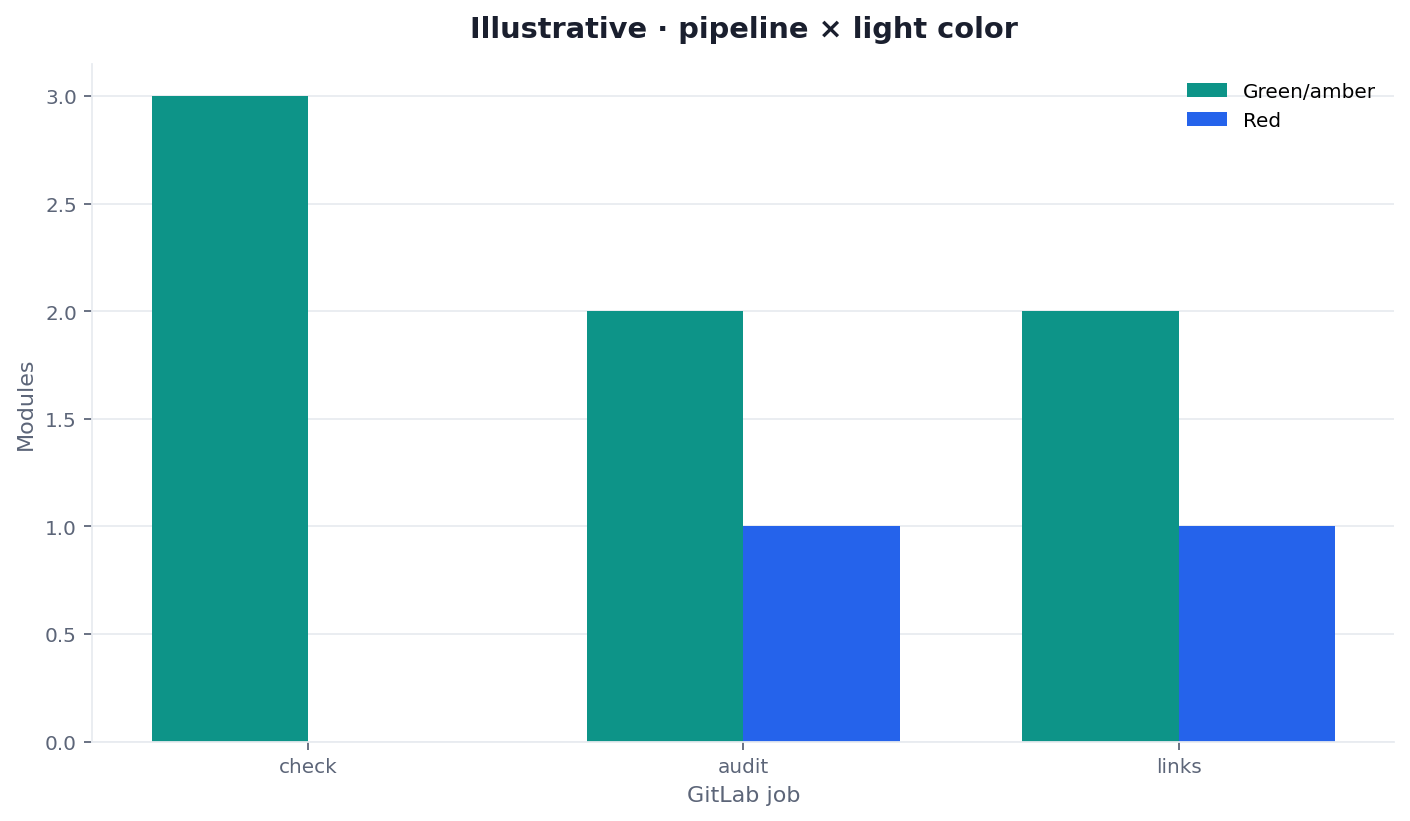
Figure: illustrative grouped bars — pipeline role × command outcome. Two dimensions. Not a Google score and not a customer lift.
How to read the grouped bars
Each cluster is a pipeline role. Each bar is pass or fail. If the test pipeline is green and this job is red, you found the reason the second pipeline exists. If both are green and the title is empty, you parsed the wrong artifact.
Social cut: ./images/og-cover.png.
Selection scorecard
Score each row 0–2 when someone asks for a GitLab CI SEO check today.
| Question | 0 | 1 | 2 |
|---|---|---|---|
| Is it a second pipeline? | Hidden inside test | Same stage, unnamed | Named job, own stage |
Does .gitlab-ci.yml contain a CLI key? | Key in the file | Key in a comment | Key only in CI variables, or no key |
Is --format json parsed? | Screenshot of a table | JSON attached, still always green | JSON parsed, red fails the job |
Is allow_failure off for required reds? | Always allowed to fail | Required, ignored | Required, enforced |
| Are deep commands optional? | eeat on every push | Deep commands on every release | Deep commands scheduled, check default |
Under 6 means you have a note. 8–10 means add the job and fail the merge request. A service-case traffic story is not product proof for this pipeline.
Failure modes that hide the second job
The first failure is selling a GitLab CI SEO check as “we already have GitLab CI.” Tests are not title lights. Say the second pipeline in the first sentence of the ticket.
The second failure is setting allow_failure: true so Friday merges stay green. A GitLab CI SEO check that cannot fail is a comment.
The third failure is copying an Actions snippet into .gitlab-ci.yml and calling the syntax error a product gap. The lights are the same. The file is not.
Folding the lights into unit tests
A job that runs after jest in the same script will be deleted when someone “simplifies the pipeline.” Keep the job visible.
Pointing the job at the default branch
The GitLab CI SEO check must see the preview. A green check on last week’s default branch will merge this week’s blank title.
If you wanted a sitemap sample instead, that is a website SEO audit job with a 50–500 cap, not a reason to skip the per-commit check.
Cluster guides for this pillar
This page is the GitLab second pipeline. Open one row when you have that job.
| Job you actually have | Guide to open next | What this page will not do |
|---|---|---|
| Learn the merge gate as the product | SEO CI/CD (hub) | Retarget the hub phrase as this page’s keyword |
| Need the same lights on GitHub | GitHub Actions SEO audit | Clone the Actions YAML here |
| Need a nightly 50–500 sample | scheduled site audit | Run 500 pages on every commit |
| Need the file-shape vocabulary | JSON SEO report | Turn the table view into the gate |
| One URL, eight lights in a browser | SEO health checker | Finish in 30 seconds on a single paste |
Keep the GitLab CI SEO check as the second pipeline, not a rewritten test job.
Fail the GitLab job when the JSON lights go red
Paste the public preview URL at the live checker, then put the same eight lights behind seo-health check --format json on the runner.
Frequently Asked Questions
Is this a replacement for the test pipeline?
Bottom line: No. This is a second pipeline. Keep the tests. Add the lights. Do not fold title-string checks into jest or rspec.
Does the job need a login for check?
Bottom line: No. The job can run seo-health check without login. audit and links also run without login. eeat, aivisibility, and gsc need a CLI key and credits. Default the merge-request job to check.
Can I set allow_failure and still call it a check?
Bottom line: No. A job that is allowed to fail is a comment. Required reds must block the merge request. Warn-only density rules are allowed if you document them.
Is the light an official Google score?
Bottom line: No. The job emits traffic lights for eight modules. Those lights are not a Google 100 and not an official EEAT grade. Do not print a fake score on the badge.
Conclusion
A GitLab CI SEO check is a second pipeline that fails on a red light. Keep the test pipeline. Write .gitlab-ci.yml without secrets. Install infinitegrowth. Run seo-health check without login. Emit --format json. Block the merge. Keep credit commands off the default merge request. Keep Google scores out of the badge.
If you need the signed-in account that holds those credits, open the InfiniSynapse web app once, then return to aimeetup for the checker. Fail the job. Do not negotiate the light.