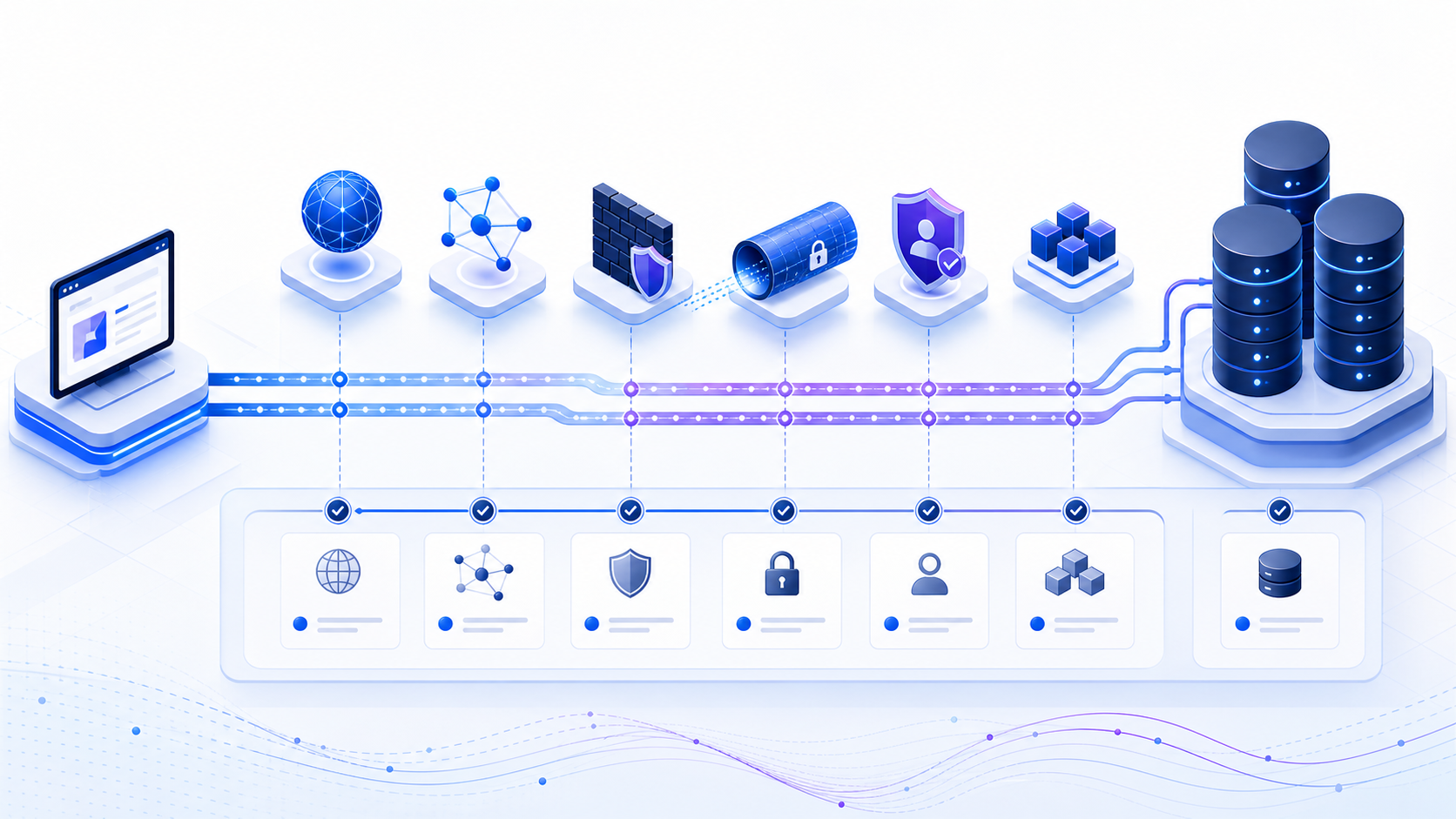
What is a database connection?
A database connection is an active client session through DNS, TCP, and TLS, then login, to a database endpoint via a driver. It succeeds only when name resolution, routing, firewall policy, port reachability, TLS, authentication, authorization, and database selection agree. “Database connectivity” describes whether that complete path works from a particular client environment.
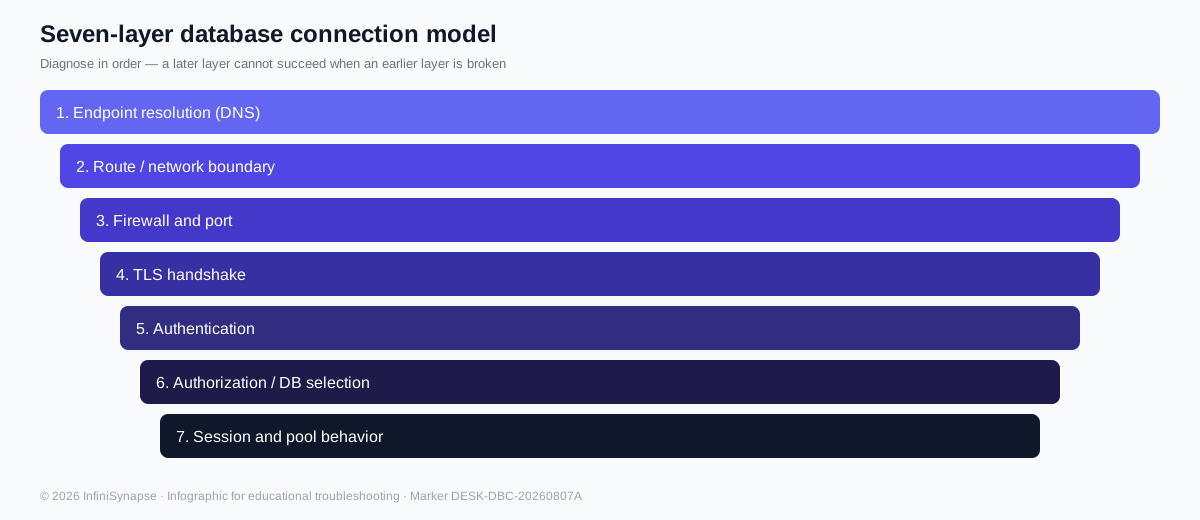
The seven layers of database connectivity
Most failures become easier to diagnose when the database connection is treated as a sequence rather than a single event. A later layer cannot succeed when an earlier layer is broken.
- Endpoint resolutionDNS converts the configured hostname into the intended address. Split-horizon DNS, stale caches, VPN rules, and misspelled endpoints can send clients to the wrong place.
- Route and network boundaryThe client needs a valid route through VPCs, subnets, peering, VPNs, proxies, or private links. A database can be healthy yet unreachable from the chosen source.
- Firewall and portSecurity groups, network ACLs, host firewalls, and egress policy must allow the actual database port in both required directions.
- TLS handshakeThe client and server must agree on encryption, certificate trust, hostname verification, and supported protocol versions.
- AuthenticationThe database validates a password, certificate, token, IAM identity, integrated login, or another supported credential method.
- Authorization and database selectionA valid identity still needs permission to connect to the requested database, schema, warehouse, or service.
- Session and pool behaviorApplications reuse connections through pools. Limits, stale sessions, leaks, and long transactions can fail requests even when a new manual connection works.
Seven-layer connectivity model (infographic)
Use this visual with the ordered list above when you brief another engineer. Each band is a hard gate on the path.
Media note: There is no hosted 2–3 minute walkthrough video on this page (and therefore no VideoObject schema). The infographic, desk chart, and HowTo steps are the multimodal evidence.
Desk data: where connectivity fails first (n=42)
We publish a first-party desk composite from 42 anonymized tickets reviewed in Q1–Q2 2026 (Postgres, MySQL, SQL Server). Raters were InfiniSynapse engineers. Percentages are decision aids, not laboratory measurements.
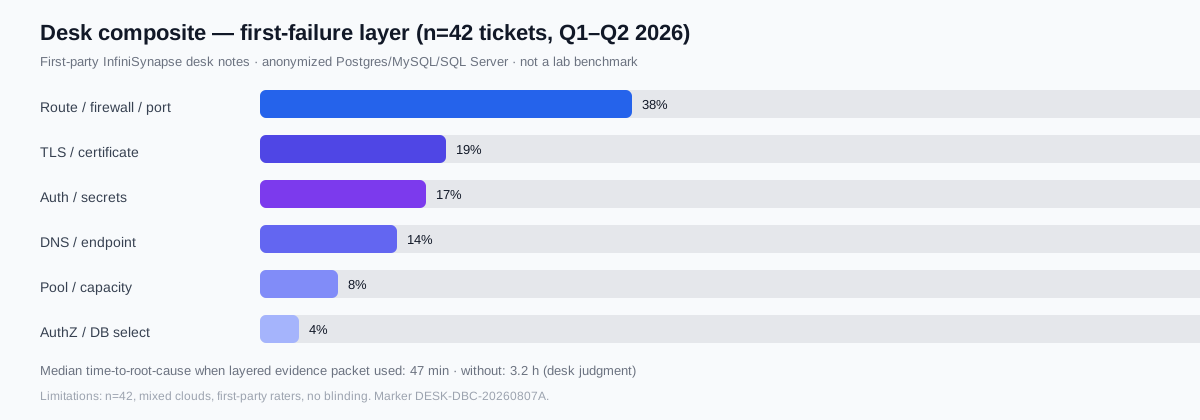
| First-failure layer | Share (n=42) | Typical next evidence |
|---|---|---|
| Route / firewall / port | 38% | Security group, ACL, egress, real port |
| TLS / certificate | 19% | Chain, SAN, expiry, CA trust, TLS mode |
| Auth / secrets | 17% | Secret version, account state, auth method |
| DNS / endpoint | 14% | Resolved address, private zone, VPN |
| Pool / capacity | 8% | Active/idle, wait time, DB limit |
| AuthZ / DB select | 4% | Grants, default DB, schema mapping |
Limitations: n=42; mixed clouds; first-party raters; no blinding. Re-run the HowTo before changing production firewall rules.
Case study: a typical connection-failure investigation
First-hand desk record (anonymized). A SaaS API in a private subnet reported intermittent “connection timed out” to managed Postgres. Manual psql on VPN succeeded; the application task role failed after ~10s.
- Capture: ETIMEDOUT at TCP phase; driver 42.7; connect_timeout=10s.
- DNS from the task: Split-horizon returned the expected private IP for the VPC.
- TCP from the task ENI: SYN sent; no SYN-ACK. Laptop TCP worked via a broader VPN allowlist.
- Firewall: DB security group ingress still listed the old app SG after a rename.
- Fix: Attach the new app SG; retest TCP → TLS →
SELECT 1. Time-to-root-cause: 41 minutes with the evidence packet.
Prove which layer failed before you change credentials or pool size on any connectivity ticket.
TCP and TLS timing on the path to the database
A client TCP handshake follows the three-way exchange in RFC 793 (SYN → SYN-ACK → ACK). Dropped SYNs often surface as connection timeout with no RST — so refused and timed out are not interchangeable when diagnosing the path.
After TCP succeeds, drivers negotiate TLS 1.2 or TLS 1.3 per RFC 8446. On our desk sample, TLS/certificate issues were 19% of first failures (SAN mismatch, expired intermediates, or verify-mode conflicts).
Desk timing bands (judgment, n=42): healthy private-path TCP connect median ~12 ms; TLS setup ~35 ms; auth + SELECT 1 ~90 ms. Values outside roughly 5× these bands usually mean a wrong hop or stalled handshake — not slow SQL.
Vendor symptoms: AWS RDS troubleshooting, PostgreSQL libpq, Microsoft TCP/IP troubleshooting.
Database connection string anatomy
A database connection string is a compact configuration contract between the application and its driver. Formats differ, but the decisions are similar. Keep the endpoint explicit, make encryption intentional, and store secrets outside source code.
postgresql://app_user@db.internal.example:5432/analytics?sslmode=require

# Secret intentionally omitted.
# Load it from an approved secret manager at runtime.| Field | Question it answers | Common failure |
|---|---|---|
| Driver / protocol | How should the client speak to the server? | Unsupported driver or wrong protocol |
| Host and port | Which network endpoint is authoritative? | Console URL, stale hostname, or default-port assumption |
| Database / service | Which logical resource should open? | Missing database, service name, warehouse, or catalog |
| Authentication | Which identity and credential method are used? | Expired secret, wrong user, unsupported auth mode |
| TLS | Is encryption required and how is trust verified? | Unknown CA, hostname mismatch, or conflicting modes |
| Timeout and pool | How long may setup wait and how are sessions reused? | Deadline too short or pool capacity exhausted |
Common database ports are defaults, not guarantees
Default ports are useful starting points, but managed services, named instances, proxies, gateways, and security policy can change them. Always verify the endpoint assigned to your environment.
| Database workflow | Common port | Important qualification |
|---|---|---|
| PostgreSQL | 5432 | Managed endpoints may require TLS and source allowlisting |
| MySQL / MariaDB | 3306 | Local socket behavior differs from remote TCP |
| SQL Server | 1433 | Named instances may use another or dynamic port; see the Port 1433 guide |
| Oracle | 1521 | Listener reachability does not validate service name or wallet |
| MongoDB | 27017 | Replica-set, SRV, TLS, and auth options still matter |
| Redshift / CockroachDB | 5439 / 26257 | Use the SQL or cluster endpoint, not a console URL |
| Snowflake / Databricks | 443 | HTTPS reachability is only one part of platform authentication |
How to test a database connection step by step
Test from the failing application's network context whenever possible. A laptop, bastion, serverless function, container, and production application may follow different DNS, routes, and firewall policies.
- Capture the exact failureRecord timestamp, client environment, sanitized endpoint, driver version, timeout phase, and the complete error code. Do not reduce everything to “database down.”
- Verify endpoint and service stateConfirm the assigned host, port, database or service name, and whether the database is running and accepting remote sessions.
- Resolve DNS from the clientCompare the resolved address with the expected private or public endpoint. Check VPN and private-zone behavior.
- Test the assigned TCP endpointUse an authorized host and port from the same network path. A pass confirms socket reachability—not login or query readiness.
- Validate TLS deliberatelyCheck required mode, certificate chain, hostname, expiry, protocol version, and whether the driver trusts the issuing CA.
- Test authentication with least privilegeUse a temporary or limited account. Distinguish invalid credentials from disabled accounts, expired tokens, and unsupported auth modes.
- Verify database access with a harmless queryRun the smallest supported health query, such as
SELECT 1, then verify the intended database and schema without modifying data. - Reproduce through the application poolIf manual login works, test the application's pool settings, secret source, runtime identity, concurrency, and stale-session handling.
What each connectivity result actually means
| Result | Evidence | Does not prove |
|---|---|---|
| DNS resolves | The client obtained an address | Route, port, or database availability |
| TCP port reachable | A listener accepted a network connection | TLS, credentials, permissions, or queries |
| TLS succeeds | Encrypted transport and trust rules agreed | Valid database identity or authorization |
| Authentication succeeds | The server accepted the identity | Access to the required schema or workload |
| Health query succeeds | A complete basic session worked | Capacity, reliability, or production performance |
Troubleshoot connection-failed errors
| Symptom | Likely layer | Best next evidence |
|---|---|---|
| Host not found | DNS | Resolution result, suffix, VPN, private-zone record |
| Connection refused / ECONNREFUSED | Listener or active rejection | Service state, real port, binding, host firewall |
| Connection timed out / ETIMEDOUT | Route, policy, or stalled handshake | Security group, ACL, egress, route table, packet timing |
| Certificate or hostname error | TLS | Certificate chain, SAN, expiry, CA trust, TLS mode |
| Access denied / login failed | Authentication | Identity source, secret version, account state, auth method |
| Database does not exist / permission denied | Selection and authorization | Database name, default database, grants, roles, schema mapping |
| Pool timeout / too many connections | Pool and capacity | Active/idle count, wait time, leak signals, DB connection limit |
Connection timeout, query timeout, and pool timeout differ
Connection timeout
Limits how long a new session may spend on resolution, routing, TCP, TLS, and login. Raising it can hide a network fault instead of fixing it.
Query timeout
Limits statement execution after a session exists. Investigate plans, locks, workload, resource pressure, and result size.
Pool acquisition timeout
Limits how long a request waits for a reusable session. Measure pool occupancy, checkout duration, leaks, and database limits.
Idle or lifetime limit
Retires old sessions before a proxy, firewall, credential rotation, or server closes them unexpectedly.
Choose pool size so the aggregate database connection count fits concurrency, average checkout time, service replicas, and the database's total connection budget. If ten application replicas each open fifty sessions, the database must absorb up to five hundred connections—not fifty.
Secure every database connection without breaking diagnosis
- Prefer private paths: use private subnets, peering, VPNs, or private endpoints instead of broad public exposure.
- Allowlist narrowly: authorize the application security group or smallest practical source range and actual port.
- Require verified encryption: encryption without certificate verification still permits avoidable trust risk.
- Keep secrets out of code and URLs: retrieve credentials from a secret manager, rotate them, and redact diagnostic output.
- Use least privilege: a connectivity check does not need write, administration, or unrestricted schema access.
Optional next step (product): check connectivity readiness
Commercial tool — separate from the educational layers above. Use the InfiniSynapse DB Compatibility Checker with an authorized endpoint. PostgreSQL, MySQL, MariaDB, Redshift, and CockroachDB use a one-time authentication test. Snowflake, ClickHouse, Databricks, SQL Server, Oracle, and MongoDB use TCP reachability only. Read the result according to the test type.
Open DB Compatibility Checker Use temporary or limited credentials for auth tests. TCP-only checks do not validate login, TLS, permissions, or queries.Build a database connection evidence packet
A useful incident record lets another engineer reproduce the failure without receiving secrets. Capture the following:
Context
UTC timestamp, environment, application version, deployment region, source subnet, runtime, driver and version.
Sanitized target
Database type, masked hostname, port, database or service name, TLS mode, and authentication method—never the secret.
Layer results
DNS answer, TCP outcome, TLS error, auth result, health query, pool metrics, and exact error code.
Comparison
Known-good source, affected source, first failure time, recent network or secret changes, and whether the problem is constant or intermittent.
Database connection FAQ
What is a database connection?
A database connection is a client session through DNS, TCP, and TLS, then login. An open port is not a ready database. The session still needs authorization and the intended database or schema.
How do I test database connectivity?
Test from the application's network path. Confirm DNS, host and port, TCP reachability, TLS, authentication, database access, and a harmless query such as SELECT 1.
Why does a connection time out?
Common causes include DNS delay, blocked routes or ports, an unreachable endpoint, TLS delay, overloaded servers, or an exhausted connection pool.
What is the difference between connection refused and connection timeout?
Refused normally means the target responded but no service accepted the port or a device rejected it. Timeout more often indicates dropped traffic, an unreachable route, a stalled handshake, or a response beyond the deadline.
What should a connection string contain?
It normally identifies the driver, host, port, database, authentication method, TLS requirements, timeout, and optional pooling settings. Secrets should come from a secret manager.
Does an open database port prove the database is ready?
No. It proves TCP reachability only, not TLS compatibility, valid credentials, permissions, schema access, query execution, or reliable performance.
Official database connectivity references
- AWS: Troubleshooting Amazon RDS connection issues
- PostgreSQL: Connection control and connection strings
- MySQL: Troubleshooting problems connecting to MySQL
- Microsoft: Fix network-related or instance-specific SQL Server errors
- Microsoft: TCP/IP connectivity troubleshooting
- RFC 793: Transmission Control Protocol
- RFC 8446: The Transport Layer Security (TLS) Protocol Version 1.3