Cursor Vibe Coding: Setup, Prompts & Workflow
By the InfiniSynapse Data Team · Last updated: 2026-09-24 · We build and maintain InfiniSynapse; this is the repository-first review loop we apply without treating generated code as verified code.
Table of Contents
- TL;DR
- What Is Cursor Vibe Coding?
- Set Up Cursor for Vibe Coding
- Give Cursor the Right Project Context
- Build a Feature from Prompt to Working Code
- Prompt Patterns for Cursor
- Review Diffs, Run Tests, and Undo Bad Changes
- Common Failure Modes
- From Cursor Prototype to Production
- Frequently Asked Questions
TL;DR
Direct answer: Cursor vibe coding is a workflow in which you describe a bounded feature in natural language, let Cursor inspect and edit the repository, review the proposed diff, run the code, and iterate until objective checks pass. Cursor can accelerate implementation; it does not replace requirements, testing, security review, or ownership of the result.
Use this five-step loop:
- Start from a runnable repository.
- Give Cursor the relevant files, constraints, and acceptance checks.
- Ask for a plan before permitting edits.
- Review the diff and run lint, tests, and the application.
- Commit a verified checkpoint before starting the next feature.
This guide is for beginners building a first app and experienced developers who want a controlled AI-assisted loop. If you are still choosing an editor or app builder, first compare the main vibe coding tools. If you already use Cursor, continue below with one small, reproducible feature.
What Is Cursor Vibe Coding?
Cursor vibe coding combines a code editor, repository context, natural-language instructions, and an agent that can read or modify files. The useful unit of work is not “build my entire startup.” It is a testable change such as “add validation to this form and cover the invalid-email path.”
The phrase vibe coding is often used loosely. In a dependable Cursor vibe coding session, you still decide what the software must do. Cursor proposes an implementation; the repository, runtime output, tests, and your review determine whether that implementation is acceptable.
Agent workflows versus autocomplete
Autocomplete predicts a local continuation. An agentic task can inspect multiple files, search the codebase, propose a plan, edit several modules, and run commands. Cursor's official quickstart demonstrates this broader interaction model.
That wider scope creates leverage and risk. A plausible multi-file change may compile while violating an existing contract. The safer pattern is to increase autonomy only when the task has clear boundaries and cheap verification.
When the approach fits
Cursor vibe coding works well for a UI component, a CRUD endpoint, a focused refactor, test coverage, documentation, or a small integration whose behavior you can observe. It is weaker when requirements are unsettled, production data is sensitive, or success depends on unstated business rules.
For a broader definition before choosing a tool, read what vibe coding means in practice. The rest of this article assumes you have a concrete feature and can run the project locally.
Set Up Cursor for Vibe Coding
To begin Cursor vibe coding, install Cursor from its official site, sign in, and open the repository folder rather than pasting isolated files into chat. A repository gives the agent access to imports, configuration, tests, and conventions that a snippet hides.
Open or create a runnable project
For an existing app, first run its documented setup without AI help:
npm install
npm run dev
npm test
Use the commands appropriate to the repository. Record failures that already exist so you do not attribute them to a later Cursor edit. For a new project, scaffold the smallest supported template, initialize Git, and make a baseline commit before requesting a feature.
If a prototype began in a browser-based builder, move the exported project into Cursor only after confirming the export installs and runs. Do not ask Cursor to repair an unknown baseline and add a feature in the same turn.
Establish a clean baseline
Before the first Cursor vibe coding prompt, write down four facts:
- the command that starts the app;
- the commands for lint, type-checking, and tests;
- the files or directories that are in scope;
- the observable behavior that means “done.”
Check git status and commit or stash unrelated work. Git is the rollback mechanism; chat history is not. The Git documentation is the source of truth for commits, diffs, restore operations, and branches.
Give Cursor the Right Project Context
Weak Cursor vibe coding prompts force the agent to infer architecture. Strong context makes constraints explicit without dumping the entire repository into one message.
Point to files, rules, and interfaces
Tell Cursor which component owns the UI, which API contract already exists, and where tests live. Include the package manager and framework version when those details affect syntax. Repository rules should capture stable conventions—commands, directory boundaries, naming, and forbidden operations—not a one-time feature request.
Cursor documents project-level context in its Rules guide. Keep rules concise enough to maintain. If a rule changes every week, it probably belongs in the task prompt or engineering documentation instead.
For example:
Inspect app/commute/page.tsx, lib/commute.ts, and tests/commute.test.ts.
Use the existing Zod schema and fetch wrapper. Do not add dependencies or
change the API response shape. First return a plan and list the files you
expect to modify. Do not edit yet.
Define acceptance checks before implementation
Acceptance checks turn Cursor vibe coding from an aesthetic conversation into a falsifiable task. For a rent-versus-commute form, checks might be:
- reject an empty monthly-rent value;
- reject negative commute minutes;
- preserve values when the server returns an error;
- show a progress state while a request is active;
- pass the existing unit test suite;
- add tests for one valid and two invalid submissions.
Do not use “make it production-ready” as an acceptance criterion. Split security, accessibility, reliability, and deployment into checks you can run or inspect.
Build a Feature from Prompt to Working Code
The following Cursor vibe coding example is deliberately bounded. You can reproduce the method in any framework even if the exact filenames differ.
Worked example: rent-versus-commute form
Suppose the page already collects monthly rent, office days per week, and commute minutes. The task is to validate inputs and show an estimated monthly commute burden. Begin with a read-only request:
Read the form component, its calculation helper, and current tests.
Explain the data flow and identify existing validation. Propose the smallest
change that adds input validation and a monthly commute estimate. Include
acceptance checks and risks. Do not edit files.
Compare the plan with the code. Correct wrong assumptions before asking for implementation. Then issue a bounded edit:
Implement the approved plan. Modify only the files named in the plan.
Reuse existing validation and test patterns. Add no dependencies.
After editing, run the relevant test and type-check commands. Report the
commands, results, changed files, and any requirement that remains unverified.
This Cursor vibe coding sequence creates an auditable artifact: prompt, plan, diff, command output, and remaining uncertainty. That is more useful than claiming a feature “looks right.”
Run, inspect, and tighten the loop
Open the changed page yourself. Test boundary values, keyboard behavior, loading state, and server failure. Read every changed file rather than relying on the agent's summary. If something fails, provide the exact error, reproduction step, and expected behavior.
A productive Cursor vibe coding loop is:
plan → edit → inspect diff → run checks → reproduce behavior → commit
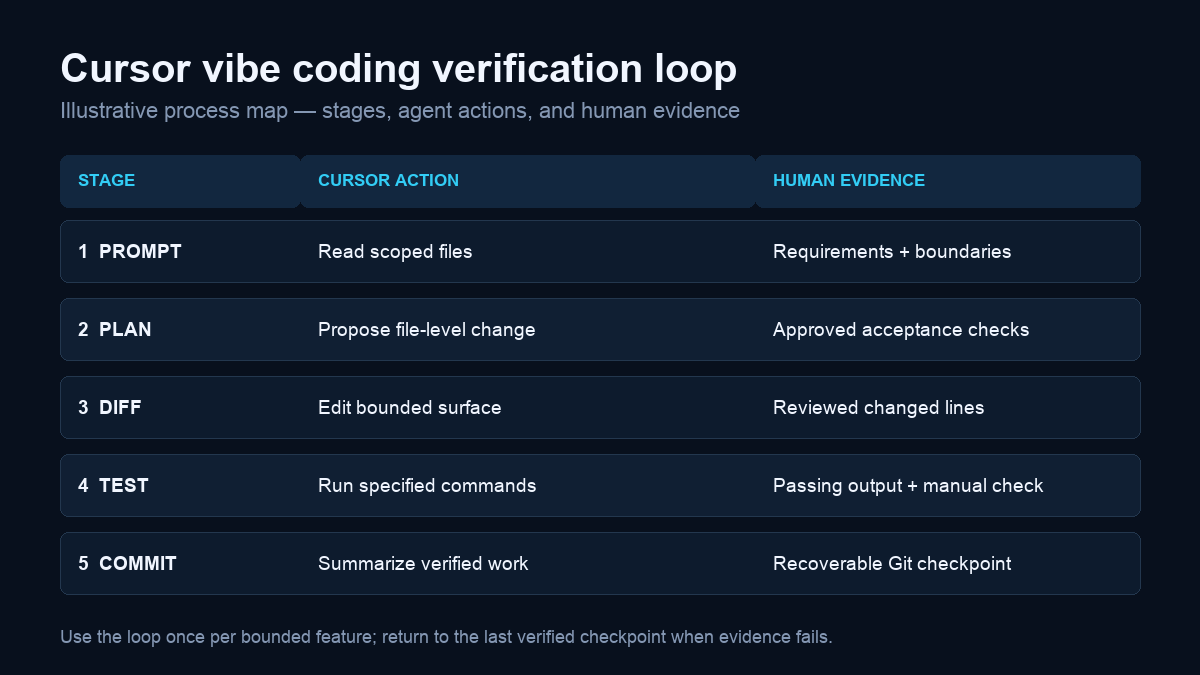
Illustrative process map; it describes verification stages rather than measured performance.
Keep each loop small enough that you can explain the resulting code. If the diff introduces unrelated cleanup, reject or revert that part and ask for a narrower change.
Prompt Patterns for Cursor
The best Cursor vibe coding prompt patterns specify evidence and limits. They do not need elaborate role-playing.
Plan before editing
Use this when the repository is unfamiliar:
Trace how [feature] works from UI to persistence. Cite the relevant files and
symbols. Identify constraints, likely tests, and the smallest implementation
plan. Ask questions where the code does not establish the answer. Do not edit.
Implement one bounded change
Use this after approving a plan:
Implement only step 1. Keep the public API unchanged, add no dependency, and
follow the nearest existing pattern. Run [commands]. Stop and report if a
check fails for a reason outside the edited files.
Debug from evidence
Paste the exact failure and request a hypothesis before a patch:
Reproduce this failure using [command]. Explain the most likely cause with
file and line references. Propose the smallest fix and a regression test.
Do not suppress the error or weaken the assertion.
For more reusable examples, see these vibe coding prompt patterns. Adapt them to your repository rather than copying a giant generic prompt.
Review Diffs, Run Tests, and Undo Bad Changes
In Cursor vibe coding, the review interface helps you inspect proposed edits, but accepting a diff is a code-review decision. A Cursor vibe coding review should examine behavior, not just syntax.
Inspect the changed surface
Ask:
- Did the agent modify only agreed files?
- Did it change a public type, API response, migration, or dependency?
- Did it duplicate an existing helper?
- Are errors handled where they occur?
- Do tests assert behavior rather than implementation details?
- Could user input reach a privileged operation?
Cursor documents its agent capabilities and controls in the Agent overview. Interface controls help manage edits; they do not prove correctness.
Verify and checkpoint
Run the narrowest relevant test first, then broader checks. A common sequence is:
npm test -- commute
npm run typecheck
npm run lint
npm run build
git diff --check
Commands vary by project. Save successful work in a descriptive commit. If the change is wrong, restore the affected files or return to the checkpoint instead of piling corrective prompts onto a broken branch. Compare this repository-first loop with the IDE copilot webhook reliability comparison or a Claude Code workflow if tool choice is still open.
Common Failure Modes
Most Cursor vibe coding failures are not mysterious model behavior. They come from broad scope, missing context, or absent verification.
Context and iteration failures
The one-shot app prompt: It bundles product decisions, architecture, UI, data, and deployment. Split it into vertical slices with acceptance checks.
The repair loop: Each new prompt patches symptoms created by the previous patch. Return to the last verified commit, reproduce the first failure, and restart from evidence.
The invisible convention: Cursor invents a new pattern because the prompt omitted the existing helper or nearby test. Point to canonical examples before editing.
The speculative dependency: The agent installs a package for behavior already supported by the stack. Require approval for dependency changes.
Hallucinated APIs and security mistakes
Cursor vibe coding output can call methods that do not exist, use outdated options, or expose server credentials to the client. Check unfamiliar APIs against official documentation and compile the exact path.
Treat external content, tool output, and copied issue text as untrusted input. The OWASP Top 10 for LLM Applications explains prompt injection, sensitive-information disclosure, and excessive agency risks that matter when an agent can invoke tools. Cursor also publishes a security overview for product-level controls and practices.
Never paste production secrets into chat. Keep credentials in server-side environment or secret-management systems, use least-privilege scopes, and require human approval for payments, destructive writes, and production deployment.
From Cursor Prototype to Production
A Cursor vibe coding prototype gets a feature into a repository; production engineering determines whether users can trust it.
Harden external integrations
Move vendor calls behind a server boundary. Validate request and response schemas, use structured errors, set timeouts, and design retries only for operations that are safe to repeat. Follow RFC 9110 semantics instead of inventing transport behavior. For payment semantics, consult Stripe's API documentation rather than asking a model to infer the contract.
Long-running analysis should leave the request thread and expose progress to the UI. InfiniSynapse can serve as a data-agent backend for tasks that require workspace artifacts, federated data work, and streamed progress. The product connection is optional: the architectural rule is to separate UI generation from authenticated, observable execution.
Production readiness check
Before releasing Cursor vibe coding work, require all of these. Use an official secret store such as Vercel Environment Variables instead of committing credentials. Instrument server-side operations with an open standard such as OpenTelemetry where the stack supports it.
| Area | Evidence |
|---|---|
| Scope | Diff contains only intended files and approved dependencies |
| Behavior | Acceptance checks reproduced manually or automatically |
| Quality | Tests, type-check, lint, and build pass |
| Security | No client secrets; privileged actions have authorization |
| Integration | Inputs and provider responses are validated |
| Operations | Errors are logged without leaking sensitive data |
| Recovery | A rollback or feature-disable path is documented |
This Cursor vibe coding checklist preserves the valuable production concerns from the original page without confusing them with the primary tutorial intent. Cursor vibe coding should end in evidence, not in an “Accept All” click.
Frequently Asked Questions
Is Cursor good for vibe coding?
Cursor vibe coding is especially effective when the project is a real repository and the task can be split into testable changes. Cursor can inspect multiple files, propose edits, and run development commands. Results still require review and verification.
How do I start Cursor vibe coding?
To start Cursor vibe coding, open a runnable repository, confirm the baseline commands, create a Git checkpoint, and choose one bounded feature. Give Cursor the relevant files, constraints, and acceptance checks; ask for a plan before edits.
Should I use Agent or inline editing?
Use inline editing for a local, well-understood change. Use Agent when the task requires repository search, several coordinated files, or command execution. Reduce scope if you cannot review the resulting diff confidently.
Do I need to know how to code?
You can begin without deep expertise, but shipping dependable software still requires the ability to state requirements, interpret errors, test behavior, and recognize security-sensitive changes. Start with low-risk projects while learning those skills.
How do I stop Cursor from changing too much?
Name the allowed files, prohibit dependency or interface changes, request a plan first, and implement one step at a time. Keep unrelated work out of the branch and use Git checkpoints so an oversized diff is easy to discard.
Is Cursor-generated code safe for production?
Not by default. Treat it like code submitted by a fast contributor who may lack business context. Review it, test it, scan dependencies, protect secrets, validate external data, and require approval around privileged operations.
Conclusion
The effective Cursor vibe coding workflow is straightforward: begin with a runnable repository, provide focused context, approve a plan, inspect every diff, run objective checks, and save verified checkpoints. Use the agent to shorten implementation—not to skip engineering judgment.
Once the local feature works, apply the production checklist to authentication, external APIs, long jobs, observability, and rollback. That combination turns a promising prompt into software you can explain, test, and safely change.