
Quick answer: build PDF from Markdown with Pandoc and a controlled engine快速答案:使用 Pandoc 和受控引擎从 Markdown 构建 PDF
The command pandoc input.md -o output.pdf is only the starting point. Typography, Unicode coverage, CSS or TeX behavior, citations, image resolution, table width, page breaks, and internal links depend on the selected route and its dependencies.
pandoc input.md -o output.pdf 只是起点。排版、Unicode 覆盖、CSS 或 TeX 行为、引用、图片分辨率、表格宽度、分页和内部链接都会受到所选路径及其依赖影响。
Understand the Pandoc Markdown-to-PDF pipeline理解 Pandoc Markdown 转 PDF 的处理链
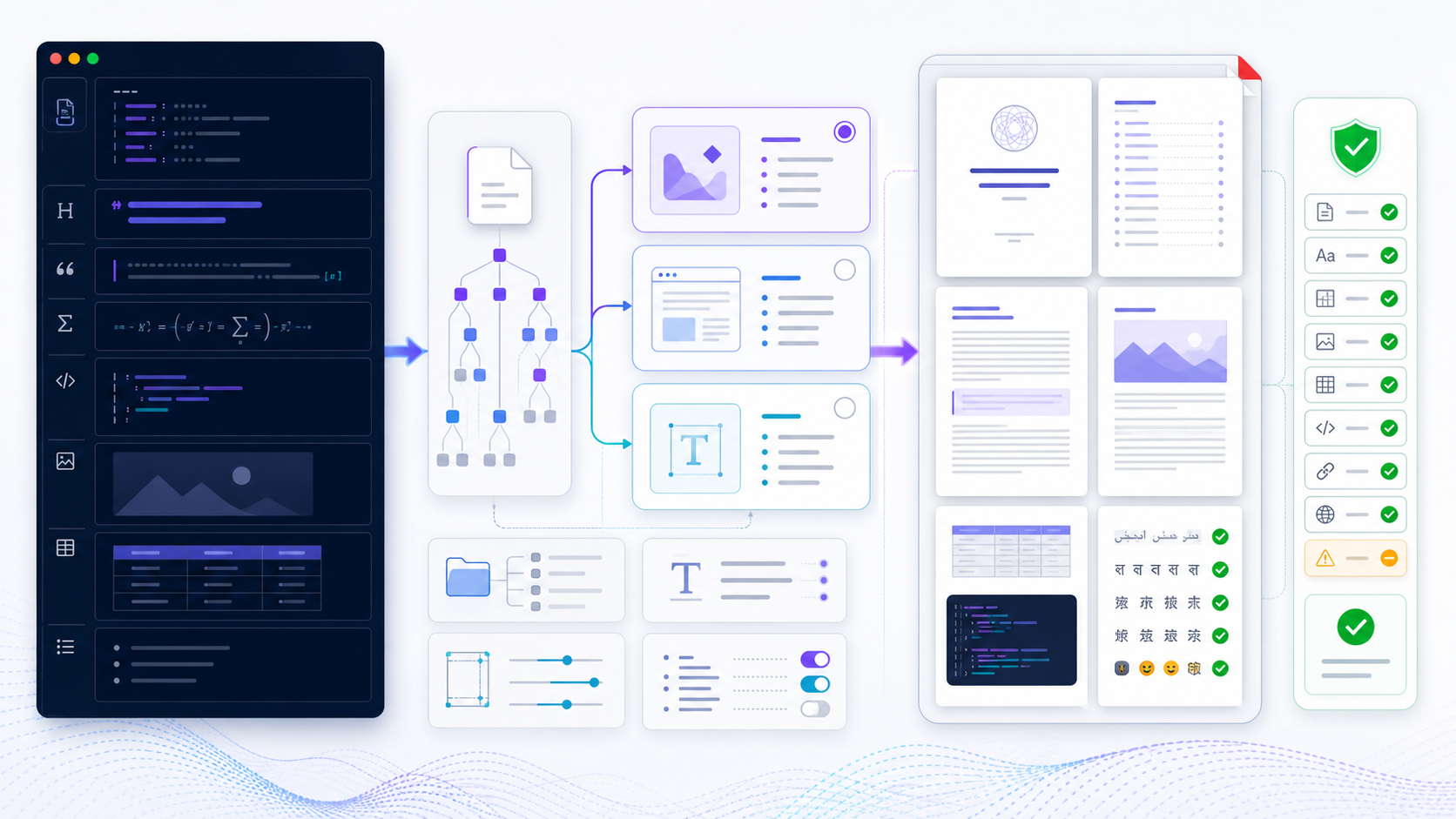
Pandoc is a document converter, not a single PDF layout engine. It reads Markdown, builds an abstract syntax tree, applies metadata, defaults, filters, citations, templates, and writer rules, then invokes a PDF engine through an intermediate format such as LaTeX, HTML/CSS, Typst, ConTeXt, or roff.
Pandoc 是文档转换器,而不是单一 PDF 排版引擎。它读取 Markdown、构建抽象语法树,应用元数据、默认配置、过滤器、引用、模板和写入规则,再通过 LaTeX、HTML/CSS、Typst、ConTeXt 或 roff 等中间格式调用 PDF 引擎。
The declared Markdown dialect determines which tables, attributes, task lists, raw blocks, and extensions are recognized.声明的 Markdown 方言决定哪些表格、属性、任务列表、原始块和扩展可以识别。
Metadata, citations, cross-references, filters, and variables transform structured content before layout.元数据、引用、交叉引用、过滤器和变量会在排版前转换结构化内容。
TeX, HTML/CSS, Typst, or another engine controls fonts, pagination, tables, and final PDF generation.TeX、HTML/CSS、Typst 或其他引擎控制字体、分页、表格和最终 PDF 生成。
A PDF reader, text extraction, link tests, visual checks, and regression builds prove the artifact is usable.PDF 阅读器、文字提取、链接测试、视觉检查和回归构建用于证明产物可用。
This separation explains why two correct Pandoc commands can produce different PDFs. The source may be identical while the engine, template, font inventory, environment, or version changes.
这种分层解释了为什么两个正确的 Pandoc 命令可能生成不同 PDF。源文件相同,但引擎、模板、字体清单、环境或版本发生变化,结果就可能不同。
What that command still needs installed这条命令还要装什么
pandoc input.md -o output.pdf does not install a PDF engine. On Linux, Pandoc and the engine are separate packages. If the shell reports pdflatex not found, install the engine you chose, or pass --pdf-engine for one already on PATH. The install steps below are that check.
pandoc input.md -o output.pdf 不会顺便装上 PDF 引擎。在 Linux 上,Pandoc 和引擎是分开的软件包。如果终端提示 pdflatex not found,就安装你选定的引擎,或用 --pdf-engine 指向已经在 PATH 里的引擎。下面的安装步骤就是这项检查。
Install Pandoc and verify the complete toolchain安装 Pandoc 并验证完整工具链
- 1Install Pandoc from an approved source. Record the exact version used by local and CI environments.从批准来源安装 Pandoc。记录本地和 CI 使用的准确版本。
- 2Choose and install one PDF engine. The output extension alone does not install LaTeX, WeasyPrint, Typst, or other dependencies.选择并安装一个 PDF 引擎。仅使用 PDF 扩展名不会自动安装 LaTeX、WeasyPrint、Typst 或其他依赖。
- 3Confirm executable discovery. Run version commands from the same shell, working directory, account, and PATH used for conversion.确认可执行文件发现。在转换所用的相同 Shell、工作目录、账户和 PATH 中运行版本命令。
- 4Inventory fonts and assets. Verify licenses, glyph coverage, image paths, bibliography files, templates, and filters.清点字体和资源。验证许可证、字形覆盖、图片路径、参考文献文件、模板和过滤器。
- 5Build a representative test. Include headings, links, a table, code, images, non-Latin text, citations, and page boundaries.构建代表性测试。包含标题、链接、表格、代码、图片、非拉丁文字、引用和分页边界。
pandoc --version
xelatex --version
weasyprint --version
typst --version
Only the engine you select needs to be installed. Do not treat this list as a requirement to install every renderer. Smaller, controlled dependencies are easier to secure and reproduce.
只需安装实际选择的引擎,不要把该列表误解为必须安装所有渲染器。依赖越少且越受控,越容易保证安全和可复现。
Choose the Pandoc PDF engine that matches the document根据文档选择 Pandoc PDF 引擎
| Route路径 | Good fit适合场景 | Strength优势 | Main caution主要注意点 |
|---|---|---|---|
| XeLaTeX / LuaLaTeX | Books, reports, math, multilingual typography书籍、报告、数学和多语言排版 | Mature pagination and system-font support成熟分页和系统字体支持 | TeX packages, template knowledge, and longer setup需要 TeX 包、模板知识和较长配置 |
| pdfLaTeX | Traditional LaTeX documents with compatible fonts字体兼容的传统 LaTeX 文档 | Stable ecosystem and established packages生态稳定、软件包成熟 | Direct system-font and Unicode coverage is limited系统字体和 Unicode 直接支持有限 |
| WeasyPrint | HTML/CSS publishing and web-oriented teamsHTML/CSS 发布和 Web 团队 | Print CSS, familiar styling, maintained HTML route支持打印 CSS、样式熟悉、HTML 路径活跃 | CSS paged-media support and fonts require testing分页媒体支持和字体仍需测试 |
| Typst | Modern programmable typesetting workflows现代可编程排版流程 | Fast builds and concise template language构建快速、模板语言简洁 | Template and feature parity must be evaluated需要评估模板和功能适配 |
| ConTeXt / roff | Specialized established toolchains特定成熟工具链 | Useful when the organization already owns the workflow组织已有相应流程时实用 | Smaller knowledge base for many teams对很多团队而言知识储备较少 |
The current Pandoc --pdf-engine documentation lists supported engines and defaults for LaTeX, HTML, ConTeXt, roff, and Typst routes. Evaluate the documentation for the installed Pandoc version rather than copying an old command from a forum.
当前 Pandoc --pdf-engine 文档列出了 LaTeX、HTML、ConTeXt、roff 和 Typst 路径支持的引擎与默认值。应根据已安装 Pandoc 版本阅读文档,不要直接复制旧论坛命令。
Pandoc and Typst for a custom PDF用 Pandoc 和 Typst 做自定义 PDF
Typst is one row in the engine table, not a second product. After Typst is installed, pass it explicitly:
Typst 是引擎表里的一行,不是另一套产品。安装 Typst 之后,要显式指定它:
pandoc input.md --pdf-engine=typst -o output.pdfUse it when you want programmable typesetting and a smaller toolchain than a full TeX install. Fonts, images, and page breaks still have to be checked in the PDF. A custom Typst template belongs in version control with the command, the same way a LaTeX template does.
想要可编程排版、又不想装一整套 TeX 时,用这条路径。字体、图片和分页仍然要在 PDF 里检查。自定义 Typst 模板要和命令一起放进版本库,和 LaTeX 模板一样。
Set YAML metadata for the Pandoc PDF用 YAML 元数据控制 Pandoc PDF
YAML metadata keeps repeatable document settings close to the source. Variables are interpreted by the selected writer and template, so a LaTeX variable may do nothing in an HTML/CSS route. Start with a minimal file and add one setting at a time.
YAML 元数据让可重复文档设置靠近源文件。变量由所选写入器和模板解释,因此 LaTeX 变量在 HTML/CSS 路径中可能没有作用。应从最简文件开始,每次只增加一个设置。
---
title: "Verified Operations Report"
author: "Analytics Team"
date: "2026-08-02"
lang: en-US
toc: true
toc-depth: 2
number-sections: true
geometry: margin=1in
mainfont: "Noto Serif"
sansfont: "Noto Sans"
monofont: "Noto Sans Mono"
---

# Executive summary

The decision and its supporting evidence.
Keep the title and publication date truthful. Avoid embedding secrets, internal file paths, personal identifiers, or unapproved metadata. For reusable defaults, Pandoc supports defaults files that can be reviewed and versioned separately from document content.
标题和发布日期必须真实。不要嵌入密钥、内部文件路径、个人标识符或未经批准的元数据。对于可复用设置,Pandoc 支持 defaults 文件,可以与文档内容分开审阅和版本管理。
# pdf.yaml
from: gfm
standalone: true
toc: true
pdf-engine: xelatex
resource-path:
  - .
  - images
variables:
  geometry: margin=1in
pandoc report.md --defaults=pdf.yaml -o report.pdfUse explicit Pandoc Markdown-to-PDF commands使用明确的 Pandoc Markdown 转 PDF 命令
For a TeX route with system fonts and a table of contents:
使用系统字体并包含目录的 TeX 路径示例:
pandoc report.md \
  --from=gfm \
  --standalone \
  --toc \
  --pdf-engine=xelatex \
  --resource-path=".;images" \
  -V geometry:margin=1in \
  -V mainfont="Noto Serif" \
  -o report.pdf
Resource-path separators vary by platform and shell. Quote paths containing spaces and test the exact command in the target environment. For an HTML/CSS route:
资源路径分隔符会因平台和 Shell 而不同。包含空格的路径要加引号,并在目标环境测试准确命令。HTML/CSS 路径示例:
pandoc report.md \
  --from=gfm \
  --standalone \
  --to=html5 \
  --css=print.css \
  --pdf-engine=weasyprint \
  --resource-path=".;images" \
  -o report.pdf
Do not combine flags until you understand which layer consumes them. A CSS file will not style a LaTeX route, and a LaTeX header will not affect an HTML writer. Explicit --from, --to, and --pdf-engine values make debugging easier.
在不清楚参数由哪一层处理时,不要随意组合。CSS 文件不会设置 LaTeX 路径,LaTeX 头文件也不会影响 HTML 写入器。明确 --from、--to 和 --pdf-engine 有利于调试。
When the Pandoc PDF is blankPandoc PDF 空白时怎么处理
A blank or broken Chinese PDF usually indicates an engine or font mismatch, not damaged Markdown. Pandoc's official Chinese PDF FAQ recommends a Unicode-capable engine such as XeLaTeX and a font that contains the required glyphs.
中文 PDF 空白或乱码通常说明引擎与字体不匹配,并不一定是 Markdown 损坏。Pandoc 官方中文 PDF FAQ建议使用 XeLaTeX 等支持 Unicode 的引擎,并选择包含所需字形的字体。
pandoc chinese.md \
  --pdf-engine=xelatex \
  -V CJKmainfont="Noto Serif CJK SC" \
  -o chinese.pdf
The exact variable depends on the template and engine. Confirm the font is installed under the build account, licensed for the intended distribution, and available in CI. Test Chinese, Latin, punctuation, math, emoji, and any required script. A font name that works on one workstation may be missing or aliased elsewhere.
准确变量取决于模板和引擎。确认字体安装在构建账户下,许可允许目标分发,并且 CI 可以使用。测试中文、拉丁字符、标点、数学、Emoji 和所有必要文字系统。在一台工作站有效的字体名称,换环境后可能缺失或被别名替代。
Resolve images, CSS, templates, and bibliography files正确解析图片、CSS、模板和参考文献文件
Pandoc resolves relative resources from the working directory and configured resource paths. A source file can preview correctly in an editor yet fail in CI because the command runs from a different directory. Store assets in predictable folders, use portable relative paths, and include required files in version control when licensing and privacy permit.
Pandoc 会根据工作目录和已配置资源路径解析相对资源。源文件在编辑器中预览正常,但 CI 命令从不同目录运行时仍可能失败。应把资源放入可预测目录,使用可移植相对路径,并在许可和隐私允许时把必要文件纳入版本控制。
project/
  report.md
  pdf.yaml
  references.bib
  print.css
  templates/
    report.tex
  images/
architecture.png- Check filename case; Linux build systems distinguish
Chart.pngfromchart.png.检查文件名大小写;Linux 构建系统会区分Chart.png与chart.png。 - Avoid temporary signed URLs and authenticated remote images in reproducible builds.可复现构建中避免临时签名网址和需要身份验证的远程图片。
- Use sufficient image resolution and correct aspect ratio; do not enlarge small raster images to page width.使用足够图片分辨率和正确宽高比,不要把小型位图放大到整页宽度。
- Verify that remote content is approved, stable, and retained as required before depending on it.依赖远程内容前,确认其获得批准、稳定可用并符合保留要求。
Handle tables, code, math, links, and citations deliberately有意识地处理表格、代码、数学、链接和引用
Tables: keep columns focused, use concise labels, avoid unbreakable content, and split wide matrices before shrinking text. Engine support differs for row breaks and column sizing. Code: set a language on fenced blocks, shorten long lines, and test copying from the PDF. Syntax highlighting should not reduce contrast.
表格:聚焦列、缩短标签、避免不可换行内容,并在缩小字体前拆分宽矩阵。不同引擎对跨页和列宽支持不同。代码:为围栏代码设置语言,缩短长行,并测试从 PDF 复制。语法高亮不应降低对比度。
Math: choose an engine and font stack that supports the notation; test equations at page boundaries. Links: inspect visible labels, external targets, internal anchors, and printed URLs where offline use matters. Citations: version the bibliography and CSL style, use --citeproc, and review every rendered reference for missing authors, dates, or identifiers.
数学:选择支持所需符号的引擎和字体,并测试分页边界的公式。链接:检查可见锚文本、外部目标、内部锚点,以及离线使用时的打印网址。引用:对参考文献库和 CSL 样式进行版本管理,使用 --citeproc,并检查每条参考文献是否缺作者、日期或标识符。
pandoc paper.md \
  --citeproc \
  --bibliography=references.bib \
  --csl=style.csl \
  --pdf-engine=xelatex \
  -o paper.pdf
Customize Pandoc PDF output without creating an unmaintainable template定制 Pandoc PDF,同时避免不可维护模板
Prefer metadata, defaults, CSS, and small include files before forking a complete template. Full templates expose more control but also couple the project to writer variables and Pandoc changes. If a custom template is necessary, start from the default template for the installed version, keep changes minimal, and document every non-obvious block.
在复制完整模板前,优先使用元数据、defaults、CSS 和小型 include 文件。完整模板提供更多控制,但也会让项目与写入器变量和 Pandoc 变化紧密耦合。如果必须自定义模板,应从已安装版本的默认模板开始,保持修改最小,并记录每个不直观代码块。
pandoc -D latex > templates/report.tex
pandoc report.md \
  --template=templates/report.tex \
  --pdf-engine=xelatex \
  -o report.pdf
Create a regression fixture that exercises the title page, TOC, headings, lists, footnotes, citations, code, images, wide tables, long URLs, page breaks, multilingual text, headers, and footers. A template that passes a two-paragraph sample is not production evidence.
建立回归样例,覆盖标题页、目录、标题、列表、脚注、引用、代码、图片、宽表格、长网址、分页、多语言文字、页眉和页脚。只通过两段文字样例的模板不足以证明可用于生产。
Troubleshoot Pandoc Markdown-to-PDF errors systematically系统排查 Pandoc Markdown 转 PDF 错误
| Symptom现象 | Likely layer可能层级 | Next diagnostic下一步诊断 |
|---|---|---|
| “pdflatex not found”“pdflatex not found” | Engine missing from PATHPATH 中缺少引擎 | Install the chosen engine or pass a supported available engine explicitly安装所选引擎,或明确指定已安装的受支持引擎 |
| Chinese is blank or boxes中文空白或方框 | Engine and font glyph coverage引擎与字体字形覆盖 | Use a Unicode-capable route and verify the named CJK font使用支持 Unicode 的路径并验证指定 CJK 字体 |
| Image not found找不到图片 | Working directory or resource path工作目录或资源路径 | Print the current directory, inspect case, and set resource paths输出当前目录、检查大小写并设置资源路径 |
| Table runs off page表格超出页面 | Source density, template, and engine源内容密度、模板和引擎 | Remove columns, shorten cells, split the table, or change orientation deliberately删除列、缩短单元格、拆表或有意识改变方向 |
| Unknown control sequence未知控制序列 | Generated TeX, raw content, or package生成 TeX、原始内容或软件包 | Generate intermediate TeX and inspect the failing line and dependencies生成中间 TeX 并检查失败行和依赖 |
| CSS has no effectCSS 不生效 | Wrong output route输出路径错误 | Use an HTML writer and CSS-capable PDF engine使用 HTML 写入器和支持 CSS 的 PDF 引擎 |
| Build differs in CICI 构建不同 | Version, fonts, locale, path, or dependency drift版本、字体、区域、路径或依赖漂移 | Compare recorded manifests and build the same fixture in both environments比较记录清单并在两个环境构建同一测试样例 |
When a LaTeX route fails, produce the intermediate file instead of the PDF:
LaTeX 路径失败时,先生成中间文件而不是 PDF:
pandoc report.md --standalone -o report.tex
xelatex -interaction=nonstopmode report.tex
For an HTML route, write standalone HTML, open it in a browser, inspect computed styles and resource requests, then invoke the PDF engine. Reduce a failing document to the smallest reproducible input without removing the element that triggers the error.
对于 HTML 路径,先写入独立 HTML,在浏览器打开并检查计算样式和资源请求,再调用 PDF 引擎。把失败文档缩减为最小可复现输入,但不要删掉真正触发错误的元素。
Automate Pandoc PDF builds with versioned evidence用版本化证据自动化 Pandoc PDF 构建
A reproducible build records the source revision, Pandoc version, PDF-engine version, OS or container image, locale, installed fonts, packages, filters, templates, defaults, bibliography, command, and output checksum. Pin dependencies where possible and review release changes before upgrading.
可复现构建应记录源版本、Pandoc 版本、PDF 引擎版本、操作系统或容器镜像、区域设置、已安装字体、软件包、过滤器、模板、defaults、参考文献、命令和输出校验和。尽量固定依赖,并在升级前审阅发行说明。
pandoc --version > build/pandoc-version.txt
xelatex --version > build/engine-version.txt
pandoc report.md --defaults=pdf.yaml -o build/report.pdf
sha256sum build/report.pdf > build/report.sha256
Checksums prove byte identity, not visual correctness. Run structural checks such as page count, expected text extraction, required metadata, broken-link tests, missing-font detection, and image presence; then visually review a representative output when templates or dependencies change.
校验和只能证明字节相同,不能证明视觉正确。应运行页数、预期文字提取、必要元数据、断链、缺失字体和图片存在等结构检查;模板或依赖变化时,还要人工检查代表性输出。
Use an online converter for a quick, sanitized export使用在线转换器快速导出已脱敏内容
Pandoc is the local command. A browser conversion is a different job: use Markdown to PDF online for a one-off export, then still check pages, links, fonts, and images before delivery.Pandoc 是本地命令。浏览器转换是另一件事:一次性导出用 Markdown 在线转 PDF,交付前仍要检查页面、链接、字体和图片。
Markdown to PDF onlineMarkdown 在线转 PDFVerify every Pandoc PDF before publishing发布前验收每个 Pandoc PDF
- Record source revision, command, Pandoc version, engine version, defaults, template, filters, fonts, and output date.记录源版本、命令、Pandoc 版本、引擎版本、defaults、模板、过滤器、字体和输出日期。
- Open the actual PDF in the target reader and confirm title, author, language, and document properties.在目标阅读器中打开实际 PDF,确认标题、作者、语言和文档属性。
- Inspect every page boundary for orphan headings, split rows, clipped code, blank pages, and unexpected whitespace.逐页检查孤立标题、表格跨页、代码截断、空白页和异常留白。
- Check the TOC, section numbering, footnotes, citations, cross-references, internal anchors, and external links.检查目录、章节编号、脚注、引用、交叉引用、内部锚点和外部链接。
- Verify images for resolution, aspect ratio, captions, color contrast, and approved content.检查图片分辨率、宽高比、说明、颜色对比度和内容审批。
- Search, select, and copy representative text, code, equations, and multilingual characters.搜索、选择并复制代表性文字、代码、公式和多语言字符。
- Run accessibility checks appropriate to the delivery standard; inspect tags and reading order when a tagged PDF is required.根据交付标准运行适当可访问性检查;需要带标签 PDF 时检查标签和阅读顺序。
- Remove private paths, comments, embedded files, temporary metadata, and unapproved source information.删除私有路径、批注、嵌入文件、临时元数据和未获批准的源信息。
- Test the artifact on another device and archive the exact source, configuration, and output that were delivered.在另一台设备测试,并归档实际交付的准确源文件、配置和输出。
A clean build log cannot guarantee readable typography, correct claims, accessible structure, or useful page breaks. Automated and human checks answer different questions and both are required for high-quality publishing.
干净构建日志不能保证排版可读、事实正确、结构可访问或分页合理。自动检查和人工检查回答不同问题,高质量发布需要两者结合。
Pandoc Markdown to PDF FAQPandoc Markdown 转 PDF 常见问题
Run pandoc input.md -o output.pdf after Pandoc and a PDF engine are installed. The command names the output. The engine, YAML, fonts, and a page check decide whether the PDF is usable.装好 Pandoc 和 PDF 引擎后,运行 pandoc input.md -o output.pdf。命令只指定输出。引擎、YAML、字体和分页检查决定这份 PDF 能不能用。
A blank page usually means the engine cannot draw the glyphs. Use a Unicode-capable engine such as XeLaTeX and a font that contains the characters, then rerun the same command.空白页通常是引擎画不出这些字形。改用 XeLaTeX 这类支持 Unicode 的引擎,并指定包含这些字符的字体,然后用同一条命令再跑一次。
Official sources and references for Pandoc Markdown to PDF官方来源与参考资料:Pandoc Markdown 转 PDF
Use the current first-party Pandoc documentation for the installed version: the --pdf-engine manual section identifies supported PDF routes and options; the official installation instructions explain supported installation paths; and the official Chinese PDF FAQ explains why a Unicode-capable engine and an appropriate CJK font may be required.
应依据已安装版本的 Pandoc 第一方资料:--pdf-engine 用户手册列出受支持 PDF 路径与选项;官方安装说明介绍支持的安装方式;官方中文 PDF FAQ解释为什么可能需要支持 Unicode 的引擎和合适的 CJK 字体。
These sources define product capabilities, not the quality of a particular output. A successful command does not prove correct typography, accessibility, citations, links, pagination, or content. Record exact versions and inspect the delivered PDF in the target reader.
这些来源说明产品能力,但不能证明某个具体输出合格。命令成功并不等于排版、无障碍、引用、链接、分页或内容正确;必须记录准确版本,并在目标阅读器中检查实际交付 PDF。
Pandoc Markdown to PDF FAQPandoc Markdown 转 PDF 常见问题
Pandoc needs an external PDF engine. Install an approved LaTeX distribution or another supported engine, confirm it is on PATH for the build account, and pass --pdf-engine explicitly when needed.Pandoc 需要外部 PDF 引擎。安装批准的 LaTeX 发行版或其他受支持引擎,确认构建账户 PATH 可以找到,并在需要时明确传入 --pdf-engine。
Choose by document needs and team skills. XeLaTeX or LuaLaTeX suits mature typography and multilingual fonts; WeasyPrint suits HTML/CSS workflows; Typst suits modern programmable typesetting. Test representative content before standardizing.根据文档需求和团队技能选择。XeLaTeX 或 LuaLaTeX 适合成熟排版和多语言字体,WeasyPrint 适合 HTML/CSS 工作流,Typst 适合现代可编程排版。标准化前要测试代表性内容。
For a compatible LaTeX template, pass a geometry variable such as -V geometry:margin=1in or place it in YAML/defaults. HTML/CSS and other routes use their own page-style mechanisms.对于兼容 LaTeX 模板,可传入 -V geometry:margin=1in 等 geometry 变量,或写入 YAML/defaults。HTML/CSS 等其他路径使用各自页面样式机制。
Record versions, rerun with explicit reader and engine settings, generate the intermediate TeX or HTML, invoke the engine directly, and reduce the source to the smallest failing example while preserving the trigger.记录版本,使用明确读取器和引擎设置重跑,生成中间 TeX 或 HTML,直接调用引擎,并在保留触发条件的前提下缩减为最小失败示例。