
Test an online DOCX viewer before trusting its preview先测试 Online DOCX Viewer,再信任预览结果
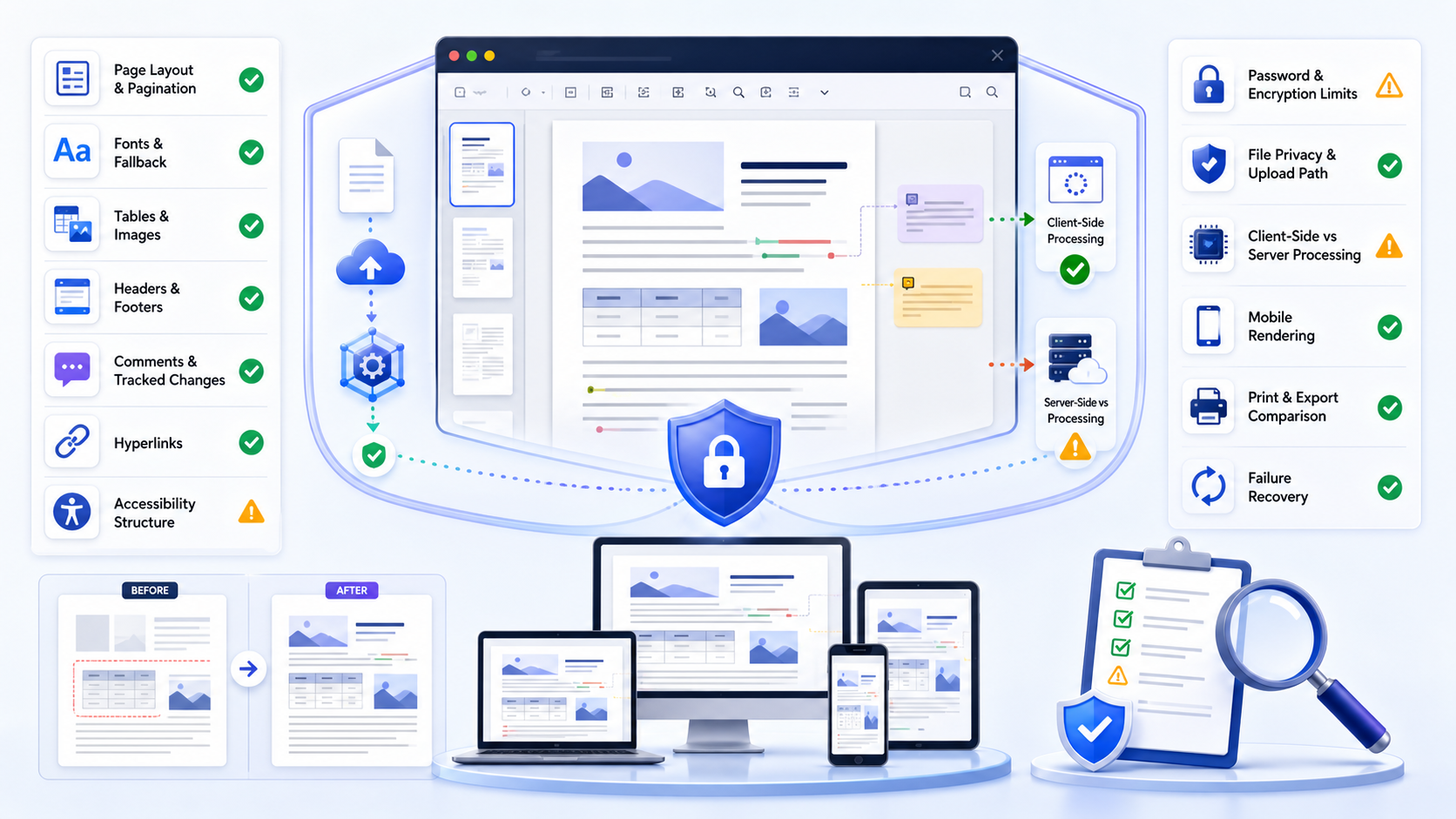
A local file can be viewed first. Team acceptance is the same preview after an upload path. An online DOCX viewer is acceptable only when a sanitized test proves that its data path, retention, access controls, layout fidelity, review evidence, accessibility, mobile behavior, and failure recovery match the document’s risk. Never begin with the confidential file. Build a synthetic DOCX containing the features you depend on, inspect it in the candidate online DOCX viewer and an authoritative reference application, record every mismatch, and approve only the use case—not the online DOCX viewer in general.
本地文件可以先看。团队验收看上传路径之后的同一份预览。只有在脱敏测试证明其数据路径、保留策略、访问控制、版式保真度、审阅证据、无障碍、移动端行为与失败恢复符合文档风险时,Online DOCX Viewer 才适合使用。不要用机密文件作为第一次测试。应先制作包含关键功能的合成 DOCX,在候选查看器与权威参考应用中分别检查,记录每个差异,并只批准特定使用场景,而不是笼统批准整个查看器。
This guide is an evaluation protocol for an online DOCX viewer, not a list of “best” viewers. It helps a reviewer turn claims such as “private,” “full fidelity,” “no upload,” or “works everywhere” into observable tests. A pass for a simple memo does not prove suitability for a contract with tracked changes, a branded report with licensed fonts, or an accessible document that depends on headings and alternative text.
本指南是一套评估协议,而不是“最佳查看器”排行榜。它把“隐私”“完整保真”“无需上传”或“适用于所有设备”等宣传语转化为可观察测试。简单备忘录通过并不代表带修订的合同、依赖授权字体的品牌报告或依赖标题与替代文本的无障碍文档也能通过。
Separate opening a file from approving a viewing system区分“打开文件”与“批准查看系统”
Opening answers a narrow question: can the service display something? Approval asks harder questions: what left the device, what was retained, which features changed, whether reviewers saw the same document, how failures are detected, and who accepts residual risk. The existing DOCX Viewer Online guide owns route selection and first-open workflow. This online DOCX viewer guide owns repeatable qualification, evidence, and the approve, restrict, or reject decision.
打开文件只回答一个狭窄问题:服务能否显示某些内容?批准则要回答更难的问题:哪些数据离开设备、保存了多久、哪些功能发生变化、不同审阅者看到的是否一致、如何发现失败,以及谁接受剩余风险。已有 DOCX Viewer Online 指南负责选择路径与首次打开流程;本 Online DOCX Viewer 指南负责可重复的资格测试、证据与“批准、限制或拒绝”决策。
| Decision决策 | Evidence needed所需证据 | Typical boundary典型边界 |
|---|---|---|
| Quick preview快速预览 | Readable text, expected pages, low sensitivity文字可读、页数符合预期、敏感度低 | Orientation only; not approval仅用于了解内容,不作为批准依据 |
| Review审阅 | Comments, changes, links, figures, and versions preserved批注、修订、链接、图形与版本均保留 | Named document classes and accounts限定文档类别与账户 |
| Release decision发布决策 | Authoritative rendering, accessibility, export, audit trail权威渲染、无障碍、导出与审计证据 | Usually requires desktop or controlled cloud verification通常需要桌面或受控云环境复核 |
Write acceptance criteria before choosing the route选择查看器前先写验收标准
Define the document class, owner, sensitivity, purpose, recipient environment for the online DOCX viewer, required features, prohibited processing, maximum retention, supported browsers, and final authority. Replace “looks correct” with measurable statements: all expected pages appear; heading order remains navigable; comments and unresolved tracked changes are visible; external links point to the expected host; tables do not lose cells; and closing the session removes temporary access as promised.
先定义文档类别、负责人、敏感度、用途、接收环境、必需功能、禁止处理方式、最长保留期、支持浏览器与最终权威环境。不要写“看起来正确”,而要写可验证条件:预期页面全部出现;标题顺序仍可导航;批注与未解决修订可见;外链指向预期主机;表格不丢失单元格;关闭会话后临时访问按承诺移除。
Text, order, figures, tables, equations, fields, hyperlinks, footnotes, comments, and changes match the reference.
文字、顺序、图形、表格、公式、域、超链接、脚注、批注与修订和参考应用一致。
Processing location, accounts, sharing, logs, retention, deletion, support access, and incident response satisfy policy.
处理位置、账户、共享、日志、保留、删除、支持人员访问与事件响应符合政策。
Supported devices, performance, error messages, retry, recovery, download, print, and escalation are predictable.
支持设备、性能、错误提示、重试、恢复、下载、打印与升级路径均可预测。
Tester, date, browser, service version, fixture hash, screenshots, failures, owner, and decision are recorded.
记录测试者、日期、浏览器、服务版本、测试文件摘要、截图、失败项、负责人和决策。
Build a synthetic DOCX that exposes silent failures制作能够暴露静默失败的合成 DOCX
A useful fixture is small enough to inspect manually but rich enough to exercise the features that matter. Use invented names, placeholder amounts, public-domain images, and fake identifiers. Add a cover page, automatic table of contents, numbered headings, normal and custom fonts, portrait and landscape sections, narrow margins, headers, footers, page numbers, a multi-page table, merged cells, wrapped images, captions, footnotes, hyperlinks, bookmarks, fields, equations, Unicode, right-to-left or CJK text if required, comments, accepted and unaccepted changes, alt text, and a deliberate page break.
有效测试文件应足够小,便于人工检查,又要足够丰富,能够覆盖关键功能。使用虚构姓名、占位金额、公共领域图片和假标识符。加入封面、自动目录、编号标题、常规与自定义字体、纵向和横向分节、窄页边距、页眉页脚、页码、跨页表格、合并单元格、环绕图片、题注、脚注、超链接、书签、域、公式、Unicode,以及业务需要的从右到左或中日韩文字、批注、已接受与未接受修订、替代文本和刻意设置的分页符。
Place visible control markers at page boundaries and inside tables so missing or reordered content is obvious. Keep an authoritative PDF or screenshots from the reference application, plus a checklist of expected page count, headings, links, comments, and changes. Do not use the production document as the fixture: that leaks information before privacy is qualified and makes failures harder to isolate.
在分页边界和表格内部放置明显控制标记,使内容缺失或乱序能够被立即发现。保留参考应用生成的权威 PDF 或截图,并记录预期页数、标题、链接、批注和修订清单。不要使用生产文档作为测试文件:这会在隐私尚未验证前泄露信息,也会让故障更难定位。
Verify where the DOCX goes and what remains afterward核验 DOCX 去向以及会话结束后的残留
“Runs in your browser” can describe several architectures. A page may parse the file locally, upload it for conversion, send selected content to an API, fetch remote fonts or analytics, or store a result in browser databases. Read the privacy notice and terms, inspect the browser network panel when authorized, test without an account and with a controlled account, and ask for documented retention and deletion behavior. A padlock icon proves transport encryption to the site; it does not prove local-only processing, short retention, limited support access, or deletion.
“在浏览器中运行”可能对应多种架构:页面可能在本地解析文件,也可能上传转换、把部分内容发送给 API、获取远程字体或分析服务,或把结果保存到浏览器数据库。在获得授权后,应阅读隐私声明与条款、检查浏览器网络面板、分别测试匿名与受控账户,并索取有记录的保留和删除行为。锁形图标只证明与站点之间的传输加密,并不能证明完全本地处理、短期保留、支持人员无法访问或已经删除。
- 1Classify the fixture and prohibit real secrets, credentials, personal records, legal privilege, regulated data, or unreleased intellectual property.对测试文件分类,并禁止真实密钥、凭据、个人记录、法律特权材料、受监管数据或未发布知识产权。
- 2Record every host contacted during load, upload, preview, print, download, close, and deletion.记录加载、上传、预览、打印、下载、关闭与删除期间联系的每个主机。
- 3Confirm who controls the account, link, workspace, cache, logs, backups, support access, and deletion request.确认谁控制账户、链接、工作区、缓存、日志、备份、支持访问与删除请求。
- 4Close the session, clear allowed browser storage, revisit the URL, and verify whether content or access persists.关闭会话,清除允许清除的浏览器存储,再次访问 URL,核验内容或权限是否仍然存在。
Local browser pass versus an upload viewer本地浏览器流程与上传查看器
A local browser pass keeps the package on an approved device while the tab parses it. An upload viewer sends a copy to a host so you can read pages in the browser. Both can be a valid online DOCX viewer path. Choose the column before anyone drops a production file.
本地浏览器流程把文件包留在获批设备上,由标签页解析。上传查看器把副本送到主机,以便在浏览器里读页。两条都可能是有效路径。任何人投放生产文件之前先选列。
Use the upload path when the file is already sanitized, retention is approved, and you only need orientation. Stay local when comments, tracked changes, or regulated text must not leave the device. An online DOCX viewer upload still needs that same gate. After either path, compare the preview with the reference application. The canvas is a working view.
文件已脱敏、保留策略已批准、只需了解内容时,可以用上传路径。批注、修订或受监管文字不能离开设备时,留在本地。两条路径之后都要把预览和参考应用对比。画布只是工作视图。
Compare structure and pagination, not just readable text比较结构与分页,而不只是文字是否可读
An online DOCX viewer may extract text correctly while changing the document’s meaning. A signature can move to another page, a warning can detach from a table, a figure can cover a label, or a footnote can disappear. Compare page count, section orientation, margins, columns, page and section breaks, headers, footers, page numbers, list numbering, line spacing, borders, shading, captions, notes, and print preview against the reference. Resize the browser only after capturing the default rendering; responsive reflow is not equivalent to Word pagination.
查看器可能正确提取文字,却改变文档含义。签名可能被移到另一页,警告可能与表格分离,图片可能覆盖标签,脚注也可能消失。应把页数、分节方向、页边距、分栏、分页符与分节符、页眉页脚、页码、列表编号、行距、边框、底纹、题注、注释和打印预览与参考应用对比。先记录默认渲染,再调整浏览器尺寸;响应式重排并不等同于 Word 分页。
Release rule: if placement carries legal, financial, safety, signature, or publication meaning, a browser preview is orientation evidence only until the final file is reopened in the recipient’s authoritative environment.
发布规则:如果位置关系承载法律、财务、安全、签名或出版含义,在最终文件于接收方权威环境重新打开之前,浏览器预览只能作为了解内容的证据。
Detect font substitution before it changes page flow在字体替换改变分页前发现问题
Missing fonts are a common cause of silent reflow. The online DOCX viewer may substitute a metrically different font, changing line breaks, table height, headings, and total pages while leaving text readable. Include standard fonts, an intentionally unavailable font, bold and italic variants, symbols, CJK characters, and long unbreakable strings in the fixture. Compare glyph shape, line endings, paragraph height, orphan and widow behavior, and page boundaries. If the workflow requires a licensed corporate font, confirm whether the online DOCX viewer may obtain, embed, cache, or display it and whether the recipient has equivalent rights.
缺失字体是静默重排的常见原因。查看器可能用字宽不同的字体替代,从而改变换行、表格高度、标题位置和总页数,但文字仍然可读。测试文件应包含常用字体、故意设置的不可用字体、粗体与斜体、符号、中日韩字符和不可断开的长字符串。比较字形、行尾、段落高度、孤行控制与分页边界。如果流程依赖授权企业字体,还要确认查看器是否允许获取、嵌入、缓存或显示该字体,以及接收者是否拥有同等许可。
Stress tables, images, equations, and embedded objects重点测试表格、图片、公式与嵌入对象
Test a wide table, a table spanning pages, repeated header rows, merged cells, nested lists, rotated text, cell shading, transparent PNG, cropped image, inline and floating image, caption, chart, equation, text box, shape, and embedded object. Record whether each item is fully rendered, flattened, repositioned, replaced with a placeholder, omitted, or causes the file to fail. An online DOCX viewer can be acceptable for narrative reports while unsuitable for forms, engineering specifications, financial schedules, or documents with floating objects.
应测试宽表、跨页表格、重复表头、合并单元格、嵌套列表、旋转文字、单元格底纹、透明 PNG、裁剪图片、嵌入式与浮动图片、题注、图表、公式、文本框、形状和嵌入对象。记录每项是完整渲染、被扁平化、重新定位、替换为占位符、被省略,还是导致文件失败。某查看器可能适合叙述性报告,却不适合表单、工程规范、财务明细或包含浮动对象的文档。
Confirm comments and tracked changes remain reviewable确认批注与修订仍然可审阅
A clean preview can be dangerous when it silently hides unresolved changes. Put inserted, deleted, moved, and formatted changes in the fixture; add threaded comments, replies, resolved comments, and multiple authors. Check whether markup is shown by default, whether “final” view hides evidence, whether author names and timestamps remain, and whether printing or downloading changes the view. Microsoft’s tracked-changes guidance distinguishes displaying markup from accepting or rejecting it; an online DOCX viewer that hides markup has not resolved it.
如果“干净预览”静默隐藏了未解决修订,风险反而更大。测试文件应包含插入、删除、移动与格式变更,以及多作者批注、回复和已解决批注。检查标记是否默认显示,“最终”视图是否隐藏证据,作者姓名与时间是否保留,以及打印或下载是否改变显示。Microsoft 的修订指南区分“显示标记”和“接受或拒绝标记”;查看器隐藏标记并不代表标记已解决。
For approval workflows, define whether the online DOCX viewer is allowed only to read a frozen version or must expose complete review evidence. If comments, authorship, or tracked changes matter, compare with Word desktop or the approved Word for the web environment and retain the source DOCX.
对于审批流程,应明确查看器只用于阅读冻结版本,还是必须显示完整审阅证据。如果批注、作者信息或修订很重要,应与 Word 桌面版或获准的 Word 网页版环境比较,并保留源 DOCX。
Exercise links, fields, bookmarks, and generated navigation测试链接、域、书签与自动导航
Verify visible link text and actual destination separately. Include HTTPS, mail, internal bookmark, relative reference, and intentionally broken links. Test a generated table of contents, cross-references, page-number fields, dates, document properties, citations, captions, and footnote return links. Some online DOCX viewer products show stale field results stored in the DOCX but cannot update them. Record whether a value is current, cached, missing, or transformed, and never click an unfamiliar external link from an untrusted document without following security policy.
应分别核验链接显示文字与实际目的地址。测试 HTTPS、邮件、内部书签、相对引用和故意损坏的链接,同时测试自动目录、交叉引用、页码域、日期、文档属性、引文、题注与脚注返回链接。有些查看器只能显示 DOCX 中缓存的旧域结果,却不能更新。应记录数值是最新、缓存、缺失还是已转换,并且不要在不可信文档中绕过安全策略点击陌生外链。
Check whether the viewer preserves usable document semantics检查查看器是否保留可用的文档语义
Visual similarity does not prove accessibility. Navigate with the keyboard, inspect focus visibility and order, zoom to 200%, test high contrast where required, and use the platform’s supported screen-reader path. Confirm that headings remain ordered, tables expose headers, images expose useful alternative text, links have meaningful names, language changes are identified, and reading order follows the document. Run the source through Word’s Accessibility Checker as one input, then test the delivered viewing experience because source quality and online DOCX viewer accessibility are separate controls.
视觉相似并不能证明无障碍。应使用键盘导航,检查焦点可见性与顺序,缩放到 200%,在需要时测试高对比度,并使用平台支持的屏幕阅读器路径。确认标题顺序正确,表格表头可识别,图片替代文本有意义,链接名称清楚,语言变化可识别,阅读顺序符合文档。可先用 Word 无障碍检查器检查源文件,再测试最终查看体验,因为源文件质量与查看器无障碍能力是两个不同控制点。
Repeat the same fixture across required devices and browsers在必需设备与浏览器中重复同一测试文件
Test the actual supported matrix rather than one convenient laptop. Record operating system, browser family and version, viewport, zoom, input method, account state, network condition, and whether the online DOCX viewer uses reflow or fixed pages. On mobile, check upload selection, shared-link opening, page navigation, zoom, table scrolling, comment visibility, download destination, orientation change, memory pressure, and return from background. An online DOCX viewer may be readable on desktop but unusable for a wide table, long report, or review conversation on a phone.
不要只在一台方便的笔记本上测试,而要覆盖真正需要支持的矩阵。记录操作系统、浏览器系列与版本、视口、缩放、输入方式、账户状态、网络条件,以及查看器采用重排还是固定页面。移动端要检查文件选择、共享链接打开、翻页、缩放、表格滚动、批注可见性、下载位置、横竖屏切换、内存压力与从后台返回。某查看器在桌面可读,并不代表手机上也能处理宽表、长报告或审阅对话。
Test file size, protection, corruption, and unsupported features测试文件大小、保护、损坏与不支持功能
Create controlled variants: empty DOCX, text-only file, large image file, many-page file, password-protected file, damaged copy, legacy DOC renamed incorrectly, macro-enabled DOCM, and a package with an unsupported embedded object. Do not attempt to bypass protection. The goal is to see whether the online DOCX viewer refuses safely, explains the limitation, preserves the original, avoids partial output that looks complete, and provides a responsible escalation path.
制作受控变体:空 DOCX、纯文本文件、大图片文件、多页文件、密码保护文件、损坏副本、错误改名的旧 DOC、启用宏的 DOCM,以及包含不支持嵌入对象的包。不要尝试绕过保护。测试目标是确认查看器能否安全拒绝、解释限制、保留原文件、避免产生“看起来完整”的部分输出,并提供负责任的升级路径。
Treat “unsupported” as a valid result when it is explicit and safe. A silent partial render is worse than a clear failure because reviewers may approve incomplete content. Record service limits from current documentation, then test below, near, and above the documented threshold with synthetic files.
当“不支持”明确且安全时,它是有效结果。静默的部分渲染比清晰失败更危险,因为审阅者可能批准不完整内容。应从当前文档记录服务限制,再用合成文件分别测试低于、接近和超过阈值的情况。
Run this 20-point viewer test matrix执行这套 20 项查看器测试矩阵
| # | Test测试项 | Pass evidence通过证据 | Escalate when升级条件 |
|---|---|---|---|
| 1 | Processing path处理路径 | Documented and observed hosts match文档说明与观察到的主机一致 | Unknown upload or third party出现未知上传或第三方 |
| 2 | Retention and deletion保留与删除 | Policy and deletion test agree政策与删除测试一致 | Persistence is unclear残留状态不清楚 |
| 3 | Account and link access账户与链接访问 | Only intended identities can reopen仅预期身份可重新打开 | Forwarded or anonymous access works转发或匿名仍可访问 |
| 4 | Page count and sections页数与分节 | Matches reference与参考一致 | Pages merge, split, or disappear页面合并、拆分或消失 |
| 5 | Fonts and line breaks字体与换行 | Approved fallback and stable flow替代字体获准且排版稳定 | Meaning or pagination changes含义或分页改变 |
| 6 | Headers, footers, numbering页眉页脚与编号 | All sections and numbers correct所有分节与编号正确 | Identity or version marks vanish身份或版本标记消失 |
| 7 | Tables表格 | Cells, spans, headers, and breaks preserved单元格、合并、表头与分页保留 | Data is clipped or reordered数据被裁切或乱序 |
| 8 | Images and captions图片与题注 | Position, crop, quality, caption match位置、裁剪、质量与题注一致 | Figure meaning changes图形含义改变 |
| 9 | Equations and objects公式与对象 | Required objects render or fail explicitly必需对象渲染或明确失败 | Placeholder looks complete占位符看似完整 |
| 10 | Hyperlinks and bookmarks超链接与书签 | Text, target, and internal jumps agree文字、地址与内部跳转一致 | Target is transformed or hidden地址被改变或隐藏 |
| 11 | Fields and table of contents域与目录 | Cached status is disclosed and acceptable缓存状态明确且可接受 | Stale values drive a decision旧值影响决策 |
| 12 | Comments批注 | Authors, threads, replies, status visible作者、线程、回复与状态可见 | Review evidence is missing审阅证据缺失 |
| 13 | Tracked changes修订 | Insertions, deletions, moves, formatting visible插入、删除、移动与格式变更可见 | Clean view hides unresolved changes干净视图隐藏未解决修订 |
| 14 | Accessibility semantics无障碍语义 | Headings, tables, alt text, order usable标题、表格、替代文本与顺序可用 | Required users cannot navigate目标用户无法导航 |
| 15 | Keyboard and zoom键盘与缩放 | Complete task at 200% without traps200% 缩放下无键盘陷阱 | Content or controls disappear内容或控件消失 |
| 16 | Mobile rendering移动端渲染 | Required content and controls remain usable必需内容与控件仍可用 | Review requires unsafe workaround审阅需要不安全变通 |
| 17 | Print and download打印与下载 | Named output matches approved state指定输出与批准状态一致 | Export changes content or markup导出改变内容或标记 |
| 18 | Large-file behavior大文件行为 | Limit, progress, cancellation, error are clear限制、进度、取消与错误清楚 | Partial result appears final部分结果看似最终 |
| 19 | Protected and damaged files受保护与损坏文件 | Safe refusal preserves original安全拒绝并保留原文件 | Protection is bypassed or output is ambiguous绕过保护或输出含糊 |
| 20 | Close, recovery, escalation关闭、恢复与升级 | Session clears; failure route is documented会话清除且失败路径有记录 | Access persists or no accountable owner exists访问残留或没有责任人 |
Use hard gates before calculating a convenience score先执行硬性门槛,再计算便利性评分
Do not average away a critical failure. Mark privacy authorization, access control, content completeness, review evidence, and required accessibility as hard gates. One failed hard gate means reject or restrict the use case regardless of speed or interface quality. For remaining items, record Pass, Conditional, Fail, or Not Applicable with evidence and owner. A conditional pass must state the workaround, affected document classes, retest date, and who accepts the risk.
不要用平均分掩盖关键失败。把隐私授权、访问控制、内容完整性、审阅证据和必需无障碍设为硬性门槛。任何一个硬门槛失败,都应拒绝或限制该使用场景,而不考虑速度或界面体验。其他项目使用“通过、有条件通过、失败、不适用”记录,并附证据与负责人。有条件通过必须说明变通方案、受影响文档类别、复测日期和风险接受人。
| Decision决策 | Use允许用途 | Control控制措施 |
|---|---|---|
| Approve批准 | Named low-risk document classes指定低风险文档类别 | Retest after material service, browser, or policy change服务、浏览器或政策重大变化后复测 |
| Restrict限制 | Orientation only; no approval or sensitive upload仅了解内容,不用于批准或敏感上传 | Authoritative verification and documented workaround权威复核与有记录的变通方案 |
| Reject拒绝 | No organizational use for tested class测试类别不得组织使用 | Select controlled alternative or desktop workflow选择受控替代方案或桌面流程 |
Classify a mismatch before changing the source document修改源文档前先对差异分类
When the preview differs, preserve the fixture and evidence. Reopen the same file in the reference application, a second browser, private mode, another account, and—when permitted—another network. Determine whether the cause is source corruption, stale cached content, missing font, unsupported OOXML feature, browser rendering, account policy, network interruption, service conversion, or export behavior. Changing the source until the online DOCX viewer “looks right” can damage the authoritative document and hide the product limitation.
预览出现差异时,应先保留测试文件与证据。用参考应用、另一浏览器、隐私模式、另一账户,并在允许时使用另一网络重新打开同一文件。判断原因是源文件损坏、缓存过期、字体缺失、不支持的 OOXML 功能、浏览器渲染、账户政策、网络中断、服务转换还是导出行为。为了让查看器“看起来正确”而不断修改源文档,可能破坏权威文件并掩盖产品限制。
- Content missing everywhere: inspect the source package and authoring history.所有环境都缺内容:检查源包与创作历史。
- Only one browser fails: compare supported versions, extensions, cache, fonts, and graphics behavior.只有一个浏览器失败:比较支持版本、扩展、缓存、字体与图形行为。
- Viewer differs from Word: identify the unsupported feature and decide whether a restriction or authoritative fallback is acceptable.查看器与 Word 不同:识别不支持功能,并决定限制使用或权威回退是否可接受。
- Account states differ: examine tenant policies, permissions, feature rollout, link type, and stored versions.账户状态不同:检查租户政策、权限、功能发布、链接类型与存储版本。
Create a sanitized DOCX fixture from structured Markdown从结构化 Markdown 创建脱敏 DOCX 测试文件
If you need a low-risk starting document, the InfiniSynapse Markdown to Word tool can convert sanitized headings, paragraphs, lists, and supported tables into an editable DOCX. Add the advanced Word-only test features later in an approved authoring environment, save the fixture, and use it consistently across candidate online DOCX viewer products. The tool creates a DOCX; it does not open an existing DOCX, inspect an online DOCX viewer, prove privacy, or certify rendering fidelity.
如果需要低风险起始文档,InfiniSynapse Markdown 转 Word 工具可把脱敏标题、段落、列表与受支持表格转换为可编辑 DOCX。随后在获准的创作环境中加入 Word 特有的高级测试功能,保存测试文件,并在所有候选查看器中保持一致使用。该工具用于创建 DOCX;它不能打开现有 DOCX、检查查看器、证明隐私或认证渲染保真度。
Build the sanitized test document before evaluating a viewer评估查看器前先制作脱敏测试文档
Convert structured, non-sensitive Markdown into a DOCX starting point, add your controlled edge cases, then run the same evidence-based matrix against every candidate.
把结构化、非敏感 Markdown 转成 DOCX 起点,加入受控边界情况,再对每个候选查看器执行同一套证据化矩阵。
Open Markdown to Word打开 Markdown 转 WordKeep a compact, reproducible viewer qualification record保留简洁且可复现的查看器资格记录
Record the online DOCX viewer name and URL, service or release date, terms and privacy versions, test date, tester, fixture identifier and hash, reference application, browsers and devices, account states, network route, every hard gate, item results, screenshots, exported files, known limitations, workaround, risk owner, approval scope, and retest trigger. Store evidence according to policy without retaining sensitive content unnecessarily.
记录查看器名称与 URL、服务或发布日期、条款与隐私版本、测试日期、测试者、测试文件标识与摘要、参考应用、浏览器和设备、账户状态、网络路径、所有硬门槛、项目结果、截图、导出文件、已知限制、变通方案、风险负责人、批准范围与复测触发条件。证据应按政策保存,同时避免不必要地保留敏感内容。
Retest triggers: viewer update, privacy or terms change, new subprocessor, browser engine change, authentication change, new document class, accessibility requirement, incident, unexplained mismatch, or expiration of the approval period.
复测触发:查看器更新、隐私或条款变化、新增分处理方、浏览器引擎变化、认证变化、新文档类别、新无障碍要求、事件、无法解释的差异,或批准期限到期。
Questions about testing the viewer关于测试查看器的常见问题
Some viewers parse the package in the tab. Others upload first. Use a sanitized file and watch the network panel, then decide whether that online DOCX viewer can be a preview. Release still means the file in the recipient application.
有的查看器在标签页里解析文件包,有的先上传。用脱敏文件看网络面板,再决定这个查看器能不能当预览。发布仍以收件人应用里的文件为准。
Not by default. Safety depends on authorization, data flow, retention, access, contracts, technical controls, file sensitivity, and the online DOCX viewer tested behavior. Qualify it with synthetic data first and use confidential files only when the accountable owner has approved the exact workflow.
默认不能这样认为。安全性取决于授权、数据流、保留、访问、合同、技术控制、文件敏感度与测试结果。应先用合成数据验证,只有责任人批准确切流程后才能处理机密文件。
It can, but the label alone is insufficient. Verify network requests, workers, remote assets, analytics, crash reporting, browser storage, account synchronization, and download behavior. Use the provider’s current documentation and an authorized technical observation.
可能如此,但标签本身不够。应核验网络请求、工作线程、远程资源、分析、崩溃报告、浏览器存储、账户同步与下载行为,并结合供应商当前文档和经授权的技术观察。
Common causes include font substitution, unsupported OOXML features, different pagination engines, responsive reflow, stale fields, floating objects, browser graphics behavior, and service conversion. Compare a controlled fixture with the authoritative renderer before editing the source.
常见原因包括字体替换、不支持的 OOXML 功能、分页引擎不同、响应式重排、旧域结果、浮动对象、浏览器图形行为与服务转换。修改源文件前,应先用受控测试文件与权威渲染器比较。
Some can, some show only part of the evidence, and some present a clean view. Test insertions, deletions, moves, formatting changes, authors, threads, replies, and resolved comments. Hidden markup is not the same as accepted markup.
有些可以,有些只显示部分证据,还有些只显示干净视图。应测试插入、删除、移动、格式变更、作者、线程、回复与已解决批注。隐藏标记不等于已经接受标记。
Escalate when exact pagination, signatures, legal or financial meaning, protected content, macros, embedded objects, complete review evidence, advanced accessibility, authoritative export, or unsupported features matter. Use the recipient’s approved authoritative environment for final verification.
当精确分页、签名、法律或财务含义、受保护内容、宏、嵌入对象、完整审阅证据、高级无障碍、权威导出或不支持功能很重要时,应升级到桌面环境,并在接收方获准的权威环境中做最终复核。
Official references for DOCX preview and verificationDOCX 预览与核验的官方参考资料
- Microsoft Support: Differences between Word in a browser and desktop WordMicrosoft 支持:浏览器 Word 与桌面 Word 的差异
- Microsoft Support: File types supported for previewMicrosoft 支持:支持预览的文件类型
- Microsoft Support: Track changes in WordMicrosoft 支持:Word 修订
- Microsoft Support: Improve accessibility with Accessibility CheckerMicrosoft 支持:使用无障碍检查器改进无障碍
- Microsoft Learn: Word for the web service descriptionMicrosoft Learn:Word 网页版服务说明
- Ecma International: ECMA-376 Office Open XML standardEcma International:ECMA-376 Office Open XML 标准