
Govern an online DOCX editor as a shared system of record把 Online DOCX Editor 作为共享记录系统治理
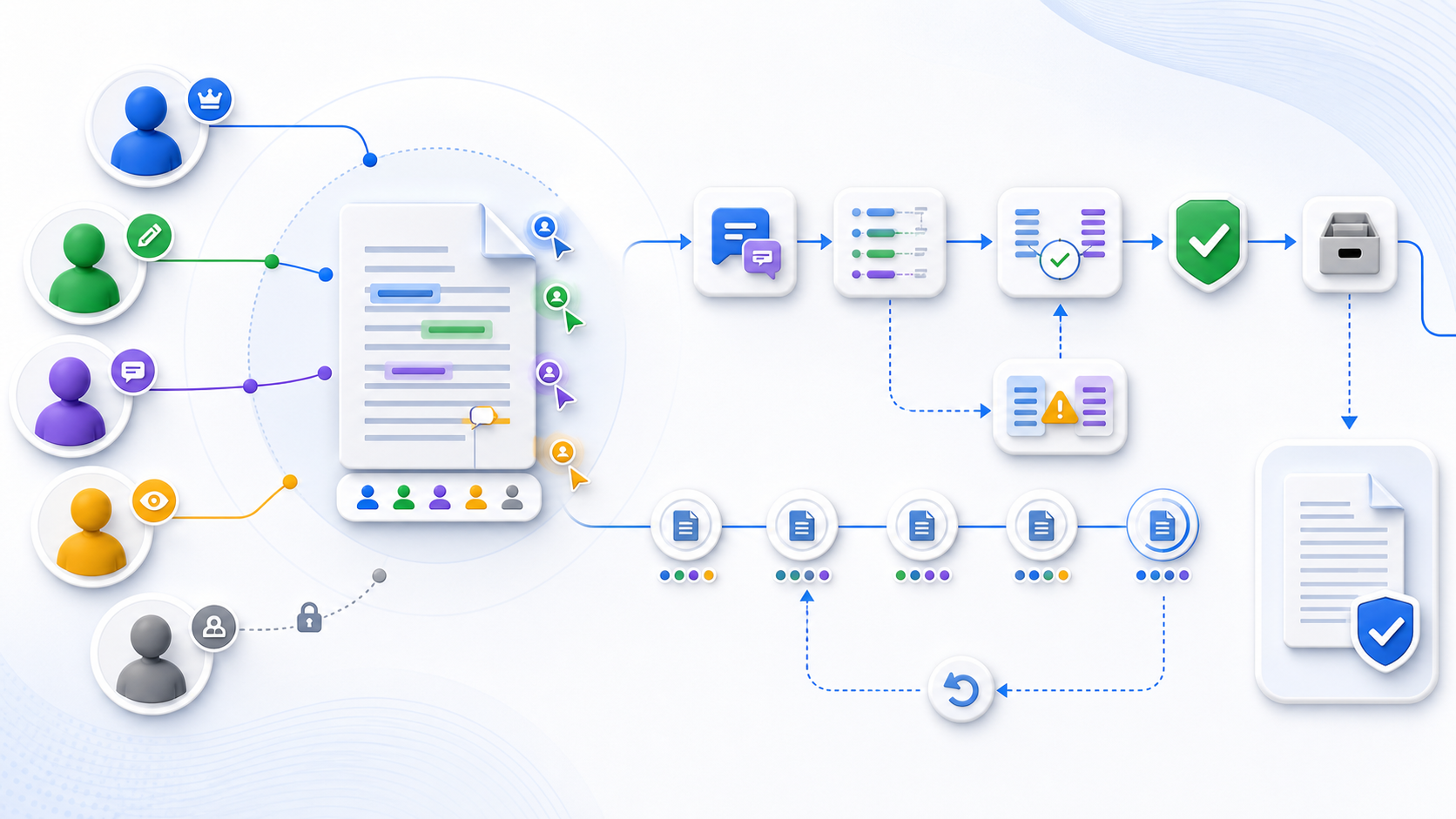
An online DOCX editor is safe for team collaboration only when one accountable owner controls the authoritative copy, every participant has the least privilege required, review and direct editing are separated, conflicts and earlier versions can be recovered, external access can be removed, and the exported DOCX is verified before approval. Define roles, data classification, link scope, identity, version ownership, retention, and final-delivery rules before inviting collaborators. Test coauthoring, comments, tracked changes, permission changes, access revocation, version restoration, and downloaded-file fidelity with sanitized documents. Do not assume every online editor provides these controls.
只有在一名责任明确的所有者控制权威副本、每位参与者仅获得必要的最小权限、审阅与直接编辑相互分离、冲突和早期版本可以恢复、外部访问能够撤销,并且导出 DOCX 在批准前经过验证时,Online DOCX Editor 才适合团队协作。邀请协作者前应定义角色、数据分类、链接范围、身份、版本所有权、保留与最终交付规则,并用脱敏文档测试共同编辑、批注、修订、权限变化、撤权、版本恢复与下载文件保真。不能假设所有在线编辑器都提供这些控制。
Confirm the document and platform are collaboration-ready确认文档和平台适合协作
Collaboration requires more than opening the same file in two browsers. The storage location must support shared identity and versioning; the file format and features must be compatible with simultaneous editing; participants need the right application or browser support; and the document must not contain restrictions that silently disable web editing. Microsoft documents that coauthoring depends on supported shared storage, compatible applications, a modern format such as DOCX, and edit permission. Other platforms can have different prerequisites.
协作并不只是让两个人在浏览器中打开同一个文件。存储位置必须支持共享身份与版本,文件格式和功能要兼容并发编辑,参与者需要适当的应用或浏览器支持,文档也不能含有会静默禁用网页编辑的限制。微软文档说明,共同创作依赖受支持的共享存储、兼容应用、DOCX 等现代格式和编辑权限。其他平台的前提可能不同。
Inspect format, size, protection, macros, embedded objects, fields, signatures, sections, and layout-critical features before collaboration begins.
协作开始前检查格式、大小、保护、宏、嵌入对象、字段、签名、分节与版式关键功能。
Confirm who operates the storage, where it processes data, how versions are retained, and what becomes authoritative.
确认存储运营方、数据处理位置、版本保留方式以及哪个副本成为权威版本。
List internal accounts, external guests, managed and personal devices, supported browsers, desktop clients, and assistive technology.
列出内部账户、外部访客、受管和个人设备、支持的浏览器、桌面客户端与辅助技术。
Name the application, renderer, file format, reviewer, and evidence that determine whether the final document is accepted.
明确决定最终文档是否获准的应用、渲染器、文件格式、审阅者与证据。
Assign document roles before sharing a link共享链接前先分配文档角色
| Role角色 | Necessary authority必要权限 | Should not inherit不应继承 |
|---|---|---|
| Owner所有者 | Classify, invite, change permissions, select authoritative version, approve archive or deletion分类、邀请、改变权限、选择权威版本、批准归档或删除 | Unreviewed content authority merely because the account created the file不能仅因账户创建文件就拥有未经审阅的内容决定权 |
| Editor编辑者 | Modify agreed content and formatting within scope; respond to comments在范围内修改约定内容和格式;回应批注 | Permission administration, uncontrolled resharing, final approval权限管理、不受控再次共享、最终批准 |
| Reviewer审阅者 | Comment and suggest or track changes; see evidence needed for review添加批注和建议或修订;查看审阅所需证据 | Directly replace accepted content unless explicitly authorized未明确授权时不能直接替换已接受内容 |
| Viewer查看者 | Read the approved scope; download or copy only when required阅读获准范围;仅在需要时下载或复制 | Comment, edit, share, or discover unrelated folder contents批注、编辑、共享或发现无关文件夹内容 |
| External guest外部访客 | Time-bounded access to named documents and minimum required action在限定时间内访问指定文档并执行最少必要操作 | Broad directory access, indefinite links, internal group membership广泛目录访问、无限期链接、内部组成员身份 |
| Approver or records owner批准者或记录责任人 | Accept the final version, evidence, retention class, and release decision接受最终版本、证据、保留类别与发布决策 | Routine editing that weakens independence of approval会削弱批准独立性的日常编辑 |
An administrator may configure identity, sharing, retention, audit, and recovery without owning the document’s meaning. Separate platform administration from content approval where accountability matters.
管理员可以配置身份、共享、保留、审计与恢复,但不一定拥有文档内容含义。需要问责时,应把平台管理与内容批准分开。
Control the shared DOCX from creation through deletion从创建到删除控制共享 DOCX
- Create and classify.创建与分类。 Name the owner, source, sensitivity, authoritative storage, allowed participants, and required output before upload.上传前确定所有者、来源、敏感度、权威存储、允许参与者与必需输出。
- Prepare a collaboration copy.准备协作副本。 Preserve the source and remove secrets, obsolete revisions, comments, metadata, or attachments not required for the task.保留原件,并移除任务不需要的密钥、旧修订、批注、元数据或附件。
- Invite by role.按角色邀请。 Give named people the minimum right, time window, download ability, and document scope they need.向指定人员授予所需的最小权限、时间窗口、下载能力与文档范围。
- Establish a working protocol.建立工作协议。 Define direct edits, suggestions, comments, assignments, deadlines, naming, notification, and conflict escalation.定义直接编辑、建议、批注、任务、期限、命名、通知与冲突升级。
- Coauthor and monitor.共同编辑与监控。 Watch presence, unresolved conflicts, unsupported features, failed saves, permission drift, guest activity, and version growth.监控在线状态、未解决冲突、不支持功能、保存失败、权限漂移、访客活动与版本增长。
- Review changes.审阅变更。 Show all markup, resolve comments, accept or reject changes, verify authorship, and separate content approval from technical cleanup.显示所有标记,处理批注,接受或拒绝修订,验证作者,并把内容批准与技术清理分开。
- Freeze and verify.冻结与验证。 Stop routine editing, select the candidate final version, export DOCX, reopen it in the final environment, and run content, layout, link, accessibility, and metadata checks.停止常规编辑,选定候选最终版本,导出 DOCX,在最终环境重新打开,并检查内容、版式、链接、无障碍与元数据。
- Approve and publish.批准与发布。 Record approver, version identifier, evidence, exceptions, release target, and any fixed-layout proof.记录批准者、版本标识、证据、例外、发布目标与固定版式校样。
- Remove temporary access.移除临时访问。 Revoke guests, expire links, remove unnecessary groups, close access requests, and confirm effective rights with test identities.撤销访客、使链接到期、移除不必要群组、关闭访问申请,并用测试身份确认实际权利。
- Retain or delete.保留或删除。 Archive the approved record and evidence under policy; delete temporary copies, exports, caches, and collaboration spaces when authorized.按策略归档获准记录和证据;获得授权后删除临时副本、导出、缓存与协作空间。
Separate comments, suggestions, tracked changes, and approval区分批注、建议、修订与批准
| Mechanism机制 | Use it for适用目的 | Acceptance evidence验收证据 |
|---|---|---|
| Comment批注 | Question, rationale, assignment, clarification, or discussion without changing body content提问、理由、任务、澄清或讨论,不直接改变正文 | Author, time, anchor, thread, resolution, and remaining open items作者、时间、锚点、线程、解决状态与剩余未决项 |
| Suggested or tracked change建议或修订 | Proposed insertion, deletion, or formatting change requiring acceptance需要接受的插入、删除或格式变更建议 | Original and proposed content, author, filters, accept/reject decision, clean result原始与建议内容、作者、筛选、接受/拒绝决策与清洁结果 |
| Direct edit直接编辑 | Authorized change where review evidence is not required or is captured elsewhere不要求审阅证据或证据另行记录的授权修改 | Version history, change log, owner, scope, and comparison when needed版本历史、变更日志、责任人、范围及必要时的对比 |
| Approval批准 | Decision that a named version meets content, legal, brand, accessibility, or release conditions决定指定版本满足内容、法律、品牌、无障碍或发布条件 | Approver identity, version, date, evidence, exceptions, and release destination批准者身份、版本、日期、证据、例外与发布目标 |
Keep one authoritative copy and a recoverable version chain保留一个权威副本和可恢复版本链
Email attachments and downloaded personal copies create branches that a live editor cannot reconcile automatically. State which cloud file is authoritative, when downloads are informational, who may replace the source, how versions are named, when a milestone copy is frozen, and how an approved release differs from the working draft. Use version history as recovery evidence, not as a substitute for ownership.
邮件附件与个人下载副本会产生在线编辑器无法自动协调的分支。应明确哪个云文件是权威版本、下载何时仅供参考、谁能替换源文件、版本如何命名、何时冻结里程碑副本,以及获准发布与工作草稿有何区别。版本历史是恢复证据,不能替代所有权。
Test restoration with a sanitized file: create known versions, restore an earlier one, verify what becomes current, confirm the previously current version remains recoverable, and record who can perform the action. Retention and restore behavior depend on the platform, plan, account, and policy.
应使用脱敏文件测试恢复:创建已知版本,恢复早期版本,验证哪个版本成为当前版本,确认先前当前版本仍可恢复,并记录谁能执行操作。保留与恢复行为取决于平台、方案、账户与策略。
Treat external collaboration as a separate risk boundary把外部协作视为独立风险边界
External guests can use different identity providers, devices, networks, browser extensions, retention practices, and organizational policies. Give them access to a named document rather than a broad folder when possible. Require sign-in for sensitive work, restrict download or copying where supported and appropriate, avoid anonymous links when identity matters, set expiry, monitor effective access, and name an internal sponsor responsible for removal.
外部访客可能使用不同的身份提供商、设备、网络、浏览器扩展、保留习惯与组织策略。可行时应让他们访问指定文档,而不是广泛文件夹。敏感工作应要求登录,在受支持且适当时限制下载或复制,身份重要时避免匿名链接,设置到期,监控实际访问,并指定负责撤权的内部发起人。
A “view” link can still allow screenshots, manual transcription, or device-level copying. Technical controls reduce certain actions; contracts, purpose limitation, training, and accountable review remain necessary.
“查看”链接仍可能允许截图、手工抄录或设备层复制。技术控制只能减少部分行为,合同、目的限制、培训与责任明确的审阅仍然必要。
Test revocation, link expiry, and collaborator offboarding测试撤权、链接到期与协作者离场
Removing a person from an invitation may not revoke access inherited from a group, folder, workspace, existing link, synchronized copy, downloaded file, or another account. Build an offboarding checklist that removes direct and inherited rights, expires public or guest links, disables or removes the account, transfers ownership, preserves required audit evidence, handles local and mobile synchronization, and confirms access denial with a test session.
把某人从邀请中移除,不一定会撤销通过群组、文件夹、工作区、既有链接、同步副本、下载文件或其他账户继承的访问。离场检查表应移除直接与继承权限,使公开或访客链接到期,禁用或移除账户,转移所有权,保留必需审计证据,处理本地与移动同步,并用测试会话确认访问被拒绝。
Govern storage, processing, retention, and deletion治理存储、处理、保留与删除
Before collaboration, document the operator, processing location, storage region, encryption claims, identity controls, administrator access, subprocessors, telemetry, integrations, backups, version retention, deletion delay, incident process, and applicable contract. Classify comments, filenames, invitations, activity logs, and version history as data too—not only the visible DOCX body.
协作前应记录运营方、处理位置、存储区域、加密声明、身份控制、管理员访问、分处理方、遥测、集成、备份、版本保留、删除延迟、事件流程与适用合同。批注、文件名、邀请、活动日志和版本历史同样属于数据,不能只考虑可见 DOCX 正文。
Retention must cover the working copy, versions, exports, comments, notifications, audit logs, recycle bins, backups, and connected applications. A user-facing delete button may not describe every copy. Verify policy and contractual behavior for the document’s classification.
保留范围应覆盖工作副本、版本、导出、批注、通知、审计日志、回收站、备份与连接应用。面向用户的删除按钮不一定说明每一份副本,应根据文档分类验证策略与合同行为。
Verify the final DOCX outside the collaboration canvas在协作画布之外验证最终 DOCX
| Layer层级 | Verify验证内容 | Reject when拒绝条件 |
|---|---|---|
| Content内容 | Approved text, numbers, links, tables, images, fields, footnotes, references, and resolved review items获准文字、数字、链接、表格、图片、字段、脚注、引用与已处理审阅项目 | Required content is missing, changed, duplicated, or left unresolved必需内容缺失、改变、重复或仍未解决 |
| Layout版式 | Pages, sections, breaks, fonts, headers, footers, tables, images, captions, and print/PDF proof页面、分节、分页、字体、页眉页脚、表格、图片、题注与打印/PDF 校样 | The intended recipient or authoritative renderer changes material presentation预期接收方或权威渲染器改变重要呈现 |
| Review evidence审阅证据 | Comments, replies, status, tracked changes, authors, timestamps, clean version, and approval record批注、回复、状态、修订、作者、时间戳、清洁版本与批准记录 | Authorship, decision state, or required markup is lost作者、决策状态或必需标记丢失 |
| Accessibility and properties无障碍与属性 | Headings, reading order, table headers, alt text, links, language, metadata, protection, and file integrity标题、阅读顺序、表头、替代文本、链接、语言、元数据、保护与文件完整性 | Required semantics or controls disappear during export必需语义或控制在导出时消失 |
Make both collaboration and the document accessible让协作过程与文档本身都可访问
Test keyboard access, visible focus, control names, dialogs, live-change announcements, comment navigation, zoom, contrast, error messages, and the assistive technology required by participants. Coauthor presence should not be communicated by color alone. The final document must preserve headings, reading order, table headers, alt text, meaningful links, document language, lists, and descriptive title. Run automated checks and manual review before approval.
测试键盘访问、可见焦点、控件名称、对话框、实时变更播报、批注导航、缩放、对比度、错误消息与参与者所需辅助技术。共同编辑在线状态不能只靠颜色表达。最终文档必须保留标题、阅读顺序、表头、替代文本、有意义的链接、文档语言、列表与描述性标题,并在批准前完成自动检查和人工审阅。
Prepare for conflicts, exposure, deletion, and recovery incidents为冲突、暴露、删除与恢复事件做准备
Define who can freeze editing, revoke links, preserve logs, restore a version, contact the platform operator, notify affected owners, assess downstream copies, and approve resumption. Common triggers include an unintended recipient, public link, suspicious account, mass deletion, lost comments, corrupt export, unsupported feature, conflicting final versions, or departed collaborator who retains access. Practice with sanitized files rather than improvising during a real incident.
应定义谁能冻结编辑、撤销链接、保留日志、恢复版本、联系平台运营方、通知受影响责任人、评估下游副本并批准恢复。常见触发包括错误接收者、公开链接、可疑账户、大量删除、批注丢失、导出损坏、不支持功能、冲突的最终版本或离场协作者仍保留访问。应使用脱敏文件演练,而不是在真实事件中临时摸索。
Create the initial DOCX when the team starts in Markdown团队从 Markdown 开始时创建初始 DOCX
When content begins as Markdown, the InfiniSynapse Markdown to Word tool can create an editable DOCX draft from headings, paragraphs, lists, and supported tables. Use sanitized Markdown, download the result, validate the structure, then place the DOCX into the team’s approved collaboration environment with an owner, classification, role plan, and acceptance criteria. The tool does not provide online coauthoring, shared permissions, version history, access removal, or collaboration governance.
当内容从 Markdown 开始时,InfiniSynapse Markdown 转 Word 工具可以根据标题、段落、列表与受支持表格创建可编辑 DOCX 初稿。使用脱敏 Markdown,下载并验证结构,再把 DOCX 放入团队批准的协作环境,并指定所有者、分类、角色计划与验收标准。该工具不提供在线共同编辑、共享权限、版本历史、访问移除或协作治理。
Turn sanitized Markdown into a DOCX collaboration draft把脱敏 Markdown 转为 DOCX 协作初稿
Create the draft first, then validate it and move it into the approved editor with explicit ownership, permissions, review, and export rules.
先创建初稿,再验证并移入批准的编辑器,同时明确所有权、权限、审阅与导出规则。
Open Markdown to Word打开 Markdown 转 WordComplete this online DOCX editor governance checklist完成这份 Online DOCX Editor 治理检查表
Owner, classification, source, authoritative copy, roles, guests, storage, retention, required controls, and final renderer are approved.
所有者、分类、来源、权威副本、角色、访客、存储、保留、必需控制与最终渲染器均已批准。
Presence, conflicts, saves, unsupported features, comments, changes, permissions, links, guests, versions, and incidents are monitored.
在线状态、冲突、保存、不支持功能、批注、修订、权限、链接、访客、版本与事件受到监控。
Editing is frozen, markup resolved, final DOCX independently verified, accessibility checked, approver and version recorded.
编辑已冻结,标记已处理,最终 DOCX 已独立验证,无障碍已检查,批准者与版本已记录。
Guests and links removed, ownership transferred, evidence retained, temporary copies deleted, archive and retest dates assigned.
访客与链接已移除,所有权已转移,证据已保留,临时副本已删除,归档与复测日期已指定。
Questions about online DOCX editor collaboration关于 Online DOCX Editor 协作的常见问题
Some platforms support real-time coauthoring when the file format, storage location, application versions, document features, and permissions are compatible. Test the exact platform, clients, accounts, and representative file; do not assume simultaneous opening guarantees safe merging.
当文件格式、存储位置、应用版本、文档功能与权限兼容时,一些平台支持实时共同编辑。应测试确切平台、客户端、账户与代表性文件,不能假设同时打开就能安全合并。
Edit normally changes content directly, review permits comments or suggested changes that an owner can accept, and view prevents changes. Effective behavior depends on the platform and existing permissions, so verify each role with separate accounts.
编辑通常直接改变内容,审阅允许添加由所有者接受的批注或建议,查看则阻止修改。实际行为取决于平台和既有权限,应使用独立账户验证每个角色。
Keep one authoritative cloud copy, use compatible clients, define direct-edit and review rules, monitor presence and unsupported features, avoid attachment branches, test offline reconnection, and record the approved version. Conflicts can be reduced but still require recovery procedures.
保留一个权威云端副本,使用兼容客户端,定义直接编辑与审阅规则,监控在线状态和不支持功能,避免附件分支,测试离线重连并记录获准版本。冲突可以减少,但仍需要恢复程序。
Not necessarily. A person may retain direct, group, folder, workspace, inherited, synchronized, downloaded, or alternate-link access. Review effective permissions, revoke every path, address local copies under policy, and verify denial with the affected identity.
不一定。某人可能仍保留直接、群组、文件夹、工作区、继承、同步、下载或其他链接访问。应审查实际权限,撤销每条路径,按策略处理本地副本,并用相关身份验证访问被拒绝。
Freeze editing, export the named version, reopen it in the recipient or authoritative environment, compare approved content and layout, resolve review evidence, check links and accessibility, confirm metadata and protection, and record the approver and version.
冻结编辑,导出指定版本,在接收或权威环境中重新打开,对比获准内容与版式,处理审阅证据,检查链接与无障碍,确认元数据和保护,并记录批准者与版本。
Official sources for online Word collaboration controls用于在线 Word 协作控制的官方资料
- Microsoft Support: Real-time coauthoring in WordMicrosoft 支持:Word 实时共同编辑
- Microsoft Support: Work together in Word for the webMicrosoft 支持:在 Word 网页版中共同工作
- Microsoft Support: Review mode and role behaviorMicrosoft 支持:审阅模式与角色行为
- Microsoft Support: Manage access to Word documentsMicrosoft 支持:管理 Word 文档访问
- Microsoft Support: Sharing permissions and link behaviorMicrosoft 支持:共享权限与链接行为
- Microsoft Support: Restore a previous OneDrive versionMicrosoft 支持:恢复 OneDrive 早期版本