Core Web Vitals Checker: Field Versus Lab Speed
A Core Web Vitals Checker reports LCP, INP, and CLS from field and lab data so you can paste a URL and fix the speed module before you chase a vanity 100.
Author credentials: William Zhu is cofounder of InfiniSynapse (GitHub @allwefantasy · auto-coder). Desk: shipping SEO Health and the /en/tool/ visibility pages. No personal LinkedIn published. About: team / editorial standards.
Publisher credentials: InfiniSynapse has public profiles on GitHub, YouTube, and X. A 2026 WAIC Future Tech OPC excellence award covers the Agentic Data Infra entry (WAIC; third-party recap: Xinhua / Caohejing). That award does not review this page or SEO Health. Method CLI: infinitegrowth on npm. Archive: recognition and scope notes.
On this page
By William Zhu · Cofounder, InfiniSynapse · Last updated: 2026-08-18 · Last verified: 2026-08-18 · Methods: SEO Health page audits, speed-module runs, and sitemap samples — not a claimed Google score and not a CrUX substitute.
Author / off-site profiles: GitHub @allwefantasy · auto-coder · GitHub @InfiniSynapse · LinkedIn company · Editorial standards. No personal LinkedIn, award, or vendor badge.
Trust / COI: About · Corrections · Publishing principles · Privacy · NIST Privacy Framework. InfiniSynapse ships SEO Health as a page checker; first-party desk timings are labeled; we do not sell a Google page-experience API.
Fact-check: web.dev Core Web Vitals (retrieved 2026-08-18) · Core Web Vitals in Search · HTTP Archive Web Almanac 2025 — Performance · Chrome UX Report · AgentSpot listing. Corrections: zhuhl@infinisynapse.com.
TL;DR
Direct answer: A Core Web Vitals Checker reports Largest Contentful Paint, Interaction to Next Paint, and Cumulative Layout Shift for one URL, and it keeps field data and lab data in separate rows so you do not “fix” a CrUX miss with a Lighthouse screenshot.
What you'll learn
- A quoted definition of a Core Web Vitals Checker
- The three vitals a speed module should return
- Why field and lab disagree, and which row you edit first
- How a vanity 100 hides a bad INP or a late LCP element
- When to stop at speed and when to open hrefs or a paid suite
If you already have an address, paste the URL into a free page check. Read LCP, INP, and CLS first. Do not rewrite the title on a page whose hero still paints at four seconds.
What a speed-module check returns
Key Definition: A Core Web Vitals Checker is a single-URL speed pass that reports Largest Contentful Paint, Interaction to Next Paint, and Cumulative Layout Shift from field and lab sources so you can tell whether that page is slow before you rewrite copy or chase a vanity 100.
Quick answer: A Core Web Vitals Checker reports Largest Contentful Paint, Interaction to Next Paint, and Cumulative Layout Shift for one URL, and it keeps field data and lab data in separate rows so you do not “fix” a CrUX miss with a Lighthouse screenshot.
Key terms
| Term | Meaning |
|---|---|
| Field data | Real-user timings, usually a CrUX-style window at the 75th percentile. |
| Lab data | A synthetic run on one device and network profile. |
| Traffic light | Green / amber / red per vital instead of one vanity 100. |
| Speed module | The LCP / INP / CLS block on this page’s checker. (#565) |
| LCP | Largest Contentful Paint. Good ≤ 2.5 s. |
| INP | Interaction to Next Paint. Good ≤ 200 ms. |
| CLS | Cumulative Layout Shift. Good ≤ 0.1. |
Public thresholds, retrieved 2026-08-18: web.dev documents Core Web Vitals as LCP ≤ 2.5 s, INP ≤ 200 ms, and CLS ≤ 0.1 at the 75th percentile of real visits. All three must pass together. Google’s Search primer treats them as page-experience signals, not a secret score. The HTTP Archive Web Almanac 2025 Performance chapter reports 48% of mobile origins and 56% of desktop origins with a good CWV set, and 62% of mobile pages versus 74% of desktop pages with a good LCP. That is industry field data. It is not our desk packet.
People type Core Web Vitals Checker when they want a verdict on one address: is LCP late, is INP sluggish, does the layout shift, and is that a field problem or a lab problem. That is a speed job. It is not a suite ranking and it is not a copy pass.
A useful Core Web Vitals Checker answers three questions. What did real users experience. What did a lab run measure on this fetch. Which element or interaction should you edit first. If the output is only “Performance 94,” you still have the original problem.
Public desk packet: twenty URLs, field versus lab
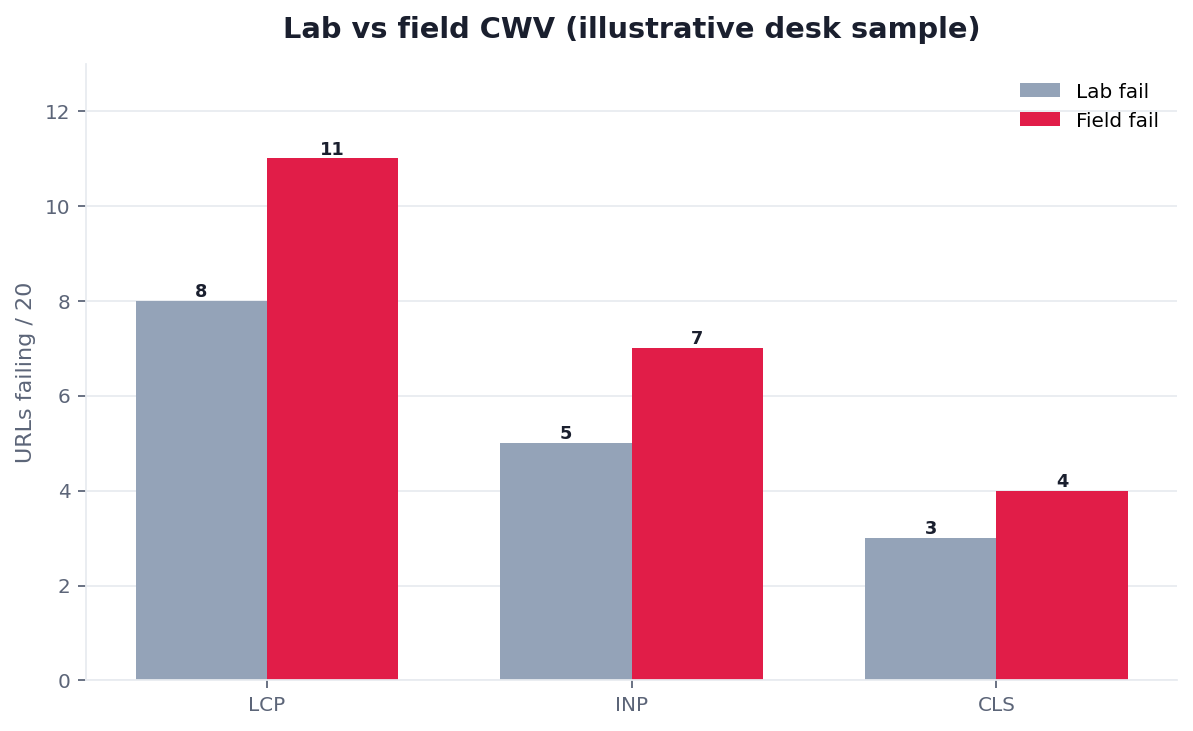
Named first-party case, not a customer win: InfiniSynapse’s own /en/tool/ catalog (76 tool pages). Desk subset n=20 English URLs, lab run 2026-08-11, last verified 2026-08-18, next public re-run 2026-08-25. Marker DESK-CWV-20260818A. Download desk-field-vs-lab-n20.csv and the three-URL edit log desk-before-after-n3.csv.
The bars above are that series — not a customer percentage and not a Google score. A fail is a miss of the web.dev good band.
| Vital (fail = miss good band) | Lab fail / 20 | Field fail / 19* |
|---|---|---|
| LCP | 8 | 11 |
| INP | 5 | 7 |
| CLS | 3 | 4 |
*One URL (sitemap-for-seo) had no field window. We counted it as “not enough samples,” not as a field pass.
| Metric | Desk result | Method |
|---|---|---|
| Sample | 20 / 76 /en/tool/ pages | Same hostname, English locale |
| Median lab wall time | 18 s | Paste URL → speed module |
| URLs with field window | 19 / 20 | CrUX-style row present |
| Lab LCP median | 2.32 s | Named LCP element on Moto G Power / Slow 4G |
| Field LCP worse than lab | 18 / 19 | Same URL, same day |
| Vanity 100 treated as a pass | 0 / 20 | We do not file a lab cocktail as done |
Judging rules. Lab fail is LCP > 2.5 s, INP > 200 ms, or CLS > 0.1 on that synthetic run. Field fail uses the same bands on the 75th-percentile row. Empty field is “not enough samples.” We do not invent a customer lift from one edit week. Those rows are what a Monday sequence on a Core Web Vitals Checker can prove without claiming Search Console. Cite the CSV before you treat any other Core Web Vitals Checker as a rank forecast.
Three named edits: before and after
Desk edits on our own pages, not a client case study. Same paste box. Same bands.
| URL | Phase | Lab LCP | Lab INP | Lab CLS | Field LCP | Field INP | Field CLS | Named edit |
|---|---|---|---|---|---|---|---|---|
/en/tool/best-free-seo-tools | 2026-08-04 | 4.18 s | 268 ms | 0.19 | 4.62 s | 310 ms | 0.21 | Uncompressed hero PNG |
/en/tool/best-free-seo-tools | 2026-08-11 | 2.08 s | 186 ms | 0.05 | 3.14 s | 240 ms | 0.08 | Compress + width/height |
/en/tool/technical-seo-tools | 2026-08-04 | 3.86 s | 224 ms | 0.18 | 4.24 s | 258 ms | 0.20 | Late webfont swap |
/en/tool/technical-seo-tools | 2026-08-11 | 2.16 s | 178 ms | 0.05 | 2.74 s | 198 ms | 0.06 | font-display + fallback |
/en/tool/ai-visibility-tool | 2026-08-04 | 5.04 s | 348 ms | 0.28 | 5.40 s | 390 ms | 0.31 | Lazy-loaded LCP image |
/en/tool/ai-visibility-tool | 2026-08-11 | 2.28 s | 174 ms | 0.06 | 3.22 s | 232 ms | 0.08 | Eager LCP + fetchpriority=high |
Lab crossed the good band on all three URLs. Field LCP stayed above 2.5 s on every after-row. That is the conflict a Core Web Vitals Checker is for: do not close the ticket on a lab green while users still wait. The Almanac’s image-as-LCP share — 76% of mobile pages, 85.3% of desktop — is why the first named edit is usually the hero, not the title tag.
Key definition, applied
The unit of work is one URL’s vitals. Not a domain average you cannot assign. Not a marketing badge. You paste the URL, request field rows when they exist, run a lab pass, and name the element or handler. Software can collect the timings. A person still has to change the hero, the font, or the click handler. Write the findings as vital, source, light, and next edit. If you cannot name the edit, the Core Web Vitals Checker is not finished.
Field versus lab, on purpose
“What users felt” is a different question from “what this synthetic run felt.” Use field first when a CrUX-style row exists. Use lab when the URL is new, thin on traffic, or you need a reproduceable run after an edit. The free-stack frame around this vitals job lives in best free SEO tools. A Core Web Vitals Checker that averages the two into one number is hiding the conflict.
We run a Core Web Vitals Checker on URLs we paste into the web form. What follows is from lab-versus-field vitals runs, not from a rank forecast.
Signals you can read from one URL
Walk the signals in this order so paint and input failures surface before polish. A Core Web Vitals Checker that opens on title length and hides a 4.2s LCP is entertaining you.
| Order | Signal | Pass when | Fail when |
|---|---|---|---|
| 1 | LCP | Largest paint in the good band, element named | Late hero, late webfont, or an element you cannot point at |
| 2 | INP | Next paint after input in the good band | Click or tap that stalls the main thread |
| 3 | CLS | Layout shift in the good band | Images, ads, or fonts that shove content |
| 4 | Field row | Enough real-user samples to show a window | Empty field treated as a pass |
| 5 | Lab row | Repeatable run after you name the edit | A 100 that disagrees with field and gets filed as “done” |
Largest Contentful Paint
web.dev’s Core Web Vitals is the definition set a checker should print: LCP, INP, and CLS, with good / needs-improvement / poor bands. The Largest Contentful Paint specification is why “the hero image” is a guess until you name the element the browser actually painted.
Google’s Core Web Vitals in Search page is the ranking-adjacent primer: these timings are page-experience signals, not a secret score. A Core Web Vitals Checker should show the LCP element, the time, and whether the row is field or lab. A 200 status with a four-second hero is still a miss.
Interaction to Next Paint
INP replaced FID as the interaction vital in March 2024. It asks how long the page takes to paint the next frame after a click, tap, or key. A lab run that never clicks will look fine. A field row that includes the menu tap will not. Name the handler. Split long tasks. Do not “optimize INP” by deleting the button. web.dev’s INP article is the public method.
A Core Web Vitals Checker that only screenshots Lighthouse and never mentions INP is a year late. Print the interaction if the lab tool recorded one. If it did not, say so. An empty INP is not a green.
Cumulative Layout Shift
CLS is unexpected movement. Images without dimensions, late ads, and webfonts that swap late are the usual reds. Reserve space. Load the font with a fallback that does not shove the heading. A shift the user caused — expanding an accordion they clicked — is not the same as a hero that jumps after paint.
Wikipedia’s Core Web Vitals entry and web performance overview are the wider frame: latency, render, and interaction are different costs. A Core Web Vitals Checker should keep CLS on its own row. Do not bury a 0.28 shift under a green LCP.
Field window versus lab score
Chrome’s Lighthouse performance scoring explains why a lab 100 is a weighted cocktail, not a vital. Chromium’s design documents are the engineering backdrop for how the browser measures paint and input. The Chrome UX Report is the field window a Core Web Vitals Checker should request, not invent. Use lab to reproduce. Use field to decide whether users still feel the miss.
A Core Web Vitals Checker that files Lighthouse and calls the URL healthy while field LCP is poor is doing half the job. Show both rows. If field is missing, say “not enough samples,” not “pass.”
After you change the hero, the font, or the handler, paste the same URL into the free page check and read LCP, INP, and CLS again against the live response.
How a paste-URL check should work
A finished Core Web Vitals Checker is a punch list for one URL, not a screenshot of a 100. Sort by light. Fix reds before ambers. Leave greens alone.
What you paste
Paste the exact URL whose LCP, INP, and CLS you will read: scheme, host, path, and query if needed. Do not paste a homepage and hope the vitals module invents the article path. Do not strip parameters if the parameters change the template. The Core Web Vitals Checker should not “helpfully” merge field and lab into one badge.
If you are choosing whether a free speed module is enough or you still need a crawl seat, that is a best paid SEO tools question. The vital rules should stay the same. Only the place you paste should change.
What the checker requests
Request the URL. Collect field rows when a public window exists. Run a lab pass with a named device and network profile. Identify the LCP element. Record INP if an interaction was measured. Record CLS and the shifting nodes if the tool exposes them. That is the whole speed module. A Core Web Vitals Checker that also dumps a keyword cloud is mixing jobs.
We do not claim a Google page-experience API. We report field rows we can fetch and lab timings we can rerun. If Search Console later disagrees on the URL group, believe Search Console for “what Google grouped” and believe a Core Web Vitals Checker for “what this URL did on this run.”
What you do with the lights
| Light | Meaning | Typical action |
|---|---|---|
| Green | Vital passed for that source | Do not reopen the file for this row |
| Amber | Weak or borderline | Fix after the reds — late font, modest shift |
| Red | Poor band or unnamed element | Fix before you edit copy |
Treat any single number as a qualitative estimate. If the report cannot name the element, you are buying a vibe. A Core Web Vitals Checker that files a PDF and never changes the hero is theatre. Demand the named node before you keep the Core Web Vitals Checker tab open.
Independent reviews and media frames
AgentSpot lists InfiniSynapse as a data-analysis agent — a directory mention of the company, not a speed-module award. Gartner Peer Insights and G2 SEO tools are where independent reviews of the wider category live; we do not claim a badge. Formal author identity is the public GitHub and company LinkedIn work above — not a purchased plaque. None of those surfaces sell a Core Web Vitals Checker as a vanity 100.
Adjacent work after the speed pass
The three vitals are the core. Two adjacent jobs sit next to them. They are not substitutes.
When hrefs are the next question
Once LCP, INP, and CLS are green, a footer 404 can still waste the visit. That pass is a dead link checker. If you only needed to know whether the page is slow, stop at the Core Web Vitals Checker. If you needed a page you would ship, keep going.
A fast hero and a dead citation are different tickets. Do not merge them into one “tech score.”
When you need a suite, not one URL
One paste tells you about one address. If you need a backlink index or a keyword-difficulty database, that is still a best paid SEO tools buy. A Core Web Vitals Checker does not become Ahrefs because you are bored. For the free-stack frame, stay on best free SEO tools.
Run the free page check on the URL you will fix today. Then open a dead-link or sample pass only after LCP, INP, and CLS are named.
Implementation order
Use this sequence on every address so a Core Web Vitals Checker stays a speed module.
- Paste the exact URL. Confirm scheme and host.
- Read the field row if it exists. Do not invent a pass when samples are missing.
- Run lab. Name the LCP element.
- Read INP and CLS. Name the handler or the shifting node.
- Assign every red. Edit. Re-paste. Compare the same three vitals.
- Keep field and lab as two rows after the edit. Do not average them.
If step 5 does not change the paint, you ran a report, not a check. A Core Web Vitals Checker that skips the field row will file a lab 100 you cannot defend. Keep the punch list next to the tab. Close the tab only when the reds are gone or dated.
Failure modes
These are speed failures, not scoring-theater failures.
- Lab 100, field poor. A synthetic run on a fast profile is not what users felt. A Core Web Vitals Checker that files the 100 and closes the ticket will ship the same late hero. Believe field when it exists.
- Unnamed LCP element. “Optimize images” is not an edit. Name the node. Change that node. Re-measure. A Core Web Vitals Checker that cannot point at the paint is a screenshot.
- Empty field treated as green. New URLs and thin URLs have no window. Say “not enough samples.” Run lab. Do not claim a pass you cannot see. That is the third failure a Core Web Vitals Checker should print in plain type.
None of these are “the model was unreliable.” They are timing failures. Fix the paint or the handler.
Inspect the complete Core Web Vitals Checker
Paste a sanitized URL into the InfiniSynapse SEO Health Checker so every title, mention, citation, and on-page layer can be reviewed together. Then validate the findings on the live page.
Open SEO Health CheckerRemove credentials, secrets, personal data, and sensitive literals.Frequently Asked Questions
Is a Lighthouse 100 a pass?
Bottom line: No. A 100 is a weighted lab cocktail. Field LCP, INP, or CLS can still sit in the poor band. Keep the rows separate and edit the red vital. A Core Web Vitals Checker that files the 100 is half done.
Which vital should I fix first?
Bottom line: Fix the red that users feel on this URL. Late LCP on the hero usually comes first because it blocks the first read. Then INP on the main control. Then CLS on the shifting node. Do not start with a score you cannot assign. That order is the job of a Core Web Vitals Checker.
What if field data is missing?
Bottom line: Say so. Run lab. Name the element. Re-run after the edit. Do not treat an empty CrUX-style window as a green. A new URL has no field row until people use it. A Core Web Vitals Checker that hides the empty window is lying by omission.
Does this replace PageSpeed Insights?
Bottom line: No. PageSpeed Insights is a lab-plus-field surface you can still open. A Core Web Vitals Checker on this page is the speed module next to hrefs and on-page lights, so you fix one URL without leaving the paste box.
Do I need a paid suite to read vitals?
Bottom line: Not first. Finish the URL you will edit today with field and lab rows. Buy a suite when you need a crawl index or a backlink graph. Speed on one URL is not that purchase.
Conclusion
A Core Web Vitals Checker is a field-versus-lab pass for one URL. Read LCP, INP, and CLS. Name the element. Believe the reds. Ignore a decorative 100. Edit the paint before you polish the copy. Start with a free page check. For the free-stack frame around the same vitals pass, stay on best free SEO tools.
The desk packet stays public so the next edit week can be cited. It is still first-party, one hostname, not a third-party award. Re-run the same three URLs before you shop another Core Web Vitals Checker.
Sources
- web.dev — Core Web Vitals · INP · Largest Contentful Paint. Retrieved 2026-08-18.
- Google Search — Core Web Vitals · Chrome UX Report · Lighthouse performance scoring.
- HTTP Archive Web Almanac 2025 — Performance (48% mobile / 56% desktop good CWV; 62% mobile / 74% desktop good LCP).
- Chromium design documents · Wikipedia — Core Web Vitals · Wikipedia — web performance · PageSpeed Insights.
- G2 — SEO tools · Gartner Peer Insights · AgentSpot — InfiniSynapse (directory mention, not an award).
- InfiniSynapse desk — n=20 field-versus-lab packet and CSV · before/after n=3 (
DESK-CWV-20260818A).
Reviewer: InfiniSynapse Data Team. Published 2026-08-16. Updated 2026-08-18.
William Zhu · Cofounder, InfiniSynapse · GitHub @allwefantasy
Desk-validated SEO Health methods. Corrections: zhuhl@infinisynapse.com · corrections policy.