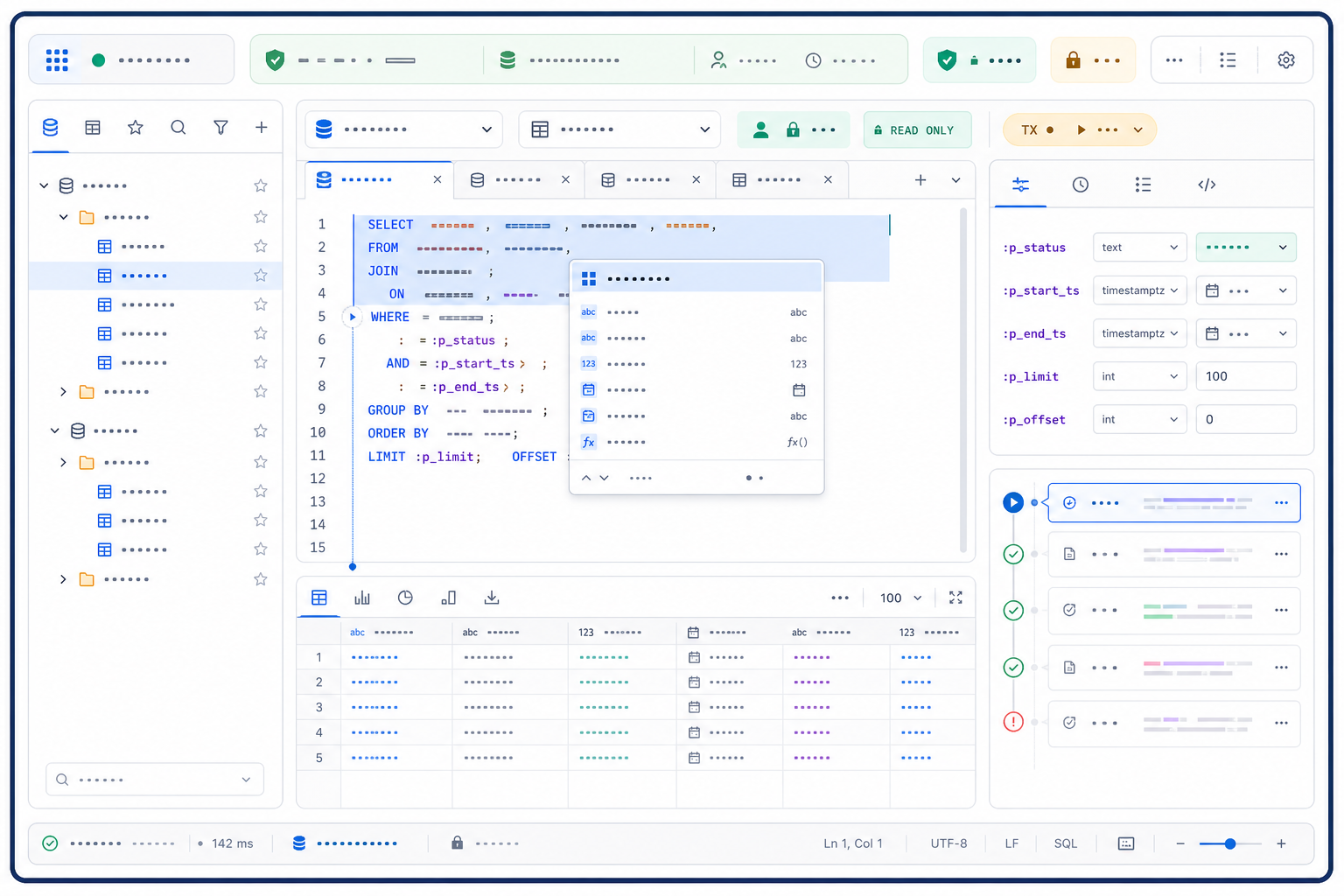
What is a SQL editor?
A SQL editor is a purpose-built workspace for writing, navigating, validating, and often executing SQL against a declared database context. Unlike a plain text box, a useful editor knows—or explicitly asks for—the engine, database, schema, role, and session behind the script. It helps the user identify the exact statement that will run, supply typed parameters, inspect results and errors, and recover the evidence later.
The best SQL editor is not the one with the longest feature list. It is the one that reduces ambiguity at the point where a human changes text into a database action. For a learner, that may mean clear diagnostics and an isolated practice database. For an analyst, it may mean reliable catalog completion and reproducible result tabs. For an engineer or administrator, connection identity, transaction control, query history, version control, and least-privilege execution may matter more than visual polish.
Separate a SQL editor from compilers, clients, IDEs, and playgrounds
Search results use “SQL editor” for several overlapping products. The label describes the authoring surface, not necessarily the execution architecture. A browser editor may be only a text component, may run an embedded database, or may send code to a remote service. A desktop client may combine an editor with a database browser, connection manager, import tool, and administration console. A database IDE may add project indexing, refactoring, tests, and source-control integration.
| Term | Primary job | Usually knows | Do not assume |
|---|---|---|---|
| SQL editor | Author, navigate, inspect, and sometimes execute SQL | Syntax, statement boundaries, optional catalog context | That it runs SQL or connects directly to a database |
| Online SQL compiler | Parse or execute a reproducible example with little setup | A declared or default sandbox engine | Production catalog, data, privileges, or performance |
| SQL client | Connect to databases and exchange commands and results | Drivers, credentials, sessions, server capabilities | Advanced editing, refactoring, or project semantics |
| Database IDE | Develop and maintain database code as a project | Files, symbols, dependencies, inspections, source control | That every operational or administrative task is covered |
| SQL playground | Learn, experiment, or share a disposable example | A small preset or user-created dataset | Persistent work, private data approval, or target fidelity |
A product can occupy several rows. Evaluate the mode you will actually use: local file editing, browser-only drafting, an attached query console, read-only analytics, migration development, or privileged maintenance. Feature claims that are true in one mode may be false in another.
Treat schema-aware completion as evidence with a freshness date
Autocomplete becomes genuinely useful when it is tied to a known catalog. It can suggest tables, columns, functions, types, aliases, join paths, and qualified identifiers; it can also warn about unresolved or ambiguous references before execution. But completion is a cached interpretation, not the database itself. A renamed column, changed search path, revoked privilege, newly added view, or switched branch can make a confident suggestion stale.
Identify the catalog, schema, object type, and data type behind a candidate. Put local snippets, keywords, and live objects in distinguishable groups.
Provide an obvious refresh action and show when introspection last succeeded. Failed refreshes should not silently preserve old certainty.
Completion inside CTEs, subqueries, correlated scopes, and multi-statement scripts should respect the actual visible symbols.
Syntax and local symbol help may continue without a connection, but database-dependent validation should be labeled unavailable rather than passed.
A schema explorer and an editor should reinforce each other without becoming the same tool. Dragging or inserting a qualified object name can reduce typing mistakes; jumping from a symbol to object definition can accelerate review. The editor should still preserve text as the durable artifact, while the browser remains a view of the catalog. A future database-browser guide in this cluster will cover object exploration and data inspection in depth.
Preview the exact statement or selection before execution
A multi-statement file may contain setup, diagnostics, destructive maintenance, temporary objects, and final queries. “Run” is therefore incomplete unless the editor reveals what the command means at the current cursor and selection. Official DBeaver documentation distinguishes executing the statement under the cursor or selected text from executing an entire script, and warns that parallel or massive script execution can create load or deadlock problems. DataGrip likewise provides a statement chooser when multiple statements could be run. These are not cosmetic features; they are safeguards against scope ambiguity.
| Execution action | Required preview | Typical risk | Safer default |
|---|---|---|---|
| Current statement | Parsed start and end, including comments and delimiter | Editor chooses a neighboring statement unexpectedly | Highlight the resolved range before submission |
| Selected text | Exact bytes or characters submitted and parameter set | Partial statement, missing CTE, or unintended selection | Parse selection and show a confirmation on writes |
| Entire script | Statement count, order, delimiters, transaction policy | Unexpected DDL/DML, partial failure, load, or locks | Require deliberate action and display a script manifest |
| Explain or estimate | Whether the engine may execute the query and collect runtime data | An “analyze” variant causes real work or side effects | Separate plan-only from run-and-measure actions |
Record the selected range with the result. If line numbers shift after editing, a line reference alone is not enough; store a statement fingerprint, normalized text or immutable run snapshot, dialect, parameters, and timestamp. That evidence lets another reviewer answer “What exactly produced this grid?” without trusting the current tab.
Keep query structure separate from parameter values
A SQL editor often sits between exploratory literals and production application code. That makes parameter handling a first-class requirement. A useful parameter panel shows name or position, expected type, entered type, representative value, nullability, binding style, and whether substitution happens in the editor, driver, or server. Replacing every placeholder with a quoted string may make a demonstration run, but it can hide type coercion, plan selection, time-zone, collation, array, or null defects.
-- target: PostgreSQL; expected grain: one row per customer
SELECT c.customer_id,
       SUM(o.net_amount) AS revenue
FROM analytics.customers c
JOIN analytics.orders o
  ON o.customer_id = c.customer_id
WHERE o.ordered_at >= :p_start_ts
  AND o.ordered_at <  :p_end_ts
  AND o.status = :p_status
GROUP BY c.customer_id
ORDER BY revenue DESC
LIMIT :p_limit;| Parameter | Declared type | Test values | Review condition |
|---|---|---|---|
:p_start_ts | Timestamp with time zone | Boundary instant, daylight-saving transition where relevant | Inclusive lower bound is intentional |
:p_end_ts | Timestamp with time zone | Next period boundary, equal-to-start invalid case | Exclusive upper bound prevents double counting |
:p_status | Enum or constrained text | Known valid value, unknown value, different case | Value is bound, not concatenated into SQL |
:p_limit | Positive integer | 1, typical page size, maximum allowed, zero, negative | Editor and server enforce an approved range |
OWASP recommends prepared statements with parameterized queries so the database can distinguish code from data. It also notes that table names, column names, and sort directions usually cannot be handled as ordinary bind values; those choices need allow-list validation or query redesign. An editor can encourage the right representation, but server-side binding remains the decisive control for application execution.
Keep files, tabs, connections, and sessions conceptually separate
A tab can represent a saved file, an unsaved scratch buffer, a query console attached to a live session, or a generated result. Those objects have different persistence and risk. Closing a file tab may lose only local text; closing a console may release temporary tables, settings, locks, or an uncommitted transaction. Reopening a tab may reconnect with a different identity or create a new server session even when the title looks unchanged.
- File identity: show the actual path, dirty state, encoding, line ending, and source-control status.
- Connection identity: show the saved connection definition, driver, network destination, and authentication mode.
- Session identity: show a server session identifier where available, creation time, role, current database, and transaction state.
- Result identity: bind every result tab to an immutable run record rather than whatever text is currently visible.
Evaluate recovery explicitly. Crash the editor with an unsaved scratch file, restore the workspace, rotate credentials, change a schema, and reconnect. A trustworthy recovery flow restores text but does not silently rerun statements, reopen privileged sessions, or present stale results as current.
Expose autocommit and transaction state before the first write
Transaction behavior is part of editor semantics. In autocommit mode, a write may become durable as soon as the statement succeeds. In manual mode, changes can remain uncommitted, hold locks, affect later statements in the same session, and disappear on rollback or disconnect. DDL behavior, implicit commits, savepoints, and error handling differ by engine and driver. A small “TX” icon without an accessible label is not enough.
| State | Editor must reveal | Safe interaction |
|---|---|---|
| Autocommit on | Each successful write may be durable immediately | Warn before write-capable execution in sensitive environments |
| Transaction open | Start time, isolation, changed-row estimate, locks if visible | Persistent commit and rollback controls with clear scope |
| Transaction failed | Whether later statements are blocked until rollback | Do not let secondary errors obscure the first failure |
| Savepoint active | Savepoint name, creation point, and rollback boundary | Preview which changes survive a partial rollback |
| Disconnect pending | Uncommitted work and engine-specific disconnect behavior | Require an explicit commit, rollback, or cancel choice |
Test transaction controls with a disposable database. Begin a transaction, update a known row, open a second session, observe visibility and locks, trigger an error, use a savepoint, close the tab, and reconnect. Document actual behavior for each supported engine instead of generalizing from one driver.
Turn query history into evidence, not a privacy liability
History can rescue unsaved work, support incident reconstruction, compare revisions, and reveal which parameter set produced a result. DBeaver documents a query manager that records executed SQL and stores history locally by default; DataGrip documents history for statements run in a query console. The existence of history is useful, but the design questions are where it is stored, what it captures, how long it persists, who can read it, and whether secrets or sensitive literals enter it.
Store statement snapshot or hash, parameters with approved redaction, engine, destination, role, session, start and end times, status, rows, and result reference.
Do not collect credentials, tokens, private keys, unrestricted result cells, or business-sensitive literals merely because they appeared in a tab.
Provide documented location, encryption, retention period, export, deletion, and administrator policy. Private browsing or closing a tab is not a deletion guarantee.
Link a run to the exact editor snapshot and optionally its parent revision so reviewers can see what changed between failed and successful attempts.
History is not source control. It is usually workstation- or account-specific, may be pruned, may omit unexecuted drafts, and may not support review. Promote reusable SQL into files with ownership, tests, review, and version history; keep query history as operational evidence governed by a separate retention policy.
Bind every result grid to the query that produced it
A result grid is persuasive even when it is stale, truncated, incorrectly typed, or produced by another revision. The editor should make the relationship visible: run identifier, statement snapshot, parameters, destination, role, start time, duration, row count, fetch limit, truncation status, warnings, and transaction. Editing the query after execution must not make the old grid look current.
| Review layer | Questions | Failure the grid can hide |
|---|---|---|
| Shape | Are column names, order, types, nullability, and row grain expected? | Duplicate entity rows or silent type coercion |
| Completeness | Was the result limited, paged, sampled, timed out, or partially fetched? | Displayed 500 rows mistaken for total result |
| Meaning | Do totals reconcile, exclusions match definitions, and boundaries behave? | Plausible numbers generated from wrong business logic |
| Ordering | Is display order specified and deterministic when it matters? | Visual comparison changes between identical runs |
| Export | Which rows, encoding, delimiter, time zone, locale, and null representation? | A partial or transformed display exported as raw truth |
Result editing requires another boundary. A grid that permits direct cell updates is no longer only a viewer; it is a data-changing interface. It should reveal the generated key predicate, detect missing or non-unique keys, preview changed rows, honor transactions, and provide conflict handling. Disable editing by default for analytical and production connections unless a governed workflow explicitly needs it.
Preserve the original database error before explaining it
An editor may detect lexical, syntax, name-resolution, type, style, and runtime problems. These diagnostics come from different authorities. A local parser can underline an unexpected token without a connection. Catalog analysis can flag a missing column only if metadata and scope are current. The database server remains the authority for its runtime error, code, position, detail, hint, and transaction effect. AI-generated explanations or rewritten messages can help, but must not replace the original evidence.
- Identify the diagnostic sourceLabel parser, editor inspection, driver, server, policy gateway, or AI explanation.
- Freeze the submitted statementKeep the exact selected text, parameters, dialect, context, and run identifier.
- Map positions carefullyAccount for editor substitutions, line endings, Unicode, generated wrappers, and server byte offsets.
- Separate cause from consequencePreserve the first failure before transaction-aborted or dependency errors cascade.
- Test the proposed fixRerun against controlled inputs and compare result meaning, not only error disappearance.
Cancellation also needs diagnostics. A user pressing Stop may cancel only result fetching while the server continues executing, may send a driver cancellation request, or may close the connection. Test what happens to the transaction, locks, temporary objects, and history. “Canceled” in the UI should describe confirmed server state, not merely a closed spinner.
Use formatting and linting to support review, not simulate correctness
Formatting can expose nesting, join conditions, predicate groups, and repeated expressions. Linting can enforce capitalization, naming, aliasing, layout, or selected structural rules. Neither proves that a query returns the intended entities, applies the right business definition, preserves privacy, or performs acceptably. The editor should show which formatter or linter version ran, which dialect and configuration were used, and which rules were disabled.
- Format the diff deliberately: separate a pure formatting change from a semantic change so reviewers do not search through avoidable noise.
- Pin configuration: project-local rules prevent different workstations from rewriting the same file repeatedly.
- Explain suppressions: every disabled warning should have a narrow scope and reason, not a blanket ignore file.
- Run in review automation: editor feedback is fastest, while CI or another shared check makes the rule reproducible.
For a broader comparison of formatters, linters, parsers, clients, and optimization utilities, use the same-batch SQL tools guide. This SQL editor page focuses on how those checks appear in an authoring workflow rather than cataloging every tool category.
Assume the editor can expose both credentials and data
A connected editor touches more than SQL text. It may store connection profiles, cached metadata, authentication tokens, SSH configuration, query history, result samples, exports, clipboard content, AI prompts, crash reports, telemetry, and extension data. A browser editor may send text or schema context to its own backend or a model provider. A desktop editor may keep local caches on an unmanaged device. Security evaluation must follow every data path, not stop at transport encryption.
| Asset | Possible exposure | Control to verify |
|---|---|---|
| Credentials and tokens | Saved profile, logs, crash dump, copied connection string | OS keychain or approved vault, short-lived auth, redaction, rotation |
| Schema metadata | Table and column names reveal internal systems or sensitive domains | Approved introspection scope, cache encryption, deletion, model-use policy |
| SQL text and literals | History, sync, telemetry, extensions, shared links, AI assistance | Collection inventory, opt-out, retention, tenant isolation, redaction |
| Result data | Grid cache, export, clipboard, screenshot, local backup | Row/column policy, masking, export controls, secure storage, cleanup |
| Extensions | Read files, editor buffers, results, network, or credentials | Allow-list, permissions, signatures, update channel, vendor review |
Least privilege remains the foundation. Use a task-specific identity, limit accessible schemas and rows, separate read from write workflows, impose statement timeouts and resource controls, and require stronger approval for production or administrative actions. A client-side read-only toggle is helpful feedback but not an authorization boundary unless the server role itself lacks write permission.
Evaluate the editor with keyboard, zoom, and assistive technology
SQL editing is keyboard-intensive, but “has shortcuts” does not equal accessible. Users need a predictable way to enter and leave the code surface, reach connection and transaction controls, inspect diagnostics, review autocomplete, switch results, and cancel execution without a mouse. Focus must remain visible. Shortcut conflicts with browsers, operating systems, screen readers, and international input methods need documented alternatives.
Complete a full task—open file, choose context, edit, inspect completion, run selection, review result, save—without trapping focus.
Errors need text, severity, source, location, and navigation; underline color or gutter icon alone is insufficient.
At 200% zoom, context, code, parameters, and results should remain reachable without root-page horizontal loss.
Production, read-only, transaction failed, modified file, warning, and success require labels or shapes in addition to color.
Also test large files and dense result grids. Virtualized rendering can improve performance but may expose only visible rows to assistive technology. Column headers, sorting, selection, copy behavior, truncation, and row position need understandable semantics. Accessibility is part of operational accuracy because an inaccessible state indicator or unreachable cancel button can cause real database harm.
Use a nine-step SQL editor workflow from question to evidence
- Define the intended resultWrite the business question, output grain, required columns, definitions, exclusions, time boundary, and acceptable latency before SQL.
- Declare the target contextRecord engine and version, environment, account or host, database, schema, role, session settings, and transaction policy.
- Confirm catalog freshnessRefresh metadata, resolve unqualified names, inspect object definitions, and record what the editor cannot validate offline.
- Draft with explicit grainBuild from a small verified relation, qualify ambiguous references, name CTE purposes, and make row multiplication visible.
- Separate and type parametersKeep data outside query structure, define types and bounds, and include normal, null, empty, boundary, and invalid cases.
- Preview the execution unitHighlight the parsed statement or exact selection and recheck destination, identity, transaction, write capability, and limits.
- Run the smallest useful testUse synthetic or approved representative data, conservative limits, timeout, and read-only access before increasing scope.
- Validate results and behaviorCheck shape, grain, totals, duplicates, nulls, boundaries, ordering, exclusions, cost, plan, locks, and cancellation—not just successful completion.
- Promote with evidenceSave SQL as a reviewed file, attach tests and run evidence, declare limitations, and revalidate in the target application or deployment path.
Choose browser, desktop, IDE, or embedded editing by risk and workflow
“Online SQL editor” is attractive because it removes installation, but deployment convenience is only one criterion. A browser editor can be excellent for training, disposable examples, or organization-hosted analytics. A desktop client can support native drivers, local files, multiple connections, and controlled network paths. An IDE extension can keep SQL beside application code. An embedded editor can give business users a constrained query surface inside an approved product. Select the boundary that matches the task and data classification.
| Model | Strong fit | Primary concern | Proof to request |
|---|---|---|---|
| Public browser editor | Synthetic examples, learning, syntax experiments | Where text, schema, data, history, and telemetry go | Network trace, privacy terms, retention, engine disclosure |
| Organization-hosted web editor | Central access, governed identity, shared analytics | Tenant isolation, authorization, audit, browser data leakage | Architecture, access tests, logs, policy enforcement |
| Desktop database client | Multiple engines, rich results, local files, advanced sessions | Endpoint security, stored credentials, driver and extension supply chain | Packaging, updates, keychain use, cache paths, permissions |
| IDE integration | Application SQL, migrations, review, tests, project navigation | Database context mixed with broad repository and plugin access | Plugin permissions, project indexing scope, secret handling |
| Embedded domain editor | Constrained self-service querying inside a product | Server authorization cannot rely on client restrictions | Query gateway, allow-list, resource limits, row policies, testing |
Score a SQL editor with evidence from real tasks
Do not score from a marketing page alone. Build a disposable evaluation database with two schemas, overlapping object names, representative types, a view, a routine, constrained columns, enough rows to expose fetch limits, and identities with different permissions. Run the same task packet in every candidate. Weight the categories for your users; the example below is a starting point, not a universal formula.
| Category | Example weight | Evidence task | Reject condition |
|---|---|---|---|
| Context and identity | 15% | Switch environment, schema, role, and session; capture pre-run display | Production or role can be mistaken without opening settings |
| Authoring intelligence | 15% | Complete and navigate CTEs, aliases, routines, and ambiguous names | Stale catalog suggestions appear authoritative |
| Execution safety | 20% | Run cursor, selection, script, write, explain, timeout, cancel | Exact scope, destination, or write capability is hidden |
| Transactions and sessions | 10% | Autocommit, rollback, savepoint, failure, close, reconnect | Uncommitted work can disappear or commit without clear choice |
| Results and evidence | 15% | Run revisions, fetch limits, types, export, history, recovery | A result cannot be tied to immutable input and context |
| Security and privacy | 15% | Inspect storage, network, secrets, history, AI, extensions, deletion | Data path or credential handling is undisclosed or unapproved |
| Accessibility and resilience | 10% | Keyboard, screen reader, 200% zoom, large file, network loss, crash | Critical state or cancel action is inaccessible |
Keep raw observations beside scores. “4/5 autocomplete” is not auditable; “resolved aliases inside two nested CTEs, failed to refresh a renamed column, and showed the last successful introspection time” is. A weighted total can shortlist products, but any reject condition should override the average.
Put AI-generated SQL through the same editor controls
Natural-language-to-SQL can accelerate a first draft, especially when the request, schema, and dialect are explicit. It does not remove the editor workflow. Generated SQL may refer to plausible but nonexistent columns, select the wrong join path, change row grain, mishandle time boundaries, ignore permissions, produce expensive plans, or encode an unstated business assumption. The editor is where those assumptions should become visible and testable.
| AI handoff artifact | Editor review | Required evidence |
|---|---|---|
| Question and success criterion | Write expected grain, dimensions, measures, exclusions, and boundary rules as comments or test notes | A human can state what a correct result means |
| Schema context | Resolve every object and column against current approved metadata | No unresolved or silently substituted identifiers |
| Candidate SQL | Inspect joins, filters, grouping, windows, null rules, parameters, and statement scope | Every nontrivial choice is explained or tested |
| Test packet | Run positive, negative, empty, duplicate, null, and boundary fixtures | Expected rows or invariants fail when logic is wrong |
| Promotion record | Save prompt summary, model/tool date, revisions, reviewer, result checks, plan and limitations | The final query is reviewable without rerunning the model |
Generate a candidate query, then review it in your SQL editor
Prepare a precise analytical question, choose a built-in synthetic schema, and specify the expected result. InfiniSynapse NL2SQL Query Tester generates a candidate SQL example in the browser. Copy the reviewed candidate into an editor with a declared dialect and safe test context; then resolve objects, type parameters, preview the statement, run representative fixtures, and validate the result before any real-data use.
Open NL2SQL Query Tester Use synthetic or approved schema context. Never paste credentials, secrets, or unapproved production data.Avoid the SQL editor mistakes that look harmless
| Mistake | Why it fails | Better practice |
|---|---|---|
| Trusting the tab title as destination | Files, connections, and sessions can be rebound or duplicated | Verify environment, host/account, database, schema, role, and session at run time |
| Pressing Run with no scope preview | Cursor rules, selections, delimiters, and script modes differ | Highlight the parsed unit and require deliberate whole-script execution |
| Using a display limit as resource protection | The server may compute or transmit far more than the grid displays | Use query predicates, approved row limits, timeout, workload controls, and plan review |
| Pasting secrets into a scratch tab | History, recovery, sync, telemetry, plugins, or backups may persist them | Use approved secret injection and redacted parameters; rotate any exposed credential |
| Assuming green syntax means correct SQL | Parser success says nothing about business meaning, authorization, or performance | Validate catalog, representative results, invariants, plan, and target path |
| Treating history as version control | History can be local, incomplete, mutable, private, or pruned | Promote reusable SQL into reviewed, tested, owned files |
| Accepting an AI fix because the error disappeared | The rewrite may change grain, filters, join type, or boundary semantics | Diff the query and rerun falsifiable result tests |
Use this SQL editor checklist before important execution
- The business question, expected row grain, definitions, exclusions, and boundary rules are written down.
- Engine, version, environment, host or account, database, schema, role, session, and transaction mode are visible and correct.
- Catalog metadata was refreshed; every unresolved or ambiguous object is investigated rather than ignored.
- The exact selected statement or script manifest is previewed, including generated wrappers and parameter substitution.
- Parameters have declared types and approved representative values; untrusted input is not concatenated into SQL.
- The identity is least privilege, read-only where possible, and server-enforced rather than only a client toggle.
- Timeout, row and resource limits, write safeguards, autocommit, rollback, and cancellation behavior are understood.
- Synthetic or approved fixtures cover normal, empty, null, duplicate, boundary, contradictory, and invalid cases.
- The result will retain an immutable link to statement, parameters, context, run time, truncation status, and warnings.
- History, cache, clipboard, export, telemetry, extensions, AI processing, retention, and deletion match policy.
- A reviewer can reproduce the test and explain why the result is correct—not merely why the statement ran.
- Reusable SQL will move into source control with ownership, tests, review, limitations, and target-path validation.
Frequently asked questions about SQL editors
It is a purpose-built workspace for writing, navigating, validating, and often executing SQL against a declared database context. A strong editor keeps the engine, database, schema, role, transaction state, statement boundary, parameters, and result relationship visible.
A SQL editor emphasizes sustained authoring, schema intelligence, navigation, history, connection context, transactions, and result review. An online SQL compiler emphasizes zero-install parsing or execution in a browser sandbox. Some products combine both.
Only with explicit controls: least-privilege identity, unmistakable environment context, read-only access where possible, statement preview, row or cost limits, timeout, transaction awareness, and organizational approval. The editor interface alone does not make execution safe.
Yes, when completion shows the catalog and context behind suggestions and refreshes metadata reliably. Treat suggestions as navigation help, not proof that a query is correct, authorized, current, or efficient.
Prefer typed bind parameters or prepared-statement workflows that keep SQL structure separate from data. Record names, types, representative values, and the database or driver binding behavior. Never build executable SQL by concatenating untrusted input.
Yes, but first confirm the question, schema, dialect, assumptions, and expected grain. Review the exact selected statement, test with synthetic or approved data, inspect results and plans, and preserve prompt and revision evidence before promotion.
Primary sources and editorial method
This guide uses primary technical documentation rather than feature-list aggregation. DBeaver’s official SQL Editor, SQL execution, and Query Manager documentation informed the distinctions among editor surfaces, execution scope, results, and history. JetBrains’ official DataGrip documentation for running queries and the code editor informed context resolution, statement selection, query consoles, and transaction controls.
Security guidance follows OWASP’s SQL Injection Prevention Cheat Sheet, especially the separation of code and data through prepared statements and the need for allow-list handling where bind variables do not apply. Product behavior varies by edition, version, driver, engine, deployment, and configuration; all consequential behavior should be tested in the exact mode under evaluation.
The editorial method is evidence-led: define search intent, separate neighboring tool categories, state product boundaries, prefer official references, label examples and limitations, and translate the complete decision workflow into equivalent English and Chinese. This page can improve relevance and usefulness, but it does not guarantee Google indexing, rankings, traffic, query correctness, security, or production performance.