Softr AI: How Its No-Code App Builder Works
By the InfiniSynapse Data Team · Last updated: 2026-09-24 · We build data products and write these notes like a builder posting after a long tool thread—not like a vendor brochure.
Disclosure: InfiniSynapse is not affiliated with Softr. This is a documentation-backed product analysis and reproducible evaluation plan, not a claim that we completed a private-workspace benchmark. Product and pricing details were checked against public Softr pages on 2026-09-24 and can change.
Table of Contents
- TL;DR
- What Is Softr AI?
- How Softr AI Works
- What Softr AI Generates
- Use Cases and Data Sources
- Permissions and Security
- Reproducible Evaluation
- Strengths, Limits, and Alternatives
- Pricing
- FAQ
TL;DR
Direct answer: Softr AI is a no-code business-app builder that turns a plain-English brief into an editable starting app with pages, a database, permissions, and workflows. It is strongest for portals and internal tools where teams value governed components and visual maintenance more than owning a generated codebase.
I reviewed the current Softr homepage, AI App Builder page, and public pricing statements on 2026-09-24. I did not treat directory listings, social posts, or anonymous comments as proof of product behavior.
- Choose Softr AI when a department needs a portal, CRM, tracker, dashboard, or internal workflow without a developer handoff.
- The AI Co-Builder creates a starting structure; visual editing, permission review, data cleanup, and acceptance testing still belong to the app owner.
- Softr says its apps use platform components rather than exporting a generated codebase. That lowers hosting and maintenance work but also changes the escape hatch compared with code-generating tools.
- Connector availability, user groups, SSO, custom code, API calls, and usage limits vary by plan. Recheck the official pricing page before buying.
What Is Softr AI?
Softr AI is Softr's AI-assisted path for building no-code business applications. A user describes an app, and the platform says its Co-Builder can create the interface, database, user roles, business logic, and workflows as a connected starting point. The same app remains editable through Softr's visual controls.
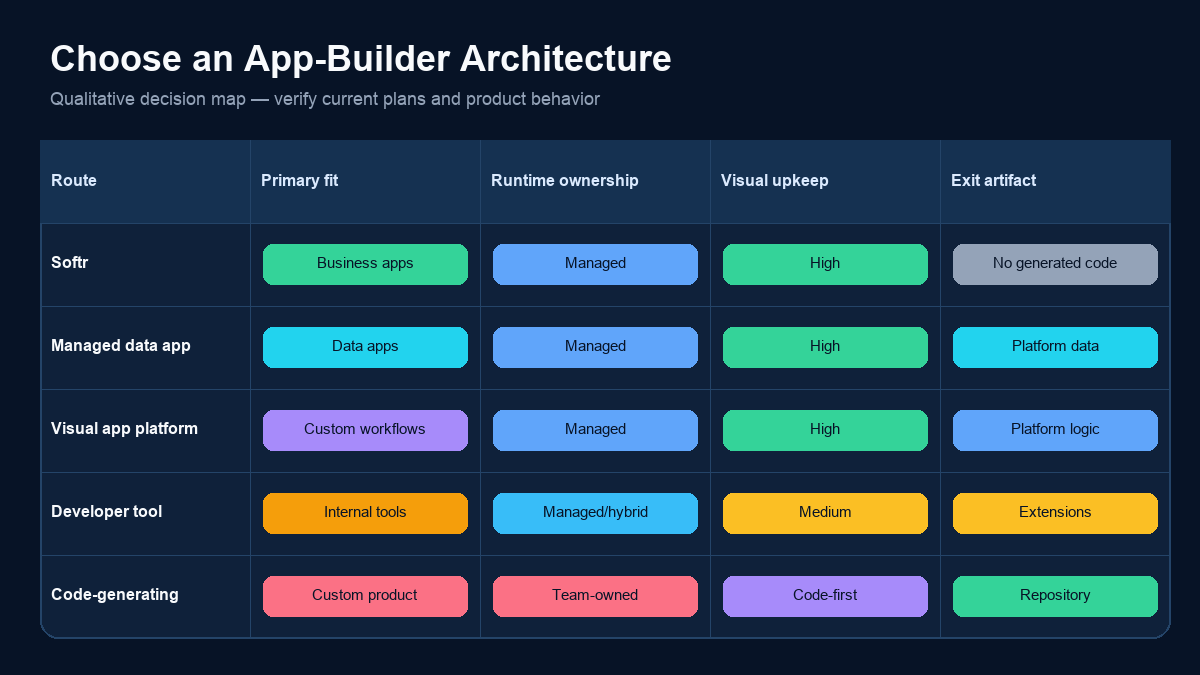
That definition matters because “AI app builder” covers two different architectures. Some tools generate code that the buyer must host, debug, and maintain. Softr says it assembles managed platform components and does not hand over generated code. The choice is therefore not only about prompt quality; it is also about who owns runtime maintenance and how much implementation freedom the team needs.
What Softr AI is designed to build
The official product pages emphasize business operations rather than consumer software: client and partner portals, internal tools, CRMs, inventory systems, intranets, dashboards, reporting apps, and knowledge tools. These are record-centered applications with users, permissions, forms, views, and workflows.
What Softr AI is not
Softr AI is not evidence that an app is production-ready because the first prompt produced polished screens. Data ownership, field definitions, access rules, approval paths, integrations, and recovery behavior still require explicit review. It is also not the same purchasing decision as a code-generating builder when source-code ownership is mandatory.
How Softr AI Works
The useful mental model is “generate, inspect, refine, connect, authorize, then publish.” Prompting is the beginning of the build, not the entire build.
1. Describe the business job
Name the users, records, actions, and restrictions. “Build a portal” is too vague. A stronger brief says that account managers can update only their assigned customers, finance can approve refunds, and clients can view—but not edit—invoice history.
2. Generate the starting app
According to the official AI App Builder page, Softr AI can generate pages, layouts, user flows, a database structure, permissions, and workflows. Treat these as a proposed model. Check names, relationships, required fields, and states before importing live data.
3. Refine with AI or visual controls
Softr describes a dual-mode workflow: continue asking AI for changes or edit the application visually. Lists, grids, charts, calendars, and forms use configurable blocks. This is a practical distinction from prompt-only generation because the operator can inspect and adjust visible configuration.
4. Connect the real data
An app can start with Softr Databases or connect to supported external systems. Data readiness is often the actual bottleneck. Duplicated identifiers, ambiguous status values, and missing ownership fields do not become correct because Softr AI generated a clean interface.
5. Configure users and permissions
Create user groups, decide which pages and actions each group can access, restrict records where required, and preview the app as representative users. Permission acceptance tests should cover both allowed and denied actions.
6. Test and publish
Test forms, record updates, workflows, empty states, validation errors, mobile layouts, invitations, and recovery. Publish only after a second person can follow the workflow without relying on the builder's unstated assumptions.
What Softr AI Generates
The official positioning groups the generated output into three layers. This is a more useful review frame than counting how many screens appear after one prompt.
Interface and user flows
Softr AI proposes pages, layouts, navigation, and flows. The visual result can accelerate a first draft, but the acceptance question is whether each user can complete a real task with clear states, errors, and next actions.
Database structure
Softr says the Co-Builder can create fields, relationships, and database organization. Review grain and ownership before adding records. A “customer” table, for example, may represent an organization, billing account, contact, or workspace; choosing the wrong grain causes permission and reporting errors later.
Permissions and workflows
The product page says Softr AI can generate user actions, permissions, onboarding, and workflows. Generated policy should be treated as a draft. Test every role against an allow/deny matrix, and verify workflow retries, duplicate submissions, and notification recipients.
Use Cases and Data Sources
Softr's public pages emphasize secure portals and internal applications. The best fit is a business process that can be represented as records, roles, forms, views, actions, and workflows.
Strong use cases
- A client portal with account-specific documents and status.
- A partner portal with submissions, approvals, and shared records.
- A lightweight CRM with defined ownership and lifecycle stages.
- An inventory or asset tracker with forms and filtered views.
- An internal dashboard paired with operational update actions.
- A knowledge application with user-specific visibility.
Data connections
As of the review date, Softr's public homepage lists Softr Databases plus Airtable, Notion, Google Sheets, Coda, SmartSuite, Xano, Zoho CRM, REST API, monday.com, Supabase, ClickUp, HubSpot, BigQuery, Microsoft Excel, MySQL, PostgreSQL, SQL Server, MariaDB, Salesforce, and Snowflake across different plans. This is a plan-sensitive list, not a promise that every connector supports every read, write, relationship, or real-time behavior.
For one concrete workflow, our Supabase tools guide explains why a scoped business frontend differs from giving nontechnical staff a developer console. Softr also publishes a dedicated Supabase frontend page.
Integration boundary
The old version of this article made generic API infrastructure the whole topic. The narrower lesson is still useful: when a Softr app calls an external API or starts a long-running job, keep elevated secrets server-side, validate payloads, make retries safe, and expose progress or failure states. The OWASP Top 10 for LLM Applications is relevant when AI agents can choose tools or handle untrusted content.
Permissions and Security
The AI-generated interface is not the security boundary. Authorization must survive a hidden button, a modified request, and direct access to a record URL.
User groups and record restrictions
Softr says it supports user groups, page/block/action visibility, and global data restrictions, with plan-dependent limits. Write an explicit matrix: role, page, record scope, allowed fields, allowed actions, and expected denial behavior.
Authentication and enterprise controls
The public site lists email/password, one-time codes, Google sign-in, magic links, and plan-dependent controls such as two-factor authentication, SAML/OpenID SSO, and SCIM. Confirm exact plan availability and identity-provider requirements before committing.
Claims to verify
Softr publicly states SOC 2 Type II, GDPR readiness, server-side database connections, and audit logging. Security review should still request current reports, subprocessors, retention terms, data residency details, incident procedures, and the exact audit events available to your plan.
Reproducible Evaluation
Do not choose Softr AI from a demo GIF or a feature checklist. Run the same small project through each candidate and preserve the evidence.
Evaluation brief
Build a marketing-operations portal with three roles:
- Marketing staff can edit campaign name, channel, owner, and lifecycle status.
- Finance can view spend and approve budget changes.
- External agencies can see only campaigns assigned to their organization.
Use the same twelve-field campaign dataset, five validation rules, three user groups, and two approval workflows for every tool.
Starting prompt
Build a marketing operations portal with campaign list and detail pages, role-based editing, a budget approval workflow, an audit-friendly change note, and a dashboard filtered to the signed-in user's permitted campaigns.
Evidence to capture
| Dimension | Evidence |
|---|---|
| Generation | Prompt, generated pages, generated schema, omissions |
| Manual correction | Fields, relationships, permissions, and flows changed by a person |
| Data | Import steps, connector limits, refresh behavior, write behavior |
| Authorization | Allowed and denied tests for every user group |
| Workflow | Trigger, retry, duplicate submission, failure and notification behavior |
| Maintenance | How a non-builder changes a field, rule, page, or integration |
| Exit path | Export options, API access, migration work, and retained data |
This protocol is the information-gain asset for the page: another team can reproduce it. We do not publish invented completion times or a winner without preserved runs.
Strengths, Limits, and Alternatives
Where Softr AI is strong
Based on current documentation, Softr AI compresses the path from business brief to a governed, visually editable starting app. Authentication, permissions, data, workflows, and hosting exist inside one managed product. That is useful when the owner is a business-operations team rather than a software engineering team.
Where Softr AI needs scrutiny
- The AI output still needs schema, permission, and workflow review.
- Important connectors and governance controls are plan-dependent.
- Softr says it does not generate a codebase for the buyer to maintain; teams requiring repository ownership should treat that as an architectural trade-off.
- Highly custom interaction, unusual backend logic, or specialized runtime behavior may require a custom block, API, automation platform, or another architecture.
- A managed platform reduces some operations work but creates platform and migration dependency.
Softr AI versus alternative architectures
Glide is another managed data-app route. Bubble emphasizes a broad visual application environment. Retool targets internal software with developer-oriented extensibility. Code-generating tools such as Lovable and Bolt answer a different ownership question because the resulting code and deployment path become part of the buyer's responsibility.
Our AI app builder comparison and vibe coding tools guide cover those architecture choices. Compare them with the same evaluation brief; do not rank products from unlike demos.
Pricing
Softr's public homepage stated the following annual-billing monthly rates on 2026-09-24: Free $0, Basic $19, Pro $99, Business $329, plus custom Enterprise pricing. The same page says plan differences include usage volume, governance depth, connectors, user groups, custom code, external API calls, SSO, and other capabilities.
These values are a dated observation, not a quote. Before purchase, verify the official pricing page, billing interval, app-user definition, usage limits, AI allowances, connector availability, permission features, support, taxes, and overage behavior.
Frequently Asked Questions
What is Softr AI?
Softr AI is an AI-assisted no-code builder for business portals and internal tools. Softr says its Co-Builder can generate pages, a database, permissions, and workflows from a prompt, after which the owner can continue with AI or edit the app visually.
Can Softr AI build a complete app?
It can generate a connected starting app and provide managed components for data, authentication, permissions, workflows, and hosting. “Complete” still requires validated data, reviewed permissions, tested workflows, error handling, and user acceptance.
Does Softr AI require coding?
Softr positions the standard build path as no-code. It also offers integrations and a custom or vibe-coding block for needs outside standard components. Whether coding is required depends on the interaction and backend behavior the app must support.
What data sources work with Softr AI?
Softr lists its native database and multiple external systems, including spreadsheets, work-management tools, Supabase, SQL databases, warehouses, and REST APIs. Availability differs by plan, and teams must verify connector-specific read, write, relationship, refresh, and authentication behavior.
Is Softr AI good for internal tools?
Internal tools and portals are central documented use cases. It is a strong candidate when the workflow maps to records, forms, roles, views, and approvals and the team prefers managed hosting over maintaining a generated codebase.
What are the main Softr AI limitations?
The main decision boundaries are plan-dependent connectors and governance, the need to review generated schema and permissions, limits of standard components for highly custom behavior, and dependence on a managed platform rather than an exported application codebase.
Conclusion
Softr AI is best evaluated as a managed business-app system with an AI-assisted starting point—not as a one-prompt substitute for product ownership. It can remove substantial setup work for portals and internal tools, but the durable value comes from the visual maintenance model, permissions, workflows, and managed runtime.
Keep this URL and its existing redirect history. Judge the product with a fixed brief, explicit access tests, current plan details, and a documented exit path.