What is a database login?
A database login is the authentication exchange that establishes which principal is requesting a session and whether the database service accepts its proof of identity. A complete application connection may also require DNS and TCP reachability, TLS negotiation, database or service selection, role activation, and object permissions. Therefore “login failed” should not be used as a generic label for every connection error.
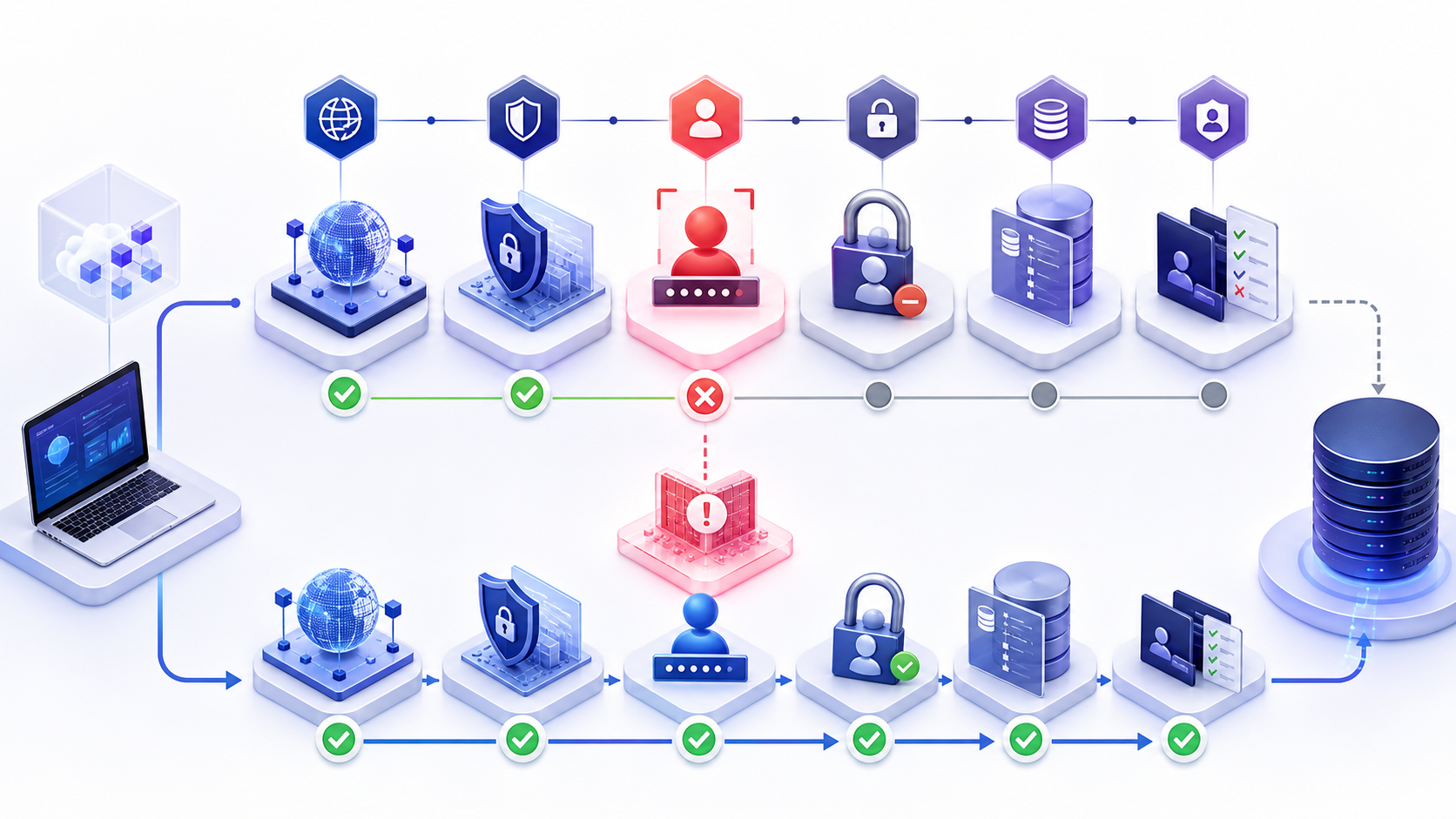
The fastest safe workflow identifies the last stage that succeeded and the first stage that failed. A TCP success followed by an authentication error is very different from a timeout before the server responds. Preserve the exact sanitized error, timestamp, source, driver, and server-side correlation evidence.
Database login stages from endpoint to authorization
Separate the connection into observable stages. Fixing the wrong stage can increase risk without changing the outcome—for example resetting a password when DNS resolves to the wrong environment or granting a role when a certificate is rejected.
| Stage | Typical evidence | Common failure |
|---|---|---|
| Endpoint resolution | Requested host, resolved IP, environment and service name. | Stale DNS, split DNS, wrong cluster, reader/writer mismatch. |
| TCP reachability | Source, destination port, route and connection result. | Timeout, refusal, policy block, listener down. |
| TLS negotiation | Protocol, certificate chain, hostname and trust result. | Untrusted CA, hostname mismatch, expired certificate, protocol mismatch. |
| Authentication | Principal, method, account state and sanitized server error. | Wrong or expired secret, disabled or locked account, unsupported method. |
| Database selection | Requested catalog/service and successful mapping. | Database missing, offline, renamed, inaccessible or wrong service name. |
| Authorization | Effective roles and permitted operation. | Login succeeds but CONNECT, USE, schema or object permission fails. |
Does an open database port mean login should work?
No. An open TCP port proves only that a connection was accepted at the network layer. The endpoint can still reject the TLS version, certificate trust, authentication mechanism, username, password, token audience, account state, database selection, or session policy. Use port evidence to narrow the search, not to declare the database healthy.
Why driver error wording can mislead database login troubleshooting
Drivers, frameworks and connection pools often wrap a server error in generic exceptions such as login failed, connection failed, or timeout. Capture the deepest available cause, vendor error code or SQLSTATE, server log correlation ID, and stage timing. Redact secrets and sensitive topology, but do not reduce the record to a screenshot with no command, configuration, source, or timestamp.
Classify database login failure before changing credentials
Invalid password versus expired credential versus locked account
These conditions may deliberately share similar client messages to reduce information disclosure. Use authorized server-side identity or audit evidence to distinguish them. Confirm the exact principal, identity source, last rotation, expiry, lockout policy, disabled state, failed-attempt count, and whether the application is repeatedly retrying an old secret. Do not weaken lockout rules merely to make testing easier.
If a secret was rotated, compare secret versions and deployment times without exposing their values. One replica, scheduled job, migration tool or connection pool may still hold the previous version and lock the account for every other client. Pause unsafe retries, identify all consumers, update through the secret-delivery system, and validate new sessions rather than relying on existing pooled sessions.
Database login timeout versus authentication rejection
A deterministic rejection usually arrives after the server or identity provider processes a request. A timeout can occur in DNS, TCP, TLS, identity-provider communication, overloaded authentication, connection-pool acquisition, or server response. Record stage durations and compare a known-good source. Increasing a global timeout can conceal a stalled stage and delay recovery.
Choose the correct database login authentication method
Password, operating-system integrated, certificate, token, cloud identity and workload federation methods have different prerequisites and failure evidence. The connection configuration must match what the endpoint and driver support.
When database login uses an identity provider or token
Validate issuer, audience, tenant, subject or workload identity, scopes or roles, token lifetime, clock skew, managed identity assignment, and the database-side principal mapping. A token can be structurally valid but intended for another service or tenant. Never paste a bearer token into a ticket or decoder operated outside the approved boundary.
Integrated authentication and the effective execution identity
Interactive tests often run as the engineer while the application runs as a service, container, scheduled task, application pool or delegated identity. A successful desktop login does not validate that workload. Record the effective runtime identity, delegation or impersonation path, service principal naming, group membership timing, and whether the driver falls back to another method.
Database login succeeds but the target database fails
Default database and initial catalog failures
A server can authenticate a principal but fail to open its default or requested database. The database may be offline, restoring, renamed, dropped, unavailable on the selected replica, or missing a user mapping. Test the server connection and target database selection separately. Avoid changing the default database globally until the intended application catalog and failover behavior are known.
Named instances, services and reader or writer endpoints
The same host can expose multiple instances or services, and managed databases can provide cluster, writer, reader, proxy or private endpoints. Ensure the connection string selects the intended service and port. A login accepted by a reader can still reject writes; a standby may be reachable but not ready for the expected workload.
Create a safe database login evidence record
What to capture without logging a database password
Capture UTC time, source workload, environment, driver and version, sanitized hostname, resolved address if allowed, port, TLS mode, authentication method, principal identifier, requested database or service, connection-pool state, sanitized exception chain, vendor code or SQLSTATE, and server-side correlation evidence. Replace secrets with version identifiers or fingerprints that cannot recreate the secret.
Why a successful existing session can hide a login failure
Connection pools keep authenticated sessions alive. Existing sessions may continue after a password rotation, role change, endpoint change or identity-provider issue while every new login fails. Test both a controlled fresh connection and normal pool behavior. Coordinate pool recycle carefully so diagnosis does not turn a partial problem into a complete outage.
Prevent recurring database login failures
Rotation, deployment and connection-pool coordination
Design rotation so old and new credential versions overlap only when the platform supports a controlled transition. Inventory every consumer, stage the new version, verify fresh sessions, stop unsafe retries, retire the old version, and monitor lockouts and authentication errors. Do not treat a manual password reset as a rotation process.
Synthetic login checks without creating security risk
Use a dedicated least-privilege identity and a minimal read-only health operation from the relevant network path. Protect its secret through the same approved system as production identities, rate-limit checks, alert on stage-specific failures, and avoid broad permissions. A network-only probe should be labeled separately from an authenticated database health check.
A repeatable database login troubleshooting workflow
Run the checks in order and stop when evidence identifies the first failing stage. Preserve the previous state before making a reversible, scoped change.
- Reproduce from the real sourceUse the affected workload context or a controlled equivalent, not only an administrator laptop.
- Verify effective endpoint and portRecord hostname, resolved address, instance or service, reader/writer role, port and environment.
- Prove TCP and TLS separatelyConfirm reachability, protocol, certificate chain, hostname validation and trust before changing identity settings.
- Verify identity and account stateConfirm principal, method, secret version or token metadata, disabled/locked/expired state and retry sources.
- Verify database selection and mappingCheck requested database or service, default catalog, user mapping, replica state and role activation.
- Validate authorization and fresh sessionsRun the smallest representative operation with a new connection, then confirm pool recovery and monitoring.
Prepare a database login failure for compatibility review
Prepare a sanitized engine, driver and version, endpoint, port, database or service, authentication method, TLS mode, effective source, secret version identifier, exact stage, vendor code or SQLSTATE, timestamp, and recent change history. Do not include a password, token, private key, or full connection string.
Check database login compatibility in context
Use the InfiniSynapse DB Compatibility Checker to organize endpoint, driver, TLS and authentication questions. Treat its result as diagnostic guidance, then validate the real login with the approved identity and driver from the actual workload path.
Open DB Compatibility CheckerDatabase login FAQ
What is a database login?
A database login is the authentication exchange that identifies a principal and determines whether the service accepts its proof of identity for a new session.
Why does database login fail when the port is open?
An open port proves TCP reachability only. TLS, authentication method, credential or token, account state, database mapping, session policy, or authorization can still fail.
How do I distinguish a wrong password from a locked account?
Client errors may intentionally look similar. Use authorized server-side identity or audit evidence to inspect account state, failed attempts, last rotation, expiry, and retrying consumers without exposing the secret.
Why can database login work interactively but fail in the application?
The application may use another identity, network source, driver, TLS trust store, endpoint, database, environment variable, secret version, or connection-pool state. Test the effective runtime context.
Can a connection pool hide a database login failure?
Yes. Existing authenticated sessions may keep working while all new sessions fail after a rotation, endpoint change, role change, or identity-provider issue.
What evidence should I collect for a database login failure?
Collect source, time, engine, driver version, sanitized endpoint, port, TLS mode, authentication method, principal identifier, database, pool state, exception chain, vendor code or SQLSTATE, and server correlation evidence.