Data Management Software: A 2026 Buyer Guide
By the InfiniSynapse Data Team · Last updated: 2026-07-15 · We build an AI-native data analysis platform and sit through buyer evaluations constantly; this guide reflects how we'd actually buy data management software in 2026, not a feature matrix.
Table of Contents
- TL;DR
- How We'd Buy It
- What It Is
- The Categories
- How to Evaluate Fit
- Total Cost of Ownership
- Common Buying Mistakes
- Software in the Age of AI
- Buyer Scorecard
- Common Misconceptions
- Frequently Asked Questions
- Conclusion
TL;DR
Direct answer: data management software is the set of applications organizations buy to store, integrate, secure, catalog, and improve the quality of their data. In 2026, the right data management software is the one that fits your stack and stays usable, because the most expensive purchase is powerful software your team cannot operate or integrate.
Who this is for: data leaders and buyers evaluating data management software in 2026.
What you'll learn: what it covers, the categories, how to evaluate fit, what it truly costs, and how it supports trustworthy AI.
This guide sits under the master data management hub.
For the tooling map, see data management tools.
Also see data management platform. A license is not a runbook—when you need outsourced data management services, score the exit first.
How We'd Buy It
Implementation details are commonly grounded in Apache Spark documentation when teams translate concepts into production practice.
We approach data management software the way a careful buyer must: by matching capability to your actual needs and stack rather than to a vendor's demo. Every recommendation reflects evaluations we have watched succeed or fail. We anchor category definitions to the Google SRE book and weigh architecture fit against the reference patterns at Snowflake documentation, which show how each category slots into a wider estate.
The table below maps the categories of data management software.
| Category | What it does |
|---|---|
| Storage & databases | Hold and serve data |
| Integration | Move and combine data |
| Quality | Measure trustworthiness |
| Catalog & governance | Discover and control data |
| Master data | Maintain golden records |
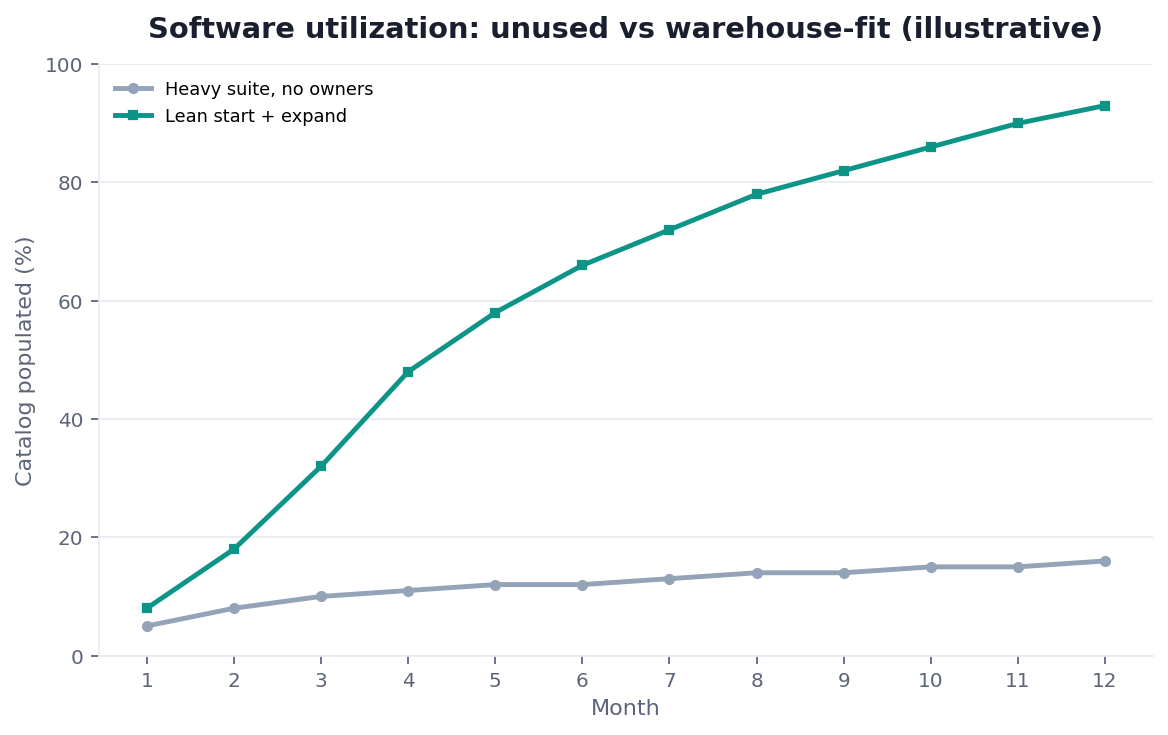
Practical example: a team bought feature-rich data management software that never integrated with its warehouse, and the license lapsed unused. A peer chose a simpler product that fit its stack, guided by connectivity patterns like those in Google Cloud AI overview, and it delivered value in weeks. Fit, not feature depth, decided the return.
Scope note: This guide reflects patterns we see when mid-market and enterprise teams work with data management software in 2026. It is not a substitute for legal counsel, vendor runbooks, or a formal survey of every industry — and when a smaller toolset or lighter process would serve, a full program is overkill.
What It Is
At its core, data management software is the application layer that executes an organization's data disciplines — storing, connecting, securing, cataloging, and cleaning data so it stays a reliable asset. No single product covers every discipline well, so most buyers assemble a small set.
Key Definition: data management software is the category of applications organizations use to store, integrate, secure, catalog, govern, and improve the quality of their data throughout its lifecycle, so it remains accurate, connected, discoverable, and controlled.
The distinction that matters is that data management software delivers value only when it fits and integrates. A powerful product that cannot connect to your systems or that your team cannot operate becomes shelfware, so we weigh fit and usability above raw capability in every evaluation we run.
The Categories
Teams evaluating this topic often cross-check Redis documentation for a durable, vendor-neutral reference point.
The market for data management software divides into a few categories, each solving a distinct problem.
Storage, database, and integration software
Storage and database software holds your data; integration software moves and combines it. These form the foundation of any data management software stack, and a weakness here — data trapped in disconnected systems — undermines everything downstream, no matter how capable the other categories are.
Quality, catalog, governance, and master data software
Quality software measures trustworthiness, catalog and governance software make data discoverable and controlled, and master data software maintains authoritative golden records. The risk framing in Wikipedia data quality overview shows why these categories increasingly share metadata, so buyers should prefer data management software that interoperates over products that duplicate each other.
How to Evaluate Fit
Evaluating data management software comes down to fit with your stack, your team's ability to operate it, and how it integrates with what you already run. The longest feature list rarely wins; the product that connects cleanly and gets used usually does.
We recommend scoring each candidate on integration with your existing systems, ease of operation, and how it exposes metadata to the rest of the estate. This is where data management software connects to your broader data management tools strategy — every new product either reduces or adds to your integration burden, and that effect belongs in the evaluation.
Total Cost of Ownership
Governance and risk expectations are framed by ISO/IEC 27001 when programs need an external control reference.
The license fee is the smallest part of what data management software costs. The larger costs are integration effort, ongoing maintenance, training, and the human time to operate the product — and these rarely appear on a pricing page.
Before committing to any data management software, model the fully loaded cost: licensing, the engineering time to integrate it, and the steward hours to keep it useful, weighed against the value delivered. Enterprise adoption patterns from ClickHouse documentation show why fit and operability drive real return more than feature breadth. The cheapest product to license is frequently the most expensive to run, because a poor fit consumes the very time it was meant to save.
Common Buying Mistakes
The mistakes we see buying data management software are consistent. Choosing on feature count produces powerful products nobody integrates. Ignoring the operational burden leaves a team drowning in tools. And buying before the underlying disciplines — ownership, standards, quality rules — are agreed produces software that measures rules nobody owns.
A subtler mistake is buying for a hypothetical future scale rather than current need. Data management software sized for a data volume you do not yet have is expensive and complex today for a benefit that may never arrive, so we favor products that fit current needs and scale when required, not ones that impose enterprise complexity on a team that is not there yet.
Build Versus Buy
Implementation details are commonly grounded in Apache Kafka documentation when teams translate concepts into production practice.
A recurring question in data management software evaluations is whether to build a capability in-house or buy it. For a narrow, unusual need on a small stack, building can make sense; for the common categories — integration, cataloging, quality monitoring — buying almost always wins, because vendors have already solved the connectors and edge cases that consume in-house teams.
Where building goes wrong
Teams routinely underestimate the ongoing maintenance cost of what they build. A custom integration script that works today becomes a fragile dependency that breaks whenever a source changes, and the engineer who wrote it becomes a single point of failure. The sticker-price saving of building is real; the maintenance cost that follows is usually larger and far less visible until it bites.
Where buying goes wrong
Buying goes wrong when the product does not fit and the team bends its process to the tool rather than the reverse. The pragmatic rule is to buy the undifferentiated plumbing and reserve in-house effort for the parts that are genuinely specific to your business, so scarce engineering time goes where it creates unique value rather than reinventing a commodity.
Deployment Models
Data management software ships in several deployment models — SaaS, self-managed, and hybrid — and the choice affects cost, control, and compliance more than most buyers expect. SaaS minimizes operational burden; self-managed maximizes control; hybrid tries to balance both.
The right model depends on your data's sensitivity and your team's operational capacity. Regulated or air-gapped environments often require self-managed or private deployment, while teams that want to minimize operational overhead lean toward SaaS. Weigh the deployment model as a first-class criterion rather than an afterthought, because a product whose only deployment option conflicts with your compliance posture is disqualified no matter how strong its features are.
It is also worth checking whether a vendor offers more than one deployment model, because needs change. A team that starts on SaaS for speed may later face a compliance requirement that forces a private deployment, and a product that supports both spares you a painful migration. Flexibility on deployment is a form of insurance against requirements you cannot fully predict at purchase time.
Software in the Age of AI
Core definitions remain usefully summarized in Wikipedia business intelligence overview for shared vocabulary across stakeholders.
AI changes how we evaluate data management software because an AI agent reading your data needs it connected, trustworthy, and well-described to produce reliable answers. The value of integration and quality software rises when the consumer is an autonomous agent rather than a patient analyst who can work around gaps.
An AI-native platform can reduce the buying burden by reading across sources directly rather than requiring every category of software to be assembled first, an approach we describe in what AI-native data analysis means. In the InfiniSynapse web app, zero-config federation lets an agent query connected sources without a heavy integration layer, so your data management software budget can shift toward quality and governance rather than plumbing.
Buyer Scorecard
Score each candidate (1 point each):
| Check | Pass? |
|---|---|
| It fits our existing stack | |
| Our team can operate it | |
| It integrates without heavy custom work | |
| It exposes metadata to the estate | |
| Its total cost is modeled, not just its license | |
| It matches current, not hypothetical, scale | |
| It supports our quality and governance rules | |
| Its data is ready for AI analysis |
6–8: strong candidate. 3–5: pilot before committing. Below 3: keep looking.
Common Misconceptions
Misconception 1: More features are better. Fit and operability beat feature count.
Misconception 2: The license is the cost. Integration and operation cost far more.
Misconception 3: Buy for future scale. Fit current needs; scale when required.
Misconception 4: Software solves data problems. Disciplines and owners do; software scales them.
Frequently Asked Questions
What is data management software?
Data management software is the category of applications organizations use to store, integrate, secure, catalog, govern, and improve the quality of their data throughout its lifecycle. No single product covers every discipline well, so most buyers assemble a small, interoperating set, and the value of any product depends on how well it fits the stack and gets used.
What are the main categories?
The categories are storage and database software (holding data), integration software (moving and combining it), quality software (measuring trustworthiness), catalog and governance software (discovering and controlling data), and master data software (maintaining golden records). Quality, catalog, and governance increasingly share metadata, so interoperating products beat ones that duplicate each other.
How do you evaluate fit?
Score each candidate on integration with your existing systems, your team's ability to operate it, and how it exposes metadata to the rest of the estate. The longest feature list rarely wins; the product that connects cleanly and gets used does. Every new product either reduces or adds to your integration burden, and that effect belongs in the evaluation.
What does it really cost?
The license fee is the smallest part. The larger costs are integration effort, ongoing maintenance, training, and the human time to operate the product. Model the fully loaded cost against the value delivered before committing, because the cheapest product to license is frequently the most expensive to run when a poor fit consumes the time it was meant to save.
How does it support AI analysis?
An AI agent reading your data needs it connected, trustworthy, and well-described to answer reliably, so integration and quality software matter more when the consumer is an autonomous agent. An AI-native platform that reads across sources directly can reduce the plumbing you must buy, letting your software budget shift toward the quality and governance that make automated answers trustworthy.
Conclusion
Data management software spans storage, integration, quality, catalog, governance, and master data — and the right choice is the one that fits your stack, stays operable, and integrates without heavy custom work. In 2026, favor fit over features, model total cost, and buy for current need. AI-native federation can shrink the plumbing you must buy at all.
To see how federated data reduces the software you must assemble for automated analysis, read what AI-native data analysis means and try the InfiniSynapse web app free on registration, no credit card required.