Tableau Public Data Analysis: A 2026 How-To
By the InfiniSynapse Data Team · Last updated: 2026-07-08 · We build an AI-native data analysis platform and use Tableau alongside it on real projects; this how-to reflects hands-on use of the free product, not a vendor pitch.
Table of Contents
- TL;DR
- What Tableau Public Is
- How to Do Tableau Public Data Analysis
- What Tableau Public Does Well
- The Limits You Should Know
- Tableau Public vs Paid Tableau
- Where an AI-Native Agent Complements It
- Building a Portfolio That Gets You Hired
- A Realistic First Project
- Selection Scorecard
- Failure Modes
- Frequently Asked Questions
- Conclusion
TL;DR
Direct answer: Tableau Public data analysis means using the free version of Tableau to build and share interactive visualizations of openly publishable data. It is excellent for learning visualization and building a portfolio, but its work saves publicly and it does not connect to private databases, so it complements rather than replaces a full analysis stack.
Who this is for: learners, job seekers, and analysts evaluating Tableau Public data analysis for visualization and portfolio work.
What you'll learn: what the free tool is, a step-by-step workflow, its strengths and limits, how it differs from paid Tableau, and where an AI-native agent fills the gaps.
This how-to sits within the data analysis tools hub; for Tableau's role as a general tool, see Tableau as a data analysis tool.
For related depth in this pillar, see Data Analysis Tools Tableau: Where It Fits in 2026.
What Tableau Public Is
Tableau Public data analysis is built on the free edition of Wikipedia business intelligence overview, the widely used visualization platform. The free edition gives you most of Tableau's drag-and-drop charting power with one defining constraint: everything you create is saved to a public profile on the web rather than to a private file or server. That single design choice shapes every appropriate use of the product.
Because the work is public, Tableau Public data analysis suits open datasets, learning exercises, journalism, and portfolio pieces meant to be shared. It is not built for confidential business data, since anything you publish becomes visible to anyone. Understanding this boundary first prevents the most common and most serious mistake newcomers make with the tool. As a category, it belongs to the visualization tier described in IBM's augmented analytics overview, and its underlying purpose is the communication stage of the process outlined in the Wikipedia data analysis overview.
How to Do Tableau Public Data Analysis
A first project in Tableau Public data analysis follows a predictable arc. Begin by downloading Tableau Public and preparing a dataset you are comfortable publishing—open government data, a public survey, or a sample file. Clean the data in a spreadsheet first, because Tableau Public expects reasonably tidy input and does limited preparation of its own.
Next, connect the file and start building a view. Drag a dimension such as a category onto columns and a measure such as a total onto rows, and Tableau renders a chart instantly. Iterate by adding filters, colors, and a second measure until the view answers a clear question. Then assemble one or more views into a dashboard, add a title and a short annotation so the story is self-explanatory, and publish to your public profile. The published dashboard is interactive and shareable by link, which is why Tableau Public data analysis is such a strong medium for portfolios: a hiring manager can explore your work rather than just read about it. Throughout, keep the question in front of you, because a beautiful chart that answers nothing is a common trap for beginners.
What Tableau Public Does Well
The free tool earns its popularity on three fronts. First, the visualization power is genuine: Tableau Public data analysis produces polished, interactive charts that rival anything from paid tools, so the output quality is not compromised by the price. Second, the learning value is high, because the drag-and-drop model teaches visualization principles quickly and the enormous public gallery offers thousands of examples to study and reverse-engineer.
Third, it is a portfolio engine. For someone breaking into analytics, a public profile of thoughtful dashboards is concrete, explorable proof of skill, and it is free to build. These strengths make Tableau Public data analysis a near-default recommendation for learners, and they explain why so many analyst portfolios live on the platform. The Stanford HAI AI Index notes how visualization literacy has become a baseline expectation, and a public Tableau profile demonstrates exactly that literacy.
The Limits You Should Know
The public-save requirement is the defining limit of Tableau Public data analysis: you cannot keep work private, which rules out confidential or proprietary data entirely. This is not a bug but the price of the free edition, and treating it casually is how people accidentally publish sensitive information.
Beyond privacy, the free edition does not connect to live private databases the way paid Tableau and other platforms do, so it works from static files rather than governed, refreshing sources. It also does little data preparation, expecting clean input, and it offers none of the collaboration and governance features a team needs. These limits mean Tableau Public data analysis is a visualization and learning tool, not a complete analysis platform, and pretending otherwise leads to frustration once real business requirements appear.
Tableau Public vs Paid Tableau
The distinction is simple to state. Paid Tableau connects to private databases, saves work privately, refreshes from live sources, and adds governance and collaboration; Tableau Public data analysis trades all of that away in exchange for being free and public. For learning and portfolios, the free edition is ideal. For confidential business dashboards viewed by a team, paid Tableau or another platform is required.
Choosing between them is really a question of data sensitivity and workflow maturity. If your data can be public and your goal is to learn or showcase, start with the free edition. If your data is private and your goal is recurring team reporting, the free edition is the wrong tool, and our comparison of top data analysis platforms covers the paid alternatives.
Where an AI-Native Agent Complements It
Tableau Public data analysis handles the communication stage beautifully but leaves the earlier stages—connecting to private sources, cleaning, and multi-step analysis—largely to you. This is exactly where an AI-native agent complements it. InfiniSynapse is not an NLP2SQL box or a ChatBI widget but a system that behaves like a professional data analyst.
An analyst can use InfiniSynapse to connect private databases with one-click authorization, clean and join data, and run multi-step analysis through InfiniSQL, then take the resulting clean dataset into Tableau for a public-facing visualization. The agent handles the private, heavy work the free edition cannot touch; Tableau handles the polished public presentation. We explain the agent paradigm in what AI-native data analysis means, and governance-minded users should validate lineage the way Databricks' documentation recommends. Used together, the two cover the whole workflow that Tableau Public data analysis alone cannot.
Building a Portfolio That Gets You Hired
For job seekers, the strongest use of the free tool is a portfolio. Hiring managers in analytics increasingly ask for evidence of skill rather than a list of courses, and a public profile of well-crafted dashboards is exactly that evidence. A handful of projects that each answer a clear question, use real open data, and include a short written interpretation will do more for a job search than another certificate. Because the work is already online and interactive, a reviewer can explore it directly rather than take your word for it, which is a meaningful advantage.
Curate rather than accumulate. Three polished, thoughtful dashboards beat a dozen half-finished ones, because a reviewer judges the ceiling of your work, not the count. Choose datasets that show range—one time series, one geographic map, one comparison—and annotate each so the reasoning is visible. This turns a profile from a gallery of charts into a demonstration of analytical thinking, which is what actually persuades an interviewer that you can be trusted with real questions.
Treat the profile as a living document. Revisit older pieces as your skills grow, retire the weakest, and add new work that reflects your current ceiling. A portfolio built through steady curation signals not only competence but the professional habit of iterating on your own work, and that habit reads clearly to anyone who reviews it.
A Realistic First Project
A good first project is small and complete rather than ambitious and abandoned. Pick a public dataset you find genuinely interesting—local transit, weather, sports, or open government figures—because curiosity sustains the effort through the tedious cleaning stage. Frame one question the data can answer, clean the file in a spreadsheet, and build a single dashboard that answers it clearly and honestly.
Resist the urge to visualize everything. The discipline of answering one question well is the skill that transfers to professional work, and it is the habit that separates useful Tableau Public data analysis from decorative charts that impress no one. Once the first project is published, the second comes faster, and a portfolio accumulates naturally from a steady rhythm of small, finished pieces rather than one grand attempt that never ships.
Treat each project as a rehearsal for the real thing. The workflow you practice here—question first, clean input, clear view, honest annotation—is the same workflow that governs professional Tableau Public data analysis and paid analysis alike, only without the private data and governance. Master it on public data, and when you move to a private tool the analytical habits are already in place; only the plumbing changes.
Selection Scorecard
Decide whether Tableau Public data analysis fits your need (1 point each):
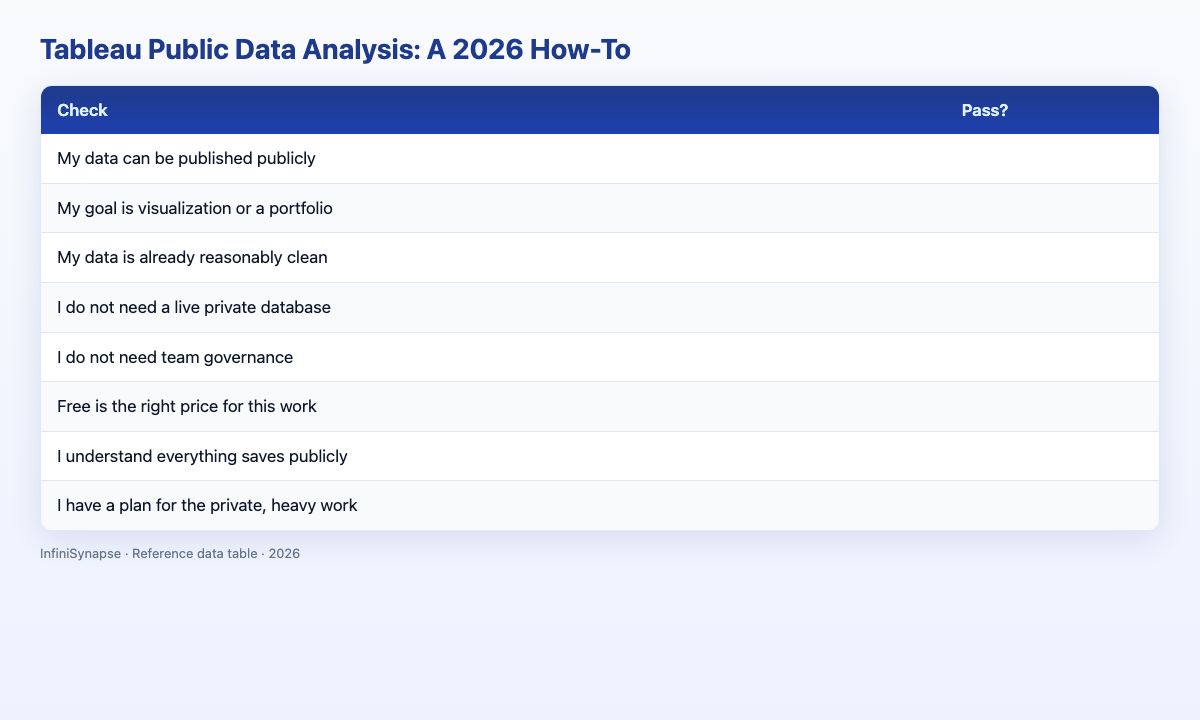
| Check | Pass? |
|---|---|
| My data can be published publicly | |
| My goal is visualization or a portfolio | |
| My data is already reasonably clean | |
| I do not need a live private database | |
| I do not need team governance | |
| Free is the right price for this work | |
| I understand everything saves publicly | |
| I have a plan for the private, heavy work |
6–8: a great fit. 3–5: fine with caveats. Below 3: use a private tool instead.
Failure Modes
Failure 1: Publishing sensitive data. The gravest error in Tableau Public data analysis is forgetting that everything saves publicly.
Failure 2: Expecting data preparation. The free edition assumes clean input; messy data must be cleaned first.
Failure 3: Treating it as a full platform. It is a visualization tool, not a governed analysis platform.
Failure 4: Charts without questions. A polished dashboard that answers nothing wastes the effort.
Frequently Asked Questions
What is Tableau Public data analysis?
Tableau Public data analysis means using the free edition of Tableau to build and share interactive visualizations of data you can publish openly. It offers most of Tableau's charting power, but every workbook saves to a public profile, so it suits open data, learning, and portfolios rather than confidential business work.
Is Tableau Public free for data analysis?
Yes, Tableau Public is completely free. The trade-off is that all work saves publicly to your online profile and the tool cannot connect to private live databases, so Tableau Public data analysis is best for open datasets, learning visualization, and building a shareable portfolio.
What are the \1options\2?
The main limits are that everything saves publicly, it cannot connect to private databases, it does little data preparation, and it lacks team governance. These make Tableau Public data analysis a visualization and learning tool rather than a complete, private analysis platform for business use.
Tableau Public vs paid Tableau: which do I need?
Use Tableau Public data analysis for learning, open data, and portfolios where public sharing is fine. Choose paid Tableau when you need private database connections, private saving, live refresh, and governance for team reporting. The deciding factor is whether your data can be public.
How can I use Tableau Public with an AI-native agent?
Use an AI-native agent like InfiniSynapse to connect private sources, clean, and run multi-step analysis, then take the clean result into Tableau Public for a shareable visualization. The agent handles the private, heavy work that Tableau Public data analysis cannot, while Tableau handles the public presentation.
Conclusion
Tableau Public data analysis is a superb free tool for learning visualization and building a portfolio, as long as you respect its defining constraint: everything saves publicly and it will not touch private databases. Match it to open data and presentation work, and pair it with a private analysis tool for everything else.
For the private, multi-step analysis the free edition cannot do, an AI-native agent is the natural partner. See how AI-native data analysis works and try the InfiniSynapse web app free on registration, no credit card required.