Python for Data Analysis: Getting Started in 2026
By the InfiniSynapse Data Team · Last updated: 2026-07-08 · We build an AI-native data analysis platform; this beginner's guide reflects the fastest sound path into analytical Python.
Table of Contents
- TL;DR
- Why Start With Python
- Setting Up Your Environment
- What to Learn First
- A Beginner Workflow
- Your First Real Analysis
- Avoiding Beginner Mistakes
- How AI Accelerates Learning
- A Realistic Learning Timeline
- Getting-Started Scorecard
- Frequently Asked Questions
- Conclusion
TL;DR
Direct answer: getting started with analytical Python means installing Python and a notebook, learning the basics of the language, and focusing on pandas, which handles most everyday work. Practice on real datasets through the load-clean-analyze-visualize cycle, and add libraries as needs arise rather than trying to learn everything at once.
Who this is for: beginners taking their first steps with analytical Python.
What you'll learn: why start with Python, how to set up, what to learn first, a beginner workflow, and how AI accelerates learning.
This guide sits within the advanced methods hub; for an end-to-end worked case, see data analysis with python. Query-first analysis aligns with concepts in the Wikipedia SQL overview.
For related depth in this pillar, see SQL Data Analysis: Patterns and Queries.
Why Start With Python
Choosing analytical Python as your first serious analytical language is a sound decision for most people. Python is readable, widely used, and supported by an enormous community, which means abundant tutorials and answers when you get stuck. Its dominance in industry also makes analytical Python a directly marketable skill, unlike some more niche tools.
The other reason to choose analytical Python is its range: the same language that handles a simple spreadsheet-style task also scales up to machine learning, so the skill grows with you. You will not outgrow it. The general activity Python supports is the disciplined process described in the Wikipedia overview of data analysis, and Python gives you a flexible, powerful way to perform it. For the broader picture of where Python fits, see the python data analysis hub.
Setting Up Your Environment
Getting started with analytical Python begins with a working environment. The simplest path for beginners is to install a distribution that bundles Python with the key data libraries and a notebook interface, so you can start analyzing immediately rather than wrestling with configuration. A notebook like Jupyter is ideal for analytical Python because it lets you run code in small steps and see results inline.
A clean setup matters for analytical Python because environment problems frustrate beginners more than the analysis itself. Using a bundled distribution or a managed environment avoids most of these headaches. Once you can open a notebook, import pandas, and load a file, you are ready to begin, and the Python documentation supports you as questions arise. Do not over-invest in perfecting the setup; a working environment that lets you start practicing analytical Python is enough, and you can refine it as you learn.
What to Learn First
The efficient path into analytical Python focuses ruthlessly on what matters most first. Learn the basics of the language, variables, data types, loops, and functions, but do not linger; you need only enough to work with data. Then invest heavily in pandas, because it handles the overwhelming majority of everyday analytical Python tasks.
Within pandas, prioritize the operations that recur constantly in analytical Python: loading data, inspecting it, selecting and filtering rows and columns, handling missing values, grouping and aggregating, and joining datasets. These cover most real work. Add visualization with matplotlib once you can manipulate data, and defer statistics and machine learning libraries until a specific need arises. This focused sequence gets you productive in analytical Python far faster than trying to learn the whole ecosystem, which overwhelms beginners and delays the satisfaction of answering a real question.
A Beginner Workflow
A reliable beginner workflow for analytical Python mirrors the general analytical process in code. Load your data into a pandas DataFrame, then inspect it to understand its structure and spot problems. Clean it by handling missing values and fixing types. Transform and filter it to focus on what your question needs. Then group, aggregate, or calculate to find your answer, and finally visualize the result.
Following this workflow consistently builds good habits in analytical Python. Working in a notebook, you run each step and check the result before moving on, which catches errors early and deepens your understanding. This step-by-step rhythm is the heart of practical analytical Python, and repeating it across many datasets is what turns tentative beginners into confident practitioners. The workflow is the same whether the dataset is tiny or large, so mastering it on small data prepares you for bigger analyses later.
Your First Real Analysis
The best way to learn analytical Python is to complete a first real analysis on data you care about. Choose a dataset that genuinely interests you, whether personal data or public open data, pose a clear question, and work through the full workflow to answer it. Finishing one real analysis teaches more than any number of disconnected tutorial exercises. Predictive workflows should be interpreted against the Wikipedia machine learning overview.
Keep your first analytical Python project small and complete rather than ambitious and abandoned. The goal is to experience the entire arc, from raw data to an answer, so the process becomes familiar. When you get stuck, the vast community around analytical Python almost certainly has an answer to your exact problem. Completing that first project builds confidence and reveals which skills to deepen next, making it the single most valuable step in learning analytical Python rather than perpetually preparing to start.
Avoiding Beginner Mistakes
Beginners in analytical Python commonly make a few avoidable mistakes. The first is tutorial hell: endlessly following tutorials without ever attempting an original analysis, which builds familiarity but not real skill. Break out by working on your own question early. The second is trying to learn too many libraries at once rather than mastering pandas first.
A third mistake in analytical Python is neglecting to clean data before analyzing, which produces wrong answers regardless of how correct the code looks. A fourth is writing messy, disorganized code that you cannot understand later, forfeiting the reproducibility that makes analytical Python valuable. Avoiding these mistakes, by building on your own questions, focusing on pandas, cleaning diligently, and keeping code organized, makes the learning path far smoother and gets you to genuine competence in analytical Python faster.
How AI Accelerates Learning
In 2026, AI-native tools meaningfully accelerate learning analytical Python. An AI assistant can generate example code for a task you describe, which you can then study, run, and adapt, seeing how experienced practitioners structure analytical Python code. This shortens the gap between wanting to do something and seeing how it is done.
InfiniSynapse reflects the broader shift these tools represent. It is not an NLP2SQL box or a ChatBI widget but a system that behaves like a professional data analyst, connecting to sources with one-click authorization and running analysis through InfiniSQL. For a learner, seeing an agent perform an analysis illustrates the process that analytical Python implements in code, reinforcing understanding. We explore the paradigm in what AI-native data analysis means, and the Stanford HAI AI Index documents how these tools support learning. Used well, AI makes the path into analytical Python faster without replacing the fundamental understanding you need to build.
A Realistic Learning Timeline
People beginning python for data analysis often want a timeline, and a realistic one helps set expectations. In the first two weeks, focus on language basics and getting comfortable in a notebook, since python for data analysis rests on being able to write and run simple code without friction. Do not rush this foundation, but do not linger either, because the real learning in python for data analysis begins once you touch data.
Over the following month, immerse yourself in pandas, the heart of python for data analysis. Practice loading, filtering, grouping, and joining on real datasets until these operations feel natural. Most everyday python for data analysis relies on this handful of pandas skills, so depth here pays off enormously. By the end of this stretch, you should be able to take a raw file and work it into an answer, which is the core competency of python for data analysis.
In the third month, add visualization and begin tackling questions that genuinely interest you, since applied practice is what cements python for data analysis. This is also when many learners complete their first real project, experiencing the full arc that defines python for data analysis. Progress in python for data analysis should be measured by projects completed rather than tutorials watched, because the ability to finish a real analysis is the true marker of skill. Learners who treat python for data analysis as a sequence of finished projects, rather than an endless course, build momentum and confidence far faster, and they arrive at genuine competence in python for data analysis within a few focused months rather than drifting indefinitely through passive study.
Getting-Started Scorecard
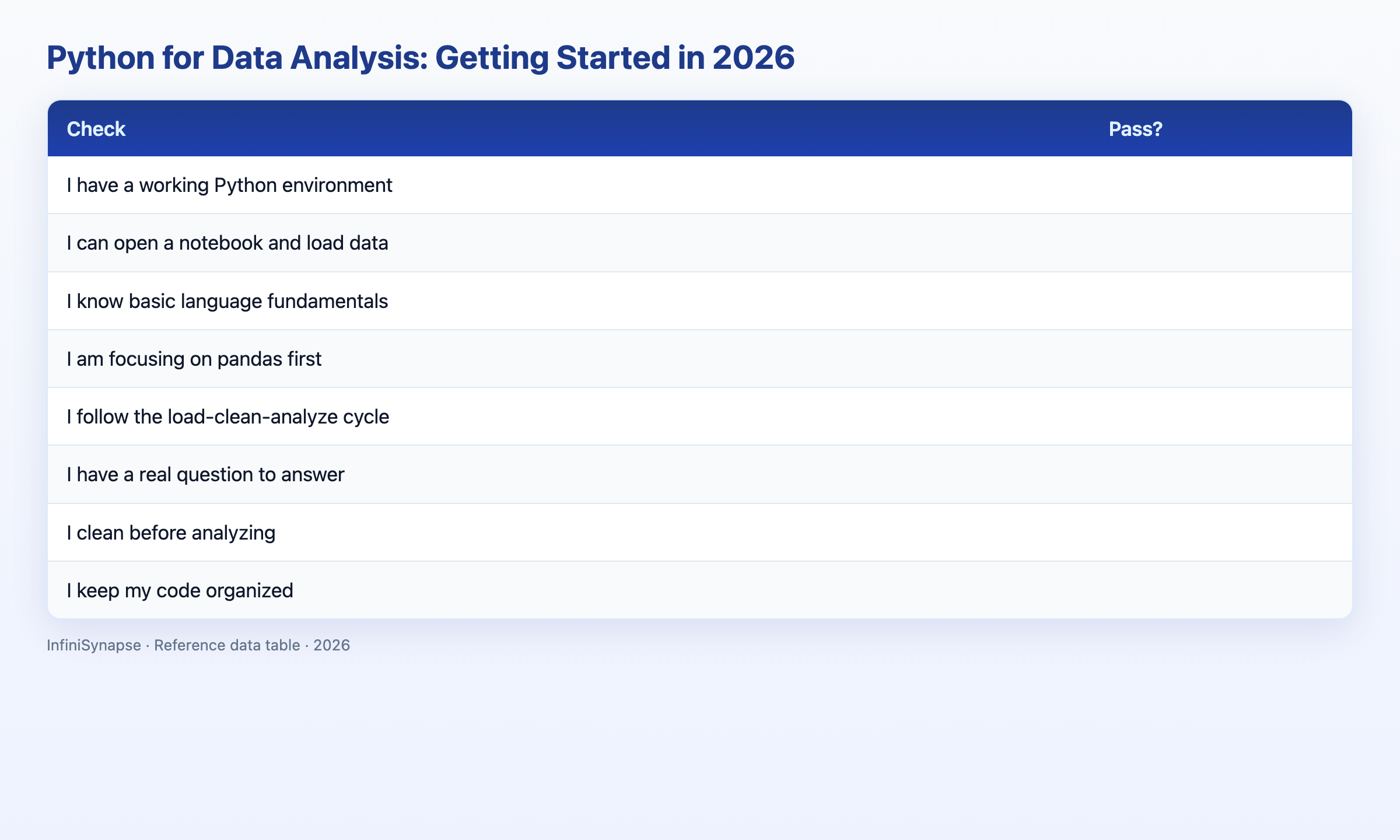
Assess your readiness to start (1 point each):
| Check | Pass? |
|---|---|
| I have a working Python environment | |
| I can open a notebook and load data | |
| I know basic language fundamentals | |
| I am focusing on pandas first | |
| I follow the load-clean-analyze cycle | |
| I have a real question to answer | |
| I clean before analyzing | |
| I keep my code organized |
6–8: ready to practice. 3–5: set up and pick a question. Below 3: install and start small.
Frequently Asked Questions
How do I get started with Python for data analysis?
Get started with Python for data analysis by installing Python and a notebook environment, learning basic language fundamentals, and focusing on pandas, which handles most everyday work. Then practice on a real dataset through the load-clean-analyze-visualize cycle. Add other libraries as specific needs arise rather than learning everything at once.
What should I learn first in Python for data analysis?
In Python for data analysis, learn basic language fundamentals just enough to work with data, then invest heavily in pandas, prioritizing loading, inspecting, filtering, handling missing values, grouping, and joining. Add matplotlib for visualization once you can manipulate data, and defer statistics and machine learning libraries until a specific need arises.
Is formal training worth it\1?
Yes, Python for data analysis is a sound choice for beginners because Python is readable, widely used, and supported by an enormous community with abundant tutorials. It is also directly marketable and scales from simple tasks to machine learning, so you will not outgrow it. Focusing on pandas first makes the learning curve manageable.
How long does \1training take\2?
Learning Python for data analysis to a productive level takes weeks to a few months of focused practice, depending on your background and consistency. Focusing on pandas and completing real analyses accelerates it, while trying to learn the entire ecosystem at once slows it. In 2026, AI tools that generate example code can speed learning further.
How do \1teams proceed\2?
AI tools help learn Python for data analysis by generating example code for tasks you describe, which you can study, run, and adapt to see how experienced practitioners structure their analysis. Seeing an AI-native agent perform an analysis also illustrates the underlying process, reinforcing the understanding that Python code implements.
Conclusion
Getting started with analytical Python means a working environment, focused learning of pandas, and practice on real questions through the load-clean-analyze-visualize cycle. Avoid tutorial hell and over-broad learning, complete a first real project, and let AI tools accelerate your progress without replacing genuine understanding.
The path into python for data analysis rewards patience and focus. Start python for data analysis with the fundamentals, deepen your pandas skills through python for data analysis on real datasets, and treat each finished project as proof of progress. Whether you pursue python for data analysis for a career move or to answer questions in your current role, the same approach applies: learn by doing, keep your code organized, and let python for data analysis grow with your ambitions rather than trying to master everything before you begin.
To see the process an agent performs, read what AI-native data analysis means and try the InfiniSynapse web app free on registration, no credit card required.