
Use presentation design to direct attention and meaning使用 Presentation Design 引导注意与意义
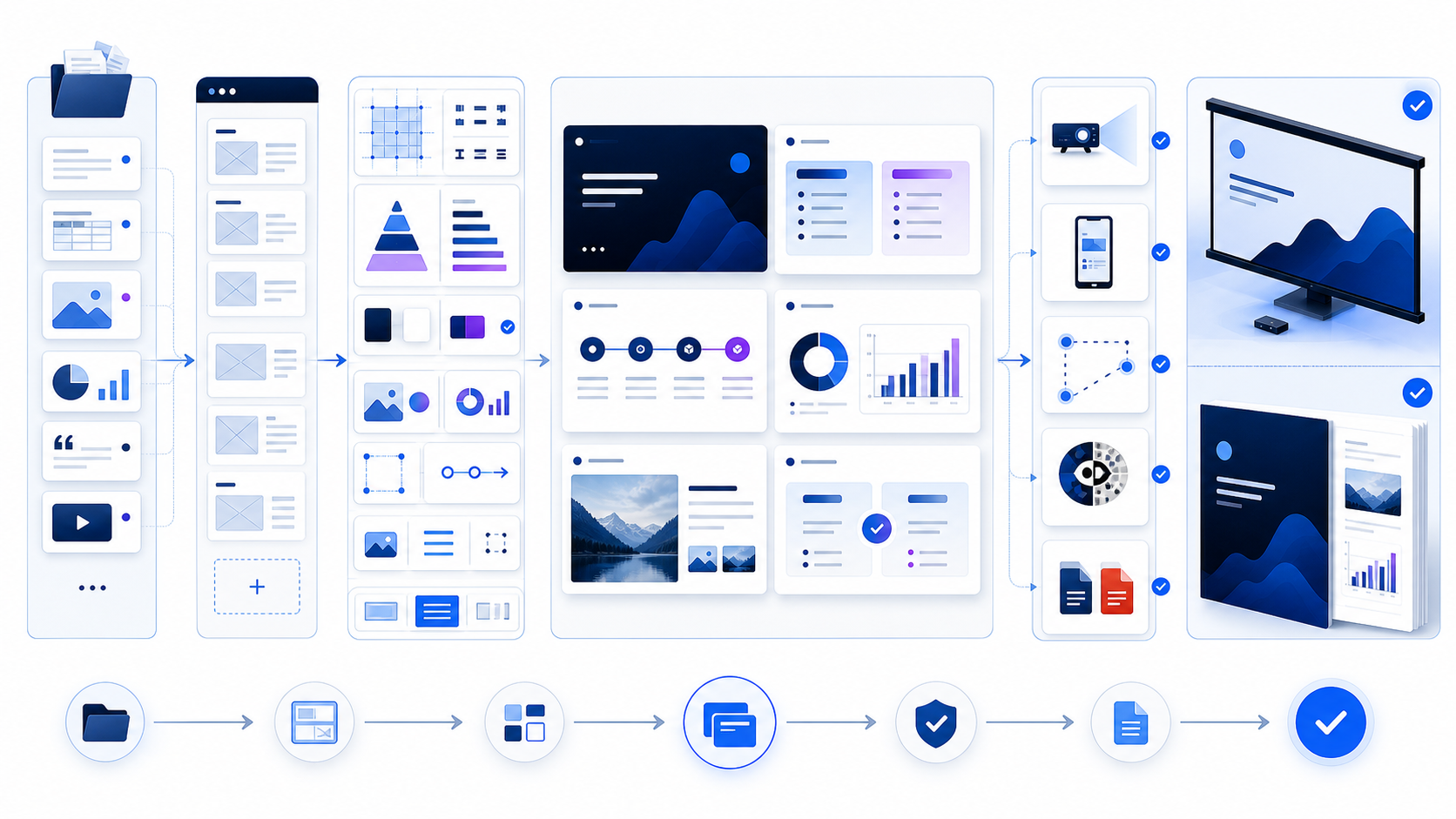
Effective presentation design begins with audience, decision, context, and delivery mode. Inventory the evidence, write the narrative in plain language, and storyboard one useful question or claim per slide before choosing visual style. Build a layout system with a grid, consistent alignment, restrained typography, accessible color, meaningful imagery, honest charts, and deliberate whitespace. Give every slide a unique title, logical reading order, alt text or descriptions, sufficient contrast, and captions where needed. Create separate live and reading versions, then test projector distance, laptop, mobile, screen reader order, links, fonts, animation, hidden data, PPTX, and PDF before release.
有效 Presentation Design 从受众、决策、情境与交付方式开始。先盘点证据,用普通语言写叙事,并在选择视觉风格前让每一页回答一个有用问题或表达一个主张。建立包含网格、一致对齐、克制字号、无障碍色彩、有意义图片、诚实图表与有意留白的版式系统。为每页设置唯一标题、逻辑阅读顺序、替代文本或描述、足够对比与必要字幕。分别制作演讲版和阅读版,发布前测试投影距离、笔记本、手机、屏幕阅读器顺序、链接、字体、动画、隐藏数据、PPTX 与 PDF。
Design cannot repair a missing argument or validate unsupported claims. Its job is to help a reader perceive structure, distinguish evidence from commentary, follow the intended sequence, and recover the same meaning across devices and abilities. Treat the slide file as an interface to the content, not a container that must display everything the team knows.
设计不能修复缺失论证,也不能验证无支持主张。它的任务是帮助读者感知结构、区分证据与评论、沿预期顺序理解,并让不同设备和能力的人获得一致意义。应把幻灯片文件当作内容界面,而不是必须展示团队全部知识的容器。
Write the presentation design brief before opening PowerPoint打开 PowerPoint 前先写 Presentation Design 简报
Define the named audience, decision, desired next action, prior knowledge, meeting setting, speaker, available time, screen or room, asynchronous distribution, confidentiality, accessibility needs, language, update cutoff, and accountable owner. A keynote, board review, training course, sales demo, project update, and emailed report may use the same visual identity but require different pacing, density, evidence, and interaction.
明确具名受众、决策、期望下一动作、已有知识、会议场景、讲述者、可用时间、屏幕或房间、异步分发、机密级别、无障碍需求、语言、更新截止日和责任人。主题演讲、董事会评审、培训课程、销售演示、项目更新与邮件报告可以使用同一视觉身份,但节奏、密度、证据和互动不同。
Viewing distance, projection quality, lighting, aspect ratio, sound, remote participants, and speaking time.
观看距离、投影质量、照明、宽高比、声音、远程参与者与讲述时间。
Self-contained definitions, source notes, navigation, accessibility, file size, and screen reading.
可独立理解的定义、来源注释、导航、无障碍、文件大小与屏幕阅读。
Unsupported claims, stale data, private information, unauthorized logos, misleading visuals, and hidden metadata.
无支持主张、过期数据、隐私信息、未授权标志、误导视觉与隐藏元数据。
What should the audience understand, decide, remember, question, or do after the presentation?
演示后受众应理解、决定、记住、质疑或执行什么?
Separate source evidence from slide-ready messages区分源证据与可上页信息
Collect the source documents, data tables, charts, images, videos, quotes, product screens, legal wording, brand assets, and prior decks. Record owner, version, date, permission, sensitivity, and intended use. Then classify each item as core message, supporting evidence, appendix, speaker note, handout, follow-up, or excluded. This prevents the common pattern of shrinking every source paragraph onto a slide.
收集源文档、数据表、图表、图片、视频、引用、产品界面、法律措辞、品牌资产与旧演示,并记录责任人、版本、日期、许可、敏感度与预期用途。再把每项分类为核心信息、支持证据、附录、演讲者备注、讲义、后续材料或排除内容,避免把每段源文字都缩进幻灯片。
Maintain a claim ledger for material numbers and assertions. Define metric, formula, population, denominator, time range, source, status, caveat, and owner. A beautiful chart built from an undefined or stale value is a design failure because it increases confidence without increasing evidence.
为重要数字与断言维护主张台账,定义指标、公式、群体、分母、时间范围、来源、状态、限制与责任人。使用未定义或过期数据制作漂亮图表仍是设计失败,因为它提高信任感却没有增加证据。
Storyboard the argument before styling individual slides设计单页样式前先完成故事板
Write one sentence for the purpose of every slide: the question it answers, the claim the audience should understand, the evidence required, and the transition to the next slide. Lay the cards out in sequence and remove duplicates, dead ends, and unsupported jumps. If the audience must remember three ideas, make the hierarchy visible at deck level rather than treating all thirty slides as equally important.
为每页写一句用途:回答什么问题、受众应理解什么主张、需要什么证据、如何过渡到下一页。按顺序排列卡片,删除重复、死路和无支持跳转。如果受众需要记住三个想法,应在整套材料层级中表现,而不是把三十页都当作同等重要。
| Slide role页面角色 | Useful question有用问题 | Visual form视觉形式 | Avoid避免 |
|---|---|---|---|
| Orientation定位 | Where are we and why does this matter?我们在哪里,为什么重要? | Clear title, short context, roadmap or framing image清楚标题、短背景、路线或框架图 | Decorative opener with no thesis没有论点的装饰开场 |
| Evidence证据 | What changed, compared with what, and how certain is it?什么发生变化、与什么比较、确定性如何? | Focused chart, comparison, example, or source excerpt聚焦图表、比较、示例或来源摘录 | Dashboard containing every available measure塞入所有指标的仪表盘 |
| Explanation解释 | How does the process, system, or mechanism work?流程、系统或机制如何运作? | Sequence, annotated diagram, layered model顺序、标注图或分层模型 | Unlabeled arrows and clip art无标注箭头与剪贴画 |
| Decision决策 | What choice, tradeoff, owner, and next step remain?还剩什么选择、权衡、责任人与下一步? | Options, criteria, recommendation, action record选项、标准、建议与行动记录 | Conclusion slogan without decision evidence没有决策证据的结论口号 |
Build a small presentation design system建立小型 Presentation Design 系统
Define slide size, safe margins, grid, columns, spacing increments, title zones, footer rules, typography roles, color tokens, chart palette, icon style, image treatment, table style, source-note format, and layout names. Create only the layouts needed for the story: title, section, statement, two-column comparison, process, data chart, image-led explanation, quote, decision, and appendix. Consistency should reduce cognitive effort, not make every slide visually identical.
定义页面尺寸、安全边距、网格、分栏、间距增量、标题区、页脚规则、字号角色、颜色变量、图表色板、图标风格、图片处理、表格样式、来源注释格式与版式名称。只创建故事需要的版式:标题、章节、陈述、双栏比较、流程、数据图、图片说明、引用、决策与附录。一致性应降低认知负担,而不是让每页完全一样。
Use theme fonts, theme colors, Slide Master, and named layouts rather than manual formatting on every slide. Keep decorative effects out of the master unless they remain useful for all content. Test long titles, translated text, dense charts, portrait images, empty states, and appendix detail so the system does not collapse under realistic variation.
使用主题字体、主题颜色、幻灯片母版与具名版式,而不是逐页手动格式化。除非装饰效果对所有内容都有用,否则不要放入母版。测试长标题、翻译文字、密集图表、竖向图片、空状态与附录细节,确保系统能承受真实变化。
Use grid, alignment, proximity, and whitespace deliberately有意使用网格、对齐、邻近与留白
Choose a grid that supports the actual content, then align titles, text, charts, images, captions, and source notes to shared anchors. Group related items through proximity and separate unrelated items with space or clear containers. Keep outer margins stable and internal spacing predictable. Misalignment that is too small to look intentional creates visual noise even when viewers cannot name the problem.
选择支持实际内容的网格,把标题、文字、图表、图片、题注与来源注释对齐到共享锚点。通过邻近分组相关项目,用空间或清楚容器分离无关项目。保持外边距稳定、内部间距可预测。小到看不出有意的错位会制造视觉噪声,即使观众说不出具体问题。
Whitespace is working area for attention, not an empty area that must be filled. Use it around the lead message, between evidence groups, and at transitions. When a slide becomes crowded, first remove, split, move detail to the appendix, or change the information form; reducing type size is a last resort and often the wrong one.
留白是注意力的工作空间,不是必须填满的空地。围绕主信息、证据组之间与过渡处使用留白。页面拥挤时,应先删除、拆分、把细节移到附录或改变信息形式;缩小字号是最后手段,而且通常不正确。
Create visual hierarchy that matches the spoken logic让视觉层级匹配讲述逻辑
Decide what should be noticed first, second, and third. Use position, size, weight, contrast, color, enclosure, and motion to express that order. Give the slide title a meaningful claim rather than a category label; “Renewal improved after onboarding change” is more useful than “Retention.” Place the evidence closest to the claim and reduce the visual weight of explanatory detail and sources without making them illegible.
决定什么应第一、第二、第三被注意,并用位置、大小、字重、对比、颜色、包围与动作表达顺序。幻灯片标题应是有意义主张,而不是类别标签;“入门流程改变后续约提高”比“留存”更有用。把证据放在主张附近,降低解释细节与来源的视觉权重,但不能让它们无法阅读。
Run a distance test and a blur or squint test: can a viewer identify the dominant element and general structure without reading every word? Then run a precise reading test: does the hierarchy still preserve definitions, caveats, labels, and navigation? A dramatic key number without its unit, period, or denominator is visually strong but informationally weak.
进行距离测试和模糊或眯眼测试:观众不读每个字时能否识别主元素与大致结构?再进行精确阅读测试:层级是否仍保留定义、限制、标签和导航?没有单位、周期或分母的巨大关键数字视觉很强,但信息很弱。
Choose typography for distance, language, and fallback按距离、语言与回退选择字体
Use a small role-based scale for title, lead, body, label, caption, and source note. Prefer readable typefaces with complete character coverage, clear punctuation, distinct numerals, and reliable embedding or system fallback. Microsoft’s accessibility guidance recommends large readable fonts and sufficient whitespace; exact size still depends on room, display, language, and density. Test the farthest seat rather than trusting the editor at 100% zoom.
为标题、引导、正文、标签、题注和来源注释使用小型角色字号表。优先选择字符覆盖完整、标点清楚、数字易分辨且能可靠嵌入或系统回退的字体。Microsoft 无障碍指南建议使用较大易读字体与足够留白;确切大小仍取决于房间、显示、语言与密度。应测试最远座位,而不是只相信编辑器 100% 缩放。
Avoid long centered paragraphs, excessive all caps, faux bold, stretched text, decorative display faces for body copy, and inconsistent manual sizes. Control line length, line spacing, paragraph spacing, and hyphenation. Test Chinese, English, numbers, symbols, superscripts, and source URLs. A bilingual deck often needs more flexible containers rather than smaller type.
避免长段居中、过多全大写、伪粗体、拉伸文字、正文装饰字体和不一致手动字号。控制行长、行距、段距与断词,并测试中英文、数字、符号、上下标与来源 URL。双语材料通常需要更灵活容器,而不是更小字号。
Use color as a system, never as the only signal把颜色作为系统,但绝不能作为唯一信号
Define background, text, muted text, accent, positive, caution, negative, and chart colors with tested contrast. Use one or two accents for attention and relationships, not a new hue for every object. Show categories through labels, position, shape, pattern, or direct annotation in addition to color. Test grayscale and common color-vision simulations, especially for charts and status indicators.
定义背景、正文、弱化文字、强调、正向、警告、负向与图表颜色,并测试对比。使用一到两种强调色表达注意与关系,不要为每个对象新增颜色。除颜色外还应用标签、位置、形状、纹理或直接标注表示类别,特别对图表与状态进行灰度及常见色觉模拟测试。
Projectors, video calls, compressed screenshots, dark rooms, bright rooms, and exported PDFs change perceived color. Test on the expected equipment and keep critical information legible when saturation or contrast drops. Do not place text over a photograph without a stable contrast treatment.
投影、视频会议、压缩截图、暗室、亮室与导出 PDF 都会改变颜色感知。应在预期设备测试,并在饱和度或对比下降时保持关键信息可读。不要在没有稳定对比处理的照片上直接放文字。
Choose visuals that explain rather than decorate选择用于解释而非装饰的视觉
Use a photograph to show real context, a diagram to explain relationships, a product screen to show workflow, an illustration to clarify an abstract model, and an icon to support fast scanning—not to replace a concept it cannot represent. Verify license, attribution, consent, sensitivity, and whether the visual could imply a customer, partnership, location, result, or demographic claim that is not true.
用照片展示真实情境,用图解说明关系,用产品界面展示工作流,用插图澄清抽象模型,用图标辅助快速扫描,而不是替代它无法表达的概念。核验许可、署名、同意、敏感度,并检查视觉是否会暗示并不真实的客户、合作、地点、结果或人口主张。
Crop around the evidence, preserve important context, maintain resolution, and use a consistent treatment. Add meaningful alt text to informative visuals and mark decorative images appropriately. Complex diagrams may need a concise on-slide summary and a longer description in notes, adjacent content, or an accessible companion document.
围绕证据裁切,保留重要上下文,保持分辨率并统一处理。为信息性视觉添加有意义替代文本,正确标记装饰图片。复杂图解可能需要页面内简短总结,以及在备注、相邻内容或无障碍配套文档中的长描述。
Design presentation charts around one honest comparison围绕一个诚实比较设计演示图表
Start with the decision question, not the available chart gallery. Choose a form that matches the task: position for magnitude, line for ordered change, bar for category comparison, dot or interval for uncertainty, and small multiples for repeated patterns. Define metric, unit, population, denominator, time range, source, cutoff, exclusions, and status. Directly label important series and annotate the relevant event.
从决策问题开始,而不是从可用图表库开始。选择匹配任务的形式:位置表示数量、折线表示有序变化、柱形比较类别、点或区间表示不确定性、小多图表示重复模式。定义指标、单位、群体、分母、时间范围、来源、截止日、排除与状态,并直接标注重要系列和相关事件。
Avoid truncated axes that exaggerate change, incompatible dual axes, unexplained smoothing, hidden missing periods, cumulative totals presented as current activity, forecast styled like actuals, or decorative 3D perspective that distorts length and area. If the audience cannot reproduce the message from labels and sources, visual polish has outpaced evidence.
避免夸大变化的截断坐标、不可比双轴、未解释平滑、隐藏缺失周期、把累计总量当作当前活动、把预测样式做成实际值,或用装饰性 3D 透视扭曲长度与面积。如果受众无法从标签与来源复现信息,说明视觉美化超过了证据。
Reduce dense tables to the evidence needed now把密集表格缩减为当前需要的证据
Use tables when exact lookup or cross-variable comparison matters. Keep simple headers, logical order, consistent units, aligned numbers, adequate cell space, and a highlighted decision row or column. Move complete transaction lists, model outputs, and operational detail to an appendix or companion document. If the audience must read every cell during a live talk, the content is probably a handout rather than a slide.
需要精确查找或跨变量比较时使用表格。保持简单表头、逻辑顺序、一致单位、数字对齐、足够单元空间,并突出决策行或列。把完整交易列表、模型输出与运营细节移到附录或配套文档。如果现场演讲要求受众阅读每个单元格,该内容更可能是讲义而不是幻灯片。
For accessibility, use a real simple table with header information when possible and avoid merged, split, or nested cells. Do not use a screenshot of a spreadsheet as the only version of important data. Provide a structured accessible alternative for complex tables.
为支持无障碍,可行时使用带表头信息的真实简单表格,避免合并、拆分或嵌套单元格。不要把电子表格截图作为重要数据的唯一版本;复杂表格应提供结构化无障碍替代。
Build accessibility into presentation design from the start从开始就把无障碍融入 Presentation Design
Microsoft recommends unique slide titles, logical reading order, alt text for visuals, meaningful link text, sufficient contrast, accessible font choices, simple tables, captions or subtitles, and use of the Accessibility Checker. Built-in layouts can provide a more reliable reading order than manually placed text boxes, but they still require verification after content changes.
Microsoft 建议使用唯一幻灯片标题、逻辑阅读顺序、视觉替代文本、有意义链接文字、足够对比、无障碍字体、简单表格、字幕或副标题以及无障碍检查器。内置版式通常比手工放置文本框提供更可靠阅读顺序,但内容变化后仍需核验。
Inspect the Reading Order pane, keyboard navigation, object names, group behavior, chart descriptions, media controls, language settings, and exported PDF tags. Do not put required information only in speaker narration, color, animation, hover, or an image of text. Test with the actual assistive route when accessibility is a delivery requirement; an automated checker is evidence, not proof of complete usability.
检查阅读顺序窗格、键盘导航、对象名称、组合行为、图表描述、媒体控制、语言设置与导出 PDF 标签。不要把必需信息只放在口头讲述、颜色、动画、悬停或文字图片中。无障碍是交付要求时,应使用实际辅助路径测试;自动检查器是证据,但不是完整可用性的证明。
Design different views for speaking and independent reading为讲述与独立阅读设计不同视图
A live deck shares attention with a speaker. Use larger type, fewer words, controlled sequence, one focal point, and visual evidence that can be understood at room distance. Put detail in notes, handouts, or an appendix. An asynchronous deck must carry definitions, transitions, sources, dates, caveats, navigation, contact, and enough explanation to stand without narration.
现场演示会与讲述者共享注意力,应使用更大字号、更少文字、受控顺序、单一焦点和能在房间距离理解的视觉证据,把细节放入备注、讲义或附录。异步材料则必须包含定义、过渡、来源、日期、限制、导航、联系与足够解释,无需讲述也能成立。
Maintain both from the same content and claim registry so numbers and meanings do not diverge. The versions may differ in density and layout but need shared identifiers, cutoff dates, owners, and change logs. A slide copied from one context to another should be reviewed, not assumed reusable.
两个版本应来自同一内容与主张登记,避免数字和含义分叉。密度与版式可以不同,但应共享标识、截止日、责任人与变更记录。从一个情境复制到另一个情境的页面必须重新评审,不能假设可直接复用。
Use motion only when sequence changes understanding仅在顺序改变理解时使用动作
Animation can reveal process steps, maintain object identity through change, compare states, or control a complex explanation. Use simple, predictable transitions with enough time to perceive the change. Avoid motion that merely makes elements enter, repeats without meaning, triggers unexpectedly, causes distraction, or fails when exported. Provide a static equivalent for PDF and a reduced-motion or nonanimated route when required.
动画可用于揭示流程步骤、在变化中保持对象身份、比较状态或控制复杂解释。使用简单可预测过渡,并给受众足够时间感知变化。避免只让元素入场、无意义重复、意外触发、造成分心或导出失败的动作。为 PDF 提供静态等价,并在需要时提供减少动作或无动画路径。
For video and audio, verify rights, captions, transcript, language, volume, local or streamed availability, autoplay behavior, network dependency, file size, fallback, and room audio. Test the exact presentation computer and display. A linked video that worked in the editor is not evidence it will work offline or under recipient permissions.
对视频与音频核验权利、字幕、转录、语言、音量、本地或流式可用性、自动播放、网络依赖、文件大小、回退与现场声音,并测试实际演示电脑和显示。编辑器中可用的链接视频不能证明离线或接收者权限下可用。
Use Slide Master without letting the template control the story使用幻灯片母版,但不要让模板控制故事
Place stable brand and structural rules in Slide Master: theme fonts, colors, background, logo treatment, footer, placeholders, safe zones, and recurring layouts. Keep slide-specific evidence and decorative exceptions out of the master. Use meaningful placeholder types and preserve logical object order. Microsoft’s guidance for custom templates also emphasizes theme contrast and appropriately sized placeholders.
把稳定品牌与结构规则放入幻灯片母版:主题字体、颜色、背景、标志处理、页脚、占位符、安全区与重复版式。把页面特有证据和装饰例外留在单页。使用有意义占位符类型并保持逻辑对象顺序。Microsoft 的自定义模板指南也强调主题对比与合适大小的占位符。
Audit imported slides for foreign masters, duplicate layouts, substituted fonts, off-grid objects, inconsistent footers, hidden animation, and broken reading order. Consolidate only after verifying that the content still fits. Applying a theme is not a substitute for redesigning a slide whose information architecture is wrong.
审计导入页面中的外来母版、重复版式、字体替换、脱离网格对象、不一致页脚、隐藏动画与损坏阅读顺序。只有确认内容仍匹配后才合并。应用主题不能替代重新设计信息架构错误的页面。
Test the presentation on the real delivery path在真实交付路径测试演示
| Route路径 | Verify核验 | Typical failure典型失败 |
|---|---|---|
| Projector or room display投影或会议显示 | Aspect ratio, contrast, type at farthest seat, motion, media, presenter view宽高比、对比、最远座位字号、动作、媒体与演讲者视图 | Low contrast, cropped edges, unreadable labels, unsupported video低对比、边缘裁切、标签不可读、视频不支持 |
| Video meeting视频会议 | Shared-window scaling, compression, captions, cursor, notifications, bandwidth共享窗口缩放、压缩、字幕、光标、通知与带宽 | Tiny text, delayed animation, private desktop exposure文字太小、动画延迟、暴露私人桌面 |
| Laptop and mobile reading笔记本与手机阅读 | Navigation, zoom, links, tables, notes, portrait preview, file size导航、缩放、链接、表格、备注、竖屏预览与文件大小 | Dense slides require repeated pan and zoom密集页面需要反复平移缩放 |
| PPTX and PDFPPTX 与 PDF | Fonts, line breaks, links, images, tags, reading order, alt text, metadata, pages字体、换行、链接、图片、标签、阅读顺序、替代文本、元数据与页面 | Substitution, reflow, lost animation meaning, broken accessibility替换、重排、动画意义丢失、无障碍损坏 |
Inspect, version, and distribute the final presentation检查、版本化并分发最终演示
Run editorial, data, brand, accessibility, privacy, security, legal, and owner review as appropriate. Reconcile numbers and source dates. Inspect comments, notes, hidden slides, embedded files, cropped image areas, document properties, personal information, custom XML, links, and stale versions. Confirm font licensing and embedding. Give each released file a clear name, version, date, owner, audience, and confidentiality status.
按需执行编辑、数据、品牌、无障碍、隐私、安全、法律与责任人复核。统一数字与来源日期,检查批注、备注、隐藏页、嵌入文件、图片裁切区域、文档属性、个人信息、自定义 XML、链接与旧版本,并确认字体许可和嵌入。每个发布文件应有清楚名称、版本、日期、责任人、受众与机密状态。
Use the approved sharing route and test recipient permissions, download, expiration, revocation, and offline behavior. Archive the released source and exports together with the claim ledger and approval record. Log material feedback and update all dependent versions from the same authoritative source.
使用获准分享路径,并测试接收者权限、下载、到期、撤销与离线行为。把发布源、导出、主张台账和批准记录一起归档,记录重要反馈,并从同一权威来源更新所有依赖版本。
Draft the presentation structure in Markdown before styling样式设计前先用 Markdown 起草演示结构
Structured Markdown can expose the argument without visual distraction. Use headings for sections and slide questions, short paragraphs for claims, lists for evidence and caveats, and tables for definitions or comparisons. Review the plain narrative for missing transitions, duplicate slides, unsupported numbers, and detail that belongs in an appendix or handout.
结构化 Markdown 可以在没有视觉干扰时呈现论证。用标题表示章节与页面问题,短段落表示主张,列表表示证据与限制,表格表示定义或比较。审阅纯文本叙事中的缺失过渡、重复页面、无支持数字,以及应进入附录或讲义的细节。
The InfiniSynapse Markdown to Word tool can turn sanitized notes into an editable DOCX review draft. Use that document for narrative comments, evidence review, and approvals before committing to slide production. The tool does not create a finished presentation, choose design, validate claims, test accessibility, or guarantee communication outcomes.
InfiniSynapse Markdown 转 Word 工具可把脱敏笔记转换为可编辑 DOCX 审阅草稿,用于投入幻灯片制作前的叙事批注、证据复核与批准。该工具不会创建最终演示、选择设计、验证主张、测试无障碍或保证沟通结果。
Convert a sanitized Markdown outline into a Word review draft把脱敏 Markdown 大纲转换为 Word 审阅草稿
Review the story and evidence before spending time on slide layout and visual polish.
投入幻灯片版式与视觉优化前,先审阅故事和证据。
Open Markdown to Word打开 Markdown 转 WordUse this presentation design checklist before delivery交付前使用这份 Presentation Design 检查表
| Area领域 | Required checks必查项目 | Stop when停止条件 |
|---|---|---|
| Story故事 | Audience, decision, claim sequence, transitions, evidence, appendix, next action受众、决策、主张顺序、过渡、证据、附录与下一动作 | A slide exists only because the content was available页面存在仅因为内容可用 |
| Visual system视觉系统 | Grid, alignment, spacing, hierarchy, typography, color, charts, images, sources网格、对齐、间距、层级、字号、颜色、图表、图片与来源 | Decoration competes with or changes the evidence装饰竞争或改变证据 |
| Accessibility无障碍 | Unique titles, reading order, alt text, contrast, non-color signals, captions, links, language唯一标题、阅读顺序、替代文本、对比、非颜色信号、字幕、链接与语言 | A required meaning is available only visually or orally必需意义只能通过视觉或口头获得 |
| Delivery交付 | Room, video, laptop, mobile, screen reader, fonts, media, PPTX, PDF, links, metadata, permissions房间、视频、笔记本、手机、屏幕阅读器、字体、媒体、PPTX、PDF、链接、元数据与权限 | The recipient route is untested or the released version is uncertain接收路径未经测试或发布版本不确定 |
Questions about professional presentation design专业 Presentation Design 常见问题
Start with audience and decision, build a clear narrative, use one lead purpose per slide, establish visual hierarchy, align to a consistent grid, choose readable type and accessible color, use visuals as evidence, preserve whitespace, and test the real delivery route.
从受众与决策开始,构建清晰叙事,每页设置一个主目的,建立视觉层级,对齐一致网格,选择易读字号与无障碍颜色,把视觉作为证据,保留留白,并测试真实交付路径。
There is no universal word limit. Use the minimum text needed for the slide’s job at the expected distance and reading mode. Live slides usually need less; asynchronous slides need more context. Split, simplify, or move detail before shrinking text.
没有通用字数限制。按预期距离与阅读方式,使用完成该页任务所需的最少文字。现场页面通常更少,异步页面需要更多上下文。缩小文字前先拆分、简化或移动细节。
Use a coherent story, strong titles, consistent grid and spacing, restrained type and color, meaningful charts and images, accurate sources, accessible layouts, and tested delivery. Professionalism comes from clarity and control, not from adding effects.
使用连贯故事、强标题、一致网格与间距、克制字号与颜色、有意义图表和图片、准确来源、无障碍版式与经过测试的交付。专业感来自清晰与控制,而不是增加特效。
Use one content and design system but create two views when needed: a concise distance-readable live deck and a self-contained navigable reading deck. Keep claims, definitions, dates, sources, version, and identity consistent.
使用同一内容与设计系统,但按需创建两个视图:精简且可远距离阅读的演讲版,以及可独立导航的阅读版。保持主张、定义、日期、来源、版本与身份一致。
No. Design can improve perception, navigation, accessibility, and comprehension, but it cannot validate a claim, remove uncertainty, create audience fit, or guarantee understanding, approval, sales, funding, or another outcome.
不能。设计可以改善感知、导航、无障碍与理解,但不能验证主张、消除不确定性、创造受众匹配,也不能保证理解、批准、销售、融资或其他结果。
Authoritative sources for presentation design and accessibilityPresentation Design 与无障碍权威资料
- Microsoft Support: Make PowerPoint presentations accessibleMicrosoft 支持:让 PowerPoint 演示无障碍
- Microsoft Support: Accessible colors and styles in slidesMicrosoft 支持:幻灯片无障碍颜色与样式
- Microsoft Support: Custom templates and DesignerMicrosoft 支持:自定义模板与 Designer
- UC San Diego: Evidence-based presentation design recommendations加州大学圣迭戈分校:基于证据的演示设计建议
- U.S. HHS: Microsoft PowerPoint accessibility reference美国 HHS:Microsoft PowerPoint 无障碍参考
- W3C WAI: Understanding use of colorW3C WAI:理解颜色使用
- W3C WAI: Understanding minimum contrastW3C WAI:理解最低对比