
Quick answer: a PDF highlighter supports retrieval, not proof快速答案:PDF Highlighter 支持检索,但不等于证据证明
PDF annotation adds review objects around existing page content: highlights, notes, underlines, strikeouts, shapes, drawings, stamps, attachments, or replies. It normally leaves the underlying text unchanged. That distinction matters. A highlight can flag a passage, but it does not approve its accuracy; a strikeout can propose deletion, but it does not remove the source sentence. A reliable workflow converts every meaningful mark into an owned decision.
PDF Annotation 会在现有页面内容周围添加审阅对象,例如高亮、便笺、下划线、删除线、图形、手绘、图章、附件或回复,通常不会改变底层正文。这个区别很重要:高亮可以标记段落,却不等于确认内容准确;删除线可以建议删除,却不会真正移除源句。可靠流程必须把每个重要标记转化为有人负责的决定。
Start the PDF highlighter workflow with one reading question从一个阅读问题开始 PDF Highlighter 流程
Highlighting is useful only when it supports retrieval, understanding, comparison, or action. Write the question before reading: What decision does this evidence support? Which requirements are mandatory? Where does the author qualify the claim? Which steps belong in an implementation plan? A clear question filters attention. Without it, bright passages accumulate faster than insight and the reader must reread the entire document later.
只有高亮能够支持检索、理解、比较或行动时才有价值。阅读前先写下问题:这些证据支持什么决定?哪些要求是强制的?作者在哪里限制了主张?哪些步骤应进入实施计划?清晰问题可以过滤注意力;没有问题时,彩色段落会比洞见增长得更快,最终仍要重读全文。
Use a small, explicit PDF highlight color system使用小而明确的 PDF 高亮颜色规则
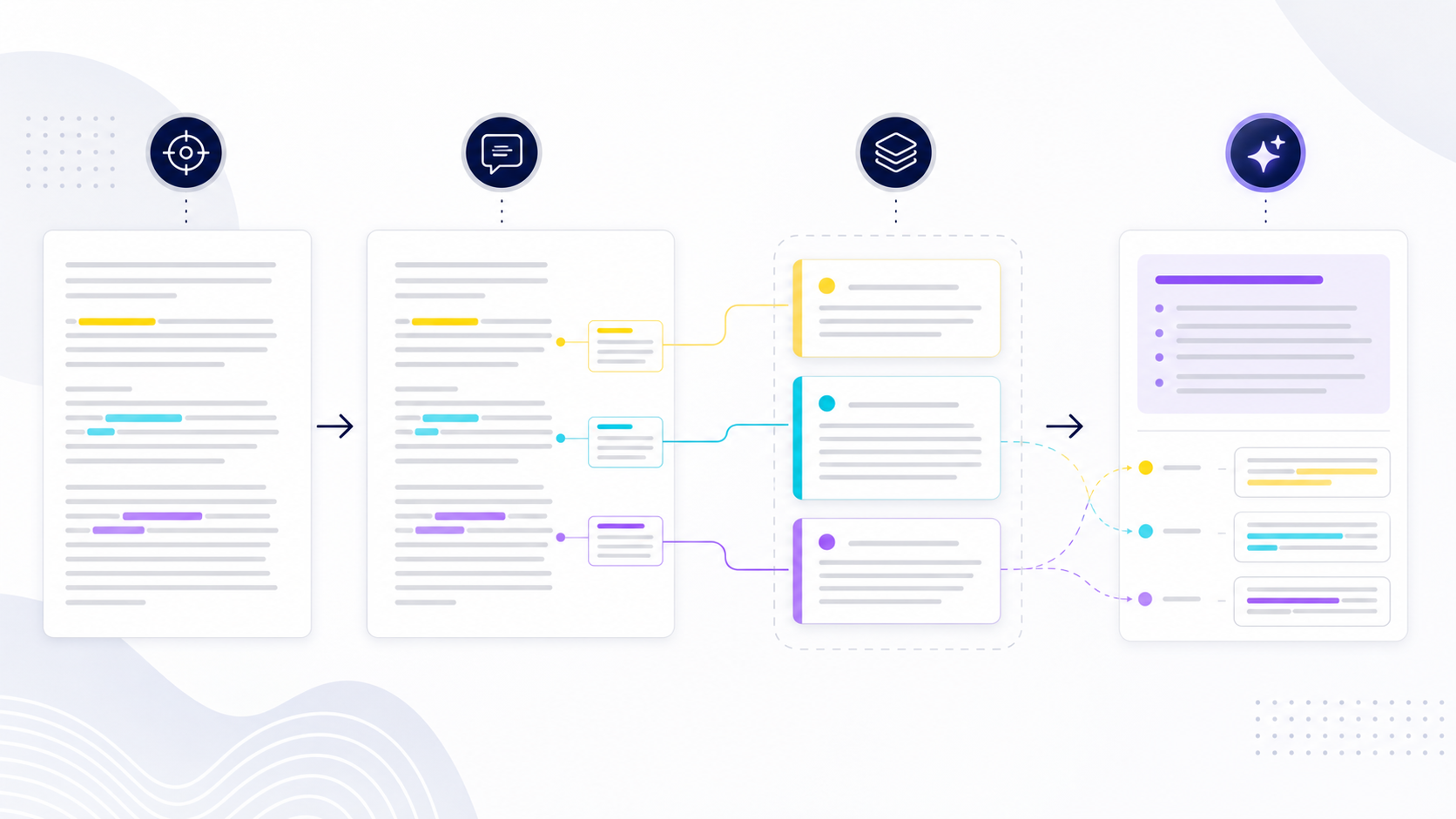
Limit the legend to categories that lead to different actions. For example: yellow for a key claim, cyan for supporting evidence, violet for an action or requirement, and a comment—not another color—for uncertainty. Record the legend in the review brief so collaborators interpret marks consistently. Color must not be the only carrier of meaning; notes, labels, and exported summaries should state the category in text.
颜色类别应限制在会引发不同动作的范围内。例如:黄色表示关键主张,青色表示支持证据,紫色表示行动或要求,不确定性则使用评论而不是再加一种颜色。把图例写入审阅简报,使协作者一致解释标记。颜色不能成为唯一含义载体,便笺、标签和导出摘要还应以文字写明类别。
| Signal信号 | Reader action阅读者动作 | Required note需要的说明 |
|---|---|---|
| Key claim关键主张 | Test scope and qualifiers核验范围和限定条件 | Why it matters为何重要 |
| Evidence证据 | Capture source and method记录来源和方法 | What it supports它支持什么 |
| Action行动 | Assign owner and due date分配负责人和期限 | Definition of done完成标准 |
Highlight the smallest span that preserves the complete meaning高亮能保留完整含义的最小范围
A useful span is large enough to retain the subject, claim, qualifier, number, unit, and time period, but small enough to distinguish the evidence from surrounding explanation. Avoid highlighting whole paragraphs when one sentence carries the claim. Also avoid selecting a number without its denominator or a conclusion without its limitation. When context is separated across pages, add a note linking the related passages rather than coloring everything between them.
有效范围应足以保留主体、主张、限定词、数值、单位和时间范围,同时足够短,能把证据与周围说明区分开。不要在一句话已经承载主张时高亮整段,也不要只选数字而丢失分母,或只选结论而丢失限制条件。当上下文分布在不同页面时,应通过便笺关联相关段落,而不是把中间内容全部涂色。
Turn PDF highlights into evidence records, not copied fragments把 PDF 高亮转成证据记录,而不是碎片摘抄
For every material highlight, retain the document title, version, page or section, short quotation, category, interpretation, decision relevance, and unresolved question. Distinguish the author's statement from your inference. If the source contains research or measurements, capture population, method, baseline, uncertainty, and date before reusing the finding. A highlight is a navigation aid; it is not proof by itself.
每个重要高亮都应保留文档标题、版本、页码或章节、短引文、类别、解释、与决定的关系和未解决问题。要区分作者原话与自己的推断。来源包含研究或测量结果时,复用结论前还应记录对象、方法、基线、不确定性和日期。高亮只是导航辅助,本身并不是证据证明。
Review highlights by retrieval, comparison, and decision通过检索、比较和决定复习高亮
After the first pass, hide or ignore unmarked prose and ask whether the selected passages answer the reading question. Group duplicates, compare contradictions, identify missing counterevidence, and convert actions into owners and deadlines. Then revisit the original context before making a consequential decision. Spaced review can support study, but operational reviews also need closure: accepted, rejected with reason, deferred with owner, or verified.
第一遍后,可暂时忽略未标记正文,检查所选段落是否回答阅读问题。合并重复项、比较矛盾项、寻找缺失的反面证据,并把行动转换为负责人和截止时间。做重要决定前再回到原始上下文。间隔复习有助于学习,但业务审阅还需要明确关闭状态:已接受、附理由拒绝、指定负责人延期或已验证。
Check whether the PDF highlighter can reach real text确认 PDF 高亮工具能否访问真实文本
Try selecting individual words, searching a known phrase, and copying a sentence into plain text. If selection follows large boxes, returns gibberish, or fails entirely, the file may be an image scan or have a damaged text layer. Run OCR on a working copy before highlighting, then compare names, numbers, and punctuation with the page image. Highlighting an inaccurate OCR layer creates notes that look precise while pointing to unreliable text.
尝试选择单个词、搜索已知短语,并把一句话复制到纯文本中。如果选择范围变成大方框、复制后乱码或完全无法选择,文件可能是图像扫描件或文本层已经损坏。应先在工作副本上执行 OCR,再把姓名、数字和标点与页面图像比对。高亮错误的 OCR 文本层会产生看似精确、实际却指向不可靠文字的笔记。
Pair every important PDF highlight with an evidence note为每个重要 PDF 高亮配套证据笔记
Record the document title, revision, page, section, highlighted wording, why it matters, and the decision or question it supports. Paraphrase the finding in your own words while preserving a short exact excerpt only when necessary. Add a stable file reference rather than depending on a temporary browser URL. This turns a colored span into a retrievable evidence record that another reader can verify without repeating the entire reading session.
记录文档标题、版本、页码、章节、高亮文字、重要原因,以及它支持的决定或问题。用自己的语言概括发现,只在确有必要时保留短小的原文摘录。引用稳定文件标识,而不是临时浏览器地址。这样可以把彩色文本转化为可检索的证据记录,让其他读者无需重复整次阅读就能验证。
Use PDF highlights to compare sources, not merely collect quotations用 PDF 高亮比较来源,而不是只收集引文
Apply the same category system across documents, then group exported notes by question, claim, method, population, limitation, or contradiction. Keep source identifiers attached during sorting. Look specifically for evidence that weakens the emerging conclusion, not only supporting passages. A synthesis table with one row per finding is more useful than hundreds of isolated highlights because it exposes agreement, disagreement, missing evidence, and the next verification step.
在多份文档中使用同一套分类体系,再按问题、主张、方法、对象、限制或矛盾对导出笔记分组。排序过程中必须保留来源标识。要主动寻找削弱当前结论的证据,而不只是支持性段落。每项发现占一行的综合表格通常比数百条孤立高亮更有价值,因为它能显示一致、分歧、证据缺口和下一步验证工作。
Highlight contracts and policies with obligation-aware categories按义务类别高亮合同与政策
Separate duties, deadlines, exceptions, definitions, approvals, financial terms, and termination triggers. Do not assign legal meaning from color alone; add a note that identifies the actor, action, condition, and consequence. Cross-reference definitions and schedules instead of highlighting clauses in isolation. For regulated or legal work, treat highlights as navigation aids and route interpretation to an authorized reviewer rather than presenting a personal annotation as legal advice.
应区分义务、期限、例外、定义、审批、财务条款和终止触发条件。不要仅凭颜色赋予法律含义,要在笔记中写清主体、行动、条件和后果。定义与附件应交叉引用,不能孤立高亮条款。在受监管或法律工作中,高亮只用于导航,应把解释交给有授权的评审者,不能把个人批注当作法律意见。
Test whether PDF highlights remain useful after export测试 PDF 高亮导出后是否仍然有用
Export the annotated PDF and any notes file, then open both outside the original application. Verify page references, excerpt text, color meaning, author metadata, links, and non-Latin characters. If the tool exports only a flat image, preserve a separate structured note register. When moving findings into Word or another document workflow, include source and page fields so each statement can be traced back instead of becoming an unattributed quotation.
导出带高亮的 PDF 和笔记文件,再在原应用之外打开两者。检查页码引用、摘录文字、颜色含义、作者元数据、链接和非拉丁字符。如果工具只能导出扁平图像,应另存结构化笔记清单。把发现转入 Word 或其他文档流程时,要保留来源和页码字段,避免内容变成无法追溯的无署名引文。
Make PDF highlights understandable without color alone让 PDF 高亮不依赖颜色也能理解
Use labels or note prefixes such as Decision, Evidence, Risk, and Question, and keep the palette small enough to remember. Check contrast against both white pages and colored diagrams. Make sure keyboard users can reach highlighted items and screen-reader users can access associated comments. For shared deliverables, include a legend and a text summary because printed copies, grayscale displays, and different viewers may alter highlight color or opacity.
使用“决定、证据、风险、问题”等标签或笔记前缀,并把颜色数量控制在容易记忆的范围。检查颜色在白色页面和彩色图表上的对比度。确保键盘用户可以定位高亮,屏幕阅读器用户可以访问关联批注。共享交付物还应提供图例和文字汇总,因为打印件、灰度显示和不同阅读器可能改变高亮颜色或透明度。
Troubleshoot missing, shifted, or excessive PDF highlights排查丢失、错位或过量的 PDF 高亮
Missing highlights usually indicate an unsaved copy, incompatible annotation support, or a flattened export. Shifted highlights often follow OCR, page replacement, crop changes, or viewer rendering differences. Excessive highlighting is a method problem: narrow the reading question, highlight the minimum complete span, and require a note for every high-priority color. Test the actual sharing path with a small file before investing hours in a large reading set.
高亮丢失通常意味着文件未正确保存、阅读器不兼容或导出时被扁平化。高亮错位常发生在 OCR、替换页面、裁剪变化或阅读器渲染差异之后。过量高亮属于方法问题:缩小阅读问题,只标记能够保留完整含义的最短文本,并要求每个高优先级颜色都附有笔记。处理大型阅读集前,应先用小文件测试真实共享路径。
Worked example: turn a PDF highlight into a reviewable evidence record实操示例:把 PDF 高亮转化为可复核的证据记录
This is a fictional teaching example, not a customer result, benchmark, or performance claim. Imagine a procurement analyst reviewing version 2.3 of an internal supplier policy. The reading question is: “Which requirements must be verified before production access?” A sentence on page 14 requires security review, named ownership, and recovery testing. Highlighting it is only the first step. The analyst records the exact revision, page, section, minimal complete excerpt, category, interpretation, open question, and review status so another reviewer can return to the source and challenge the conclusion.
这是虚构的教学示例,不代表真实客户结果、基准测试或性能声明。假设采购分析人员正在审阅内部供应商政策 2.3 版,阅读问题是:“获得生产环境访问权限前必须核验哪些要求?”第 14 页要求完成安全审查、明确负责人并验证恢复测试。高亮只是第一步;还需记录准确版本、页码、章节、最小完整摘录、分类、解释、待确认问题和审阅状态,让其他审阅者能够返回原文并质疑结论。
| Evidence field证据字段 | Fictional entry虚构记录 | Validation question验证问题 |
|---|---|---|
| Source来源 | Supplier Policy v2.3, page 14《供应商政策》2.3 版,第 14 页 | Is this the approved revision?这是已批准版本吗? |
| Span范围 | One complete sentence with all conditions包含全部条件的一整句 | Were qualifiers omitted?是否遗漏限定条件? |
| Interpretation解释 | All conditions appear mandatory所有条件似乎均为强制 | Source statement or reviewer inference?原文表述还是审阅者推断? |
| Open question待确认问题 | Who accepts recovery evidence?由谁验收恢复证据? | Is an owner defined elsewhere?其他位置是否定义负责人? |
| Status状态 | Pending policy-owner confirmation等待政策负责人确认 | What evidence closes the item?什么证据可关闭事项? |
A second reviewer must be able to locate the same sentence, verify that its conditions remain intact, separate quotation from interpretation, and see what is unresolved. If any step fails, the highlight is not decision-ready.
第二位审阅者必须能够定位同一句话、确认条件完整、区分原文与解释,并看见尚未解决的问题。任何一步失败,都说明该高亮尚不足以支持决策。
Test PDF highlighter compatibility, privacy, and accessibility before rollout上线前测试 PDF Highlighter 的兼容性、隐私与无障碍表现
A highlighter that works in one browser is not automatically safe for a team workflow. Test real input types, supported viewers, the export route, and the handoff process. Use sanitized documents during evaluation: highlighting is not redaction, and annotation metadata can expose names, timestamps, comments, or attachments. Sensitive work must follow approved storage, access, and review controls.
在一个浏览器中可用的高亮工具并不一定适合团队流程。应测试真实输入类型、受支持阅读器、导出路径和交接过程。评估时只使用已脱敏文档:高亮不等于脱敏,批注元数据还可能暴露姓名、时间戳、评论或附件。敏感工作必须遵循获批的存储、访问和审阅控制。
| Risk风险 | Acceptance test验收测试 | Pass criterion通过标准 | Fallback备选方案 |
|---|---|---|---|
| Scanned text扫描文本 | Select, search, and copy known values after OCROCR 后选择、搜索并复制已知值 | Text matches the page image文字与页面图像一致 | Use region notes and retain the image使用区域便笺并保留图像 |
| Viewer mismatch阅读器差异 | Open exports in every supported viewer在所有支持的阅读器中打开导出文件 | Marks, notes, authors, and anchors persist标记、便笺、作者和锚点均保留 | Export a structured evidence register导出结构化证据清单 |
| Color-only meaning仅靠颜色 | Review in grayscale and by keyboard使用灰度和键盘检查 | Labels preserve meaning without color无颜色时标签仍可表达含义 | Add text prefixes and a legend添加文字前缀和图例 |
| Version drift版本漂移 | Compare revision IDs before release发布前比对版本 ID | Every record identifies one revision每条记录指向唯一版本 | Freeze the reviewed copy冻结审阅副本 |
| Sensitive metadata敏感元数据 | Inspect comments, authors, attachments, and properties检查评论、作者、附件和属性 | Only approved information remains只保留获批信息 | Create a clean release copy创建干净发布副本 |
Document a PDF highlighter pilot before team adoption团队采用 PDF Highlighter 前记录试点证据
Run the acceptance test as a documented pilot. Select one native-text PDF, one OCR-derived scan, one file containing non-Latin characters, and one document with comments from two reviewers. Record application and viewer versions, test date, input revision, each expected behavior, the observed result, and the evidence file supporting the verdict. Have a second person repeat export and retrieval without verbal guidance. A pass means that reviewer can find the same passage, read its label, identify the source revision, and recover the associated note. Record failures instead of silently working around them; the pattern determines whether the team needs a different viewer, a text evidence register, an OCR correction step, or a narrower supported-file policy.
验收测试应作为有记录的小型试点执行。选择一份原生文本 PDF、一份经过 OCR 的扫描件、一份包含非拉丁字符的文件,以及一份由两位审阅者添加评论的文档。记录应用和阅读器版本、测试日期、输入版本、每项预期行为、实际结果及支持结论的证据文件。请第二个人在没有口头提示的情况下重复导出与检索步骤。只有当其能够找到同一段落、读懂标签、识别来源版本并恢复关联便笺时,才算通过。不要默默绕过失败;失败模式决定团队需要更换阅读器、增加文本证据清单、加入 OCR 修正步骤,还是缩小受支持文件范围。
Turn verified PDF highlights into an editable evidence brief把已验证 PDF 高亮转成可编辑证据简报
Structure the source, page, excerpt, interpretation, and next action in Markdown, then convert the evidence brief to Word without retyping the research notes.
用 Markdown 组织来源、页码、摘录、解释和下一步行动,再把证据简报转换为 Word,无需重复录入研究笔记。
Open Markdown to Word打开 Markdown 转 Word 工具PDF highlighter release checklistPDF Highlighter 发布检查清单
- The reviewed file and revision are unambiguous.被审文件和修订版本清晰无歧义。
- Every blocking comment has an owner and evidence-backed disposition.每个阻断评论都有负责人和有证据的处理结果。
- Accepted changes were made in the authoritative source.已接受修改已落实到权威源文件。
- The re-exported PDF was visually and technically verified.重新导出的 PDF 已通过视觉与技术验证。
- Supported viewers preserve required annotation behavior.受支持阅读器能保留所需批注行为。
- Sensitive comments, metadata, attachments, and hidden content were reviewed.已检查敏感评论、元数据、附件和隐藏内容。
- A clean release file and separate review record are retained.已分别保留干净发布文件和审阅记录。
PDF highlighter questionsPDF Highlighter 常见问题
Does annotating a PDF change the original text?批注 PDF 会改变原始文字吗?
Usually no. Annotation objects sit above or beside page content. Apply accepted corrections in the editable source and re-export when the published content must change.通常不会。批注对象位于页面内容之上或旁边。需要改变发布内容时,应在可编辑源文件中实施修改并重新导出。
Why do PDF comments disappear for another reviewer?为什么另一位审阅者看不到 PDF 评论?
The file may have been printed, flattened, exported without annotations, opened in a viewer with limited support, or replaced by another version. Test the actual sharing route.文件可能被打印、扁平化、导出时未包含批注、在支持有限的阅读器中打开,或被另一版本替换。应测试真实分享路径。
Should annotations remain in the final PDF?最终 PDF 应保留批注吗?
Only when the audience and purpose require them. Public or customer-facing releases usually need a clean artifact, while the annotated review copy and decision log are retained separately.只有受众和用途需要时才保留。公开或客户交付通常需要干净文件,批注审阅副本和决定记录应单独保存。
Can I annotate a scanned PDF?扫描 PDF 可以批注吗?
Yes, but text-based highlighting may require a reliable OCR layer. Validate recognition and use region-based notes when text anchors are unstable.可以,但文字高亮可能需要可靠 OCR 文本层。应验证识别结果;文字锚点不稳定时使用区域便笺。
Is flattening the same as redaction?扁平化等于遮盖删除吗?
No. Flattening changes annotation editability and rendering. Redaction must remove targeted content and be verified in the saved output.不等于。扁平化改变的是批注可编辑性和呈现方式;遮盖删除必须移除目标内容并在保存结果中验证。