
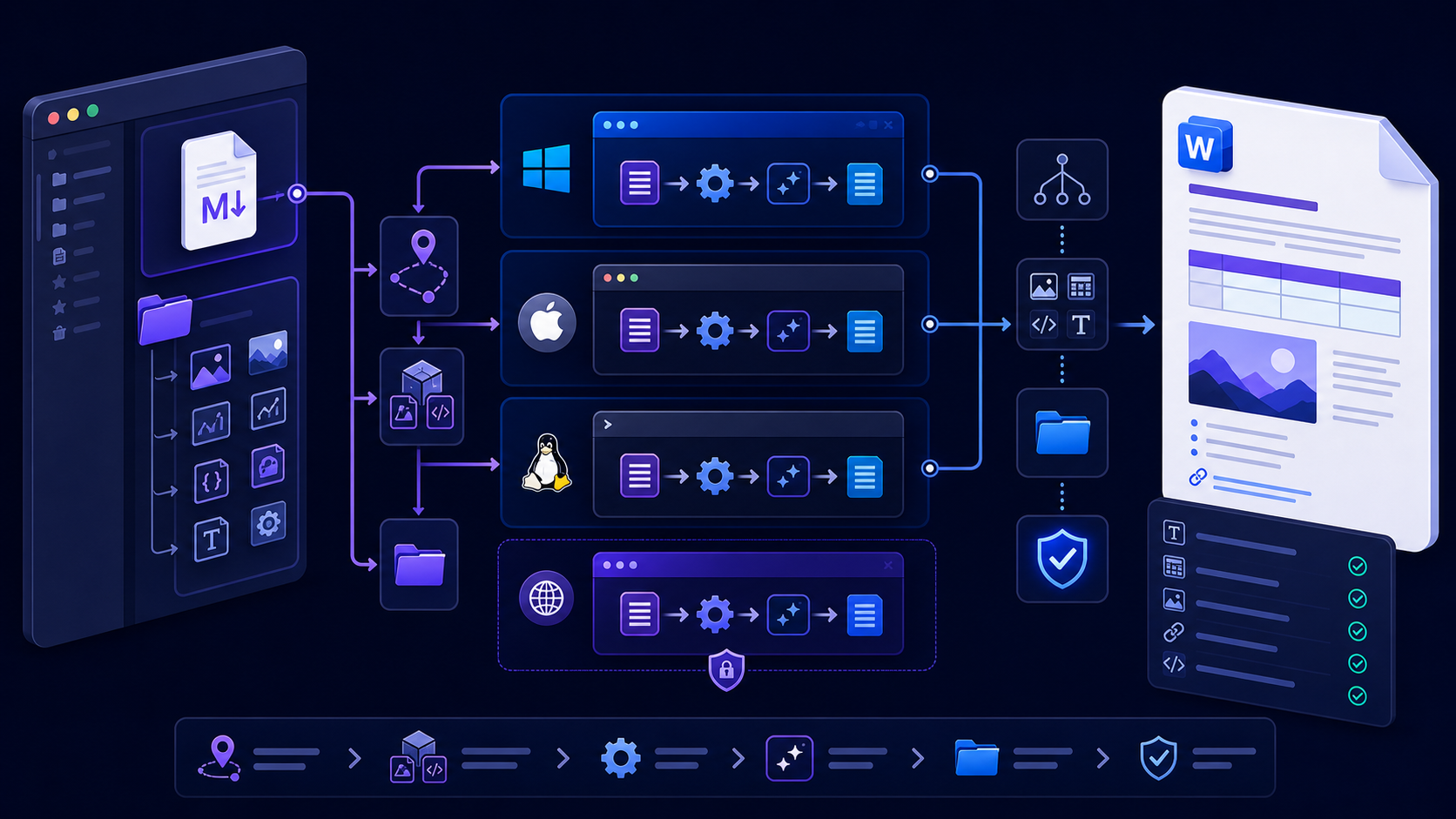
Quick answer: convert an MD file to DOCX in one tested workflow快速答案:用一套经过测试的流程把 MD 文件转为 DOCX
pandoc input.md --from=gfm --to=docx
                  --output=output.docx
. Keep images beside the project, quote paths that contain
spaces, choose the Markdown dialect explicitly, and open the
result in the recipient's Word version. A successful command
only proves that a file was created; headings, images, tables,
links, notes, fields, and pages still need review.对于已脱敏普通内容,可以使用 InfiniSynapse
浏览器工具,并检查下载的 Word 兼容文件。需要原生可编辑 DOCX
时,安装 Pandoc 并运行
pandoc input.md --from=gfm --to=docx
                  --output=output.docx
。把图片放在项目目录中,带空格的路径必须加引号,明确选择 Markdown
方言,并在接收者的 Word
版本中打开结果。命令成功只证明生成了文件,标题、图片、表格、链接、脚注、字段和页面仍需检查。
The .md extension normally identifies a Markdown
plain-text file. DOCX is an Office Open XML package designed for
structured editing in Word-compatible software. Conversion
therefore parses Markdown structure and writes a different
document model; renaming the extension does not perform that
transformation.
.md 扩展名通常表示 Markdown 纯文本文件;DOCX 是为 Word
兼容软件中的结构化编辑设计的 Office Open XML 文件包。转换会解析
Markdown 结构并写入不同文档模型,单纯改扩展名不能完成转换。
Inspect the MD file before choosing a converter选择转换器前检查 MD 文件
Open the source in a plain-text editor and identify the dialect and dependencies. GitHub-Flavored Markdown commonly uses fenced code, tables, and task lists. Pandoc Markdown can add metadata, footnotes, attributes, citations, definition lists, and other extensions. A converter configured for the wrong reader may silently reinterpret or discard features.
先在纯文本编辑器中打开源文件,识别方言与依赖。GitHub-Flavored Markdown 常使用围栏代码、表格和任务列表;Pandoc Markdown 还可能包含元数据、脚注、属性、引用、定义列表等扩展。读取器配置错误时,转换器可能静默误解或丢弃功能。
- Confirm the file encoding is UTF-8 and line endings are handled consistently.确认文件编码为 UTF-8,换行符处理一致。
- Find local images, diagrams, included files, bibliographies, citation styles, and custom filters.找到本地图片、图表、被包含文件、参考文献、引用样式和自定义过滤器。
- Check whether remote links and images are allowed in the target environment.确认目标环境是否允许远程链接与图片。
- Remove secrets, credentials, personal data, private URLs, hidden comments, and unpublished information before using an online service.使用在线服务前,删除密钥、凭据、个人数据、私有 URL、隐藏批注和未公开信息。
Use a browser for a quick MD to Word-compatible export使用浏览器快速把 MD 导出为 Word 兼容文件
- 1Create a sanitized copy of the MD source and its essential assets.创建 MD 源文件及必要资源的脱敏副本。
- 2Open the approved converter and paste or upload representative content.打开批准的转换器,粘贴或上传代表性内容。
- 3Preview headings, lists, tables, code, links, and images before download.下载前预览标题、列表、表格、代码、链接与图片。
- 4Download once, identify the actual format, and open it in the target Word environment.下载一次,识别实际格式,并在目标 Word 环境中打开。
- 5Save a native DOCX copy if required and compare content against the source.如有需要另存为原生 DOCX,并与源文件比较内容。
A Word-compatible .doc file can contain HTML that
Word opens. That may be sufficient for fast editing, but it is not
equivalent to native DOCX structure. Choose the local Pandoc route
when package structure, templates, fields, automation, or formal
review matters.
Word 兼容 .doc 文件可能包含 Word 能打开的
HTML。它可以满足快速编辑,但不等同于原生 DOCX
结构。需要文件包结构、模板、字段、自动化或正式审核时,应选择本地
Pandoc 路线。
Install Pandoc and verify the command before conversion安装 Pandoc 并在转换前验证命令
Use the installation method approved for the device. After installation, open a new shell so the executable path is refreshed, then record the version:
使用设备批准的安装方式。安装后打开新的终端,让可执行文件路径刷新,然后记录版本:
pandoc --versionOn Windows, run the command in PowerShell or Command Prompt. On macOS and Linux, use the terminal. The conversion syntax is the same; quoting, path separators, package management, permissions, and shell scripting differ. Do not copy a command that uses shell-specific continuation characters without adapting it.
Windows 可在 PowerShell 或命令提示符中运行;macOS 与 Linux 使用终端。转换语法相同,但引号、路径分隔符、包管理、权限和脚本方式不同。不要直接复制包含特定 Shell 续行符的命令而不做调整。
| Platform平台 | Version check版本检查 | Common issue常见问题 |
|---|---|---|
| Windows | pandoc --version |
Old terminal has not picked up PATH旧终端尚未刷新 PATH |
| macOS | pandoc --version |
Shell or package-manager path differsShell 或包管理器路径不同 |
| Linux | pandoc --version |
Repository version differs from project requirement仓库版本与项目要求不同 |
Run the MD to DOCX command with safe paths使用安全路径运行 MD 转 DOCX 命令
Run from the project root so relative image paths resolve predictably. The basic command works in PowerShell, Command Prompt, macOS shells, and common Linux shells:
从项目根目录运行,使相对图片路径可预测地解析。以下基本命令可用于 PowerShell、命令提示符、macOS Shell 与常见 Linux Shell:
pandoc input.md --from=gfm --to=docx --output=output.docxQuote every path that contains spaces or shell-significant characters:
包含空格或 Shell 特殊字符的路径都应加引号:
pandoc "Project Notes/input file.md" \
  --from=gfm \
  --to=docx \
  --output="build/Project Notes.docx"
In PowerShell, use the backtick for line continuation or place the
command on one line. In bash and similar shells, use
the backslash shown above. Avoid ambiguous smart quotes copied
from formatted documents.
PowerShell 使用反引号续行,或把命令写成一行;bash 等
Shell 使用上面的反斜杠。不要使用从格式化文档复制来的弯引号。
Resolve images and linked resources before writing DOCX写入 DOCX 前解析图片与关联资源
Local images are resolved relative to the working directory and resource path. A Markdown preview may show an image because the editor supplies its own project context, while a terminal command cannot find the same file. State approved resource directories explicitly:
本地图片会相对工作目录与资源路径解析。Markdown 编辑器可能因为自带项目上下文而显示图片,但终端命令找不到同一文件。应明确指定批准的资源目录:
pandoc docs/report.md \
  --from=gfm \
  --to=docx \
  --resource-path="docs:assets:assets/images" \
  --output=build/report.docx
The separator accepted by --resource-path follows the
platform. Prefer simple project-relative paths, consistent
filename case, and portable names. Verify the DOCX contains each
intended image, not only a placeholder. Check aspect ratio,
effective resolution, captions, alternative text, licensing, and
whether remote assets were embedded.
--resource-path
接受的分隔符随平台变化。优先使用简单项目相对路径、一致文件名大小写和可移植名称。确认
DOCX
真正包含每张预期图片,而不只是占位符;检查宽高比、有效分辨率、说明、替代文本、许可,以及远程资源是否被嵌入。
Preserve headings, tables, links, code, notes, and metadata保留标题、表格、链接、代码、脚注与元数据
| Element元素 | Prepare in MDMD 中准备 | Verify in DOCXDOCX 中验证 |
|---|---|---|
| Headings标题 | One title and ordered levels一个标题并逐级下降 | Navigation Pane and named styles导航窗格与命名样式 |
| Lists列表 | Consistent indentation and markers一致缩进与标记 | Nesting, restart, spacing嵌套、重新编号、间距 |
| Tables表格 | Real tabular data and manageable width真实表格数据且宽度可控 | Header rows, wrapping, page splits表头、换行、跨页 |
| Links链接 | Descriptive anchor and intended URL描述性锚文本与正确 URL | Clickable destination and privacy目标可点击且无隐私参数 |
| Code代码 | Fenced blocks with language where useful围栏代码并按需声明语言 | Readable font, wrapping, no clipping字体可读、可换行、不裁切 |
| Notes and citations脚注与引用 | Supported syntax and verified source data受支持语法与已验证来源 | Numbering, backlinks, bibliography accuracy编号、返回链接、参考文献准确性 |
If the source contains YAML metadata, use a reader that supports it. For citations, configure bibliography and CSL files deliberately. Never treat syntactically generated references as factually correct without source review.
源文件包含 YAML 元数据时,应使用支持它的读取器;引用需要明确配置参考文献与 CSL 文件。通过语法生成的参考条目也必须核对来源,不能自动视为事实正确。
Add a reference DOCX only when the output needs controlled styles只有输出需要受控样式时才添加 reference DOCX
The basic Pandoc command is enough for an ordinary editable
document. Add --reference-doc when the output must
use approved heading fonts, body spacing, page size, margins,
headers, footers, numbering, captions, or code styles. Pandoc's
manual explains that the reference file contributes its styles and
document properties while its body content is ignored.
普通可编辑文档使用基本 Pandoc
命令即可。只有输出必须使用批准的标题字体、正文间距、纸张、页边距、页眉页脚、编号、图注或代码样式时,才添加
--reference-doc。Pandoc
手册说明,参考文件提供样式和文档属性,而其正文内容会被忽略。
pandoc input.md \
  --from=gfm \
  --to=docx \
  --reference-doc=templates/approved-reference.docx \
  --output=build/output.docx
Do not point to an arbitrary old corporate document. Hidden style history, legacy numbering, unavailable theme fonts, private properties, headers, and relationships can make output unstable or disclose information. Start from a clean Pandoc reference file, modify named styles, version it with the build, and test it against headings, lists, tables, images, notes, multilingual text, and page boundaries.
不要随意使用旧企业文档。隐藏样式历史、旧编号、不可用主题字体、私人属性、页眉和关系可能让输出不稳定或泄露信息。应从干净的 Pandoc 参考文件开始,修改命名样式,与构建一起版本化,并用标题、列表、表格、图片、脚注、多语言文字和分页进行测试。
Batch-convert MD files without overwriting source content批量转换 MD 文件且不覆盖源内容
Write outputs into a separate build directory and preserve relative paths or use a manifest so two files with the same base name do not collide. Stop on the first conversion error and record each source-to-output mapping.
把输出写入独立构建目录,并保留相对路径或使用清单,避免同名文件冲突。第一次转换错误就应停止,并记录每个源到输出的映射。
$ErrorActionPreference = 'Stop'
New-Item -ItemType Directory -Force build | Out-Null
Get-ChildItem content -Filter *.md -Recurse | ForEach-Object {
  $target = Join-Path build ($_.BaseName + '.docx')
  & pandoc $_.FullName --from=gfm --to=docx --output=$target
  if ($LASTEXITCODE -ne 0) { throw "Failed: $($_.FullName)" }
}
For production use, add collision checks, a versioned reference DOCX, resource paths, logging, Pandoc version capture, source revision, checksums, and representative visual review. A loop is not a complete publishing system.
生产使用还要增加重名检查、有版本 reference DOCX、资源路径、日志、Pandoc 版本记录、源版本、校验和与代表性视觉审核。循环脚本并不等于完整发布系统。
Fix common MD to DOCX errors from evidence根据证据修复常见 MD 转 DOCX 错误
| Message or symptom错误或现象 | Check first首先检查 | Correction修复 |
|---|---|---|
pandoc: command not found |
PATH | Open a new shell and verify installation打开新终端并验证安装 |
| Input file not found找不到输入文件 | Working directory, spelling, quotes工作目录、拼写、引号 | Resolve the absolute path, then simplify先解析绝对路径,再简化命令 |
| Image not found找不到图片 | Relative path, case, resource path相对路径、大小写、资源路径 | Run from project root and set approved resource paths从项目根运行并设置批准资源路径 |
| Chinese text uses the wrong font中文字体错误 | Reference styles, theme fonts, target device参考样式、主题字体、目标设备 | Set tested fonts and verify fallback on another device设置经过测试的字体并在另一设备检查回退 |
| Table exceeds page表格超页 | Column count and unbreakable cells列数与不可断行单元格 | Reduce, split, redesign, or use a controlled landscape section删减、拆分、重设计或使用受控横向分节 |
| Output differs between devices设备间输出不同 | Versions, fonts, template, locale版本、字体、模板、区域设置 | Compare manifests and the same fixture比较环境清单和同一测试样例 |
Reduce a failing source to the smallest file that still reproduces the problem. Add metadata, images, tables, filters, templates, and options back one layer at a time. This separates source syntax from path, reader, writer, and template behavior.
把失败源缩减为仍能复现问题的最小文件,再逐层加回元数据、图片、表格、过滤器、模板和选项。这样能区分源语法、路径、读取器、写入器与模板行为。
Convert a sanitized MD file with InfiniSynapse使用 InfiniSynapse 转换已脱敏 MD 文件
For a quick browser-based Word-compatible export, open the InfiniSynapse Markdown to Word tool. Use non-sensitive content, download the result, identify its actual file format, and inspect it in the target Word environment. Use the Pandoc route for controlled native DOCX, templates, automation, or sensitive documents.如需快速浏览器生成 Word 兼容文件,可使用 InfiniSynapse Markdown to Word 工具。请处理非敏感内容,下载后识别实际文件格式,并在目标 Word 环境中检查。受控原生 DOCX、模板、自动化或敏感文档应使用 Pandoc 路线。
Open Markdown to Word Tool打开 Markdown 转 Word 工具Verify the DOCX file before you send it发送前验证 DOCX 文件
- Confirm the extension and actual package type match the requirement.确认扩展名与实际文件包类型符合要求。
- Open without a repair warning in the supported Word versions.在受支持 Word 版本中打开且不出现修复警告。
- Compare complete text, headings, lists, tables, links, images, code, notes, and citations against the MD source.把完整文字、标题、列表、表格、链接、图片、代码、脚注与引用同 MD 源比较。
- Inspect Navigation Pane, named styles, numbering, page settings, header, footer, and fields.检查导航窗格、命名样式、编号、页面设置、页眉页脚和字段。
- Review every page for orphan headings, split rows, clipped code, blank pages, and bad spacing.逐页检查孤立标题、表格跨页、代码裁切、空白页与异常间距。
- Test search, editing, copying, comments, tracked review, and other recipient tasks.测试搜索、编辑、复制、批注、修订和其他接收者任务。
- Remove private properties, comments, hidden text, embedded files, and unapproved metadata.删除私人属性、批注、隐藏文字、嵌入文件和未批准元数据。
- Open on a second approved device and archive the source, command, versions, output, and review record.在第二台批准设备上打开,并归档源、命令、版本、输出和审核记录。
MD to DOCX questions and direct answersMD 转 DOCX 常见问题与直接答案
Yes, for approved and sanitized content, use a browser converter. Inspect the downloaded format and result. Use local Pandoc for native DOCX control, privacy, templates, or repeatable builds.可以。对于批准且已脱敏内容,可用浏览器转换器;下载后检查格式与结果。原生 DOCX 控制、隐私、模板或可重复构建应使用本地 Pandoc。
The shell is probably in a different working directory, the path is misspelled, or an unquoted space split the argument. Print the current directory, resolve the absolute path, quote it, and rerun.Shell 可能位于不同工作目录、路径拼写错误,或未加引号的空格拆分了参数。输出当前目录,解析绝对路径,加引号后重跑。
Use stable relative paths, run from a predictable project root, set approved resource paths, and verify the image is embedded in the resulting DOCX rather than trusting the conversion log.使用稳定相对路径,从固定项目根运行,设置批准资源路径,并验证图片真正嵌入 DOCX,而不是只相信转换日志。
Yes. Write to an isolated build directory, detect duplicate names, stop on errors, record source-to-output mappings, pin versions, and review representative and high-risk files.可以。写入隔离构建目录,检测重名,遇错停止,记录源到输出映射,固定版本,并审核代表性和高风险文件。
About this MD file conversion guide关于这份 MD 文件转换指南
Primary references: the official Pandoc installation guide, the Pandoc User's Guide for readers, writers, resource paths, and DOCX output, and Microsoft's Open XML package overview.
主要参考:Pandoc 官方安装指南、关于读取器、写入器、资源路径与 DOCX 输出的 Pandoc 用户指南,以及 微软 Open XML 文件包概述。