
Quick answer: choose Markdown or Word by workflow authority快速答案:根据工作流权威选择 Markdown 或 Word
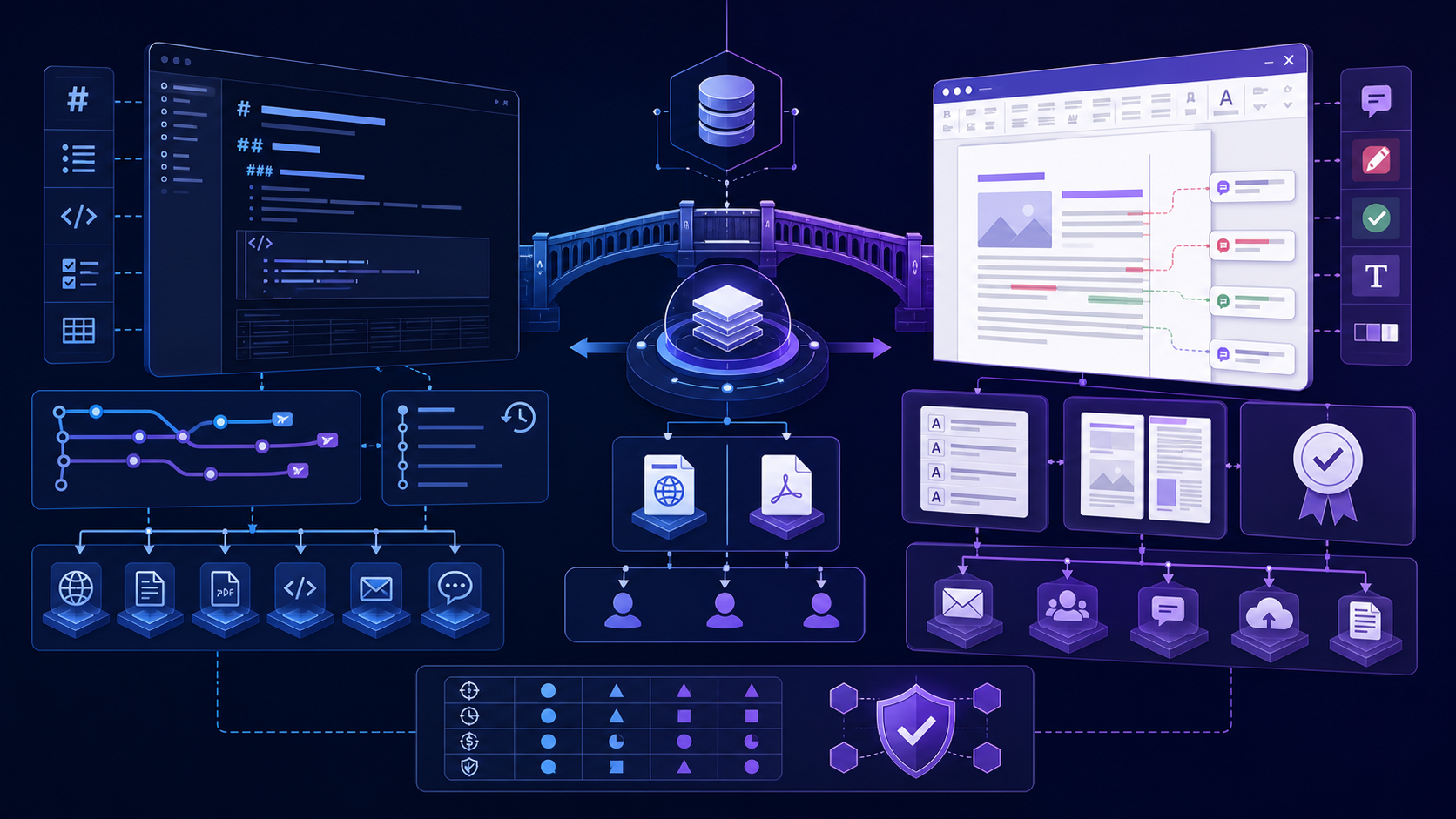
This is not a contest between a lightweight markup syntax and a word processor. It is a choice about where structure lives, who can edit, how changes are reviewed, what the final artifact must do, and how much conversion risk the team can manage.
这不是轻量标记语法与文字处理器之间的比赛,而是关于结构保存在何处、谁能编辑、如何审核变更、最终文件必须完成什么,以及团队能承受多少转换风险的选择。
Understand how Markdown and Word represent a document理解 Markdown 与 Word 如何表示文档
Markdown stores human-readable plain text plus lightweight markers for headings, emphasis, lists, links, code, images, and other structures. The exact feature set depends on the dialect and renderer. Word DOCX is a packaged document model with XML parts, relationships, named styles, numbering definitions, media, comments, fields, properties, and application-specific extensions.
Markdown 保存人类可读的纯文本,并用轻量标记表示标题、强调、列表、链接、代码、图片等结构;确切功能取决于方言和渲染器。Word DOCX 则是打包文档模型,包含 XML 部件、关系、命名样式、编号定义、媒体、批注、字段、属性及应用特定扩展。
| Question问题 | Markdown | Word / DOCX |
|---|---|---|
| Primary representation主要表示 | Readable plain text可读纯文本 | Structured package rendered by a word processor由文字处理器渲染的结构化文件包 |
| Visual formatting视觉格式 | Applied by a renderer or publishing theme由渲染器或发布主题应用 | Stored through styles, themes, direct formatting, and layout properties通过样式、主题、直接格式与布局属性保存 |
| Change history变更历史 | Usually external, such as Git通常在外部,如 Git | Comments and tracked changes can live in the document批注与修订可存在文档内 |
| Automation自动化 | Easy to parse, diff, transform, and generate容易解析、比较、转换和生成 | Powerful but package and application behavior must be handled功能强,但需处理文件包与应用行为 |
Use Markdown for portable, versioned, multi-output content用 Markdown 管理可移植、有版本、多输出内容
Markdown is strongest when the same structured content must live longer than a single visual layout. Plain text is easy to store in repositories, compare line by line, review through pull requests, search at scale, process with scripts, and feed to static-site generators, documentation platforms, APIs, and AI systems.
当同一份结构化内容需要比某个视觉版式存活更久时,Markdown 最有优势。纯文本易于保存在仓库中、逐行比较、通过 Pull Request 审核、大规模搜索、脚本处理,并可输入静态站点生成器、文档平台、API 和 AI 系统。
- Developer and product documentation: content changes with code and benefits from Git review.开发与产品文档:内容随代码变化,并受益于 Git 审核。
- Knowledge bases: many small documents need links, metadata, search, reuse, and automated publishing.知识库:大量小文档需要链接、元数据、搜索、复用和自动发布。
- AI-assisted drafting: models produce and revise structured plain text predictably, while teams can inspect every change.AI 辅助写作:模型能稳定生成与修改结构化纯文本,团队也能检查每次变更。
- Multi-channel publishing: one source can generate web pages, PDF, DOCX, slides, email, or application content with controlled transforms.多渠道发布:一个源可通过受控转换生成网页、PDF、DOCX、幻灯片、邮件或应用内容。
The trade-off is that Markdown does not provide one universal visual result. Dialects differ, renderers differ, and page-specific requirements need a publishing layer.
代价是 Markdown 不提供唯一通用视觉结果。方言与渲染器之间存在差异,特定页面需求也需要额外发布层。
Use Word for stakeholder review and page-oriented delivery用 Word 完成利益相关者审核与页面化交付
Word is strongest when the document itself is the collaborative workplace or contractual artifact. Reviewers can comment on exact passages, suggest changes with author identity and timestamps, compare documents, apply organizational templates, manipulate fields, and see a page-oriented result close to what will be printed or signed.
当文档本身就是协作工作区或契约性文件时,Word 最有优势。审核者可以对准确段落批注,以作者身份和时间戳提出修订,比较文档,应用组织模板,操作字段,并看到接近打印或签署结果的页面版式。
- Legal, policy, HR, procurement, and client review where tracked redlines are part of the process.法律、政策、人力资源、采购和客户审核,其中修订红线属于正式流程。
- Branded reports and proposals that rely on named styles, headers, footers, page numbering, and controlled templates.依赖命名样式、页眉页脚、页码和受控模板的品牌报告与提案。
- Documents that use mail merge, content controls, macros, organization-specific add-ins, or complex fields.使用邮件合并、内容控件、宏、企业加载项或复杂字段的文档。
- Handoffs to audiences that expect DOCX and do not participate in repository workflows.面向只接受 DOCX、不会参与仓库流程的受众交付。
The trade-off is that binary packages are harder to diff meaningfully in ordinary Git workflows, local copies can diverge, direct formatting can erode template consistency, and structured content can be difficult to republish safely.
代价是二进制文件包难以在普通 Git 流程中做有意义比较,本地副本容易分叉,直接格式可能破坏模板一致性,结构化内容也较难安全地重新发布。
Score the workflow instead of choosing by habit根据工作流评分,而不是凭习惯选择
| Requirement需求 | Lean Markdown倾向 Markdown | Lean Word倾向 Word |
|---|---|---|
| Line-level version history and merge逐行版本历史与合并 | Strong need强需求 | Only if a document platform already solves it只有文档平台已解决时 |
| Comments and tracked review for nontechnical stakeholders非技术审核者批注与修订 | Only with a separate review system需额外审核系统 | Strong need强需求 |
| Publish to web, PDF, DOCX, and API发布到网页、PDF、DOCX 与 API | Strong need强需求 | Possible, but conversion becomes central可以,但转换成为核心问题 |
| Precise branded page layout精确品牌页面布局 | Use a dedicated publishing template使用专用发布模板 | Strong need强需求 |
| Automated content transformations自动内容转换 | Strong need强需求 | Requires package-aware tooling需要理解文件包的工具 |
| Macros, mail merge, content controls宏、邮件合并、内容控件 | Not a native fit并非原生适配 | Strong need强需求 |
Weight each requirement by business impact. A legal review requirement may outweigh five convenience benefits. Record the decision, owner, exceptions, and review date so the workflow can evolve without becoming accidental policy.
应按业务影响为每项需求加权。一个法律审核要求可能比五个便利性优势更重要。记录决策、负责人、例外与复审日期,避免工作流无意中变成不可更改的政策。
Worked example: move a policy guide from Markdown to reviewed Word without losing authority实例:把政策指南从 Markdown 转入 Word 审核,同时保持权威源清晰
Assume a product team maintains a 40-page policy guide in Git, but legal and operations reviewers require Word comments and tracked changes. The team should define the handoff as a controlled review milestone, not allow two files to become competing masters. The example below makes ownership and evidence explicit at every stage.
假设产品团队在 Git 中维护一份 40 页的政策指南,但法务与运营审核者需要使用 Word 批注和修订。团队应把交付定义为受控审核里程碑,不能让两个文件变成相互竞争的主文件。下面的实例明确了每个阶段的所有权和证据。
| Stage阶段 | Authoritative file权威文件 | Required action必须动作 | Acceptance evidence验收证据 |
|---|---|---|---|
| Drafting起草 | Versioned Markdown有版本的 Markdown | Write content, metadata, links, and reusable structure; review changes through commits.编写内容、元数据、链接和可复用结构,并通过提交记录审核修改。 | Approved commit ID and a clean build from the pinned toolchain.已批准的提交编号,以及使用固定工具链完成的干净构建。 |
| DOCX generation生成 DOCX | Markdown remains authoritativeMarkdown 仍是权威源 | Generate DOCX with a versioned reference template; record converter and template versions.使用有版本的参考模板生成 DOCX,并记录转换器和模板版本。 | Heading styles, links, tables, images, page breaks, and document properties pass the fixture check.标题样式、链接、表格、图片、分页符和文档属性通过样例检查。 |
| Formal review正式审核 | One controlled review DOCX一份受控审核 DOCX | Freeze or branch Markdown, collect comments in one file, and assign each accepted change.冻结或分支 Markdown,在一份文件中收集评论,并为每项接受的修改指定负责人。 | Named reviewers, resolved decisions, retained comment history, and a review deadline.明确的审核者、已解决决定、保留的评论历史和审核期限。 |
| Reconciliation对账回写 | Markdown regains authorityMarkdown 恢复权威 | Apply accepted Word changes to Markdown and link each change to review evidence.把已接受的 Word 修改回写 Markdown,并将每项修改关联到审核证据。 | Reconciliation log contains decision, owner, source commit, and completion status.对账记录包含决定、负责人、来源提交和完成状态。 |
| Release发布 | Approved Markdown plus generated artifacts已批准 Markdown 与生成产物 | Regenerate DOCX and compare it with the accepted review copy before publication.重新生成 DOCX,并在发布前与已接受的审核副本进行比较。 | Final commit, output checksum, visual check, accessibility check, and release identifier.最终提交、输出校验值、视觉检查、无障碍检查和发布编号。 |
If the reviewed DOCX must become the permanent master, record that authority transfer and archive the former Markdown source. Continuing to regenerate from stale Markdown after the transfer can silently overwrite approved Word changes.
如果审核后的 DOCX 必须成为永久主文件,应记录权威转移并归档原 Markdown 源。权威转移后继续从过期 Markdown 重新生成,可能会悄悄覆盖已经批准的 Word 修改。
Design a Markdown Word hybrid with one source of truth用单一事实源设计 Markdown 与 Word 混合流程
A hybrid workflow succeeds only when the authority of each file is explicit. The safest common pattern is one-way publishing: Markdown remains authoritative, DOCX is generated for a review milestone, accepted Word changes are reconciled back into Markdown by an owner, and the next DOCX is regenerated. This prevents two independently edited masters.
只有明确每个文件的权威性,混合工作流才会成功。最安全的常见模式是单向发布:Markdown 保持权威,DOCX 在审核里程碑生成,由负责人把接受的 Word 修改回写到 Markdown,再重新生成下一版 DOCX。这样可避免两个独立编辑的主文件。
- 1Keep content and metadata in a versioned Markdown repository.把内容和元数据保存在有版本的 Markdown 仓库中。
- 2Generate DOCX with a pinned converter and versioned reference template.使用固定版本转换器和有版本参考模板生成 DOCX。
- 3Freeze Markdown during the formal Word review window or establish conflict rules.正式 Word 审核期间冻结 Markdown,或建立冲突规则。
- 4Collect one reviewed DOCX instead of multiple email forks.收集一份审核后的 DOCX,而不是多个邮件分叉副本。
- 5Reconcile accepted changes into Markdown with traceable evidence.把接受的修改以可追溯方式回写 Markdown。
- 6Regenerate and compare the final DOCX before delivery.重新生成并比较最终 DOCX 后再交付。
If Word becomes authoritative after handoff, state that transition and stop regenerating from stale Markdown. Ambiguous authority creates lost edits, duplicate work, and audit gaps.
如果交付后 Word 转为权威源,应明确记录这一切换,并停止从过期 Markdown 重新生成。权威不清会造成修改丢失、重复劳动和审计空缺。
Use Markdown for AI exchange and Word for human review boundaries用 Markdown 与 AI 交换,用 Word 定义人工审核边界
AI systems commonly emit Markdown because headings, lists, tables, code, and links remain visible in plain text. That makes prompts, outputs, diffs, and transformations easier to inspect. But AI-generated structure still needs verification: a plausible heading hierarchy can be wrong, citations can be fabricated, tables can omit rows, and converted files can hide unresolved formatting failures.
AI 系统常输出 Markdown,因为标题、列表、表格、代码和链接在纯文本中仍然可见,便于检查提示词、输出、差异与转换。但 AI 生成结构仍需验证:看似合理的标题层级可能错误,引用可能虚构,表格可能漏行,转换文件也可能隐藏未解决格式问题。
Use Word at the point where accountable reviewers need to comment, redline, approve, sign, or deliver. Do not confuse a polished DOCX with validated content. Preserve source evidence, reviewer identity, decision history, and the exact transformation used.
当负责审核者需要批注、修订、批准、签署或交付时再使用 Word。不能把外观精美的 DOCX 等同于经过验证的内容;应保留来源证据、审核者身份、决策历史和准确转换过程。
Match review mechanics to the people doing the review让审核机制适配真正执行审核的人
A technically elegant workflow fails if reviewers cannot participate. Repository review works well when contributors understand branches, diffs, comments, and merge responsibility. Word review works well when contributors understand tracked changes, comment resolution, version naming, and shared-document etiquette. Neither tool fixes unclear ownership.
如果审核者无法参与,再技术优雅的流程也会失败。参与者理解分支、差异、评论与合并责任时,仓库审核很有效;参与者理解修订、批注解决、版本命名与共享文档规范时,Word 审核很有效。任何工具都无法弥补所有权不清。
- Name the source owner, review owner, template owner, conversion owner, and final approver.明确源负责人、审核负责人、模板负责人、转换负责人和最终批准者。
- Define how simultaneous changes, rejected edits, unresolved comments, and late corrections are handled.定义如何处理并发修改、拒绝编辑、未解决批注和迟到更正。
- Use one approved channel for review artifacts and avoid uncontrolled attachments.使用一个批准渠道保存审核文件,避免不受控附件。
- Archive the final decision and exact delivered artifact, not only the latest working copy.归档最终决策和准确交付文件,而不只是最新工作副本。
Treat Markdown and Word conversion as a lossy boundary把 Markdown 与 Word 转换视为可能有损的边界
The formats do not express identical features, so conversion is a mapping, not a neutral save operation. Markdown heading levels can map cleanly to Word heading styles, but comments, tracked changes, macros, content controls, complex floating objects, and section-specific layouts have no simple Markdown equivalent. In the other direction, direct formatting and custom Word styles may collapse into generic Markdown.
两种格式表达的功能并不相同,因此转换是映射,而不是中性保存操作。Markdown 标题级别可以清晰映射到 Word 标题样式,但批注、修订、宏、内容控件、复杂浮动对象和分节布局没有简单 Markdown 对应;反向转换时,直接格式和自定义 Word 样式也可能退化为通用 Markdown。
Round-trip rule: never assume Markdown → DOCX → Markdown returns the original. Define which elements must survive, create a fixture, compare structure and content, and document every unsupported feature.往返规则:绝不能假设 Markdown → DOCX → Markdown 会恢复原文。应定义必须保留的元素,制作测试样例,比较结构与内容,并记录所有不支持功能。
Prefer one-way generation when possible. If round-trip editing is mandatory, use explicit identifiers, custom style mappings, controlled tools, and reconciliation checks.
应尽可能采用单向生成。如果必须往返编辑,应使用明确标识符、自定义样式映射、受控工具与对账检查。
Test Markdown-to-Word fidelity with a representative fixture使用代表性样例测试 Markdown 转 Word 的格式保真度
Do not validate a conversion with a one-paragraph sample. Build a small fixture containing the difficult structures the real document uses, then compare semantic structure and visible output. The acceptance rule should state what must survive, what may be transformed, and what is intentionally unsupported.
不能只用一个段落验证转换。应创建包含真实文档中复杂结构的小型样例,然后比较语义结构和可见输出。验收规则必须写明哪些内容必须保留、哪些可以转换,以及哪些明确不支持。
| Element元素 | Expected Word mapping预期 Word 映射 | Common failure常见失败 | Verification验证方法 |
|---|---|---|---|
| Headings标题 | Word heading styles with correct levels层级正确的 Word 标题样式 | Large bold paragraphs replace semantic headings.大号粗体段落代替语义标题。 | Inspect Navigation Pane and exported outline.检查导航窗格和导出大纲。 |
| Tables表格 | Editable table with correct cells and header row单元格和表头正确的可编辑表格 | Merged cells, wrapping, or wide columns break the page.合并单元格、换行或宽列破坏页面。 | Check row count, column count, reading order, and print layout.检查行列数量、阅读顺序和打印版式。 |
| Images and captions图片与题注 | Embedded image, stable size, alt text, and associated caption嵌入图片、稳定尺寸、替代文字及关联题注 | Broken relative path, low resolution, or detached caption.相对路径损坏、分辨率过低或题注分离。 | Open the delivered DOCX on another device and inspect accessibility properties.在另一台设备上打开交付 DOCX,并检查无障碍属性。 |
| Links and citations链接与引用 | Clickable destination with readable anchor and retained evidence目标可点击、锚文本可读并保留证据 | Displayed URL changes, footnotes disappear, or citation IDs detach.显示网址变化、脚注消失或引用编号分离。 | Test every unique destination and compare citation count with the source.测试每个唯一目标,并将引用数量与源文件比较。 |
| Code and special characters代码与特殊字符 | Preserved text, spacing, font choice, and language metadata保留文本、空格、字体选择和语言元数据 | Smart punctuation, wrapping, glyph substitution, or lost indentation.智能标点、换行、字形替换或缩进丢失。 | Compare exact text and inspect multilingual glyph coverage.比较准确文本,并检查多语言字形覆盖。 |
Prevent the failure modes that make Markdown Word workflows expensive预防让 Markdown 与 Word 工作流成本失控的失败场景
Markdown and DOCX are edited independently after handoff. Stop concurrent master editing, identify the last approved state, reconcile decisions, and record one authoritative file.
交付后 Markdown 与 DOCX 被独立编辑。应停止并行主文件编辑,确认最后批准状态,对账所有决定,并记录唯一权威文件。
Direct formatting hides missing heading styles, table headers, language metadata, or alt text. Inspect document structure and accessibility properties, not screenshots alone.
直接格式可能掩盖标题样式、表头、语言元数据或替代文字缺失。应检查文档结构和无障碍属性,不能只看截图。
The reviewed DOCX is approved, but accepted edits never reach Markdown. Assign a reconciliation owner and verify the regenerated output against the approved review copy.
审核 DOCX 已批准,但接受的修改从未回到 Markdown。应指定对账负责人,并将重新生成的输出与批准副本比较。
A new tool version changes styles, pagination, links, or image handling. Pin versions, archive the reference template, and rerun the representative fixture before rollout.
新工具版本改变样式、分页、链接或图片处理。应固定版本、归档参考模板,并在推广前重新运行代表性样例。
Create a quick Word-compatible handoff from Markdown从 Markdown 快速生成 Word 兼容交付文件
When a Markdown-first workflow needs a quick Word-compatible handoff, use the InfiniSynapse Markdown to Word tool with sanitized content. Download the output, identify its actual format, and verify headings, lists, links, tables, images, and editing behavior in the recipient’s Word environment. Use a controlled native DOCX pipeline for templates, fields, automation, regulated review, or sensitive material.当 Markdown 优先工作流需要快速交付 Word 兼容文件时,可使用 InfiniSynapse Markdown to Word 工具处理已脱敏内容。下载后确认实际格式,并在接收者的 Word 环境中验证标题、列表、链接、表格、图片和编辑行为。模板、字段、自动化、受监管审核或敏感材料应使用受控原生 DOCX 流程。
Open Markdown to Word Tool打开 Markdown 转 Word 工具Validate the chosen writing workflow before adoption采用前验证所选写作工作流
- List authors, reviewers, approvers, publishers, recipients, and downstream systems.列出作者、审核者、批准者、发布者、接收者和下游系统。
- Define required content structures, collaboration features, page features, security controls, and final formats.定义所需内容结构、协作功能、页面功能、安全控制和最终格式。
- Choose and document the source of truth at every stage.在每个阶段选择并记录单一事实源。
- Create a representative fixture with difficult tables, images, links, notes, code, citations, and multilingual text.创建包含复杂表格、图片、链接、脚注、代码、引用和多语言文字的代表性样例。
- Test authoring, review, conversion, publication, rollback, and archival—not only the happy path.测试创作、审核、转换、发布、回滚和归档,而不仅是顺利路径。
- Measure manual cleanup, lost edits, turnaround time, training, accessibility work, and maintenance cost.衡量人工整理、修改丢失、周转时间、培训、无障碍工作和维护成本。
- Run a pilot with the real team and revise rules from evidence.让真实团队试点,并根据证据修改规则。
Markdown Word workflow questionsMarkdown 与 Word 工作流常见问题
Neither is universally better. Markdown is usually better for portable plain text, version control, automation, and multi-output publishing. Word is usually better for familiar stakeholder review, tracked changes, page layout, templates, and native DOCX delivery.没有一种格式普遍更好。Markdown 通常更适合可移植纯文本、版本控制、自动化和多输出发布;Word 通常更适合利益相关者熟悉的审核、修订、页面布局、模板和原生 DOCX 交付。
Yes, if the source of truth, conversion milestone, review window, reconciliation owner, and accepted direction of change are explicit. Avoid two independently edited masters.可以,但必须明确单一事实源、转换里程碑、审核窗口、对账负责人和允许的修改方向,避免两个独立编辑的主文件。
Choose the format that owns the most important ongoing work. Use Markdown when content is versioned and republished; use DOCX when formal Word collaboration and document-specific functions dominate. Record any authority transition.选择承载最重要持续工作的格式。内容需要版本化和重复发布时用 Markdown;正式 Word 协作与文档专用功能占主导时用 DOCX,并记录权威切换。
Do not assume that opening or pasting raw Markdown provides a complete standards-based import. Behavior depends on Word version, platform, add-ins, paste mode, and the Markdown features used. Test a representative file or convert through an approved tool.不要假设打开或粘贴原始 Markdown 就能完成符合标准的导入。行为取决于 Word 版本、平台、加载项、粘贴模式和所用 Markdown 功能,应测试代表性文件或使用批准工具转换。
About this Markdown and Word comparison关于这份 Markdown 与 Word 比较
Primary references include the CommonMark specification for a defined Markdown syntax, the Pandoc User’s Guide for document conversion, and Microsoft Support guidance for tracked changes in Word.
主要参考包括定义 Markdown 语法的 CommonMark 规范、关于文档转换的 Pandoc 用户指南,以及 微软 Word 修订指南。