Supabase Data Analysis with AI: From Cross-Source Question to Result Written Back to Supabase
- AI data analysis on Supabase runs a four-stage loop — plan, execute, verify, explain — on top of your project's Postgres, with the agent retrieving business context before SQL.
- The cross-source angle is the unlock: Supabase + S3 + CSV in one question, no ETL prerequisite.
- The unusual capability is write-back. An analysis result becomes a Supabase table the agent creates, normalizes, and inserts into — with your plan approval. See the AI database query pillar for the underlying pattern.
Direct answer: what does AI data analysis on Supabase actually do?
What AI data analysis on Supabase looks like
You connect your Supabase project once — host, port, database, user, password from the project settings — with a role scoped to what the agent should see. From that point on, you ask questions in plain English instead of writing SQL.
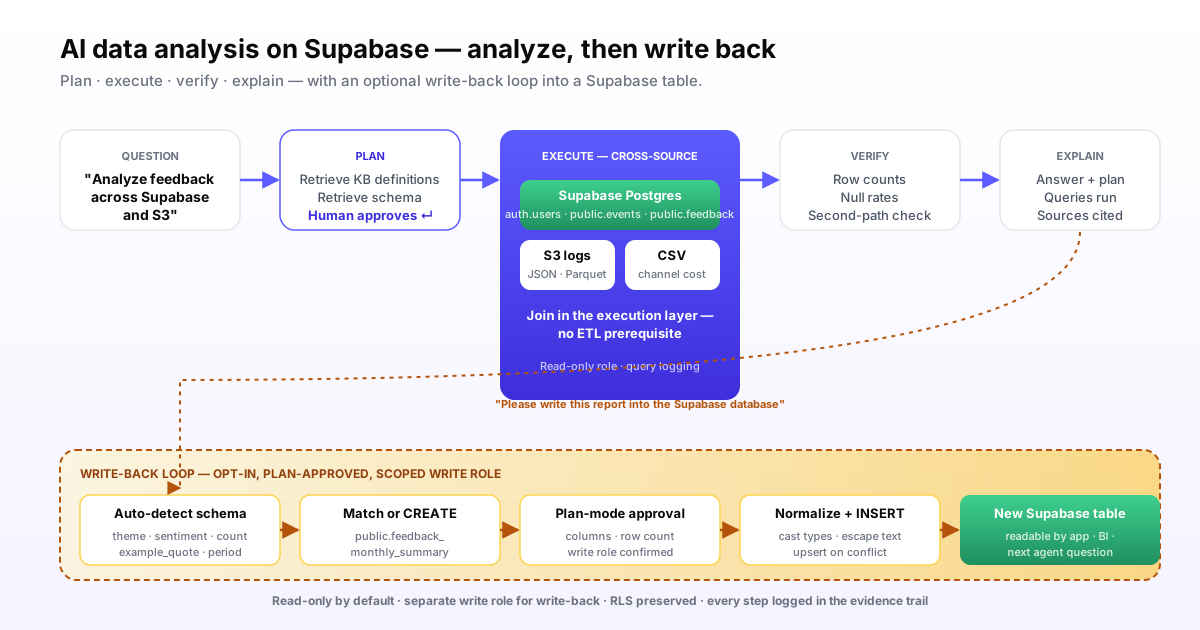
The agent runs a four-stage loop borrowed from the agent research literature, especially the ReAct pattern and Anthropic's Building Effective Agents guidance:
- Plan. The agent retrieves business context and Supabase schema, then drafts a query plan you can review and edit before anything runs.
- Execute. Once approved, the agent runs SQL against your Supabase tables plus any other sources in the same request — S3, CSVs, other Postgres or warehouses.
- Verify. The agent sanity-checks results — row counts, null rates, second-path metric validation — and flags low-confidence outputs.
- Explain. You get an answer plus the plan, the queries that ran, the sources pulled, and any caveats.
Worked example 1: cross-source channel attribution on Supabase
Imagine a SaaS startup running on Supabase. Auth and app data live in Supabase (auth.users, public.profiles, public.events). Marketing analytics logs land in S3 as daily JSON. The marketing channel cost CSV lives in a Google Drive folder synced to disk.
The product manager asks:
"Which marketing channels are bringing users who actually activate within seven days, and what is the cost per activated user by channel for the last 30 days?"
Stage 1: Plan
The agent retrieves from the knowledge base that "activate" means at least three public.events with event_type IN ('project_created','member_invited','data_connected') in the user's first seven days. It retrieves Supabase schema for auth.users and public.events, lists the S3 log prefix, and notes the cost CSV columns. The plan: join Supabase users to S3 first-touch logs on email, classify channel from the log, count activations per user from public.events, join channel costs from the CSV, return a table.
Stage 2: Execute
You approve the plan. The agent runs three queries: a Supabase SQL pull of new users and their activation events, an S3 read of the marketing log, and a read of the channel cost CSV. The cross-source join happens in the execution layer; you do not write the join yourself.
Stage 3: Verify
The agent checks that the user count matches a sanity query against auth.users for the date range, confirms no channel is missing a cost row, and flags that 4.2% of users could not be matched to a first-touch log — it surfaces this rather than silently dropping them.
Stage 4: Explain
You get a table: channel, new users, activated users, activation rate, channel cost, cost per activated user. Underneath, the plan, the three queries, and the source list. The PM forwards the row that matters to finance with the evidence trail attached.
Worked example 2: analyze user feedback, then write the report back to Supabase
This is the documented InfiniSynapse demonstration that motivates this page — and the capability you will not find in most AI SQL tools.
Setup: feedback data lives in public.feedback in your Supabase project, and additional support tickets are exported daily to S3 as Parquet. You want a recurring monthly analysis whose output is itself a Supabase table other parts of your application can read.
Step 1: Ask for the analysis
"Please analyze user feedback from these sources and produce a monthly summary report — top themes, sentiment, and example quotes."
The agent retrieves Supabase schema, lists the S3 prefix, plans the analysis, asks for plan approval, and runs. It returns a structured report: themes, sentiment scores, counts, example quotes. So far this is normal AI data analysis.
Step 2: Ask the agent to write it back
"Please write this analysis report into the Supabase database."
This is where the workflow diverges from read-only AI SQL tools. The agent:
- Auto-detects the result schema — columns for theme, sentiment_score, mention_count, example_quote, period_start, period_end.
- Checks for a target table in Supabase. If
public.feedback_monthly_summaryexists with a matching schema, the agent prepares an upsert. If it does not exist, the agent proposes a CREATE TABLE statement and the column types it chose. - Asks you to approve the write. Read-only credentials are not enough at this step; the agent needs the write role you granted explicitly for write-back, and the plan you see lists every column and the row count it intends to insert.
- Normalizes the data — converts sentiment from the model's labels to numeric scores, casts dates to
timestamptz, escapes quote text — and runs the INSERT or upsert. - Confirms the write with a count query against the target table, surfaced as part of the explain step.
The result: a Supabase table populated by an AI agent from a cross-source analysis. Your dashboard tool, your app, or your next agent question can read it like any other table.
Why this is rare
Most AI SQL features stop at the read. Write operations introduce schema risk, idempotency risk, and security risk that vendors avoid. InfiniSynapse handles them by combining schema auto-detection, plan review, scoped write roles, and a verification step. This is the data-migration-between-data-sources angle — data flows between formats and stores without manual export, import, or transform scripts.
Knowledge base bound to Supabase — definitions on rails
The single biggest source of AI SQL errors is not bad query generation. It is the agent guessing what your metric means. For a Supabase project, the bound knowledge base fixes this.
Each Supabase connection in InfiniSynapse pairs with a curated knowledge base of business definitions, dictionary entries, and analysis playbooks. Examples for the SaaS scenario:
- "Activation" is at least three
public.eventswith specificevent_typevalues in the first seven days. auth.users.emailis the join key against external first-touch logs.- "Free tier" is a profile with
plan_id IS NULLorplan_id = 'free'. - The marketing channel taxonomy lists 11 canonical values; anything else is "other."
The agent retrieves from this knowledge base as a tool call before running SQL. The database tells the agent what happened. The knowledge base tells the agent what those facts mean. Retrieval-augmented generation is the underlying primitive — applied to business semantics, not general knowledge.
| Without KB binding | With KB binding |
|---|---|
| Agent guesses "active user" = a recent login | Agent uses your defined event-based activation criterion |
| Channel names vary between queries | Agent normalizes to your 11 canonical channels |
| "Last 30 days" silently rolls timezone differently each run | Agent applies your defined timezone and boundary rule |
| RLS policies surprise the agent | KB notes which schemas have RLS and what role the agent is using |
Plan mode on Supabase — why review matters more for writes
InfiniSynapse surfaces every analysis as a plan you can read and edit before execution. For read-only Supabase queries the plan is a safety check. For write-back queries it is the safety check.
What you see in plan mode for the write-back step:
- The target schema and table name — created or matched
- The column types the agent picked, with reasoning
- The INSERT or upsert pattern, including conflict targets
- The expected row count
- The role the agent will use — the one with write permissions on this specific schema
Approval is binary. Reject and the agent revises. Approve and it writes. Either way the plan, the queries, the row count, and the result land in the audit trail.
Cross-source patterns that just work
The combinations Supabase teams ask about most often.
| Pattern | Sources | What the agent does | Where it shines |
|---|---|---|---|
| Supabase + S3 | App DB + object storage logs | Joins event logs in S3 to user identity in Supabase | Product analytics that outgrew Studio reports |
| Supabase + external Postgres | App DB + ops or finance DB | Cross-database joins on shared business keys | Customer lifecycle analysis across systems |
| Supabase + CSV | App DB + uploaded sales or marketing file | Joins the uploaded file against Supabase tables in one question | Ad-hoc business questions that need an offline data source |
| Supabase + Snowflake | App DB + warehouse | Pulls warehouse aggregates and joins to app data | Hybrid product + data team setups |
| Supabase + Supabase | Two Supabase projects | Multi-tenant or staging-vs-prod comparisons | Investigating differences between environments |
Supabase-specific gotchas the agent has to handle
Supabase is Postgres with extras. The extras matter.
Row-Level Security
RLS policies apply to whichever role the agent connects with. If the agent role has RLS enabled, the agent sees only what that role can see — by design. Set this up before running the agent on data with user-level access controls.
Auth schema vs public schema
The auth.users table is owned by Supabase and has its own access rules. The agent should usually join to your public.profiles rather than read auth.users directly, except when computing user-cohort metrics where the auth signup time matters.
JSONB columns
Supabase apps lean heavily on JSONB. The agent has to understand which JSON keys are stable and which are not. The knowledge base is where you tell it.
Realtime channels
Supabase realtime is a websocket subscription pattern, not a queryable table. Agent analysis ignores realtime channels and reads the underlying tables directly. Surface this so analysts do not expect "live stream" results.
Encrypted columns
If you use pgcrypto-encrypted columns, the agent's role needs decrypt access for those columns to be analyzable. Otherwise the agent sees opaque bytea and will flag the column as unreadable.
Honest limits
Where the AI workflow shines
- Open-ended Supabase questions with no pre-built dashboard
- Cross-source joins against S3, CSV, or external databases
- Recurring analyses that should land back in a Supabase table
- Investigations that need an evidence trail for review
- Teams with at least the top ten metric definitions written down
Where it is the wrong tool
- Fixed daily dashboards — a BI tool is cheaper and faster
- Sub-second app queries that the application itself should issue
- Teams with no agreed metric definitions — the agent will faithfully automate the ambiguity
- Schema design and migrations — that is Supabase Studio's job
- Write-back at scale without human review — do not skip the plan
Adoption: a one-week Supabase pilot
- Connect Supabase read-only with a role limited to the schemas you want analyzed. Confirm the agent retrieves schema without you describing tables.
- Seed the knowledge base with your top ten metric definitions and the canonical values for any business taxonomy. Confirm the agent cites them back in plan mode.
- Run three questions you know the answer to. One single-source, one cross-source, one open-ended "why." Score the plans, the answers, and the evidence trail.
- Add a second source. An S3 bucket or a CSV. Re-run the cross-source question end to end and watch the join happen at the execution layer.
- Try one write-back in a staging Supabase project. Approve the plan, watch the agent create or match the target table, and verify the row count. Only after this works do you wire write-back to production.
Try AI data analysis on your own Supabase project
Connect Supabase, ask one cross-source question, and review the plan, queries, result, and evidence trail. If you want to see the write-back loop, ask the agent to materialize the result as a new Supabase table — review the plan first.
Try InfiniSynapse onlineRelated InfiniSynapse pages
For the broader pattern see the AI database query pillar. For the tool landscape around Supabase analytics see Supabase data analysis tools. Adjacent stacks: MySQL data analysis tools, data analyst Snowflake, and data analyst Snowflake with AI. Concept pages: what is a data agent, data agent memory explained, and explainable AI data analysis.
FAQ
Methodology and review notes
Last updated: 2026-06-15 · Next scheduled review: 2026-09-15
The worked examples on this page are based on documented InfiniSynapse demonstrations using Supabase and S3 as connectable data sources. Stage names follow the ReAct pattern from the academic agent literature. Accuracy claims trace to the BIRD text-to-SQL benchmark; governance guidance traces to the NIST AI Risk Management Framework and the EU AI Act.
Conflict of interest: InfiniSynapse publishes this guide and is the vendor demonstrated. To reduce bias, the page calls out cases where AI agents are the wrong tool, separates the write-back step as a higher-risk operation that needs explicit human review, and lists Supabase-specific gotchas the agent must handle rather than glossing over them.
Update cadence: Reviewed every 90 days for terminology, source links, and Supabase feature changes.
Sources and references
- [Vendor] Supabase. Official documentation. supabase.com/docs.
- [Vendor] Supabase. Product site. supabase.com.
- [Independent] Yao et al. (2022). ReAct: Synergizing Reasoning and Acting in Language Models. arXiv 2210.03629.
- [Vendor] Anthropic (2024). Building Effective Agents. anthropic.com/research/building-effective-agents.
- [Independent] BIRD-SQL: A Big Bench for Large-Scale Database Grounded Text-to-SQL Evaluation. BIRD benchmark.
- [Independent] Wikipedia. Retrieval-augmented generation. en.wikipedia.org/wiki/Retrieval-augmented_generation.
- [Independent] NIST. AI Risk Management Framework. nist.gov/itl/ai-risk-management-framework.
- [Independent] A Survey of Data Agents (2025). arXiv 2510.23587.