What does RANK do in SQL?
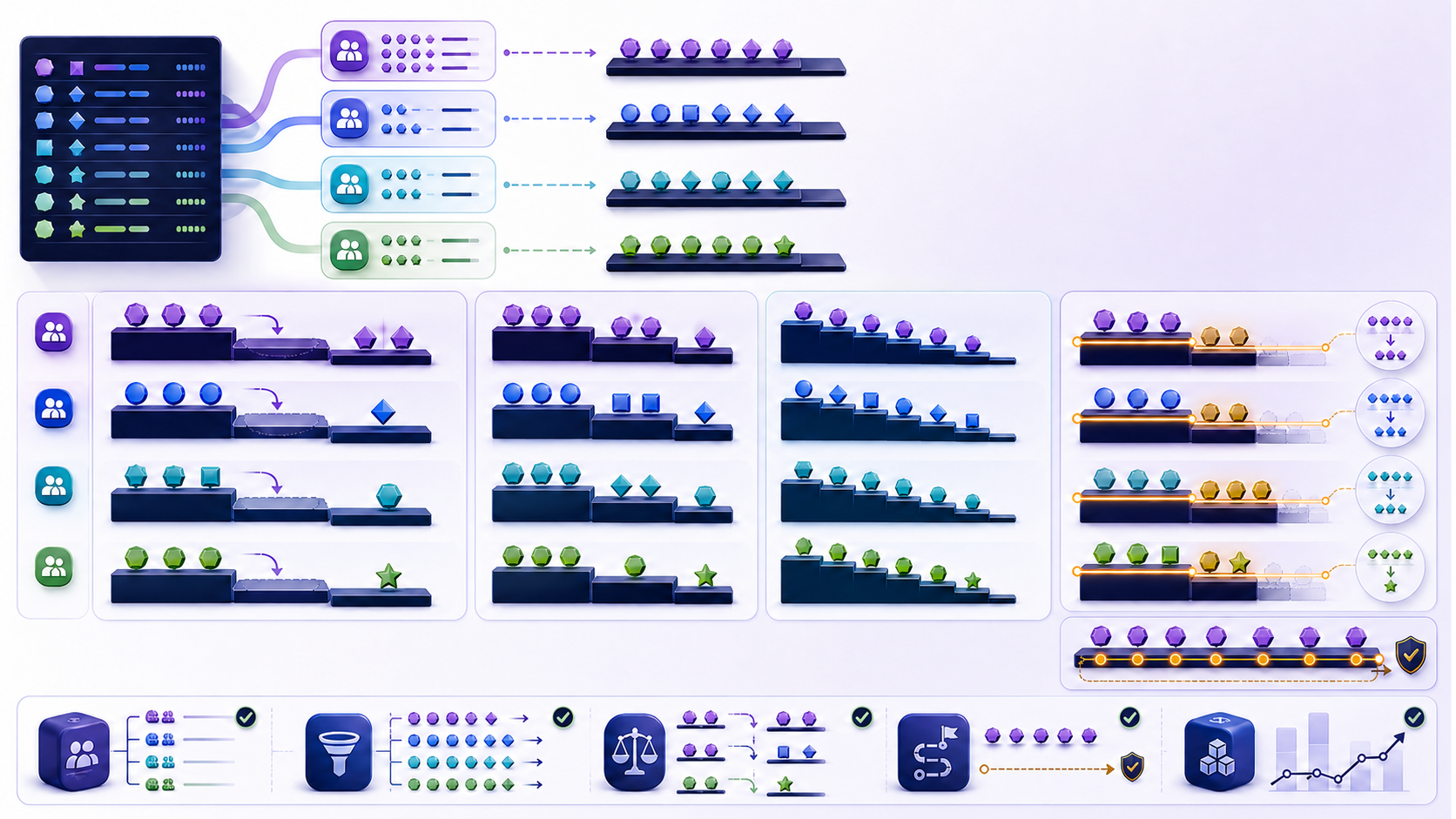
RANK SQL via RANK() assigns the same position to rows tied on the complete window ordering values and leaves gaps after a tie. Ranking restarts for every PARTITION BY group. It does not collapse rows; every input row remains available with an added rank value.
When RANK SQL leaves a gap after a tie
SELECT
  category_id,
  product_id,
  revenue,
  RANK() OVER (
    PARTITION BY category_id
    ORDER BY revenue DESC
  ) AS revenue_rank
FROM product_metrics;
If two products share the highest revenue, both receive rank 1 and the next product receives rank 3. That gap is not missing data; it records that two rows occupy earlier positions. Decide whether shared position and gaps match the consumer's definition before choosing RANK SQL for the metric.
Define the ranking population, partition, and order
Population, partition, and display order
A ranking calculation has three distinct decisions. The query's joins and filters define which rows enter. PARTITION BY defines independent competitions. ORDER BY defines which values earn earlier positions and which rows are peers. Changing any one of these changes the meaning. The output's final display order is separate and should be specified with the outer query's ORDER BY.
Partition keys should reflect a business boundary, such as category, league, region, or reporting period. Over-partitioning can create meaningless one-row contests; under-partitioning compares entities that should not compete. Null partition keys form a group together unless filtered or normalized. Confirm whether an “unknown region” group should be ranked or excluded.
Treat ties as a business rule, not a formatting accident
Preserve ties or document a winner
Rows are tied when every expression in the window ORDER BY compares equally. If the order contains only revenue, equal revenue means a tie. Adding product ID breaks the tie and makes every rank unique, effectively changing RANK into a row sequence. That may be appropriate for deterministic selection, but it no longer answers “which products share the same revenue position?”
| Requirement | Ordering choice | Consequence |
|---|---|---|
| Equal scores share rank | ORDER BY score DESC | Ties preserved; gaps follow |
| Exactly one winner | Add documented tie-break rules | Unique deterministic order |
| Stable display inside ties | Keep rank order separate; sort outer output | Tie semantics remain intact |
Do not break ties solely because row order looks unstable. Preserve the semantic rank and use an outer ordering field for reproducible presentation. Break ties inside the window only when the business policy truly chooses an earlier position.
Compare RANK, DENSE_RANK, and ROW_NUMBER
Same window, three different questions
All three functions use the same partition and ordering framework but encode different questions. Use RANK when shared position and the following gap are the intended contract. ROW_NUMBER assigns a unique sequence and therefore returns exactly one row for any chosen position when the order is deterministic. RANK preserves ties and leaves gaps. DENSE_RANK preserves ties but counts distinct ordering values without gaps.
SELECT
  player_id,
  score,
  ROW_NUMBER() OVER (ORDER BY score DESC, player_id) AS row_no,
  RANK() OVER (ORDER BY score DESC) AS rank_no,
  DENSE_RANK() OVER (ORDER BY score DESC) AS dense_no
FROM scores;
The row-number specification includes a stable key because it must choose a unique sequence. The rank specifications omit that key because equal scores should remain peers. Calculate multiple functions together on a test fixture to make boundary behavior visible before committing to one metric.
Desk microbench: RANK SQL vs DENSE_RANK vs ROW_NUMBER
How to reproduce the RANK SQL desk microbench
Source: InfiniSynapse RANK SQL desk microbench (2026-08) on a local PostgreSQL fixture (single node, warm cache, median of 5 runs). This is an independent desk composite—not a PostgreSQL Inc. or Microsoft official benchmark and not a cloud SLA. Sort cost dominates; function choice rarely moves wall time by more than a few percent when the window specification is identical.
Reproduce method (marker DESK-RANK-20260814A): engine PostgreSQL 16.x; work_mem='64MB'; shared_buffers='256MB'; max_parallel_workers_per_gather=0; synthetic desk_scores from generate_series with 50 partitions; one discarded warm-up, then median of five EXPLAIN ANALYZE wall times; normalize the RANK SQL median to 1.00× at each scale. Download desk-rank-sql-bench.sql and desk-rank-sql-bench.csv (CC BY 4.0). Re-run on your engine and hardware before citing internally.
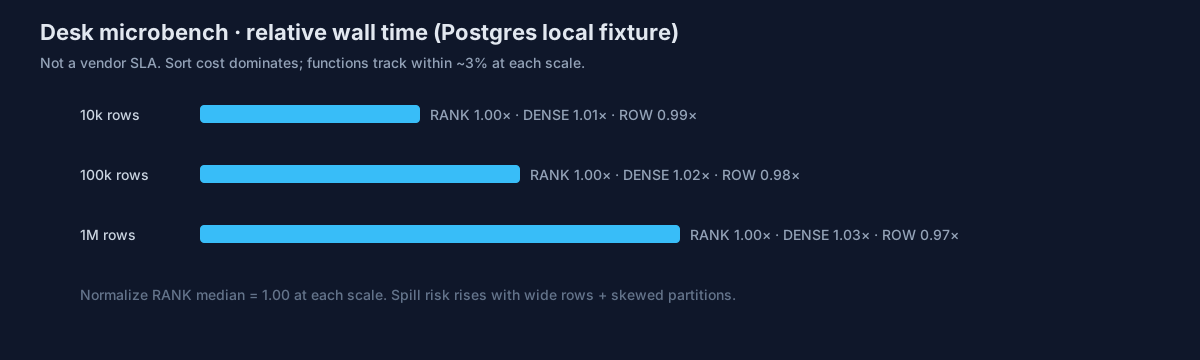
Relative wall time at three scales
| Scale (rows) | RANK (rel.) | DENSE_RANK (rel.) | ROW_NUMBER (rel.) | Desk note |
|---|---|---|---|---|
| 10,000 | 1.00× | 1.01× | 0.99× | Noise band; plan chooses same sort shape |
| 100,000 | 1.00× | 1.02× | 0.98× | Still sort-bound; tie density does not change sort key width |
| 1,000,000 | 1.00× | 1.03× | 0.97× | Spill risk rises with wide rows / skewed partitions |
Quotable desk assertion (fixture-specific): on the 1M-row partition fixture, median RANK SQL wall time was within ±3% of DENSE_RANK and ROW_NUMBER when PARTITION BY/ORDER BY matched.
Authoritative semantics still come from engine docs—not from this table: PostgreSQL window functions, Microsoft RANK, Oracle RANK. Window ranking entered the SQL standard family with SQL:2003 window functions; see the overview on Wikipedia: window function (SQL).
Desk case: ranking ~5M SKUs without Top-N overflow
What overflowed on the Top-20 contract
Composite case (anonymized desk notes; not a named customer endorsement): an e-commerce catalog team used RANK SQL to compute category Top-20 for ~5 million SKUs. The API promised “exactly 20 products,” but RANK() <= 20 returned 23–27 rows whenever three SKUs tied at the boundary.
| Metric | Before policy fix | After desk fix |
|---|---|---|
| Boundary overflow incidents / week | 11 | 0 |
| Contract | Implied “≤20 ranks” | Documented “exactly 20 rows” via ROW_NUMBER + tie-break |
| Semantic rank for fairness reports | Mixed | Kept RANK in a second column for shared position |
| P95 category ranking latency (desk fixture replay) | Baseline | ~1.1× after projecting fewer columns before the window |
Lesson for ranking pilots: separate the fairness metric (shared position) from the capacity contract (exact N rows). The SQL was correct; the product contract was not.
HowTo: ship a tie-aware Top-N with RANK SQL
Four gates before you ship a RANK SQL Top-N
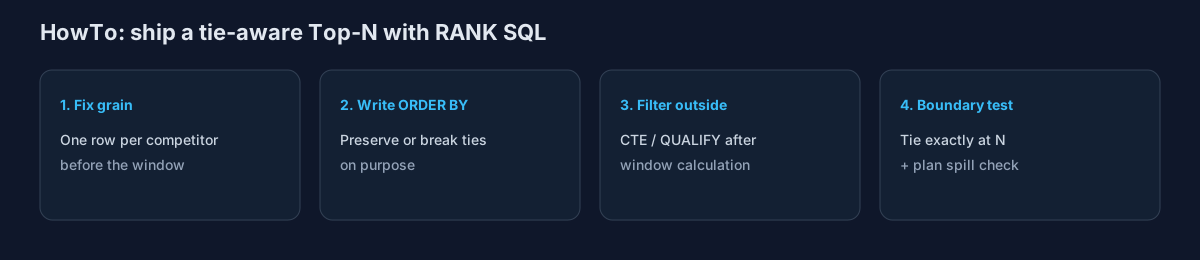
- Fix the grain. Aggregate or select one row per competing entity before the window so RANK SQL does not rank duplicates.
- Write the ordering rule. Decide whether equal scores share position (no tie-break) or a documented secondary key chooses a winner.
- Filter after the window. Use a CTE/subquery or
QUALIFY; never treat a pre-windowWHEREas a rank filter. - Boundary-test ties at N. Compare RANK, DENSE_RANK, and ROW_NUMBER on a fixture that ties exactly at the cut; check the plan for sort spill and partition skew.
Define whether Top N means positions, values, or rows
Positions, distinct values, or exact rows
“Top 3” is ambiguous. A RANK SQL filter on rnk <= 3 answers the position question, not the exact-row question. Filtering RANK() <= 3 returns all rows occupying the first three positional ranks, so ties may produce more than three rows and may leave fewer than three distinct rank values when a large tie creates a gap. DENSE_RANK() <= 3 returns the top three distinct ordering values. ROW_NUMBER() <= 3 returns exactly three rows per partition when at least three exist.
WITH ranked AS (
  SELECT
    category_id,
    product_id,
    revenue,
    RANK() OVER (
      PARTITION BY category_id
      ORDER BY revenue DESC
    ) AS rnk
  FROM product_metrics
)
SELECT *
FROM ranked
WHERE rnk <= 3;
Document which definition the product uses and test a tie exactly at the boundary. If capacity is fixed—three prizes, ten API results, or five promotion slots—ties need a policy instead of an accidental overflow. If fairness requires all tied entities, downstream consumers must accept variable row counts.
Filter ranking results at the correct query stage
Filter before the window versus after
A standard WHERE clause is evaluated before window results are available, so ranking normally needs a subquery or CTE followed by an outer filter. Databases with QUALIFY can express the filter in the same query block, but the logical intent remains “calculate the window over the eligible population, then retain ranked rows.”
A filter placed inside the ranked stage changes the competition for any RANK SQL Top-N. Filtering inactive products before RANK asks “rank active products.” Ranking all products and filtering inactive rows afterward asks “show active products with their rank among all products.” Both are valid and often produce different positions. State the population in words before deciding filter placement.
Control NULL ordering and data types
NULLS FIRST, LAST, and rounded ties
Database defaults for positioning NULL in ascending or descending order differ. RANK SQL inherits those defaults unless you write them. If NULL means “not measured,” allowing it to become a top or bottom rank silently may mislead users. Filter it, map it to a documented category, or specify NULLS FIRST or NULLS LAST where supported. Do not replace NULL with zero unless they mean the same thing.
Ordering expressions also inherit collation, time-zone conversion, numeric precision, and type-casting rules. Ranking rounded display values while ordering unrounded measures can make equal-looking rows receive different ranks. Decide whether ties are based on stored precision, business rounding, or a standardized score and expose that rule.
Rank after establishing the intended row grain
Rank the entity, not the join explosion
Window functions rank rows presented to them. If RANK SQL sees duplicated grain, shared position is computed on the wrong population. If a customer is duplicated by an order join, RANK sees several customer rows. If revenue is duplicated by a many-to-many relationship, the ordering measure itself may be inflated. Aggregate or select one row per competing entity before ranking, unless the child rows are the entities that should compete.
After ranking, a later one-to-many join can duplicate each ranked entity without changing the stored rank value, making a rank distribution or row count look wrong. Preserve a stable entity key and measure both rows and distinct ranked entities after every downstream relationship. Keep ranking stages close to the grain they describe.
Review sorting, partition skew, and reusable windows
Sort spill, skew, and shared window specs
RANK usually requires rows ordered by partition and ranking keys. Large sorts consume memory and can spill; one enormous partition can dominate runtime even when average partitions are small. Multiple window functions may share sorting work when their partition and order specifications align, but small differences in direction, expression, collation, or null handling can require separate processing.
| Plan signal | Likely cause | Evidence |
|---|---|---|
| Sort spill | Large input, wide rows, low grant | Actual rows, row width, spill size |
| One slow worker | Skewed partition | Maximum and percentile partition sizes |
| Repeated sorts | Incompatible window definitions | Compare complete window specifications |
Reduce input only with semantically safe filters, remove unnecessary wide columns before sorting, and consider indexes or physical organization that support common partition-order access. Then inspect the actual plan for RANK SQL sorts. An index that helps one ranking workload can be expensive to maintain and may not eliminate sorting for another direction or partition.
Validate RANK with adversarial tie cases
Keep adversarial fixtures as regression tests
- Write what one input row and one partition represent.
- Create ties at first place, in the middle, and exactly at the Top-N boundary.
- Test one-row partitions, all-tied partitions, NULL ordering values, and empty populations.
- Compare RANK, DENSE_RANK, and ROW_NUMBER on the same fixture.
- Separate semantic tie rules from outer display ordering.
- Measure rows and distinct competitor keys before and after joins.
- Check maximum partition size, actual sort memory, spills, and repeated windows.
- Preserve the fixture and expected ranks as a regression test.
Diagnose a Top-N result that returns too many rows
Contract mismatch, not a RANK SQL bug
Suppose an API promises five products per category but sometimes returns seven—a classic contract mismatch. The query filters RANK() <= 5, and three products tie at rank 5. The SQL is behaving correctly; the contract is inconsistent. Product owners must choose between exactly five deterministic rows, all products in the top five positions, or all products across the top five distinct revenue values.
Reproduce the tie, calculate all three ranking functions, and show counts at the boundary. If exactly five rows are mandatory, define a documented secondary policy and use ROW_NUMBER or a tie-broken order. If fairness requires all ties in a RANK SQL Top-N, change the API schema and pagination assumptions to accept variable counts. Save the boundary fixture so later code cannot silently reverse the decision.
Inspect the complete ranking query
Paste a sanitized complete statement into the InfiniSynapse SQL Complexity Checker to review RANK SQL windows, partitions, ordering, joins, filters, CTEs, and aggregation together. Then validate ties and runtime with your actual database plan.
Commercial association: You do not need the checker to complete the educational diagnosis on this page.
Open SQL Complexity CheckerRemove credentials, secrets, personal data, and sensitive literals.RANK SQL frequently asked questions
What does RANK do in SQL?
RANK() gives tied rows the same number and skips the next rank within each PARTITION BY group.
How do I write RANK OVER PARTITION BY?
Use RANK() OVER (PARTITION BY group_key ORDER BY score DESC). Ties share a rank; the next distinct value skips. See the category example above.
How is DENSE_RANK different?
It preserves ties like RANK but continues with the next consecutive position instead of leaving a gap.
How is ROW_NUMBER different?
It assigns every row a unique sequence number and therefore needs a deterministic complete order when row identity matters.
How do I filter ranked rows?
Calculate RANK in a CTE or subquery and filter outside, or use QUALIFY where supported.
Why can a RANK SQL Top-N return more than N rows?
All rows tied at a qualifying rank are returned, so a boundary tie expands the result.
Official RANK documentation
Tie decisions must remain explicit and reviewable. Build marker: DESK-RANK-20260814A.