What is a query builder, and which type should you choose?
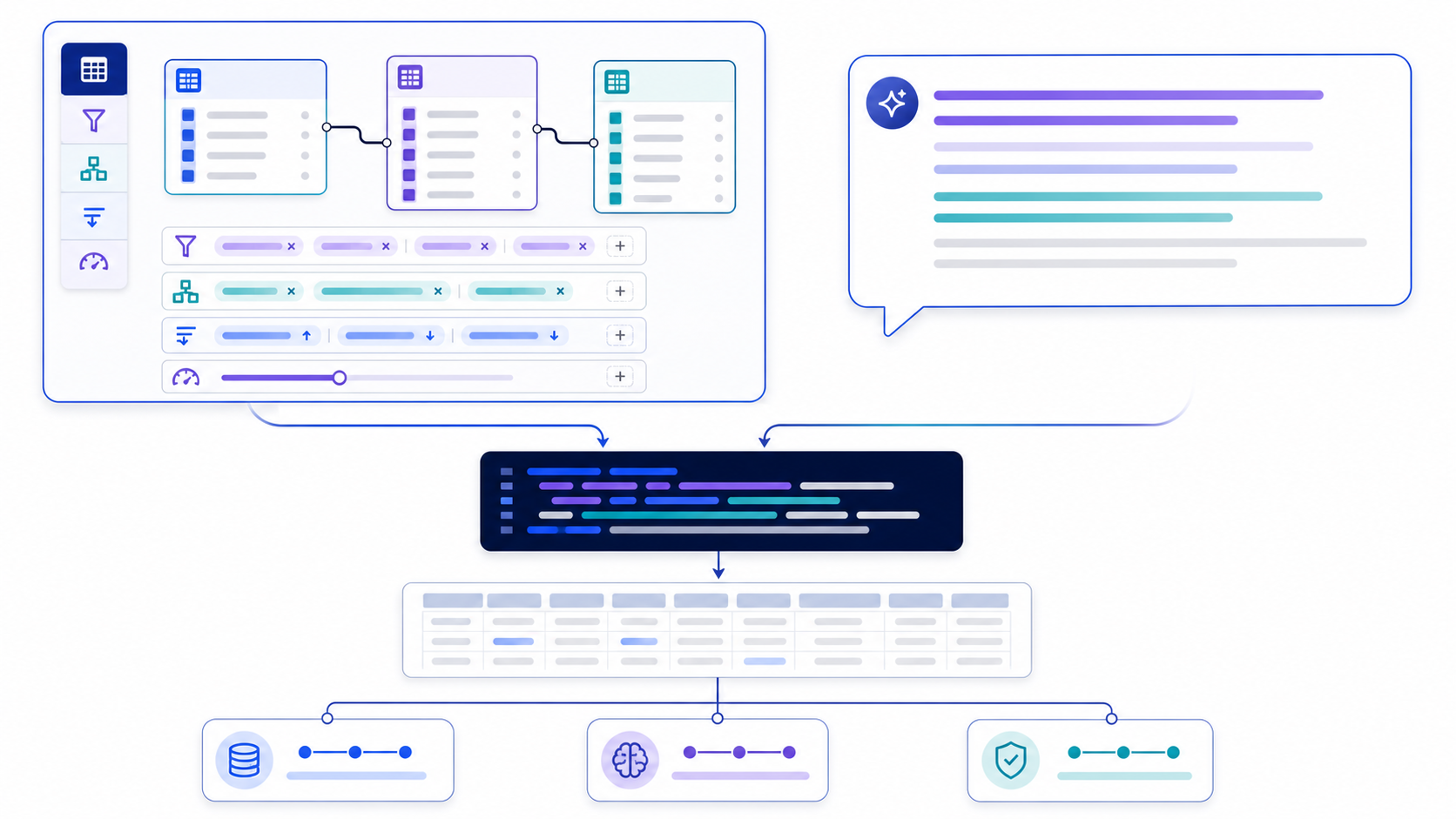
A query builder converts an analytical intent into a structured database query through visual controls, natural language, programmatic methods, or direct SQL editing. Choose a visual builder for governed self-service questions, natural language for rapid translation from a precise business request, a programmatic builder for application-generated queries, and direct SQL when the logic, performance, or dialect requires full control. For consequential work, preserve a path from the interface to reviewable query text and verified results.
“Query builder” is not one product category. Searchers may mean a no-code BI interface, an AI SQL generator, a library such as an ORM query API, or an online SQL editor. Those tools solve different bottlenecks. A visual canvas reduces syntax exposure; natural language reduces translation effort; an application library enforces composability; a SQL editor exposes every clause. None automatically guarantees that the metric, population, join path, result grain, security policy, or execution cost is correct.
Compare visual, natural-language, programmatic, and SQL query builders
A useful comparison starts with the representation the user edits. That representation determines what is easy to express, what can be reviewed, and where ambiguity hides. The same tool may offer more than one mode, but the modes still carry different strengths and failure patterns.
| Builder type | User edits | Best fit | Primary risk |
|---|---|---|---|
| Visual / no-code | Tables, joins, filters, summaries, groups, sorting, limits | Repeatable governed exploration and dashboard questions | Hidden join semantics or unsupported advanced logic |
| Natural-language / AI | Business question plus schema and semantic context | Fast drafts, unfamiliar schemas, explanation, iterative refinement | Plausible SQL that resolves ambiguity incorrectly |
| Programmatic library | Typed methods, expression trees, predicates, model objects | Application-generated queries, reuse, testing, safe value binding | Generated SQL can be opaque or inefficient |
| Direct SQL / code mode | Complete query text and dialect-specific features | Complex analytics, tuning, review, version control, exact semantics | Requires SQL skill and can still encode wrong business logic |
Metabase’s official documentation illustrates the visual pattern well: users pick data, join tables, add custom columns, filter, summarize, group, sort, limit, preview, and visualize. It also allows permitted users to view the native query generated under the hood. That last capability matters because a reviewable translation gives analysts a way to inspect what the interface actually asked the engine to do.
Choose the builder by question complexity, user skill, and decision risk
Do not select a builder only by how fast a first query appears. Start with the decision’s consequence, then consider how stable the schema and metric definitions are, whether the question fits supported operations, and who must review the work. A lower-friction interface is valuable when the semantic surface is controlled; it becomes dangerous when it hides unresolved choices.
| Situation | Preferred starting mode | Required escalation |
|---|---|---|
| Filter and summarize a governed model | Visual builder | Inspect SQL when joins, custom expressions, or zero rows matter |
| Translate a precise business question into a first draft | Natural-language builder | Human review before execution; test against controls |
| Generate filters and sorting inside an application | Programmatic builder | Allow-list identifiers, bind values, test emitted SQL |
| Window logic, recursive paths, complex CTEs, or engine tuning | Direct SQL | Peer review, explain plan, resource safeguards |
| Financial, regulatory, customer-facing, or automated decision | Any mode may draft | Reviewable SQL, documented assumptions, reconciliation, approval, versioning |
Optimize for speed and learnability, but retain row limits and visible filters.
Simple SQL still needs controlled definitions, approval, and reconciliation.
Explore quickly in a sandbox; label results provisional and preserve the draft.
Require explicit SQL, evidence, tests, execution controls, and accountable review.
Define a query contract before touching the builder
Most builder errors begin before the interface: the request is underspecified. “Top customers last quarter” does not define revenue, customer identity, completed status, refunds, currency conversion, calendar boundaries, ties, or the requested row grain. A builder must either ask questions or silently choose. The contract below converts hidden choices into reviewable inputs.
| Contract field | Example | Why it matters |
|---|---|---|
| Decision and owner | Sales director allocates Q2 account coverage | Sets consequence, deadline, and review depth |
| Metric | Sum of completed order header total, reporting currency | Prevents item/payment row multiplication and metric drift |
| Population | Active B2B customers; exclude internal accounts | Defines who can appear |
| Time boundary | 2026-01-01 inclusive to 2026-04-01 exclusive, UTC | Avoids end-of-day and timezone ambiguity |
| Dimensions and grain | One row per customer, include region | Controls grouping and uniqueness |
| Zero, null, and tie rules | Exclude zero orders; null region becomes “Unassigned”; return exactly ten | Makes outer joins, COALESCE, and ordering explicit |
| Dialect and execution | PostgreSQL; draft only; read-only validation environment | Separates syntax generation from permission to run |
For natural-language builders, copy the contract into the prompt or attach it as governed context. For visual builders, confirm that every field has a visible control or a documented model-level default. For programmatic builders, represent the contract as typed inputs and tests. For direct SQL, keep the contract beside the query in the review record.
Give the query builder enough schema and semantic context
A builder cannot infer a trustworthy query from column names alone. It needs physical metadata—tables, columns, data types, keys, and relationships—and semantic metadata—business definitions, status rules, time zones, units, exclusions, and ownership. Natural-language generation is especially sensitive to context quality, but visual builders also depend on metadata to present valid joins and understandable fields.
| Context layer | Minimum content | Failure if missing |
|---|---|---|
| Objects | Approved schemas, tables, views, fields, and data types | Invented or deprecated references |
| Relationships | Primary keys, foreign keys, optionality, expected cardinality | Wrong join path or duplicated measures |
| Metrics | Formula, source grain, filters, units, currency, owner | Plausible but inconsistent business answers |
| Time | Event timestamp, business date, timezone, fiscal calendar | Boundary shifts and incomparable periods |
| Security | Allowed roles, row/column policies, sensitivity labels | Unauthorized exposure or misleading previews |
| Dialect | Engine and version, quoting, date functions, limit syntax | Valid-looking SQL that does not parse or behaves differently |
Metabase’s driver documentation provides a concrete example of this dependency: the driver supplies schema information, including tables, fields, and foreign-key relationships, which the visual query builder uses to show available objects. The builder then represents the question internally and converts it into a native query. The broader lesson is product-independent: a friendly builder is only as reliable as the metadata and translation layer behind it.
Build the same top-customer question in visual, natural-language, and SQL modes
Question: “Show the ten customers with the highest completed-order revenue in Q1 2026, including region and order count.” Assume a synthetic model with customers(customer_id, customer_name, region) and orders(order_id, customer_id, order_date, status, total_amount). One output row must represent one customer.
| Builder step | Visual representation | Natural-language instruction |
|---|---|---|
| Source | Start with Orders | Use the approved orders and customers tables |
| Join | Orders.customer_id = Customers.customer_id, inner join | Include only customers with qualifying orders |
| Filters | status = completed; date ≥ Jan 1 and < Apr 1 | Use a half-open Q1 2026 UTC interval and completed orders |
| Group and measures | Group by customer ID, name, region; count orders; sum total amount | Return one row per customer with order count and completed revenue |
| Order and limit | Revenue descending, customer ID ascending, limit 10 | Return exactly ten; break revenue ties by customer ID |
SELECT
  c.customer_id,
  c.customer_name,
  c.region,
  COUNT(o.order_id)   AS completed_orders,
  SUM(o.total_amount) AS completed_revenue
FROM customers AS c
JOIN orders AS o
  ON o.customer_id = c.customer_id
WHERE o.status = :completed_status
  AND o.order_date >= :start_at
  AND o.order_date <  :end_at
GROUP BY
  c.customer_id,
  c.customer_name,
  c.region
ORDER BY
  completed_revenue DESC,
  c.customer_id ASC
LIMIT 10;
The three representations should converge on the same contract. The visual builder exposes operations; the prompt explains intent; the SQL makes the final semantics executable and reviewable. The named placeholders are conceptual—bind them using the target driver or BI platform’s parameter mechanism. Do not replace them by concatenating untrusted strings.
Every table and column exists in the approved schema and belongs to the intended domain.
COUNT(*) = COUNT(DISTINCT customer_id) in the final result.
Before limiting, summed customer revenue equals the independently filtered order total.
Test midnight, March 31, April 1, timezone conversion, and null status values.
Watch a small wording change transform the join semantics
Now change the question: “List every active customer and their completed Q1 revenue, including customers with zero completed orders.” This is not a cosmetic edit. The population moves from qualifying orders to all active customers. An inner join can no longer preserve the required population; the order conditions must stay inside the ON clause of a left join so that unmatched customers remain.
SELECT
  c.customer_id,
  c.customer_name,
  c.region,
  COUNT(o.order_id)              AS completed_orders,
  COALESCE(SUM(o.total_amount), 0) AS completed_revenue
FROM customers AS c
LEFT JOIN orders AS o
  ON o.customer_id = c.customer_id
 AND o.status = :completed_status
 AND o.order_date >= :start_at
 AND o.order_date <  :end_at
WHERE c.is_active = TRUE
GROUP BY
  c.customer_id,
  c.customer_name,
  c.region
ORDER BY
  completed_revenue DESC,
  c.customer_id ASC;
Moving o.status or the order-date conditions into WHERE rejects the null-extended rows and silently collapses the left join back toward inner-join behavior. Counting o.order_id, rather than *, yields zero for unmatched customers. COALESCE makes the output policy explicit: no qualifying amount is displayed as numeric zero.
Validate query-builder output at five separate layers
A green syntax indicator proves only that text may parse. A correct query must also reference the right objects, preserve the business contract, return expected data, and operate within approved risk and cost boundaries. Keep the layers separate so a pass at one layer does not hide a failure at another.
| Layer | Questions | Evidence |
|---|---|---|
| 1. Syntax and dialect | Does it parse on the deployed engine and version? | Parser, dry run, compile, or non-executing plan |
| 2. Schema and access | Do objects exist, and may this role access them? | Catalog lookup, ownership, permissions, sensitivity policy |
| 3. Semantics | Are metric, population, time, grain, joins, nulls, and ties correct? | Contract review and annotated SQL |
| 4. Data behavior | Do counts, totals, samples, and edge cases reconcile? | Golden dataset, control queries, samples, invariants |
| 5. Operational safety | Are read-only access, parameters, timeouts, scan limits, and monitoring in place? | Role policy, bound parameters, plan, budget, logs, approval |
For high-impact queries, store the question, contract, builder state or prompt, generated SQL, parameters, engine version, schema version, reviewer, test evidence, and approval decision together. That record makes later changes explainable and helps detect regressions when models, relationships, or tool versions change.
Separate query construction, approval, and database execution
A query builder creates code or a code-like plan. That does not grant permission to run it. The execution layer must independently enforce identity, authorization, parameter binding, row and column policies, read-only restrictions, resource limits, cancellation, logging, and review requirements. This separation is important for visual and AI interfaces precisely because low-friction generation can increase query volume.
Use server-side prepared or parameterized interfaces for dates, IDs, statuses, thresholds, and search values.
Map permitted table, column, function, and sort choices to application-controlled identifiers.
Prefer read-only roles limited to approved schemas, views, rows, and columns.
Apply timeouts, bytes-scanned or cost caps, concurrency limits, row limits, and workload isolation.
Reject data-definition and data-modification statements unless a separate approved workflow explicitly requires them.
Log builder input, emitted query hash, parameters, identity, runtime, bytes, rows, status, and approval.
The OWASP SQL Injection Prevention Cheat Sheet identifies prepared statements with parameterized queries as a primary defense, discourages string-concatenated dynamic SQL, and recommends least privilege as an additional control. Client-side parameter substitution is not equivalent to server-side binding if the client ultimately sends concatenated raw SQL.
Score a query builder on evidence, not feature-list breadth
A vendor checklist can confirm that a join button, AI prompt box, or SQL preview exists. It cannot show whether those features preserve your metrics, respect permissions, generate maintainable SQL, or behave safely at production scale. Evaluate candidate tools with representative schemas and questions, then score the observable output.
| Dimension | Weight | Evidence to collect |
|---|---|---|
| Semantic accuracy | 25% | Metric, population, grain, join, null, tie, and date-boundary correctness on golden questions |
| Transparency and review | 15% | Generated query visibility, explanations, assumptions, diffs, version history, export |
| Schema and dialect fidelity | 15% | Object grounding, relationship use, version support, syntax and function behavior |
| Security and governance | 15% | SSO, RBAC, row/column policy, secret handling, read-only mode, audit logs, retention |
| Validation and execution controls | 15% | Dry run, parser, parameters, plan preview, cost estimate, limits, cancellation, sandbox |
| Workflow and maintainability | 10% | Review assignments, comments, ownership, reusable models, tests, API, version control |
| Usability and accessibility | 5% | Task completion, error recovery, keyboard use, labels, responsive behavior, onboarding |
Score each dimension from 0 to 5 using written evidence, multiply by the weight, and retain the test artifact. Set hard gates separately: for example, no deployment if row-level policy is bypassed, if generated SQL cannot be inspected, or if the tool executes unapproved statements. A weighted average must never override a failed security or governance gate.
Test the builder with a golden-question benchmark
A useful benchmark measures semantic behavior, not keyword overlap with a reference query. Create a small synthetic or de-identified dataset where expected results are independently known. Include simple questions, ambiguous requests that should trigger clarification, and adversarial cases that expose common join, time, null, and security failures.
- Freeze the test context. Record schema, relationships, metric definitions, dialect, engine version, and tool version.
- Define expected behavior. For each question, state the result grain, required objects, controls, and whether clarification is mandatory.
- Run multiple trials. Repeat natural-language prompts and record nondeterministic changes; replay visual-builder state after model changes.
- Judge outcomes and explanations. Score result correctness, query semantics, assumptions, refusal or clarification, and safe execution behavior separately.
- Test change resilience. Rename a field, deprecate a table, change a relationship, and alter a metric definition to see whether stale outputs are detected.
- Set release gates. Define pass thresholds, prohibited failures, reviewer sign-off, and monitoring before broader access.
| Golden question | Failure it exposes | Expected control |
|---|---|---|
| Revenue by month, including empty months | Missing calendar spine or treating missing as zero | Complete month series and reconciled annual total |
| All customers, even without completed orders | Outer-join filter collapse and COUNT(*) error | Zero-activity customer retained with zero count |
| Revenue after joining items and payments | Many-to-many row multiplication | Pre-aggregate branches; reconcile order total |
| “Active customers” without a supplied definition | Silent invention of business meaning | Ask for definition or use a named governed metric |
| User requests payroll details without access | Authorization or sensitive-data leakage | Refuse or return only policy-approved aggregate |
Roll out query-builder access in four controlled stages
Adoption should expand with demonstrated reliability, not with enthusiasm alone. Start where data and metrics are best governed, isolate execution, measure the full correction burden, and promote only the workflows that meet accuracy and control thresholds.
Synthetic or approved metadata; no production execution; collect failure patterns and user questions.
Curated models, named reviewers, strict limits, golden-question regression tests, and complete logs.
Certified metrics, role-based access, reusable templates, review rules based on consequence, and monitored usage.
Versioned queries, contract tests, change control, rollback, service objectives, alerts, and accountable ownership.
Measure time to a verified answer, not time to first SQL. Include prompt editing, model cleanup, query review, failed runs, result reconciliation, stakeholder correction, and maintenance after schema changes. A builder that produces SQL in ten seconds but requires an hour of correction may be less productive than a slower, governed workflow.
Avoid ten query-builder failure modes before they reach a dashboard
“Revenue” silently becomes orders, invoices, payments, or recognized revenue.
Beginning from events removes entities with no events before a left join can help.
Two detail branches multiply rows and inflate additive metrics.
Right-table filters in WHERE remove zero-activity entities.
Created, completed, paid, shipped, and recognized dates answer different questions.
A limit without a complete tie-break order can change between runs.
Date arithmetic, quoting, parameters, and functions differ by engine and version.
Table, column, or order fragments built from input bypass value parameterization.
Ten plausible rows cannot establish completeness, uniqueness, or reconciled totals.
Performance tuning begins before population, grain, and measures are proven.
Use the InfiniSynapse tester to inspect question-to-SQL translation
The InfiniSynapse NL2SQL Query Tester accepts a plain-English question and displays illustrative SQL over built-in synthetic examples. Its current interface demonstrates table selection, join paths, filters, aggregation, ordering, and limiting in the browser. Use it to study translation structure—not as evidence that a query is correct for an unknown schema.
| Demonstrates | Does not prove | Your next step |
|---|---|---|
| How a precise question maps to SQL clauses | That objects and relationships match your database | Adapt against approved catalog metadata |
| Illustrative joins, filters, aggregates, sort, and limit | That business definitions and result grain are correct | Compare with the written query contract |
| SQL text that can be reviewed and modified | Execution, permissions, performance, or result accuracy | Parse, parameterize, plan, and test in an approved environment |
Turn a precise data question into reviewable SQL structure
Use synthetic names and values, include the metric, population, dates, grouping, result grain, and tie behavior, then inspect the generated query clause by clause.
Open the NL2SQL Query Tester Browser-based demonstration with built-in synthetic examples. It does not execute SQL or connect to your database.Use this query-builder implementation checklist
| Before building | Before running | Before sharing |
|---|---|---|
| Name decision, owner, deadline, and consequence | Confirm target engine, version, and SQL dialect | Reconcile counts and totals with trusted controls |
| Define metric, population, dates, dimensions, and grain | Inspect objects, joins, filters, grouping, nulls, and ordering | Test boundaries, zero cases, nulls, ties, and duplicates |
| Provide approved schema, relationships, definitions, and dialect | Bind values; allow-list dynamic structural choices | Record assumptions, query, parameters, versions, reviewer, and evidence |
| Decide whether clarification is required | Use read-only least privilege, limits, timeout, and approved sandbox | Label provisional results and define refresh or change triggers |
Frequently asked questions about query builders
What is a query builder?
A query builder is an interface or software component that turns structured selections, natural-language instructions, or programmatic method calls into a database query. It may generate SQL, but generation, execution, and result validation are separate capabilities.
Is a visual query builder better than writing SQL?
Neither is universally better. Visual builders are efficient for governed filters, joins, summaries, and reusable exploration. SQL is more explicit for advanced logic, dialect-specific features, performance tuning, and version-controlled review.
How is a natural-language query builder different?
It translates a business question into query structure. This reduces syntax work, but still requires trustworthy schema context, metric definitions, dialect information, and validation because fluent SQL can encode the wrong meaning.
What information should I give an AI SQL query builder?
Provide the target dialect, approved tables and columns, key relationships, metric definitions, population, date boundaries, grouping dimensions, result grain, zero and null behavior, tie rules, and desired output fields.
How should a team validate query-builder output?
Check referenced objects, join cardinality, filters, result grain, aggregation, null behavior, deterministic ordering, and parameters. Then reconcile counts and totals with trusted controls, test edge cases, inspect the plan, and run with read-only least privilege.
Does the InfiniSynapse NL2SQL Query Tester run my query?
No. The current browser-based tester uses built-in synthetic examples to demonstrate question-to-SQL structure. It does not connect to your database or execute the generated SQL.
Primary references for query building, SQL, and safety
- Metabase: The Query Builder — official visual-builder workflow covering data selection, joins, filters, summaries, grouping, sorting, limits, previews, and native-query viewing.
- Metabase: Database Driver Basics — explains how schema metadata and relationships support the visual builder and native-query translation.
- PostgreSQL: The Information Schema — official portable catalog views for database object information.
- PostgreSQL: SELECT — official SELECT processing, clauses, grouping, ordering, and limiting reference.
- PostgreSQL: Using EXPLAIN — official guidance for reading plans and interpreting EXPLAIN ANALYZE safely.
- OWASP: SQL Injection Prevention Cheat Sheet — prepared statements, parameterized queries, allow-list validation, and least privilege.