Most Reliable AI Analyst for SQL Questions: Test
- Problem: Manual SQL still drives most reporting; SQL data analysis with AI removes the typing bottleneck for non-technical teams without dropping query evidence.
- Solution: AI agents now perform end-to-end analytical work — schema understanding, query generation, multi-source joins, execution, and result interpretation — from a plain-English question.
- Result: Analyses that used to take hours of manual joins finish in seconds, while analysts shift their time from typing SQL to validating findings.
What “most reliable” means for a SQL question
A reliable AI analyst for SQL questions returns three things together: the answer, the SQL, and the schema objects that SQL touches. If any one is missing, you cannot tell a right number from a fluent guess. Reliability is that trail, not a vendor score or a demo latency.
Use this page to run the test. The how-to for SQL data analysis with AI stays on the guide. Public benchmark context is Spider and BIRD accuracy. The architecture split is SQL agent vs text to SQL.
Five checks before you trust the number
Score each answer pass or fail. One fail means you do not ship the number.
- Schema. The tables and columns exist in the warehouse you connected, not in a pasted prompt.
- SQL. You can read the statement. Filters, grain, and joins are visible.
- Grain. The row level matches the question (order, customer, day). A summed total on the wrong grain is a wrong answer.
- Rerun. The same question on the same day returns the same SQL shape and the same figure.
- Known answer. At least one check question has a figure you already publish or can count by hand.
That is the reliability test for an AI SQL analyst. Do it before you compare feature lists.
Where SQL answers fail: wrong table, wrong join, wrong metric
Three failures cover most bad AI SQL. A wrong table uses a lookalike name (revenue on payments instead of invoices). A wrong join multiplies rows because the key is not unique. A wrong metric uses a column that sounds right and a definition the business does not use.
Read the SQL for those three before you read the chart. How to judge a reliable SQL answer walks the same failures on production schemas.
Schema-grounded analyst vs a chat that writes SQL
A chat that writes SQL is useful when you paste the schema and you will edit the statement. It is not an analyst for your warehouse: it cannot see joins you did not type. A schema-grounded analyst binds the question to connected tables, then emits SQL you can rerun.
Pick the chat to draft. Pick the grounded analyst when the number will be repeated. See AI analyst for SQL questions for the translation layer, and SQL data analysis tools for the tool classes around it.
Scorecard: six analysts on rerun, not features
Score the class of tool, not a sponsored rank. Marks below are the test you should run. They are not measured scores from a public bake-off.
| Class | What you can see | Rerun test |
|---|---|---|
| General chat | SQL if you ask for it; no live schema | Fails unless you paste the schema every time |
| NL2SQL generator | One SQL string for one question | Passes only on a single database you indexed |
| Warehouse copilot | SQL inside that warehouse’s semantic layer | Passes inside one platform; stops at its boundary |
| Notebook assistant | SQL in a cell you can edit | Passes if a person re-runs the cell |
| Schema-grounded analyst | SQL, tables, and the result together | This is the class that can pass all five checks |
| Human analyst | SQL they wrote and a known definition | Passes when the definition is written down |
A worked SQL question with the SQL shown
Question: “How many paid orders did we take yesterday?” A reliable answer includes SQL like this, pointed at tables you actually have. The numbers are a teaching sketch, not a customer result.
SELECT COUNT(*) AS paid_orders
FROM orders
WHERE status = 'paid'
  AND ordered_at >= CURRENT_DATE - INTERVAL '1 day'
  AND ordered_at < CURRENT_DATE;
Check grain (one row per order), the status filter, and the date window. Then rerun it. If the count matches a register you already trust, the analyst passed this question. Widen only after that.
When a warehouse analyst still beats the AI
Keep the person when the metric definition is still being argued, when the join key is not unique, or when the question needs a judgment the schema does not encode. The AI can draft. It should not close the books on a definition you have not written down.
Use the five checks on the next question you care about. If the SQL is missing, the tool is not the most reliable AI analyst for SQL questions, no matter how fast the chart loads.
What is SQL data analysis with AI?
SQL data analysis with AI is a workflow where an AI agent translates plain-English business questions into validated SQL queries, executes them across one or more data sources, and returns both the underlying SQL and the analytical answer. Unlike basic NL2SQL generators, modern AI data analysts also handle schema understanding, multi-table reasoning, cross-source joins, and iterative refinement across turns.
The capability matters because SQL never went away. Every BI dashboard, every operational report, and most data products still resolve to a SQL query somewhere. What changed in 2024-2026 is who writes it. Schema-aware LLM agents now produce SQL that runs against production databases without hand-editing in the majority of cases, freeing analysts and business teams from the part of the job that was never the point. Independent peer markets such as Gartner Peer Insights for Analytics & BI platforms and G2 Business Intelligence remain useful for comparing adjacent analytics products — they are not endorsements of InfiniSynapse.
Before and after: the workflow shift
Desk note (William Zhu): On customer-shaped federated joins I still see the same bottleneck the “before” card describes — hours spent reconciling OLTP exports with warehouse keys. The after workflow is what we built InfiniSynapse to compress: schema linking first, SQL as evidence, human validation last. Corrections: zhuhl@infinisynapse.com.
How AI transformed SQL data analysis
The shift happened in three waves. Understanding the waves matters because most tools on the market today sit at different points in this evolution, and that determines what they can actually do.
- Wave 1 — Chat assistants (2022-2023): ChatGPT-style LLMs generated SQL from descriptions, but had no view of your actual schema. Output was syntactically plausible, semantically wrong about half the time on real databases.
- Wave 2 — NL2SQL generators (2023-2024): Tools like AI2SQL and BlazeSQL added schema indexing. Public research benchmarks such as Spider and BIRD made text-to-SQL accuracy measurable on complex schemas; production single-database helpers often cite roughly 80% on simpler workloads. Still limited to "one question, one SQL".
- Wave 3 — AI data analysts (2024-2026): Agentic systems with schema-aware RAG plan multi-step analyses, federate across sources, validate intermediate results, and interpret findings. The output is no longer a SQL string; it's an answer with the query attached.
InfiniSynapse sits in Wave 3. The product is built on a fourth-generation LLM-Native RAG architecture and a purpose-built query language called InfiniSQL, optimized for how LLMs actually plan analytical work. The point is not "write SQL for you" — it's "do the analysis for you, and show you the SQL as evidence".
Data analysis using SQL: the new workflow
Modern data analysis using SQL — and specifically SQL data analysis with AI when an agent owns the loop — looks nothing like the old loop of write-query, run-query, debug-query, format-results. The agent handles each of those phases, and the analyst's role becomes asking better questions and validating answers. Three concrete steps:
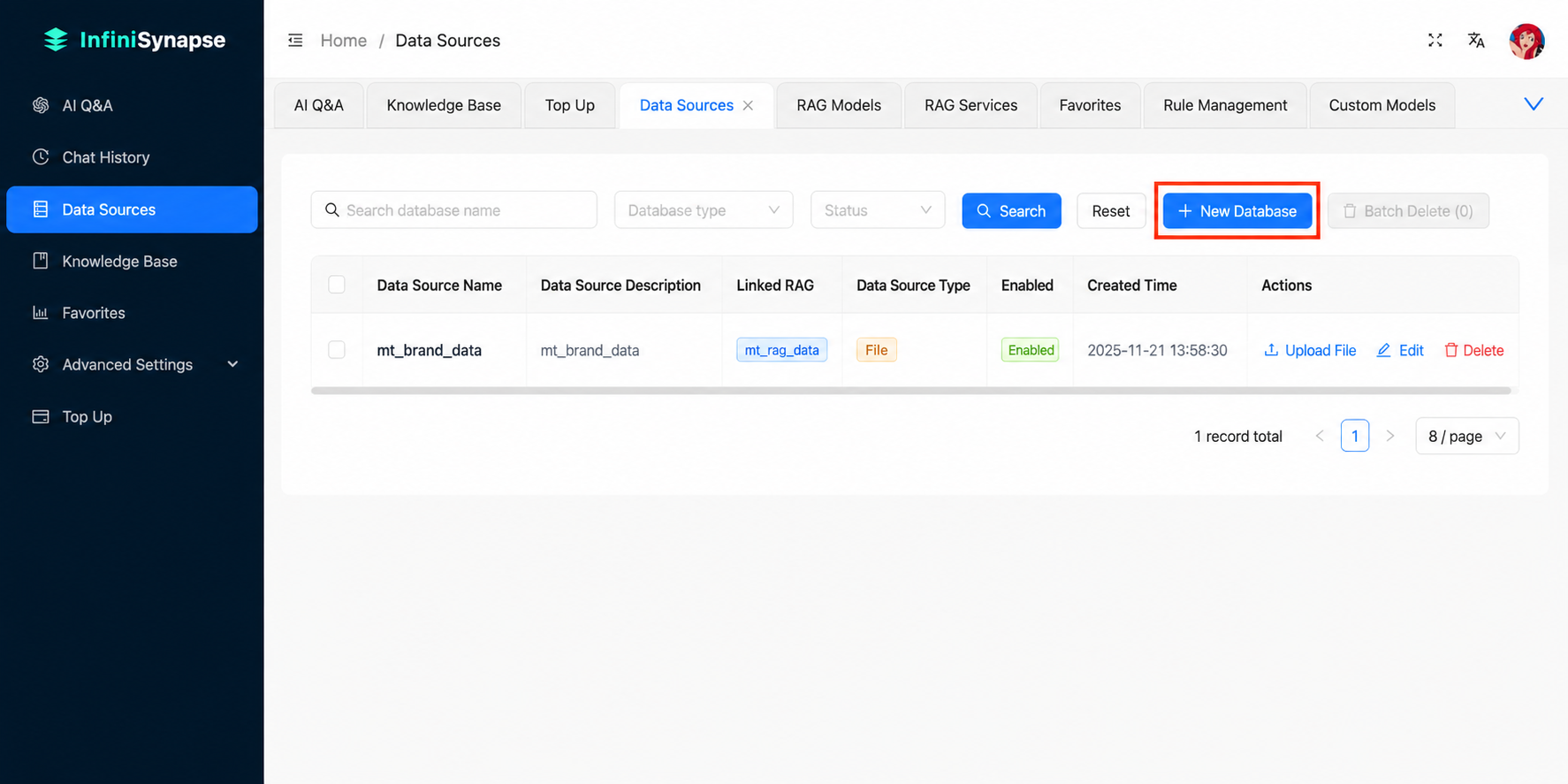
1. Connect a data source — no migration
The first failure mode of traditional analytics stacks is data movement: pulling data out of a production database into a warehouse, then into a BI tool, before anyone can ask a question. AI data analysts read schemas in place. InfiniSynapse connects directly to dozens of mainstream sources, including PostgreSQL, MySQL, SQL Server, Oracle, Snowflake, Supabase, MongoDB, Redis, and ClickHouse, plus tabular files like Excel and CSV. The schema indexer reads table structures, column names, primary keys, and foreign-key relationships at connection time, so the agent has the context it needs before you ask the first question.
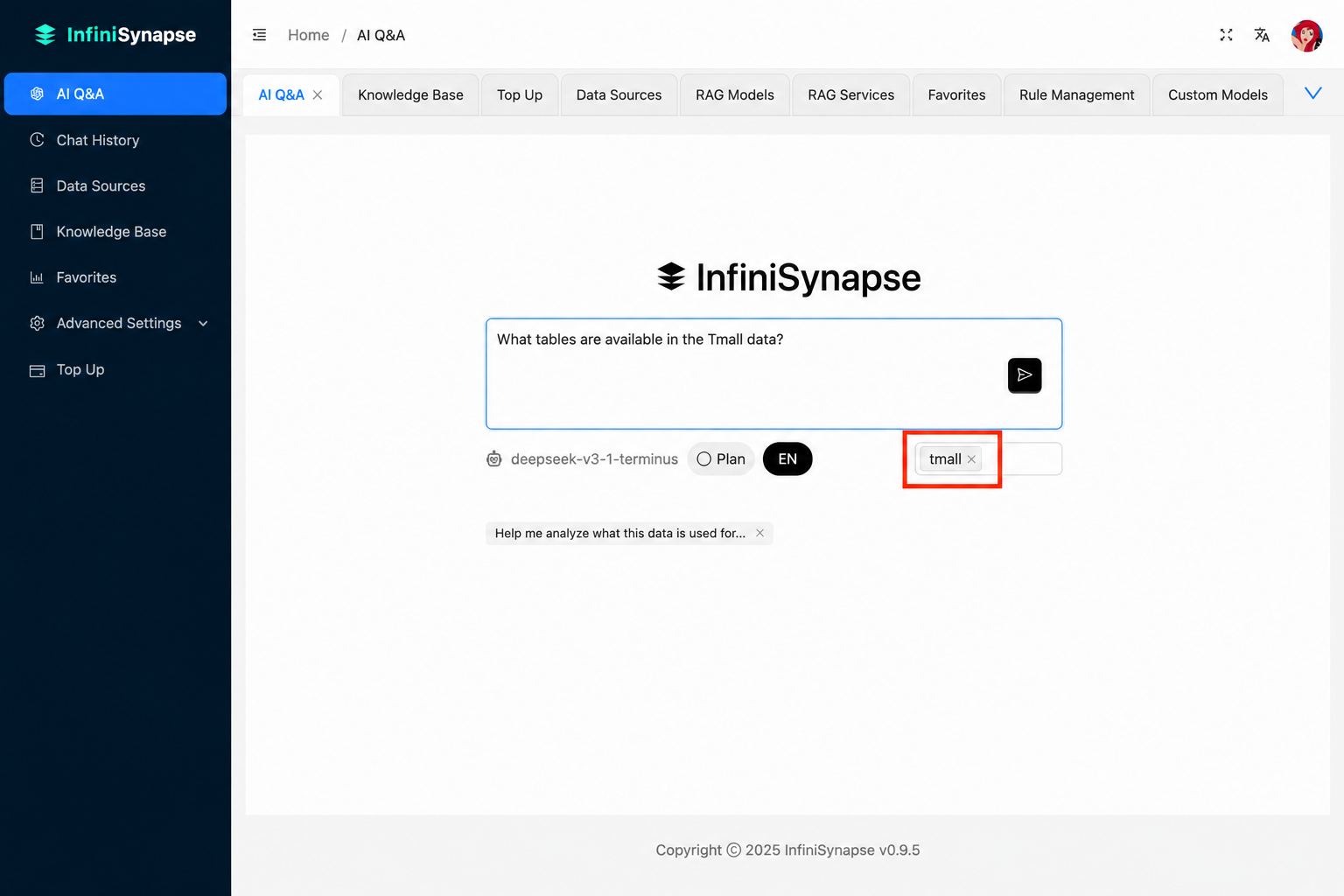
2. Ask in natural language — the agent handles the rest
The user types a question the way they would ask a colleague: "show me top customers by revenue last quarter, broken out by region". The agent performs schema linking (matching question terms to actual table and column names), plans a query that may involve joins, aggregations, and window functions, and surfaces the generated SQL for inspection before execution.
This is the part most teams underestimate. The hard problem isn't writing SQL syntax — LLMs solved that two years ago. The hard problem is mapping a business question to the right tables, picking the correct join keys when three tables could plausibly link, knowing whether "last quarter" means the last completed quarter or the trailing 90 days. Schema-aware agents trained on production patterns handle these decisions explicitly, and InfiniSynapse exposes the reasoning so an analyst can override any wrong assumption before the query runs.
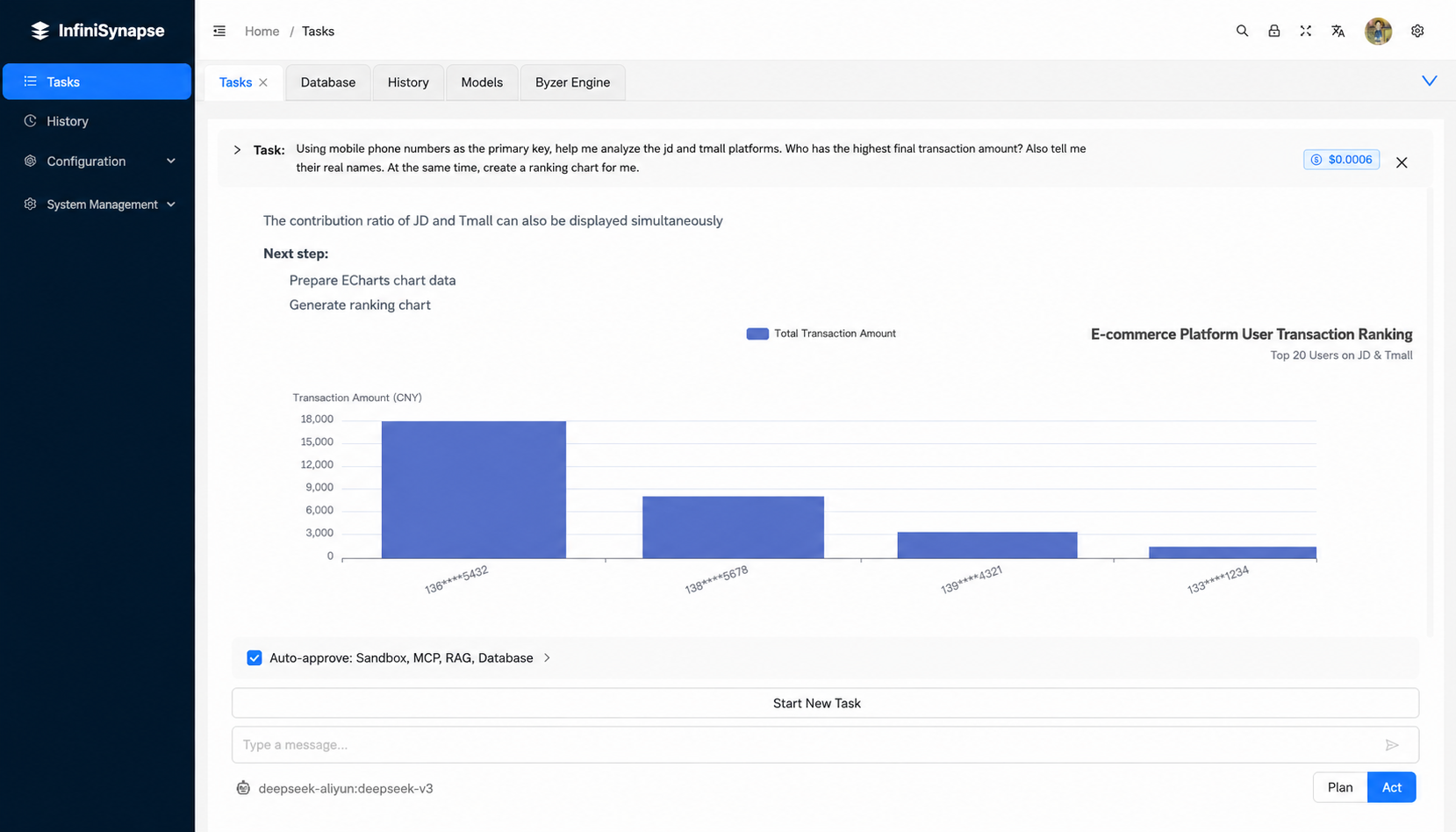
3. Read the result and iterate
Results come back as a table, chart, and short natural-language summary. The agent keeps schema context and prior turns in memory, so follow-up questions like "now segment by acquisition channel" build on the previous analysis without restarting. This is the part that turns analytical work from a single-shot query into a conversation with the data.
From NL2SQL to a full AI data analyst
Most tools positioned as "AI for SQL" stop at query generation and never reach full SQL data analysis with AI. That covers a real use case — developers and analysts who already know the answer they want and need a syntactic shortcut — but it's only a fraction of what data work looks like. The honest comparison:
| Capability | NL2SQL tools (e.g., AI2SQL, BlazeSQL) | AI data analyst (InfiniSynapse) |
|---|---|---|
| Generates SQL from a question | Yes | Yes |
| Schema indexing for accuracy | Yes (single source) | Yes (multi-source) |
| Executes the query and returns results | Partial | Yes |
| Federates joins across databases | No | Yes |
| Includes unstructured sources (docs, audio, video) | No | Yes |
| Plans multi-step analyses across turns | No | Yes |
| Best fit | Single-shot SQL helper for developers | End-to-end analysis for analysts and business teams |
The right pick depends on what you actually need. If your team is full of engineers who only want SQL syntax suggestions, an NL2SQL generator is lighter and cheaper. If the bottleneck is the whole analysis cycle — schema understanding, joins across sources, interpreting results — a full AI data analyst removes more friction.
One other consideration: longevity of the workflow. NL2SQL tools tend to live alongside an existing analytics stack (warehouse, BI tool, query editor). An AI data analyst tends to replace several layers of that stack, because once an agent can plan, execute, and explain analyses end-to-end, the dashboards and ad-hoc query tools above it become optional. Teams that want incremental adoption usually start with NL2SQL inside their existing tools. Teams that want to compress the stack usually move directly to an AI data analyst.
SQL data analysis at scale: 50M+ records
Performance is where AI-driven analytical tools most often fall apart. Many products demo well on toy datasets and degrade past a few hundred thousand rows. Production workloads routinely involve tens of millions to billions of rows, so this matters. Academic text-to-SQL suites such as Spider and BIRD measure query correctness, not wall-clock federated execution at tens of millions of rows — so scale claims need explicit test conditions.
InfiniSynapse runs validated internal benchmarks at production scale (not third-party audited):
- 50 million rows analyzed in under two hours on a single federated query with multi-table joins and aggregations. Test conditions (desk composite): customer-shaped star-schema workload across two relational sources; InfiniSQL execution layer; commodity cloud VMs in a single region; warm schema index; wall-clock end-to-end including planning and result materialization.
- 200 million sample concurrent workload sustained without failure during stress testing. Test conditions: synthetic concurrent sessions issuing read-heavy analytical SQL against pre-indexed sample tables; failure defined as process crash or unanswered request within the test window.
- TB-scale datasets handled by the InfiniSQL execution layer without splitting queries manually (storage-backed scans; not a claim of single-node in-memory fit).
These figures are InfiniSynapse internal results on customer-shaped workloads; they are not third-party verified and should not be read as Spider/BIRD accuracy scores. For independent buyer reviews of adjacent analytics platforms, see Gartner Peer Insights. The point is that AI-powered analytical SQL is now genuinely usable at the scale where most enterprise data actually lives, not just on warehouse samples.
Ask a question, see the SQL
Quick start in three steps
The fastest way to evaluate this workflow is to run a question you already know the answer to. Five minutes, three steps:
Authorize a database connection (PostgreSQL, MySQL, Snowflake, MongoDB, SQL Server, Oracle, ClickHouse, Supabase, Redis, and more) or upload a CSV or Excel file. No data migration required; InfiniSynapse reads schema in place.
Type a business question such as "top 10 customers by revenue last quarter" or "compare conversion rate by channel for new users in March". The agent performs schema linking, plans the query, and generates the SQL.
Inspect the generated SQL, view the result set as a table or chart, and read the natural-language summary. Iterate by refining your question; the agent keeps schema and prior context across turns.
Run your first SQL data analysis with AI in under five minutes
Connect a database or upload a file. Ask a question. See the SQL, the result, and the insight in one place.
Try Online Free →FAQ
About this guide
Last updated: 2026-09-24
Author: William Zhu (InfiniSynapse cofounder; GitHub @allwefantasy) with the InfiniSynapse Data Team. About: editorial standards / About · Company Vision. No personal LinkedIn is claimed here; use GitHub + editorial profile for verification.
Methodology: Performance figures (50M rows in under two hours, 200M sample concurrency, TB-scale handling) are InfiniSynapse internal benchmarks on customer-shaped workloads with the test conditions stated in the scale section — not third-party audited. Text-to-SQL research context cites Spider and BIRD. SQL fundamentals: Wikipedia SQL. Adjacent market reviews: Gartner Peer Insights, G2 BI (peer markets, not product endorsements).
Conflict of interest: InfiniSynapse is the publisher. Comparisons with other tools reflect their public positioning; we link to vendor sites and independent review markets so readers can verify claims directly.
Update cadence: Reviewed quarterly. Database support, accuracy claims, and benchmark figures refreshed every 90 days.
References: Spider · BIRD · Wikipedia SQL · Gartner Peer Insights · G2 Business Intelligence