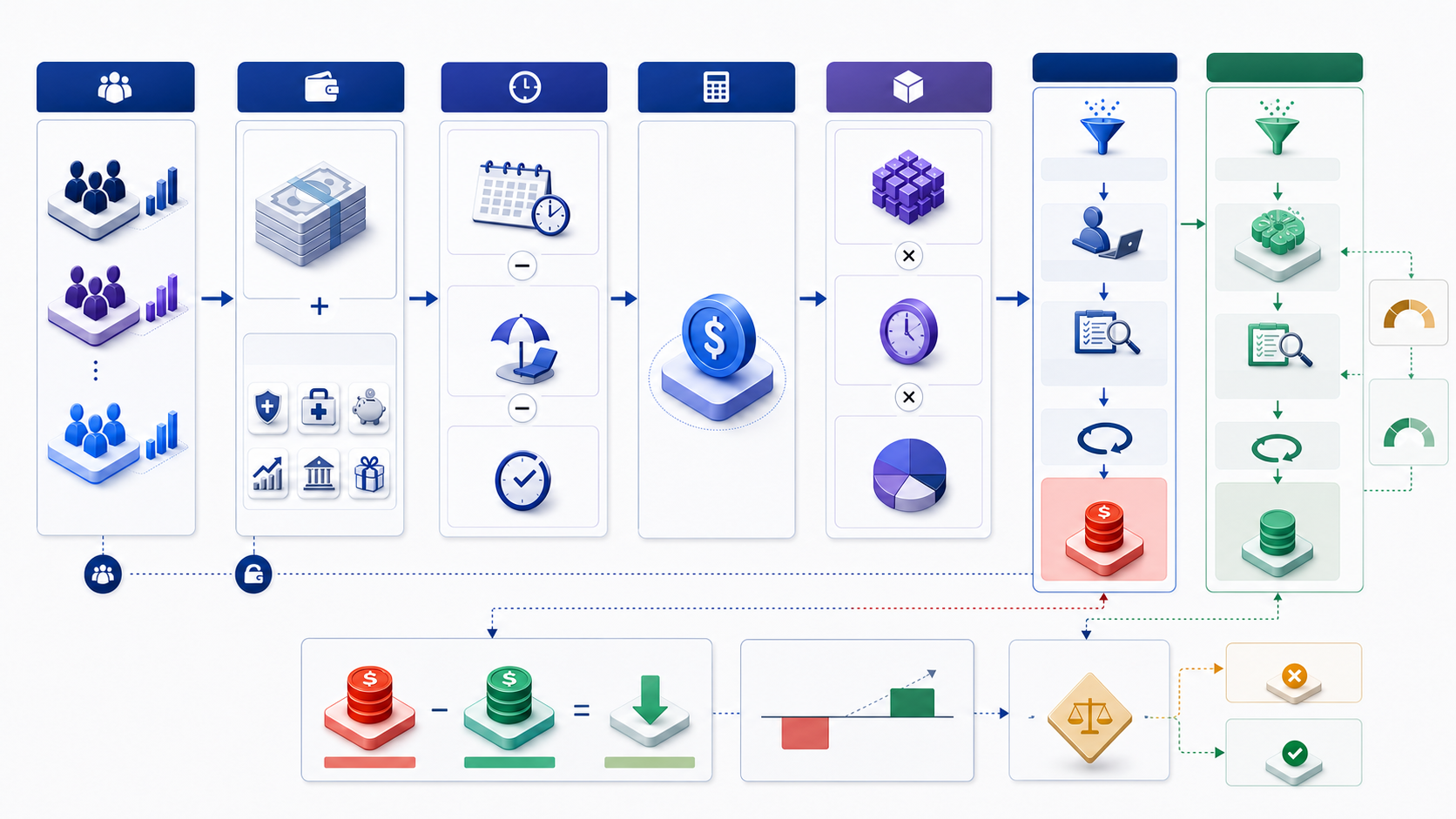
How does a labor cost calculator work?
Calculate annual employer labor cost by adding the compensation components included in your model, then divide by actual hours worked to obtain loaded hourly cost. To price a workflow, multiply each role's hourly cost by its task time and annual task volume. For an AI-assisted scenario, apply technical eligibility, user adoption, human review, rework, and capacity utilization before claiming value.
Loaded hourly labor cost = annual employer labor cost ÷ actual annual hours worked
Annual workflow labor cost = annual tasks × Σ (role minutes per task ÷ 60 × role hourly cost)
Choose the labor-cost boundary before entering numbers
“Labor cost” can mean direct wages, total employer compensation, or a fully burdened operating rate. These are not interchangeable. Select the boundary that matches the decision, label it, and apply it to every role and scenario. For workforce planning and task economics, employer compensation per hour worked is usually more useful than base salary alone.
Salary, hourly wages, overtime, commissions, and included cash bonuses. Useful for payroll questions but incomplete for employer cost.
Direct pay plus employer-paid benefits, payroll contributions, legally required costs, and other included compensation.
Loaded labor plus allocated facilities, software, equipment, management, and shared services when the decision requires them.
Only the cost that changes because of one more task, hour, hire, shift, or option. Often lower than an allocated average.
Decision rule: use total employer compensation to value internal labor, but use incremental cash cost when testing a budget change. Keep both visible rather than switching definitions to make an option look better.
Collect compensation, hours, workload, and workflow evidence
Build the model by role rather than using one blended rate too early. Analysts, data engineers, reviewers, managers, security specialists, and support staff may have different compensation, actual hours, and task involvement. A blended rate is appropriate only after weighting each role by the work it actually performs.
| Input group | Fields to collect | Evidence source |
|---|---|---|
| People and roles | Headcount, FTE fraction, employment type, location, level | HR or workforce system |
| Direct pay | Salary or wage, overtime, shift premium, variable pay | Payroll and compensation records |
| Employer-paid cost | Payroll contributions, insurance, retirement, benefits, included taxes | Finance, benefits, and statutory schedules |
| Time basis | Scheduled, paid, leave, holiday, training, absence, and worked hours | Timekeeping, policy, and calendar |
| Workflow demand | Task volume, seasonality, task types, queue, exceptions | Ticket, request, and operational systems |
| Task labor | Execution, review, correction, coordination, support by role | Representative time study and logs |
Calculate annual employer labor cost without double counting
For a salaried employee, begin with annual base pay, then add employer-paid compensation not already included: variable pay, payroll contributions, insurance, retirement, and other benefits required by the model. For an hourly employee, use paid hours by pay category and rate, then add employer-paid components. Subtract applicable employer subsidies only when finance confirms the treatment.
Annual employer labor cost = base pay + variable pay + employer payroll cost + benefits + included employment cost − employer subsidies
| Component | Include when | Double-count warning |
|---|---|---|
| Base salary or hourly wages | Always for employed labor | Annual salary usually already pays ordinary leave |
| Overtime and premiums | Expected or observed for the modeled role | Do not apply a flat rate and observed overtime together |
| Payroll contributions and taxes | Employer liability in the relevant jurisdiction | Separate employee deductions from employer cost |
| Insurance, retirement, and benefits | Employer-funded expected cost | Use actual plan cost or approved allocation, not both |
| Recruitment and training | Only when the chosen boundary includes them | Keep recurring and one-time cost separate |
Official statistical definitions vary by purpose. Eurostat distinguishes wages and salaries from non-wage employer costs and its Labour Cost Survey uses a broad total-expenditure concept that can include compensation, employer social contributions, training, other expenditure, and employment taxes less subsidies. It calculates hourly labor cost by dividing annual labor cost by hours worked. Use the definition appropriate to your organization and document differences.
Reconcile scheduled, paid, and actual working hours
The denominator changes the hourly result materially. If annual employer cost includes pay for leave and holidays, divide by hours actually worked to express the employer cost of productive labor time. Do not divide one role by paid hours and another by worked hours. Use the same definition in current and future scenarios.
Actual annual hours worked = scheduled hours − paid leave − holidays not worked − absence − non-work time excluded by the model
Training and internal meetings require an explicit choice. For total employer labor cost per hour worked, they may remain part of hours worked. For task capacity, subtract the time unavailable to the workflow. Label the second result “available workflow hours” rather than pretending it is a different compensation rate.
| Hour measure | Meaning | Best use |
|---|---|---|
| Scheduled hours | Contracted or rostered time before leave and absence | Staffing and roster planning |
| Hours paid | Work plus paid non-work time | Hourly payroll calculation |
| Hours worked | Time actually worked under the selected definition | Loaded hourly employer cost |
| Workflow-available hours | Worked hours after competing duties and capacity reserve | Capacity and service planning |
Convert annual employer cost into a loaded hourly rate
Calculate each role separately. In the example below, an analyst receives $90,000 annual salary and the employer incurs $22,500 in included payroll contributions and benefits. With 1,760 actual hours worked, annual employer cost is $112,500 and loaded hourly cost is $63.92. These figures are hypothetical and are not InfiniSynapse compensation data.
$112,500 annual employer cost = $90,000 salary + $22,500 employer-paid cost
$63.92 loaded hourly cost = $112,500 ÷ 1,760 actual hours worked
For teams, multiply each employee or role-level result by FTE count, then sum annual cost. Do not average salaries first when role headcount, benefits, overtime, or hours differ materially. A weighted average hourly cost equals total employer cost across included roles divided by total actual hours across those roles.
Price the complete task, not only the visible execution step
Map labor from request intake to accepted outcome. Include clarification, access approval, preparation, execution, review, correction, delivery, exception handling, and support when they are caused by the task. Measure active labor separately from queue time. Queue time affects service and opportunity cost, but it is not active labor unless someone is working on the request.
| Task phase | Role | Minutes | Hourly cost | Cost per task |
|---|---|---|---|---|
| Analysis and execution | Analyst | 18 | $63.92 | $19.18 |
| Quality review | Reviewer | 5 | $82.50 | $6.88 |
| Total current task | — | 23 | — | $26.05 |
At 24,000 recurring tasks per year, the modeled annual labor cost is approximately $625,227. This is the labor value consumed by the defined workflow at the selected rates and task times. It is not necessarily a removable payroll budget because the same people may perform many other duties.
Reconcile annual demand with available team capacity
A cost model should also test feasibility. Convert annual task labor into hours by role and compare it with workflow-available hours, not total scheduled hours. Apply seasonality, service-level reserve, exception load, and a capacity buffer. A team may have enough annual hours in aggregate while still failing during peak weeks or at a constrained review step.
Annual role hours required = annual tasks × role minutes per task ÷ 60
Capacity utilization = required workflow hours ÷ workflow-available hours
Capacity rule: do not target 100% planned utilization for work with unpredictable arrivals, exceptions, incidents, and leave. Choose a reserve appropriate to service risk and test peaks separately from annual averages.
Model eligibility, adoption, review, and rework explicitly
An AI-assisted workflow does not change every task. First identify which tasks are technically and operationally eligible. Then apply actual or expected user adoption. For adopted tasks, measure total human work after change—including prompt or setup work, review, correction, exception handling, and fallback. Leave ineligible and non-adopted tasks on the current cost path.
Adopted annual tasks = total tasks × eligible share × adoption rate
| Input | Illustrative value | Evidence needed |
|---|---|---|
| Annual recurring tasks | 24,000 | Complete operational count with stable definition |
| Eligible share | 60% | Representative task classification and exclusions |
| Adoption among eligible tasks | 75% | Workflow telemetry, not license activation |
| Adopted annual tasks | 10,800 | 24,000 × 60% × 75% |
| Analyst / review / rework minutes | 7 / 4 / 1 | Timed representative pilot at accepted quality |
Using the example rates, an adopted task costs about $14.02 in human labor: seven analyst minutes, four reviewer minutes, and one analyst rework minute. The remaining 13,200 tasks retain the $26.05 current cost. Total modeled workflow labor cost becomes approximately $495,320, creating $129,907 in annual capacity-cost potential before utilization.
Separate cash savings from reusable labor capacity
The $129,907 difference in the example is not automatically a budget saving. If salaries and headcount remain unchanged, it is potential capacity value. Apply a utilization factor representing the share of recovered time that can be reassigned to named, measured work. At 65% utilization, realized capacity value is approximately $84,439.
Realized capacity value = $129,907 potential × 65% utilization = $84,439
| Value class | Recognition test | Evidence |
|---|---|---|
| Payroll cash saving | Approved payroll expenditure declines | Budget, payroll, position, and timing change |
| Overtime or contractor saving | Invoices or paid overtime decline relative to baseline | Contract, invoice, schedule, and attribution |
| Avoided hiring | Approved role or credible hiring plan is no longer required | Demand forecast, approval, capacity, and date |
| Redeployed capacity | Recovered time is used for named productive work | Work allocation and delivered outcome |
| Unused capacity | Time is recovered but no measured outcome or budget changes | Track, but assign zero realized value |
Do not double count: if recovered hours avoid a contractor invoice, do not also value the same hours as redeployed internal capacity unless they produce an additional distinct outcome.
Model role mix, handoffs, and constrained reviewers
A blended rate can hide a bottleneck. Calculate annual hours and cost for each role, then test capacity independently. If AI reduces analyst execution time but increases expert review, total task cost may decline while the reviewer queue grows. A viable scenario must meet both economics and service constraints.
| Role-level output | Formula | Decision use |
|---|---|---|
| Hours required | Tasks × role minutes ÷ 60 | Compare with available role capacity |
| Annual role cost | Hours required × loaded role rate | Explain cost composition and change |
| Peak utilization | Peak hours required ÷ peak capacity | Detect queue and service risk |
| Exception burden | Exception volume × extra role time | Prevent averages from hiding difficult cases |
Use activity sampling or representative task studies to estimate role time. Include ordinary, difficult, exception, failed, and prohibited cases. Report median and high-percentile effort when variability matters; one average can understate the capacity needed to meet a service level.
Compare employees and contractors on the same output basis
An employee's loaded hourly cost and a contractor's invoice rate represent different cost structures. A contractor rate may include supplier overhead and margin, while employee cost may omit internal management, software, equipment, and bench capacity. Compare total cost for an accepted unit of work, including onboarding, coordination, review, minimum commitments, change orders, supplier management, and transition or exit.
| Comparison field | Employee | Contractor |
|---|---|---|
| Core rate | Loaded employer cost per hour worked | Invoice rate or contracted unit price |
| Availability | FTE capacity less competing duties | Contracted capacity and minimums |
| Quality and review | Internal control and management time | Supplier QA plus internal acceptance |
| Knowledge and continuity | Retention, training, reassignment | Dependency, transfer, renewal, and exit |
Calculate overtime, shift premiums, and seasonal peaks separately
Do not spread observed overtime evenly across every hour if the decision concerns a peak period. Model regular hours at the regular cost, overtime hours at the applicable premium and employer-cost treatment, and contractors or temporary staff at their actual rate. The legal definition and premium vary by jurisdiction and worker status, so use payroll and legal guidance rather than a universal multiplier.
Peak labor cost = regular hours × regular loaded rate + premium hours × premium loaded rate + temporary labor + peak support cost
Automation value may be greater during peaks if it avoids premium labor or missed service, but only when the workflow performs safely at peak volume. Test concurrency, review capacity, exception rates, supplier limits, and fallback before assigning that benefit.
Stress-test the variables that control annual labor cost
Test a low, base, and high case for workload, wage growth, employer-paid cost, actual hours worked, task time, reviewer time, eligibility, adoption, rework, and utilization. Use evidence ranges and update triggers. A precise result built on untested adoption or review assumptions is less useful than a range with clear decision thresholds.
| Driver | Downside test | Switching question |
|---|---|---|
| Annual task volume | Lower demand or higher exception share | Minimum volume that covers project cost? |
| Total human time after change | Review and correction take longer | Maximum minutes for positive value? |
| Adoption | Eligible users bypass the workflow | Break-even adoption rate? |
| Capacity utilization | Recovered time remains unused | Minimum reuse that supports approval? |
| Recurring technology cost | Usage, review, or monitoring cost increases | Maximum cost before net value turns negative? |
Validate rates, time, volume, and realization after launch
Before approval, reconcile payroll totals to finance, headcount and FTE to HR, hours to timekeeping, and task volume to operational systems. Validate task time with a representative sample using the same start, stop, acceptance, and quality definitions. Record exclusions, missing data, sample coverage, median, variation, and confidence.
After launch, compare forecast and actual by role and task type: eligible volume, adoption, analyst time, reviewer time, rework, exceptions, accepted quality, cycle time, overtime, contractor spend, capacity reassignment, technology cost, and incidents. Refresh the model at every decision gate and when price, scope, demand, workflow, or controls change materially.
Role-level annual cost must sum to the approved payroll and benefit basis.
Current and future measurements use the same task and quality definitions.
Separate technology effects from demand, staffing, policy, and process changes.
Name the budget or work outcome changed by each recovered hour.
Build a defensible labor-cost model in nine steps
- Define the decision and boundary. Choose direct, loaded, fully burdened, or incremental cost and a common horizon.
- Segment roles and employment types. Keep employees, contractors, reviewers, and specialists separate until weighted.
- Calculate annual employer cost. Reconcile pay, employer contributions, benefits, premiums, and included items.
- Reconcile hours. Separate scheduled, paid, worked, and workflow-available time.
- Calculate loaded role rates. Divide each role's annual employer cost by actual hours worked.
- Map complete task labor. Include intake, execution, review, correction, exception, and support by role.
- Apply annual volume and capacity. Test seasonality, peaks, service reserve, and constrained roles.
- Model the alternative workflow. Apply eligibility, adoption, human review, rework, fallback, and utilization.
- Validate and refresh. Reconcile sources, test sensitivity, assign owners, and replace forecasts with actuals.
Avoid labor-cost calculations that look precise but mislead
This omits employer-paid compensation and understates internal labor cost.
Scheduled hours may not equal hours worked in the organization and jurisdiction.
Annual salary may already include pay for leave while worked hours reflect the reduction.
Averages can hide an expensive or capacity-constrained review step.
Review, correction, exceptions, failures, and coordination remain real work.
No budget saving exists until payroll, overtime, contractor, or hiring cost changes.
Carry labor-cost evidence into the ROI Calculator
Use the InfiniSynapse ROI Calculator after calculating current workflow labor cost, future human labor cost, cash savings, realized capacity value, technology cost, implementation investment, and horizon. Build separate downside, base, and upside cases. Keep role-level data and personal compensation outside the tool; enter only approved aggregate figures.
Turn labor economics into a project return
Compare implementation and recurring cost with evidence-based cash and capacity benefits across the selected horizon.
Open ROI CalculatorUse aggregate, sanitized inputs. Do not enter personal compensation or confidential workforce data.Frequently asked questions
How do you calculate total labor cost?
Add salary or wages, employer payroll costs, benefits, bonuses, and other employment costs included in the selected boundary. Keep overhead separate unless the model explicitly requires a fully burdened operating cost.
How do you calculate loaded hourly labor cost?
Divide total annual employer labor cost by actual hours worked during the year. If annual salary already covers paid leave, do not add the same paid leave again in the numerator.
How do you calculate labor cost per task?
For each role, multiply minutes per task by the role's loaded hourly cost divided by 60, then add the role-level results. Include review, correction, exception, coordination, and support time caused by the task.
Does time saved equal cash savings?
No. Time saved is capacity value unless payroll, overtime, contractor, or approved hiring expenditure changes. Apply eligibility, adoption, and utilization before reporting realized value.
Which working hours should the calculator use?
Use hours actually worked when converting annual employer cost into hourly cost. Reconcile scheduled, paid, and worked hours, and avoid mixing hours paid with hours worked in the same comparison.
Sources, definitions, and calculation scope
This page provides a general organizational calculation method, not payroll, tax, employment-law, accounting, or compensation advice. Employer-cost components and working-time rules vary by jurisdiction, plan, employment status, collective agreement, and internal policy. Finance, HR, payroll, and legal owners should approve the actual inputs and treatment.
Eurostat, Labour Costs — official overview of wages, non-wage employer costs, hours worked, hours paid, and labor-cost data structures.
Eurostat, Labour Cost Survey Metadata — definitions of total employer expenditure, annual, monthly, hourly, per-capita and FTE measures, including the rule that hourly labor cost divides annual cost by hours worked.
U.S. GAO Cost Estimating and Assessment Guide — best practices for defining scope, documenting assumptions and source data, sensitivity, risk, and updating estimates with actual cost.
All worked figures are hypothetical and rounded. The model values labor at employer cost; it does not claim that InfiniSynapse or any AI workflow produces the illustrated time or cost change. Validate performance at the required quality and control level before using it in an investment decision.